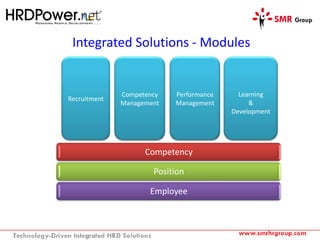
Integrated Solutions - Modules
Competency
Position
Employee
Recruitment
Competency
Management
Performance
Management
Learning
&
Development
Home Screen
Dashboard
Employee Profiles
Competency Library
Competency Details
Position Library
Assign Competency to Position
RCL – Required Competency Level
ITJ – Importance to Job (High value denotes high importance)
Set RCL when assign competency to position
Assign Position to Employee
Position
(Eg. Sales Manager)
Competencies
(Eg.
Effective Communication,
Customer Orientation, Team,
Management)
When assign position to employee, competencies mapped with that position will be
assigned automatically to the employee.
Employee
Employee Competency Profile
RCL – Required Competency Level
CCL – Current Competency Level
Gap = RCL - CCL
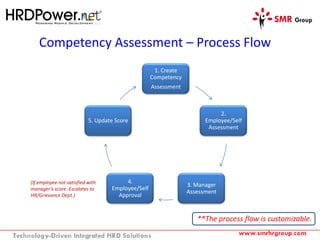
Competency Assessment – Process Flow
1. Create
Competency
Assessment
2.
Employee/Self
Assessment
3. Manager
Assessment
4.
Employee/Self
Approval
5. Update Score
**The process flow is customizable.
(If employee not satisfied with
manager’s score. Escalates to
HR/Grievance Dept.)
Create Competency Assessment
System will send email notifications to assigned employees and reviewers
Competency Assessment Form
Self/Employee
Score Manager Score
Employee
Remarks/
Comments
Manager
Remarks/
Comments
Current score
comparison with
previous/past
assessment score
 - High
 - Low
 - Same
Rating scale
description is
customizable.
Eg. User can
change it as
Good, Excellent
etc.
Also range is
customizable.
Eg. 1-4, 1-5
Competency Assessment Score Summary
Employee Overall Score
&
Manager Overall Score
Activity track of people’s
action.
Reports
User will be able to generate reports in various formats like PDF, Excel etc.
For more information contact SMR at
+603 2296 9199 or email at info@smrhrgroup.com
or visit www.smrhrgroup.com

HRDPower.net Competency Management Walkthrough

  • 2.
    Integrated Solutions -Modules Competency Position Employee Recruitment Competency Management Performance Management Learning & Development
  • 3.
  • 4.
  • 6.
  • 7.
  • 8.
  • 9.
  • 10.
    Assign Competency toPosition RCL – Required Competency Level ITJ – Importance to Job (High value denotes high importance) Set RCL when assign competency to position
  • 11.
    Assign Position toEmployee Position (Eg. Sales Manager) Competencies (Eg. Effective Communication, Customer Orientation, Team, Management) When assign position to employee, competencies mapped with that position will be assigned automatically to the employee. Employee
  • 12.
    Employee Competency Profile RCL– Required Competency Level CCL – Current Competency Level Gap = RCL - CCL
  • 13.
    Competency Assessment –Process Flow 1. Create Competency Assessment 2. Employee/Self Assessment 3. Manager Assessment 4. Employee/Self Approval 5. Update Score **The process flow is customizable. (If employee not satisfied with manager’s score. Escalates to HR/Grievance Dept.)
  • 14.
    Create Competency Assessment Systemwill send email notifications to assigned employees and reviewers
  • 15.
    Competency Assessment Form Self/Employee ScoreManager Score Employee Remarks/ Comments Manager Remarks/ Comments Current score comparison with previous/past assessment score  - High  - Low  - Same Rating scale description is customizable. Eg. User can change it as Good, Excellent etc. Also range is customizable. Eg. 1-4, 1-5
  • 16.
    Competency Assessment ScoreSummary Employee Overall Score & Manager Overall Score Activity track of people’s action.
  • 17.
    Reports User will beable to generate reports in various formats like PDF, Excel etc.
  • 18.
    For more informationcontact SMR at +603 2296 9199 or email at info@smrhrgroup.com or visit www.smrhrgroup.com