

HOW TO WRITE AN EMAIL
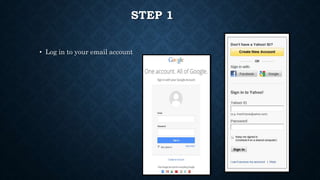
STEP 1
• Log in to your email account
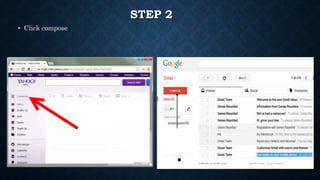
STEP 2
• Click compose
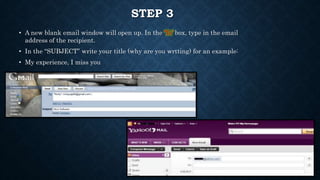
STEP 3
• A new blank email window will open up. In the ‘To’ box, type in the email
address of the recipient.
• In the “SUBJECT” write your title (why are you wrtting) for an example:
• My experience, I miss you
STEP 4
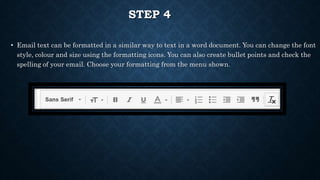
• Email text can be formatted in a similar way to text in a word document. You can change the font
style, colour and size using the formatting icons. You can also create bullet points and check the
spelling of your email. Choose your formatting from the menu shown.
STEP 5
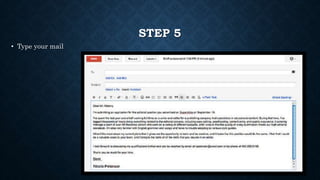
• Type your mail
STEP 6
• Lastly step 6, click the “SEND” button
• Write a letter to your teacher about your friend
• For example write about your friend hobbies or your outing experience with your friend
• Send it to:-
• ameera@yahoo.com.my

How to write an email

  • 1.
    HOW TO WRITEAN EMAIL
  • 2.
    STEP 1 • Login to your email account
  • 3.
  • 4.
    STEP 3 • Anew blank email window will open up. In the ‘To’ box, type in the email address of the recipient. • In the “SUBJECT” write your title (why are you wrtting) for an example: • My experience, I miss you
  • 5.
    STEP 4 • Emailtext can be formatted in a similar way to text in a word document. You can change the font style, colour and size using the formatting icons. You can also create bullet points and check the spelling of your email. Choose your formatting from the menu shown.
  • 6.
    STEP 5 • Typeyour mail
  • 7.
    STEP 6 • Lastlystep 6, click the “SEND” button
  • 8.
    • Write aletter to your teacher about your friend • For example write about your friend hobbies or your outing experience with your friend • Send it to:- • ameera@yahoo.com.my