

1Confidential and propriety Galil Software, Ltd. 20128-Jul-15
Author :
Amir Najjar – Automation Development Lead.
Selenium Grid + Cloud Based Solutions
2Confidential and propriety Galil Software, Ltd. 201219.8.12
Selenium Grid
- What is Selenium Grid?
- Tool for distributing tests across multiple physical or virtual
machines simultaneously.
- Dramatically accelerates the testing process and returns a
quick feedback.
- The code doesn’t need to be present on the machines which
run the tests.
3Confidential and propriety Galil Software, Ltd. 201219.8.12
Distribute Tests across Machines:
There are 2 ways to distribute tests across multiple machines:
1) Use Selenium Grid
2) Distribute them by making relevant configurations using a CI system (TeamCity)
4Confidential and propriety Galil Software, Ltd. 201219.8.12
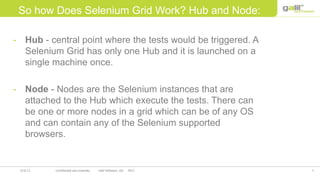
So how Does Selenium Grid Work? Hub and Node:
- Hub - central point where the tests would be triggered. A
Selenium Grid has only one Hub and it is launched on a
single machine once.
- Node - Nodes are the Selenium instances that are
attached to the Hub which execute the tests. There can
be one or more nodes in a grid which can be of any OS
and can contain any of the Selenium supported
browsers.
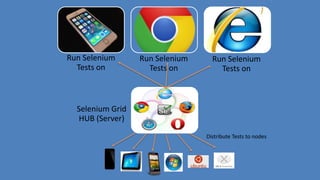
Run Selenium
Tests on
Run Selenium
Tests on
Run Selenium
Tests on
Selenium Grid
HUB (Server)
Distribute Tests to nodes
6Confidential and propriety Galil Software, Ltd. 201219.8.12
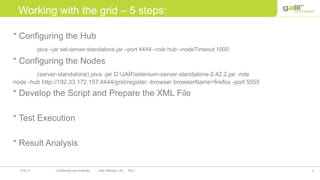
Working with the grid – 5 steps:
* Configuring the Hub
java –jar sel-server-standalone.jar –port 4444 –role hub –nodeTimeout 1000
* Configuring the Nodes
(server-standalone) java -jar D:JARselenium-server-standalone-2.42.2.jar -role
node -hub http://192.33.172.157:4444/grid/register -browser browserName=firefox -port 5555
* Develop the Script and Prepare the XML File
* Test Execution
* Result Analysis
7Confidential and propriety Galil Software, Ltd. 201219.8.12
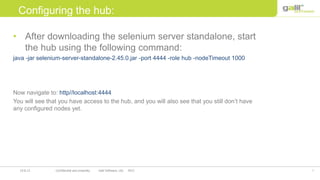
Configuring the hub:
• After downloading the selenium server standalone, start
the hub using the following command:
java -jar selenium-server-standalone-2.45.0.jar -port 4444 -role hub -nodeTimeout 1000
Now navigate to: http//localhost:4444
You will see that you have access to the hub, and you will also see that you still don’t have
any configured nodes yet.
8Confidential and propriety Galil Software, Ltd. 201219.8.12
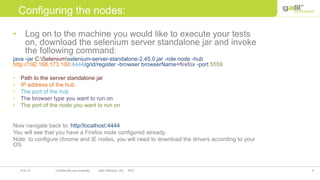
Configuring the nodes:
• Log on to the machine you would like to execute your tests
on, download the selenium server standalone jar and invoke
the following command:
java -jar C:Seleniumselenium-server-standalone-2.45.0.jar -role node -hub
http://192.168.173.100:4444/grid/register -browser browserName=firefox -port 5559
• Path to the server standalone jar
• IP address of the hub
• The port of the hub
• The browser type you want to run on
• The port of the node you want to run on
Now navigate back to: http//localhost:4444
You will see that you have a Firefox node configured already.
Note: to configure chrome and IE nodes, you will need to download the drivers according to your
OS.
9
Data Sources
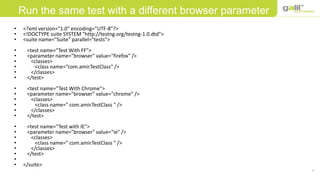
• <?xml version="1.0" encoding="UTF-8"?>
• <!DOCTYPE suite SYSTEM "http://testng.org/testng-1.0.dtd">
• <suite name="Suite" parallel="tests">
• <test name="Test With FF">
• <parameter name="browser" value="firefox" />
• <classes>
• <class name=“com.amir.TestClass" />
• </classes>
• </test>
• <test name=“Test With Chrome">
• <parameter name="browser" value="chrome" />
• <classes>
• <class name=" com.amir.TestClass " />
• </classes>
• </test>
• <test name=“Test with IE">
• <parameter name="browser" value="ie" />
• <classes>
• <class name=" com.amir.TestClass " />
• </classes>
• </test>
•
• </suite>
Run the same test with a different browser parameter
10
Data Sources
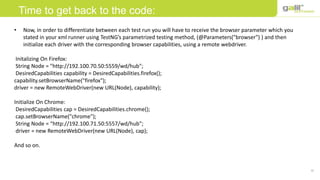
• Now, in order to differentiate between each test run you will have to receive the browser parameter which you
stated in your xml runner using TestNG’s parametrized testing method, (@Parameters("browser") ) and then
initialize each driver with the corresponding browser capabilities, using a remote webdriver.
Initalizing On Firefox:
String Node = "http://192.100.70.50:5559/wd/hub";
DesiredCapabilities capability = DesiredCapabilities.firefox();
capability.setBrowserName("firefox");
driver = new RemoteWebDriver(new URL(Node), capability);
Initialize On Chrome:
DesiredCapabilities cap = DesiredCapabilities.chrome();
cap.setBrowserName("chrome");
String Node = “http://192.100.71.50:5557/wd/hub";
driver = new RemoteWebDriver(new URL(Node), cap);
And so on.
Time to get back to the code:
11Confidential and propriety Galil Software, Ltd. 201219.8.12
There are 3 popular Cloud based solutions out there:
1) BrowserStack
2) SauceLabs
3) Rainforest
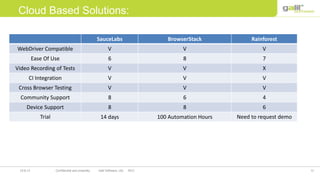
We will make a small comparison in order to determine what would suit selenium tests more
Cloud Based Solutions:
12Confidential and propriety Galil Software, Ltd. 201219.8.12
RainforestBrowserStackSauceLabs
VVVWebDriver Compatible
786Ease Of Use
XVVVideo Recording of Tests
VVVCI Integration
VVVCross Browser Testing
468Community Support
688Device Support
Need to request demo100 Automation Hours14 daysTrial
Cloud Based Solutions:
13Confidential and propriety Galil Software, Ltd. 201219.8.12
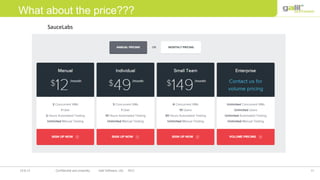
What about the price???
SauceLabs
14Confidential and propriety Galil Software, Ltd. 201219.8.12
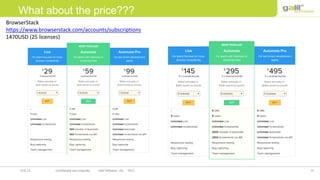
What about the price???
BrowserStack
https://www.browserstack.com/accounts/subscriptions
1470USD (25 licenses)
15Confidential and propriety Galil Software, Ltd. 201219.8.12
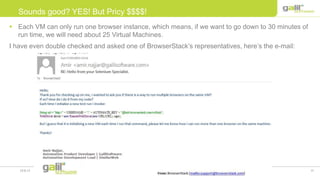
 Each VM can only run one browser instance, which means, if we want to go down to 30 minutes of
run time, we will need about 25 Virtual Machines.
I have even double checked and asked one of BrowserStack’s representatives, here’s the e-mail:
Sounds good? YES! But Pricy $$$$!
16Confidential and propriety Galil Software, Ltd. 201219.8.12
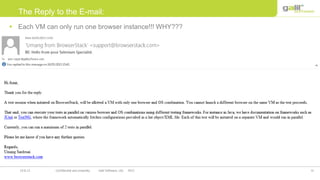
 Each VM can only run one browser instance!!! WHY???
The Reply to the E-mail:
17Confidential and propriety Galil Software, Ltd. 201219.8.12
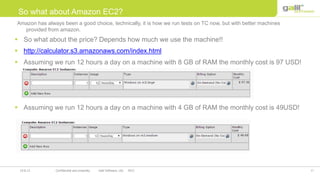
 So what about the price? Depends how much we use the machine!!
 http://calculator.s3.amazonaws.com/index.html
 Assuming we run 12 hours a day on a machine with 8 GB of RAM the monthly cost is 97 USD!
 Assuming we run 12 hours a day on a machine with 4 GB of RAM the monthly cost is 49USD!
So what about Amazon EC2?
Amazon has always been a good choice, technically, it is how we run tests on TC now, but with better machines
provided from amazon.
18Confidential and propriety Galil Software, Ltd. 201219.8.12
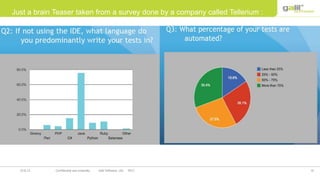
Just a brain Teaser taken from a survey done by a company called Tellerium :
19Confidential and propriety Galil Software, Ltd. 201219.8.12
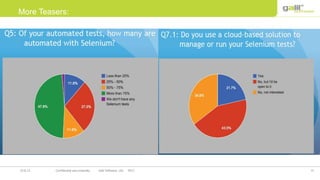
More Teasers:
20Confidential and propriety Galil Software, Ltd. 201219.8.12
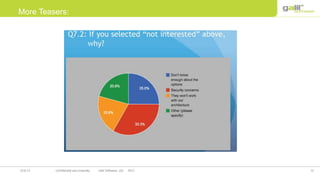
More Teasers:
21Confidential and propriety Galil Software, Ltd. 201219.8.12
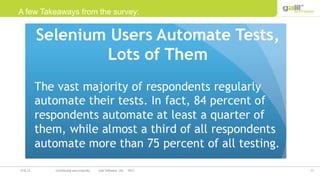
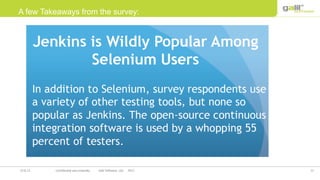
A few Takeaways from the survey:
22Confidential and propriety Galil Software, Ltd. 201219.8.12
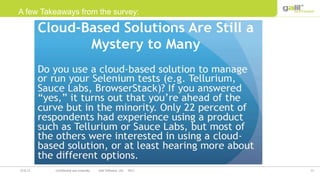
A few Takeaways from the survey:
23Confidential and propriety Galil Software, Ltd. 201219.8.12
A few Takeaways from the survey:
24Confidential and propriety Galil Software, Ltd. 20128-Jul-15
Author :
Amir Najjar – Automation Development Lead.
Thank you!! Stay Tuned!! DEMO AHEAD!

How to work with Selenium Grid and Cloud Solutions

  • 1.
    1Confidential and proprietyGalil Software, Ltd. 20128-Jul-15 Author : Amir Najjar – Automation Development Lead. Selenium Grid + Cloud Based Solutions
  • 2.
    2Confidential and proprietyGalil Software, Ltd. 201219.8.12 Selenium Grid - What is Selenium Grid? - Tool for distributing tests across multiple physical or virtual machines simultaneously. - Dramatically accelerates the testing process and returns a quick feedback. - The code doesn’t need to be present on the machines which run the tests.
  • 3.
    3Confidential and proprietyGalil Software, Ltd. 201219.8.12 Distribute Tests across Machines: There are 2 ways to distribute tests across multiple machines: 1) Use Selenium Grid 2) Distribute them by making relevant configurations using a CI system (TeamCity)
  • 4.
    4Confidential and proprietyGalil Software, Ltd. 201219.8.12 So how Does Selenium Grid Work? Hub and Node: - Hub - central point where the tests would be triggered. A Selenium Grid has only one Hub and it is launched on a single machine once. - Node - Nodes are the Selenium instances that are attached to the Hub which execute the tests. There can be one or more nodes in a grid which can be of any OS and can contain any of the Selenium supported browsers.
  • 5.
    Run Selenium Tests on RunSelenium Tests on Run Selenium Tests on Selenium Grid HUB (Server) Distribute Tests to nodes
  • 6.
    6Confidential and proprietyGalil Software, Ltd. 201219.8.12 Working with the grid – 5 steps: * Configuring the Hub java –jar sel-server-standalone.jar –port 4444 –role hub –nodeTimeout 1000 * Configuring the Nodes (server-standalone) java -jar D:JARselenium-server-standalone-2.42.2.jar -role node -hub http://192.33.172.157:4444/grid/register -browser browserName=firefox -port 5555 * Develop the Script and Prepare the XML File * Test Execution * Result Analysis
  • 7.
    7Confidential and proprietyGalil Software, Ltd. 201219.8.12 Configuring the hub: • After downloading the selenium server standalone, start the hub using the following command: java -jar selenium-server-standalone-2.45.0.jar -port 4444 -role hub -nodeTimeout 1000 Now navigate to: http//localhost:4444 You will see that you have access to the hub, and you will also see that you still don’t have any configured nodes yet.
  • 8.
    8Confidential and proprietyGalil Software, Ltd. 201219.8.12 Configuring the nodes: • Log on to the machine you would like to execute your tests on, download the selenium server standalone jar and invoke the following command: java -jar C:Seleniumselenium-server-standalone-2.45.0.jar -role node -hub http://192.168.173.100:4444/grid/register -browser browserName=firefox -port 5559 • Path to the server standalone jar • IP address of the hub • The port of the hub • The browser type you want to run on • The port of the node you want to run on Now navigate back to: http//localhost:4444 You will see that you have a Firefox node configured already. Note: to configure chrome and IE nodes, you will need to download the drivers according to your OS.
  • 9.
    9 Data Sources • <?xmlversion="1.0" encoding="UTF-8"?> • <!DOCTYPE suite SYSTEM "http://testng.org/testng-1.0.dtd"> • <suite name="Suite" parallel="tests"> • <test name="Test With FF"> • <parameter name="browser" value="firefox" /> • <classes> • <class name=“com.amir.TestClass" /> • </classes> • </test> • <test name=“Test With Chrome"> • <parameter name="browser" value="chrome" /> • <classes> • <class name=" com.amir.TestClass " /> • </classes> • </test> • <test name=“Test with IE"> • <parameter name="browser" value="ie" /> • <classes> • <class name=" com.amir.TestClass " /> • </classes> • </test> • • </suite> Run the same test with a different browser parameter
  • 10.
    10 Data Sources • Now,in order to differentiate between each test run you will have to receive the browser parameter which you stated in your xml runner using TestNG’s parametrized testing method, (@Parameters("browser") ) and then initialize each driver with the corresponding browser capabilities, using a remote webdriver. Initalizing On Firefox: String Node = "http://192.100.70.50:5559/wd/hub"; DesiredCapabilities capability = DesiredCapabilities.firefox(); capability.setBrowserName("firefox"); driver = new RemoteWebDriver(new URL(Node), capability); Initialize On Chrome: DesiredCapabilities cap = DesiredCapabilities.chrome(); cap.setBrowserName("chrome"); String Node = “http://192.100.71.50:5557/wd/hub"; driver = new RemoteWebDriver(new URL(Node), cap); And so on. Time to get back to the code:
  • 11.
    11Confidential and proprietyGalil Software, Ltd. 201219.8.12 There are 3 popular Cloud based solutions out there: 1) BrowserStack 2) SauceLabs 3) Rainforest We will make a small comparison in order to determine what would suit selenium tests more Cloud Based Solutions:
  • 12.
    12Confidential and proprietyGalil Software, Ltd. 201219.8.12 RainforestBrowserStackSauceLabs VVVWebDriver Compatible 786Ease Of Use XVVVideo Recording of Tests VVVCI Integration VVVCross Browser Testing 468Community Support 688Device Support Need to request demo100 Automation Hours14 daysTrial Cloud Based Solutions:
  • 13.
    13Confidential and proprietyGalil Software, Ltd. 201219.8.12 What about the price??? SauceLabs
  • 14.
    14Confidential and proprietyGalil Software, Ltd. 201219.8.12 What about the price??? BrowserStack https://www.browserstack.com/accounts/subscriptions 1470USD (25 licenses)
  • 15.
    15Confidential and proprietyGalil Software, Ltd. 201219.8.12  Each VM can only run one browser instance, which means, if we want to go down to 30 minutes of run time, we will need about 25 Virtual Machines. I have even double checked and asked one of BrowserStack’s representatives, here’s the e-mail: Sounds good? YES! But Pricy $$$$!
  • 16.
    16Confidential and proprietyGalil Software, Ltd. 201219.8.12  Each VM can only run one browser instance!!! WHY??? The Reply to the E-mail:
  • 17.
    17Confidential and proprietyGalil Software, Ltd. 201219.8.12  So what about the price? Depends how much we use the machine!!  http://calculator.s3.amazonaws.com/index.html  Assuming we run 12 hours a day on a machine with 8 GB of RAM the monthly cost is 97 USD!  Assuming we run 12 hours a day on a machine with 4 GB of RAM the monthly cost is 49USD! So what about Amazon EC2? Amazon has always been a good choice, technically, it is how we run tests on TC now, but with better machines provided from amazon.
  • 18.
    18Confidential and proprietyGalil Software, Ltd. 201219.8.12 Just a brain Teaser taken from a survey done by a company called Tellerium :
  • 19.
    19Confidential and proprietyGalil Software, Ltd. 201219.8.12 More Teasers:
  • 20.
    20Confidential and proprietyGalil Software, Ltd. 201219.8.12 More Teasers:
  • 21.
    21Confidential and proprietyGalil Software, Ltd. 201219.8.12 A few Takeaways from the survey:
  • 22.
    22Confidential and proprietyGalil Software, Ltd. 201219.8.12 A few Takeaways from the survey:
  • 23.
    23Confidential and proprietyGalil Software, Ltd. 201219.8.12 A few Takeaways from the survey:
  • 24.
    24Confidential and proprietyGalil Software, Ltd. 20128-Jul-15 Author : Amir Najjar – Automation Development Lead. Thank you!! Stay Tuned!! DEMO AHEAD!