How to Start a “Hangout” (group video
          conference) over Google+
Hi champs!

Here’s a simple step-by-step guide to setting up a “hangout” for group
meetings (video chats). First, some things you’ll need:

1.   A Google+ account.
2.   To connect or add AUDRN people to at least 1 G+ circle (*circles are
     categories into which you organize people you connect with). I suggest
     making a circle for AUDRN people.
3.   A workable internet connection.
4.   A flash-enabled internet browser (Firefox, Chrome or Safari are okay).
5.   A webcam, mic, speakers.
Step 1: Access your G+


You can easily do this from your Google homepage if you are logged in or via Gmail.
Click on your +[username] on the upper left hand corner of the page, or on your profile
Photo on the upper right hand corner.
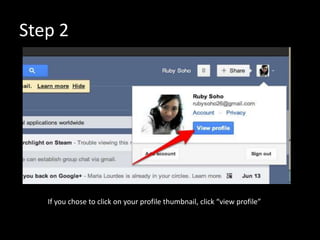
Step 2


   If you chose to click on your profile thumbnail, click “view profile”
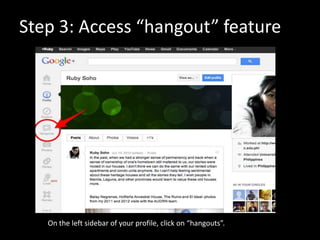
Step 3: Access “hangout” feature


   On the left sidebar of your profile, click on “hangouts”.
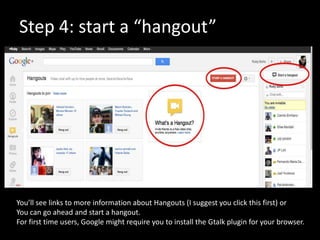
Step 4: start a “hangout”


You’ll see links to more information about Hangouts (I suggest you click this first) or
You can go ahead and start a hangout.
For first time users, Google might require you to install the Gtalk plugin for your browser.
Step 5: start a hangout & invite circles


Once you have successfully installed the plugin and set up your webcam, mic, etc., (and
restarted your browser), you can repeat the first 4 steps.
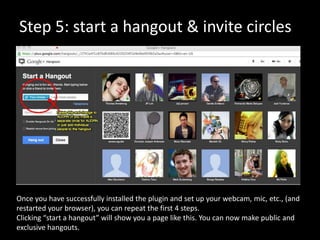
Clicking “start a hangout” will show you a page like this. You can now make public and
exclusive hangouts.
Step 5: start a hangout & invite circles


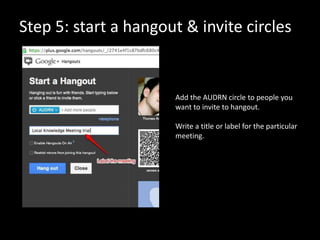
                      Add the AUDRN circle to people you
                      want to invite to hangout.

                      Write a title or label for the particular
                      meeting.
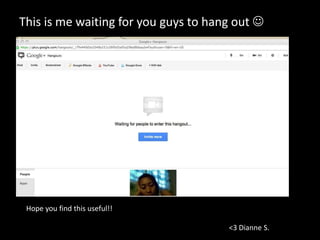
This is me waiting for you guys to hang out 


 Hope you find this useful!!

                                      <3 Dianne S.

How to use G+ hangout

  • 1.
    How to Starta “Hangout” (group video conference) over Google+ Hi champs! Here’s a simple step-by-step guide to setting up a “hangout” for group meetings (video chats). First, some things you’ll need: 1. A Google+ account. 2. To connect or add AUDRN people to at least 1 G+ circle (*circles are categories into which you organize people you connect with). I suggest making a circle for AUDRN people. 3. A workable internet connection. 4. A flash-enabled internet browser (Firefox, Chrome or Safari are okay). 5. A webcam, mic, speakers.
  • 2.
    Step 1: Accessyour G+ You can easily do this from your Google homepage if you are logged in or via Gmail. Click on your +[username] on the upper left hand corner of the page, or on your profile Photo on the upper right hand corner.
  • 3.
    Step 2 If you chose to click on your profile thumbnail, click “view profile”
  • 4.
    Step 3: Access“hangout” feature On the left sidebar of your profile, click on “hangouts”.
  • 5.
    Step 4: starta “hangout” You’ll see links to more information about Hangouts (I suggest you click this first) or You can go ahead and start a hangout. For first time users, Google might require you to install the Gtalk plugin for your browser.
  • 6.
    Step 5: starta hangout & invite circles Once you have successfully installed the plugin and set up your webcam, mic, etc., (and restarted your browser), you can repeat the first 4 steps. Clicking “start a hangout” will show you a page like this. You can now make public and exclusive hangouts.
  • 7.
    Step 5: starta hangout & invite circles Add the AUDRN circle to people you want to invite to hangout. Write a title or label for the particular meeting.
  • 8.
    This is mewaiting for you guys to hang out  Hope you find this useful!! <3 Dianne S.