Make That WordPress Website FAST!
By following this information, you’ll learn how to keep
your WordPress website fast!
The speed optimization process is pretty standard for
most websites. It involves a database & script
optimization, image resizing and compression, and a
few other adjustments. WordPress websites we build
have these optimization methods built into their
designs.
How Do We Make WordPress Faster?
Every WordPress website can load fast if it's optimized properly.
Our website, BocainDesigns.com, usually loads in one to two seconds.
I like to compare a fine tuned website to a fuel efficient car.
If you insist on towing a 10,000 pound trailer with your fuel efficient car, you
can expect the efficiency to take a major hit.
What tools should I use to measure my WordPress
website speed?
There are many ways to figure out how fast your website loads. The
easiest way to do this is to visit your own website after clearing your
browser cache of course.
Important: When checking your website speed or loading, do so with a
clean cache. This gives you a better idea how the website loads for a real
visitor.
When we optimize WordPress websites, we rely on a a few industry
website testing tools to get the job done.
Pingdom Tools
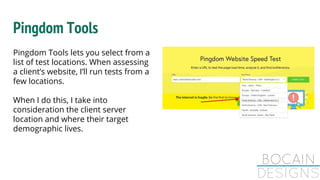
Pingdom Tools lets you select from a
list of test locations. When assessing
a client’s website, I’ll run tests from a
few locations.
When I do this, I take into
consideration the client server
location and where their target
demographic lives.
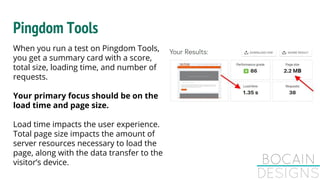
When you run a test on Pingdom Tools,
you get a summary card with a score,
total size, loading time, and number of
requests.
Your primary focus should be on the
load time and page size.
Load time impacts the user experience.
Total page size impacts the amount of
server resources necessary to load the
page, along with the data transfer to the
visitor’s device.
Pingdom Tools
Pingdom Tools
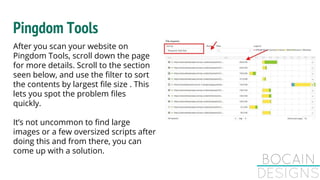
After you scan your website on
Pingdom Tools, scroll down the page
for more details. Scroll to the section
seen below, and use the filter to sort
the contents by largest file size . This
lets you spot the problem files
quickly.
It’s not uncommon to find large
images or a few oversized scripts after
doing this and from there, you can
come up with a solution.
GTmetrix
To get the most out of GTmetrix,
sign up for a free account.
By doing this, you’re given more
tools and access to finer data
points.
This includes being able to select
your test location, browser type,
and a few other settings.
GTmetrix
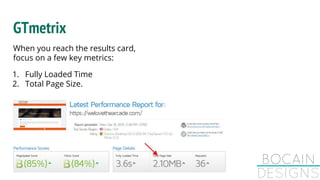
When you reach the results card,
focus on a few key metrics: 
1. Fully Loaded Time
2. Total Page Size.
GTmetrix
GTmetrix gives you scores
for different factors.
This website is already well
optimized but has some
problems relating to the
images.
GTmetrix
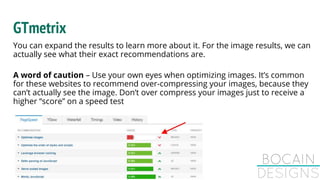
You can expand the results to learn more about it. For the image results, we can
actually see what their exact recommendations are.
A word of caution – Use your own eyes when optimizing images. It’s common
for these websites to recommend over-compressing your images, because they
can’t actually see the image. Don’t over compress your images just to receive a
higher “score” on a speed test
GTmetrix
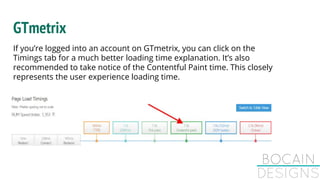
If you’re logged into an account on GTmetrix, you can click on the
Timings tab for a much better loading time explanation. It’s also
recommended to take notice of the Contentful Paint time. This closely
represents the user experience loading time.
GTmetrix
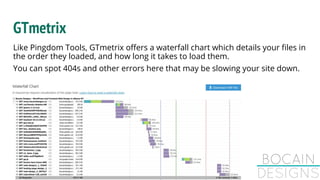
Like Pingdom Tools, GTmetrix offers a waterfall chart which details your files in
the order they loaded, and how long it takes to load them.
You can spot 404s and other errors here that may be slowing your site down.
imgix Page Weight Tool
This one is a bit less known but very
helpful! As the name suggests, it’s for
image optimization.
When we want to visually assess how
well I can scale image sizes down, this
tool is priceless!
Google, GTmetrix, and Pingdom tools
do let you find large images, but they
don’t go as far as imgix Page Weight
Tool.
imgix Page Weight Tool
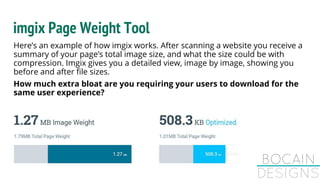
Here’s an example of how imgix works. After scanning a website you receive a
summary of your page’s total image size, and what the size could be with
compression. Imgix gives you a detailed view, image by image, showing you
before and after file sizes.
How much extra bloat are you requiring your users to download for the
same user experience?
Google PageSpeed
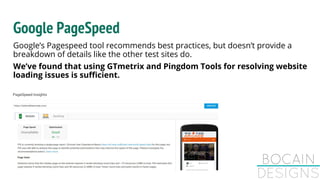
Google’s Pagespeed tool recommends best practices, but doesn’t provide a
breakdown of details like the other test sites do.
We’ve found that using GTmetrix and Pingdom Tools for resolving website
loading issues is sufficient.
What is a WordPress website's speed based off of?
Your website’s speed will vary based on a few factors, many of which change on
a daily, or hourly basis. It’s important to be mindful of your location, your
server’s location, and any website speed testing tool locations.
Many website speed testing tools allow you to select a test location. Select a
location closest to your target website’s demographic to see how it might load
for them.
An easy way to test your website speed, without the use of a testing tool, is to
visit your website from a browser that hasn’t cached your pages yet.
What is a WordPress website's speed based off of?
What does this mean? If you use Google Chrome to browse the web, install
Firefox, and visit your website. This gives the same user experience as
someone who visited your website or the first time.
A few things to watch for while doing a fresh browser test:
● How fast is the initial page load?
● During that initial page load, did your website.
● Visit another page on your site, how fast was that page load? Faster? It
should be.
What WordPress speed plugins can I use to improve
my website loading time?
We currently use a plugin called WP Rocket for optimizing WordPress websites. It
offers optimization solutions that use to take several plugins to achieve (script,
database, lazy loading, CDNs, images, etc)
We started using WP Rocket in 2016. Before using WP Rocket, we had been using
W3 Total Cache or WP-SuperCache for optimizing loading times on WordPress
websites.
These are still good options, but if you don’t mind spending a few dollars, WP
Rocket is superior in many ways.
Why do we prefer WP Rocket?
It’s simple to use and still offers optimization methods like:
● Minification of HTML/JS/CSS
● Combining of JS and CSS files
● Automated database optimization
● Google Analytics script caching
● Built in CDN support
● Lazyloading of images and iframes
● Improved YouTube and Vimeo loading techniques
● Deferring JS files
● DNS pre-fetching
● Blacklists for files you don’t want it optimizing
What WordPress speed plugins can I use to improve
my website loading time?
Depending on your website’s size, content, and web host, you might be able to
get by without a caching plugin at all.
If your web host happens to be SiteGround, their server-side caching tool
(SuperCacher) does a fantastic job by itself. It’s compatible with WP Rocket, but
you may find it unnecessary.
You can add this code to your website’s .htaccess file to improve how fast your
website loads. If you are not comfortable with editing your .htaccess file, do NOT
do it. Breaking this file can make your website unreachable.
Optimizing Your Website Images
If you’re on a computer with a photo editing software like Photoshop, Photopea, or
Paint, you already have the tools to get the job done!
It’s important to resize your images based on how you plan to use the image. If it’s
going to be a full width background on your website, you may want the image to be
2000 pixels wide.
If the picture is a headshot for an about page, you don’t need it to be larger than 1000
pixels in width.
Optimizing Your Website Images
Resizing your images before adding them to your server will cut down on unnecessary
page load sizes, and cut down on the need for lots of storage space.
Once your images have been scaled down to the appropriate size, you want to save it
in a compressed format.
When saving the image for your website, make sure you’re saving in RGB mode, and
not CMYK mode. CMYK file sizes will be much larger than RGB.
Dynamic Drive Image Optimizer
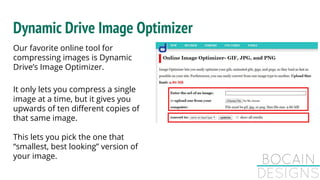
Our favorite online tool for
compressing images is Dynamic
Drive’s Image Optimizer.
It only lets you compress a single
image at a time, but it gives you
upwards of ten different copies of
that same image.
This lets you pick the one that
“smallest, best looking” version of
your image.
After Optimizing Your Website
Make sure you haven’t broken any features on your website, or broken how it
looks. Visit your website in a browser (clear your cache!), and pay attention to
how fast the page loads, and how it looks.
Is anything off? Missing? Non-functioning?
After Optimizing Your Website
When optimizing your WordPress website with a plugin, you sometimes have to
do a bit of trial and error to learn which configuration delivers the best results.
If everything is still working fine, re-visit the test websites from earlier, and run
new tests. It’s important to make sure your test location (for Pingdom and
GTmetrix) is the same as the initial test, to get a more accurate set of data.
After Optimizing Your Website
If you followed the advice in this post, you should have seen a significant
improvement to your website loading speed, while seeing a reduction in total
website size. Your scores most likely improved too, but in some cases, scores
may actually go down, when speed is improved, and that is OK!
This is one of the few times you can say “test scores don’t matter” – website
speed does.
Bocain Designs has been creating websites for small businesses in
Albany, NY. We also operate a top seller, PRO seller account on
Fiverr where we have helped over 2,500 different businesses
enhance their online presence.

How to make WordPress Faster in 2019

  • 1.
    Make That WordPressWebsite FAST! By following this information, you’ll learn how to keep your WordPress website fast! The speed optimization process is pretty standard for most websites. It involves a database & script optimization, image resizing and compression, and a few other adjustments. WordPress websites we build have these optimization methods built into their designs.
  • 2.
    How Do WeMake WordPress Faster? Every WordPress website can load fast if it's optimized properly. Our website, BocainDesigns.com, usually loads in one to two seconds. I like to compare a fine tuned website to a fuel efficient car. If you insist on towing a 10,000 pound trailer with your fuel efficient car, you can expect the efficiency to take a major hit.
  • 3.
    What tools shouldI use to measure my WordPress website speed? There are many ways to figure out how fast your website loads. The easiest way to do this is to visit your own website after clearing your browser cache of course. Important: When checking your website speed or loading, do so with a clean cache. This gives you a better idea how the website loads for a real visitor. When we optimize WordPress websites, we rely on a a few industry website testing tools to get the job done.
  • 4.
    Pingdom Tools Pingdom Toolslets you select from a list of test locations. When assessing a client’s website, I’ll run tests from a few locations. When I do this, I take into consideration the client server location and where their target demographic lives.
  • 5.
    When you runa test on Pingdom Tools, you get a summary card with a score, total size, loading time, and number of requests. Your primary focus should be on the load time and page size. Load time impacts the user experience. Total page size impacts the amount of server resources necessary to load the page, along with the data transfer to the visitor’s device. Pingdom Tools
  • 6.
    Pingdom Tools After youscan your website on Pingdom Tools, scroll down the page for more details. Scroll to the section seen below, and use the filter to sort the contents by largest file size . This lets you spot the problem files quickly. It’s not uncommon to find large images or a few oversized scripts after doing this and from there, you can come up with a solution.
  • 7.
    GTmetrix To get themost out of GTmetrix, sign up for a free account. By doing this, you’re given more tools and access to finer data points. This includes being able to select your test location, browser type, and a few other settings.
  • 8.
    GTmetrix When you reachthe results card, focus on a few key metrics:  1. Fully Loaded Time 2. Total Page Size.
  • 9.
    GTmetrix GTmetrix gives youscores for different factors. This website is already well optimized but has some problems relating to the images.
  • 10.
    GTmetrix You can expandthe results to learn more about it. For the image results, we can actually see what their exact recommendations are. A word of caution – Use your own eyes when optimizing images. It’s common for these websites to recommend over-compressing your images, because they can’t actually see the image. Don’t over compress your images just to receive a higher “score” on a speed test
  • 11.
    GTmetrix If you’re loggedinto an account on GTmetrix, you can click on the Timings tab for a much better loading time explanation. It’s also recommended to take notice of the Contentful Paint time. This closely represents the user experience loading time.
  • 12.
    GTmetrix Like Pingdom Tools,GTmetrix offers a waterfall chart which details your files in the order they loaded, and how long it takes to load them. You can spot 404s and other errors here that may be slowing your site down.
  • 13.
    imgix Page WeightTool This one is a bit less known but very helpful! As the name suggests, it’s for image optimization. When we want to visually assess how well I can scale image sizes down, this tool is priceless! Google, GTmetrix, and Pingdom tools do let you find large images, but they don’t go as far as imgix Page Weight Tool.
  • 14.
    imgix Page WeightTool Here’s an example of how imgix works. After scanning a website you receive a summary of your page’s total image size, and what the size could be with compression. Imgix gives you a detailed view, image by image, showing you before and after file sizes. How much extra bloat are you requiring your users to download for the same user experience?
  • 15.
    Google PageSpeed Google’s Pagespeedtool recommends best practices, but doesn’t provide a breakdown of details like the other test sites do. We’ve found that using GTmetrix and Pingdom Tools for resolving website loading issues is sufficient.
  • 16.
    What is aWordPress website's speed based off of? Your website’s speed will vary based on a few factors, many of which change on a daily, or hourly basis. It’s important to be mindful of your location, your server’s location, and any website speed testing tool locations. Many website speed testing tools allow you to select a test location. Select a location closest to your target website’s demographic to see how it might load for them. An easy way to test your website speed, without the use of a testing tool, is to visit your website from a browser that hasn’t cached your pages yet.
  • 17.
    What is aWordPress website's speed based off of? What does this mean? If you use Google Chrome to browse the web, install Firefox, and visit your website. This gives the same user experience as someone who visited your website or the first time. A few things to watch for while doing a fresh browser test: ● How fast is the initial page load? ● During that initial page load, did your website. ● Visit another page on your site, how fast was that page load? Faster? It should be.
  • 18.
    What WordPress speedplugins can I use to improve my website loading time? We currently use a plugin called WP Rocket for optimizing WordPress websites. It offers optimization solutions that use to take several plugins to achieve (script, database, lazy loading, CDNs, images, etc) We started using WP Rocket in 2016. Before using WP Rocket, we had been using W3 Total Cache or WP-SuperCache for optimizing loading times on WordPress websites. These are still good options, but if you don’t mind spending a few dollars, WP Rocket is superior in many ways.
  • 19.
    Why do weprefer WP Rocket? It’s simple to use and still offers optimization methods like: ● Minification of HTML/JS/CSS ● Combining of JS and CSS files ● Automated database optimization ● Google Analytics script caching ● Built in CDN support ● Lazyloading of images and iframes ● Improved YouTube and Vimeo loading techniques ● Deferring JS files ● DNS pre-fetching ● Blacklists for files you don’t want it optimizing
  • 20.
    What WordPress speedplugins can I use to improve my website loading time? Depending on your website’s size, content, and web host, you might be able to get by without a caching plugin at all. If your web host happens to be SiteGround, their server-side caching tool (SuperCacher) does a fantastic job by itself. It’s compatible with WP Rocket, but you may find it unnecessary. You can add this code to your website’s .htaccess file to improve how fast your website loads. If you are not comfortable with editing your .htaccess file, do NOT do it. Breaking this file can make your website unreachable.
  • 21.
    Optimizing Your WebsiteImages If you’re on a computer with a photo editing software like Photoshop, Photopea, or Paint, you already have the tools to get the job done! It’s important to resize your images based on how you plan to use the image. If it’s going to be a full width background on your website, you may want the image to be 2000 pixels wide. If the picture is a headshot for an about page, you don’t need it to be larger than 1000 pixels in width.
  • 22.
    Optimizing Your WebsiteImages Resizing your images before adding them to your server will cut down on unnecessary page load sizes, and cut down on the need for lots of storage space. Once your images have been scaled down to the appropriate size, you want to save it in a compressed format. When saving the image for your website, make sure you’re saving in RGB mode, and not CMYK mode. CMYK file sizes will be much larger than RGB.
  • 23.
    Dynamic Drive ImageOptimizer Our favorite online tool for compressing images is Dynamic Drive’s Image Optimizer. It only lets you compress a single image at a time, but it gives you upwards of ten different copies of that same image. This lets you pick the one that “smallest, best looking” version of your image.
  • 24.
    After Optimizing YourWebsite Make sure you haven’t broken any features on your website, or broken how it looks. Visit your website in a browser (clear your cache!), and pay attention to how fast the page loads, and how it looks. Is anything off? Missing? Non-functioning?
  • 25.
    After Optimizing YourWebsite When optimizing your WordPress website with a plugin, you sometimes have to do a bit of trial and error to learn which configuration delivers the best results. If everything is still working fine, re-visit the test websites from earlier, and run new tests. It’s important to make sure your test location (for Pingdom and GTmetrix) is the same as the initial test, to get a more accurate set of data.
  • 26.
    After Optimizing YourWebsite If you followed the advice in this post, you should have seen a significant improvement to your website loading speed, while seeing a reduction in total website size. Your scores most likely improved too, but in some cases, scores may actually go down, when speed is improved, and that is OK! This is one of the few times you can say “test scores don’t matter” – website speed does.
  • 27.
    Bocain Designs hasbeen creating websites for small businesses in Albany, NY. We also operate a top seller, PRO seller account on Fiverr where we have helped over 2,500 different businesses enhance their online presence.