August 3, 2018
How to Ensure Your Agile PLM Solution
Provides Maximum Value
Prepared by: Sahil Gupta
@ NexinfoSolution
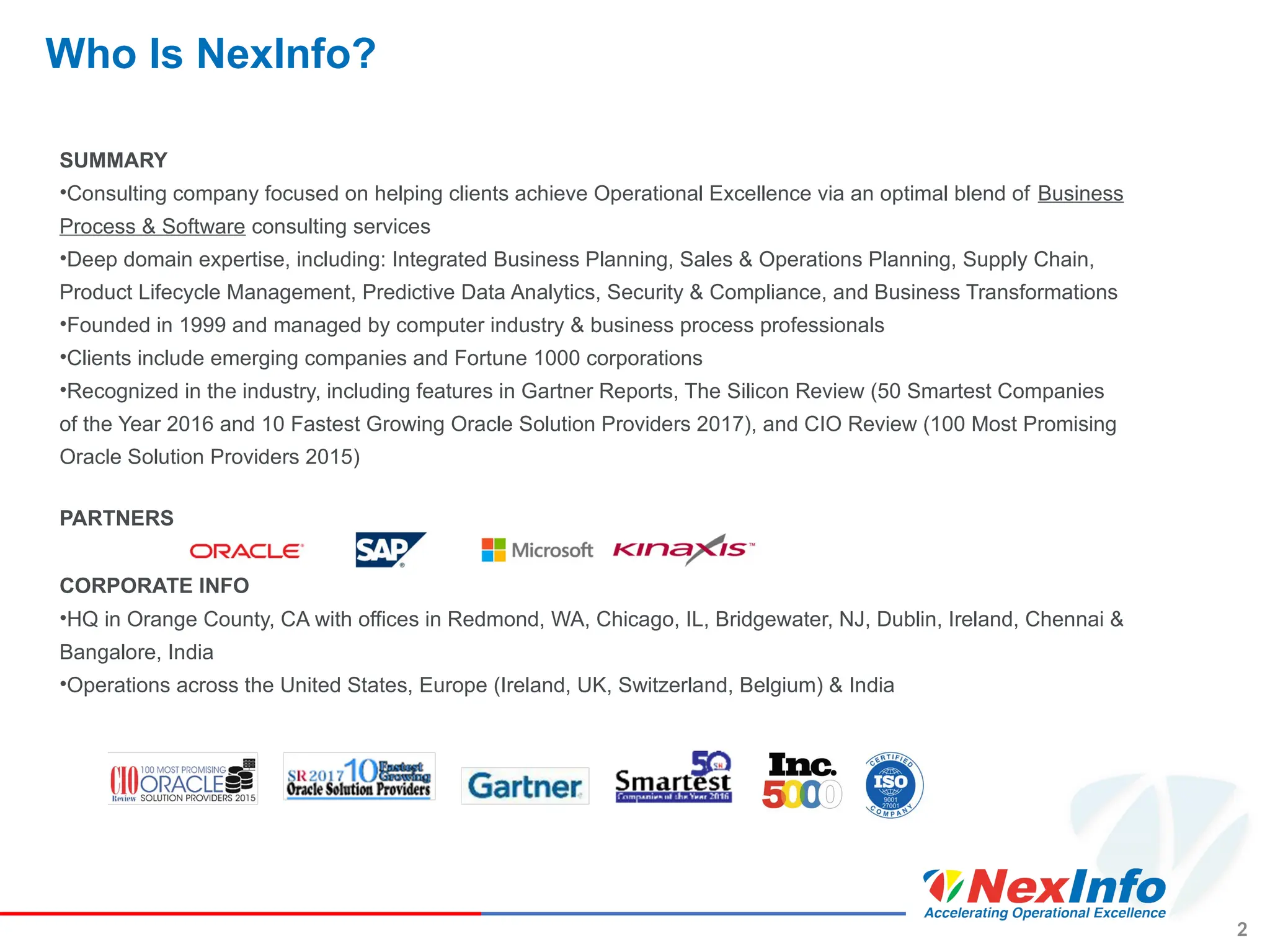
Who Is NexInfo?
SUMMARY
•Consulting company focused on helping clients achieve Operational Excellence via an optimal blend of Business
Process & Software consulting services
•Deep domain expertise, including: Integrated Business Planning, Sales & Operations Planning, Supply Chain,
Product Lifecycle Management, Predictive Data Analytics, Security & Compliance, and Business Transformations
•Founded in 1999 and managed by computer industry & business process professionals
•Clients include emerging companies and Fortune 1000 corporations
•Recognized in the industry, including features in Gartner Reports, The Silicon Review (50 Smartest Companies
of the Year 2016 and 10 Fastest Growing Oracle Solution Providers 2017), and CIO Review (100 Most Promising
Oracle Solution Providers 2015)
PARTNERS
CORPORATE INFO
•HQ in Orange County, CA with offices in Redmond, WA, Chicago, IL, Bridgewater, NJ, Dublin, Ireland, Chennai &
Bangalore, India
•Operations across the United States, Europe (Ireland, UK, Switzerland, Belgium) & India
2
Presenter Information
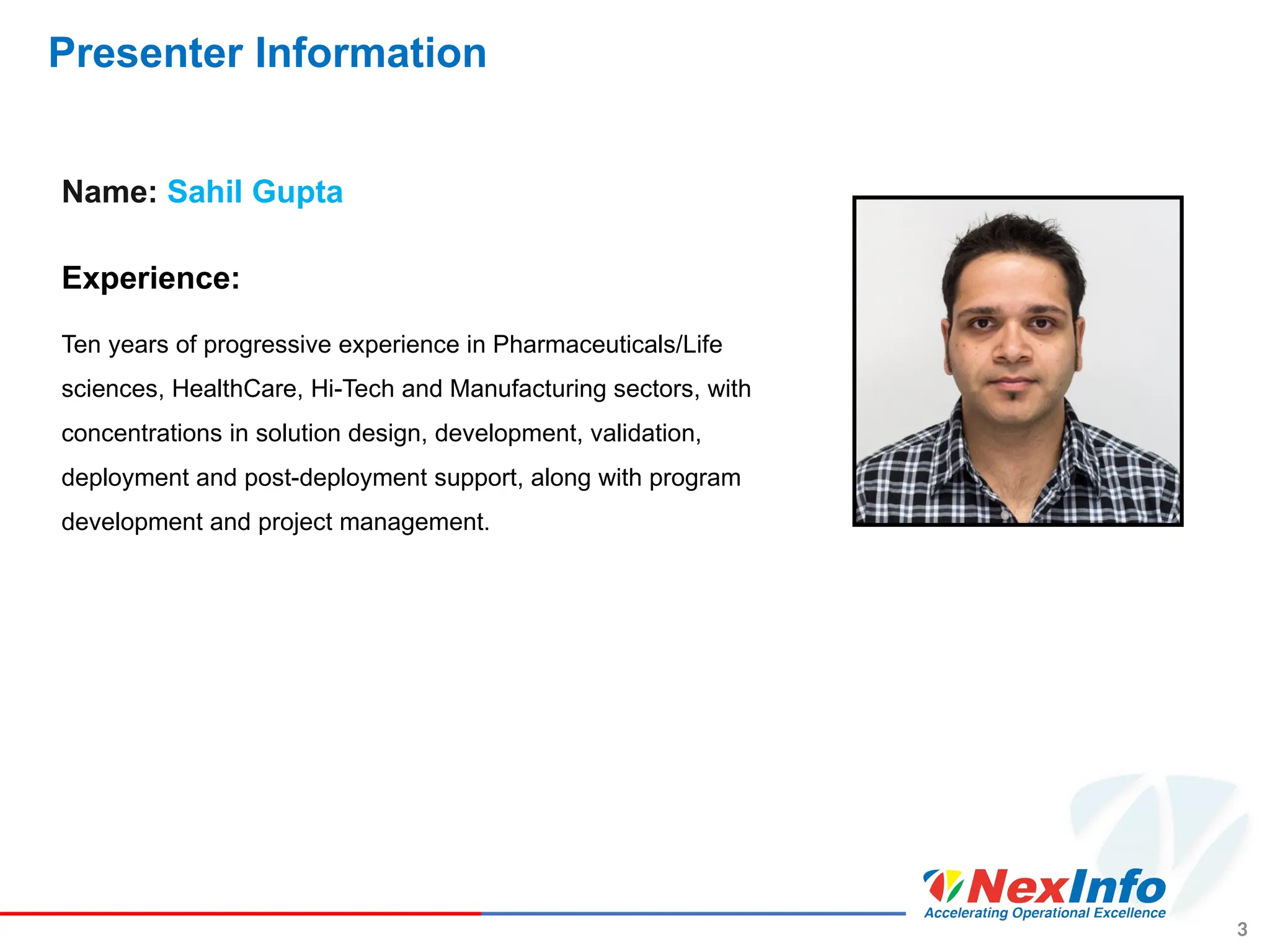
Name: Sahil Gupta
Experience:
Ten years of progressive experience in Pharmaceuticals/Life
sciences, HealthCare, Hi-Tech and Manufacturing sectors, with
concentrations in solution design, development, validation,
deployment and post-deployment support, along with program
development and project management.
3
Want more insights?
• Insights about Business Process
• Efficiency
• Bottlenecks
• Insights about Product
• Product evolution - history, changes, Investigate & Audit
• Sub-components used in the product portfolio
• Insights about the System
• Usage
• User adoption
4
5
Agenda
6
Chat Remainder
CHAT
Reminder:
Please submit questions via chat to
cover at the end of the presentation.
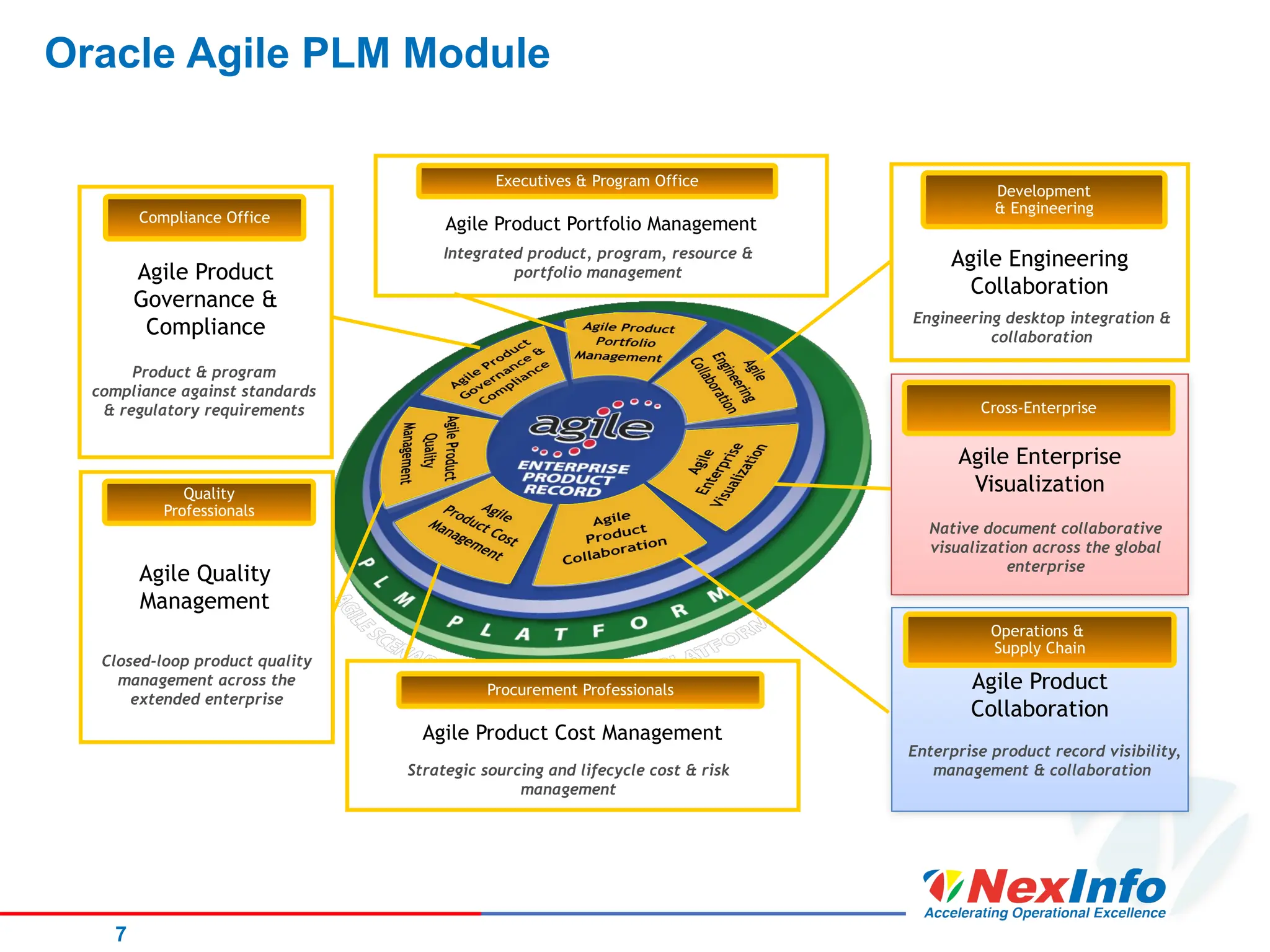
Oracle Agile PLM Module
7
Agile Product
Collaboration
Operations &
Supply Chain
Enterprise product record visibility,
management & collaboration
Agile Enterprise
Visualization
Native document collaborative
visualization across the global
enterprise
Cross-Enterprise
Agile Engineering
Collaboration
Engineering desktop integration &
collaboration
Development
& Engineering
Agile Product Cost Management
Strategic sourcing and lifecycle cost & risk
management
Procurement Professionals
Agile Product Portfolio Management
Integrated product, program, resource &
portfolio management
Executives & Program Office
Agile Product
Governance &
Compliance
Product & program
compliance against standards
& regulatory requirements
Compliance Office
Closed-loop product quality
management across the
extended enterprise
Quality
Professionals
Agile Quality
Management
8
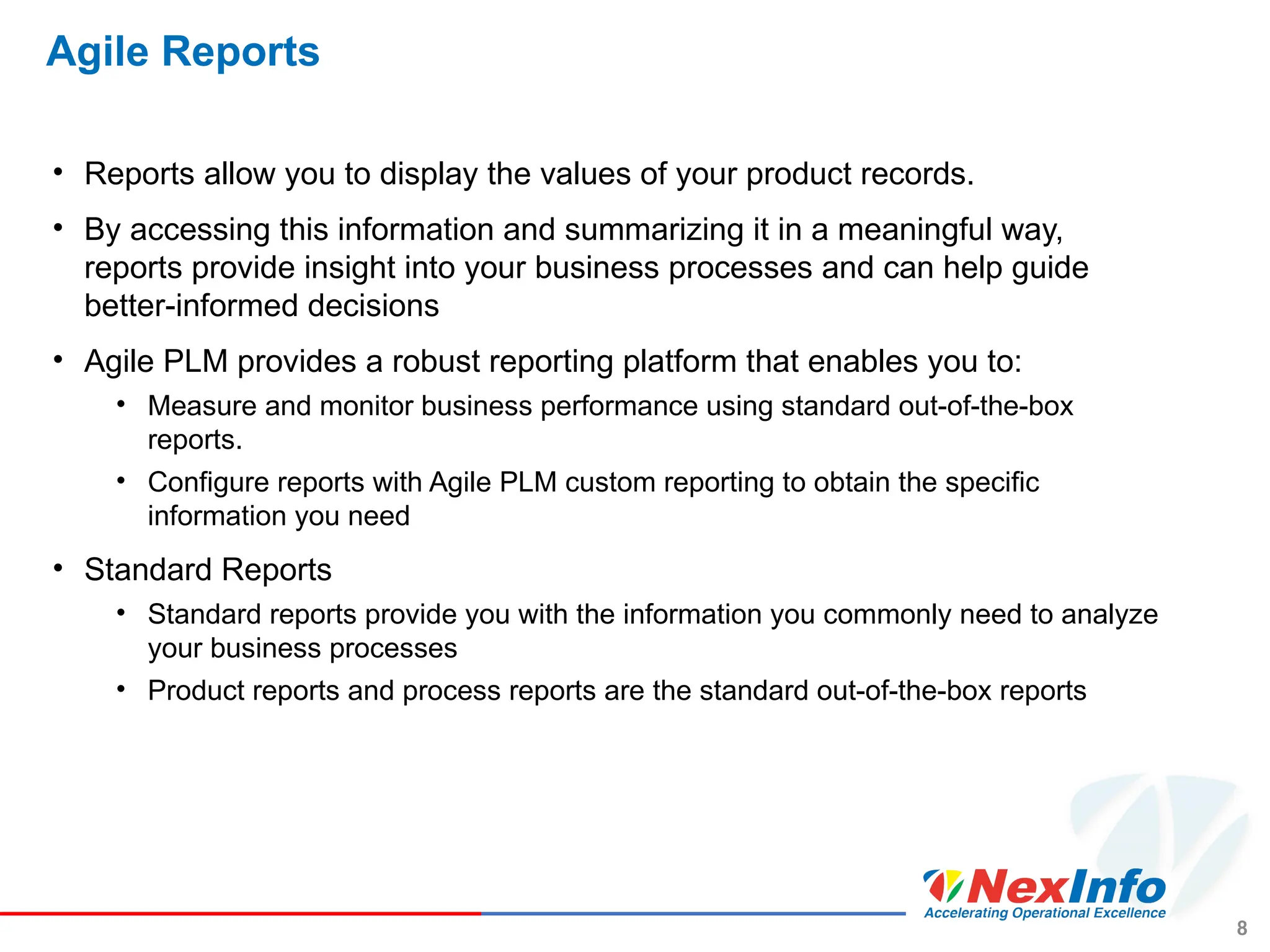
Agile Reports
• Reports allow you to display the values of your product records.
• By accessing this information and summarizing it in a meaningful way,
reports provide insight into your business processes and can help guide
better-informed decisions
• Agile PLM provides a robust reporting platform that enables you to:
• Measure and monitor business performance using standard out-of-the-box
reports.
• Configure reports with Agile PLM custom reporting to obtain the specific
information you need
• Standard Reports
• Standard reports provide you with the information you commonly need to analyze
your business processes
• Product reports and process reports are the standard out-of-the-box reports
9
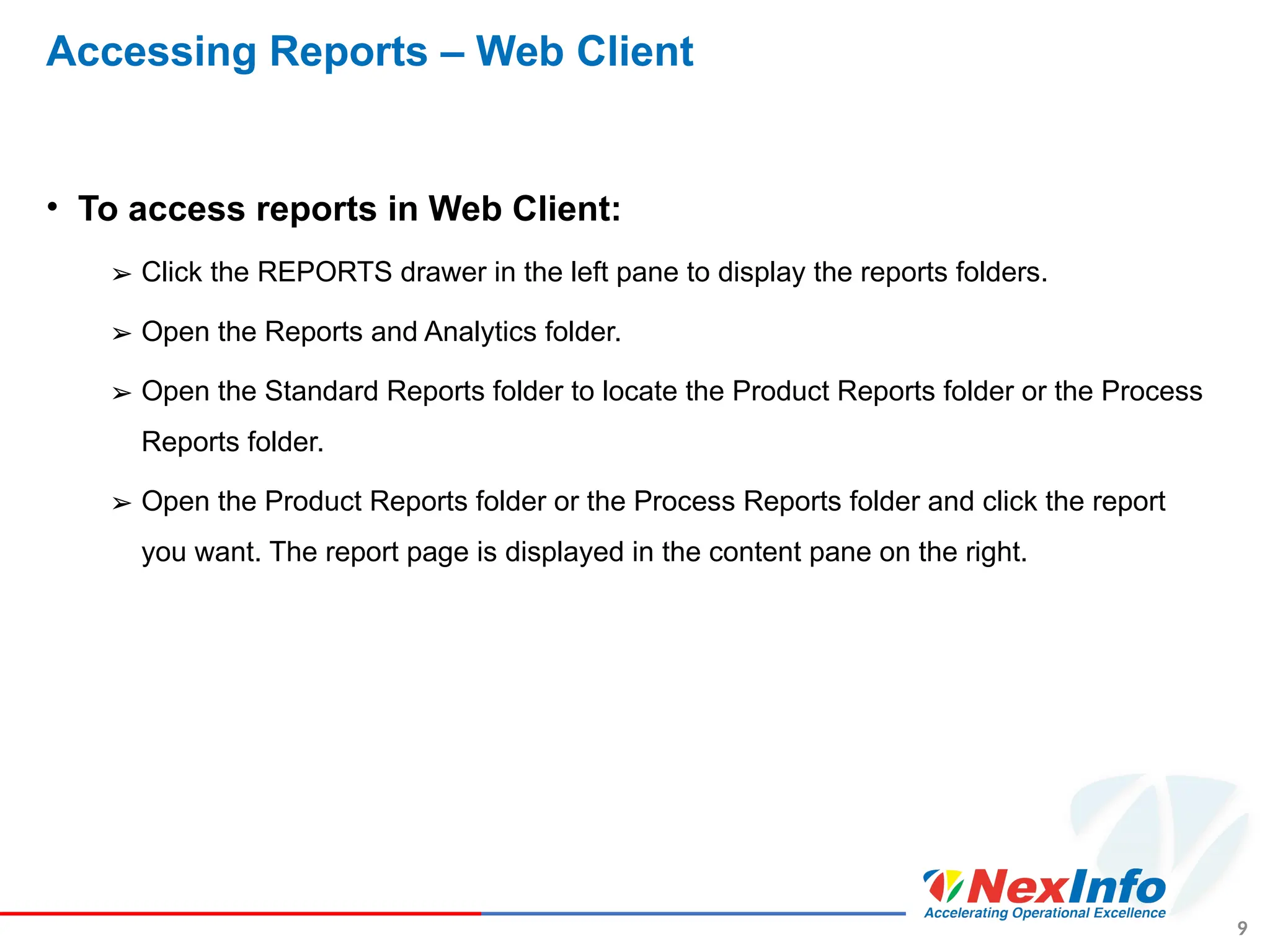
Accessing Reports – Web Client
• To access reports in Web Client:
➢ Click the REPORTS drawer in the left pane to display the reports folders.
➢ Open the Reports and Analytics folder.
➢ Open the Standard Reports folder to locate the Product Reports folder or the Process
Reports folder.
➢ Open the Product Reports folder or the Process Reports folder and click the report
you want. The report page is displayed in the content pane on the right.
10
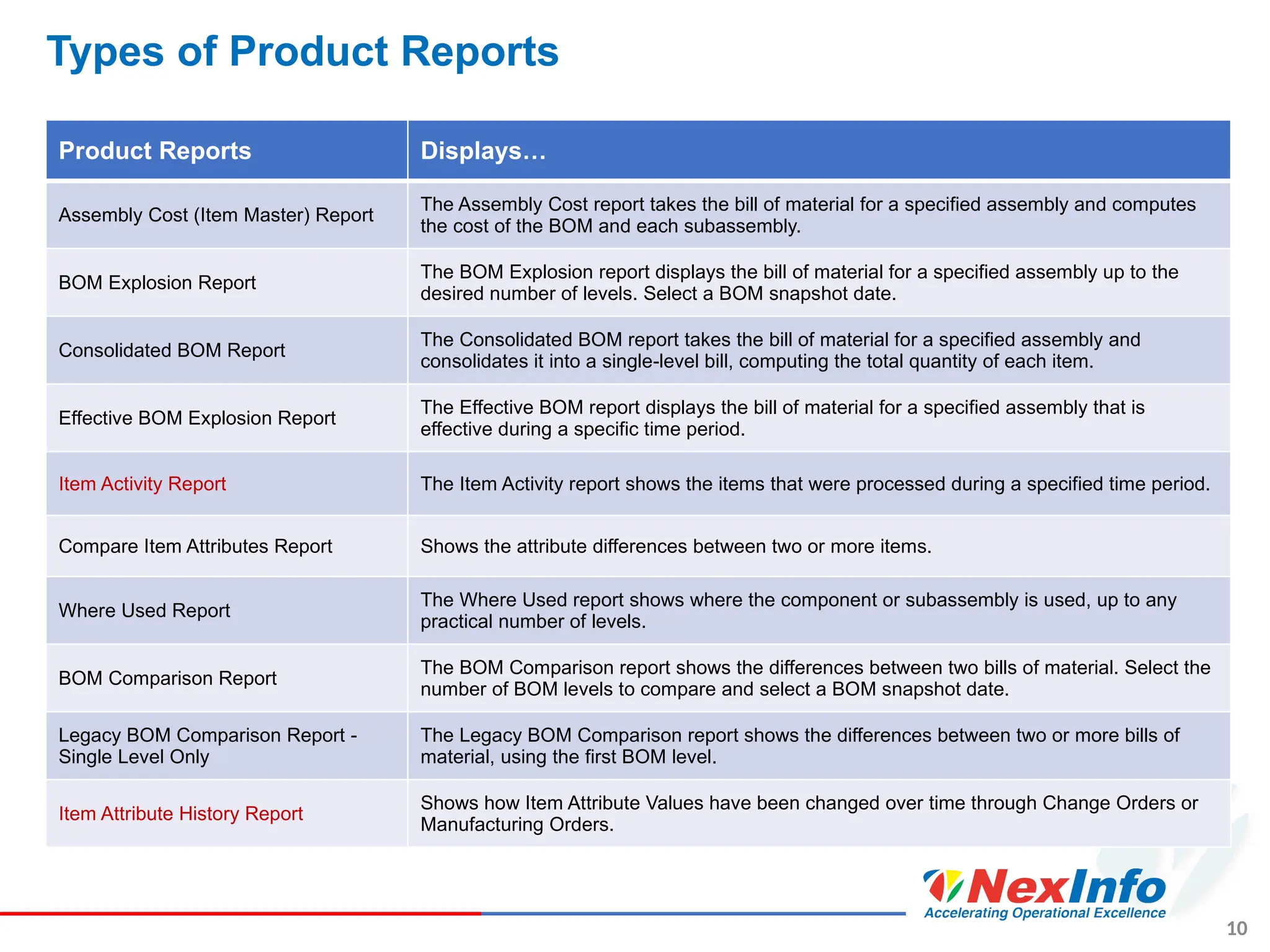
Types of Product Reports
Product Reports Displays…
Assembly Cost (Item Master) Report
The Assembly Cost report takes the bill of material for a specified assembly and computes
the cost of the BOM and each subassembly.
BOM Explosion Report
The BOM Explosion report displays the bill of material for a specified assembly up to the
desired number of levels. Select a BOM snapshot date.
Consolidated BOM Report
The Consolidated BOM report takes the bill of material for a specified assembly and
consolidates it into a single-level bill, computing the total quantity of each item.
Effective BOM Explosion Report
The Effective BOM report displays the bill of material for a specified assembly that is
effective during a specific time period.
Item Activity Report The Item Activity report shows the items that were processed during a specified time period.
Compare Item Attributes Report Shows the attribute differences between two or more items.
Where Used Report
The Where Used report shows where the component or subassembly is used, up to any
practical number of levels.
BOM Comparison Report
The BOM Comparison report shows the differences between two bills of material. Select the
number of BOM levels to compare and select a BOM snapshot date.
Legacy BOM Comparison Report -
Single Level Only
The Legacy BOM Comparison report shows the differences between two or more bills of
material, using the first BOM level.
Item Attribute History Report
Shows how Item Attribute Values have been changed over time through Change Orders or
Manufacturing Orders.
11
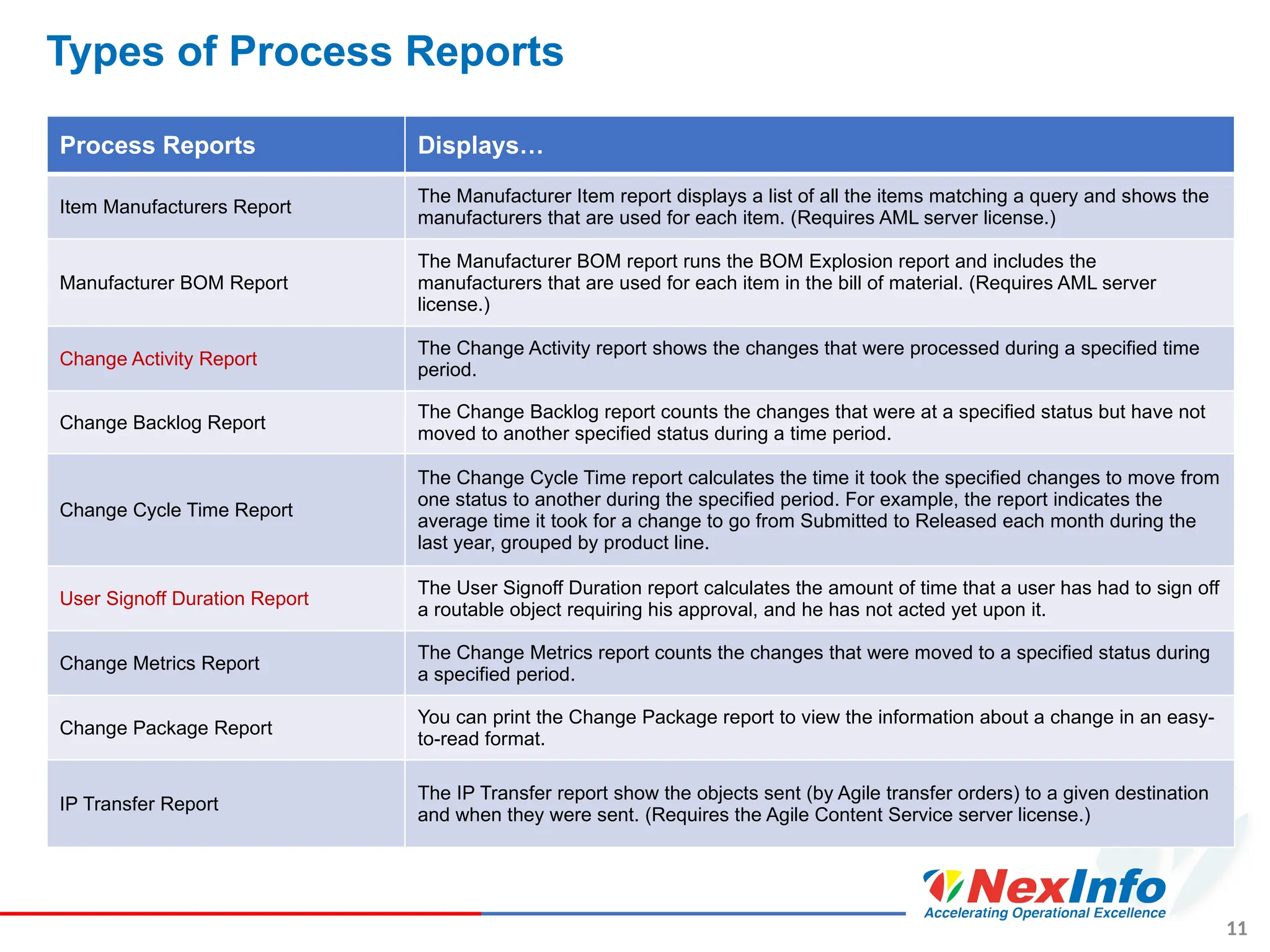
Types of Process Reports
Process Reports Displays…
Item Manufacturers Report
The Manufacturer Item report displays a list of all the items matching a query and shows the
manufacturers that are used for each item. (Requires AML server license.)
Manufacturer BOM Report
The Manufacturer BOM report runs the BOM Explosion report and includes the
manufacturers that are used for each item in the bill of material. (Requires AML server
license.)
Change Activity Report
The Change Activity report shows the changes that were processed during a specified time
period.
Change Backlog Report
The Change Backlog report counts the changes that were at a specified status but have not
moved to another specified status during a time period.
Change Cycle Time Report
The Change Cycle Time report calculates the time it took the specified changes to move from
one status to another during the specified period. For example, the report indicates the
average time it took for a change to go from Submitted to Released each month during the
last year, grouped by product line.
User Signoff Duration Report
The User Signoff Duration report calculates the amount of time that a user has had to sign off
a routable object requiring his approval, and he has not acted yet upon it.
Change Metrics Report
The Change Metrics report counts the changes that were moved to a specified status during
a specified period.
Change Package Report
You can print the Change Package report to view the information about a change in an easy-
to-read format.
IP Transfer Report
The IP Transfer report show the objects sent (by Agile transfer orders) to a given destination
and when they were sent. (Requires the Agile Content Service server license.)
12
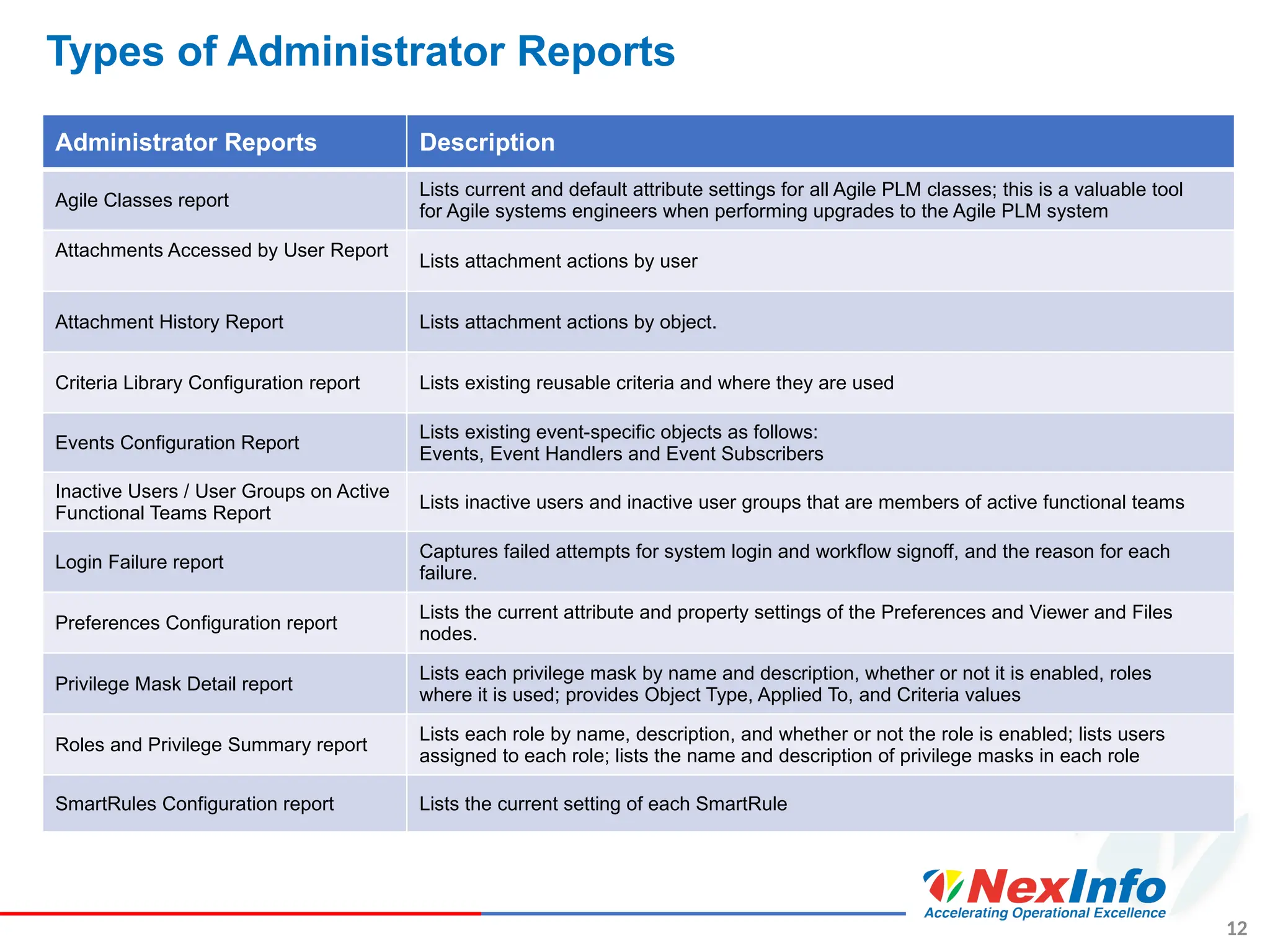
Types of Administrator Reports
Administrator Reports Description
Agile Classes report
Lists current and default attribute settings for all Agile PLM classes; this is a valuable tool
for Agile systems engineers when performing upgrades to the Agile PLM system
Attachments Accessed by User Report
Lists attachment actions by user
Attachment History Report Lists attachment actions by object.
Criteria Library Configuration report Lists existing reusable criteria and where they are used
Events Configuration Report
Lists existing event-specific objects as follows:
Events, Event Handlers and Event Subscribers
Inactive Users / User Groups on Active
Functional Teams Report
Lists inactive users and inactive user groups that are members of active functional teams
Login Failure report
Captures failed attempts for system login and workflow signoff, and the reason for each
failure.
Preferences Configuration report
Lists the current attribute and property settings of the Preferences and Viewer and Files
nodes.
Privilege Mask Detail report
Lists each privilege mask by name and description, whether or not it is enabled, roles
where it is used; provides Object Type, Applied To, and Criteria values
Roles and Privilege Summary report
Lists each role by name, description, and whether or not the role is enabled; lists users
assigned to each role; lists the name and description of privilege masks in each role
SmartRules Configuration report Lists the current setting of each SmartRule
13
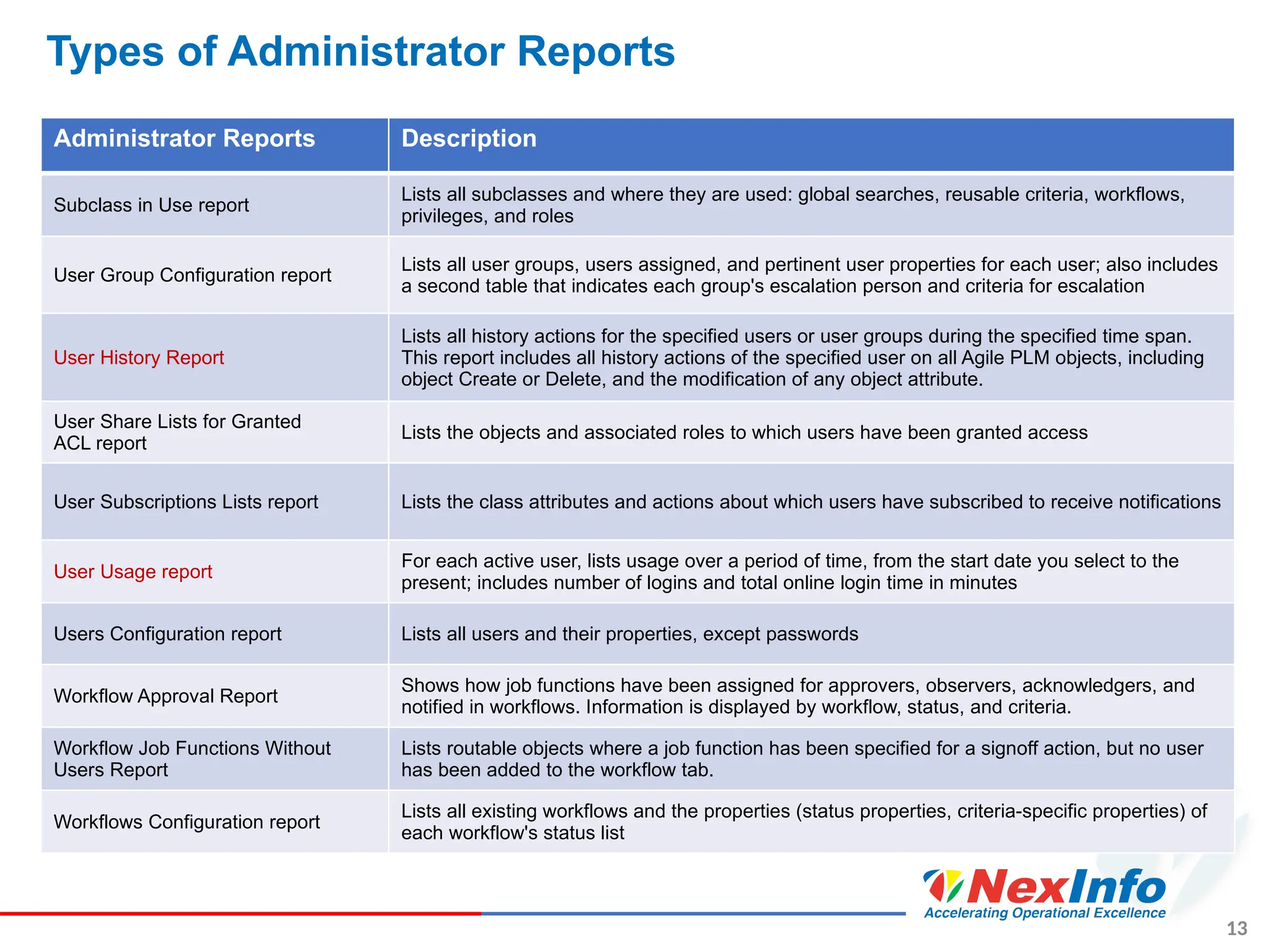
Types of Administrator Reports
Administrator Reports Description
Subclass in Use report
Lists all subclasses and where they are used: global searches, reusable criteria, workflows,
privileges, and roles
User Group Configuration report
Lists all user groups, users assigned, and pertinent user properties for each user; also includes
a second table that indicates each group's escalation person and criteria for escalation
User History Report
Lists all history actions for the specified users or user groups during the specified time span.
This report includes all history actions of the specified user on all Agile PLM objects, including
object Create or Delete, and the modification of any object attribute.
User Share Lists for Granted
ACL report
Lists the objects and associated roles to which users have been granted access
User Subscriptions Lists report Lists the class attributes and actions about which users have subscribed to receive notifications
User Usage report
For each active user, lists usage over a period of time, from the start date you select to the
present; includes number of logins and total online login time in minutes
Users Configuration report Lists all users and their properties, except passwords
Workflow Approval Report
Shows how job functions have been assigned for approvers, observers, acknowledgers, and
notified in workflows. Information is displayed by workflow, status, and criteria.
Workflow Job Functions Without
Users Report
Lists routable objects where a job function has been specified for a signoff action, but no user
has been added to the workflow tab.
Workflows Configuration report
Lists all existing workflows and the properties (status properties, criteria-specific properties) of
each workflow's status list
14
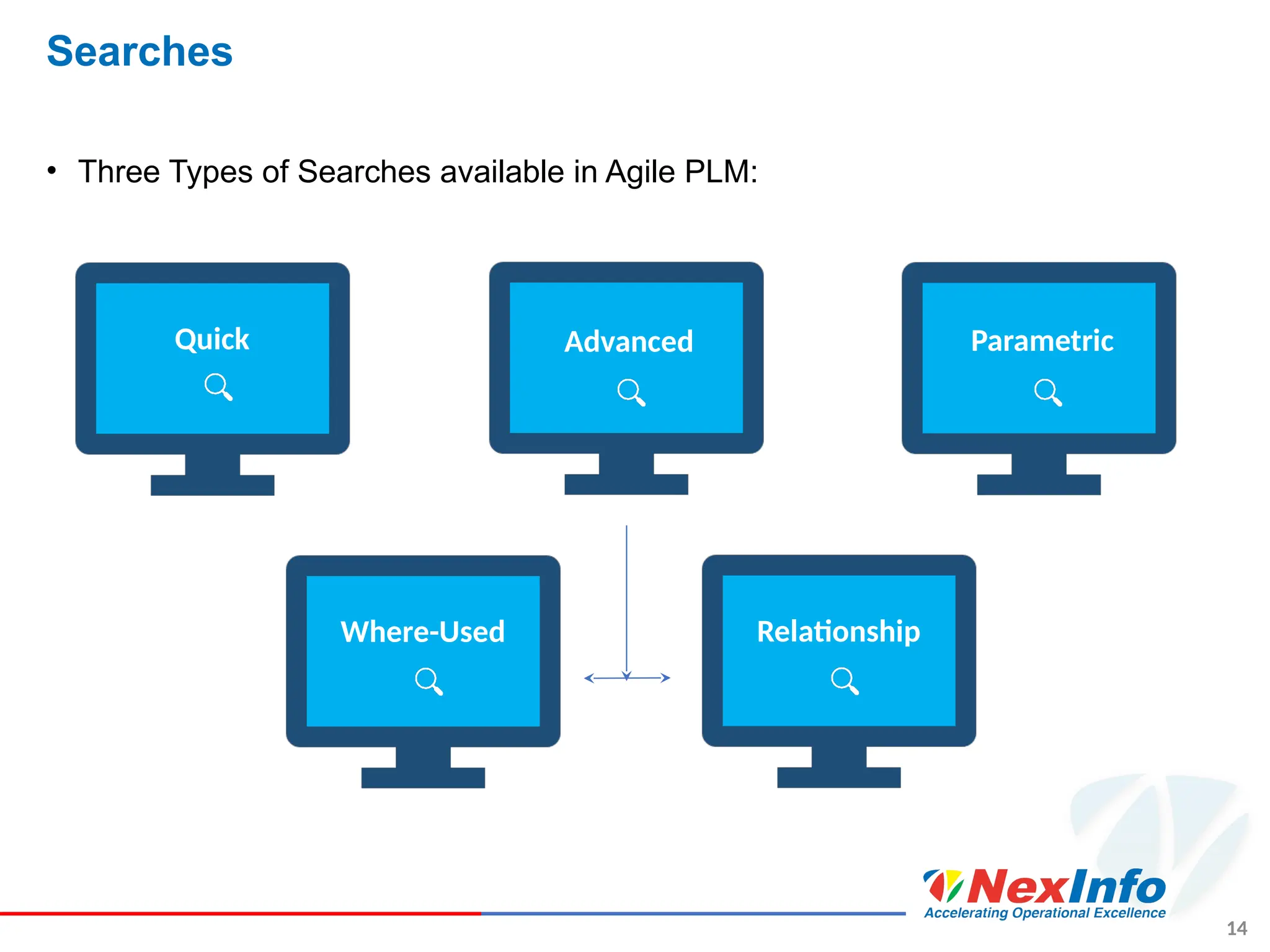
Searches
• Three Types of Searches available in Agile PLM:
Quick Advanced Parametric
Where-Used Relationship
15
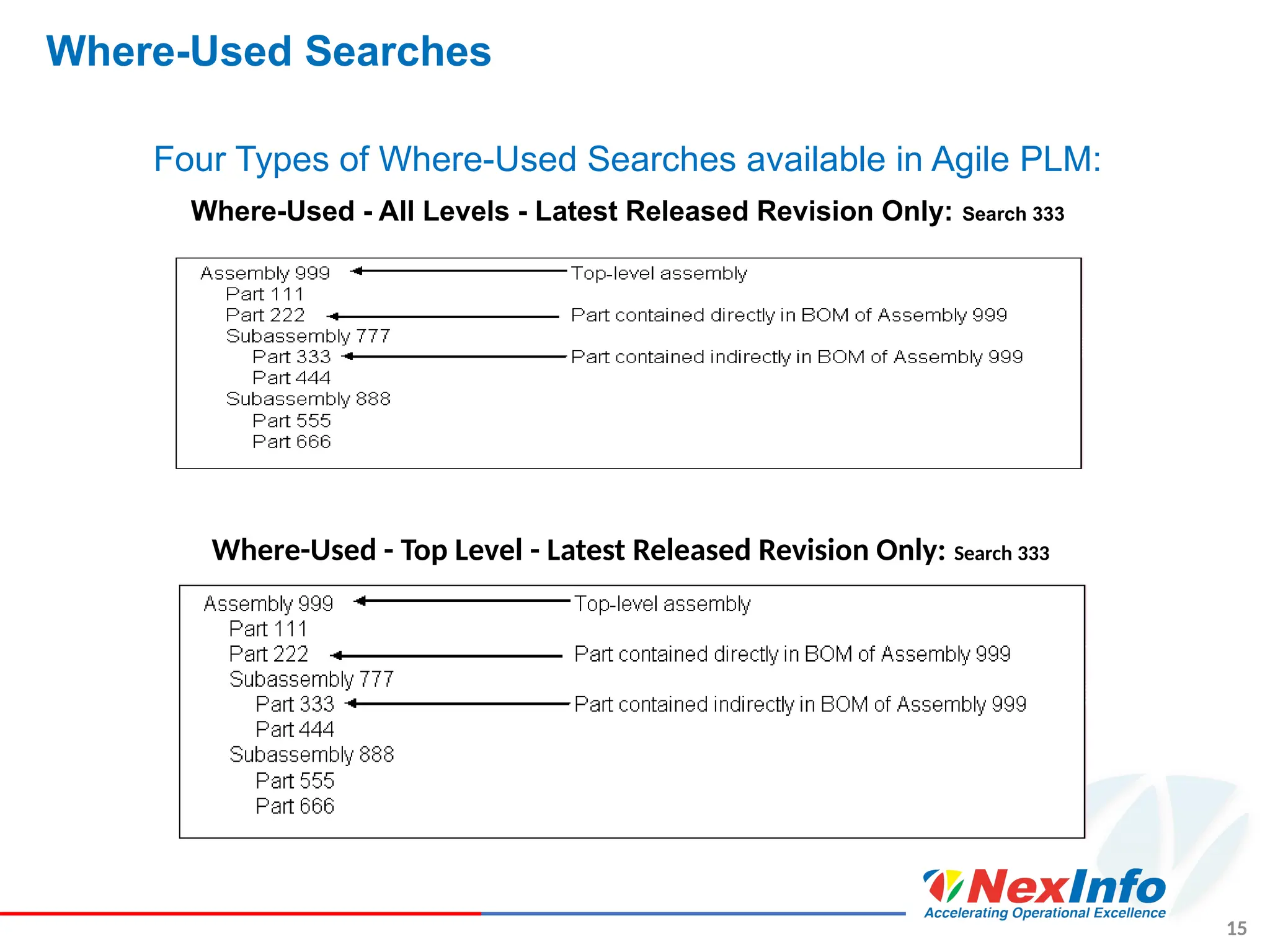
Where-Used Searches
Four Types of Where-Used Searches available in Agile PLM:
Where-Used - All Levels - Latest Released Revision Only: Search 333
Where-Used - Top Level - Latest Released Revision Only: Search 333
16
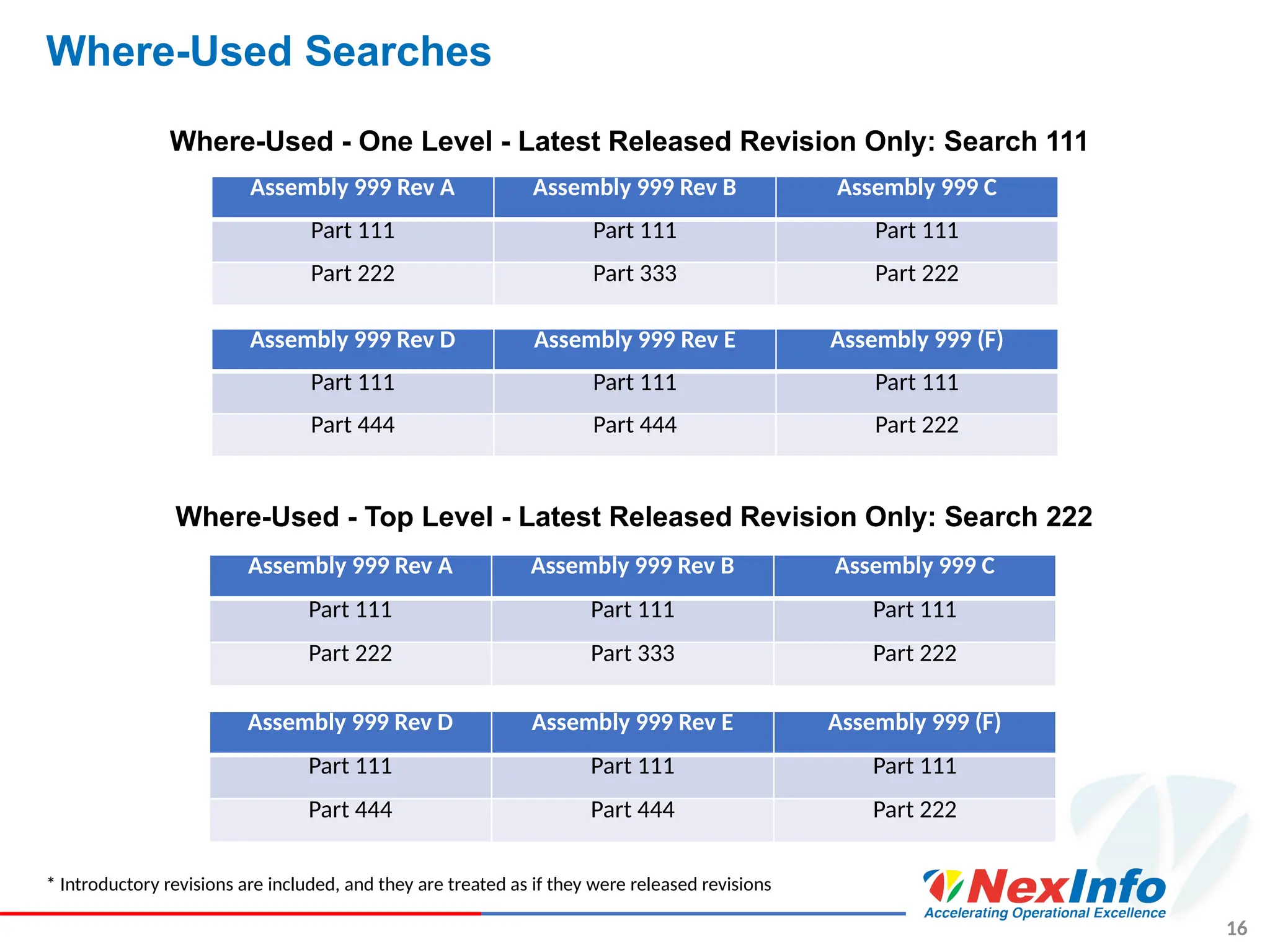
Where-Used Searches
* Introductory revisions are included, and they are treated as if they were released revisions
Assembly 999 Rev A Assembly 999 Rev B Assembly 999 C
Part 111 Part 111 Part 111
Part 222 Part 333 Part 222
Assembly 999 Rev D Assembly 999 Rev E Assembly 999 (F)
Part 111 Part 111 Part 111
Part 444 Part 444 Part 222
Where-Used - One Level - Latest Released Revision Only: Search 111
Assembly 999 Rev A Assembly 999 Rev B Assembly 999 C
Part 111 Part 111 Part 111
Part 222 Part 333 Part 222
Assembly 999 Rev D Assembly 999 Rev E Assembly 999 (F)
Part 111 Part 111 Part 111
Part 444 Part 444 Part 222
Where-Used - Top Level - Latest Released Revision Only: Search 222
17
Relationship Searches
• Relationship searches are available for any class that has a Relationships tab
• For example: all object classes except Action Items and Reports.
• In a relationship search you select the related object type, for example, Changes
• This lets you specify search conditions that include change object attributes, in
addition to search criteria that specify the attributes of the searched-for object.
• If the Relationships tab is visible for the searched-for object:
• You will be able to select this search type in the search definition dialog
18
Audit Trail
• Agile PLM maintains the complete audit trail for the released objects.
• For non change-controlled attributes, the audit trail for released objects is
captured on the object itself.
19
Ask Your Questions Via Chat
Contact Us
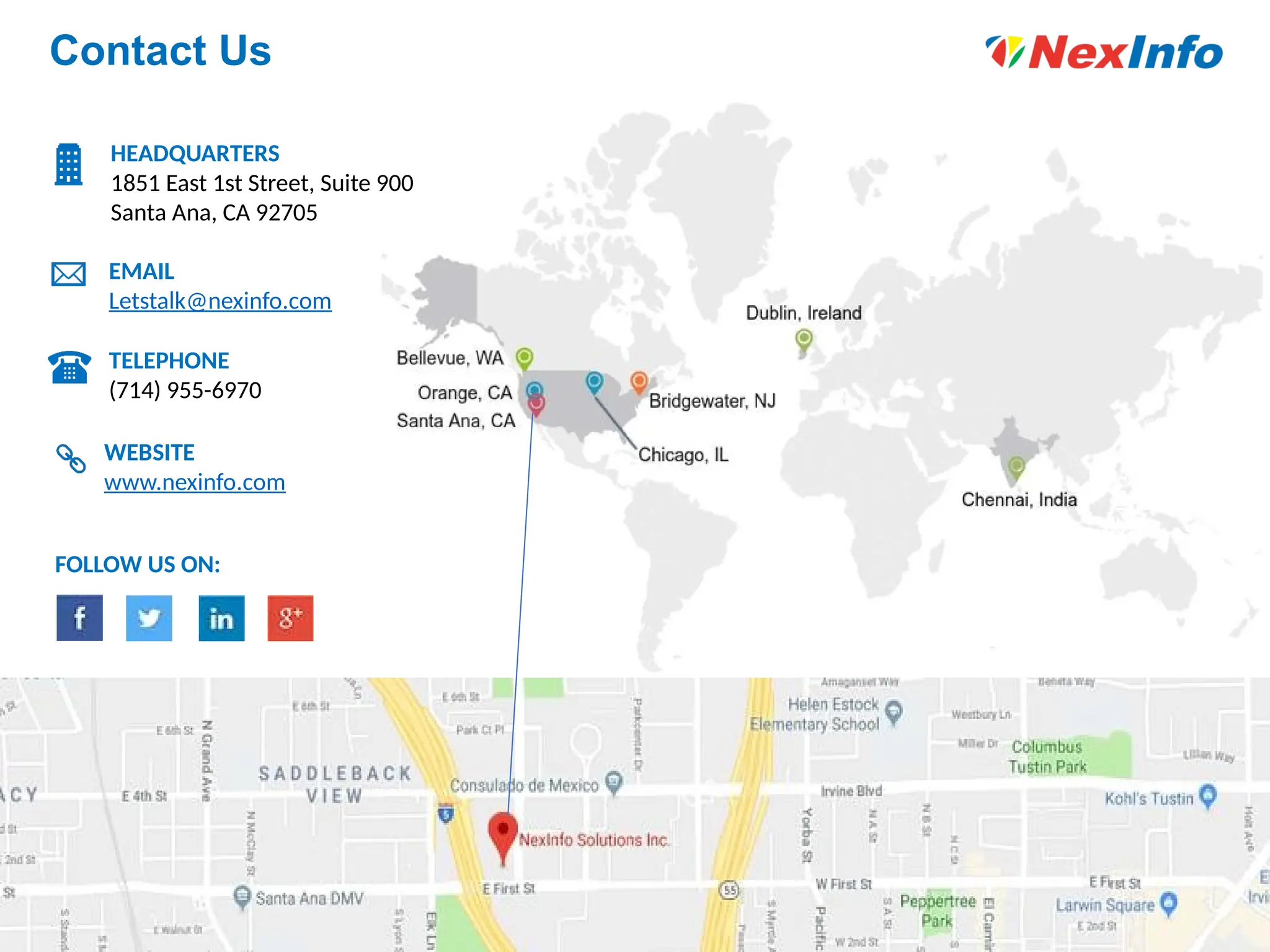
HEADQUARTERS
1851 East 1st Street, Suite 900
Santa Ana, CA 92705
EMAIL
Letstalk@nexinfo.com
TELEPHONE
(714) 955-6970
WEBSITE
www.nexinfo.com
FOLLOW US ON:

Maximizing the Value of Your Agile PLM Solution: NexInfo

  • 1.
    August 3, 2018 Howto Ensure Your Agile PLM Solution Provides Maximum Value Prepared by: Sahil Gupta @ NexinfoSolution
  • 2.
    Who Is NexInfo? SUMMARY •Consultingcompany focused on helping clients achieve Operational Excellence via an optimal blend of Business Process & Software consulting services •Deep domain expertise, including: Integrated Business Planning, Sales & Operations Planning, Supply Chain, Product Lifecycle Management, Predictive Data Analytics, Security & Compliance, and Business Transformations •Founded in 1999 and managed by computer industry & business process professionals •Clients include emerging companies and Fortune 1000 corporations •Recognized in the industry, including features in Gartner Reports, The Silicon Review (50 Smartest Companies of the Year 2016 and 10 Fastest Growing Oracle Solution Providers 2017), and CIO Review (100 Most Promising Oracle Solution Providers 2015) PARTNERS CORPORATE INFO •HQ in Orange County, CA with offices in Redmond, WA, Chicago, IL, Bridgewater, NJ, Dublin, Ireland, Chennai & Bangalore, India •Operations across the United States, Europe (Ireland, UK, Switzerland, Belgium) & India 2
  • 3.
    Presenter Information Name: SahilGupta Experience: Ten years of progressive experience in Pharmaceuticals/Life sciences, HealthCare, Hi-Tech and Manufacturing sectors, with concentrations in solution design, development, validation, deployment and post-deployment support, along with program development and project management. 3
  • 4.
    Want more insights? •Insights about Business Process • Efficiency • Bottlenecks • Insights about Product • Product evolution - history, changes, Investigate & Audit • Sub-components used in the product portfolio • Insights about the System • Usage • User adoption 4
  • 5.
  • 6.
    6 Chat Remainder CHAT Reminder: Please submitquestions via chat to cover at the end of the presentation.
  • 7.
    Oracle Agile PLMModule 7 Agile Product Collaboration Operations & Supply Chain Enterprise product record visibility, management & collaboration Agile Enterprise Visualization Native document collaborative visualization across the global enterprise Cross-Enterprise Agile Engineering Collaboration Engineering desktop integration & collaboration Development & Engineering Agile Product Cost Management Strategic sourcing and lifecycle cost & risk management Procurement Professionals Agile Product Portfolio Management Integrated product, program, resource & portfolio management Executives & Program Office Agile Product Governance & Compliance Product & program compliance against standards & regulatory requirements Compliance Office Closed-loop product quality management across the extended enterprise Quality Professionals Agile Quality Management
  • 8.
    8 Agile Reports • Reportsallow you to display the values of your product records. • By accessing this information and summarizing it in a meaningful way, reports provide insight into your business processes and can help guide better-informed decisions • Agile PLM provides a robust reporting platform that enables you to: • Measure and monitor business performance using standard out-of-the-box reports. • Configure reports with Agile PLM custom reporting to obtain the specific information you need • Standard Reports • Standard reports provide you with the information you commonly need to analyze your business processes • Product reports and process reports are the standard out-of-the-box reports
  • 9.
    9 Accessing Reports –Web Client • To access reports in Web Client: ➢ Click the REPORTS drawer in the left pane to display the reports folders. ➢ Open the Reports and Analytics folder. ➢ Open the Standard Reports folder to locate the Product Reports folder or the Process Reports folder. ➢ Open the Product Reports folder or the Process Reports folder and click the report you want. The report page is displayed in the content pane on the right.
  • 10.
    10 Types of ProductReports Product Reports Displays… Assembly Cost (Item Master) Report The Assembly Cost report takes the bill of material for a specified assembly and computes the cost of the BOM and each subassembly. BOM Explosion Report The BOM Explosion report displays the bill of material for a specified assembly up to the desired number of levels. Select a BOM snapshot date. Consolidated BOM Report The Consolidated BOM report takes the bill of material for a specified assembly and consolidates it into a single-level bill, computing the total quantity of each item. Effective BOM Explosion Report The Effective BOM report displays the bill of material for a specified assembly that is effective during a specific time period. Item Activity Report The Item Activity report shows the items that were processed during a specified time period. Compare Item Attributes Report Shows the attribute differences between two or more items. Where Used Report The Where Used report shows where the component or subassembly is used, up to any practical number of levels. BOM Comparison Report The BOM Comparison report shows the differences between two bills of material. Select the number of BOM levels to compare and select a BOM snapshot date. Legacy BOM Comparison Report - Single Level Only The Legacy BOM Comparison report shows the differences between two or more bills of material, using the first BOM level. Item Attribute History Report Shows how Item Attribute Values have been changed over time through Change Orders or Manufacturing Orders.
  • 11.
    11 Types of ProcessReports Process Reports Displays… Item Manufacturers Report The Manufacturer Item report displays a list of all the items matching a query and shows the manufacturers that are used for each item. (Requires AML server license.) Manufacturer BOM Report The Manufacturer BOM report runs the BOM Explosion report and includes the manufacturers that are used for each item in the bill of material. (Requires AML server license.) Change Activity Report The Change Activity report shows the changes that were processed during a specified time period. Change Backlog Report The Change Backlog report counts the changes that were at a specified status but have not moved to another specified status during a time period. Change Cycle Time Report The Change Cycle Time report calculates the time it took the specified changes to move from one status to another during the specified period. For example, the report indicates the average time it took for a change to go from Submitted to Released each month during the last year, grouped by product line. User Signoff Duration Report The User Signoff Duration report calculates the amount of time that a user has had to sign off a routable object requiring his approval, and he has not acted yet upon it. Change Metrics Report The Change Metrics report counts the changes that were moved to a specified status during a specified period. Change Package Report You can print the Change Package report to view the information about a change in an easy- to-read format. IP Transfer Report The IP Transfer report show the objects sent (by Agile transfer orders) to a given destination and when they were sent. (Requires the Agile Content Service server license.)
  • 12.
    12 Types of AdministratorReports Administrator Reports Description Agile Classes report Lists current and default attribute settings for all Agile PLM classes; this is a valuable tool for Agile systems engineers when performing upgrades to the Agile PLM system Attachments Accessed by User Report Lists attachment actions by user Attachment History Report Lists attachment actions by object. Criteria Library Configuration report Lists existing reusable criteria and where they are used Events Configuration Report Lists existing event-specific objects as follows: Events, Event Handlers and Event Subscribers Inactive Users / User Groups on Active Functional Teams Report Lists inactive users and inactive user groups that are members of active functional teams Login Failure report Captures failed attempts for system login and workflow signoff, and the reason for each failure. Preferences Configuration report Lists the current attribute and property settings of the Preferences and Viewer and Files nodes. Privilege Mask Detail report Lists each privilege mask by name and description, whether or not it is enabled, roles where it is used; provides Object Type, Applied To, and Criteria values Roles and Privilege Summary report Lists each role by name, description, and whether or not the role is enabled; lists users assigned to each role; lists the name and description of privilege masks in each role SmartRules Configuration report Lists the current setting of each SmartRule
  • 13.
    13 Types of AdministratorReports Administrator Reports Description Subclass in Use report Lists all subclasses and where they are used: global searches, reusable criteria, workflows, privileges, and roles User Group Configuration report Lists all user groups, users assigned, and pertinent user properties for each user; also includes a second table that indicates each group's escalation person and criteria for escalation User History Report Lists all history actions for the specified users or user groups during the specified time span. This report includes all history actions of the specified user on all Agile PLM objects, including object Create or Delete, and the modification of any object attribute. User Share Lists for Granted ACL report Lists the objects and associated roles to which users have been granted access User Subscriptions Lists report Lists the class attributes and actions about which users have subscribed to receive notifications User Usage report For each active user, lists usage over a period of time, from the start date you select to the present; includes number of logins and total online login time in minutes Users Configuration report Lists all users and their properties, except passwords Workflow Approval Report Shows how job functions have been assigned for approvers, observers, acknowledgers, and notified in workflows. Information is displayed by workflow, status, and criteria. Workflow Job Functions Without Users Report Lists routable objects where a job function has been specified for a signoff action, but no user has been added to the workflow tab. Workflows Configuration report Lists all existing workflows and the properties (status properties, criteria-specific properties) of each workflow's status list
  • 14.
    14 Searches • Three Typesof Searches available in Agile PLM: Quick Advanced Parametric Where-Used Relationship
  • 15.
    15 Where-Used Searches Four Typesof Where-Used Searches available in Agile PLM: Where-Used - All Levels - Latest Released Revision Only: Search 333 Where-Used - Top Level - Latest Released Revision Only: Search 333
  • 16.
    16 Where-Used Searches * Introductoryrevisions are included, and they are treated as if they were released revisions Assembly 999 Rev A Assembly 999 Rev B Assembly 999 C Part 111 Part 111 Part 111 Part 222 Part 333 Part 222 Assembly 999 Rev D Assembly 999 Rev E Assembly 999 (F) Part 111 Part 111 Part 111 Part 444 Part 444 Part 222 Where-Used - One Level - Latest Released Revision Only: Search 111 Assembly 999 Rev A Assembly 999 Rev B Assembly 999 C Part 111 Part 111 Part 111 Part 222 Part 333 Part 222 Assembly 999 Rev D Assembly 999 Rev E Assembly 999 (F) Part 111 Part 111 Part 111 Part 444 Part 444 Part 222 Where-Used - Top Level - Latest Released Revision Only: Search 222
  • 17.
    17 Relationship Searches • Relationshipsearches are available for any class that has a Relationships tab • For example: all object classes except Action Items and Reports. • In a relationship search you select the related object type, for example, Changes • This lets you specify search conditions that include change object attributes, in addition to search criteria that specify the attributes of the searched-for object. • If the Relationships tab is visible for the searched-for object: • You will be able to select this search type in the search definition dialog
  • 18.
    18 Audit Trail • AgilePLM maintains the complete audit trail for the released objects. • For non change-controlled attributes, the audit trail for released objects is captured on the object itself.
  • 19.
  • 20.
    Contact Us HEADQUARTERS 1851 East1st Street, Suite 900 Santa Ana, CA 92705 EMAIL Letstalk@nexinfo.com TELEPHONE (714) 955-6970 WEBSITE www.nexinfo.com FOLLOW US ON: