How to create a
University Entrepreneurship Program
              entry on


                              http://SmallBusiness.com/
                                 wiki/Category:Help
Easiest way
      Just send an email to
    "help@smallbusiness.com"
   with the information you'd
   like to see in the entry and
     write in the subject line:
   "Help me finish this entry."
  But if you do it yourself,
you can update it anytime...
                              http://SmallBusiness.com/
                                 wiki/Category:Help
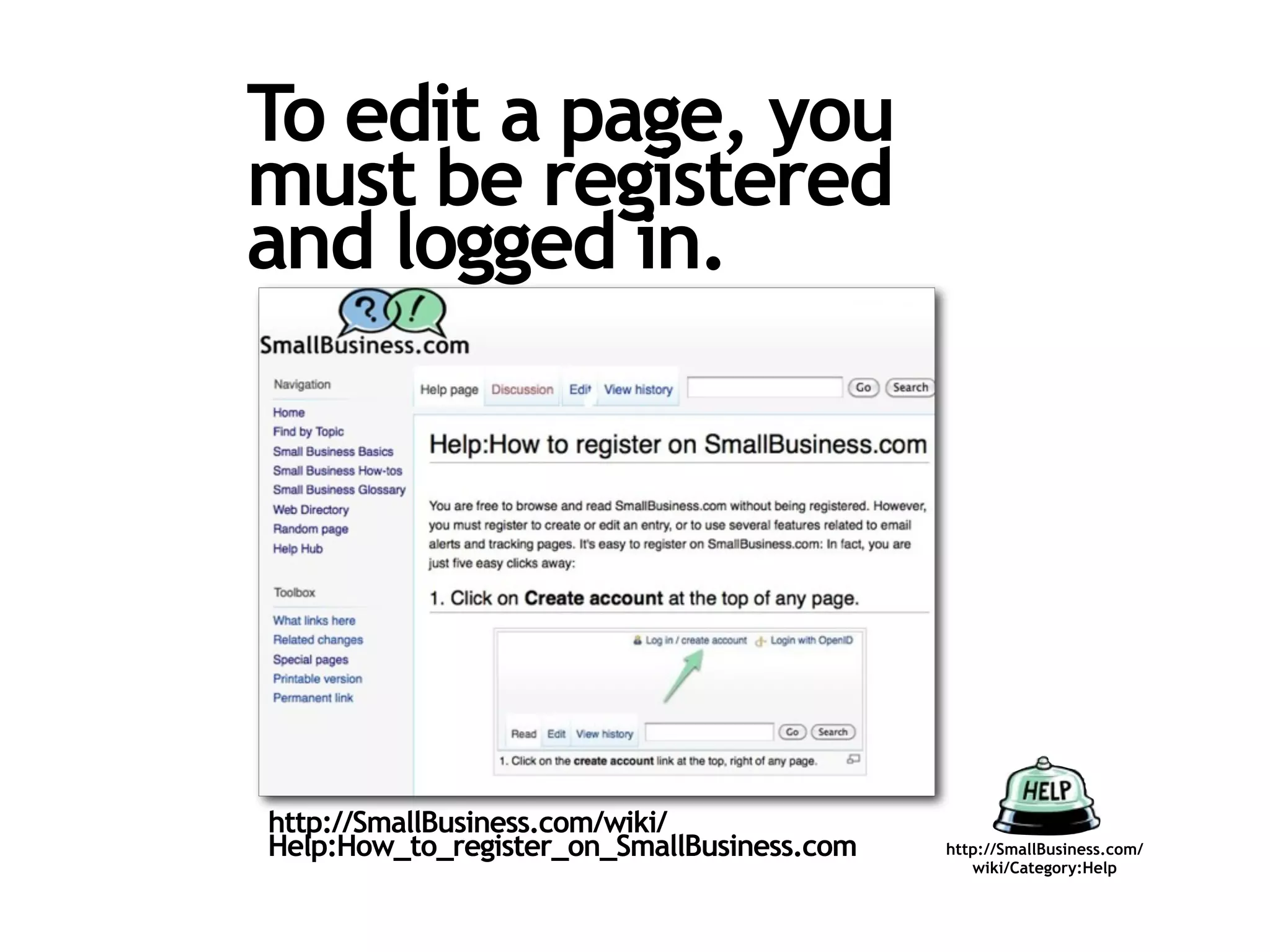
To edit a page, you
must be registered
and logged in.


http://SmallBusiness.com/wiki/
Help:How_to_register_on_SmallBusiness.com   http://SmallBusiness.com/
                                               wiki/Category:Help
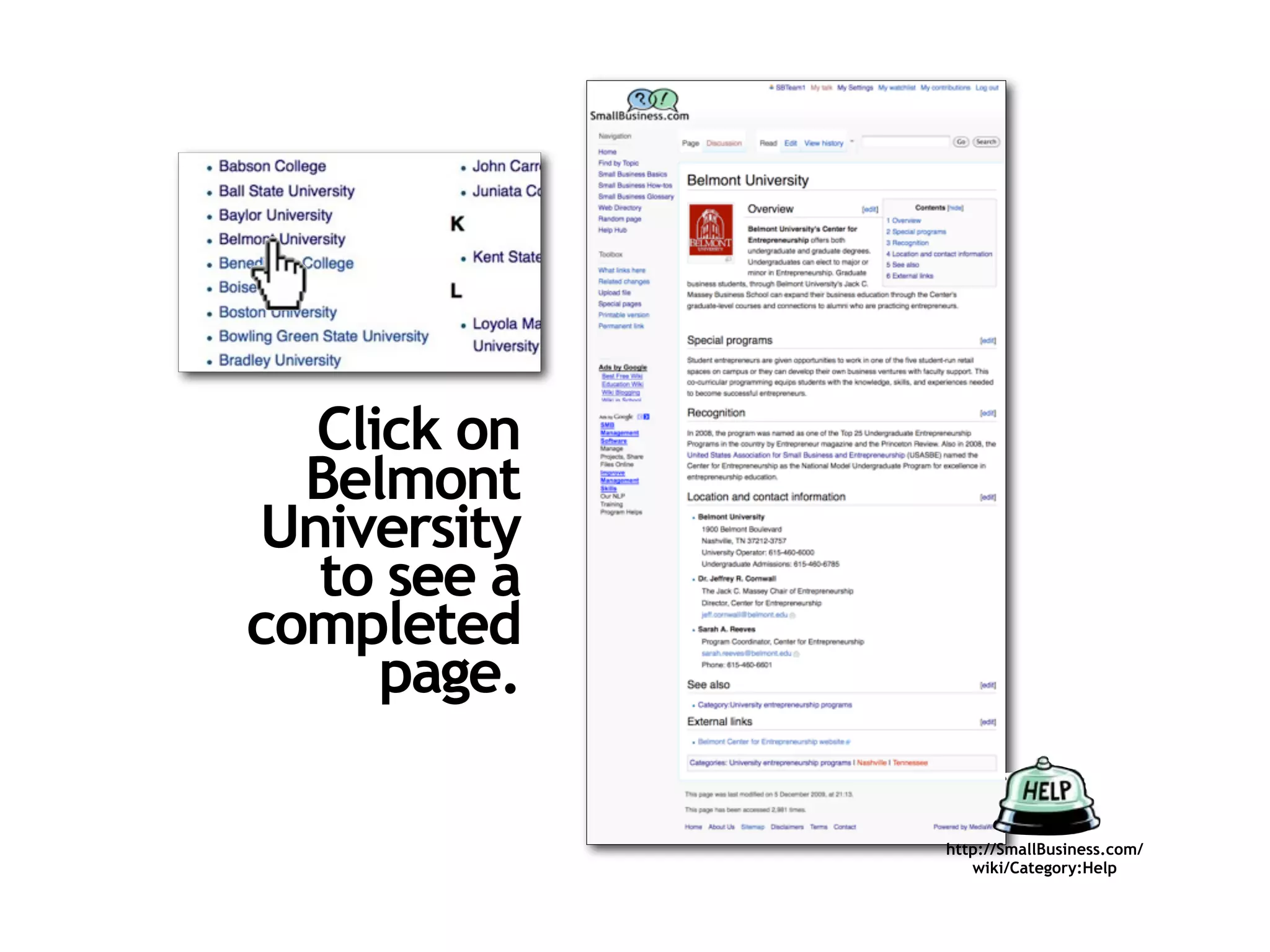
Click on
  Belmont
University
  to see a
completed
     page.

             http://SmallBusiness.com/
                wiki/Category:Help
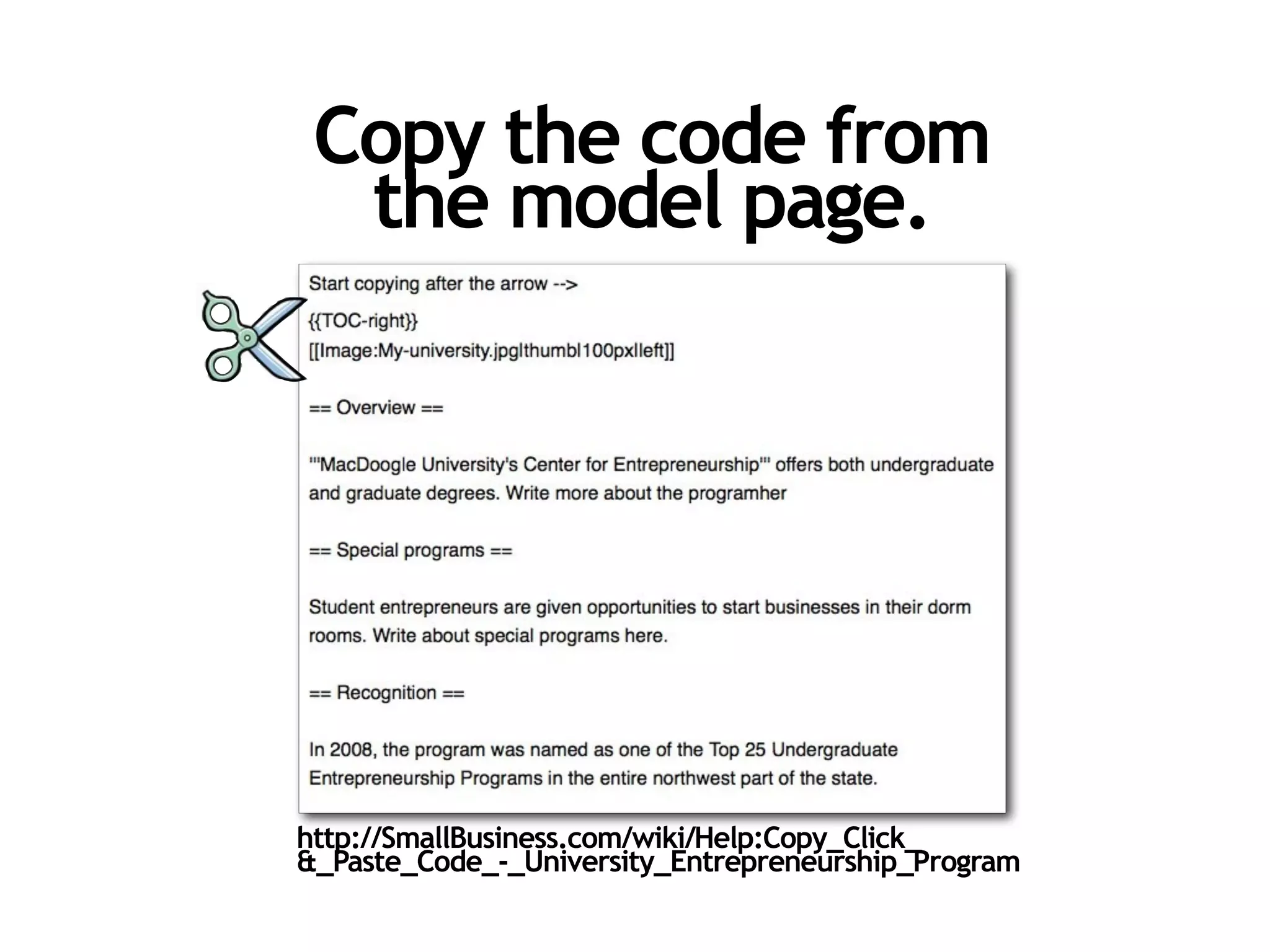
Copy the code from
  the model page.


http://SmallBusiness.com/wiki/Help:Copy_Click_
&_Paste_Code_-_University_Entrepreneurship_Program
Go to the page we've
started for your university.
  It should look like this:

                          Can't find it? Search the first
                          word in your school's name.


    If you can't find it, email: help@smallbusiness.com
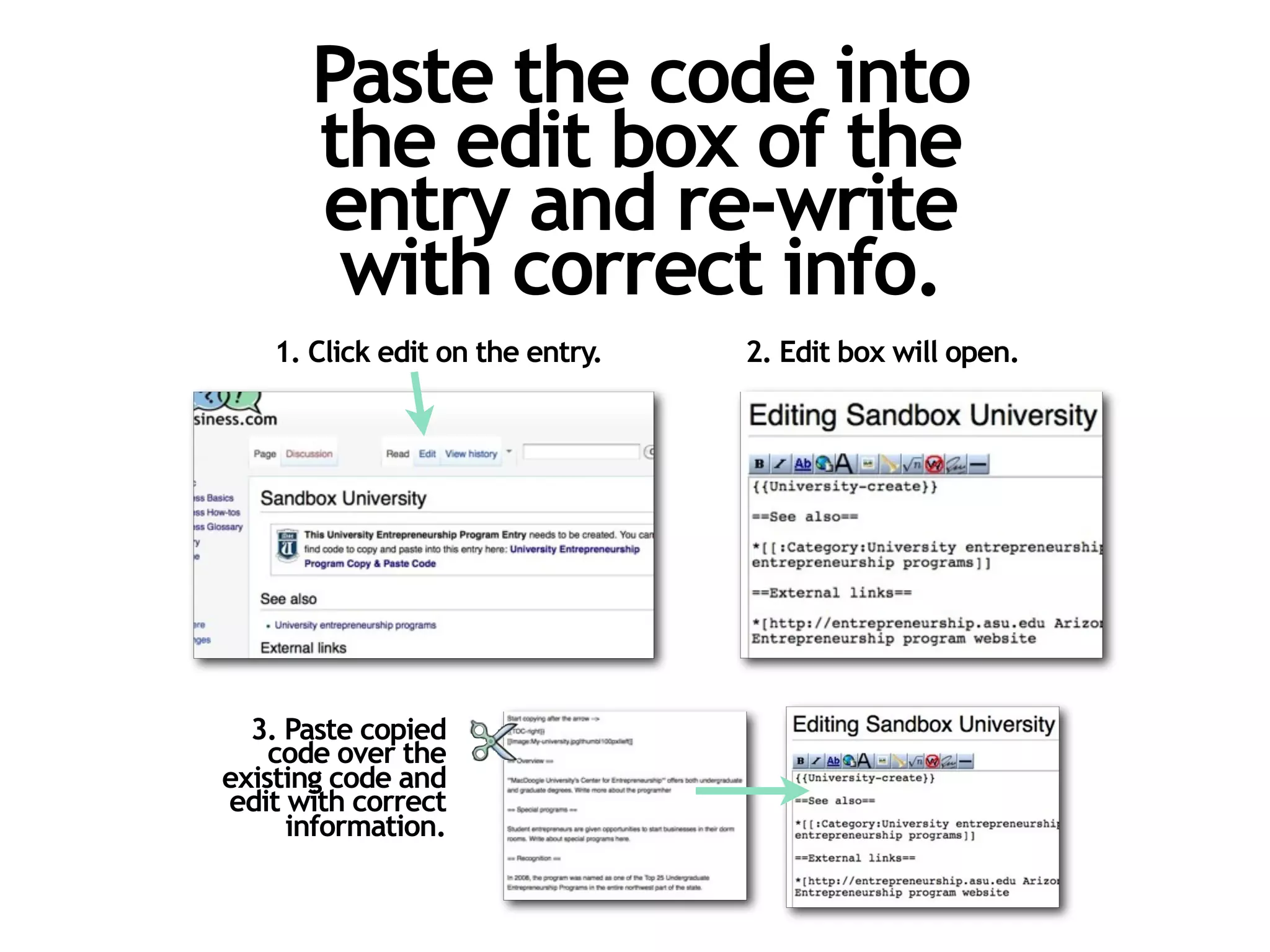
Paste the code into
      the edit box of the
      entry and re-write
       with correct info.
   1. Click edit on the entry.   2. Edit box will open.


  3. Paste copied
    code over the
existing code and
edit with correct
     information.
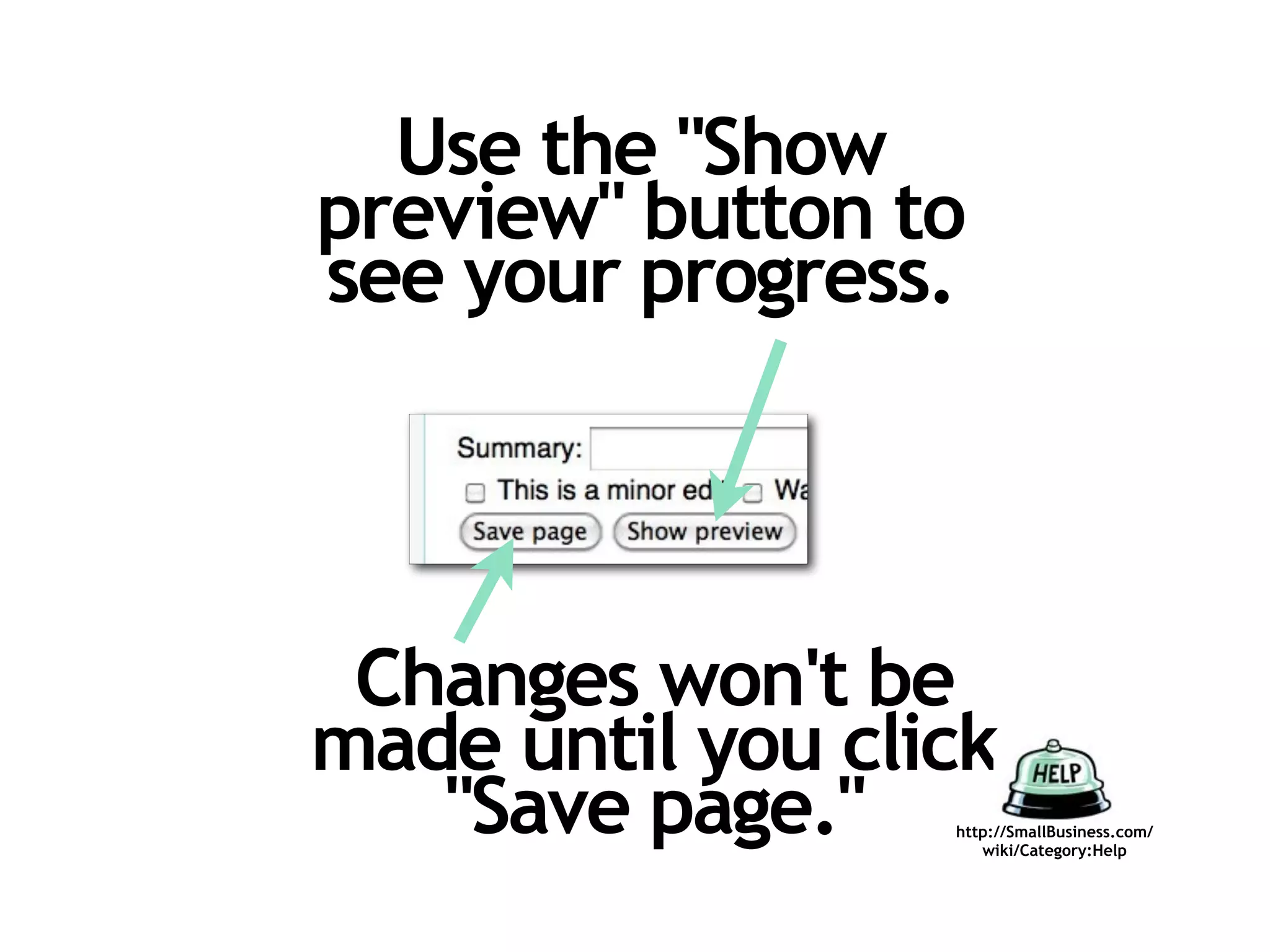
Use the "Show
preview" button to
see your progress.


 Changes won't be
made until you click
   "Save page."   http://SmallBusiness.com/
                     wiki/Category:Help
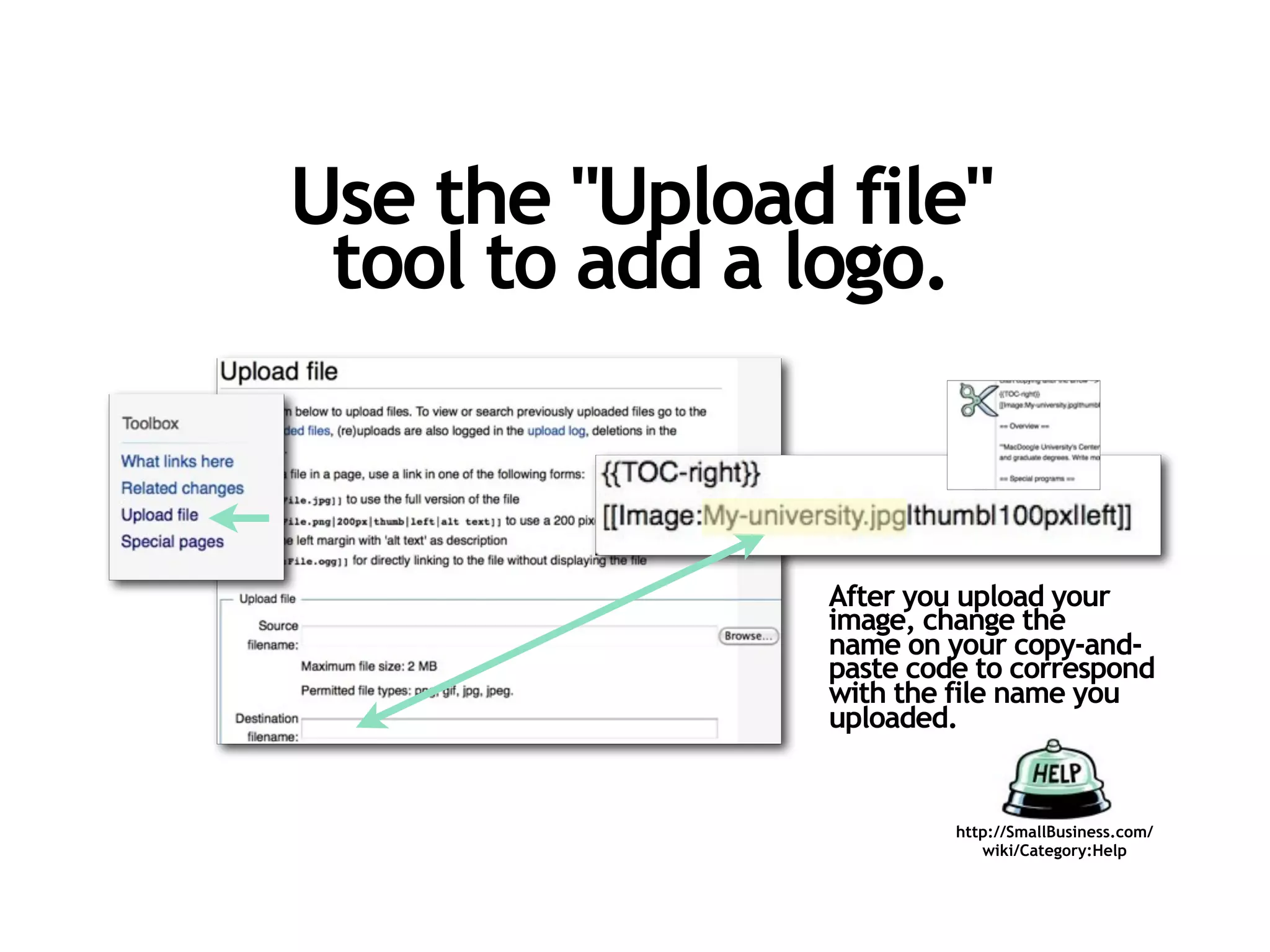
Use the "Upload file"
 tool to add a logo.


                After you upload your
                image, change the
                name on your copy-and-
                paste code to correspond
                with the file name you
                uploaded.


                         http://SmallBusiness.com/
                            wiki/Category:Help
Remember you
              ,
     can always...
      Send an email to
 "help@smallbusiness.com"
with the information you'd
like to see in the entry and
  write in the subject line:
"Help me finish this entry."

                               http://SmallBusiness.com/
                                  wiki/Category:Help
http://SmallBusiness.com/
   wiki/Category:Help

How to Create a University Entrepreneurship Program entry on SmallBusiness.com

  • 1.
    How to createa University Entrepreneurship Program entry on http://SmallBusiness.com/ wiki/Category:Help
  • 2.
    Easiest way Just send an email to "help@smallbusiness.com" with the information you'd like to see in the entry and write in the subject line: "Help me finish this entry." But if you do it yourself, you can update it anytime... http://SmallBusiness.com/ wiki/Category:Help
  • 3.
    To edit apage, you must be registered and logged in. http://SmallBusiness.com/wiki/ Help:How_to_register_on_SmallBusiness.com http://SmallBusiness.com/ wiki/Category:Help
  • 4.
    Click on Belmont University to see a completed page. http://SmallBusiness.com/ wiki/Category:Help
  • 5.
    Copy the codefrom the model page. http://SmallBusiness.com/wiki/Help:Copy_Click_ &_Paste_Code_-_University_Entrepreneurship_Program
  • 6.
    Go to thepage we've started for your university. It should look like this: Can't find it? Search the first word in your school's name. If you can't find it, email: help@smallbusiness.com
  • 7.
    Paste the codeinto the edit box of the entry and re-write with correct info. 1. Click edit on the entry. 2. Edit box will open. 3. Paste copied code over the existing code and edit with correct information.
  • 8.
    Use the "Show preview"button to see your progress. Changes won't be made until you click "Save page." http://SmallBusiness.com/ wiki/Category:Help
  • 9.
    Use the "Uploadfile" tool to add a logo. After you upload your image, change the name on your copy-and- paste code to correspond with the file name you uploaded. http://SmallBusiness.com/ wiki/Category:Help
  • 10.
    Remember you , can always... Send an email to "help@smallbusiness.com" with the information you'd like to see in the entry and write in the subject line: "Help me finish this entry." http://SmallBusiness.com/ wiki/Category:Help
  • 11.
    http://SmallBusiness.com/ wiki/Category:Help