How to Builda Simple
Operating System
BY:ABDULAZIZ AHMED ALBARQI
422102094
Dr.SAKN
2.
How to Builda Simple
Operating System
An introduction to OSDev, guiding software developers and students
through the exciting journey of creating a basic operating system from
the ground up. This presentation focuses on practical insights,
foundational concepts, and hands-on tools that make OS development
accessible and educational.
3.
Table of Contents
1.Introduction
2. What is an Operating
System?
3. Tools and Languages
Used
4. Key Components of a Simple
OS
5. Example: A Basic "Hello World"
OS
6. Challenges and Learning
Benefits
7. Conclusion
8. References
4.
Introduction:
Understanding OSDev
OS asa Hardware-
Software Bridge
Operating systems manage
hardware resources and
provide a platform for
applications, making
computing possible and
efficient.
Scope of this
Presentation
Explore essential concepts
and technical foundations
for building a simple OS
from scratch, emphasizing
practical learning and
foundational knowledge.
Audience
Targeted at software developers and computer science students
interested in low-level programming and system design.
5.
What is anOperating
System?
Definition
An Operating System (OS) is critical system software that
manages the entire computer hardware and orchestrates
software execution.
Core Responsibilities
• Memory management: allocating and protecting
memory for processes
• Process management: scheduling and executing multiple
programs
• File systems: organizing how data is stored and retrieved
• Input/Output control: managing communication with
peripherals
6.
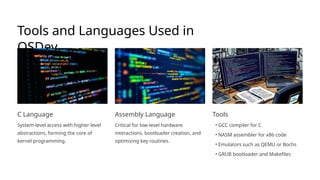
Tools and LanguagesUsed in
OSDev
C Language
System-level access with higher-level
abstractions, forming the core of
kernel programming.
Assembly Language
Critical for low-level hardware
interactions, bootloader creation, and
optimizing key routines.
Tools
• GCC compiler for C
• NASM assembler for x86 code
• Emulators such as QEMU or Bochs
• GRUB bootloader and Makefiles
7.
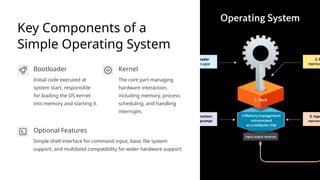
Key Components ofa
Simple Operating System
Bootloader
Initial code executed at
system start, responsible
for loading the OS kernel
into memory and starting it.
Kernel
The core part managing
hardware interaction,
including memory, process
scheduling, and handling
interrupts.
Optional Features
Simple shell interface for command input, basic file system
support, and multiboot compatibility for wider hardware support.
8.
Example: A Basic"Hello World"
OS
Boot on Emulator or
Hardware
The OS boots successfully in
emulated environments like QEMU,
demonstrating OS-level control from
the start.
Display Output
Prints "Hello, World!" using VGA text
mode, showcasing fundamental video
output techniques and hardware
communication.
Keyboard Input
Reads basic keyboard input to
interact with the user, allowing
extension toward command
processing.
9.
Challenges and Learning
Benefitsof OSDev
Hardware
Knowledge
OS development demands understanding computer architecture and
hardware mechanisms deeply.
Programming Skills
Enhances proficiency in C and Assembly, requiring meticulous
attention to detail and efficient code.
Architectural Insight
Developers gain firsthand experience with memory management,
interrupts, and process scheduling.
Real-world Design
Provides practical knowledge applicable to advanced system
programming and kernel development.
10.
Conclusion: The Valueof
Building a Simple OS
Constructing a simple operating system is an enriching journey that
connects theoretical knowledge with practical technical skills. It
highlights the complex interplay between software and hardware,
cultivating a deep appreciation of system design.
This foundational project prepares the way for advanced study in
embedded systems, kernel development, and more complex OS
architectures, opening paths to future innovation.
11.
References and Resourcesfor OS
Development
• OSDev Wiki: https://wiki.osdev.org/ — Comprehensive online resource for OS development concepts and tutorials
• Operating Systems: Three Easy Pieces by Remzi H. Arpaci-Dusseau — Deep dive into key OS principles
• Modern Operating Systems by Andrew S. Tanenbaum — Classic textbook covering OS design and theory
• YouTube Channels: Low Level Learning, Codephile — Video tutorials on OS and system programming
• GitHub Tutorial: https://github.com/cfenollosa/os-tutorial — Practical example of building a simple OS