TWITTER BASICS AND BECOME A
TWITTER PRO
WHY TWITTER ?
 Twitter was born as a
mobile service,
designed to fit the
character limit of a text
message.
 Brevity keeps Twitter
fast-paced and
relevant by
encouraging people to
Tweet in the moment
and to focus on the
WHY TWEET?
 When you Tweet, your message is publicly posted on
your Twitter profile.
 In addition, people can follow your account so that
your Tweets automatically appear in their own
timelines every time they log in to Twitter.
 Fastest way to communicate. They say twitter is faster
than earthquake
 To establish you as a brand, expert and knowledge
sharer. You can decide for yourself
ANATOMY OF A TWEET
 Twitter helps you create and share ideas and
information instantly, without barriers.
 It’s the easiest way to follow the trends,
stories, and breaking news making headlines
around the world.
 It also helps you stay in touch with subjects a
little closer to home: friends, family,
businesses, and social causes that are dear to
your heart.
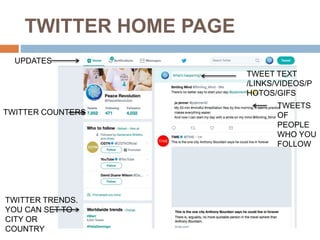
TWITTER HOME PAGE
UPDATES
TWITTER COUNTERS
TWITTER TRENDS.
YOU CAN SET TO
CITY OR
COUNTRY
TWEETS
OF
PEOPLE
WHO YOU
FOLLOW
TWEET TEXT
/LINKS/VIDEOS/P
HOTOS/GIFS
TWITTER LINGO
 Tweet: A message posted via Twitter that may contain
photos, videos, links, and up to 280 characters of text.
 Tweet, Tweeting, Tweeted: The act of sending a Tweet.
 Profile photo: The personal image uploaded to your Twitter
profile.
 Twitter account name: The name on your account. Think
about whether you want to use your real name or some other
identification.
 Twitter @username: Your @username is your unique
identity on Twitter and is always preceded by the @ symbol.
The @ sign is also used to mention people in Tweets, like
this: “Hello @Twitter!” Your account name and username do
not need to be the same.
 Tweet timestamp/date: This tells you when the Tweet was
sent. Click the date or time to view the permalink page for a
Tweet.
 Tweet text: Every Tweet fits into a space that’s 280
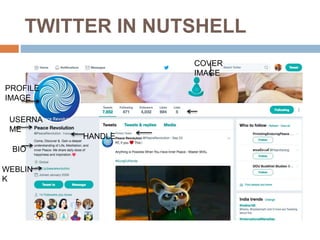
TWITTER IN NUTSHELL
PROFILE
IMAGE
USERNA
ME
HANDLE
BIO
WEBLIN
K
COVER
IMAGE
TWITTER LINGO
 Links: You can link to other websites, articles, photos, and
videos within a Tweet (Twitter automatically shortens links).
 Hashtags: A hashtag is any word or phrase immediately
preceded by the # symbol. When you click on a hashtag,
you’ll see other Tweets containing the same keyword or topic.
 Tweet actions: There are three Twitter icons that allow you
to take action and interact with a Tweet: Retweet, Reply, and
Favourite
 Twitter timeline: A timeline is a real-time stream of Tweets.
Your Home timeline is where you see all the Tweets shared
by your friends and other people you follow.
 Twitter bio: Your bio is a short (up to 160 characters)
description that appears in your profile that serves to
characterize your persona on Twitter. Connect with people by
sharing your organization’s mission and how they can get
involved. Add a link to your website so that they can take the
next step. Use keywords, account @usernames, and
hashtags to make your account more searchable.
ANNOUNCE YOUR PRESENCE ON
TWITTER
 Mention your twitter handle in email signature
 Communicate to people when you meet them or
thank them using twitter and connect them there
by following their handle
 Mention in your public presentation
 Participate in tweet chat on topics related to your
work. Follow the account @tweetchat
 Be participative. Tweet about city using city
hashtag. It will make you searchable.
 Follow for Follow
HASHTAGS #
 Hashtags have become synonymous with people,
events, and campaigns that have achieved a
particular level of mass recognition. Sometimes for
good reasons, sometimes for bad.
 Your campaign should seek to either communicate
into a popular pre-existing hashtag or identify space
where a new, thoughtfully worded one might come to
define a particular issue and then capitalize on this by
making it the centerpiece of your Twitter campaign.
 When using a hashtag that contains more than one
word, be sure to capitalize the first letter of each word.
This makes it easier to read for the first-time viewer.
 Like #PEACEREVOLUTION
YOU SHOULD TWEET
 Your belief & philosophies and those who like.
 Your Ideas
 Your views on your subject of interest
 Newspaper articles
 Photos
 Interesting videos
 GIFs
 Choose your style, you can be funny, serious
or plain informative.
WHAT WORKS ON TWITTER?
 Photos
 Hashtags
 Links
 Videos
 Tweets containing a number or digit
 GIFs
 Twitter Moments (Compilation of tweets on
a given hashtag/subject)
 Twitter Polls
BIG QUESTION : HOW OFTEN
SHOULD YOU TWEET?
 There is no one-size-fits-all answer to this
question. However, successful accounts
maintain a consistent pattern of regular
Tweeting.
 This could be one Tweet per day with high-
quality content or several Tweets per day that
strike a conversational tone and interact with
the community of followers.
 Your following will grow if you invest in your
presence on the platform.
WHAT TO DO ON TWITTER TO
GAIN FOLLOWERSHIPS
1.BeAuthentic:Donotfakeit.
2.BeTopical: Contextmatters.
3.BeInformative:Informthem.
4.BeEngaging: Talktothem.
5.BeProactive:Fast&furious.
6.BeVisual :Pictures,GIFs,Videosare
Magic
7.BeVocal :Speakupandshareit.
PS:Donotimpersonate,avoidabusive
words,notrollingandnonuditypictures.
LET’S SUM UP
 280 Characters In A Tweet Only. Space Is Also A
Character.
 Maximum Four Pictures In A Single Tweet
 Videos Less Than 2 Mins 20 Seconds For Upload
 One Gif Image At A Time
 You Can Tag At Max 10 Twitter Handles On A Tweet
Picture
 You Can Filter Tweets On Your Timeline
 You Can Choose To Get Updates From A Twitter
Handle As And When They Tweet.
 You Can Create Twitter List- Private & Public And You
Don’t Necessarily Have To Follow All the Handle
Which Are Added in the List.
Resources :
 @twittersupport : Help and Querries
 @tweetdeck : scheduling your tweets and
manging multiple accounts from desktop
 @socialilot_co : A good twitter scheduling app
 @keyhole or @tweetbinder : hashtag analysis
 @buffer : Ideas, Content and for #BufferChat
(tweetchat)
 @peacerevolution : Philosophy & Meditation

How To Become a Twitter Pro ?

  • 1.
    TWITTER BASICS ANDBECOME A TWITTER PRO
  • 2.
    WHY TWITTER ? Twitter was born as a mobile service, designed to fit the character limit of a text message.  Brevity keeps Twitter fast-paced and relevant by encouraging people to Tweet in the moment and to focus on the
  • 3.
    WHY TWEET?  Whenyou Tweet, your message is publicly posted on your Twitter profile.  In addition, people can follow your account so that your Tweets automatically appear in their own timelines every time they log in to Twitter.  Fastest way to communicate. They say twitter is faster than earthquake  To establish you as a brand, expert and knowledge sharer. You can decide for yourself
  • 4.
    ANATOMY OF ATWEET  Twitter helps you create and share ideas and information instantly, without barriers.  It’s the easiest way to follow the trends, stories, and breaking news making headlines around the world.  It also helps you stay in touch with subjects a little closer to home: friends, family, businesses, and social causes that are dear to your heart.
  • 5.
    TWITTER HOME PAGE UPDATES TWITTERCOUNTERS TWITTER TRENDS. YOU CAN SET TO CITY OR COUNTRY TWEETS OF PEOPLE WHO YOU FOLLOW TWEET TEXT /LINKS/VIDEOS/P HOTOS/GIFS
  • 6.
    TWITTER LINGO  Tweet:A message posted via Twitter that may contain photos, videos, links, and up to 280 characters of text.  Tweet, Tweeting, Tweeted: The act of sending a Tweet.  Profile photo: The personal image uploaded to your Twitter profile.  Twitter account name: The name on your account. Think about whether you want to use your real name or some other identification.  Twitter @username: Your @username is your unique identity on Twitter and is always preceded by the @ symbol. The @ sign is also used to mention people in Tweets, like this: “Hello @Twitter!” Your account name and username do not need to be the same.  Tweet timestamp/date: This tells you when the Tweet was sent. Click the date or time to view the permalink page for a Tweet.  Tweet text: Every Tweet fits into a space that’s 280
  • 7.
  • 8.
    TWITTER LINGO  Links:You can link to other websites, articles, photos, and videos within a Tweet (Twitter automatically shortens links).  Hashtags: A hashtag is any word or phrase immediately preceded by the # symbol. When you click on a hashtag, you’ll see other Tweets containing the same keyword or topic.  Tweet actions: There are three Twitter icons that allow you to take action and interact with a Tweet: Retweet, Reply, and Favourite  Twitter timeline: A timeline is a real-time stream of Tweets. Your Home timeline is where you see all the Tweets shared by your friends and other people you follow.  Twitter bio: Your bio is a short (up to 160 characters) description that appears in your profile that serves to characterize your persona on Twitter. Connect with people by sharing your organization’s mission and how they can get involved. Add a link to your website so that they can take the next step. Use keywords, account @usernames, and hashtags to make your account more searchable.
  • 9.
    ANNOUNCE YOUR PRESENCEON TWITTER  Mention your twitter handle in email signature  Communicate to people when you meet them or thank them using twitter and connect them there by following their handle  Mention in your public presentation  Participate in tweet chat on topics related to your work. Follow the account @tweetchat  Be participative. Tweet about city using city hashtag. It will make you searchable.  Follow for Follow
  • 10.
    HASHTAGS #  Hashtagshave become synonymous with people, events, and campaigns that have achieved a particular level of mass recognition. Sometimes for good reasons, sometimes for bad.  Your campaign should seek to either communicate into a popular pre-existing hashtag or identify space where a new, thoughtfully worded one might come to define a particular issue and then capitalize on this by making it the centerpiece of your Twitter campaign.  When using a hashtag that contains more than one word, be sure to capitalize the first letter of each word. This makes it easier to read for the first-time viewer.  Like #PEACEREVOLUTION
  • 11.
    YOU SHOULD TWEET Your belief & philosophies and those who like.  Your Ideas  Your views on your subject of interest  Newspaper articles  Photos  Interesting videos  GIFs  Choose your style, you can be funny, serious or plain informative.
  • 12.
    WHAT WORKS ONTWITTER?  Photos  Hashtags  Links  Videos  Tweets containing a number or digit  GIFs  Twitter Moments (Compilation of tweets on a given hashtag/subject)  Twitter Polls
  • 13.
    BIG QUESTION :HOW OFTEN SHOULD YOU TWEET?  There is no one-size-fits-all answer to this question. However, successful accounts maintain a consistent pattern of regular Tweeting.  This could be one Tweet per day with high- quality content or several Tweets per day that strike a conversational tone and interact with the community of followers.  Your following will grow if you invest in your presence on the platform.
  • 14.
    WHAT TO DOON TWITTER TO GAIN FOLLOWERSHIPS 1.BeAuthentic:Donotfakeit. 2.BeTopical: Contextmatters. 3.BeInformative:Informthem. 4.BeEngaging: Talktothem. 5.BeProactive:Fast&furious. 6.BeVisual :Pictures,GIFs,Videosare Magic 7.BeVocal :Speakupandshareit. PS:Donotimpersonate,avoidabusive words,notrollingandnonuditypictures.
  • 15.
    LET’S SUM UP 280 Characters In A Tweet Only. Space Is Also A Character.  Maximum Four Pictures In A Single Tweet  Videos Less Than 2 Mins 20 Seconds For Upload  One Gif Image At A Time  You Can Tag At Max 10 Twitter Handles On A Tweet Picture  You Can Filter Tweets On Your Timeline  You Can Choose To Get Updates From A Twitter Handle As And When They Tweet.  You Can Create Twitter List- Private & Public And You Don’t Necessarily Have To Follow All the Handle Which Are Added in the List.
  • 16.
    Resources :  @twittersupport: Help and Querries  @tweetdeck : scheduling your tweets and manging multiple accounts from desktop  @socialilot_co : A good twitter scheduling app  @keyhole or @tweetbinder : hashtag analysis  @buffer : Ideas, Content and for #BufferChat (tweetchat)  @peacerevolution : Philosophy & Meditation