Pluralsight
Learn to create stunning content with
CG, VFX, and digital art training
Super charge your tech skills
Nov-15 1
(formerly Digital Tutors)
Pluralsight
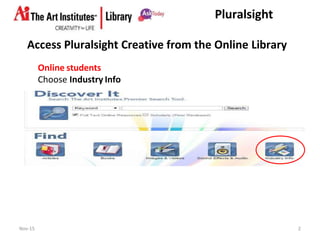
Access Pluralsight Creative from the Online Library
Online students
Choose Industry Info
Nov-15 2
Pluralsight
The Digital Tutors you know is now
and
What this means:
New name & logo, slightly revised access and…
more great content!
Nov-15 3
Pluralsight
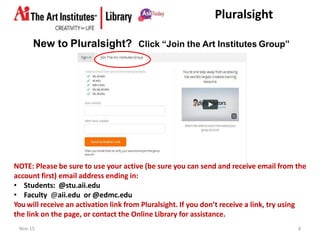
New to Pluralsight?
Nov-15 4
Click “Join the Art Institutes Group”
NOTE: Please be sure to use your active (be sure you can send and receive email from the
account first) email address ending in:
• Students: @stu.aii.edu
• Faculty @aii.edu or @edmc.edu
You will receive an activation link from Pluralsight. If you don’t receive a link, try using
the link on the page, or contact the Online Library for assistance.
Pluralsight
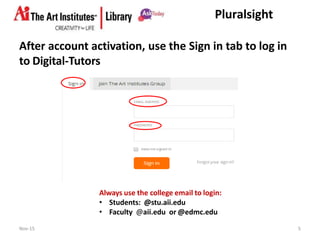
Always use the college email to login:
• Students: @stu.aii.edu
• Faculty @aii.edu or @edmc.edu
After account activation, use the Sign in tab to log in
to Digital-Tutors
Nov-15 5
Pluralsight
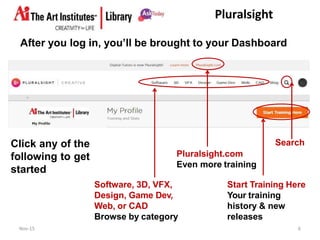
Click any of the
following to get
started
After you log in, you’ll be brought to your Dashboard
Start Training Here
Your training
history & new
releases
Pluralsight.com
Even more training
Software, 3D, VFX,
Design, Game Dev,
Web, or CAD
Browse by category
Search
Nov-15 6
Pluralsight
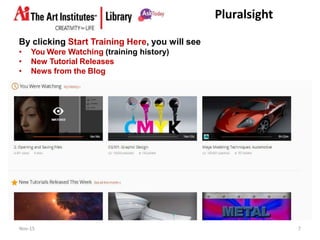
By clicking Start Training Here, you will see
• You Were Watching (training history)
• New Tutorial Releases
• News from the Blog
Nov-15 7
Pluralsight
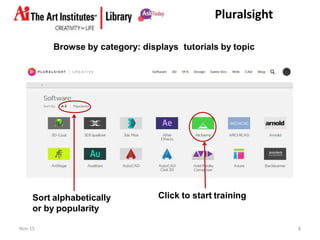
Browse by category: displays tutorials by topic
Sort alphabetically
or by popularity
Click to start training
Nov-15 8
Pluralsight
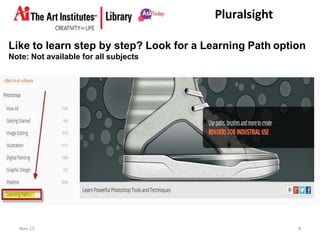
Like to learn step by step? Look for a Learning Path option
Note: Not available for all subjects
Nov-15 9
Pluralsight
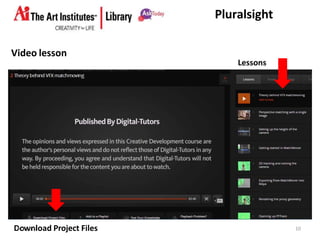
Lessons
Video lesson
DNoowv-1n5load Project Files 10
Pluralsight
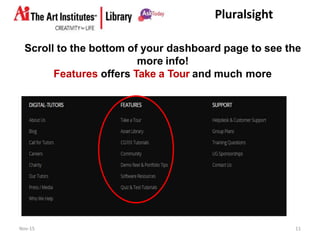
Scroll to the bottom of your dashboard page to see the
more info!
Features offers Take a Tour and much more
Nov-15 11
Pluralsight
Practice your CG & VFX skills: Download finished assets
Go to the Features menu, which is located at bottom of
your dashboard page, and select Asset Library
Watch the
video to
learn how
to download
finished
assets to
practice
your CG &
VFX skills.
Nov-15 12
Pluralsight
Need more help?
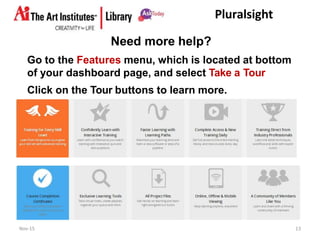
Go to the Features menu, which is located at bottom
of your dashboard page, and select Take a Tour
Click on the Tour buttons to learn more.
Nov-15 13
Pluralsight
14Nov-15
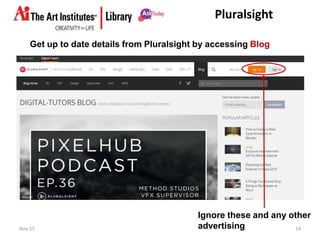
Get up to date details from Pluralsight by accessing Blog
Ignore these and any other
advertising
Pluralsight
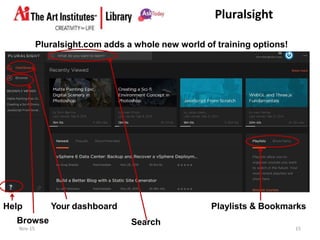
Pluralsight.com adds a whole new world of training options!
Your dashboard Playlists & BookmarksHelp
Browse Search
Nov-15 15
Pluralsight
Pluralsight focuses on more industries and expands your
training portfolio to enhance your career
Nov-15 16
Pluralsight
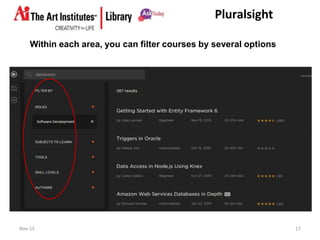
Within each area, you can filter courses by several options
Nov-15 17
Pluralsight
Questions?
Nov-15 18
Call: 888-318-3440
email: aionlinelibrary@aii.edu
Mon-Thu 8:00 AM-2:00AM
Fri 8:00 AM-11:00 PM
Sat 10:00 AM-11:00PM
Sun 12:00 Noon-2:00AM
(All times Eastern)

How to Access PluralSight at AiPOD

  • 1.
    Pluralsight Learn to createstunning content with CG, VFX, and digital art training Super charge your tech skills Nov-15 1 (formerly Digital Tutors)
  • 2.
    Pluralsight Access Pluralsight Creativefrom the Online Library Online students Choose Industry Info Nov-15 2
  • 3.
    Pluralsight The Digital Tutorsyou know is now and What this means: New name & logo, slightly revised access and… more great content! Nov-15 3
  • 4.
    Pluralsight New to Pluralsight? Nov-154 Click “Join the Art Institutes Group” NOTE: Please be sure to use your active (be sure you can send and receive email from the account first) email address ending in: • Students: @stu.aii.edu • Faculty @aii.edu or @edmc.edu You will receive an activation link from Pluralsight. If you don’t receive a link, try using the link on the page, or contact the Online Library for assistance.
  • 5.
    Pluralsight Always use thecollege email to login: • Students: @stu.aii.edu • Faculty @aii.edu or @edmc.edu After account activation, use the Sign in tab to log in to Digital-Tutors Nov-15 5
  • 6.
    Pluralsight Click any ofthe following to get started After you log in, you’ll be brought to your Dashboard Start Training Here Your training history & new releases Pluralsight.com Even more training Software, 3D, VFX, Design, Game Dev, Web, or CAD Browse by category Search Nov-15 6
  • 7.
    Pluralsight By clicking StartTraining Here, you will see • You Were Watching (training history) • New Tutorial Releases • News from the Blog Nov-15 7
  • 8.
    Pluralsight Browse by category:displays tutorials by topic Sort alphabetically or by popularity Click to start training Nov-15 8
  • 9.
    Pluralsight Like to learnstep by step? Look for a Learning Path option Note: Not available for all subjects Nov-15 9
  • 10.
  • 11.
    Pluralsight Scroll to thebottom of your dashboard page to see the more info! Features offers Take a Tour and much more Nov-15 11
  • 12.
    Pluralsight Practice your CG& VFX skills: Download finished assets Go to the Features menu, which is located at bottom of your dashboard page, and select Asset Library Watch the video to learn how to download finished assets to practice your CG & VFX skills. Nov-15 12
  • 13.
    Pluralsight Need more help? Goto the Features menu, which is located at bottom of your dashboard page, and select Take a Tour Click on the Tour buttons to learn more. Nov-15 13
  • 14.
    Pluralsight 14Nov-15 Get up todate details from Pluralsight by accessing Blog Ignore these and any other advertising
  • 15.
    Pluralsight Pluralsight.com adds awhole new world of training options! Your dashboard Playlists & BookmarksHelp Browse Search Nov-15 15
  • 16.
    Pluralsight Pluralsight focuses onmore industries and expands your training portfolio to enhance your career Nov-15 16
  • 17.
    Pluralsight Within each area,you can filter courses by several options Nov-15 17
  • 18.
    Pluralsight Questions? Nov-15 18 Call: 888-318-3440 email:aionlinelibrary@aii.edu Mon-Thu 8:00 AM-2:00AM Fri 8:00 AM-11:00 PM Sat 10:00 AM-11:00PM Sun 12:00 Noon-2:00AM (All times Eastern)