Session ID:
本情報の内容(添付文書、リンク先などを含む)は、Microsoft Tech Summit 開催日(2016年11月1-2日)時点のものであり、予告なく変更される場合があります。
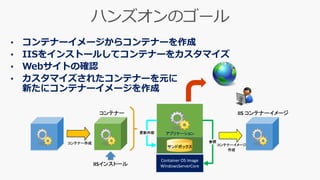
Container OS Image
WindowsServerCore
参照
アプリケーション更新内容
コンテナー
コンテナー作成
サンドボックス
IISインストール
IIS コンテナーイメージ
コンテナーイメージ
作成
• コンテナーイメージからコンテナーを作成
• IISをインストールしてコンテナーをカスタマイズ
• Webサイトの確認
• カスタマイズされたコンテナーを元に
新たにコンテナーイメージを作成
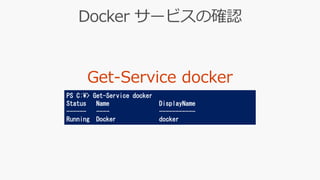
PS C:¥> Get-Service docker
Status Name DisplayName
------ ---- -----------
Running Docker docker
docker --help
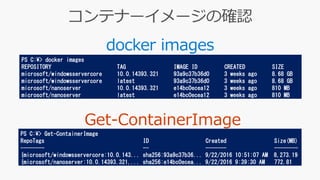
docker images
PS C:¥> docker images
REPOSITORY TAG IMAGE ID CREATED SIZE
microsoft/windowsservercore 10.0.14393.321 93a9c37b36d0 3 weeks ago 8.68 GB
microsoft/windowsservercore latest 93a9c37b36d0 3 weeks ago 8.68 GB
microsoft/nanoserver 10.0.14393.321 e14bc0ecea12 3 weeks ago 810 MB
microsoft/nanoserver latest e14bc0ecea12 3 weeks ago 810 MB
PS C:¥> Get-ContainerImage
RepoTags ID Created Size(MB)
-------- -- ------- --------
{microsoft/windowsservercore:10.0.143... sha256:93a9c37b36... 9/22/2016 10:51:07 AM 8,273.19
{microsoft/nanoserver:10.0.14393.321,... sha256:e14bc0ecea... 9/22/2016 9:39:30 AM 772.81
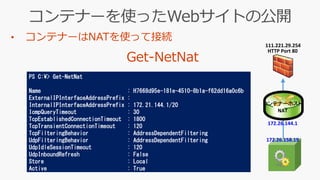
PS C:¥> Get-NetNat
Name : H7668d95e-181e-4510-8b1a-f62dd16a0c6b
ExternalIPInterfaceAddressPrefix :
InternalIPInterfaceAddressPrefix : 172.21.144.1/20
IcmpQueryTimeout : 30
TcpEstablishedConnectionTimeout : 1800
TcpTransientConnectionTimeout : 120
TcpFilteringBehavior : AddressDependentFiltering
UdpFilteringBehavior : AddressDependentFiltering
UdpIdleSessionTimeout : 120
UdpInboundRefresh : False
Store : Local
Active : True
172.26.158.19
HTTP Port 80
コンテナーホスト
NAT
172.26.144.1
111.221.29.254
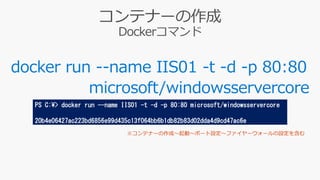
docker run --name IIS01 -t -d -p 80:80
microsoft/windowsservercore
PS C:¥> docker run --name IIS01 -t -d -p 80:80 microsoft/windowsservercore
20b4e06427ac223bd6856e99d435c13f064bb6b1db82b83d02dda4d9cd47ac6e
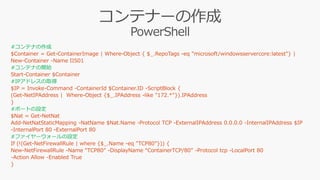
#コンテナの作成
#コンテナの開始
#IPアドレスの取得
#ポートの設定
#ファイヤーウォールの設定
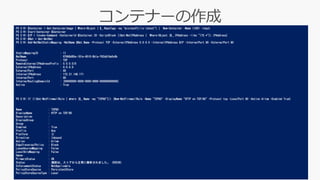
PS C:¥> $Container = Get-ContainerImage | Where-Object { $_.RepoTags -eq "microsoft/iis:latest"} | New-Container -Name IIS01 -Input
PS C:¥> Start-Container $Container
PS C:¥> $IP = Invoke-Command -ContainerId $Container.ID -ScriptBlock {(Get-NetIPAddress | Where-Object {$_.IPAddress -like "172.*"}).IPAddress}
PS C:¥> $Nat = Get-NetNat
PS C:¥> Add-NetNatStaticMapping -NatName $Nat.Name -Protocol TCP -ExternalIPAddress 0.0.0.0 -InternalIPAddress $IP -InternalPort 80 -ExternalPort 80
StaticMappingID : 11
NatName : H7668d95e-181e-4510-8b1a-f62dd16a0c6b
Protocol : TCP
RemoteExternalIPAddressPrefix : 0.0.0.0/0
ExternalIPAddress : 0.0.0.0
ExternalPort : 80
InternalIPAddress : 172.21.148.171
InternalPort : 80
InternalRoutingDomainId : {00000000-0000-0000-0000-000000000000}
Active : True
PS C:¥> If (!(Get-NetFirewallRule | where {$_.Name -eq "TCP80"})) {New-NetFirewallRule -Name "TCP80" -DisplayName "HTTP on TCP/80" -Protocol tcp -LocalPort 80 -Action Allow -Enabled True}
Name : TCP80
DisplayName : HTTP on TCP/80
Description :
DisplayGroup :
Group :
Enabled : True
Profile : Any
Platform : {}
Direction : Inbound
Action : Allow
EdgeTraversalPolicy : Block
LooseSourceMapping : False
LocalOnlyMapping : False
Owner :
PrimaryStatus : OK
Status : 規則は、ストアから正常に解析されました。 (65536)
EnforcementStatus : NotApplicable
PolicyStoreSource : PersistentStore
PolicyStoreSourceType : Local
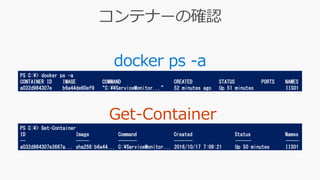
docker ps -a
PS C:¥> docker ps -a
CONTAINER ID IMAGE COMMAND CREATED STATUS PORTS NAMES
a032d984307e b6a44de60ef9 “C:¥¥ServiceMonitor...” 52 minutes ago Up 51 minutes IIS01
PS C:¥> Get-Container
ID Image Command Created Status Names
-- ----- ------- ------- ------ -----
a032d984307e3667a... sha256:b6a44... C:¥ServiceMonitor... 2016/10/17 7:09:21 Up 50 minutes IIS01
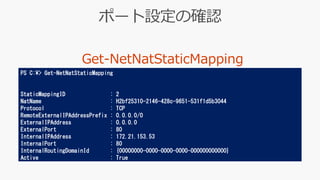
PS C:¥> Get-NetNatStaticMapping
StaticMappingID : 2
NatName : H2bf25310-2146-428c-9651-531f1d5b3044
Protocol : TCP
RemoteExternalIPAddressPrefix : 0.0.0.0/0
ExternalIPAddress : 0.0.0.0
ExternalPort : 80
InternalIPAddress : 172.21.153.53
InternalPort : 80
InternalRoutingDomainId : {00000000-0000-0000-0000-000000000000}
Active : True
docker exec -it IIS01 powershell
PS C:¥> docker exec -it IIS01 powershell
PS C:¥> Enter-PSSession (Get-Container IIS01).ID –RunAsAdministrator
Windows PowerShell
Copyright (C) 2016 Microsoft Corporation. All rights reserved.
PS C:¥>
[a032d984307e...]: PS C:¥Users¥ContainerAdministrator¥Documents>
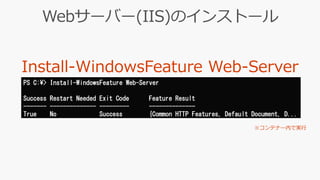
PS C:¥> Install-WindowsFeature Web-Server
Success Restart Needed Exit Code Feature Result
------- -------------- --------- --------------
True No Success {Common HTTP Features, Default Document, D...
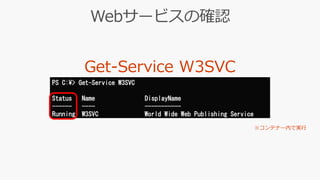
PS C:¥> Get-Service W3SVC
Status Name DisplayName
------ ---- -----------
Running W3SVC World Wide Web Publishing Service
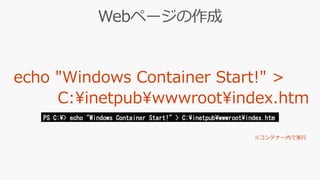
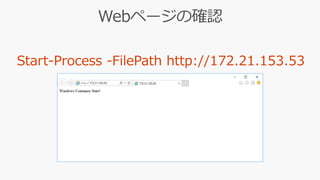
PS C:¥> echo "Windows Container Start!" > C:¥inetpub¥wwwroot¥index.htm
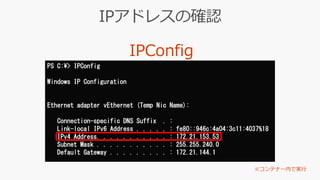
PS C:¥> IPConfig
Windows IP Configuration
Ethernet adapter vEthernet (Temp Nic Name):
Connection-specific DNS Suffix . :
Link-local IPv6 Address . . . . . : fe80::946c:4a04:3c11:4037%18
IPv4 Address. . . . . . . . . . . : 172.21.153.53
Subnet Mask . . . . . . . . . . . : 255.255.240.0
Default Gateway . . . . . . . . . : 172.21.144.1
PS C:¥> exit
PS C:¥>
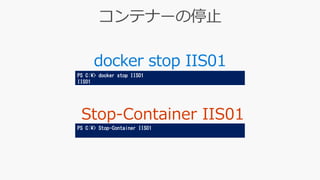
docker stop IIS01
PS C:¥> docker stop IIS01
IIS01
PS C:¥> Stop-Container IIS01
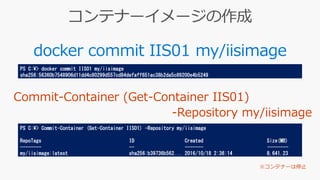
docker commit IIS01 my/iisimage
PS C:¥> docker commit IIS01 my/iisimage
sha256:56360b7548906d11dd4c80299d557cd84defaff651ac38b2da5c89200e4b5249
PS C:¥> Commit-Container (Get-Container IIS01) -Repository my/iisimage
RepoTags ID Created Size(MB)
-------- -- ------- --------
my/iisimage:latest sha256:b39736b562... 2016/10/18 2:36:14 8,641.23
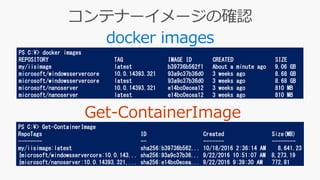
docker images
PS C:¥> docker images
REPOSITORY TAG IMAGE ID CREATED SIZE
my/iisimage latest b39736b562f1 About a minute ago 9.06 GB
microsoft/windowsservercore 10.0.14393.321 93a9c37b36d0 3 weeks ago 8.68 GB
microsoft/windowsservercore latest 93a9c37b36d0 3 weeks ago 8.68 GB
microsoft/nanoserver 10.0.14393.321 e14bc0ecea12 3 weeks ago 810 MB
microsoft/nanoserver latest e14bc0ecea12 3 weeks ago 810 MB
PS C:¥> Get-ContainerImage
RepoTags ID Created Size(MB)
-------- -- ------- --------
my/iisimage:latest sha256:b39736b562... 10/18/2016 2:36:14 AM 8,641.23
{microsoft/windowsservercore:10.0.143... sha256:93a9c37b36... 9/22/2016 10:51:07 AM 8,273.19
{microsoft/nanoserver:10.0.14393.321,... sha256:e14bc0ecea... 9/22/2016 9:39:30 AM 772.81
https://www.facebook.com/groups/749187091776055/

Hol012 windowsコンテナー始動

  • 1.
    Session ID: 本情報の内容(添付文書、リンク先などを含む)は、Microsoft TechSummit 開催日(2016年11月1-2日)時点のものであり、予告なく変更される場合があります。
  • 2.
    Container OS Image WindowsServerCore 参照 アプリケーション更新内容 コンテナー コンテナー作成 サンドボックス IISインストール IISコンテナーイメージ コンテナーイメージ 作成 • コンテナーイメージからコンテナーを作成 • IISをインストールしてコンテナーをカスタマイズ • Webサイトの確認 • カスタマイズされたコンテナーを元に 新たにコンテナーイメージを作成
  • 9.
    PS C:¥> Get-Servicedocker Status Name DisplayName ------ ---- ----------- Running Docker docker
  • 11.
  • 12.
    docker images PS C:¥>docker images REPOSITORY TAG IMAGE ID CREATED SIZE microsoft/windowsservercore 10.0.14393.321 93a9c37b36d0 3 weeks ago 8.68 GB microsoft/windowsservercore latest 93a9c37b36d0 3 weeks ago 8.68 GB microsoft/nanoserver 10.0.14393.321 e14bc0ecea12 3 weeks ago 810 MB microsoft/nanoserver latest e14bc0ecea12 3 weeks ago 810 MB PS C:¥> Get-ContainerImage RepoTags ID Created Size(MB) -------- -- ------- -------- {microsoft/windowsservercore:10.0.143... sha256:93a9c37b36... 9/22/2016 10:51:07 AM 8,273.19 {microsoft/nanoserver:10.0.14393.321,... sha256:e14bc0ecea... 9/22/2016 9:39:30 AM 772.81
  • 13.
    PS C:¥> Get-NetNat Name: H7668d95e-181e-4510-8b1a-f62dd16a0c6b ExternalIPInterfaceAddressPrefix : InternalIPInterfaceAddressPrefix : 172.21.144.1/20 IcmpQueryTimeout : 30 TcpEstablishedConnectionTimeout : 1800 TcpTransientConnectionTimeout : 120 TcpFilteringBehavior : AddressDependentFiltering UdpFilteringBehavior : AddressDependentFiltering UdpIdleSessionTimeout : 120 UdpInboundRefresh : False Store : Local Active : True 172.26.158.19 HTTP Port 80 コンテナーホスト NAT 172.26.144.1 111.221.29.254
  • 14.
    docker run --nameIIS01 -t -d -p 80:80 microsoft/windowsservercore PS C:¥> docker run --name IIS01 -t -d -p 80:80 microsoft/windowsservercore 20b4e06427ac223bd6856e99d435c13f064bb6b1db82b83d02dda4d9cd47ac6e
  • 15.
  • 16.
    PS C:¥> $Container= Get-ContainerImage | Where-Object { $_.RepoTags -eq "microsoft/iis:latest"} | New-Container -Name IIS01 -Input PS C:¥> Start-Container $Container PS C:¥> $IP = Invoke-Command -ContainerId $Container.ID -ScriptBlock {(Get-NetIPAddress | Where-Object {$_.IPAddress -like "172.*"}).IPAddress} PS C:¥> $Nat = Get-NetNat PS C:¥> Add-NetNatStaticMapping -NatName $Nat.Name -Protocol TCP -ExternalIPAddress 0.0.0.0 -InternalIPAddress $IP -InternalPort 80 -ExternalPort 80 StaticMappingID : 11 NatName : H7668d95e-181e-4510-8b1a-f62dd16a0c6b Protocol : TCP RemoteExternalIPAddressPrefix : 0.0.0.0/0 ExternalIPAddress : 0.0.0.0 ExternalPort : 80 InternalIPAddress : 172.21.148.171 InternalPort : 80 InternalRoutingDomainId : {00000000-0000-0000-0000-000000000000} Active : True PS C:¥> If (!(Get-NetFirewallRule | where {$_.Name -eq "TCP80"})) {New-NetFirewallRule -Name "TCP80" -DisplayName "HTTP on TCP/80" -Protocol tcp -LocalPort 80 -Action Allow -Enabled True} Name : TCP80 DisplayName : HTTP on TCP/80 Description : DisplayGroup : Group : Enabled : True Profile : Any Platform : {} Direction : Inbound Action : Allow EdgeTraversalPolicy : Block LooseSourceMapping : False LocalOnlyMapping : False Owner : PrimaryStatus : OK Status : 規則は、ストアから正常に解析されました。 (65536) EnforcementStatus : NotApplicable PolicyStoreSource : PersistentStore PolicyStoreSourceType : Local
  • 17.
    docker ps -a PSC:¥> docker ps -a CONTAINER ID IMAGE COMMAND CREATED STATUS PORTS NAMES a032d984307e b6a44de60ef9 “C:¥¥ServiceMonitor...” 52 minutes ago Up 51 minutes IIS01 PS C:¥> Get-Container ID Image Command Created Status Names -- ----- ------- ------- ------ ----- a032d984307e3667a... sha256:b6a44... C:¥ServiceMonitor... 2016/10/17 7:09:21 Up 50 minutes IIS01
  • 18.
    PS C:¥> Get-NetNatStaticMapping StaticMappingID: 2 NatName : H2bf25310-2146-428c-9651-531f1d5b3044 Protocol : TCP RemoteExternalIPAddressPrefix : 0.0.0.0/0 ExternalIPAddress : 0.0.0.0 ExternalPort : 80 InternalIPAddress : 172.21.153.53 InternalPort : 80 InternalRoutingDomainId : {00000000-0000-0000-0000-000000000000} Active : True
  • 19.
    docker exec -itIIS01 powershell PS C:¥> docker exec -it IIS01 powershell PS C:¥> Enter-PSSession (Get-Container IIS01).ID –RunAsAdministrator Windows PowerShell Copyright (C) 2016 Microsoft Corporation. All rights reserved. PS C:¥> [a032d984307e...]: PS C:¥Users¥ContainerAdministrator¥Documents>
  • 20.
    PS C:¥> Install-WindowsFeatureWeb-Server Success Restart Needed Exit Code Feature Result ------- -------------- --------- -------------- True No Success {Common HTTP Features, Default Document, D...
  • 21.
    PS C:¥> Get-ServiceW3SVC Status Name DisplayName ------ ---- ----------- Running W3SVC World Wide Web Publishing Service
  • 22.
    PS C:¥> echo"Windows Container Start!" > C:¥inetpub¥wwwroot¥index.htm
  • 23.
    PS C:¥> IPConfig WindowsIP Configuration Ethernet adapter vEthernet (Temp Nic Name): Connection-specific DNS Suffix . : Link-local IPv6 Address . . . . . : fe80::946c:4a04:3c11:4037%18 IPv4 Address. . . . . . . . . . . : 172.21.153.53 Subnet Mask . . . . . . . . . . . : 255.255.240.0 Default Gateway . . . . . . . . . : 172.21.144.1
  • 24.
  • 26.
    docker stop IIS01 PSC:¥> docker stop IIS01 IIS01 PS C:¥> Stop-Container IIS01
  • 27.
    docker commit IIS01my/iisimage PS C:¥> docker commit IIS01 my/iisimage sha256:56360b7548906d11dd4c80299d557cd84defaff651ac38b2da5c89200e4b5249 PS C:¥> Commit-Container (Get-Container IIS01) -Repository my/iisimage RepoTags ID Created Size(MB) -------- -- ------- -------- my/iisimage:latest sha256:b39736b562... 2016/10/18 2:36:14 8,641.23
  • 28.
    docker images PS C:¥>docker images REPOSITORY TAG IMAGE ID CREATED SIZE my/iisimage latest b39736b562f1 About a minute ago 9.06 GB microsoft/windowsservercore 10.0.14393.321 93a9c37b36d0 3 weeks ago 8.68 GB microsoft/windowsservercore latest 93a9c37b36d0 3 weeks ago 8.68 GB microsoft/nanoserver 10.0.14393.321 e14bc0ecea12 3 weeks ago 810 MB microsoft/nanoserver latest e14bc0ecea12 3 weeks ago 810 MB PS C:¥> Get-ContainerImage RepoTags ID Created Size(MB) -------- -- ------- -------- my/iisimage:latest sha256:b39736b562... 10/18/2016 2:36:14 AM 8,641.23 {microsoft/windowsservercore:10.0.143... sha256:93a9c37b36... 9/22/2016 10:51:07 AM 8,273.19 {microsoft/nanoserver:10.0.14393.321,... sha256:e14bc0ecea... 9/22/2016 9:39:30 AM 772.81
  • 37.