Š 2019 itemis AG
Modelling HMIs using State Machines
HMI software development
with
YAKINDU StatechartTools
Š 2019 itemis AG
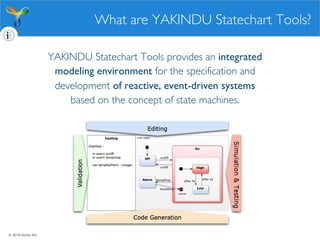
YAKINDU Statechart Tools provides an integrated
modeling environment for the specification and
development of reactive, event-driven systems
based on the concept of state machines.
What are YAKINDU Statechart Tools?
Š 2019 itemis AG
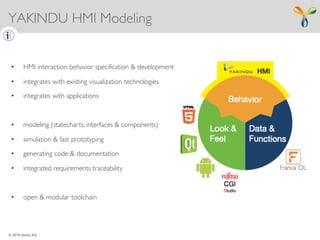
YAKINDU HMI Modeling
• HMI interaction behavior specification & development
• integrates with existing visualization technologies
• integrates with applications
• modeling (statecharts, interfaces & components)
• simulation & fast prototyping
• generating code & documentation
• integrated requirements traceability
• open & modular toolchain
Š 2019 itemis AG
UI technology Platforms:
• bring their own abstractions
• are optimized for a specific porpose
• provide optimized tools
• mostly no need to be cross-technology
‣ embrace UI technologies
‣ do not provide a further abstraction for visual design
UI-TechnologiesRelation to UI Technologies
Š 2019 itemis AG
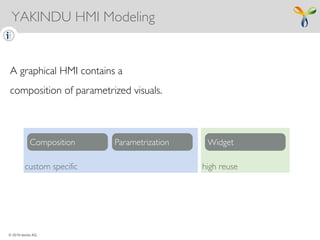
custom specific high reuse
A graphical HMI contains a
composition of parametrized visuals.
Composition Parametrization Widget
YAKINDU HMI Modeling
Š 2019 itemis AG
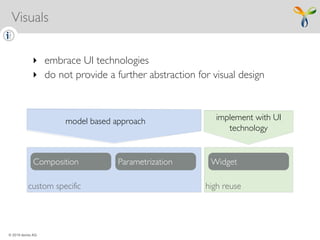
custom specific high reuse
Composition Parametrization Widget
‣ embrace UI technologies
‣ do not provide a further abstraction for visual design
model based approach implement with UI
technology
Visuals
Š 2019 itemis AG
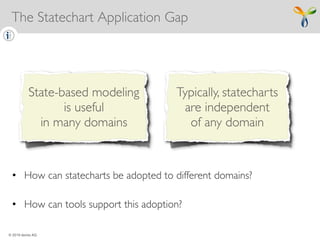
• How can statecharts be adopted to different domains?
• How can tools support this adoption?
The Statechart Application Gap
Š 2019 itemis AG
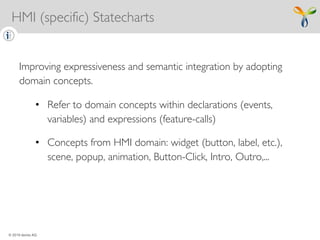
Improving expressiveness and semantic integration by adopting
domain concepts.
• Refer to domain concepts within declarations (events,
variables) and expressions (feature-calls)
• Concepts from HMI domain: widget (button, label, etc.),
scene, popup, animation, Button-Click, Intro, Outro,...
HMI (specific) Statecharts
Š 2019 itemis AG
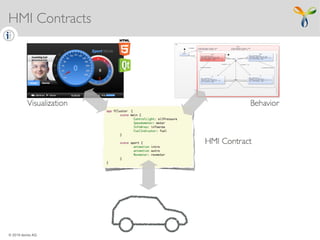
HMI Contracts
Š 2019 itemis AG
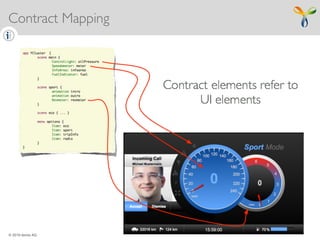
Contract Mapping
Š 2019 itemis AG
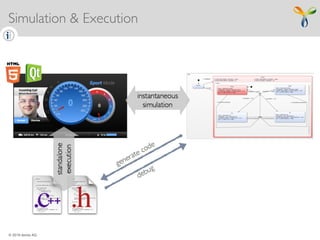
Simulation & Execution
Š 2019 itemis AG
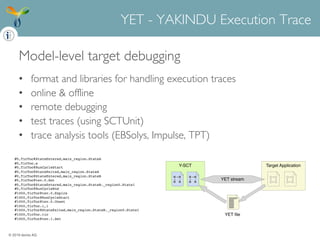
Model-level target debugging
• format and libraries for handling execution traces
• online & offline
• remote debugging
• test traces (using SCTUnit)
• trace analysis tools (EBSolys, Impulse, TPT)
YET - YAKINDU Execution Trace
Target ApplicationY-SCT
YET le
YET stream
#0,TicToc@StateEntered,main_region.StateA
#0,TicToc.e
#0,TicToc@RunCycleStart
#0,TicToc@StateExited,main_region.StateA
#0,TicToc@StateEntered,main_region.StateB
#0,TicToc@tev.0.Set
#0,TicToc@StateEntered,main_region.StateB._region0.State1
#0,TicToc@RunCycleEnd
#1000,TicToc@tev.0.Expire
#1000,TicToc@RunCycleStart
#1000,TicToc@tev.0.Unset
#1000,TicToc.i,1
#1000,TicToc@StateExited,main_region.StateB._region0.State1
#1000,TicToc.tic
#1000,TicToc@tev.1.Set
Š 2019 itemis AG
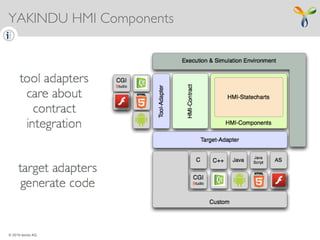
YAKINDU HMI Components
Š 2019 itemis AG
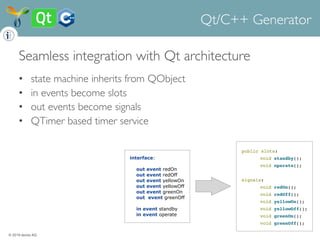
Seamless integration with Qt architecture
• state machine inherits from QObject
• in events become slots
• out events become signals
• QTimer based timer service
Qt/C++ Generator
public slots:
void standby();
void operate();
signals:
void redOn();
void redOff();
void yellowOn();
void yellowOff();
void greenOn();
void greenOff();
interface:
out event redOn
out event redOff
out event yellowOn
out event yellowOff
out event greenOn
out event greenOff
in event standby
in event operate
Š 2019 itemis AG
Š 2015 itemis AG
Questions?
Ask us - statecharts@itemis.com !
Get hands on YAKINDU Statecharts ?
Download and try !
Learn more?
Read on statecharts.org ! ?!
YAKINDU StatechartTools
state machines made easy …

HMI Modelling using State Machines

  • 1.
    Š 2019 itemisAG Modelling HMIs using State Machines HMI software development with YAKINDU StatechartTools
  • 2.
    Š 2019 itemisAG YAKINDU Statechart Tools provides an integrated modeling environment for the specification and development of reactive, event-driven systems based on the concept of state machines. What are YAKINDU Statechart Tools?
  • 3.
    © 2019 itemisAG YAKINDU HMI Modeling • HMI interaction behavior specification & development • integrates with existing visualization technologies • integrates with applications • modeling (statecharts, interfaces & components) • simulation & fast prototyping • generating code & documentation • integrated requirements traceability • open & modular toolchain
  • 4.
    © 2019 itemisAG UI technology Platforms: • bring their own abstractions • are optimized for a specific porpose • provide optimized tools • mostly no need to be cross-technology ‣ embrace UI technologies ‣ do not provide a further abstraction for visual design UI-TechnologiesRelation to UI Technologies
  • 5.
    Š 2019 itemisAG custom specific high reuse A graphical HMI contains a composition of parametrized visuals. Composition Parametrization Widget YAKINDU HMI Modeling
  • 6.
    © 2019 itemisAG custom specific high reuse Composition Parametrization Widget ‣ embrace UI technologies ‣ do not provide a further abstraction for visual design model based approach implement with UI technology Visuals
  • 7.
    © 2019 itemisAG • How can statecharts be adopted to different domains? • How can tools support this adoption? The Statechart Application Gap
  • 8.
    © 2019 itemisAG Improving expressiveness and semantic integration by adopting domain concepts. • Refer to domain concepts within declarations (events, variables) and expressions (feature-calls) • Concepts from HMI domain: widget (button, label, etc.), scene, popup, animation, Button-Click, Intro, Outro,... HMI (specific) Statecharts
  • 9.
    Š 2019 itemisAG HMI Contracts
  • 10.
    Š 2019 itemisAG Contract Mapping
  • 11.
    Š 2019 itemisAG Simulation & Execution
  • 12.
    © 2019 itemisAG Model-level target debugging • format and libraries for handling execution traces • online & offline • remote debugging • test traces (using SCTUnit) • trace analysis tools (EBSolys, Impulse, TPT) YET - YAKINDU Execution Trace Target ApplicationY-SCT YET file YET stream #0,TicToc@StateEntered,main_region.StateA #0,TicToc.e #0,TicToc@RunCycleStart #0,TicToc@StateExited,main_region.StateA #0,TicToc@StateEntered,main_region.StateB #0,TicToc@tev.0.Set #0,TicToc@StateEntered,main_region.StateB._region0.State1 #0,TicToc@RunCycleEnd #1000,TicToc@tev.0.Expire #1000,TicToc@RunCycleStart #1000,TicToc@tev.0.Unset #1000,TicToc.i,1 #1000,TicToc@StateExited,main_region.StateB._region0.State1 #1000,TicToc.tic #1000,TicToc@tev.1.Set
  • 13.
    Š 2019 itemisAG YAKINDU HMI Components
  • 14.
    © 2019 itemisAG Seamless integration with Qt architecture • state machine inherits from QObject • in events become slots • out events become signals • QTimer based timer service Qt/C++ Generator public slots: void standby(); void operate(); signals: void redOn(); void redOff(); void yellowOn(); void yellowOff(); void greenOn(); void greenOff(); interface: out event redOn out event redOff out event yellowOn out event yellowOff out event greenOn out event greenOff in event standby in event operate
  • 15.
    © 2019 itemisAG © 2015 itemis AG Questions? Ask us - statecharts@itemis.com ! Get hands on YAKINDU Statecharts ? Download and try ! Learn more? Read on statecharts.org ! ?! YAKINDU StatechartTools state machines made easy …