Heart Rate Variability Logger
V4.2 Quick Start Guide

@marco_alt
• Extracts, plots, stores and exports heart rate, rr-intervals, time and
frequency domain heart rate variability features
(AVNN, SDNN, rMSSD, pNN50, LF, HF, LF/HF)
• Configurable experience sampling for events annotation
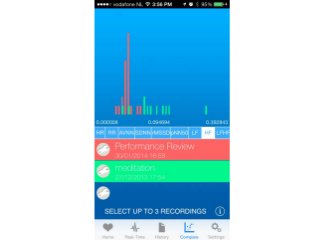
• Comparison between recordings lets you get a better
understanding of autonomic regulation and
sympathetic/parasympathetic activity under different contexts in a
glance
• Step counter or accelerometer derived motion intensity for user
context (step counter only for iPhones 5S)
• Configurable time window for features computation (choose
between 30 seconds, 1, 2 or 5 minutes)
• Location tracking (GSM/WiFI or GPS based)
• RR-intervals correction can be enabled to prevent ectopic beats
or artifacts from affecting HRV features
• Data export using iTunes or Dropbox
• Tested for recordings longer than 24 hours
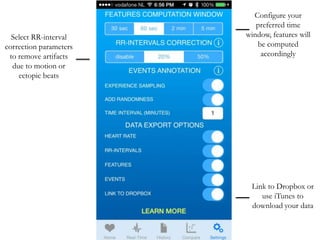
Select RR-interval
correction parameters
to remove artifacts
due to motion or
ectopic beats

Configure your
preferred time
window, features will
be computed
accordingly

Link to Dropbox or
use iTunes to
download your data
By enabling
experience
sampling, events will
be automatically
triggered at
configurable time
intervals

You can also add
some randomness to
avoid receiving events
at constant time
intervals, in this case
enable 'add
randomness' as well.
There will be a shift
in time of maximum
5% more or 5% less
than the time
specified as 'time
interval’
Activity tracking can
be used to add
context to your
recordings (motion
intensity for iphons
prior to the 5S, and
step counter for the
5S)

Additional context
can be acquired
enabling location
tracking. GSM and
WiFi networks will be
used if high accuracy
location is
disabled, otherwise
the app will use GPS
and therefore drain
more battery
power, but provide
more accurate and
frequent location
updates.
connect
Connect to your
Bluetooth SMART
Heart Rate Monitor
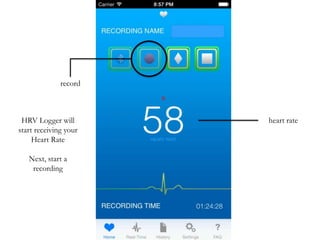
record

HRV Logger will
start receiving your
Heart Rate
Next, start a
recording

heart rate
stop
log event

During the
recording, you can
log relevant events
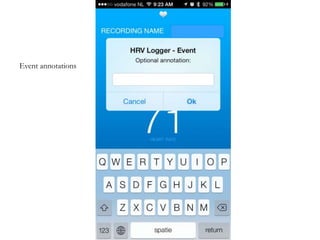
Event annotations
The real-time view
shows the HR and RR
data received from the
sensor, as well as the
computed features
RR-intervals can be
corrected
automatically for
artifacts and ectopic
beats
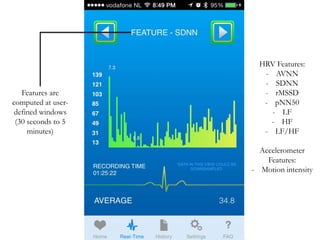
Features are
computed at userdefined windows
(30 seconds to 5
minutes)

HRV Features:
- AVNN
- SDNN
- rMSSD
- pNN50
- LF
- HF
- LF/HF
Accelerometer
Features:
- Motion intensity
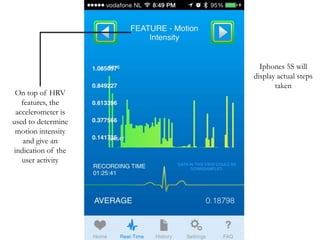
On top of HRV
features, the
accelerometer is
used to determine
motion intensity
and give an
indication of the
user activity

Iphones 5S will
display actual steps
taken
Steps
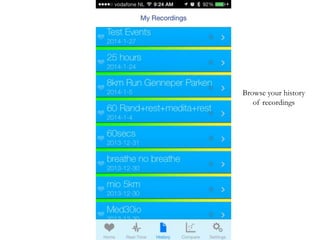
Browse your history
of recordings
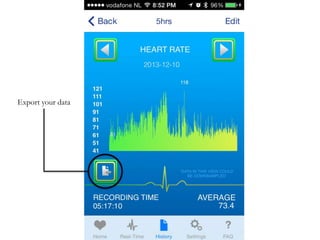
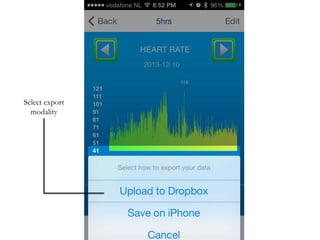
Export your data
Select export
modality
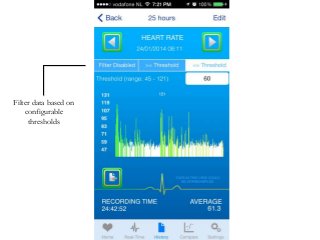
Filter data based on
configurable
thresholds
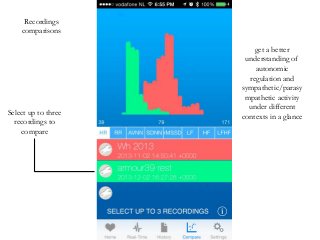
Recordings
comparisons

Select up to three
recordings to
compare

get a better
understanding of
autonomic
regulation and
sympathetic/parasy
mpathetic activity
under different
contexts in a glance
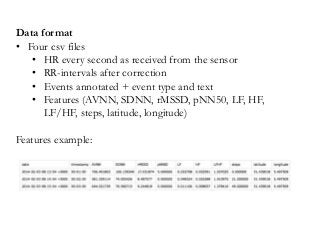
Data format
• Four csv files
• HR every second as received from the sensor
• RR-intervals after correction
• Events annotated + event type and text
• Features (AVNN, SDNN, rMSSD, pNN50, LF, HF,
LF/HF, steps, latitude, longitude)
Features example:
Questions?
See link below

@marco_alt

Heart Rate Variability Logger - Quick Start Guide

  • 1.
    Heart Rate VariabilityLogger V4.2 Quick Start Guide @marco_alt
  • 2.
    • Extracts, plots,stores and exports heart rate, rr-intervals, time and frequency domain heart rate variability features (AVNN, SDNN, rMSSD, pNN50, LF, HF, LF/HF) • Configurable experience sampling for events annotation • Comparison between recordings lets you get a better understanding of autonomic regulation and sympathetic/parasympathetic activity under different contexts in a glance • Step counter or accelerometer derived motion intensity for user context (step counter only for iPhones 5S) • Configurable time window for features computation (choose between 30 seconds, 1, 2 or 5 minutes) • Location tracking (GSM/WiFI or GPS based) • RR-intervals correction can be enabled to prevent ectopic beats or artifacts from affecting HRV features • Data export using iTunes or Dropbox • Tested for recordings longer than 24 hours
  • 3.
    Select RR-interval correction parameters toremove artifacts due to motion or ectopic beats Configure your preferred time window, features will be computed accordingly Link to Dropbox or use iTunes to download your data
  • 4.
    By enabling experience sampling, eventswill be automatically triggered at configurable time intervals You can also add some randomness to avoid receiving events at constant time intervals, in this case enable 'add randomness' as well. There will be a shift in time of maximum 5% more or 5% less than the time specified as 'time interval’
  • 5.
    Activity tracking can beused to add context to your recordings (motion intensity for iphons prior to the 5S, and step counter for the 5S) Additional context can be acquired enabling location tracking. GSM and WiFi networks will be used if high accuracy location is disabled, otherwise the app will use GPS and therefore drain more battery power, but provide more accurate and frequent location updates.
  • 6.
    connect Connect to your BluetoothSMART Heart Rate Monitor
  • 7.
    record HRV Logger will startreceiving your Heart Rate Next, start a recording heart rate
  • 8.
    stop log event During the recording,you can log relevant events
  • 9.
  • 10.
    The real-time view showsthe HR and RR data received from the sensor, as well as the computed features
  • 11.
    RR-intervals can be corrected automaticallyfor artifacts and ectopic beats
  • 12.
    Features are computed atuserdefined windows (30 seconds to 5 minutes) HRV Features: - AVNN - SDNN - rMSSD - pNN50 - LF - HF - LF/HF Accelerometer Features: - Motion intensity
  • 13.
    On top ofHRV features, the accelerometer is used to determine motion intensity and give an indication of the user activity Iphones 5S will display actual steps taken
  • 14.
  • 15.
  • 16.
  • 17.
  • 18.
    Filter data basedon configurable thresholds
  • 19.
    Recordings comparisons Select up tothree recordings to compare get a better understanding of autonomic regulation and sympathetic/parasy mpathetic activity under different contexts in a glance
  • 21.
    Data format • Fourcsv files • HR every second as received from the sensor • RR-intervals after correction • Events annotated + event type and text • Features (AVNN, SDNN, rMSSD, pNN50, LF, HF, LF/HF, steps, latitude, longitude) Features example:
  • 22.