Social Media Measurement Presented by: Allie Herzog (@alliezog) @LikeableMedia Harper Collins Training Session #3 Presented by #Likeable
What’s in Store… •  Facebook Insights •  Facebook Ad Platform Bit.ly Other Tools Helpful Tips
So you have a Facebook page…  Now  what??
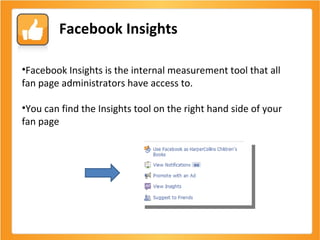
Facebook Insights Facebook Insights is the internal measurement tool that all fan page administrators have access to. You can find the Insights tool on the right hand side of your fan page
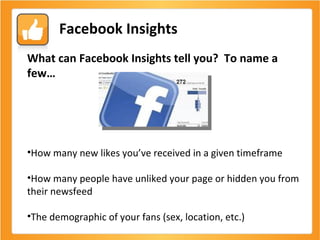
Facebook Insights What can Facebook Insights tell you?  To name a few… How many new likes you’ve received in a given timeframe How many people have unliked your page or hidden you from their newsfeed  The demographic of your fans (sex, location, etc.)
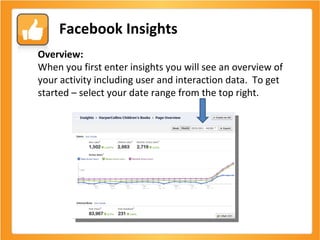
Facebook Insights Overview:  When you first enter insights you will see an overview of your activity including user and interaction data.  To get started – select your date range from the top right.
Facebook Insights User information: Facebook Insights can tell you A LOT of great info about your users.  Here are some highlights: Active Users Active User breakdown Likes/Unlikes and source of Likes Fan demographic Fan activity
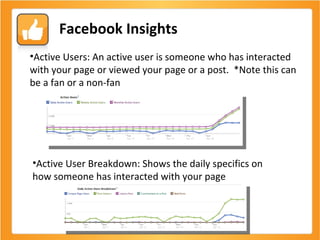
Facebook Insights Active Users: An active user is someone who has interacted with your page or viewed your page or a post.  *Note this can be a fan or a non-fan Active User Breakdown: Shows the daily specifics on how someone has interacted with your page
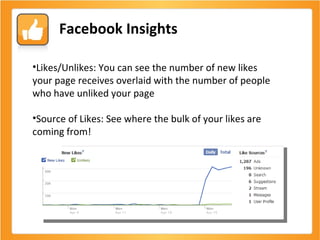
Facebook Insights Likes/Unlikes: You can see the number of new likes your page receives overlaid with the number of people who have unliked your page Source of Likes: See where the bulk of your likes are coming from!
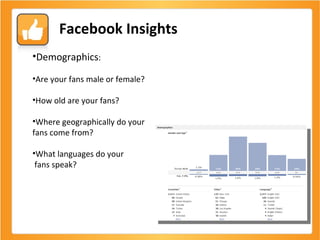
Facebook Insights Demographics : Are your fans male or female? How old are your fans? Where geographically do your  fans come from? What languages do your fans speak?
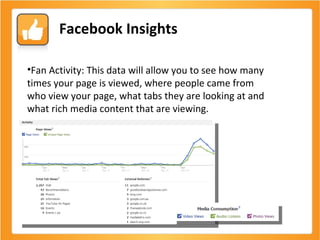
Facebook Insights Fan Activity: This data will allow you to see how many times your page is viewed, where people came from who view your page, what tabs they are looking at and what rich media content that are viewing.
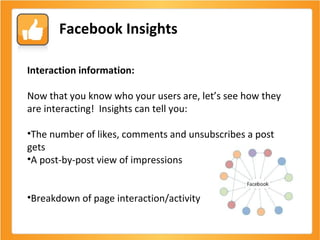
Facebook Insights Interaction information: Now that you know who your users are, let’s see how they are interacting!  Insights can tell you: The number of likes, comments and unsubscribes a post gets A post-by-post view of impressions  Breakdown of page interaction/activity
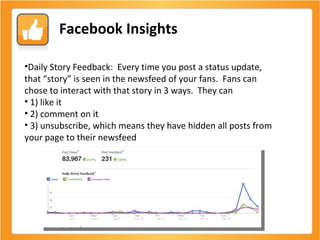
Facebook Insights Daily Story Feedback:  Every time you post a status update, that “story” is seen in the newsfeed of your fans.  Fans can chose to interact with that story in 3 ways.  They can 1) like it 2) comment on it 3) unsubscribe, which means they have hidden all posts from your page to their newsfeed
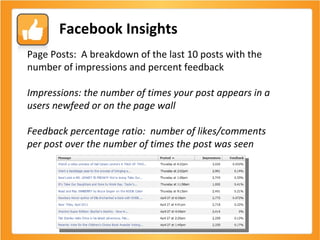
Facebook Insights Page Posts:  A breakdown of the last 10 posts with the number of impressions and percent feedback Impressions: the number of times your post appears in a users newfeed or on the page wall Feedback percentage ratio:  number of likes/comments per post over the number of times the post was seen
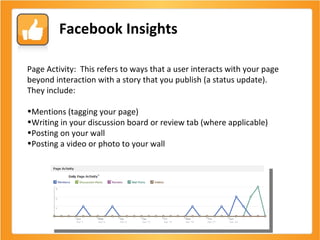
Facebook Insights Page Activity:  This refers to ways that a user interacts with your page beyond interaction with a story that you publish (a status update).  They include: Mentions (tagging your page) Writing in your discussion board or review tab (where applicable) Posting on your wall Posting a video or photo to your wall
Analyzing your Data
Questions so far?
Facebook Ad Platform The Basics:  Impressions – number of times your ad appeared Clicks – number of times title link was clicked Actions (if liking ad) – number of clicks directly on the like button Conversions (if liking ad) – number of people who clicked the link and eventually liked your page  CPC – average cost per click CPM – average cost per thousand impressions  Calculate your cost per fan:  dollars spent/actions
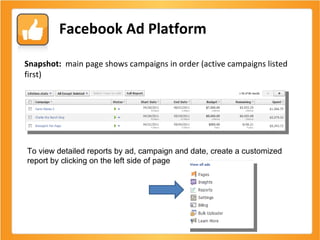
Facebook Ad Platform Snapshot:  main page shows campaigns in order (active campaigns listed first)  To view detailed reports by ad, campaign and date, create a customized report by clicking on the left side of page
Analyzing your Data
Bit.ly Bit.ly is a click aggregator that both shortens and tracks links.  It is useful to: Shorten links for space on Facebook and Twitter Create vanity URL for link Tracking clicks, shares, tweets, etc. Seeing referring and location insights
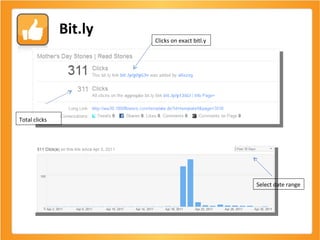
Bit.ly Clicks on exact bitl.y Total clicks   Select date range
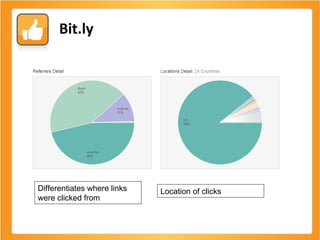
Bit.ly Differentiates where links were clicked from Location of clicks
Analyzing your Data
Other Measurement Tools
Some Tips…
Likeable.com Engage with us: @LikeableMedia on Twitter Ask us questions:  Facebook.com/LikeableMedia Tweet me: @alliezog Or,  email me anytime allie@likeable.com Thank you!

Harper collins measurement

  • 1.
    Social Media MeasurementPresented by: Allie Herzog (@alliezog) @LikeableMedia Harper Collins Training Session #3 Presented by #Likeable
  • 2.
    What’s in Store…• Facebook Insights • Facebook Ad Platform Bit.ly Other Tools Helpful Tips
  • 3.
    So you havea Facebook page… Now what??
  • 4.
    Facebook Insights FacebookInsights is the internal measurement tool that all fan page administrators have access to. You can find the Insights tool on the right hand side of your fan page
  • 5.
    Facebook Insights Whatcan Facebook Insights tell you? To name a few… How many new likes you’ve received in a given timeframe How many people have unliked your page or hidden you from their newsfeed The demographic of your fans (sex, location, etc.)
  • 6.
    Facebook Insights Overview: When you first enter insights you will see an overview of your activity including user and interaction data. To get started – select your date range from the top right.
  • 7.
    Facebook Insights Userinformation: Facebook Insights can tell you A LOT of great info about your users. Here are some highlights: Active Users Active User breakdown Likes/Unlikes and source of Likes Fan demographic Fan activity
  • 8.
    Facebook Insights ActiveUsers: An active user is someone who has interacted with your page or viewed your page or a post. *Note this can be a fan or a non-fan Active User Breakdown: Shows the daily specifics on how someone has interacted with your page
  • 9.
    Facebook Insights Likes/Unlikes:You can see the number of new likes your page receives overlaid with the number of people who have unliked your page Source of Likes: See where the bulk of your likes are coming from!
  • 10.
    Facebook Insights Demographics: Are your fans male or female? How old are your fans? Where geographically do your fans come from? What languages do your fans speak?
  • 11.
    Facebook Insights FanActivity: This data will allow you to see how many times your page is viewed, where people came from who view your page, what tabs they are looking at and what rich media content that are viewing.
  • 12.
    Facebook Insights Interactioninformation: Now that you know who your users are, let’s see how they are interacting! Insights can tell you: The number of likes, comments and unsubscribes a post gets A post-by-post view of impressions Breakdown of page interaction/activity
  • 13.
    Facebook Insights DailyStory Feedback: Every time you post a status update, that “story” is seen in the newsfeed of your fans. Fans can chose to interact with that story in 3 ways. They can 1) like it 2) comment on it 3) unsubscribe, which means they have hidden all posts from your page to their newsfeed
  • 14.
    Facebook Insights PagePosts: A breakdown of the last 10 posts with the number of impressions and percent feedback Impressions: the number of times your post appears in a users newfeed or on the page wall Feedback percentage ratio: number of likes/comments per post over the number of times the post was seen
  • 15.
    Facebook Insights PageActivity: This refers to ways that a user interacts with your page beyond interaction with a story that you publish (a status update). They include: Mentions (tagging your page) Writing in your discussion board or review tab (where applicable) Posting on your wall Posting a video or photo to your wall
  • 16.
  • 17.
  • 18.
    Facebook Ad PlatformThe Basics: Impressions – number of times your ad appeared Clicks – number of times title link was clicked Actions (if liking ad) – number of clicks directly on the like button Conversions (if liking ad) – number of people who clicked the link and eventually liked your page CPC – average cost per click CPM – average cost per thousand impressions Calculate your cost per fan: dollars spent/actions
  • 19.
    Facebook Ad PlatformSnapshot: main page shows campaigns in order (active campaigns listed first) To view detailed reports by ad, campaign and date, create a customized report by clicking on the left side of page
  • 20.
  • 21.
    Bit.ly Bit.ly isa click aggregator that both shortens and tracks links. It is useful to: Shorten links for space on Facebook and Twitter Create vanity URL for link Tracking clicks, shares, tweets, etc. Seeing referring and location insights
  • 22.
    Bit.ly Clicks onexact bitl.y Total clicks Select date range
  • 23.
    Bit.ly Differentiates wherelinks were clicked from Location of clicks
  • 24.
  • 25.
  • 26.
  • 27.
    Likeable.com Engage withus: @LikeableMedia on Twitter Ask us questions: Facebook.com/LikeableMedia Tweet me: @alliezog Or, email me anytime allie@likeable.com Thank you!

Editor's Notes

  • #6 -get definition (urbandictionary?) -ss of HC tweet?