Hackolade Tutorial
Part 12 - Create a REST API model
Copyright © 2016-2023 Hackolade 1
In this Tutorial
• How to visually design a schema-centric REST API, using the Swagger
or OpenAPI specification
• No need to know the Swagger/OpenAPI syntax
• but need to know the features...
• Fits really well with API-first and design-first processes
• Especially when combined with NoSQL data stores: access patterns and APIs
are very often aligned – and therefore so is their model
• Helps to understand existing APIs: visual representation of
Swagger/OpenAPI files
• Hackolade Studio will reverse engineer these files into a data model
• Focusing on OpenAPI – principles also apply to Swagger
Copyright © 2016-2023 Hackolade 2
Example: URL shortener
• a user creates an entry based on a full URL, and receives a
short slug generated by the service
• any system can send a slug and get back the full URL.
• The example is inspired by Shorty, an existing service
Copyright © 2016-2023 Hackolade 3
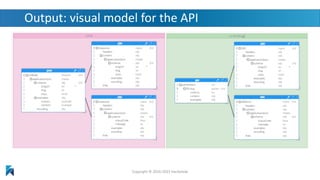
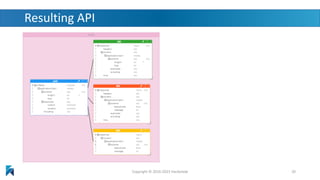
Output: visual model for the API
Copyright © 2016-2023 Hackolade
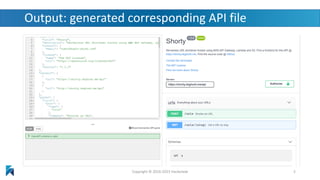
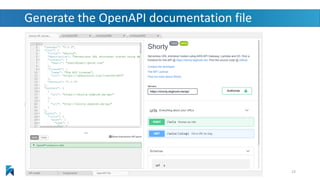
Output: generated corresponding API file
Copyright © 2016-2023 Hackolade 5
Design the API
• Put yourself in the shoes of the consumer & make it easy to
understand and navigate
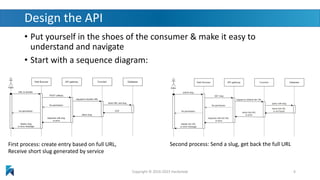
• Start with a sequence diagram:
Copyright © 2016-2023 Hackolade 6
First process: create entry based on full URL,
Receive short slug generated by service
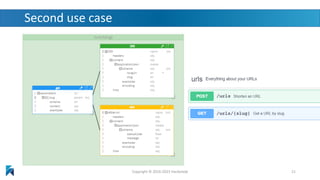
Second process: Send a slug, get back the full URL
Sequence is important!
• Many Swagger tutorials start with info, then paths, then components
• We recommend that you start with the foundation: schema describing the
structure of the service contract between producer and consumer
• Process:
1. create reusable components
• schema for the exchange
• request body to submit a long URL, using the schema
• parameter to fetch the full URL from a slug
• responses
• returning the generated slug (200 - OK) using the schema
• returning an error message, reusable for different kinds of errors
• an OAuth2 security scheme (can be done later)
2. create resources with requests and responses
3. add endpoint, tags, and metadata information, plus color coding of responses
4. generate the OpenAPI documentation file, with API testing
Copyright © 2016-2023 Hackolade 7
Create reusable components
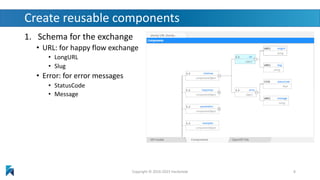
1. Schema for the exchange
• URL: for happy flow exchange
• LongURL
• Slug
• Error: for error messages
• StatusCode
• Message
Copyright © 2016-2023 Hackolade 8
Create reusable components
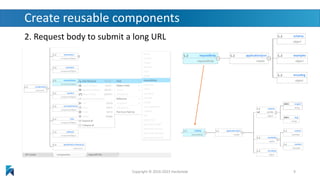
2. Request body to submit a long URL
Copyright © 2016-2023 Hackolade 9
Create reusable components
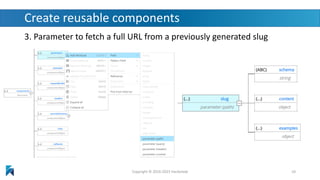
3. Parameter to fetch a full URL from a previously generated slug
Copyright © 2016-2023 Hackolade 10
Create reusable components
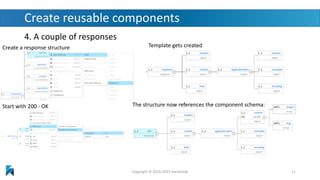
4. A couple of responses
Copyright © 2016-2023 Hackolade 11
Create a response structure Template gets created
Start with 200 - OK The structure now references the component schema:
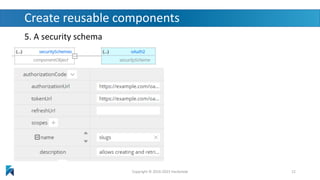
Create reusable components
5. A security schema
Copyright © 2016-2023 Hackolade 12
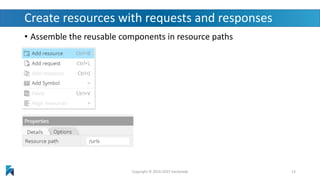
Create resources with requests and responses
• Assemble the reusable components in resource paths
Copyright © 2016-2023 Hackolade 13
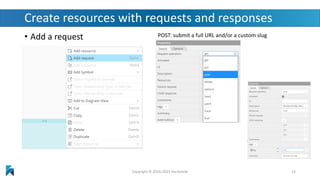
Create resources with requests and responses
• Add a request
Copyright © 2016-2023 Hackolade 14
POST: submit a full URL and/or a custom slug
Create resources with requests and responses
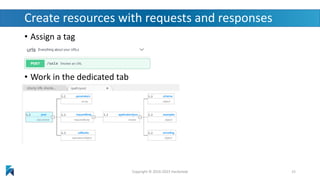
• Assign a tag
• Work in the dedicated tab
Copyright © 2016-2023 Hackolade 15
Create resources with requests and responses
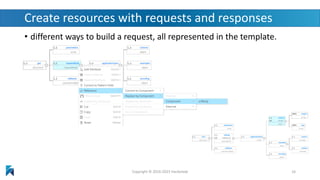
• different ways to build a request, all represented in the template.
Copyright © 2016-2023 Hackolade 16
Create resources with requests and responses
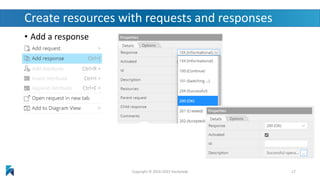
• Add a response
Copyright © 2016-2023 Hackolade 17
Create resources with requests and responses
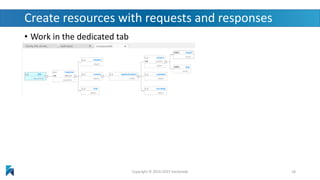
• Work in the dedicated tab
Copyright © 2016-2023 Hackolade 18
Create resources with requests and responses
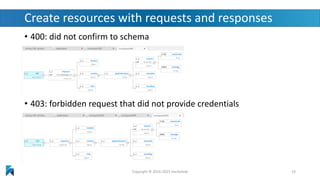
• 400: did not confirm to schema
• 403: forbidden request that did not provide credentials
Copyright © 2016-2023 Hackolade 19
Resulting API
Copyright © 2016-2023 Hackolade 20
Second use case
Copyright © 2016-2023 Hackolade 21
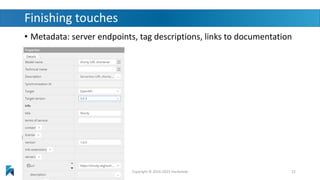
Finishing touches
• Metadata: server endpoints, tag descriptions, links to documentation
Copyright © 2016-2023 Hackolade 22
Generate the OpenAPI documentation file
Copyright © 2016-2023 Hackolade 23
API creation debate
• Code-first vs. design-first?
• Design-first helps you think through all the details, discuss
alternatives with stakeholders, evaluate impacts, etc.
• Advantages = Lower TCO, higher quality, easier evolution, and…
quicker Time to Value!
• Reduces the risk of rework!
• See this article by Smartbear, creators of Swagger
Copyright © 2016-2023 Hackolade 24
Reading material
• See Hackolade online documentation
• The Hackolade Blog
• This excellent new book:
MongoDB Data Modeling & Schema Design
• Many of the principles in the book are related to query
driven modeling based on access patterns!
• Hackolade’s on social media: LinkedIn page, Twitter page
• Download Hackolade studio for free
Copyright © 2016-2023 Hackolade 25
Questions?
Answers!
Copyright © 2016-2023 Hackolade 26

Hackolade Tutorial - part 12 - Create a REST API model

  • 1.
    Hackolade Tutorial Part 12- Create a REST API model Copyright © 2016-2023 Hackolade 1
  • 2.
    In this Tutorial •How to visually design a schema-centric REST API, using the Swagger or OpenAPI specification • No need to know the Swagger/OpenAPI syntax • but need to know the features... • Fits really well with API-first and design-first processes • Especially when combined with NoSQL data stores: access patterns and APIs are very often aligned – and therefore so is their model • Helps to understand existing APIs: visual representation of Swagger/OpenAPI files • Hackolade Studio will reverse engineer these files into a data model • Focusing on OpenAPI – principles also apply to Swagger Copyright © 2016-2023 Hackolade 2
  • 3.
    Example: URL shortener •a user creates an entry based on a full URL, and receives a short slug generated by the service • any system can send a slug and get back the full URL. • The example is inspired by Shorty, an existing service Copyright © 2016-2023 Hackolade 3
  • 4.
    Output: visual modelfor the API Copyright © 2016-2023 Hackolade
  • 5.
    Output: generated correspondingAPI file Copyright © 2016-2023 Hackolade 5
  • 6.
    Design the API •Put yourself in the shoes of the consumer & make it easy to understand and navigate • Start with a sequence diagram: Copyright © 2016-2023 Hackolade 6 First process: create entry based on full URL, Receive short slug generated by service Second process: Send a slug, get back the full URL
  • 7.
    Sequence is important! •Many Swagger tutorials start with info, then paths, then components • We recommend that you start with the foundation: schema describing the structure of the service contract between producer and consumer • Process: 1. create reusable components • schema for the exchange • request body to submit a long URL, using the schema • parameter to fetch the full URL from a slug • responses • returning the generated slug (200 - OK) using the schema • returning an error message, reusable for different kinds of errors • an OAuth2 security scheme (can be done later) 2. create resources with requests and responses 3. add endpoint, tags, and metadata information, plus color coding of responses 4. generate the OpenAPI documentation file, with API testing Copyright © 2016-2023 Hackolade 7
  • 8.
    Create reusable components 1.Schema for the exchange • URL: for happy flow exchange • LongURL • Slug • Error: for error messages • StatusCode • Message Copyright © 2016-2023 Hackolade 8
  • 9.
    Create reusable components 2.Request body to submit a long URL Copyright © 2016-2023 Hackolade 9
  • 10.
    Create reusable components 3.Parameter to fetch a full URL from a previously generated slug Copyright © 2016-2023 Hackolade 10
  • 11.
    Create reusable components 4.A couple of responses Copyright © 2016-2023 Hackolade 11 Create a response structure Template gets created Start with 200 - OK The structure now references the component schema:
  • 12.
    Create reusable components 5.A security schema Copyright © 2016-2023 Hackolade 12
  • 13.
    Create resources withrequests and responses • Assemble the reusable components in resource paths Copyright © 2016-2023 Hackolade 13
  • 14.
    Create resources withrequests and responses • Add a request Copyright © 2016-2023 Hackolade 14 POST: submit a full URL and/or a custom slug
  • 15.
    Create resources withrequests and responses • Assign a tag • Work in the dedicated tab Copyright © 2016-2023 Hackolade 15
  • 16.
    Create resources withrequests and responses • different ways to build a request, all represented in the template. Copyright © 2016-2023 Hackolade 16
  • 17.
    Create resources withrequests and responses • Add a response Copyright © 2016-2023 Hackolade 17
  • 18.
    Create resources withrequests and responses • Work in the dedicated tab Copyright © 2016-2023 Hackolade 18
  • 19.
    Create resources withrequests and responses • 400: did not confirm to schema • 403: forbidden request that did not provide credentials Copyright © 2016-2023 Hackolade 19
  • 20.
    Resulting API Copyright ©2016-2023 Hackolade 20
  • 21.
    Second use case Copyright© 2016-2023 Hackolade 21
  • 22.
    Finishing touches • Metadata:server endpoints, tag descriptions, links to documentation Copyright © 2016-2023 Hackolade 22
  • 23.
    Generate the OpenAPIdocumentation file Copyright © 2016-2023 Hackolade 23
  • 24.
    API creation debate •Code-first vs. design-first? • Design-first helps you think through all the details, discuss alternatives with stakeholders, evaluate impacts, etc. • Advantages = Lower TCO, higher quality, easier evolution, and… quicker Time to Value! • Reduces the risk of rework! • See this article by Smartbear, creators of Swagger Copyright © 2016-2023 Hackolade 24
  • 25.
    Reading material • SeeHackolade online documentation • The Hackolade Blog • This excellent new book: MongoDB Data Modeling & Schema Design • Many of the principles in the book are related to query driven modeling based on access patterns! • Hackolade’s on social media: LinkedIn page, Twitter page • Download Hackolade studio for free Copyright © 2016-2023 Hackolade 25
  • 26.