Hackolade Tutorial
Tutorial Expert – Command Line Interface (CLI)
Copyright © 2016-2023 Hackolade 1
Metadata-as-Code
• See our article
• Business purpose: promote a shared understanding of meaning and
context for data structures across business users and technical users,
through the synchronization and publication of these data structures
to business-facing data catalogs.
• Technical purpose: ensure that the evolution of data models and their
schema artifacts follow the same lifecycle as application code,
through their co-location in Git repository and branches.
Copyright © 2016-2023 Hackolade 2
Design
Data Model
Generate
Schema
Catalog
Publish
Use
Evaluate
Data
Modeler
Data
Architect
Subject
Matter
Expert
Data
Engineer
Data
Analyst
Business
Analyst
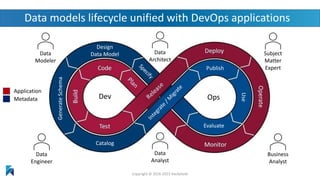
Data models lifecycle unified with DevOps applications
Copyright © 2016-2023 Hackolade
Application
Metadata Dev Ops
Data models
Schema contracts
Application code
Git repository DevOps CI/CD
pipeline
Application
Database
Copyright © 2016-2023 Hackolade 4
Co-locate data models and schemas with application code
Environments:
• Dev
• Test
• Integration
• Production
ALTER scripts
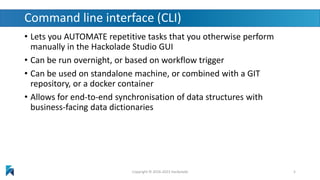
Command line interface (CLI)
• Lets you AUTOMATE repetitive tasks that you otherwise perform
manually in the Hackolade Studio GUI
• Can be run overnight, or based on workflow trigger
• Can be used on standalone machine, or combined with a GIT
repository, or a docker container
• Allows for end-to-end synchronisation of data structures with
business-facing data dictionaries
Copyright © 2016-2023 Hackolade 5
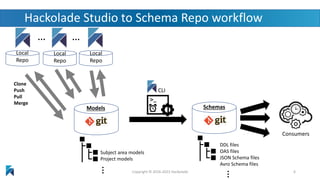
… …
Consumers
Subject area models
Project models
Models
Local
Repo
Local
Repo
Local
Repo
Clone
Push
Pull
Merge …
Copyright © 2016-2022 Hackolade 6
Hackolade Studio to Schema Repo workflow
CLI
Schemas
DDL files
OAS files
JSON Schema files
Avro Schema files
…
Copyright © 2016-2022 Hackolade
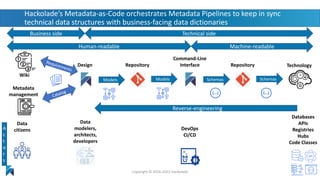
Hackolade’s Metadata-as-Code orchestrates Metadata Pipelines to keep in sync
technical data structures with business-facing data dictionaries
Repository
Human-readable
Models
A
c
t
o
r
s
Design
Models
Data
modelers,
architects,
developers
Technical side
Machine-readable
Schemas
Databases
APIs
Registries
Hubs
Code Classes
Technology
Command-Line
Interface Repository
Schemas
DevOps
CI/CD
Business side
Data
citizens
Metadata
management
Reverse-engineering
Wiki
CLI orchestration
• Often scripted
• Example use cases:
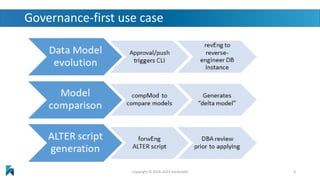
• Governance-first:
reverse-engineer >> compare with baseline model >> delta model >> forward
engineer ALTER script >> submit committed ALTER script for review
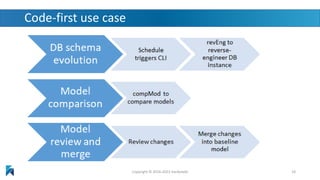
• Code-first:
reverse engineer >> compare with baseline model >> delta model >> review
of model comparison >> produce merged model >> commit merged model as
new baseline model
• Many other possibilities depending on your needs
Copyright © 2016-2023 Hackolade 8
Governance-first use case
Copyright © 2016-2023 Hackolade 9
Code-first use case
Copyright © 2016-2023 Hackolade 10
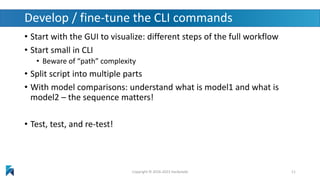
Develop / fine-tune the CLI commands
• Start with the GUI to visualize: different steps of the full workflow
• Start small in CLI
• Beware of “path” complexity
• Split script into multiple parts
• With model comparisons: understand what is model1 and what is
model2 – the sequence matters!
• Test, test, and re-test!
Copyright © 2016-2023 Hackolade 11
Reading material
• See Hackolade online documentation
• The Hackolade Blog
• This excellent new book:
MongoDB Data Modeling & Schema Design
• Many of the principles in the book are related to query
driven modeling based on access patterns!
• Hackolade’s on social media: LinkedIn page, Twitter page
• Download Hackolade studio for free
Copyright © 2016-2023 Hackolade 12
Questions?
Answers!
Copyright © 2016-2023 Hackolade 13

Tutorial Expert How-To - Command Line Interface (CLI)

  • 1.
    Hackolade Tutorial Tutorial Expert– Command Line Interface (CLI) Copyright © 2016-2023 Hackolade 1
  • 2.
    Metadata-as-Code • See ourarticle • Business purpose: promote a shared understanding of meaning and context for data structures across business users and technical users, through the synchronization and publication of these data structures to business-facing data catalogs. • Technical purpose: ensure that the evolution of data models and their schema artifacts follow the same lifecycle as application code, through their co-location in Git repository and branches. Copyright © 2016-2023 Hackolade 2
  • 3.
  • 4.
    Data models Schema contracts Applicationcode Git repository DevOps CI/CD pipeline Application Database Copyright © 2016-2023 Hackolade 4 Co-locate data models and schemas with application code Environments: • Dev • Test • Integration • Production ALTER scripts
  • 5.
    Command line interface(CLI) • Lets you AUTOMATE repetitive tasks that you otherwise perform manually in the Hackolade Studio GUI • Can be run overnight, or based on workflow trigger • Can be used on standalone machine, or combined with a GIT repository, or a docker container • Allows for end-to-end synchronisation of data structures with business-facing data dictionaries Copyright © 2016-2023 Hackolade 5
  • 6.
    … … Consumers Subject areamodels Project models Models Local Repo Local Repo Local Repo Clone Push Pull Merge … Copyright © 2016-2022 Hackolade 6 Hackolade Studio to Schema Repo workflow CLI Schemas DDL files OAS files JSON Schema files Avro Schema files …
  • 7.
    Copyright © 2016-2022Hackolade Hackolade’s Metadata-as-Code orchestrates Metadata Pipelines to keep in sync technical data structures with business-facing data dictionaries Repository Human-readable Models A c t o r s Design Models Data modelers, architects, developers Technical side Machine-readable Schemas Databases APIs Registries Hubs Code Classes Technology Command-Line Interface Repository Schemas DevOps CI/CD Business side Data citizens Metadata management Reverse-engineering Wiki
  • 8.
    CLI orchestration • Oftenscripted • Example use cases: • Governance-first: reverse-engineer >> compare with baseline model >> delta model >> forward engineer ALTER script >> submit committed ALTER script for review • Code-first: reverse engineer >> compare with baseline model >> delta model >> review of model comparison >> produce merged model >> commit merged model as new baseline model • Many other possibilities depending on your needs Copyright © 2016-2023 Hackolade 8
  • 9.
    Governance-first use case Copyright© 2016-2023 Hackolade 9
  • 10.
    Code-first use case Copyright© 2016-2023 Hackolade 10
  • 11.
    Develop / fine-tunethe CLI commands • Start with the GUI to visualize: different steps of the full workflow • Start small in CLI • Beware of “path” complexity • Split script into multiple parts • With model comparisons: understand what is model1 and what is model2 – the sequence matters! • Test, test, and re-test! Copyright © 2016-2023 Hackolade 11
  • 12.
    Reading material • SeeHackolade online documentation • The Hackolade Blog • This excellent new book: MongoDB Data Modeling & Schema Design • Many of the principles in the book are related to query driven modeling based on access patterns! • Hackolade’s on social media: LinkedIn page, Twitter page • Download Hackolade studio for free Copyright © 2016-2023 Hackolade 12
  • 13.