Hackolade Tutorial
Tutorial – Export/Import with the Excel template
Copyright © 2016-2023 Hackolade 1
Excel template
• Allows to exchange data between Excel and Hackolade Studio data models
• Easy editing of properties in tabular format, and re-import into Hackolade Studio
• Facilitates productive bulk actions for maintenance of properties
• Capabilities:
1. Edit containers, entities, and attributes of existing models, or addition to existing
models;
2. Select properties of an attribute that are exported in the Excel file;
3. Select custom attributes to be added in data types of the plugin.
• Important:
• References to definitions are not resolved
• Version of Excel template must be same as target and plugin version of export
process
Copyright © 2016-2023 Hackolade 2
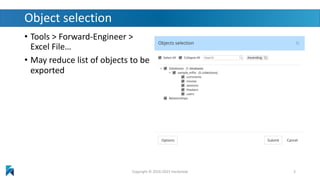
Object selection
• Tools > Forward-Engineer >
Excel File…
• May reduce list of objects to be
exported
Copyright © 2016-2023 Hackolade 3
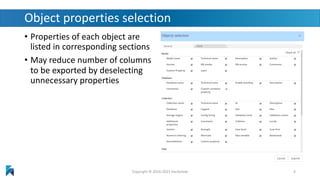
Object properties selection
• Properties of each object are
listed in corresponding sections
• May reduce number of columns
to be exported by deselecting
unnecessary properties
Copyright © 2016-2023 Hackolade 4
Maintain export options
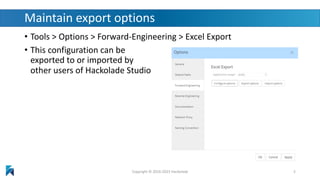
• Tools > Options > Forward-Engineering > Excel Export
• This configuration can be
exported to or imported by
other users of Hackolade Studio
Copyright © 2016-2023 Hackolade 5
Reverse-Engineering from Excel template
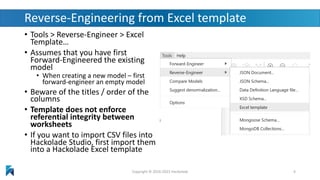
• Tools > Reverse-Engineer > Excel
Template…
• Assumes that you have first
Forward-Engineered the existing
model
• When creating a new model – first
forward-engineer an empty model
• Beware of the titles / order of the
columns
• Template does not enforce
referential integrity between
worksheets
• If you want to import CSV files into
Hackolade Studio, first import them
into a Hackolade Excel template
Copyright © 2016-2023 Hackolade 6
Expected behavior
• If target/GUID of the model match, updates/inserts to the open
model are processed
• For new model, entire file is inserted
• Based on GUID, import will overwrite existing property values
• If no GUID, object will be created / inserted in proper order
• Complex structures are supported using dot notation
• Multiple data types are supported also
• e.g. {"id":"c973c0a0-7e84-11e9-9a55-eba2b9bb390e" ,"type":"string"
,"enum":["user" ,"owner" ,"tester"]} | {"id":"d7cd4e50-7e84-11e9-9a55-
eba2b9bb390e" ,"type":"null"} | {"id":"cbd7a140-7e84-11e9-9a55-
eba2b9bb390e" ,"type":"numeric" ,"minimum":""
,"exclusiveMinimum":false,"maximum":"",
"exclusiveMaximum":false,"multipleOf":"" ,"unit":""}
Copyright © 2016-2023 Hackolade 7
Reverse Engineering / Import validations
• Import should never corrupt the model
• import is rejected if the target of the Excel file does not
match the target of the model;
• only allow one line (other than the title line) in the
model tab;
• only import if tab names match acceptable values for
the target;
• column name (property) does not have to be marked
for export in the config to be usable in the Excel import,
as long as it is a valid “propertyName”;
• attribute line referencing an entity not present in the
entities tab cannot be imported.
• entity referencing a container not present in the
containers tab cannot be imported.
• container referencing a model not present in the model
tab cannot be imported;
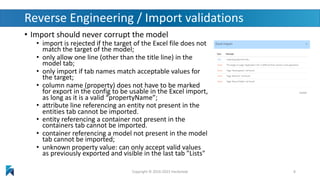
• unknown property value: can only accept valid values
as previously exported and visible in the last tab "Lists"
Copyright © 2016-2023 Hackolade 8
Best practices for a successful integration
• Excel export/import is best suited for bulk editing of existing models where
you can leverage formulas, conditional formatting, vlookups and other
advanced functions to facilitate modifications
• It can also be used to create new models or add entities and attributes
• BUT it is advised, BEFORE embarking on a huge effort, to:
• Realize that Excel is a tool with:
• a tabular design, i.e. not naturally built for nested structures (we use a workaround with dot
notation)
• limitations when it comes to ensuring the integrity of the data model (in other words, an Excel file
obviously does not have all the business logic that is built into Hackolade Studio)
• Start small and validate approach and use cases
• Build an understanding for the behavior and constraints of the interactions between
Excel and Hackolade Studio
• Regularly test import process to detect anomalies in the Excel input
• Progressively try more elaborate scenarios
Copyright © 2016-2023 Hackolade 9
Reading material
• See Hackolade online documentation
• The Hackolade Blog
• This excellent new book:
MongoDB Data Modeling & Schema Design
• Many of the principles in the book are related to query
driven modeling based on access patterns
• Hackolade’s on social media: LinkedIn page, Twitter page
• Download Hackolade Studio for free
Copyright © 2016-2023 Hackolade 10
Questions?
Answers!
Copyright © 2016-2023 Hackolade 11

Tutorial Expert How-To - Export-Import with Excel template

  • 1.
    Hackolade Tutorial Tutorial –Export/Import with the Excel template Copyright © 2016-2023 Hackolade 1
  • 2.
    Excel template • Allowsto exchange data between Excel and Hackolade Studio data models • Easy editing of properties in tabular format, and re-import into Hackolade Studio • Facilitates productive bulk actions for maintenance of properties • Capabilities: 1. Edit containers, entities, and attributes of existing models, or addition to existing models; 2. Select properties of an attribute that are exported in the Excel file; 3. Select custom attributes to be added in data types of the plugin. • Important: • References to definitions are not resolved • Version of Excel template must be same as target and plugin version of export process Copyright © 2016-2023 Hackolade 2
  • 3.
    Object selection • Tools> Forward-Engineer > Excel File… • May reduce list of objects to be exported Copyright © 2016-2023 Hackolade 3
  • 4.
    Object properties selection •Properties of each object are listed in corresponding sections • May reduce number of columns to be exported by deselecting unnecessary properties Copyright © 2016-2023 Hackolade 4
  • 5.
    Maintain export options •Tools > Options > Forward-Engineering > Excel Export • This configuration can be exported to or imported by other users of Hackolade Studio Copyright © 2016-2023 Hackolade 5
  • 6.
    Reverse-Engineering from Exceltemplate • Tools > Reverse-Engineer > Excel Template… • Assumes that you have first Forward-Engineered the existing model • When creating a new model – first forward-engineer an empty model • Beware of the titles / order of the columns • Template does not enforce referential integrity between worksheets • If you want to import CSV files into Hackolade Studio, first import them into a Hackolade Excel template Copyright © 2016-2023 Hackolade 6
  • 7.
    Expected behavior • Iftarget/GUID of the model match, updates/inserts to the open model are processed • For new model, entire file is inserted • Based on GUID, import will overwrite existing property values • If no GUID, object will be created / inserted in proper order • Complex structures are supported using dot notation • Multiple data types are supported also • e.g. {"id":"c973c0a0-7e84-11e9-9a55-eba2b9bb390e" ,"type":"string" ,"enum":["user" ,"owner" ,"tester"]} | {"id":"d7cd4e50-7e84-11e9-9a55- eba2b9bb390e" ,"type":"null"} | {"id":"cbd7a140-7e84-11e9-9a55- eba2b9bb390e" ,"type":"numeric" ,"minimum":"" ,"exclusiveMinimum":false,"maximum":"", "exclusiveMaximum":false,"multipleOf":"" ,"unit":""} Copyright © 2016-2023 Hackolade 7
  • 8.
    Reverse Engineering /Import validations • Import should never corrupt the model • import is rejected if the target of the Excel file does not match the target of the model; • only allow one line (other than the title line) in the model tab; • only import if tab names match acceptable values for the target; • column name (property) does not have to be marked for export in the config to be usable in the Excel import, as long as it is a valid “propertyName”; • attribute line referencing an entity not present in the entities tab cannot be imported. • entity referencing a container not present in the containers tab cannot be imported. • container referencing a model not present in the model tab cannot be imported; • unknown property value: can only accept valid values as previously exported and visible in the last tab "Lists" Copyright © 2016-2023 Hackolade 8
  • 9.
    Best practices fora successful integration • Excel export/import is best suited for bulk editing of existing models where you can leverage formulas, conditional formatting, vlookups and other advanced functions to facilitate modifications • It can also be used to create new models or add entities and attributes • BUT it is advised, BEFORE embarking on a huge effort, to: • Realize that Excel is a tool with: • a tabular design, i.e. not naturally built for nested structures (we use a workaround with dot notation) • limitations when it comes to ensuring the integrity of the data model (in other words, an Excel file obviously does not have all the business logic that is built into Hackolade Studio) • Start small and validate approach and use cases • Build an understanding for the behavior and constraints of the interactions between Excel and Hackolade Studio • Regularly test import process to detect anomalies in the Excel input • Progressively try more elaborate scenarios Copyright © 2016-2023 Hackolade 9
  • 10.
    Reading material • SeeHackolade online documentation • The Hackolade Blog • This excellent new book: MongoDB Data Modeling & Schema Design • Many of the principles in the book are related to query driven modeling based on access patterns • Hackolade’s on social media: LinkedIn page, Twitter page • Download Hackolade Studio for free Copyright © 2016-2023 Hackolade 10
  • 11.