SAP's New Global Trade Services
User Experience
2010 and Beyond


Ben Ceaser
Director, GRC Solution Management
SAP Labs LLC
May 2010


Session 1306
Safe Harbor Statement


        This document is intended to outline future product direction, and is not a
        commitment by SAP to deliver any given code or functionality. Any statements
        contained in this document that are not historical facts are forward-looking
        statements. SAP undertakes no obligation to publicly update or revise any
        forward-looking statements. All forward-looking statements are subject to
        various risks and uncertainties that could cause actual results to differ materially
        from expectations. The timing or release of any product described in this
        document remains at the sole discretion of SAP. This document is for
        informational purposes and may not be incorporated into a contract. Readers
        are cautioned not to place undue reliance on these forward-looking statements,
        and they should not be relied upon in making purchasing decisions.


© 2010 SAP AG. All rights reserved. / Page 2
Agenda


  1. GTS User Experience Project Overview

  2. GTS 10 User Experience Technology Overview
  3. User Centered Design at SAP

  4. GTS 10 User Research Findings

  5. The New GTS 10 User Experience

  6. Benefits for GTS 10 and Beyond


© 2010 SAP AG. All rights reserved. / Page 3
GTS 10 and Beyond
  User Experience Project Objectives

  Usability
      Productivity
      End User satisfaction

  Harmonization
      GRC 2010 Suite
      Business Suite

  Total Cost of Ownership
      Cheaper to extend UI
      Easier to personalize

  Collaboration


© 2010 SAP AG. All rights reserved. / Page 4
GTS 10 User Experience Project
  Team
                                                          SAP Product Team


                                                         User            Solution
                                                      Experience       Management


                                                      Customer             GTS
                                                      Advisory         Developement
                                                       Office


                                                               Key Influencers

                                                                         Partner        SAP
                                               GTS Customers
                                                                        Ecosystem     Consulting


© 2010 SAP AG. All rights reserved. / Page 5
Agenda


  1. GTS User Experience Project Overview

  2. GTS 10 User Experience Technology Overview
  3. User Centered Design at SAP

  4. GTS 10 User Research Findings

  5. The New GTS 10 User Experience

  6. Benefits for GTS 10 and Beyond


© 2010 SAP AG. All rights reserved. / Page 6
GTS 10 Technology
  Facts and Figures

  Platform
      NetWeaver 7.02

  User Interface Technology
      New UI – WebDynpro ABAP
      Classic UI - Dynpro

  Prerequisites
      GTS 10+

  Deployment Options
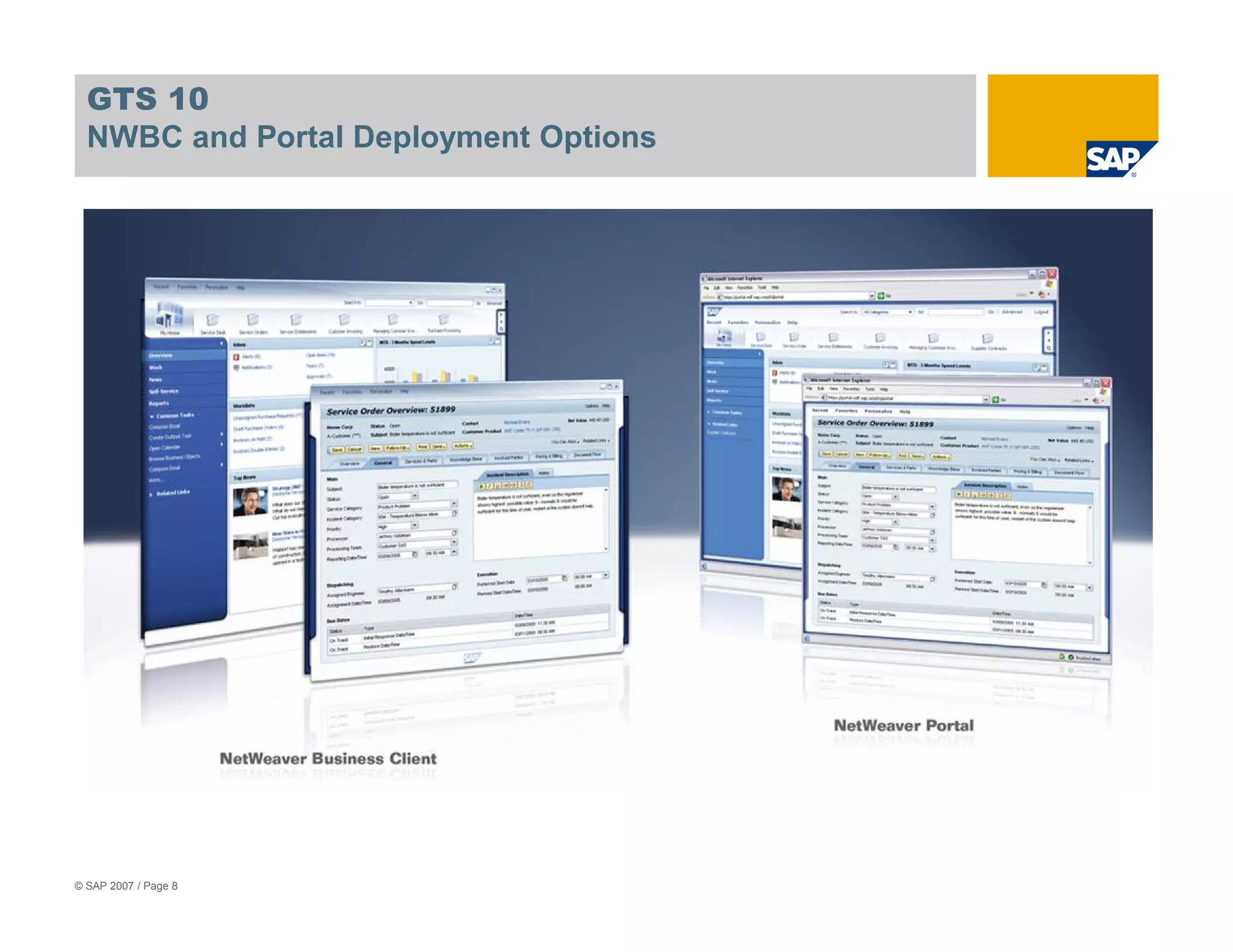
      Portal
      NWBC
      SAPGUI
      Browser


© 2010 SAP AG. All rights reserved. / Page 7
GTS 10
  NWBC and Portal Deployment Options


© SAP 2007 / Page 8
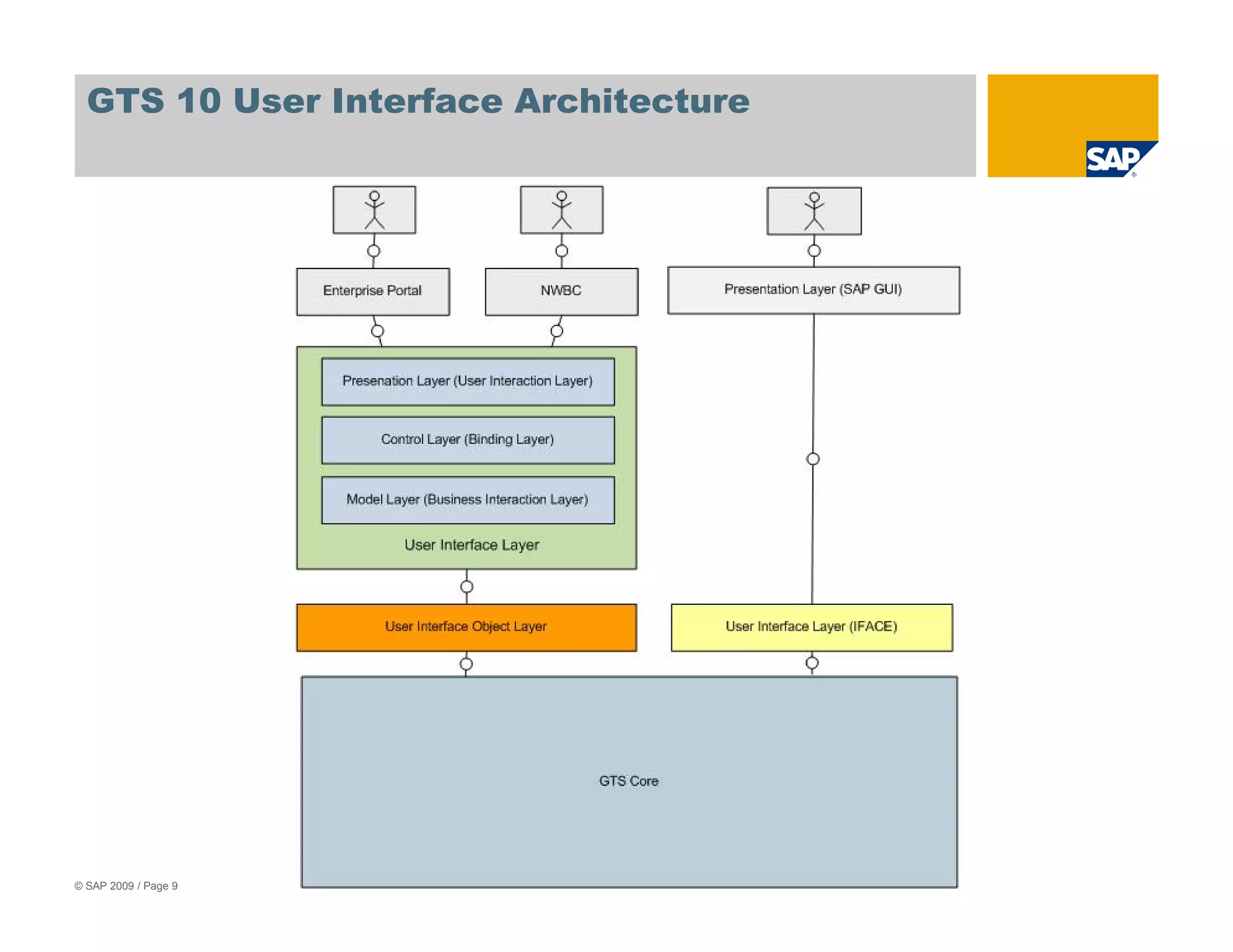
GTS 10 User Interface Architecture


© SAP 2009 / Page 9
Agenda


  1. GTS User Experience Project Overview

  2. GTS 10 User Experience Technology Overview
  3. User Centered Design at SAP

  4. GTS 10 User Research Findings

  5. The New GTS 10 User Experience

  6. Benefits for GTS 10 and Beyond


© 2010 SAP AG. All rights reserved. / Page 10
In a Nutshell, the 4 Principles of UCD


             Focus on real end-users

             Validate requirements & designs

             Design, prototype, & develop products iteratively

             Understand & design for a holistic user experience


© SAP 2009 / Page 11
Focus on Real End-Users


  Engage end users who use the product early and continuously – NOT just
   ”proxies” who buy the product or manage those who use it
              Proxies typically do not understand end users’ daily needs and pain points deeply enough
              to represent them

  Understand end users:
              Characteristics, e.g., backgrounds, skill levels, and responsibilities
              Goals
              Tasks and activities     Typical use cases
              Use of other software and artifacts needed to perform their jobs
              Organizational and social contexts
              Workflows within these contexts


© SAP 2009 / Page 12
Validate Requirements & Designs


  Observe, measure, and record end-users’ feedback and performance on tasks
   and activities throughout the product design and development lifecycle:

              Validate end-user profiles – Design for the right end-users!
              Validate end-user requirements – Build what end-users need!
              Validate step-by-step use cases – Provide a blueprint everyone at SAP can follow to
              insure that the right content is provided for the right end-users!
              Identify usability issues on low- to medium-fidelity prototypes and running applications –
              Fix issues early, before software is released!
              Benchmark the usability of “shipped” products with standardized usability tests – Measure
              how usable our products really are and strive to improve every release!


© SAP 2009 / Page 13
Design, Prototype, & Develop Products Iteratively


  Design, prototype, and develop product iteratively:
              Create and refine scope, quality, and fidelity continuously
              Start with light-weight paper mockups
              Incrementally build up functionality and fidelity in prototypes
              Incorporate feedback from usability evaluations on prototypes and iterative UI designs
              Incorporate feedback from formative and benchmark tests of running applications into
              future releases


© SAP 2009 / Page 14
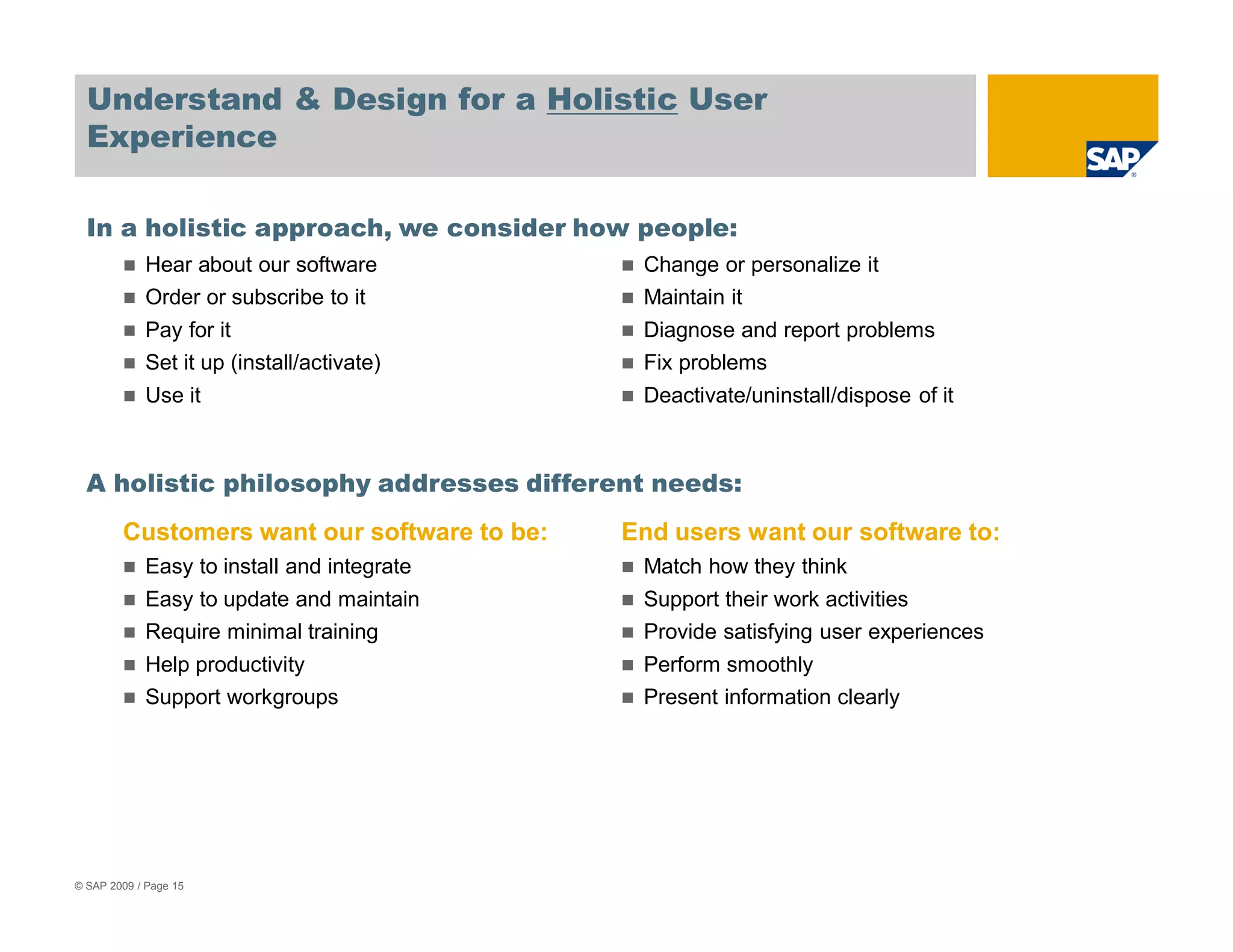
Understand & Design for a Holistic User
  Experience

  In a holistic approach, we consider how people:
            Hear about our software           Change or personalize it
            Order or subscribe to it          Maintain it
            Pay for it                        Diagnose and report problems
            Set it up (install/activate)      Fix problems
            Use it                            Deactivate/uninstall/dispose of it


  A holistic philosophy addresses different needs:
        Customers want our software to be:   End users want our software to:
            Easy to install and integrate     Match how they think
            Easy to update and maintain       Support their work activities
            Require minimal training          Provide satisfying user experiences
            Help productivity                 Perform smoothly
            Support workgroups                Present information clearly


© SAP 2009 / Page 15
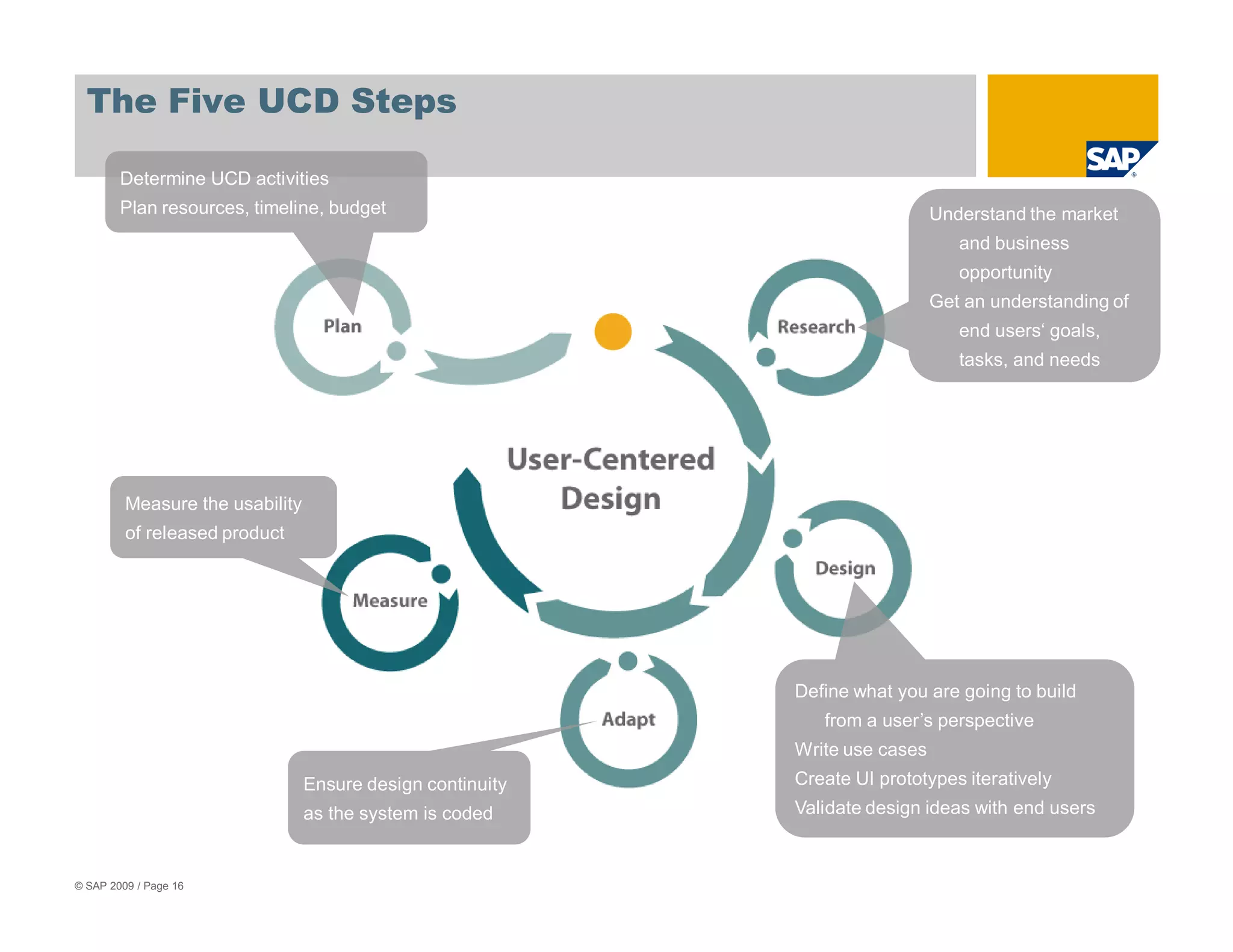
The Five UCD Steps

        Determine UCD activities
        Plan resources, timeline, budget                                      Understand the market
                                                                                 and business
                                                                                 opportunity
                                                                              Get an understanding of
                                                                                 end users‘ goals,
                                                                                 tasks, and needs


         Measure the usability
         of released product


                                                            Define what you are going to build
                                                               from a user’s perspective
                                                            Write use cases
                                 Ensure design continuity   Create UI prototypes iteratively
                                 as the system is coded     Validate design ideas with end users


© SAP 2009 / Page 16
Agenda


  1. GTS User Experience Project Overview

  2. GTS 10 User Experience Technology Overview
  3. User Centered Design at SAP

  4. GTS 10 User Research Findings

  5. The New GTS 10 User Experience

  6. Benefits for GTS 10 and Beyond


© 2010 SAP AG. All rights reserved. / Page 17
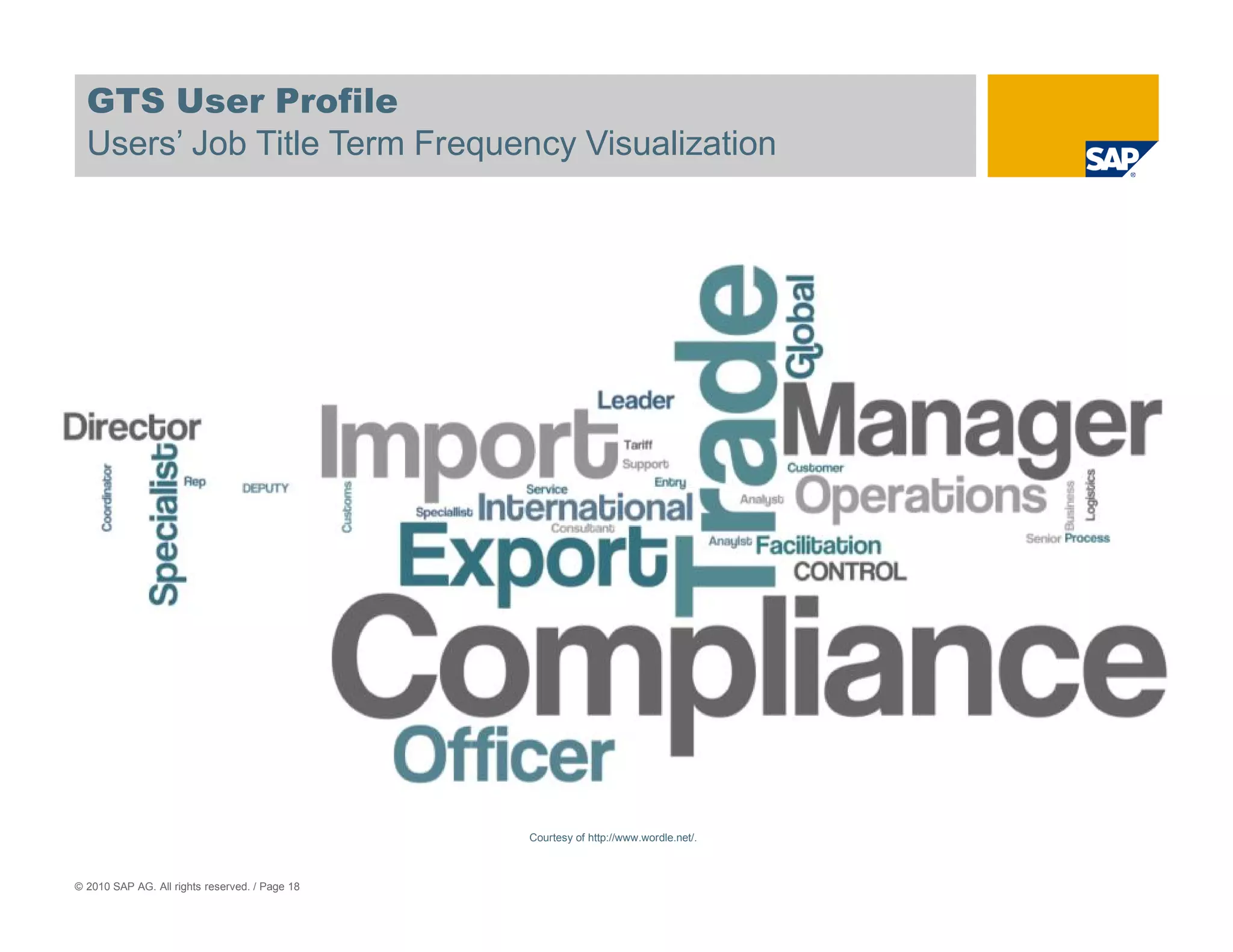
GTS User Profile
  Users’ Job Title Term Frequency Visualization


                                                Courtesy of http://www.wordle.net/.


© 2010 SAP AG. All rights reserved. / Page 18
User Research Findings


Findings

• Too        many clicks

•   Structure of Compliance Organizations

•   Escalation process

• Address               formatting

•   Evaluation of SPL blocks


Surprises

•   Most users are not power users

•   “No one trained me to use that”

•   SPL Master

© 2010 SAP AG. All rights reserved. / Page 19
Agenda


  1. GTS User Experience Project Overview

  2. GTS 10 User Experience Technology Overview
  3. User Centered Design at SAP

  4. GTS 10 User Research Findings

  5. The New GTS 10 User Experience
                        Information Architecture
                        SPL Master Example
                        SPL Exception Resolution
                        Management Dashboards

  6. Benefits for GTS 10 and Beyond

© 2010 SAP AG. All rights reserved. / Page 20
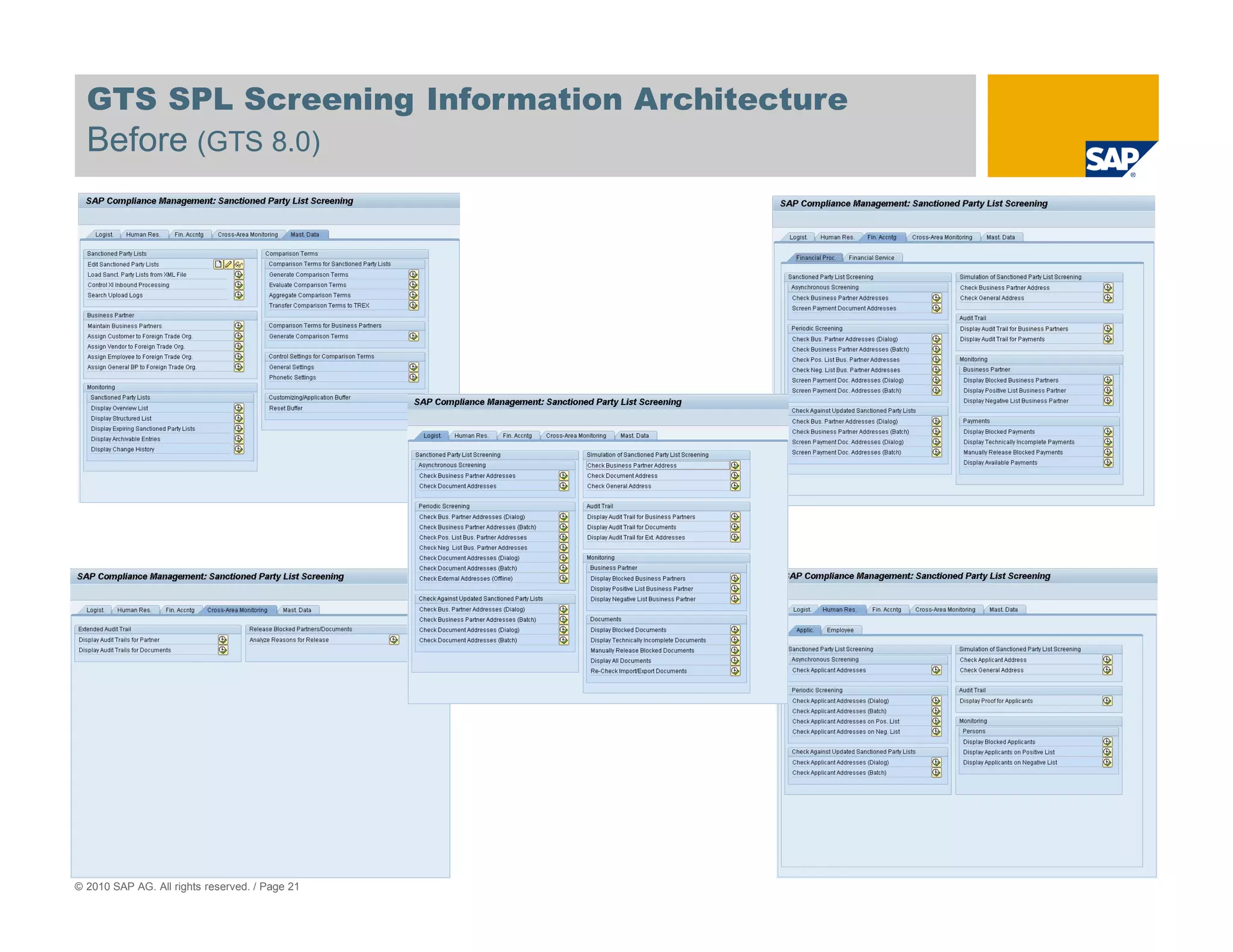
GTS SPL Screening Information Architecture
  Before (GTS 8.0)


© 2010 SAP AG. All rights reserved. / Page 21
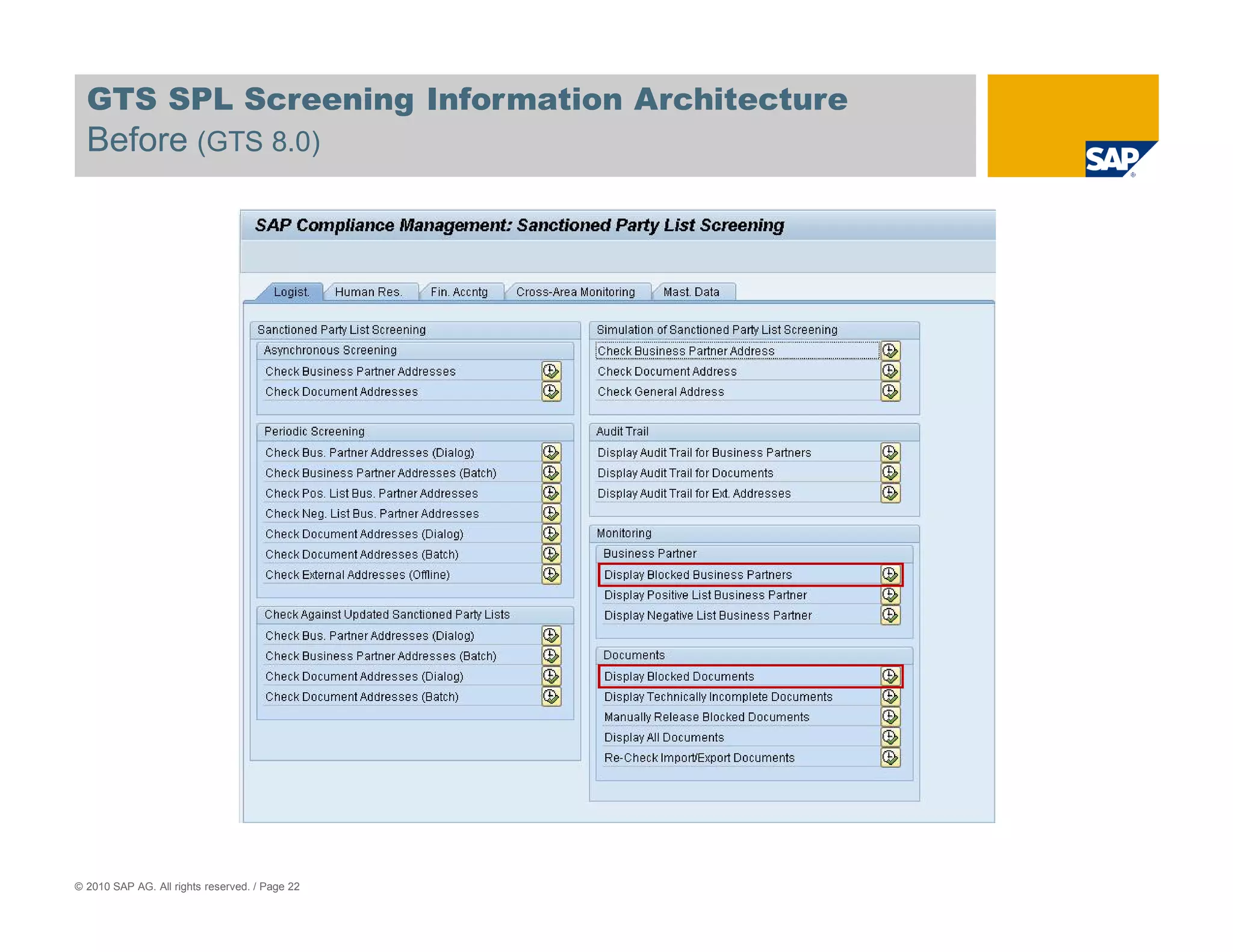
GTS SPL Screening Information Architecture
  Before (GTS 8.0)


© 2010 SAP AG. All rights reserved. / Page 22
GTS SPL Screening Information Architecture
  After (GTS 10)
                                                GTS 10 Global Trade Administration Service Map


© 2010 SAP AG. All rights reserved. / Page 23
GTS SPL Screening Information Architecture
  After (GTS 10)
                                                GTS 10 Trade Compliance Service Map


© 2010 SAP AG. All rights reserved. / Page 24
Agenda


  1. GTS User Experience Project Overview

  2. GTS 10 User Experience Technology Overview
  3. User Centered Design at SAP

  4. GTS 10 User Research Findings

  5. The New GTS 10 User Experience
                        Information Architecture
                        SPL Master Example
                        SPL Exception Resolution
                        Management Dashboards

  6. Benefits for GTS 10 and Beyond

© 2010 SAP AG. All rights reserved. / Page 25
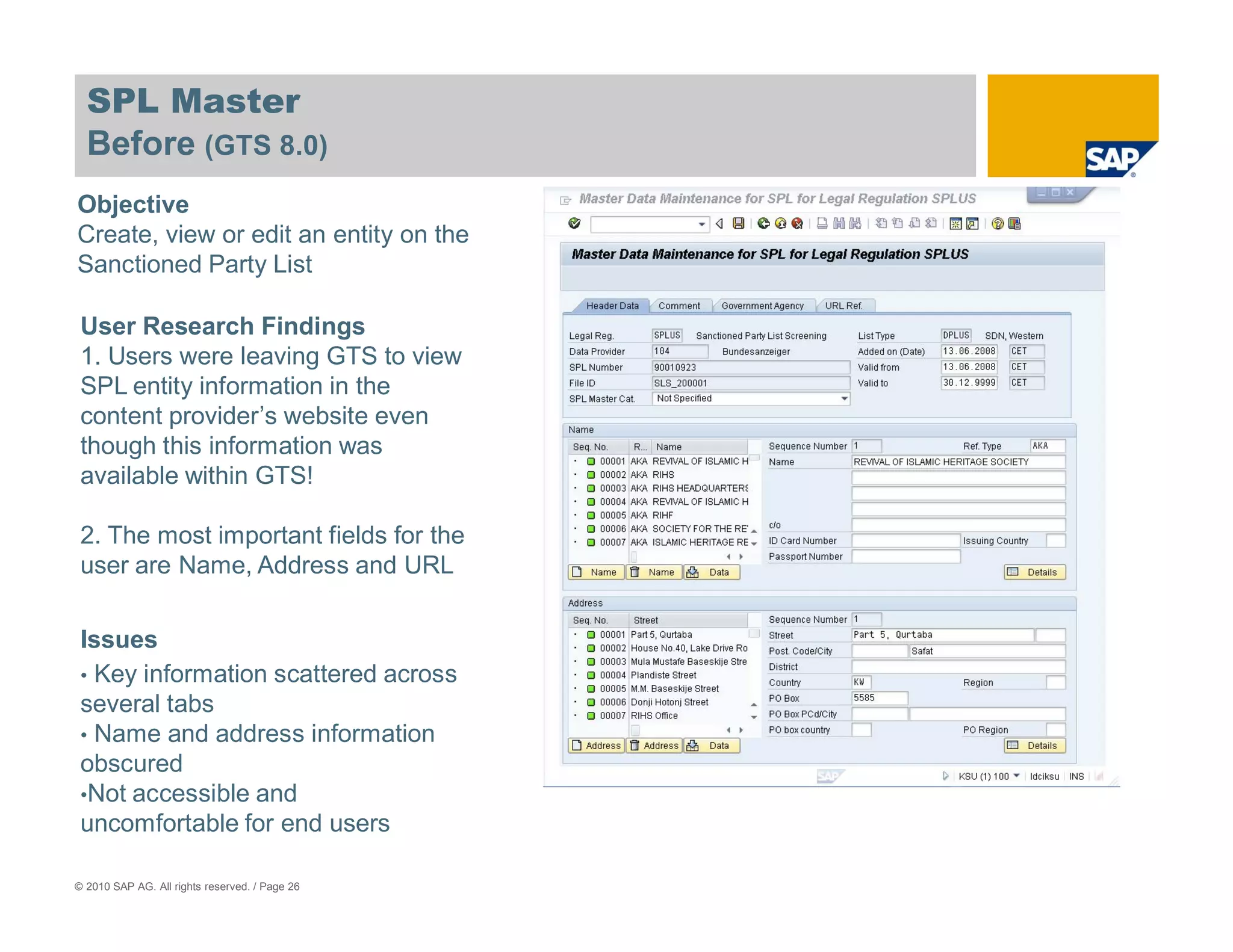
SPL Master
  Before (GTS 8.0)
Objective
Create, view or edit an entity on the
Sanctioned Party List

 User Research Findings
 1. Users were leaving GTS to view
 SPL entity information in the
 content provider’s website even
 though this information was
 available within GTS!

 2. The most important fields for the
 user are Name, Address and URL

 Issues
 • Key information scattered across
 several tabs
 • Name and address information
 obscured
 •Not accessible and
 uncomfortable for end users

© 2010 SAP AG. All rights reserved. / Page 26
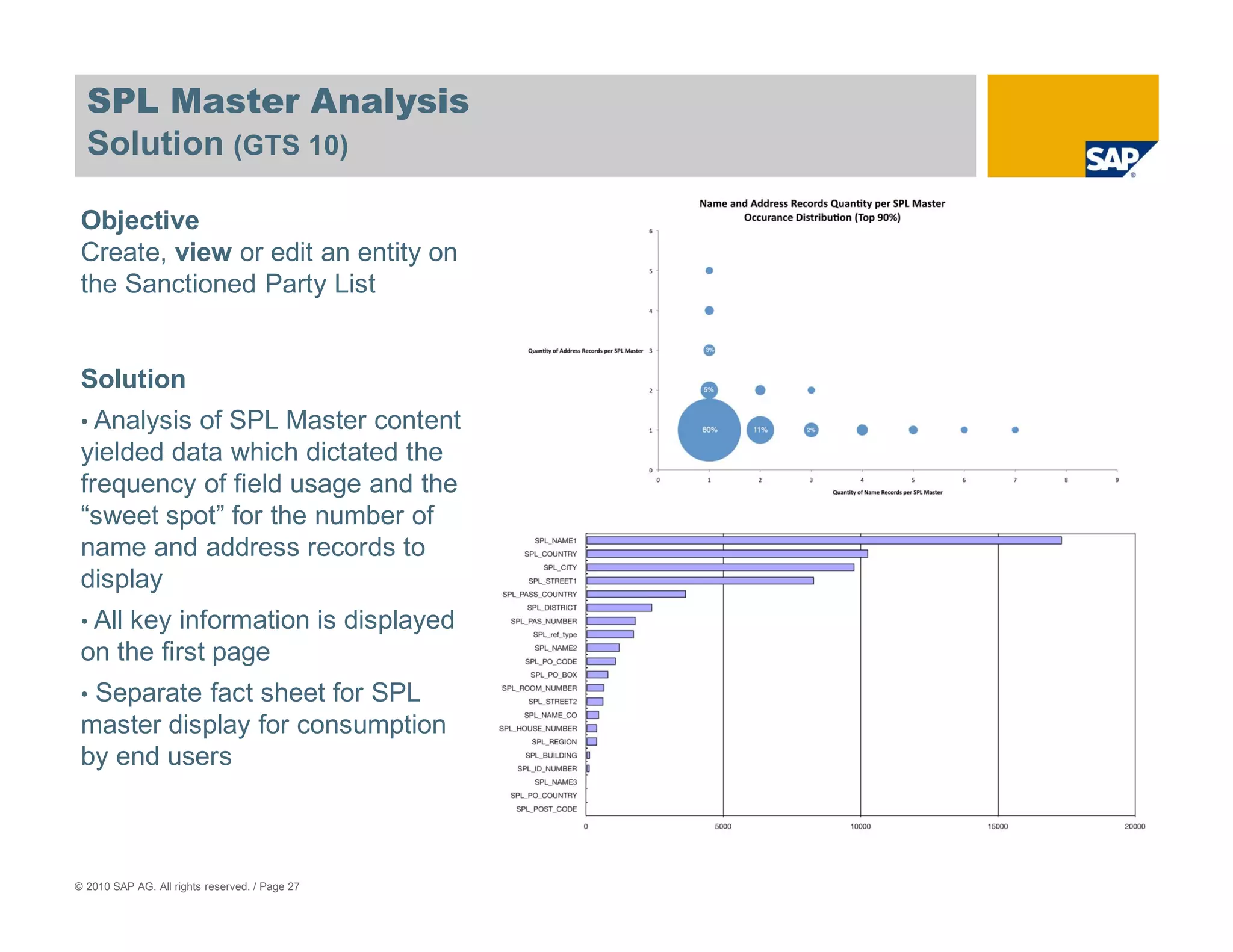
SPL Master Analysis
  Solution (GTS 10)

 Objective
 Create, view or edit an entity on
 the Sanctioned Party List


 Solution
 • Analysisof SPL Master content
 yielded data which dictated the
 frequency of field usage and the
 “sweet spot” for the number of
 name and address records to
 display
 • All
     key information is displayed
 on the first page
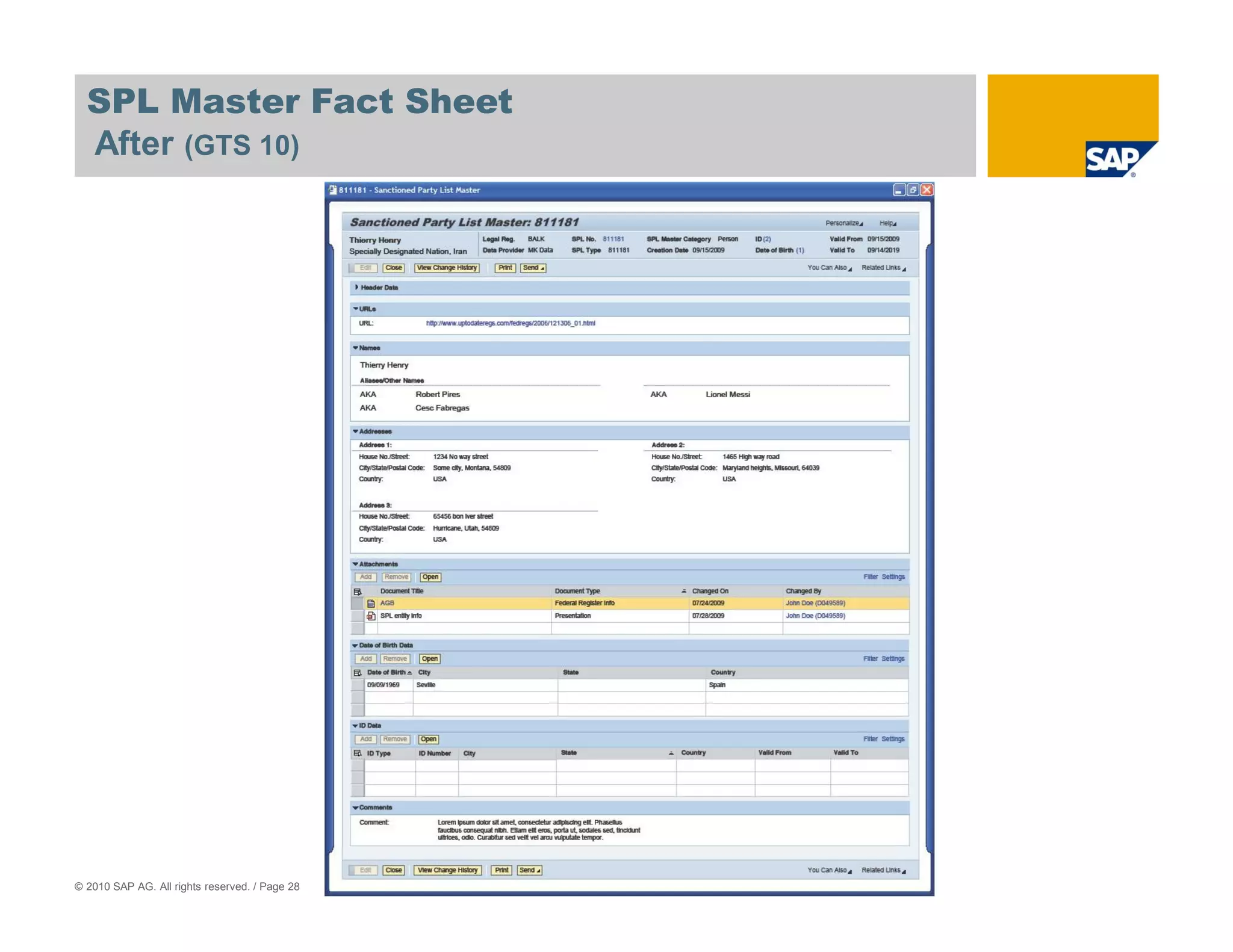
 •Separate fact sheet for SPL
 master display for consumption
 by end users


© 2010 SAP AG. All rights reserved. / Page 27
SPL Master Fact Sheet
  After (GTS 10)


© 2010 SAP AG. All rights reserved. / Page 28
Agenda


  1. GTS User Experience Project Overview

  2. GTS 10 User Experience Technology Overview
  3. User Centered Design at SAP

  4. GTS 10 User Research Findings

  5. The New GTS 10 User Experience
                        Information Architecture
                        SPL Master Example
                        SPL Exception Resolution
                        Management Dashboards

  6. Benefits for GTS 10 and Beyond

© 2010 SAP AG. All rights reserved. / Page 29
What is Sanctioned Party List Screening?


                             Is my Business Partner this bad guy?


                                                             =                       ?
                                                GTS Blocked Business Partner Resolution


© 2010 SAP AG. All rights reserved. / Page 30
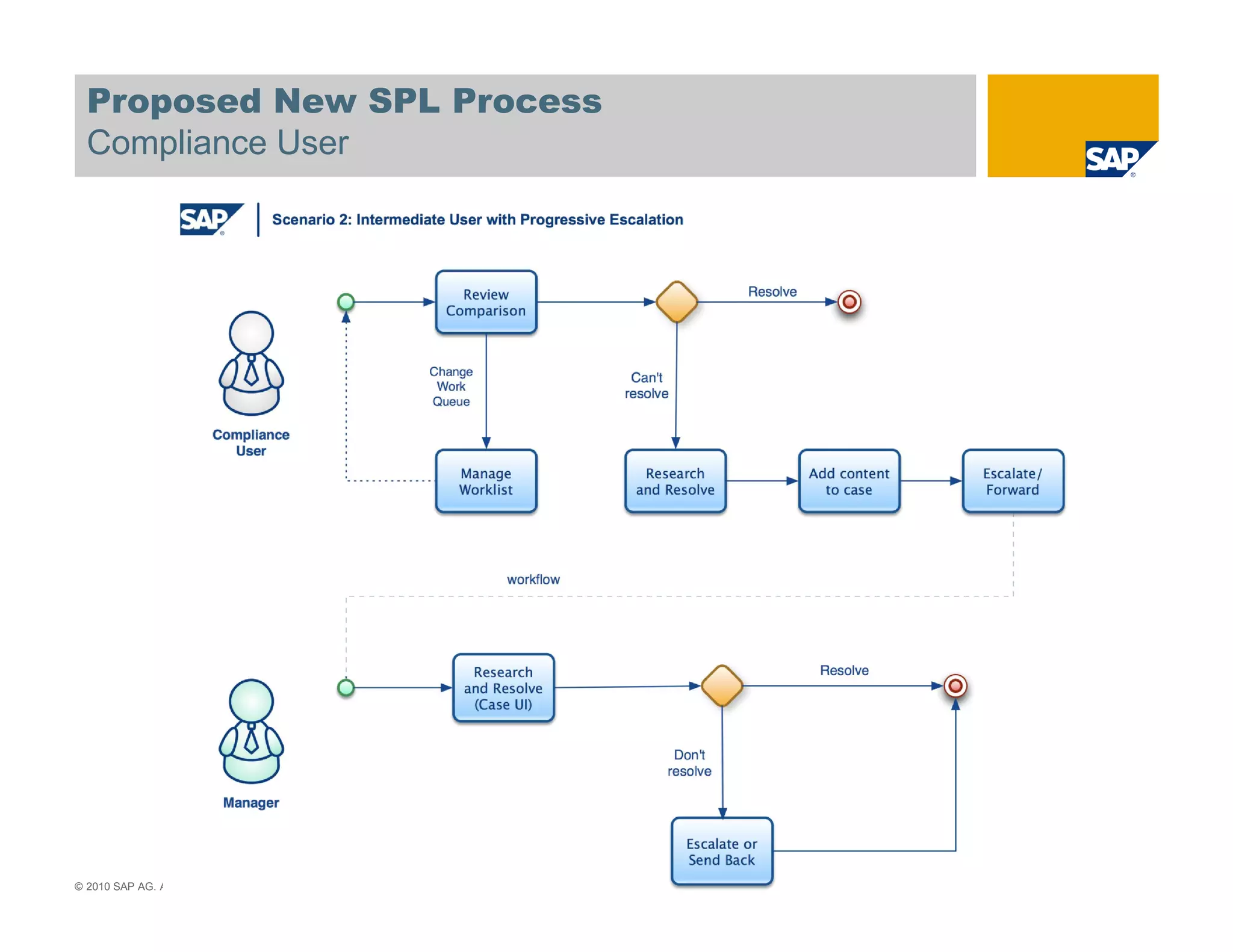
Proposed New SPL Process
  Compliance User


© 2010 SAP AG. All rights reserved. / Page 31
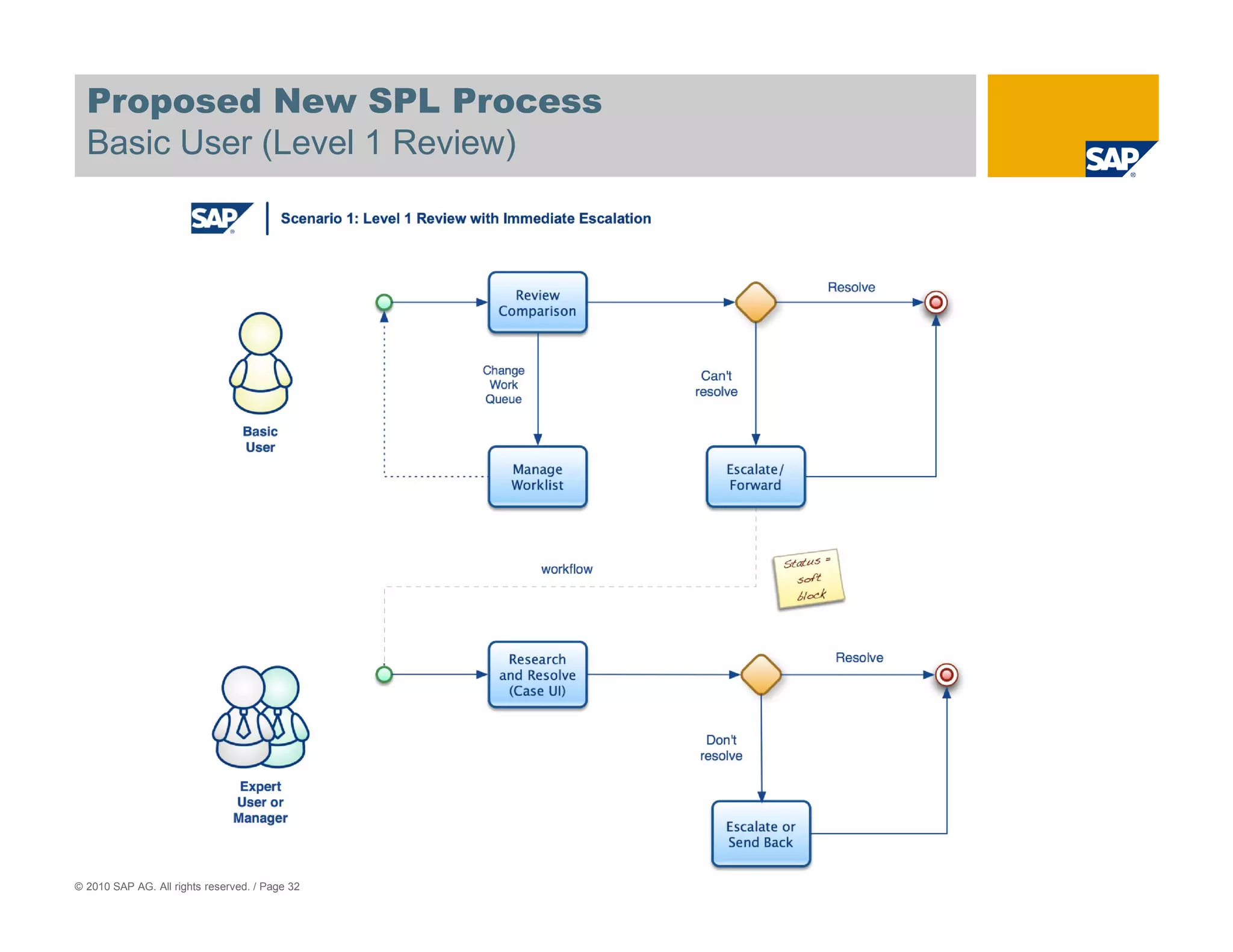
Proposed New SPL Process
  Basic User (Level 1 Review)


© 2010 SAP AG. All rights reserved. / Page 32
Product Demonstration


                   GTS 10 Sanctioned Party List Screening Exception
                                 Resolution Process


© 2010 SAP AG. All rights reserved. / Page 33
Agenda


  1. GTS User Experience Project Overview

  2. GTS 10 User Experience Technology Overview
  3. User Centered Design at SAP

  4. GTS 10 User Research Findings

  5. The New GTS 10 User Experience
                        Information Architecture
                        SPL Master Example
                        SPL Exception Resolution
                        Management Dashboards

  6. Benefits for GTS 10 and Beyond

© 2010 SAP AG. All rights reserved. / Page 34
Product Demonstration


                            GTS 10 Management Information Dashboards


© 2010 SAP AG. All rights reserved. / Page 35
Agenda


  1. GTS User Experience Project Overview

  2. GTS 10 User Experience Technology Overview
  3. User Centered Design at SAP

  4. GTS 10 User Research Findings

  5. The New GTS 10 User Experience

  6. Benefits for GTS 10 and Beyond


© 2010 SAP AG. All rights reserved. / Page 36
GTS User Experience Renovation
  A Call to Participate


  GTS 10
      Validation
      Testing

  Beyond
      Prioritization of UI Development
      User Research
      Validation
      Testing


© 2010 SAP AG. All rights reserved. / Page 37
GTS User Experience Renovation Benefits
  Summary of Benefits for GTS 10 and Beyond


  Usability
      Simplified information architecture
      Increased productivity
      Internal and external collaboration
      Escalation processes with workflow

  Even More Compliance
      Case Management 2.0
      More usable audit trail reports


  Lower Cost of Ownership
      Multiple deployment options
      Decreased training costs
      Easier to enhance


© 2010 SAP AG. All rights reserved. / Page 38
Thank you!


© 2010 SAP AG. All rights reserved. / Page 39
Contact
    Ben Ceaser

    SAP Labs LLC
    3408 Hillview Ave
    Palo Alto, CA 94303

    ben.ceaser@sap.com
    www.sap.com


© 2010 SAP AG. All rights reserved. / Page 40
© 2010 SAP AG. All Rights Reserved

  No part of this publication may be reproduced or transmitted in any form or for any purpose without the express permission of SAP AG. The information contained herein
  may be changed without prior notice.
  Some software products marketed by SAP AG and its distributors contain proprietary software components of other software vendors.
  Microsoft, Windows, Excel, Outlook, and PowerPoint are registered trademarks of Microsoft Corporation.
  IBM, DB2, DB2 Universal Database, System i, System i5, System p, System p5, System x, System z, System z10, System z9, z10, z9, iSeries, pSeries, xSeries, zSeries,
  eServer, z/VM, z/OS, i5/OS, S/390, OS/390, OS/400, AS/400, S/390 Parallel Enterprise Server, PowerVM, Power Architecture, POWER6+, POWER6, POWER5+,
  POWER5, POWER, OpenPower, PowerPC, BatchPipes, BladeCenter, System Storage, GPFS, HACMP, RETAIN, DB2 Connect, RACF, Redbooks, OS/2, Parallel Sysplex,
  MVS/ESA, AIX, Intelligent Miner, WebSphere, Netfinity, Tivoli and Informix are trademarks or registered trademarks of IBM Corporation.
  Linux is the registered trademark of Linus Torvalds in the U.S. and other countries.
  Adobe, the Adobe logo, Acrobat, PostScript, and Reader are either trademarks or registered trademarks of Adobe Systems Incorporated in the United States and/or other
  countries.
  Oracle is a registered trademark of Oracle Corporation.
  UNIX, X/Open, OSF/1, and Motif are registered trademarks of the Open Group.
  Citrix, ICA, Program Neighborhood, MetaFrame, WinFrame, VideoFrame, and MultiWin are trademarks or registered trademarks of Citrix Systems, Inc.
  HTML, XML, XHTML and W3C are trademarks or registered trademarks of W3C®, World Wide Web Consortium, Massachusetts Institute of Technology.
  Java is a registered trademark of Sun Microsystems, Inc.
  JavaScript is a registered trademark of Sun Microsystems, Inc., used under license for technology invented and implemented by Netscape.
  SAP, R/3, SAP NetWeaver, Duet, PartnerEdge, ByDesign, Clear Enterprise, SAP BusinessObjects Explorer and other SAP products and services mentioned herein as well
  as their respective logos are trademarks or registered trademarks of SAP AG in Germany and other countries.
  Business Objects and the Business Objects logo, BusinessObjects, Crystal Reports, Crystal Decisions, Web Intelligence, Xcelsius, and other Business Objects products and
  services mentioned herein as well as their respective logos are trademarks or registered trademarks of SAP France in the United States and in other countries.
  All other product and service names mentioned are the trademarks of their respective companies. Data contained in this document serves informational purposes only.
  National product specifications may vary.
  The information in this document is proprietary to SAP. No part of this document may be reproduced, copied, or transmitted in any form or for any purpose without the
  express prior written permission of SAP AG.
  This document is a preliminary version and not subject to your license agreement or any other agreement with SAP. This document contains only intended strategies,
  developments, and functionalities of the SAP® product and is not intended to be binding upon SAP to any particular course of business, product strategy, and/or
  development. Please note that this document is subject to change and may be changed by SAP at any time without notice.
  SAP assumes no responsibility for errors or omissions in this document. SAP does not warrant the accuracy or completeness of the information, text, graphics, links, or other
  items contained within this material. This document is provided without a warranty of any kind, either express or implied, including but not limited to the implied warranties of
  merchantability, fitness for a particular purpose, or non-infringement.
  SAP shall have no liability for damages of any kind including without limitation direct, special, indirect, or consequential damages that may result from the use of these
  materials. This limitation shall not apply in cases of intent or gross negligence.
  The statutory liability for personal injury and defective products is not affected. SAP has no control over the information that you may access through the use of hot links
  contained in these materials and does not endorse your use of third-party Web pages nor provide any warranty whatsoever relating to third-party Web pages.
© 2010 SAP AG. All rights reserved. / Page 41

Gts10 (1)

  • 1.
    SAP's New GlobalTrade Services User Experience 2010 and Beyond Ben Ceaser Director, GRC Solution Management SAP Labs LLC May 2010 Session 1306
  • 2.
    Safe Harbor Statement This document is intended to outline future product direction, and is not a commitment by SAP to deliver any given code or functionality. Any statements contained in this document that are not historical facts are forward-looking statements. SAP undertakes no obligation to publicly update or revise any forward-looking statements. All forward-looking statements are subject to various risks and uncertainties that could cause actual results to differ materially from expectations. The timing or release of any product described in this document remains at the sole discretion of SAP. This document is for informational purposes and may not be incorporated into a contract. Readers are cautioned not to place undue reliance on these forward-looking statements, and they should not be relied upon in making purchasing decisions. © 2010 SAP AG. All rights reserved. / Page 2
  • 3.
    Agenda 1.GTS User Experience Project Overview 2. GTS 10 User Experience Technology Overview 3. User Centered Design at SAP 4. GTS 10 User Research Findings 5. The New GTS 10 User Experience 6. Benefits for GTS 10 and Beyond © 2010 SAP AG. All rights reserved. / Page 3
  • 4.
    GTS 10 andBeyond User Experience Project Objectives Usability Productivity End User satisfaction Harmonization GRC 2010 Suite Business Suite Total Cost of Ownership Cheaper to extend UI Easier to personalize Collaboration © 2010 SAP AG. All rights reserved. / Page 4
  • 5.
    GTS 10 UserExperience Project Team SAP Product Team User Solution Experience Management Customer GTS Advisory Developement Office Key Influencers Partner SAP GTS Customers Ecosystem Consulting © 2010 SAP AG. All rights reserved. / Page 5
  • 6.
    Agenda 1.GTS User Experience Project Overview 2. GTS 10 User Experience Technology Overview 3. User Centered Design at SAP 4. GTS 10 User Research Findings 5. The New GTS 10 User Experience 6. Benefits for GTS 10 and Beyond © 2010 SAP AG. All rights reserved. / Page 6
  • 7.
    GTS 10 Technology Facts and Figures Platform NetWeaver 7.02 User Interface Technology New UI – WebDynpro ABAP Classic UI - Dynpro Prerequisites GTS 10+ Deployment Options Portal NWBC SAPGUI Browser © 2010 SAP AG. All rights reserved. / Page 7
  • 8.
    GTS 10 NWBC and Portal Deployment Options © SAP 2007 / Page 8
  • 9.
    GTS 10 UserInterface Architecture © SAP 2009 / Page 9
  • 10.
    Agenda 1.GTS User Experience Project Overview 2. GTS 10 User Experience Technology Overview 3. User Centered Design at SAP 4. GTS 10 User Research Findings 5. The New GTS 10 User Experience 6. Benefits for GTS 10 and Beyond © 2010 SAP AG. All rights reserved. / Page 10
  • 11.
    In a Nutshell,the 4 Principles of UCD Focus on real end-users Validate requirements & designs Design, prototype, & develop products iteratively Understand & design for a holistic user experience © SAP 2009 / Page 11
  • 12.
    Focus on RealEnd-Users Engage end users who use the product early and continuously – NOT just ”proxies” who buy the product or manage those who use it Proxies typically do not understand end users’ daily needs and pain points deeply enough to represent them Understand end users: Characteristics, e.g., backgrounds, skill levels, and responsibilities Goals Tasks and activities Typical use cases Use of other software and artifacts needed to perform their jobs Organizational and social contexts Workflows within these contexts © SAP 2009 / Page 12
  • 13.
    Validate Requirements &Designs Observe, measure, and record end-users’ feedback and performance on tasks and activities throughout the product design and development lifecycle: Validate end-user profiles – Design for the right end-users! Validate end-user requirements – Build what end-users need! Validate step-by-step use cases – Provide a blueprint everyone at SAP can follow to insure that the right content is provided for the right end-users! Identify usability issues on low- to medium-fidelity prototypes and running applications – Fix issues early, before software is released! Benchmark the usability of “shipped” products with standardized usability tests – Measure how usable our products really are and strive to improve every release! © SAP 2009 / Page 13
  • 14.
    Design, Prototype, &Develop Products Iteratively Design, prototype, and develop product iteratively: Create and refine scope, quality, and fidelity continuously Start with light-weight paper mockups Incrementally build up functionality and fidelity in prototypes Incorporate feedback from usability evaluations on prototypes and iterative UI designs Incorporate feedback from formative and benchmark tests of running applications into future releases © SAP 2009 / Page 14
  • 15.
    Understand & Designfor a Holistic User Experience In a holistic approach, we consider how people: Hear about our software Change or personalize it Order or subscribe to it Maintain it Pay for it Diagnose and report problems Set it up (install/activate) Fix problems Use it Deactivate/uninstall/dispose of it A holistic philosophy addresses different needs: Customers want our software to be: End users want our software to: Easy to install and integrate Match how they think Easy to update and maintain Support their work activities Require minimal training Provide satisfying user experiences Help productivity Perform smoothly Support workgroups Present information clearly © SAP 2009 / Page 15
  • 16.
    The Five UCDSteps Determine UCD activities Plan resources, timeline, budget Understand the market and business opportunity Get an understanding of end users‘ goals, tasks, and needs Measure the usability of released product Define what you are going to build from a user’s perspective Write use cases Ensure design continuity Create UI prototypes iteratively as the system is coded Validate design ideas with end users © SAP 2009 / Page 16
  • 17.
    Agenda 1.GTS User Experience Project Overview 2. GTS 10 User Experience Technology Overview 3. User Centered Design at SAP 4. GTS 10 User Research Findings 5. The New GTS 10 User Experience 6. Benefits for GTS 10 and Beyond © 2010 SAP AG. All rights reserved. / Page 17
  • 18.
    GTS User Profile Users’ Job Title Term Frequency Visualization Courtesy of http://www.wordle.net/. © 2010 SAP AG. All rights reserved. / Page 18
  • 19.
    User Research Findings Findings •Too many clicks • Structure of Compliance Organizations • Escalation process • Address formatting • Evaluation of SPL blocks Surprises • Most users are not power users • “No one trained me to use that” • SPL Master © 2010 SAP AG. All rights reserved. / Page 19
  • 20.
    Agenda 1.GTS User Experience Project Overview 2. GTS 10 User Experience Technology Overview 3. User Centered Design at SAP 4. GTS 10 User Research Findings 5. The New GTS 10 User Experience Information Architecture SPL Master Example SPL Exception Resolution Management Dashboards 6. Benefits for GTS 10 and Beyond © 2010 SAP AG. All rights reserved. / Page 20
  • 21.
    GTS SPL ScreeningInformation Architecture Before (GTS 8.0) © 2010 SAP AG. All rights reserved. / Page 21
  • 22.
    GTS SPL ScreeningInformation Architecture Before (GTS 8.0) © 2010 SAP AG. All rights reserved. / Page 22
  • 23.
    GTS SPL ScreeningInformation Architecture After (GTS 10) GTS 10 Global Trade Administration Service Map © 2010 SAP AG. All rights reserved. / Page 23
  • 24.
    GTS SPL ScreeningInformation Architecture After (GTS 10) GTS 10 Trade Compliance Service Map © 2010 SAP AG. All rights reserved. / Page 24
  • 25.
    Agenda 1.GTS User Experience Project Overview 2. GTS 10 User Experience Technology Overview 3. User Centered Design at SAP 4. GTS 10 User Research Findings 5. The New GTS 10 User Experience Information Architecture SPL Master Example SPL Exception Resolution Management Dashboards 6. Benefits for GTS 10 and Beyond © 2010 SAP AG. All rights reserved. / Page 25
  • 26.
    SPL Master Before (GTS 8.0) Objective Create, view or edit an entity on the Sanctioned Party List User Research Findings 1. Users were leaving GTS to view SPL entity information in the content provider’s website even though this information was available within GTS! 2. The most important fields for the user are Name, Address and URL Issues • Key information scattered across several tabs • Name and address information obscured •Not accessible and uncomfortable for end users © 2010 SAP AG. All rights reserved. / Page 26
  • 27.
    SPL Master Analysis Solution (GTS 10) Objective Create, view or edit an entity on the Sanctioned Party List Solution • Analysisof SPL Master content yielded data which dictated the frequency of field usage and the “sweet spot” for the number of name and address records to display • All key information is displayed on the first page •Separate fact sheet for SPL master display for consumption by end users © 2010 SAP AG. All rights reserved. / Page 27
  • 28.
    SPL Master FactSheet After (GTS 10) © 2010 SAP AG. All rights reserved. / Page 28
  • 29.
    Agenda 1.GTS User Experience Project Overview 2. GTS 10 User Experience Technology Overview 3. User Centered Design at SAP 4. GTS 10 User Research Findings 5. The New GTS 10 User Experience Information Architecture SPL Master Example SPL Exception Resolution Management Dashboards 6. Benefits for GTS 10 and Beyond © 2010 SAP AG. All rights reserved. / Page 29
  • 30.
    What is SanctionedParty List Screening? Is my Business Partner this bad guy? = ? GTS Blocked Business Partner Resolution © 2010 SAP AG. All rights reserved. / Page 30
  • 31.
    Proposed New SPLProcess Compliance User © 2010 SAP AG. All rights reserved. / Page 31
  • 32.
    Proposed New SPLProcess Basic User (Level 1 Review) © 2010 SAP AG. All rights reserved. / Page 32
  • 33.
    Product Demonstration GTS 10 Sanctioned Party List Screening Exception Resolution Process © 2010 SAP AG. All rights reserved. / Page 33
  • 34.
    Agenda 1.GTS User Experience Project Overview 2. GTS 10 User Experience Technology Overview 3. User Centered Design at SAP 4. GTS 10 User Research Findings 5. The New GTS 10 User Experience Information Architecture SPL Master Example SPL Exception Resolution Management Dashboards 6. Benefits for GTS 10 and Beyond © 2010 SAP AG. All rights reserved. / Page 34
  • 35.
    Product Demonstration GTS 10 Management Information Dashboards © 2010 SAP AG. All rights reserved. / Page 35
  • 36.
    Agenda 1.GTS User Experience Project Overview 2. GTS 10 User Experience Technology Overview 3. User Centered Design at SAP 4. GTS 10 User Research Findings 5. The New GTS 10 User Experience 6. Benefits for GTS 10 and Beyond © 2010 SAP AG. All rights reserved. / Page 36
  • 37.
    GTS User ExperienceRenovation A Call to Participate GTS 10 Validation Testing Beyond Prioritization of UI Development User Research Validation Testing © 2010 SAP AG. All rights reserved. / Page 37
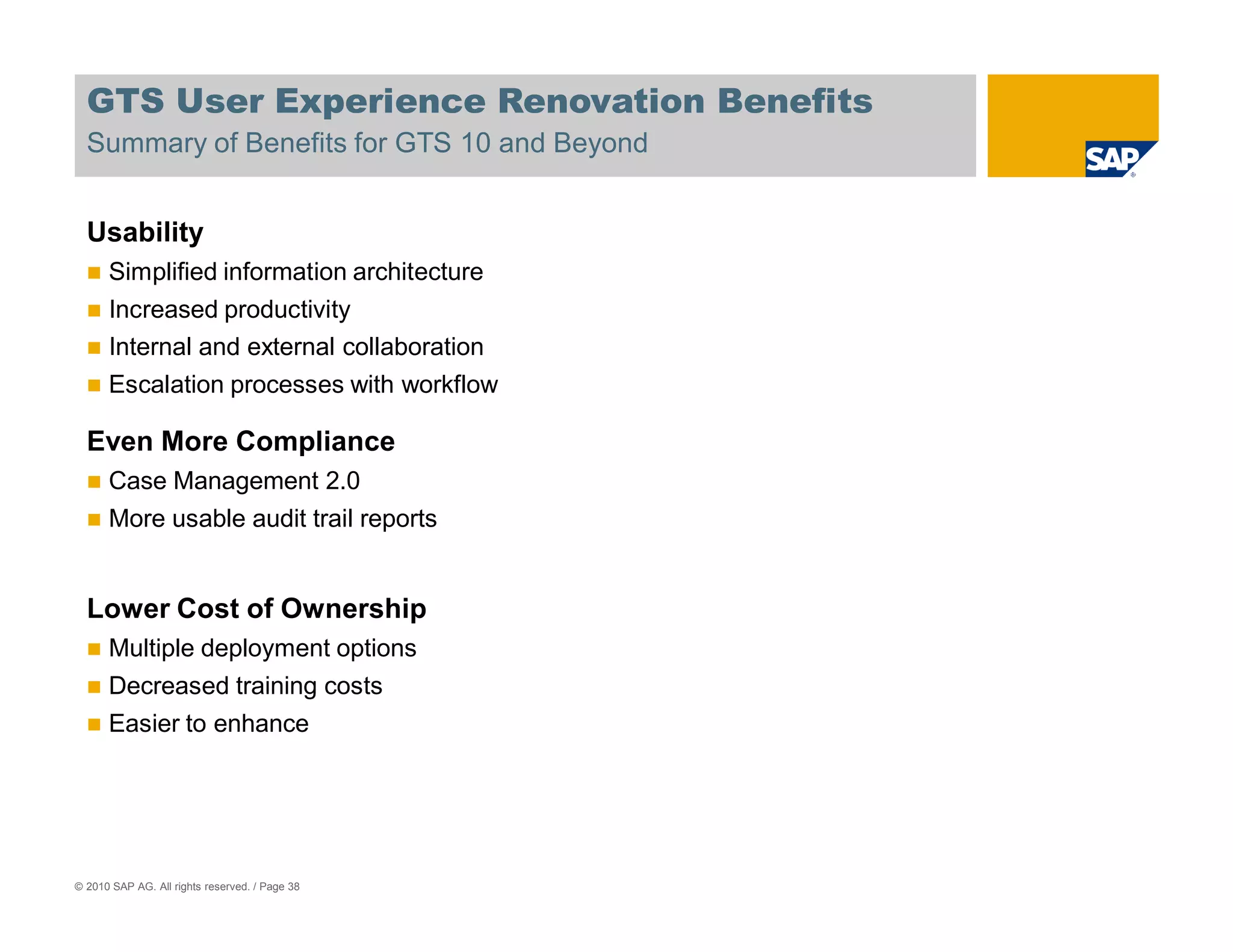
  • 38.
    GTS User ExperienceRenovation Benefits Summary of Benefits for GTS 10 and Beyond Usability Simplified information architecture Increased productivity Internal and external collaboration Escalation processes with workflow Even More Compliance Case Management 2.0 More usable audit trail reports Lower Cost of Ownership Multiple deployment options Decreased training costs Easier to enhance © 2010 SAP AG. All rights reserved. / Page 38
  • 39.
    Thank you! © 2010SAP AG. All rights reserved. / Page 39
  • 40.
    Contact Ben Ceaser SAP Labs LLC 3408 Hillview Ave Palo Alto, CA 94303 ben.ceaser@sap.com www.sap.com © 2010 SAP AG. All rights reserved. / Page 40
  • 41.
    © 2010 SAPAG. All Rights Reserved No part of this publication may be reproduced or transmitted in any form or for any purpose without the express permission of SAP AG. The information contained herein may be changed without prior notice. Some software products marketed by SAP AG and its distributors contain proprietary software components of other software vendors. Microsoft, Windows, Excel, Outlook, and PowerPoint are registered trademarks of Microsoft Corporation. IBM, DB2, DB2 Universal Database, System i, System i5, System p, System p5, System x, System z, System z10, System z9, z10, z9, iSeries, pSeries, xSeries, zSeries, eServer, z/VM, z/OS, i5/OS, S/390, OS/390, OS/400, AS/400, S/390 Parallel Enterprise Server, PowerVM, Power Architecture, POWER6+, POWER6, POWER5+, POWER5, POWER, OpenPower, PowerPC, BatchPipes, BladeCenter, System Storage, GPFS, HACMP, RETAIN, DB2 Connect, RACF, Redbooks, OS/2, Parallel Sysplex, MVS/ESA, AIX, Intelligent Miner, WebSphere, Netfinity, Tivoli and Informix are trademarks or registered trademarks of IBM Corporation. Linux is the registered trademark of Linus Torvalds in the U.S. and other countries. Adobe, the Adobe logo, Acrobat, PostScript, and Reader are either trademarks or registered trademarks of Adobe Systems Incorporated in the United States and/or other countries. Oracle is a registered trademark of Oracle Corporation. UNIX, X/Open, OSF/1, and Motif are registered trademarks of the Open Group. Citrix, ICA, Program Neighborhood, MetaFrame, WinFrame, VideoFrame, and MultiWin are trademarks or registered trademarks of Citrix Systems, Inc. HTML, XML, XHTML and W3C are trademarks or registered trademarks of W3C®, World Wide Web Consortium, Massachusetts Institute of Technology. Java is a registered trademark of Sun Microsystems, Inc. JavaScript is a registered trademark of Sun Microsystems, Inc., used under license for technology invented and implemented by Netscape. SAP, R/3, SAP NetWeaver, Duet, PartnerEdge, ByDesign, Clear Enterprise, SAP BusinessObjects Explorer and other SAP products and services mentioned herein as well as their respective logos are trademarks or registered trademarks of SAP AG in Germany and other countries. Business Objects and the Business Objects logo, BusinessObjects, Crystal Reports, Crystal Decisions, Web Intelligence, Xcelsius, and other Business Objects products and services mentioned herein as well as their respective logos are trademarks or registered trademarks of SAP France in the United States and in other countries. All other product and service names mentioned are the trademarks of their respective companies. Data contained in this document serves informational purposes only. National product specifications may vary. The information in this document is proprietary to SAP. No part of this document may be reproduced, copied, or transmitted in any form or for any purpose without the express prior written permission of SAP AG. This document is a preliminary version and not subject to your license agreement or any other agreement with SAP. This document contains only intended strategies, developments, and functionalities of the SAP® product and is not intended to be binding upon SAP to any particular course of business, product strategy, and/or development. Please note that this document is subject to change and may be changed by SAP at any time without notice. SAP assumes no responsibility for errors or omissions in this document. SAP does not warrant the accuracy or completeness of the information, text, graphics, links, or other items contained within this material. This document is provided without a warranty of any kind, either express or implied, including but not limited to the implied warranties of merchantability, fitness for a particular purpose, or non-infringement. SAP shall have no liability for damages of any kind including without limitation direct, special, indirect, or consequential damages that may result from the use of these materials. This limitation shall not apply in cases of intent or gross negligence. The statutory liability for personal injury and defective products is not affected. SAP has no control over the information that you may access through the use of hot links contained in these materials and does not endorse your use of third-party Web pages nor provide any warranty whatsoever relating to third-party Web pages. © 2010 SAP AG. All rights reserved. / Page 41