Groovy & Eclipse
About the Speaker Java developer since the beginning True believer in Open Source Groovy committer since August 2007 Eclipse user since 2004 Project lead of the Griffon framework
Agenda What is Groovy From Java to Groovy Getting Groovy on Eclipse Feature List I (close to home) Feature List II (explore the neighborhood) Feature List III (space out!) Related Projects Resources
What is Groovy?
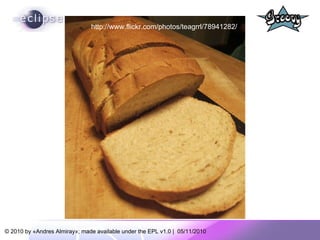
http://www.flickr.com/photos/teagrrl/78941282/
What is Groovy? Groovy is an agile and  dynamic  language for the Java Virtual Machine  Builds upon the strengths of Java but has additional power features inspired by languages like Python, Ruby & Smalltalk  Makes modern programming features available to Java developers with  almost-zero learning curve Supports  Domain Specific Languages  and other compact syntax so your code becomes easy to read and maintain
What is Groovy? Increases developer productivity by  reducing scaffolding  code when developing web, GUI, database or console applications  Simplifies testing  by supporting unit testing and mocking out-of-the-box  Seamlessly integrates  with all existing Java objects and libraries  Compiles straight to Java byte code so you can  use it anywhere you can use Java
From Java to Groovy
HelloWorld in Java public class  HelloWorld { String name; public   void  setName(String name) { this.name = name; } public  String getName(){ return name; } public  String greet() { return  “Hello “ + name; } public   static void  main(String args[]){ HelloWorld helloWorld =  new  HelloWorld() helloWorld.setName( “Groovy” ) System.err.println( helloWorld.greet() ) } }
HelloWorld in Groovy public class  HelloWorld { String name; public   void  setName(String name) { this.name = name; } public  String getName(){ return name; } public  String greet() { return  “Hello “ + name; } public   static void  main(String args[]){ HelloWorld helloWorld =  new  HelloWorld() helloWorld.setName( “Groovy” ) System.err.println( helloWorld.greet() ) } }
Step1: Let’s get rid of the noise Everything in Groovy is public unless defined otherwise. Semicolons at end-of-line are optional.
Step 1 - Results class  HelloWorld { String name void  setName(String name) { this.name = name } String getName(){ return name } String greet() { return  "Hello " + name } static void  main(String args[]){ HelloWorld helloWorld =  new  HelloWorld() helloWorld.setName( "Groovy" ) System.err.println( helloWorld.greet() ) } }
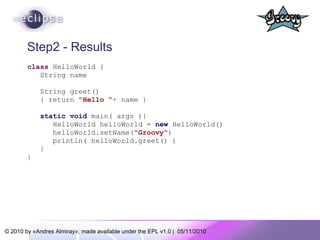
Step 2: let’s get rid of boilerplate Programming a JavaBean requires a pair of get/set for each property, we all know that. Let Groovy write those for you! Main( ) always requires String[ ] as parameter. Make that method definition shorter with optional types! Printing to the console is so common, can we get a shorter version too?
Step2 - Results class  HelloWorld { String name String greet() { return  "Hello " + name } static void  main( args ){ HelloWorld helloWorld =  new  HelloWorld() helloWorld.setName( "Groovy" ) println( helloWorld.greet() ) } }
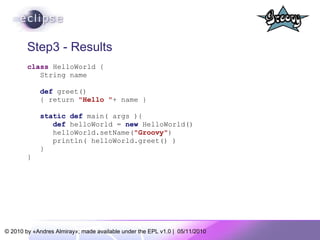
Step 3: Introduce dynamic types Use the  def  keyword when you do not care about the type of a variable, think of it as the  var  keyword in JavaScript. Groovy will figure out the correct type, this is called duck typing.
Step3 - Results class  HelloWorld { String name def  greet() { return  "Hello " + name } static def  main( args ){ def  helloWorld =  new  HelloWorld() helloWorld.setName( "Groovy" ) println( helloWorld.greet() ) } }
Step 4 : Use variable interpolation Groovy supports variable interpolation through GStrings (seriously, that is the correct name!) It works as you would expect in other languages. Prepend any Groovy expression with ${} inside a String
Step 4 - Results class  HelloWorld { String name def  greet(){ return  "Hello ${name}"  } static def  main( args ){ def  helloWorld =  new  HelloWorld() helloWorld.setName( "Groovy" ) println( helloWorld.greet() ) } }
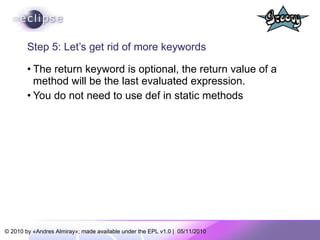
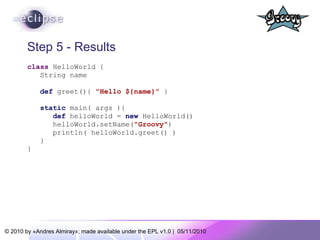
Step 5: Let’s get rid of more keywords The return keyword is optional, the return value of a method will be the last evaluated expression. You do not need to use def in static methods
Step 5 - Results class  HelloWorld { String name def  greet(){  "Hello ${name}"  } static  main( args ){ def  helloWorld =  new  HelloWorld() helloWorld.setName( "Groovy" ) println( helloWorld.greet() ) } }
Step 6: POJOs on steroids Not only do POJOs (we call them POGOs in Groovy) write their own property accessors, they also provide a default constructor with named parameters (kind of). POGOs support the array subscript (bean[prop]) and dot notation (bean.prop) to access properties
Step 6 - Results class  HelloWorld { String name def  greet(){  "Hello ${name}"  } static  main( args ){ def  helloWorld =  new HelloWorld(name: "Groovy" ) helloWorld.name =  "Groovy" helloWorld[ " name " ] =  "Groovy" println( helloWorld.greet() ) } }
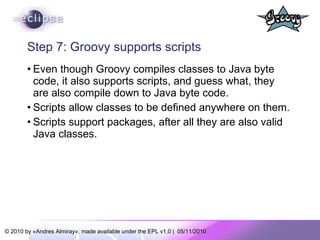
Step 7: Groovy supports scripts Even though Groovy compiles classes to Java byte code, it also supports scripts, and guess what, they are also compile down to Java byte code. Scripts allow classes to be defined anywhere on them. Scripts support packages, after all they are also valid Java classes.
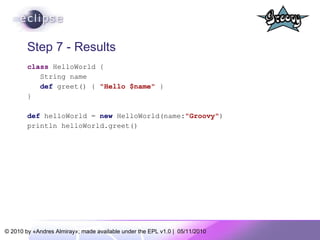
Step 7 - Results class  HelloWorld { String name def  greet() {  "Hello $name"   } } def  helloWorld =  new  HelloWorld(name : " Groovy" ) println helloWorld.greet()
We came from here… public class  HelloWorld { String name; public   void  setName(String name) { this.name = name; } public  String getName(){ return name; } public  String greet() { return  "Hello " + name; } public   static void  main(String args[]){ HelloWorld helloWorld =  new  HelloWorld() helloWorld.setName( "Groovy" ) System.err.println( helloWorld.greet() ) } }
…  to here class  HelloWorld { String name def  greet() {  "Hello $name"   } } def  helloWorld =  new  HelloWorld(name : " Groovy" ) println helloWorld.greet()
Getting Groovy on Eclipse
http://www.eclipse.org/org/foundation/eclipseawards/winners10.php
Go to Help -> Install New Software Configure a new update site http://dist.springsource.org/release/GRECLIPSE/e3.5/ Follow the wizard instructions Restart Eclipse. You are now ready to start Groovying!
 
 
Feature List I Close to home
Follow the mantra… Java is Groovy, Groovy is Java Flat learning curve for Java developers, start with straight Java syntax then move on to a groovier syntax as you feel comfortable. Almost 99% Java code is Groovy code, meaning you can in most changes rename *.java to *.groovy and it will work.
Feature List I – JDK5 Groovy supports JSR 175 annotations (same as Java), in fact it is the second language on the Java platform to do so. Enums Generics Static imports Enhanced for loop Varargs can be declared as in Java (with the triple dot notation) or through a convention:  if the last parameter of a method is of type Object[ ] then varargs may be used.
Varargs in action class  Calculator { def  addAllGroovy( Object[] args ){ int total = 0 for( i in args ) { total += i } total } def  addAllJava( int... args ){ int total = 0 for( i in args ) { total += i } total } } Calculator c =  new  Calculator() assert  c.addAllGroovy(1,2,3,4,5) == 15 assert  c.addAllJava(1,2,3,4,5) == 15
Feature List II Explore the Neighborhood
Assorted goodies Default parameter values as in PHP Named parameters as in Ruby (reuse the Map trick of default POGO constructor) Operator overloading, using a naming convention, for example + plus() [ ] getAt() / putAt() << leftShift()
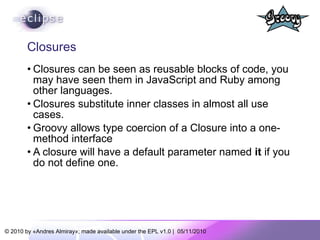
Closures Closures can be seen as reusable blocks of code, you may have seen them in JavaScript and Ruby among other languages. Closures substitute inner classes in almost all use cases. Groovy allows type coercion of a Closure into a one-method interface A closure will have a default parameter named  it  if you do not define one.
Examples of closures def  greet = { name -> println  “Hello $name”  } greet(  “Groovy”  ) // prints Hello Groovy def  greet = { println  “Hello $it”  } greet(  “Groovy”  ) // prints Hello Groovy   def  iCanHaveTypedParametersToo = {  int  x,  int  y ->  println  “coordinates are ($x,$y)” } def  myActionListener = { event -> // do something cool with event }  as  ActionListener
Iterators everywhere As in Ruby you may use iterators in almost any context, Groovy will figure out what to do in each case Iterators harness the power of closures, all iterators accept a closure as parameter. Iterators relieve you of the burden of looping constructs
Iterators in action def  printIt = { println it } // 3 ways to iterate from 1 to 5 [1,2,3,4,5].each printIt 1.upto 5, printIt (1..5).each printIt // compare to a regular loop for( i in [1,2,3,4,5] ) printIt(i) // same thing but use a Range for( i in (1..5) ) printIt(i) [1,2,3,4,5].eachWithIndex { v, i -> println  &quot;list[$i] => $v&quot;  } // list[0] => 1 // list[1] => 2 // list[2] => 3 // list[3] => 4 // list[4] => 5
Feature List III Space out!
The  as  keyword Used for “Groovy casting”, convert a value of typeA into a value of typeB def  intarray = [1,2,3]  as  int[ ] Used to coerce a closure into an implementation of single method interface.  Used to coerce a Map into an implementation of an interface, abstract and/or concrete class. Used to create aliases on imports
Some examples of as import  javax.swing.table.DefaultTableCellRenderer  as  DTCR def  myActionListener = { event -> // do something cool with event }  as  ActionListener def  renderer = [ getTableCellRendererComponent: { t, v, s, f, r, c -> // cool renderer code goes here } ]  as  DTCR // note that this technique is like creating objects in // JavaScript with JSON format // it also circumvents the fact that Groovy can’t create // inner classes (yet)
New operators ?: (elvis) -  a refinement over the ternary operator ?. Safe dereference – navigate an object graph without worrying on NPEs <=> (spaceship) – compares two values * (spread) – “explode” the contents of a list or array *. (spread-dot) – apply a method call to every element of a list or array
Traversing object graphs GPath is to objects what XPath is to XML. *. and ?. come in handy in many situations Because POGOs accept dot and bracket notation for property access its very easy to write GPath expressions.
Sample GPath expressions class  Person { String name int id } def  persons = [ new Person( name:  'Duke' , id: 1 ), [name:  'Tux' , id: 2]  as  Person ] assert  [1,2] == persons.id assert  [ 'Duke' , 'Tux' ] == persons*.getName() assert  null == persons[2]?.name assert   'Duke'  == persons[0].name ?:  'Groovy' assert   'Groovy'  == persons[2]?.name ?:  'Groovy'
MetaProgramming  You can add methods and properties to any object at runtime. You can intercept calls to method invocations and/or property access (similar to doing AOP but without the hassle). This means Groovy offers a similar concept to Ruby’s open classes, Groovy even extends final classes as String and Integer with new methods (we call it GDK).
A simple example using categories class  Pouncer { static  pounce( Integer self ){ def  s =  “Boing!&quot; 1.upto(self-1) { s +=  &quot; boing!&quot;  } s +  &quot;!&quot; } } use ( Pouncer ){ assert  3.pounce() ==  “Boing! boing! boing!&quot; }
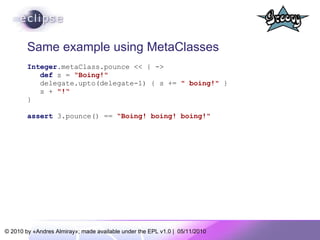
Same example using MetaClasses Integer. metaClass.pounce << { -> def  s =  “Boing!&quot; delegate.upto(delegate-1) { s +=  &quot; boing!&quot;  } s +  &quot;!“ } assert  3.pounce() ==  “Boing! boing! boing!&quot;
Related Projects
Grails - http://grails.org Full stack web framework based on Spring, Hibernate, Sitemesh, Quartz and more Powerful plugin system (more than 400!) Huge community Most active mailing list at The Codehaus (Groovy is 2nd)
Griffon - http://griffon.codehaus.org Desktop development framework inspired in Grails Primarily Swing based however supports SWT, Pivot, GTK and JavaFX too Growing plugin system (80 plugins and counting)
Gaelyk - http://gaelyk.appspot.com Google App Engine development framework based on Groovy and Groovlets Emerging plugin system (just released!)
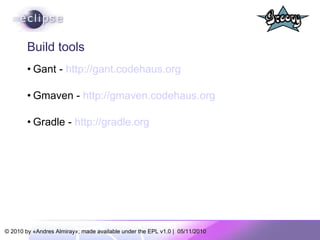
Build tools Gant -  http://gant.codehaus.org Gmaven -  http://gmaven.codehaus.org Gradle -  http://gradle.org
Testing frameworks Easyb –  http://easyb.org Spock -  http://spockframework.org
And a few more... Gpars –  http://gpars.codehaus.org Groovy++ –  http://code.google.com/p/groovypptest/
Resources Groovy Language, guides, examples http://groovy.codehaus.org Groovy Eclipse Plugin http://groovy.codehaus.org/Eclipse+Plugin Groovy Related News http://groovyblogs.org http://groovy.dzone.com Twitter: @groovyeclipse @jeervin   @werdnagreb @andy_clement My own Groovy/Java/Swing blog http://jroller.com/aalmiray
Q&A
Thank you!

Groovy for Java Developers

  • 1.
  • 2.
    About the SpeakerJava developer since the beginning True believer in Open Source Groovy committer since August 2007 Eclipse user since 2004 Project lead of the Griffon framework
  • 3.
    Agenda What isGroovy From Java to Groovy Getting Groovy on Eclipse Feature List I (close to home) Feature List II (explore the neighborhood) Feature List III (space out!) Related Projects Resources
  • 4.
  • 5.
  • 6.
    What is Groovy?Groovy is an agile and dynamic language for the Java Virtual Machine Builds upon the strengths of Java but has additional power features inspired by languages like Python, Ruby & Smalltalk Makes modern programming features available to Java developers with almost-zero learning curve Supports Domain Specific Languages and other compact syntax so your code becomes easy to read and maintain
  • 7.
    What is Groovy?Increases developer productivity by reducing scaffolding code when developing web, GUI, database or console applications Simplifies testing by supporting unit testing and mocking out-of-the-box Seamlessly integrates with all existing Java objects and libraries Compiles straight to Java byte code so you can use it anywhere you can use Java
  • 8.
  • 9.
    HelloWorld in Javapublic class HelloWorld { String name; public void setName(String name) { this.name = name; } public String getName(){ return name; } public String greet() { return “Hello “ + name; } public static void main(String args[]){ HelloWorld helloWorld = new HelloWorld() helloWorld.setName( “Groovy” ) System.err.println( helloWorld.greet() ) } }
  • 10.
    HelloWorld in Groovypublic class HelloWorld { String name; public void setName(String name) { this.name = name; } public String getName(){ return name; } public String greet() { return “Hello “ + name; } public static void main(String args[]){ HelloWorld helloWorld = new HelloWorld() helloWorld.setName( “Groovy” ) System.err.println( helloWorld.greet() ) } }
  • 11.
    Step1: Let’s getrid of the noise Everything in Groovy is public unless defined otherwise. Semicolons at end-of-line are optional.
  • 12.
    Step 1 -Results class HelloWorld { String name void setName(String name) { this.name = name } String getName(){ return name } String greet() { return &quot;Hello &quot; + name } static void main(String args[]){ HelloWorld helloWorld = new HelloWorld() helloWorld.setName( &quot;Groovy&quot; ) System.err.println( helloWorld.greet() ) } }
  • 13.
    Step 2: let’sget rid of boilerplate Programming a JavaBean requires a pair of get/set for each property, we all know that. Let Groovy write those for you! Main( ) always requires String[ ] as parameter. Make that method definition shorter with optional types! Printing to the console is so common, can we get a shorter version too?
  • 14.
    Step2 - Resultsclass HelloWorld { String name String greet() { return &quot;Hello &quot; + name } static void main( args ){ HelloWorld helloWorld = new HelloWorld() helloWorld.setName( &quot;Groovy&quot; ) println( helloWorld.greet() ) } }
  • 15.
    Step 3: Introducedynamic types Use the def keyword when you do not care about the type of a variable, think of it as the var keyword in JavaScript. Groovy will figure out the correct type, this is called duck typing.
  • 16.
    Step3 - Resultsclass HelloWorld { String name def greet() { return &quot;Hello &quot; + name } static def main( args ){ def helloWorld = new HelloWorld() helloWorld.setName( &quot;Groovy&quot; ) println( helloWorld.greet() ) } }
  • 17.
    Step 4 :Use variable interpolation Groovy supports variable interpolation through GStrings (seriously, that is the correct name!) It works as you would expect in other languages. Prepend any Groovy expression with ${} inside a String
  • 18.
    Step 4 -Results class HelloWorld { String name def greet(){ return &quot;Hello ${name}&quot; } static def main( args ){ def helloWorld = new HelloWorld() helloWorld.setName( &quot;Groovy&quot; ) println( helloWorld.greet() ) } }
  • 19.
    Step 5: Let’sget rid of more keywords The return keyword is optional, the return value of a method will be the last evaluated expression. You do not need to use def in static methods
  • 20.
    Step 5 -Results class HelloWorld { String name def greet(){ &quot;Hello ${name}&quot; } static main( args ){ def helloWorld = new HelloWorld() helloWorld.setName( &quot;Groovy&quot; ) println( helloWorld.greet() ) } }
  • 21.
    Step 6: POJOson steroids Not only do POJOs (we call them POGOs in Groovy) write their own property accessors, they also provide a default constructor with named parameters (kind of). POGOs support the array subscript (bean[prop]) and dot notation (bean.prop) to access properties
  • 22.
    Step 6 -Results class HelloWorld { String name def greet(){ &quot;Hello ${name}&quot; } static main( args ){ def helloWorld = new HelloWorld(name: &quot;Groovy&quot; ) helloWorld.name = &quot;Groovy&quot; helloWorld[ &quot; name &quot; ] = &quot;Groovy&quot; println( helloWorld.greet() ) } }
  • 23.
    Step 7: Groovysupports scripts Even though Groovy compiles classes to Java byte code, it also supports scripts, and guess what, they are also compile down to Java byte code. Scripts allow classes to be defined anywhere on them. Scripts support packages, after all they are also valid Java classes.
  • 24.
    Step 7 -Results class HelloWorld { String name def greet() { &quot;Hello $name&quot; } } def helloWorld = new HelloWorld(name : &quot; Groovy&quot; ) println helloWorld.greet()
  • 25.
    We came fromhere… public class HelloWorld { String name; public void setName(String name) { this.name = name; } public String getName(){ return name; } public String greet() { return &quot;Hello &quot; + name; } public static void main(String args[]){ HelloWorld helloWorld = new HelloWorld() helloWorld.setName( &quot;Groovy&quot; ) System.err.println( helloWorld.greet() ) } }
  • 26.
    … tohere class HelloWorld { String name def greet() { &quot;Hello $name&quot; } } def helloWorld = new HelloWorld(name : &quot; Groovy&quot; ) println helloWorld.greet()
  • 27.
  • 28.
  • 29.
    Go to Help-> Install New Software Configure a new update site http://dist.springsource.org/release/GRECLIPSE/e3.5/ Follow the wizard instructions Restart Eclipse. You are now ready to start Groovying!
  • 30.
  • 31.
  • 32.
    Feature List IClose to home
  • 33.
    Follow the mantra…Java is Groovy, Groovy is Java Flat learning curve for Java developers, start with straight Java syntax then move on to a groovier syntax as you feel comfortable. Almost 99% Java code is Groovy code, meaning you can in most changes rename *.java to *.groovy and it will work.
  • 34.
    Feature List I– JDK5 Groovy supports JSR 175 annotations (same as Java), in fact it is the second language on the Java platform to do so. Enums Generics Static imports Enhanced for loop Varargs can be declared as in Java (with the triple dot notation) or through a convention: if the last parameter of a method is of type Object[ ] then varargs may be used.
  • 35.
    Varargs in actionclass Calculator { def addAllGroovy( Object[] args ){ int total = 0 for( i in args ) { total += i } total } def addAllJava( int... args ){ int total = 0 for( i in args ) { total += i } total } } Calculator c = new Calculator() assert c.addAllGroovy(1,2,3,4,5) == 15 assert c.addAllJava(1,2,3,4,5) == 15
  • 36.
    Feature List IIExplore the Neighborhood
  • 37.
    Assorted goodies Defaultparameter values as in PHP Named parameters as in Ruby (reuse the Map trick of default POGO constructor) Operator overloading, using a naming convention, for example + plus() [ ] getAt() / putAt() << leftShift()
  • 38.
    Closures Closures canbe seen as reusable blocks of code, you may have seen them in JavaScript and Ruby among other languages. Closures substitute inner classes in almost all use cases. Groovy allows type coercion of a Closure into a one-method interface A closure will have a default parameter named it if you do not define one.
  • 39.
    Examples of closuresdef greet = { name -> println “Hello $name” } greet( “Groovy” ) // prints Hello Groovy def greet = { println “Hello $it” } greet( “Groovy” ) // prints Hello Groovy def iCanHaveTypedParametersToo = { int x, int y -> println “coordinates are ($x,$y)” } def myActionListener = { event -> // do something cool with event } as ActionListener
  • 40.
    Iterators everywhere Asin Ruby you may use iterators in almost any context, Groovy will figure out what to do in each case Iterators harness the power of closures, all iterators accept a closure as parameter. Iterators relieve you of the burden of looping constructs
  • 41.
    Iterators in actiondef printIt = { println it } // 3 ways to iterate from 1 to 5 [1,2,3,4,5].each printIt 1.upto 5, printIt (1..5).each printIt // compare to a regular loop for( i in [1,2,3,4,5] ) printIt(i) // same thing but use a Range for( i in (1..5) ) printIt(i) [1,2,3,4,5].eachWithIndex { v, i -> println &quot;list[$i] => $v&quot; } // list[0] => 1 // list[1] => 2 // list[2] => 3 // list[3] => 4 // list[4] => 5
  • 42.
    Feature List IIISpace out!
  • 43.
    The as keyword Used for “Groovy casting”, convert a value of typeA into a value of typeB def intarray = [1,2,3] as int[ ] Used to coerce a closure into an implementation of single method interface. Used to coerce a Map into an implementation of an interface, abstract and/or concrete class. Used to create aliases on imports
  • 44.
    Some examples ofas import javax.swing.table.DefaultTableCellRenderer as DTCR def myActionListener = { event -> // do something cool with event } as ActionListener def renderer = [ getTableCellRendererComponent: { t, v, s, f, r, c -> // cool renderer code goes here } ] as DTCR // note that this technique is like creating objects in // JavaScript with JSON format // it also circumvents the fact that Groovy can’t create // inner classes (yet)
  • 45.
    New operators ?:(elvis) - a refinement over the ternary operator ?. Safe dereference – navigate an object graph without worrying on NPEs <=> (spaceship) – compares two values * (spread) – “explode” the contents of a list or array *. (spread-dot) – apply a method call to every element of a list or array
  • 46.
    Traversing object graphsGPath is to objects what XPath is to XML. *. and ?. come in handy in many situations Because POGOs accept dot and bracket notation for property access its very easy to write GPath expressions.
  • 47.
    Sample GPath expressionsclass Person { String name int id } def persons = [ new Person( name: 'Duke' , id: 1 ), [name: 'Tux' , id: 2] as Person ] assert [1,2] == persons.id assert [ 'Duke' , 'Tux' ] == persons*.getName() assert null == persons[2]?.name assert 'Duke' == persons[0].name ?: 'Groovy' assert 'Groovy' == persons[2]?.name ?: 'Groovy'
  • 48.
    MetaProgramming Youcan add methods and properties to any object at runtime. You can intercept calls to method invocations and/or property access (similar to doing AOP but without the hassle). This means Groovy offers a similar concept to Ruby’s open classes, Groovy even extends final classes as String and Integer with new methods (we call it GDK).
  • 49.
    A simple exampleusing categories class Pouncer { static pounce( Integer self ){ def s = “Boing!&quot; 1.upto(self-1) { s += &quot; boing!&quot; } s + &quot;!&quot; } } use ( Pouncer ){ assert 3.pounce() == “Boing! boing! boing!&quot; }
  • 50.
    Same example usingMetaClasses Integer. metaClass.pounce << { -> def s = “Boing!&quot; delegate.upto(delegate-1) { s += &quot; boing!&quot; } s + &quot;!“ } assert 3.pounce() == “Boing! boing! boing!&quot;
  • 51.
  • 52.
    Grails - http://grails.orgFull stack web framework based on Spring, Hibernate, Sitemesh, Quartz and more Powerful plugin system (more than 400!) Huge community Most active mailing list at The Codehaus (Groovy is 2nd)
  • 53.
    Griffon - http://griffon.codehaus.orgDesktop development framework inspired in Grails Primarily Swing based however supports SWT, Pivot, GTK and JavaFX too Growing plugin system (80 plugins and counting)
  • 54.
    Gaelyk - http://gaelyk.appspot.comGoogle App Engine development framework based on Groovy and Groovlets Emerging plugin system (just released!)
  • 55.
    Build tools Gant- http://gant.codehaus.org Gmaven - http://gmaven.codehaus.org Gradle - http://gradle.org
  • 56.
    Testing frameworks Easyb– http://easyb.org Spock - http://spockframework.org
  • 57.
    And a fewmore... Gpars – http://gpars.codehaus.org Groovy++ – http://code.google.com/p/groovypptest/
  • 58.
    Resources Groovy Language,guides, examples http://groovy.codehaus.org Groovy Eclipse Plugin http://groovy.codehaus.org/Eclipse+Plugin Groovy Related News http://groovyblogs.org http://groovy.dzone.com Twitter: @groovyeclipse @jeervin @werdnagreb @andy_clement My own Groovy/Java/Swing blog http://jroller.com/aalmiray
  • 59.
  • 60.