Introduction to Groovy
About Instructor
Instructor and Author: Deepak Bhagat
Bachelor of Engineering in Computer Science and Engineering
Working in IT Industry since 1996
Working with Oracle ADF since 2007
Worked in Verizon, USA for 4 years (1998-2002)
Worked in Oracle for 11.8 years (2002-2013)
Consulting Director, Applications Architect &
Oracle ADF Instructor since 2014
Agenda
What is Groovy
From Java to Groovy
Feature List I (close to home)
Feature List II (explore the neighborhood)
Feature List III (space out!)
Eclipse and Groovy
3
What is Groovy?
Groovy is an agile and dynamic OOP language for the Java
Virtual Machine (JVM)
Builds upon the strengths of Java but has additional power
features inspired by languages like Python, Ruby & Smalltalk
Makes modern programming features available to Java
developers with almost-zero learning curve
Compiles straight to Java byte code so you can use it anywhere
you can use Java
4
What is Groovy?
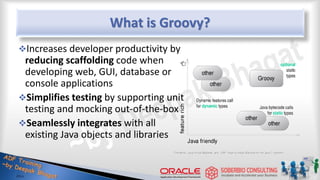
Increases developer productivity by
reducing scaffolding code when
developing web, GUI, database or
console applications
Simplifies testing by supporting unit
testing and mocking out-of-the-box
Seamlessly integrates with all
existing Java objects and libraries
5
From Java to Groovy
HelloWorld in Java
public class HelloWorld {
String name;
public void setName(String name)
{ this.name = name; }
public String getName()
{ return name; }
public String greet()
{ return “Hello “+ name; }
public static void main(String args[]){
HelloWorld helloWorld = new HelloWorld();
helloWorld.setName(“Groovy”);
System.err.println( helloWorld.greet(); )
}
}
7
HelloWorld in Groovy
public class HelloWorld {
String name;
public void setName(String name)
{ this.name = name; }
public String getName()
{ return name; }
public String greet()
{ return “Hello “+ name; }
public static void main(String args[]){
HelloWorld helloWorld = new HelloWorld();
helloWorld.setName(“Groovy”);
System.err.println( helloWorld.greet(); )
}
}
8
Step1: Let’s Get Rid of The Noise
Everything in Groovy is public unless defined otherwise.
Semicolons at end-of-line are optional.
9
Step 1 - Results
Result
class HelloWorld {
String name
void setName(String name){ this.name = name }
String getName(){ return name }
String greet(){ return "Hello "+ name }
static void main(String args[]){
HelloWorld helloWorld = new HelloWorld()
helloWorld.setName("Groovy")
System.err.println( helloWorld.greet() )
}
}
Previous
public class HelloWorld {
String name;
public void setName(String name)
{ this.name = name; }
public String getName(){ return name; }
public String greet()
{ return “Hello “+ name; }
public static void main(String args[]){
HelloWorld helloWorld = new HelloWorld();
helloWorld.setName(“Groovy”);
System.err.println( helloWorld.greet(); )
}
}
10
Step 2: Let’s Get Rid of Boilerplate
Programming a JavaBean requires a pair of get/set for each
property, we all know that. Let Groovy write those for you!
Main( ) always requires String[ ] as parameter. Make that
method definition shorter with optional types!
Printing to the console is so common, can we get a shorter
version too?
11
Step2 - Results
Result
class HelloWorld {
String name
String greet()
{ return "Hello "+ name }
static void main( args ){
HelloWorld helloWorld = new HelloWorld()
helloWorld.setName("Groovy")
println( helloWorld.greet() )
}
}
Previous
class HelloWorld {
String name
void setName(String name)
{ this.name = name }
String getName(){ return name }
String greet()
{ return "Hello "+ name }
static void main(String args[]){
HelloWorld helloWorld = new HelloWorld()
helloWorld.setName("Groovy")
System.err.println( helloWorld.greet() )
}
}
12
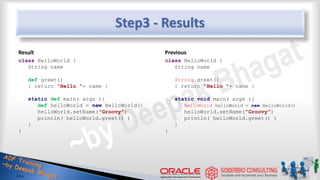
Step 3: Introduce Dynamic Types
Use the def keyword when you do not care about the type of a
variable, think of it as the var keyword in JavaScript.
Groovy will figure out the correct type, this is called duck
typing.
13
Step3 - Results
Result
class HelloWorld {
String name
def greet()
{ return "Hello "+ name }
static def main( args ){
def helloWorld = new HelloWorld()
helloWorld.setName("Groovy")
println( helloWorld.greet() )
}
}
Previous
class HelloWorld {
String name
String greet()
{ return "Hello "+ name }
static void main( args ){
HelloWorld helloWorld = new HelloWorld()
helloWorld.setName("Groovy")
println( helloWorld.greet() )
}
}
14
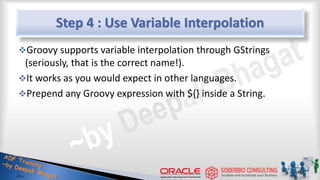
Step 4 : Use Variable Interpolation
Groovy supports variable interpolation through GStrings
(seriously, that is the correct name!).
It works as you would expect in other languages.
Prepend any Groovy expression with ${} inside a String.
15
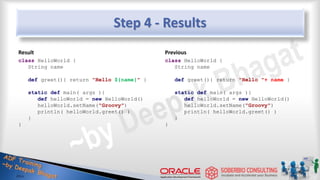
Step 4 - Results
Result
class HelloWorld {
String name
def greet(){ return "Hello ${name}" }
static def main( args ){
def helloWorld = new HelloWorld()
helloWorld.setName("Groovy")
println( helloWorld.greet() )
}
}
Previous
class HelloWorld {
String name
def greet(){ return "Hello "+ name }
static def main( args ){
def helloWorld = new HelloWorld()
helloWorld.setName("Groovy")
println( helloWorld.greet() )
}
}
16
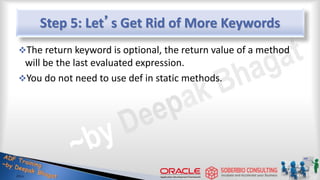
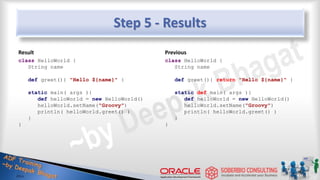
Step 5: Let’s Get Rid of More Keywords
The return keyword is optional, the return value of a method
will be the last evaluated expression.
You do not need to use def in static methods.
17
Step 5 - Results
Result
class HelloWorld {
String name
def greet(){ "Hello ${name}" }
static main( args ){
def helloWorld = new HelloWorld()
helloWorld.setName("Groovy")
println( helloWorld.greet() )
}
}
Previous
class HelloWorld {
String name
def greet(){ return "Hello ${name}" }
static def main( args ){
def helloWorld = new HelloWorld()
helloWorld.setName("Groovy")
println( helloWorld.greet() )
}
}
18
Step 6: POJOs on Steroids
Not only do POJOs (we call them POGOs in Groovy) write their
own property accessors, they also provide a default constructor
with named parameters (kind of).
POGOs support the array subscript (bean[prop]) and dot
notation (bean.prop) to access properties.
19
Step 6 - Results
Result
class HelloWorld {
String name
def greet(){ "Hello ${name}" }
static main( args ){
def helloWorld = new
HelloWorld(name:"Groovy")
helloWorld.name = "Groovy"
helloWorld["name"] = "Groovy"
println( helloWorld.greet() )
}
}
Previous
class HelloWorld {
String name
def greet(){ "Hello ${name}" }
static main( args ){
def helloWorld = new HelloWorld()
helloWorld.setName("Groovy")
println( helloWorld.greet() )
}
}
20
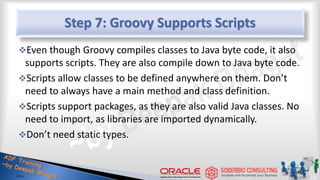
Step 7: Groovy Supports Scripts
Even though Groovy compiles classes to Java byte code, it also
supports scripts. They are also compile down to Java byte code.
Scripts allow classes to be defined anywhere on them. Don’t
need to always have a main method and class definition.
Scripts support packages, as they are also valid Java classes. No
need to import, as libraries are imported dynamically.
Don’t need static types.
21
Step 7 - Results
Result
class HelloWorld {
String name
def greet() { "Hello $name" }
}
def helloWorld = new
HelloWorld(name:"Groovy")
println helloWorld.greet()
Previous
class HelloWorld {
String name
def greet(){ "Hello ${name}" }
static main( args ){
def helloWorld = new
HelloWorld(name:"Groovy")
helloWorld.name = "Groovy"
helloWorld["name"] = "Groovy"
println( helloWorld.greet() )
}
}
22
Groovy… from …Java
Final Result in Groovy
class HelloWorld {
String name
def greet() { "Hello $name" }
}
def helloWorld = new
HelloWorld(name:"Groovy")
println helloWorld.greet()
Java (We came from here… -first code)
import java.util.List;
public class HelloWorld {
String name;
public void setName(String name)
{ this.name = name; }
public String getName()
{ return name; }
public String greet()
{ return "Hello "+ name; }
public static void main(String args[]){
HelloWorld = new HelloWorld()
helloWorld.setName("Groovy")
System.err.println( helloWorld.greet() )
}
}
23
Feature List I
Close To Home
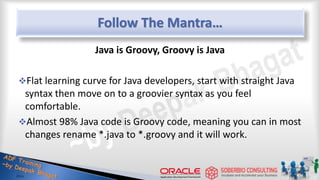
Follow The Mantra…
Java is Groovy, Groovy is Java
Flat learning curve for Java developers, start with straight Java
syntax then move on to a groovier syntax as you feel
comfortable.
Almost 98% Java code is Groovy code, meaning you can in most
changes rename *.java to *.groovy and it will work.
25
Common Gotchas from Java to Groovy
Native syntax for Lists and Maps.
Java Array initializers are not supported, but lists can be
coerced into arrays.
Inner class definitions are not supported yet.
26
Feature List I – JDK5
Groovy supports jsr 175 annotations (same as Java), in fact it is
the second language on the Java platform to do so.
Annotation definitions can not be written in Groovy (yet).
Groovy supports Enums too
There is still work to do in terms of fancier syntax.
Initial generics support
27
Feature List I – JDK5
Varargs can be declared as in Java (with the triple dot notation)
or through a convention:
if the last parameter of a method is of type Object[ ] then varargs may
be used.
28
Varargs in Action
class Calculator {
def addAllGroovy( Object[] args ){
int total = 0
for( i in args ) { total += i }
total
}
def addAllJava( int... args ){
int total = 0
for( i in args ) { total += i }
total
}
}
Calculator c = new Calculator()
assert c.addAllGroovy(1,2,3,4,5) == 15
assert c.addAllJava(1,2,3,4,5) == 15
29
Feature List II
Explore The Neighborhood
Assorted Goodies
Default parameter values as in PHP
Named parameters as in Ruby (reuse the Map trick of default
POGO constructor)
Operator overloading, using a naming convention, for example
31
+ plus()
[ ] getAt() / putAt()
<< leftShift()
Closures
Closures can be seen as reusable blocks of code, you may have
seen them in JavaScript and Ruby among other languages.
Closures substitute inner classes in almost all use cases.
Groovy allows type coercion of a Closure into a one-method
interface
A closure will have a default parameter named it if you do not
define one.
32
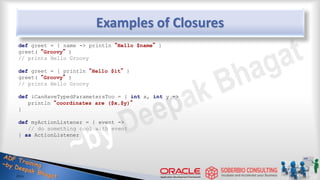
Examples of Closures
def greet = { name -> println “Hello $name” }
greet( “Groovy” )
// prints Hello Groovy
def greet = { println “Hello $it” }
greet( “Groovy” )
// prints Hello Groovy
def iCanHaveTypedParametersToo = { int x, int y ->
println “coordinates are ($x,$y)”
}
def myActionListener = { event ->
// do something cool with event
} as ActionListener
33
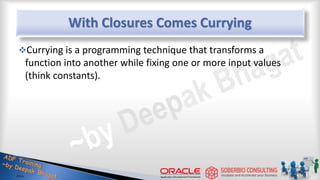
With Closures Comes Currying
Currying is a programming technique that transforms a
function into another while fixing one or more input values
(think constants).
34
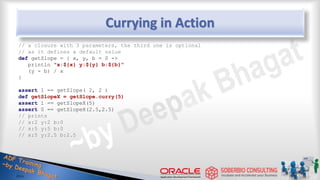
Currying in Action
// a closure with 3 parameters, the third one is optional
// as it defines a default value
def getSlope = { x, y, b = 0 ->
println "x:${x} y:${y} b:${b}"
(y - b) / x
}
assert 1 == getSlope( 2, 2 )
def getSlopeX = getSlope.curry(5)
assert 1 == getSlopeX(5)
assert 0 == getSlopeX(2.5,2.5)
// prints
// x:2 y:2 b:0
// x:5 y:5 b:0
// x:5 y:2.5 b:2.5
35
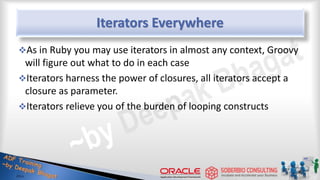
Iterators Everywhere
As in Ruby you may use iterators in almost any context, Groovy
will figure out what to do in each case
Iterators harness the power of closures, all iterators accept a
closure as parameter.
Iterators relieve you of the burden of looping constructs
36
Iterators in Action
def printIt = { println it }
// 3 ways to iterate from 1 to 5
[1,2,3,4,5].each printIt
1.upto 5, printIt
(1..5).each printIt
// compare to a regular loop
for( i in [1,2,3,4,5] ) printIt(i)
// same thing but use a Range
for( i in (1..5) ) printIt(i)
[1,2,3,4,5].eachWithIndex { v, i -> println "list[$i] => $v" }
// list[0] => 1
// list[1] => 2
// list[2] => 3
// list[3] => 4
// list[4] => 5
37
Feature List III
Space Out!
The as Keyword
Used for “Groovy casting”, convert a value of typeA into a
value of typeB
def intarray = [1,2,3] as int[ ]
Used to coerce a closure into an implementation of single
method interface.
Used to coerce a Map into an implementation of an interface,
abstract and/or concrete class.
Used to create aliases on imports
39
Some Examples of as
import javax.swing.table.DefaultTableCellRenderer as DTCR
def myActionListener = { event ->
// do something cool with event
} as ActionListener
def renderer = [
getTableCellRendererComponent: { t, v, s, f, r, c ->
// cool renderer code goes here
}
] as DTCR
// note that this technique is like creating objects in
// JavaScript with JSON format
// it also circumvents the fact that Groovy can’t create
// inner classes (yet)
40
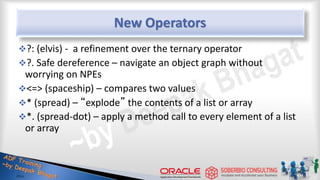
New Operators
?: (elvis) - a refinement over the ternary operator
?. Safe dereference – navigate an object graph without
worrying on NPEs
<=> (spaceship) – compares two values
* (spread) – “explode” the contents of a list or array
*. (spread-dot) – apply a method call to every element of a list
or array
41
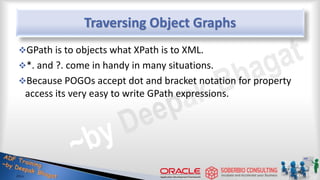
Traversing Object Graphs
GPath is to objects what XPath is to XML.
*. and ?. come in handy in many situations.
Because POGOs accept dot and bracket notation for property
access its very easy to write GPath expressions.
42
Sample GPath Expressions
class Person {
String name
int id
}
def persons = [
new Person( name: 'Duke', id: 1 ),
[name: 'Tux', id: 2] as Person
]
assert [1,2] == persons.id
assert ['Duke','Tux'] == persons*.getName()
assert null == persons[2]?.name
assert 'Duke' == persons[0].name ?: 'Groovy'
assert 'Groovy' == persons[2]?.name ?: 'Groovy'
43
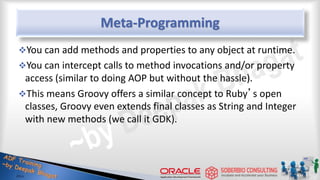
Meta-Programming
You can add methods and properties to any object at runtime.
You can intercept calls to method invocations and/or property
access (similar to doing AOP but without the hassle).
This means Groovy offers a similar concept to Ruby’s open
classes, Groovy even extends final classes as String and Integer
with new methods (we call it GDK).
44
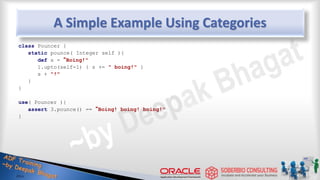
A Simple Example Using Categories
class Pouncer {
static pounce( Integer self ){
def s = “Boing!"
1.upto(self-1) { s += " boing!" }
s + "!"
}
}
use( Pouncer ){
assert 3.pounce() == “Boing! boing! boing!"
}
45
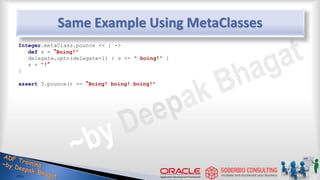
Same Example Using MetaClasses
Integer.metaClass.pounce << { ->
def s = “Boing!"
delegate.upto(delegate-1) { s += " boing!" }
s + "!“
}
assert 3.pounce() == “Boing! boing! boing!"
46
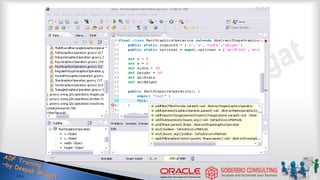
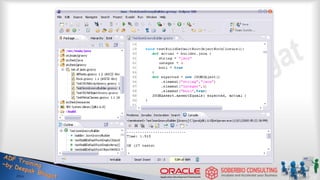
Eclipse and Groovy
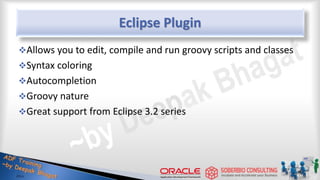
Eclipse Plugin
Allows you to edit, compile and run groovy scripts and classes
Syntax coloring
Autocompletion
Groovy nature
Great support from Eclipse 3.2 series
48
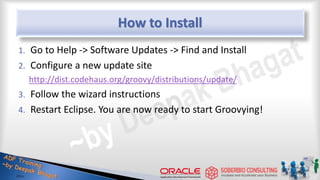
How to Install
1. Go to Help -> Software Updates -> Find and Install
2. Configure a new update site
http://dist.codehaus.org/groovy/distributions/update/
3. Follow the wizard instructions
4. Restart Eclipse. You are now ready to start Groovying!
49
50
51
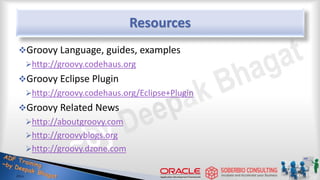
Resources
Groovy Language, guides, examples
http://groovy.codehaus.org
Groovy Eclipse Plugin
http://groovy.codehaus.org/Eclipse+Plugin
Groovy Related News
http://aboutgroovy.com
http://groovyblogs.org
http://groovy.dzone.com
52
Thank you!

Introduction to Oracle Groovy

  • 1.
  • 2.
    About Instructor Instructor andAuthor: Deepak Bhagat Bachelor of Engineering in Computer Science and Engineering Working in IT Industry since 1996 Working with Oracle ADF since 2007 Worked in Verizon, USA for 4 years (1998-2002) Worked in Oracle for 11.8 years (2002-2013) Consulting Director, Applications Architect & Oracle ADF Instructor since 2014
  • 3.
    Agenda What is Groovy FromJava to Groovy Feature List I (close to home) Feature List II (explore the neighborhood) Feature List III (space out!) Eclipse and Groovy 3
  • 4.
    What is Groovy? Groovyis an agile and dynamic OOP language for the Java Virtual Machine (JVM) Builds upon the strengths of Java but has additional power features inspired by languages like Python, Ruby & Smalltalk Makes modern programming features available to Java developers with almost-zero learning curve Compiles straight to Java byte code so you can use it anywhere you can use Java 4
  • 5.
    What is Groovy? Increasesdeveloper productivity by reducing scaffolding code when developing web, GUI, database or console applications Simplifies testing by supporting unit testing and mocking out-of-the-box Seamlessly integrates with all existing Java objects and libraries 5
  • 6.
  • 7.
    HelloWorld in Java publicclass HelloWorld { String name; public void setName(String name) { this.name = name; } public String getName() { return name; } public String greet() { return “Hello “+ name; } public static void main(String args[]){ HelloWorld helloWorld = new HelloWorld(); helloWorld.setName(“Groovy”); System.err.println( helloWorld.greet(); ) } } 7
  • 8.
    HelloWorld in Groovy publicclass HelloWorld { String name; public void setName(String name) { this.name = name; } public String getName() { return name; } public String greet() { return “Hello “+ name; } public static void main(String args[]){ HelloWorld helloWorld = new HelloWorld(); helloWorld.setName(“Groovy”); System.err.println( helloWorld.greet(); ) } } 8
  • 9.
    Step1: Let’s GetRid of The Noise Everything in Groovy is public unless defined otherwise. Semicolons at end-of-line are optional. 9
  • 10.
    Step 1 -Results Result class HelloWorld { String name void setName(String name){ this.name = name } String getName(){ return name } String greet(){ return "Hello "+ name } static void main(String args[]){ HelloWorld helloWorld = new HelloWorld() helloWorld.setName("Groovy") System.err.println( helloWorld.greet() ) } } Previous public class HelloWorld { String name; public void setName(String name) { this.name = name; } public String getName(){ return name; } public String greet() { return “Hello “+ name; } public static void main(String args[]){ HelloWorld helloWorld = new HelloWorld(); helloWorld.setName(“Groovy”); System.err.println( helloWorld.greet(); ) } } 10
  • 11.
    Step 2: Let’sGet Rid of Boilerplate Programming a JavaBean requires a pair of get/set for each property, we all know that. Let Groovy write those for you! Main( ) always requires String[ ] as parameter. Make that method definition shorter with optional types! Printing to the console is so common, can we get a shorter version too? 11
  • 12.
    Step2 - Results Result classHelloWorld { String name String greet() { return "Hello "+ name } static void main( args ){ HelloWorld helloWorld = new HelloWorld() helloWorld.setName("Groovy") println( helloWorld.greet() ) } } Previous class HelloWorld { String name void setName(String name) { this.name = name } String getName(){ return name } String greet() { return "Hello "+ name } static void main(String args[]){ HelloWorld helloWorld = new HelloWorld() helloWorld.setName("Groovy") System.err.println( helloWorld.greet() ) } } 12
  • 13.
    Step 3: IntroduceDynamic Types Use the def keyword when you do not care about the type of a variable, think of it as the var keyword in JavaScript. Groovy will figure out the correct type, this is called duck typing. 13
  • 14.
    Step3 - Results Result classHelloWorld { String name def greet() { return "Hello "+ name } static def main( args ){ def helloWorld = new HelloWorld() helloWorld.setName("Groovy") println( helloWorld.greet() ) } } Previous class HelloWorld { String name String greet() { return "Hello "+ name } static void main( args ){ HelloWorld helloWorld = new HelloWorld() helloWorld.setName("Groovy") println( helloWorld.greet() ) } } 14
  • 15.
    Step 4 :Use Variable Interpolation Groovy supports variable interpolation through GStrings (seriously, that is the correct name!). It works as you would expect in other languages. Prepend any Groovy expression with ${} inside a String. 15
  • 16.
    Step 4 -Results Result class HelloWorld { String name def greet(){ return "Hello ${name}" } static def main( args ){ def helloWorld = new HelloWorld() helloWorld.setName("Groovy") println( helloWorld.greet() ) } } Previous class HelloWorld { String name def greet(){ return "Hello "+ name } static def main( args ){ def helloWorld = new HelloWorld() helloWorld.setName("Groovy") println( helloWorld.greet() ) } } 16
  • 17.
    Step 5: Let’sGet Rid of More Keywords The return keyword is optional, the return value of a method will be the last evaluated expression. You do not need to use def in static methods. 17
  • 18.
    Step 5 -Results Result class HelloWorld { String name def greet(){ "Hello ${name}" } static main( args ){ def helloWorld = new HelloWorld() helloWorld.setName("Groovy") println( helloWorld.greet() ) } } Previous class HelloWorld { String name def greet(){ return "Hello ${name}" } static def main( args ){ def helloWorld = new HelloWorld() helloWorld.setName("Groovy") println( helloWorld.greet() ) } } 18
  • 19.
    Step 6: POJOson Steroids Not only do POJOs (we call them POGOs in Groovy) write their own property accessors, they also provide a default constructor with named parameters (kind of). POGOs support the array subscript (bean[prop]) and dot notation (bean.prop) to access properties. 19
  • 20.
    Step 6 -Results Result class HelloWorld { String name def greet(){ "Hello ${name}" } static main( args ){ def helloWorld = new HelloWorld(name:"Groovy") helloWorld.name = "Groovy" helloWorld["name"] = "Groovy" println( helloWorld.greet() ) } } Previous class HelloWorld { String name def greet(){ "Hello ${name}" } static main( args ){ def helloWorld = new HelloWorld() helloWorld.setName("Groovy") println( helloWorld.greet() ) } } 20
  • 21.
    Step 7: GroovySupports Scripts Even though Groovy compiles classes to Java byte code, it also supports scripts. They are also compile down to Java byte code. Scripts allow classes to be defined anywhere on them. Don’t need to always have a main method and class definition. Scripts support packages, as they are also valid Java classes. No need to import, as libraries are imported dynamically. Don’t need static types. 21
  • 22.
    Step 7 -Results Result class HelloWorld { String name def greet() { "Hello $name" } } def helloWorld = new HelloWorld(name:"Groovy") println helloWorld.greet() Previous class HelloWorld { String name def greet(){ "Hello ${name}" } static main( args ){ def helloWorld = new HelloWorld(name:"Groovy") helloWorld.name = "Groovy" helloWorld["name"] = "Groovy" println( helloWorld.greet() ) } } 22
  • 23.
    Groovy… from …Java FinalResult in Groovy class HelloWorld { String name def greet() { "Hello $name" } } def helloWorld = new HelloWorld(name:"Groovy") println helloWorld.greet() Java (We came from here… -first code) import java.util.List; public class HelloWorld { String name; public void setName(String name) { this.name = name; } public String getName() { return name; } public String greet() { return "Hello "+ name; } public static void main(String args[]){ HelloWorld = new HelloWorld() helloWorld.setName("Groovy") System.err.println( helloWorld.greet() ) } } 23
  • 24.
  • 25.
    Follow The Mantra… Javais Groovy, Groovy is Java Flat learning curve for Java developers, start with straight Java syntax then move on to a groovier syntax as you feel comfortable. Almost 98% Java code is Groovy code, meaning you can in most changes rename *.java to *.groovy and it will work. 25
  • 26.
    Common Gotchas fromJava to Groovy Native syntax for Lists and Maps. Java Array initializers are not supported, but lists can be coerced into arrays. Inner class definitions are not supported yet. 26
  • 27.
    Feature List I– JDK5 Groovy supports jsr 175 annotations (same as Java), in fact it is the second language on the Java platform to do so. Annotation definitions can not be written in Groovy (yet). Groovy supports Enums too There is still work to do in terms of fancier syntax. Initial generics support 27
  • 28.
    Feature List I– JDK5 Varargs can be declared as in Java (with the triple dot notation) or through a convention: if the last parameter of a method is of type Object[ ] then varargs may be used. 28
  • 29.
    Varargs in Action classCalculator { def addAllGroovy( Object[] args ){ int total = 0 for( i in args ) { total += i } total } def addAllJava( int... args ){ int total = 0 for( i in args ) { total += i } total } } Calculator c = new Calculator() assert c.addAllGroovy(1,2,3,4,5) == 15 assert c.addAllJava(1,2,3,4,5) == 15 29
  • 30.
    Feature List II ExploreThe Neighborhood
  • 31.
    Assorted Goodies Default parametervalues as in PHP Named parameters as in Ruby (reuse the Map trick of default POGO constructor) Operator overloading, using a naming convention, for example 31 + plus() [ ] getAt() / putAt() << leftShift()
  • 32.
    Closures Closures can beseen as reusable blocks of code, you may have seen them in JavaScript and Ruby among other languages. Closures substitute inner classes in almost all use cases. Groovy allows type coercion of a Closure into a one-method interface A closure will have a default parameter named it if you do not define one. 32
  • 33.
    Examples of Closures defgreet = { name -> println “Hello $name” } greet( “Groovy” ) // prints Hello Groovy def greet = { println “Hello $it” } greet( “Groovy” ) // prints Hello Groovy def iCanHaveTypedParametersToo = { int x, int y -> println “coordinates are ($x,$y)” } def myActionListener = { event -> // do something cool with event } as ActionListener 33
  • 34.
    With Closures ComesCurrying Currying is a programming technique that transforms a function into another while fixing one or more input values (think constants). 34
  • 35.
    Currying in Action //a closure with 3 parameters, the third one is optional // as it defines a default value def getSlope = { x, y, b = 0 -> println "x:${x} y:${y} b:${b}" (y - b) / x } assert 1 == getSlope( 2, 2 ) def getSlopeX = getSlope.curry(5) assert 1 == getSlopeX(5) assert 0 == getSlopeX(2.5,2.5) // prints // x:2 y:2 b:0 // x:5 y:5 b:0 // x:5 y:2.5 b:2.5 35
  • 36.
    Iterators Everywhere As inRuby you may use iterators in almost any context, Groovy will figure out what to do in each case Iterators harness the power of closures, all iterators accept a closure as parameter. Iterators relieve you of the burden of looping constructs 36
  • 37.
    Iterators in Action defprintIt = { println it } // 3 ways to iterate from 1 to 5 [1,2,3,4,5].each printIt 1.upto 5, printIt (1..5).each printIt // compare to a regular loop for( i in [1,2,3,4,5] ) printIt(i) // same thing but use a Range for( i in (1..5) ) printIt(i) [1,2,3,4,5].eachWithIndex { v, i -> println "list[$i] => $v" } // list[0] => 1 // list[1] => 2 // list[2] => 3 // list[3] => 4 // list[4] => 5 37
  • 38.
  • 39.
    The as Keyword Usedfor “Groovy casting”, convert a value of typeA into a value of typeB def intarray = [1,2,3] as int[ ] Used to coerce a closure into an implementation of single method interface. Used to coerce a Map into an implementation of an interface, abstract and/or concrete class. Used to create aliases on imports 39
  • 40.
    Some Examples ofas import javax.swing.table.DefaultTableCellRenderer as DTCR def myActionListener = { event -> // do something cool with event } as ActionListener def renderer = [ getTableCellRendererComponent: { t, v, s, f, r, c -> // cool renderer code goes here } ] as DTCR // note that this technique is like creating objects in // JavaScript with JSON format // it also circumvents the fact that Groovy can’t create // inner classes (yet) 40
  • 41.
    New Operators ?: (elvis)- a refinement over the ternary operator ?. Safe dereference – navigate an object graph without worrying on NPEs <=> (spaceship) – compares two values * (spread) – “explode” the contents of a list or array *. (spread-dot) – apply a method call to every element of a list or array 41
  • 42.
    Traversing Object Graphs GPathis to objects what XPath is to XML. *. and ?. come in handy in many situations. Because POGOs accept dot and bracket notation for property access its very easy to write GPath expressions. 42
  • 43.
    Sample GPath Expressions classPerson { String name int id } def persons = [ new Person( name: 'Duke', id: 1 ), [name: 'Tux', id: 2] as Person ] assert [1,2] == persons.id assert ['Duke','Tux'] == persons*.getName() assert null == persons[2]?.name assert 'Duke' == persons[0].name ?: 'Groovy' assert 'Groovy' == persons[2]?.name ?: 'Groovy' 43
  • 44.
    Meta-Programming You can addmethods and properties to any object at runtime. You can intercept calls to method invocations and/or property access (similar to doing AOP but without the hassle). This means Groovy offers a similar concept to Ruby’s open classes, Groovy even extends final classes as String and Integer with new methods (we call it GDK). 44
  • 45.
    A Simple ExampleUsing Categories class Pouncer { static pounce( Integer self ){ def s = “Boing!" 1.upto(self-1) { s += " boing!" } s + "!" } } use( Pouncer ){ assert 3.pounce() == “Boing! boing! boing!" } 45
  • 46.
    Same Example UsingMetaClasses Integer.metaClass.pounce << { -> def s = “Boing!" delegate.upto(delegate-1) { s += " boing!" } s + "!“ } assert 3.pounce() == “Boing! boing! boing!" 46
  • 47.
  • 48.
    Eclipse Plugin Allows youto edit, compile and run groovy scripts and classes Syntax coloring Autocompletion Groovy nature Great support from Eclipse 3.2 series 48
  • 49.
    How to Install 1.Go to Help -> Software Updates -> Find and Install 2. Configure a new update site http://dist.codehaus.org/groovy/distributions/update/ 3. Follow the wizard instructions 4. Restart Eclipse. You are now ready to start Groovying! 49
  • 50.
  • 51.
  • 52.
    Resources Groovy Language, guides,examples http://groovy.codehaus.org Groovy Eclipse Plugin http://groovy.codehaus.org/Eclipse+Plugin Groovy Related News http://aboutgroovy.com http://groovyblogs.org http://groovy.dzone.com 52
  • 53.