   Free!

   Portable!

   Easy to Use!
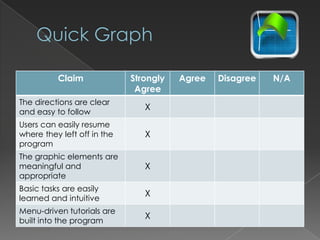
Claim              Strongly   Agree   Disagree   N/A
                              Agree
The directions are clear
                                X
and easy to follow
Users can easily resume
where they left off in the      X
program
The graphic elements are
meaningful and                  X
appropriate
Basic tasks are easily
                                X
learned and intuitive
Menu-driven tutorials are
                                X
built into the program
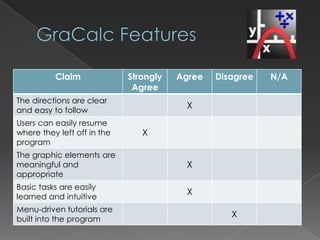
Claim              Strongly   Agree   Disagree   N/A
                              Agree
The directions are clear
                                         X
and easy to follow
Users can easily resume
where they left off in the      X
program
The graphic elements are
meaningful and                           X
appropriate
Basic tasks are easily
                                         X
learned and intuitive
Menu-driven tutorials are
                                                   X
built into the program
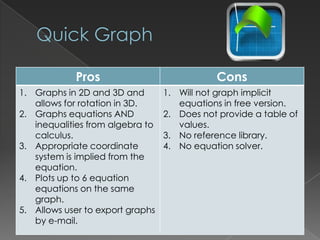
Pros                             Cons
1. Graphs in 2D and 3D and        1. Will not graph implicit
   allows for rotation in 3D.        equations in free version.
2. Graphs equations AND           2. Does not provide a table of
   inequalities from algebra to      values.
   calculus.                      3. No reference library.
3. Appropriate coordinate         4. No equation solver.
   system is implied from the
   equation.
4. Plots up to 6 equation
   equations on the same
   graph.
5. Allows user to export graphs
   by e-mail.
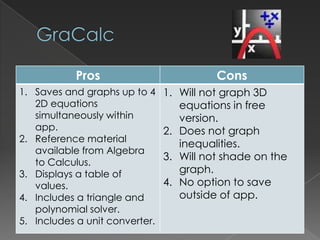
Pros                          Cons
1. Saves and graphs up to 4     1. Will not graph 3D
   2D equations                    equations in free
   simultaneously within           version.
   app.                         2. Does not graph
2. Reference material
                                   inequalities.
   available from Algebra
                                3. Will not shade on the
   to Calculus.
3. Displays a table of             graph.
   values.                      4. No option to save
4. Includes a triangle and         outside of app.
   polynomial solver.
5. Includes a unit converter.
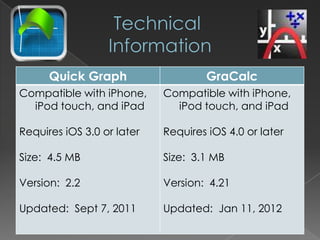
Quick Graph                   GraCalc
Compatible with iPhone,     Compatible with iPhone,
  iPod touch, and iPad        iPod touch, and iPad

Requires iOS 3.0 or later   Requires iOS 4.0 or later

Size: 4.5 MB                Size: 3.1 MB

Version: 2.2                Version: 4.21

Updated: Sept 7, 2011       Updated: Jan 11, 2012
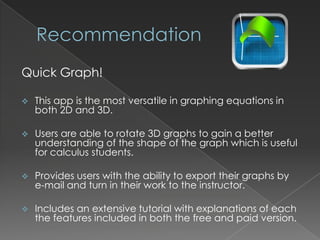
Quick Graph!

   This app is the most versatile in graphing equations in
    both 2D and 3D.

   Users are able to rotate 3D graphs to gain a better
    understanding of the shape of the graph which is useful
    for calculus students.

   Provides users with the ability to export their graphs by
    e-mail and turn in their work to the instructor.

   Includes an extensive tutorial with explanations of each
    the features included in both the free and paid version.

Graphing calculator apps for i pad2

  • 2.
    Free!  Portable!  Easy to Use!
  • 3.
    Claim Strongly Agree Disagree N/A Agree The directions are clear X and easy to follow Users can easily resume where they left off in the X program The graphic elements are meaningful and X appropriate Basic tasks are easily X learned and intuitive Menu-driven tutorials are X built into the program
  • 4.
    Claim Strongly Agree Disagree N/A Agree The directions are clear X and easy to follow Users can easily resume where they left off in the X program The graphic elements are meaningful and X appropriate Basic tasks are easily X learned and intuitive Menu-driven tutorials are X built into the program
  • 5.
    Pros Cons 1. Graphs in 2D and 3D and 1. Will not graph implicit allows for rotation in 3D. equations in free version. 2. Graphs equations AND 2. Does not provide a table of inequalities from algebra to values. calculus. 3. No reference library. 3. Appropriate coordinate 4. No equation solver. system is implied from the equation. 4. Plots up to 6 equation equations on the same graph. 5. Allows user to export graphs by e-mail.
  • 6.
    Pros Cons 1. Saves and graphs up to 4 1. Will not graph 3D 2D equations equations in free simultaneously within version. app. 2. Does not graph 2. Reference material inequalities. available from Algebra 3. Will not shade on the to Calculus. 3. Displays a table of graph. values. 4. No option to save 4. Includes a triangle and outside of app. polynomial solver. 5. Includes a unit converter.
  • 7.
    Quick Graph GraCalc Compatible with iPhone, Compatible with iPhone, iPod touch, and iPad iPod touch, and iPad Requires iOS 3.0 or later Requires iOS 4.0 or later Size: 4.5 MB Size: 3.1 MB Version: 2.2 Version: 4.21 Updated: Sept 7, 2011 Updated: Jan 11, 2012
  • 8.
    Quick Graph!  This app is the most versatile in graphing equations in both 2D and 3D.  Users are able to rotate 3D graphs to gain a better understanding of the shape of the graph which is useful for calculus students.  Provides users with the ability to export their graphs by e-mail and turn in their work to the instructor.  Includes an extensive tutorial with explanations of each the features included in both the free and paid version.