::  GRAPHICAL TOOL KIT   ::
::  SOFTWARE DEVELOPERS  :: Team Members:  M.G Praveen Vinoth.S.Ratnam M.Sivakumar  A.Kasi viswanathan  D.Pradeep K.Prabhu
::   AIM   :: To develop a software for solving graphical applications of a customer in graphical working environment in order to nurture the needs of  an end graphical user by providing various ways to design and perform graphical tasks. Also to enable the user’s workspace to have additional functionalities which are not provided under a conventional graphical software
::  Problem Description  :: Graphical Tool Kit is a software which embeds all the commonly used functions of graphical tool.It designed keeping in about the basic drawing functions of an graphical manner. Graphical toolkit is designed to automate and to perform the operations with tools such as free hand drawing, shape with colors. This project is developed with the pact paving way for drawing shapes in a graphical method.
::  REQUIREMENTS   :: Functional requirements Non-Functional requirements User requirements System requirements
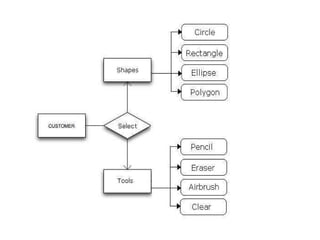
::  Functional Requirements   :: User basic graphical tools such as shapes,objects,brushes,colour tools,eraser etc  Should allow free hand drawing, object shapes such as circle,ellipse,rectangle,polygon. Should allow the usage of different colors in the form of brushes,shapes,curves. Manage the picture with tools such as pencil,airbrush,clear all.
::  Non-Functional Requirements  :: Must provide the program in vivid colours  and format. Should have adaptability to allow usage of  single module at a time Must enable faster processing of operations when a module is selected.
::  USER REQUIREMENTS   :: User  basic graphical tools such as  shapes,objects,brushes,colour tools,eraser etc  Should allow free hand drawing, object shapes such as circle,ellipse,rectangle,polygon. Should allow the usage of different colors in the form of brushes,shapes,curves. Manage the picture with tools such as pencil,airbrush,clear all.
::  SYSTEM REQUIREMENTS   :: SOFTWARE REQUIREMANTS FRONT END  : C++
::  SYSTEM REQUIREMENTS  :: HARDWARE REQUIREMENTS Pentium VI Processor RAM  512MB HDD Capacity 2GB We use the above mentioned  hardware tools for increased speed ,reduced complexity and for improved productivity.
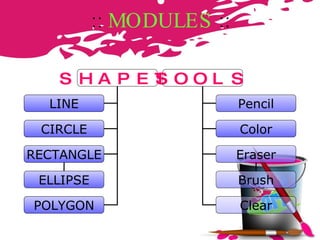
::  MODULES   :: SHAPES LINE CIRCLE RECTANGLE ELLIPSE POLYGON TOOLS Pencil Color Eraser Brush Clear
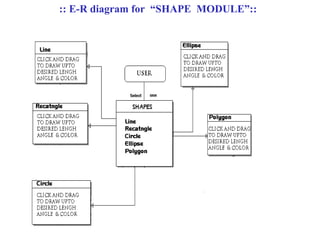
:: SHAPE  MODULE :: Shape module implemented using “graphics.h” header file. Shapes available in graphical tool kit is circle,rectangle,ellipse,polygon and line. The shapes are with the basic concept of mathematical functions(x & y points).
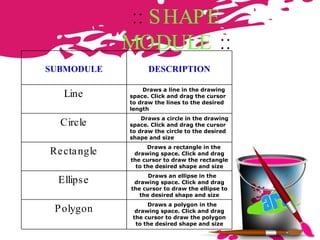
::  SHAPE MODULE  :: SUBMODULE DESCRIPTION Line Draws a line in the drawing space. Click and drag the cursor to draw the lines to the desired length  Circle Draws a circle in the drawing space. Click and drag the cursor to draw the circle to the desired shape and size Rectangle Draws a rectangle in the drawing space. Click and drag the cursor to draw the rectangle to the desired shape and size Ellipse Draws an ellipse in the drawing space. Click and drag the cursor to draw the ellipse to the desired shape and size Polygon Draws a polygon in the drawing space. Click and drag the cursor to draw the polygon to the desired shape and size
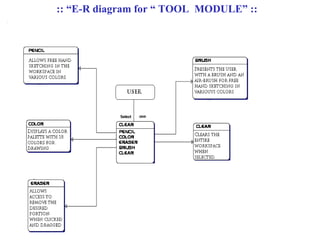
:: TOOLS  MODULE :: Various colors can be used to draw the shapes in graphical tool kit. The ‘Pencil’ tool allows free hand drawing in various colors. Essential painting items such brush airbrush in different shades
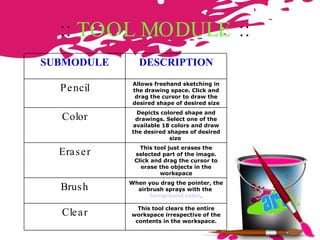
::  TOOL MODULE  :: SUBMODULE DESCRIPTION Pencil Allows freehand sketching in the drawing space. Click and drag the cursor to draw the desired shape of desired size Color Depicts colored shape and drawings. Select one of the available 18 colors and draw the desired shapes of desired size  Eraser This tool just erases the selected part of the image. Click and drag the cursor to erase the objects in the workspace Brush When you drag the pointer, the airbrush sprays with the  foreground color . Clear This tool clears the entire workspace irrespective of the contents in the workspace.
E R DIAGRAM
Click  here :: E-R diagram for  “SHAPE  MODULE”::
Click  here :: “E-R diagram for “ TOOL  MODULE” ::
 
OUTPUT Click  here
::   CONCLUSION  :: This project is developed to nurture the needs of a graphical user by embedding all the functions of graphical tool in a programming environment. Future version of this software will still be much enhanced than the current version 1.0.Thus the graphical toolkit is developed and executed successfully.
:: SNAPSHOTS::

Graphical Tool Kit 2

  • 1.
    :: GRAPHICALTOOL KIT ::
  • 2.
    :: SOFTWAREDEVELOPERS :: Team Members: M.G Praveen Vinoth.S.Ratnam M.Sivakumar A.Kasi viswanathan D.Pradeep K.Prabhu
  • 3.
    :: AIM :: To develop a software for solving graphical applications of a customer in graphical working environment in order to nurture the needs of an end graphical user by providing various ways to design and perform graphical tasks. Also to enable the user’s workspace to have additional functionalities which are not provided under a conventional graphical software
  • 4.
    :: ProblemDescription :: Graphical Tool Kit is a software which embeds all the commonly used functions of graphical tool.It designed keeping in about the basic drawing functions of an graphical manner. Graphical toolkit is designed to automate and to perform the operations with tools such as free hand drawing, shape with colors. This project is developed with the pact paving way for drawing shapes in a graphical method.
  • 5.
    :: REQUIREMENTS :: Functional requirements Non-Functional requirements User requirements System requirements
  • 6.
    :: FunctionalRequirements :: User basic graphical tools such as shapes,objects,brushes,colour tools,eraser etc Should allow free hand drawing, object shapes such as circle,ellipse,rectangle,polygon. Should allow the usage of different colors in the form of brushes,shapes,curves. Manage the picture with tools such as pencil,airbrush,clear all.
  • 7.
    :: Non-FunctionalRequirements :: Must provide the program in vivid colours and format. Should have adaptability to allow usage of single module at a time Must enable faster processing of operations when a module is selected.
  • 8.
    :: USERREQUIREMENTS :: User basic graphical tools such as shapes,objects,brushes,colour tools,eraser etc Should allow free hand drawing, object shapes such as circle,ellipse,rectangle,polygon. Should allow the usage of different colors in the form of brushes,shapes,curves. Manage the picture with tools such as pencil,airbrush,clear all.
  • 9.
    :: SYSTEMREQUIREMENTS :: SOFTWARE REQUIREMANTS FRONT END : C++
  • 10.
    :: SYSTEMREQUIREMENTS :: HARDWARE REQUIREMENTS Pentium VI Processor RAM 512MB HDD Capacity 2GB We use the above mentioned hardware tools for increased speed ,reduced complexity and for improved productivity.
  • 11.
    :: MODULES :: SHAPES LINE CIRCLE RECTANGLE ELLIPSE POLYGON TOOLS Pencil Color Eraser Brush Clear
  • 12.
    :: SHAPE MODULE :: Shape module implemented using “graphics.h” header file. Shapes available in graphical tool kit is circle,rectangle,ellipse,polygon and line. The shapes are with the basic concept of mathematical functions(x & y points).
  • 13.
    :: SHAPEMODULE :: SUBMODULE DESCRIPTION Line Draws a line in the drawing space. Click and drag the cursor to draw the lines to the desired length Circle Draws a circle in the drawing space. Click and drag the cursor to draw the circle to the desired shape and size Rectangle Draws a rectangle in the drawing space. Click and drag the cursor to draw the rectangle to the desired shape and size Ellipse Draws an ellipse in the drawing space. Click and drag the cursor to draw the ellipse to the desired shape and size Polygon Draws a polygon in the drawing space. Click and drag the cursor to draw the polygon to the desired shape and size
  • 14.
    :: TOOLS MODULE :: Various colors can be used to draw the shapes in graphical tool kit. The ‘Pencil’ tool allows free hand drawing in various colors. Essential painting items such brush airbrush in different shades
  • 15.
    :: TOOLMODULE :: SUBMODULE DESCRIPTION Pencil Allows freehand sketching in the drawing space. Click and drag the cursor to draw the desired shape of desired size Color Depicts colored shape and drawings. Select one of the available 18 colors and draw the desired shapes of desired size Eraser This tool just erases the selected part of the image. Click and drag the cursor to erase the objects in the workspace Brush When you drag the pointer, the airbrush sprays with the foreground color . Clear This tool clears the entire workspace irrespective of the contents in the workspace.
  • 16.
  • 17.
    Click here:: E-R diagram for “SHAPE MODULE”::
  • 18.
    Click here:: “E-R diagram for “ TOOL MODULE” ::
  • 19.
  • 20.
  • 21.
    :: CONCLUSION :: This project is developed to nurture the needs of a graphical user by embedding all the functions of graphical tool in a programming environment. Future version of this software will still be much enhanced than the current version 1.0.Thus the graphical toolkit is developed and executed successfully.
  • 22.