:: GRAPHICAL TOOL KIT ::
:: SOFTWARE DEVELOPERS
::
 Team Members:
M.G Praveen
Vinoth.S.Ratnam
M.Sivakumar
A.Kasi viswanathan
D.Pradeep
K.Prabhu
:: AIM ::
To develop a software for solving graphical applications of a
customer in graphical working environment.
To enable the user’s workspace to have additional functionalities
which are not provided under a conventional graphical software.
:: Problem Description ::
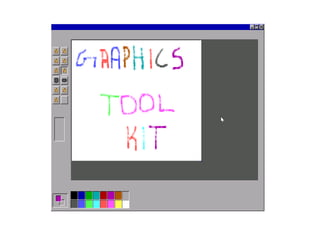
Graphical Tool Kit is a software which can embed all the
commonly used functions required by a graphical user such as
pencil,shapes,color and brush.It is used to perform the operations
with tools such as free hand drawing, shapes with colors.
:: REQUIREMENTS ::
Functional requirements
Non-Functional requirements
User requirements
System requirements
:: Functional Requirements ::
Essential drawing function like free hand sketching
is provided for desired shapes.
Commonly used shapes such as circle,
rectangle,ellipse & polygon are available.
Provides the usage of different colors in the form of
brushes and shapes.
Manages the picture with tools such as pencil,
airbrush, erase and clear all.
:: Non-Functional Requirements ::
Must provide the program in vivid colours
and clear format.
Should have adaptability to allow usage of
single module at a time
Must enable faster processing of operations
when a module is selected.
:: USER REQUIREMENTS
::User basic drawing function like free hand
sketching is provided for desired shapes.
Should allow free hand drawing object shapes
such as circle,ellipse,rectangle,polygon.
Should allow the usage of different colors in the
form of brushes,shapes,curves.
Manage the picture with tools such as
pencil,airbrush,clear all.
:: SYSTEM REQUIREMENTS
::
SOFTWARE REQUIREMANTS
FRONT END : C++
Operating System : Windows 98/2000/XP
:: SYSTEM REQUIREMENTS
::
HARDWARE REQUIREMENTS
Pentium VI Processor
RAM 512MB
HDD Capacity 2GB
PS2/USB Compatible Keyboard & Mouse
TESTING
Types of Testing:
Unit Testing
Integration Testing
oTop down integration
oBottom up integration
oSmoke Testing
oRegression Testing
Black Box Testing
White Box Testing
Testing is a process of executing a program
with the intent of finding an error in a program. Test
case is one that has high probability of finding an yet
undiscovered error
TESTING
Integration Testing
Integration testing is a logical extension of unit testing. In
its simplest form, two units that have already been tested are
combined into a component and the interface between them is
tested.
Integration testing strategies:
Topdownintegration
Bottomupintegration
Smoketesting
Regression Testing
Unit Testing
The primary goal of unit testing is to take the smallest piece of
testable software in the application, isolate it from the remainder of the
code, and determine whether it behaves exactly as you expect.
Is the error due to a defect in shape module
Is the error due to a defect in tool module
Is the error due to defects in both the modules
Is the error due to a defect in the interface between the module
Is the error due to a defect in the test?
Top down Integration
The highest-level modules are tested and integrated first. This
allows high-level logic and data flow to be tested early in the process
and it tends to minimize the need for drivers. Need for stubs are reduced
in test management and low-level utilities are tested relatively late in the
development cycle.
Bottom up Integration
The lowest-level units are tested and integrated first. These
units are frequently referred to as utility modules. By using this
approach, utility modules are tested early in the development process
and the need for stubs is minimized. Like the top-down approach, the
bottom-up approach also provides poor support for early release of
limited functionality.
Smoke testing
Smoke testing is carried out testing along functional data and
control-flow paths. First, the inputs for functions are integrated in the
bottom-up pattern.Degree of support for early release of limited
functionality is tested. Need for stubs and drivers is minimized
Top down Integration
Regression testing is done do so by rerunning existing tests
against the modified code to determine whether the changes break
anything that worked prior to the change and by writing new tests where
necessary. Adequate coverage without wasting time is considered when
conducting regression test.
Black Box Testing
Black Box Testing is testing without knowledge of the
internal workings of the item being tested. For example, when black
box testing is applied to software engineering, the tester would only
know the "legal" inputs and what the expected outputs should be, but
not how the program actually arrives at those outputs.
Black Box Testing Strategies:
Needs no knowledge of implementation, including specific
programming languages
Tests are done from a user's point of view
Ambiguities or inconsistencies in the specifications are Exposed
if any.
Test cases are be designed as soon as the specifications are
complete
White Box Testing
White box testing strategy deals with the internal logic and
structure of the code. White box testing is also called as glass,
structural, open box or clears box testing. The tests written based on
the white box testing strategy incorporate coverage of the code
written, branches, paths, statements and internal logic of the code
etc.
Advantages of White box testing
I) As the knowledge of internal coding structure is prerequisite, it
becomes very easy to find out which type of input/data can help in
testing this effectively.
Ii) Code is being optimized
iii) Extra lines of code are removed which can bring in hidden
defects.
DESIGN
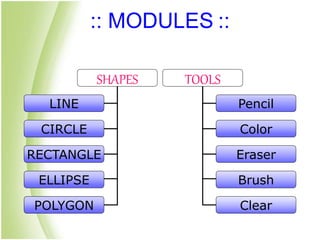
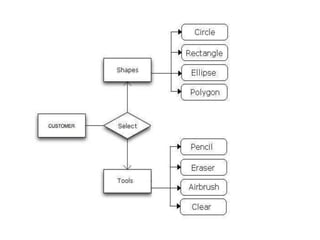
:: MODULES ::
SHAPES
LINE
CIRCLE
RECTANGLE
ELLIPSE
POLYGON
TOOLS
Pencil
Color
Eraser
Brush
Clear
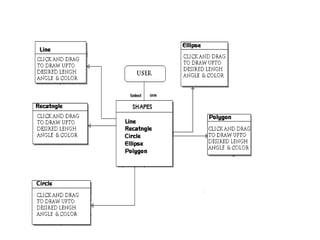
::SHAPE MODULE::
Shape module implemented using
“graphics.h” header file.
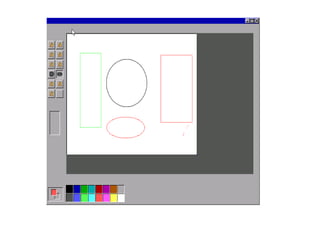
Shapes available in graphical tool kit is
circle,rectangle,ellipse,polygon and line.
The shapes are with the basic concept of
mathematical functions(x & y points).
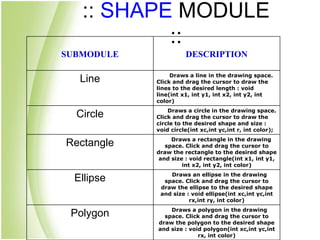
:: SHAPE MODULE
::
SUBMODULE DESCRIPTION
Line Draws a line in the drawing space.

Click and drag the cursor to draw the
lines to the desired length : void
line(int x1, int y1, int x2, int y2, int
color)
Circle Draws a circle in the drawing space.
Click and drag the cursor to draw the
circle to the desired shape and size :
void circle(int xc,int yc,int r, int color);
Rectangle Draws a rectangle in the drawing
space. Click and drag the cursor to
draw the rectangle to the desired shape
and size : void rectangle(int x1, int y1,
int x2, int y2, int color)
Ellipse Draws an ellipse in the drawing
space. Click and drag the cursor to
draw the ellipse to the desired shape
and size : void ellipse(int xc,int yc,int
rx,int ry, int color)
Polygon Draws a polygon in the drawing
space. Click and drag the cursor to
draw the polygon to the desired shape
and size : void polygon(int xc,int yc,int
rx, int color)
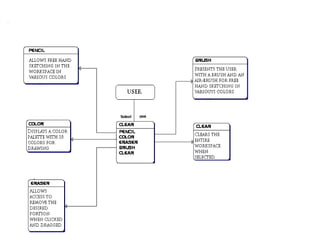
::TOOLS MODULE::
Various colors can be used to draw the
shapes in graphical tool kit.
The ‘Pencil’ tool allows free hand drawing
in various colors.
Essential painting items such brush
airbrush in different shades
:: TOOL MODULE ::
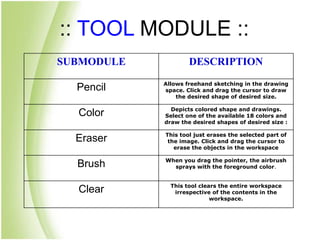
SUBMODULE DESCRIPTION
Pencil Allows freehand sketching in the drawing
space. Click and drag the cursor to draw
the desired shape of desired size.
Color Depicts colored shape and drawings.
Select one of the available 18 colors and
draw the desired shapes of desired size :
Eraser This tool just erases the selected part of
the image. Click and drag the cursor to
erase the objects in the workspace
Brush When you drag the pointer, the airbrush
sprays with the foreground color.
Clear This tool clears the entire workspace
irrespective of the contents in the
workspace.
DESIGN
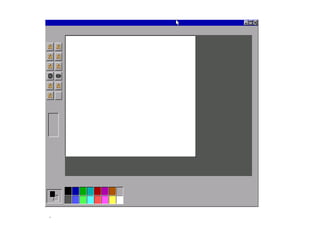
:: SNAPSHOTS::
:: CONCLUSION ::
This project is developed to nurture the needs
of a graphical user by embedding all the functions of
graphical tool in a programming environment.
Future version of this software will include
options for importing pictures and save option which
will enhance the current version 1.0.Thus the
graphical toolkit is developed and executed
successfully.
Click here
Thank You

Presentation Latest

  • 1.
  • 2.
    :: SOFTWARE DEVELOPERS :: Team Members: M.G Praveen Vinoth.S.Ratnam M.Sivakumar A.Kasi viswanathan D.Pradeep K.Prabhu
  • 3.
    :: AIM :: Todevelop a software for solving graphical applications of a customer in graphical working environment. To enable the user’s workspace to have additional functionalities which are not provided under a conventional graphical software.
  • 4.
    :: Problem Description:: Graphical Tool Kit is a software which can embed all the commonly used functions required by a graphical user such as pencil,shapes,color and brush.It is used to perform the operations with tools such as free hand drawing, shapes with colors.
  • 5.
    :: REQUIREMENTS :: Functionalrequirements Non-Functional requirements User requirements System requirements
  • 6.
    :: Functional Requirements:: Essential drawing function like free hand sketching is provided for desired shapes. Commonly used shapes such as circle, rectangle,ellipse & polygon are available. Provides the usage of different colors in the form of brushes and shapes. Manages the picture with tools such as pencil, airbrush, erase and clear all.
  • 7.
    :: Non-Functional Requirements:: Must provide the program in vivid colours and clear format. Should have adaptability to allow usage of single module at a time Must enable faster processing of operations when a module is selected.
  • 8.
    :: USER REQUIREMENTS ::Userbasic drawing function like free hand sketching is provided for desired shapes. Should allow free hand drawing object shapes such as circle,ellipse,rectangle,polygon. Should allow the usage of different colors in the form of brushes,shapes,curves. Manage the picture with tools such as pencil,airbrush,clear all.
  • 9.
    :: SYSTEM REQUIREMENTS :: SOFTWAREREQUIREMANTS FRONT END : C++ Operating System : Windows 98/2000/XP
  • 10.
    :: SYSTEM REQUIREMENTS :: HARDWAREREQUIREMENTS Pentium VI Processor RAM 512MB HDD Capacity 2GB PS2/USB Compatible Keyboard & Mouse
  • 11.
  • 12.
    Types of Testing: UnitTesting Integration Testing oTop down integration oBottom up integration oSmoke Testing oRegression Testing Black Box Testing White Box Testing Testing is a process of executing a program with the intent of finding an error in a program. Test case is one that has high probability of finding an yet undiscovered error TESTING
  • 13.
    Integration Testing Integration testingis a logical extension of unit testing. In its simplest form, two units that have already been tested are combined into a component and the interface between them is tested. Integration testing strategies: Topdownintegration Bottomupintegration Smoketesting Regression Testing
  • 14.
    Unit Testing The primarygoal of unit testing is to take the smallest piece of testable software in the application, isolate it from the remainder of the code, and determine whether it behaves exactly as you expect. Is the error due to a defect in shape module Is the error due to a defect in tool module Is the error due to defects in both the modules Is the error due to a defect in the interface between the module Is the error due to a defect in the test?
  • 15.
    Top down Integration Thehighest-level modules are tested and integrated first. This allows high-level logic and data flow to be tested early in the process and it tends to minimize the need for drivers. Need for stubs are reduced in test management and low-level utilities are tested relatively late in the development cycle. Bottom up Integration The lowest-level units are tested and integrated first. These units are frequently referred to as utility modules. By using this approach, utility modules are tested early in the development process and the need for stubs is minimized. Like the top-down approach, the bottom-up approach also provides poor support for early release of limited functionality.
  • 16.
    Smoke testing Smoke testingis carried out testing along functional data and control-flow paths. First, the inputs for functions are integrated in the bottom-up pattern.Degree of support for early release of limited functionality is tested. Need for stubs and drivers is minimized Top down Integration Regression testing is done do so by rerunning existing tests against the modified code to determine whether the changes break anything that worked prior to the change and by writing new tests where necessary. Adequate coverage without wasting time is considered when conducting regression test.
  • 17.
    Black Box Testing BlackBox Testing is testing without knowledge of the internal workings of the item being tested. For example, when black box testing is applied to software engineering, the tester would only know the "legal" inputs and what the expected outputs should be, but not how the program actually arrives at those outputs. Black Box Testing Strategies: Needs no knowledge of implementation, including specific programming languages Tests are done from a user's point of view Ambiguities or inconsistencies in the specifications are Exposed if any. Test cases are be designed as soon as the specifications are complete
  • 18.
    White Box Testing Whitebox testing strategy deals with the internal logic and structure of the code. White box testing is also called as glass, structural, open box or clears box testing. The tests written based on the white box testing strategy incorporate coverage of the code written, branches, paths, statements and internal logic of the code etc. Advantages of White box testing I) As the knowledge of internal coding structure is prerequisite, it becomes very easy to find out which type of input/data can help in testing this effectively. Ii) Code is being optimized iii) Extra lines of code are removed which can bring in hidden defects.
  • 19.
  • 20.
  • 21.
    ::SHAPE MODULE:: Shape moduleimplemented using “graphics.h” header file. Shapes available in graphical tool kit is circle,rectangle,ellipse,polygon and line. The shapes are with the basic concept of mathematical functions(x & y points).
  • 22.
    :: SHAPE MODULE :: SUBMODULEDESCRIPTION Line Draws a line in the drawing space. Click and drag the cursor to draw the lines to the desired length : void line(int x1, int y1, int x2, int y2, int color) Circle Draws a circle in the drawing space. Click and drag the cursor to draw the circle to the desired shape and size : void circle(int xc,int yc,int r, int color); Rectangle Draws a rectangle in the drawing space. Click and drag the cursor to draw the rectangle to the desired shape and size : void rectangle(int x1, int y1, int x2, int y2, int color) Ellipse Draws an ellipse in the drawing space. Click and drag the cursor to draw the ellipse to the desired shape and size : void ellipse(int xc,int yc,int rx,int ry, int color) Polygon Draws a polygon in the drawing space. Click and drag the cursor to draw the polygon to the desired shape and size : void polygon(int xc,int yc,int rx, int color)
  • 23.
    ::TOOLS MODULE:: Various colorscan be used to draw the shapes in graphical tool kit. The ‘Pencil’ tool allows free hand drawing in various colors. Essential painting items such brush airbrush in different shades
  • 24.
    :: TOOL MODULE:: SUBMODULE DESCRIPTION Pencil Allows freehand sketching in the drawing space. Click and drag the cursor to draw the desired shape of desired size. Color Depicts colored shape and drawings. Select one of the available 18 colors and draw the desired shapes of desired size : Eraser This tool just erases the selected part of the image. Click and drag the cursor to erase the objects in the workspace Brush When you drag the pointer, the airbrush sprays with the foreground color. Clear This tool clears the entire workspace irrespective of the contents in the workspace.
  • 25.
  • 29.
  • 33.
    :: CONCLUSION :: Thisproject is developed to nurture the needs of a graphical user by embedding all the functions of graphical tool in a programming environment. Future version of this software will include options for importing pictures and save option which will enhance the current version 1.0.Thus the graphical toolkit is developed and executed successfully.
  • 34.
  • 35.