
Linked data analytics in an ad-
system (Slide outlines)
Inder Singh, Srikanth Sundarrajan
@inmobi
User store
• Why a store for user data
– Just like advertiser or publisher in the network,
consumer/user is a very important entity
• It is an entity that has associated activity
• Not an attribute on a network entity
• Value for network, advertiser & publisher by
showing ads that are very relevant to users
– We need to understand users better
– And leverage information about them better
What do we need to store?
• Activities that a user is involved in
• Profile of the user (ex. Demographics)
• Besides
• Location
• Device
• Apps etc
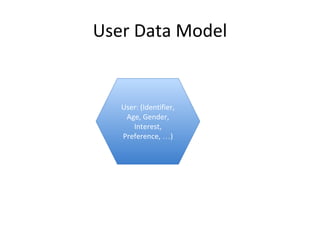
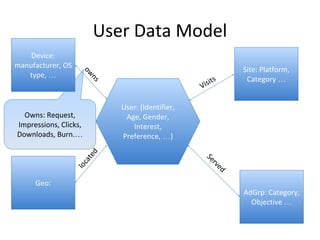
User Data Model
User: (Identifier,
Age, Gender,
Interest,
Preference, …)
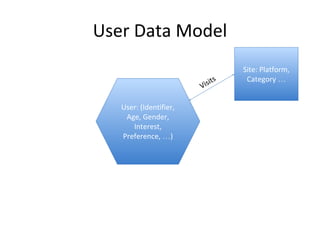
User Data Model
User: (Identifier,
Age, Gender,
Interest,
Preference, …)
Site: Platform,
Category …
Visits
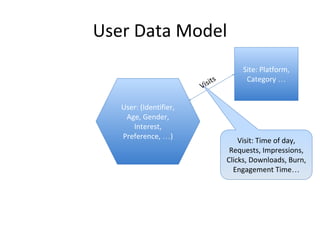
User Data Model
User: (Identifier,
Age, Gender,
Interest,
Preference, …)
Site: Platform,
Category …
Visits
Visit: Time of day,
Requests, Impressions,
Clicks, Downloads, Burn,
Engagement Time…
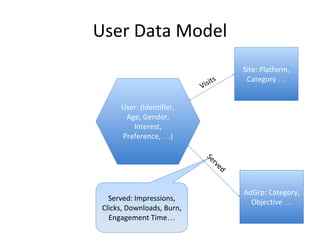
User Data Model
User: (Identifier,
Age, Gender,
Interest,
Preference, …)
Site: Platform,
Category …
Visits
Served: Impressions,
Clicks, Downloads, Burn,
Engagement Time…
AdGrp: Category,
Objective …
Served
User Data Model
Owns: Request,
Impressions, Clicks,
Downloads, Burn.…
User: (Identifier,
Age, Gender,
Interest,
Preference, …)
Site: Platform,
Category …
Visits
AdGrp: Category,
Objective …
Served
Geo:
located
Device:
manufacturer, OS
type, …
owns
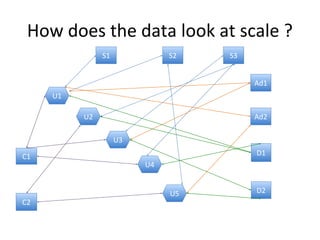
How does the data look at scale ?
U1
S1 S2
U2
U3
U4
U5
S3
Ad1
Ad2
C1
C2
D1
D2
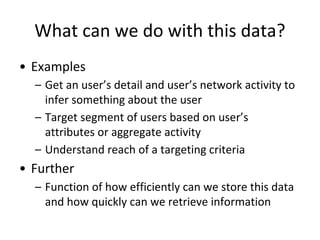
What can we do with this data?
• Examples
– Get an user’s detail and user’s network activity to
infer something about the user
– Target segment of users based on user’s
attributes or aggregate activity
– Understand reach of a targeting criteria
• Further
– Function of how efficiently can we store this data
and how quickly can we retrieve information
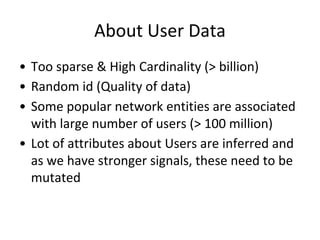
About User Data
• Too sparse & High Cardinality (> billion)
• Random id (Quality of data)
• Some popular network entities are associated
with large number of users (> 100 million)
• Lot of attributes about Users are inferred and
as we have stronger signals, these need to be
mutated
How ?
• Store for Analytics / Insights
– Is all about organizing data aligning with retrieval
use cases
– Retrieval time = Organization / Data Size
– What is Organization
• Simply put: Trade space for time
Popular storage structures
• Rows & Columns – Relational Table
– Indexing ?
• Each column ?
• Group of columns ?
• Ingestion cost
• Cardinality
– Ideal if the queries/data extraction is reasonably
well defined and conforms to set patterns
– Appends is the most efficient way of ingestion
Popular storage structures
• Columnar storage (big table / db)
– Key based lookup / scan
– Optimized for use cases where not all data stored
for the key needs to be retrieved
– Mutations / Append patterns are both scalable
patterns for ingestion
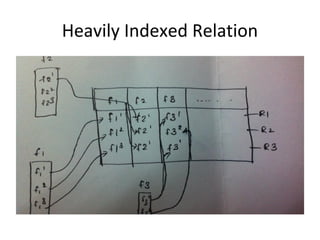
Heavily Indexed Relation
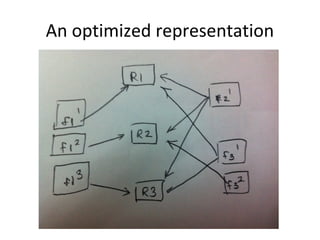
An optimized representation
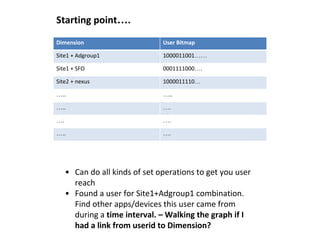
Dimension User Bitmap
Site1 + Adgroup1 1000011001……
Site1 + SFO 0001111000….
Site2 + nexus 1000011110…
….. …..
….. ….
…. ….
….. ….
Starting point….
• Can do all kinds of set operations to get you user
reach
• Found a user for Site1+Adgroup1 combination.
Find other apps/devices this user came from
during a time interval. – Walking the graph if I
had a link from userid to Dimension?
Dimension User Bitmap
Site1 + Adgroup1 1000011001……
Site1 + SFO 0001111000….
Site2 + nexus 1000011110…
….. …..
….. ….
…. ….
….. ….
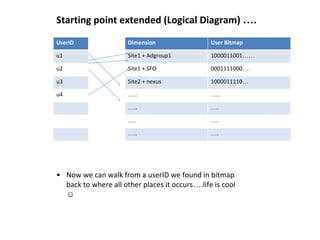
Starting point extended (Logical Diagram) ….
UserID
u1
u2
u3
u4
• Now we can walk from a userID we found in bitmap
back to where all other places it occurs….life is cool
☺
Engineers, we want neat abstractions
so life is uncool again..
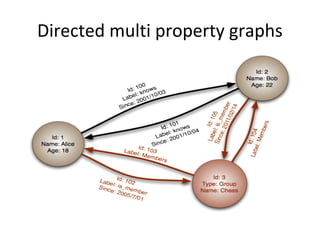
Directed multi property graphs
Buzzwords in Graph world
• Neo4j
• Titan
• Dex
• Pregel
• Giraph
• Gremlin
• Tinker Pop blueprint
What to do?
• Evaluate leading graph db’s neo4j, titan,
orientDB, flockdb(twitter), Facebook TAO.
• Titan & neo4j
– Challenges we faced
• SuperNodes
• Queries like give me Sites, Devices with exclusive users
or in general class of queries requiring lots of edge
traversals over lots of super nodes never returned for
hours and the DB server goes in GC.
• Talk to experts from neo4j, titan. Still not there for
huge scale and expensive queries.
• Research paper of DEX
• Formalizes and provides abstractions over our
thinking of using bitmaps
• Compares class of queries it supports against
leading graph DB’s and results are very promising.
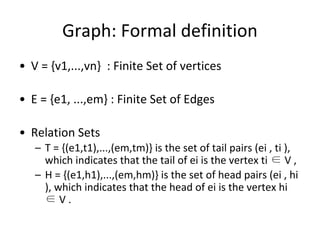
Graph: Formal definition
• V = {v1,...,vn} : Finite Set of vertices
• E = {e1, ...,em} : Finite Set of Edges
• Relation Sets
– T = {(e1,t1),...,(em,tm)} is the set of tail pairs (ei , ti ),
which indicates that the tail of ei is the vertex ti ∈ V ,
– H = {(e1,h1),...,(em,hm)} is the set of head pairs (ei , hi
), which indicates that the head of ei is the vertex hi
∈ V .
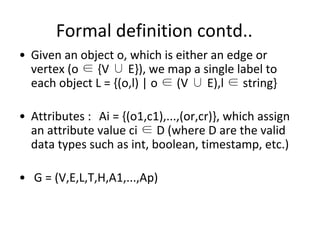
Formal definition contd..
• Given an object o, which is either an edge or
vertex (o ∈ {V ∪ E}), we map a single label to
each object L = {(o,l) | o ∈ (V ∪ E),l ∈ string}
• Attributes : Ai = {(o1,c1),...,(or,cr)}, which assign
an attribute value ci ∈ D (where D are the valid
data types such as int, boolean, timestamp, etc.)
• G = (V,E,L,T,H,A1,...,Ap)
Some things we want
• Store large #objects sets and access efficiently
• Given a key, find matching objects
(Vertex/Edges)
• Given and object retrieve set of values
associated with this object.
Assumptions
• Vertex/Edges in the entire graph have a
unique ID called oid (object identifier).
So what’s the real deal
• Value Sets : Group all objects matching a value
together. Similar to inverted index.
• Two set of maps :
– VALUE_OID : maps a value to a bitmap
– OID_VALUE : maps an oid to a value
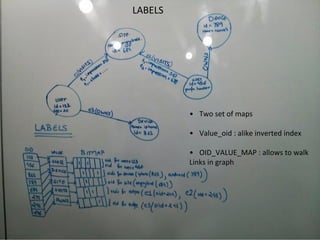
LABELS
• Two set of maps
• Value_oid : alike inverted index
• OID_VALUE_MAP : allows to walk
Links in graph
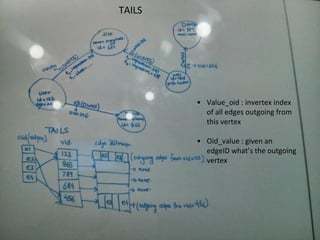
TAILS
• Value_oid : invertex index
of all edges outgoing from
this vertex
• Oid_value : given an
edgeID what’s the outgoing
vertex
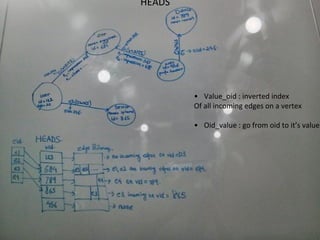
HEADS
• Value_oid : inverted index
Of all incoming edges on a vertex
• Oid_value : go from oid to it’s value
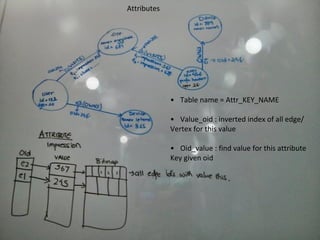
Attributes
• Table name = Attr_KEY_NAME
• Value_oid : inverted index of all edge/
Vertex for this value
• Oid_value : find value for this attribute
Key given oid
Efficient bitmaps
• Parition 64 bitmap space into significantly big
ranges for each entitytype like device, site,
etc.
• Results in less sparse bitmaps and better
compression.
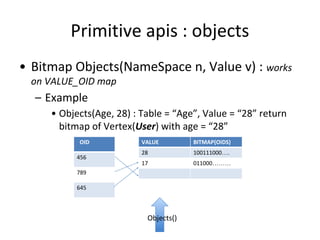
Primitive apis : objects
• Bitmap Objects(NameSpace n, Value v) : works
on VALUE_OID map
– Example
• Objects(Age, 28) : Table = “Age”, Value = “28” return
bitmap of Vertex(User) with age = “28”
VALUE BITMAP(OIDS)
28 100111000….
17 011000………
OID
456
789
645
Objects()
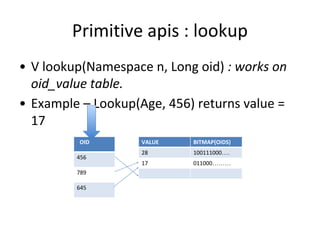
Primitive apis : lookup
• V lookup(Namespace n, Long oid) : works on
oid_value table.
• Example – Lookup(Age, 456) returns value =
17
VALUE BITMAP(OIDS)
28 100111000….
17 011000………
OID
456
789
645
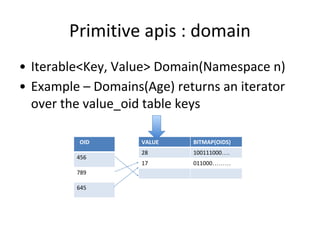
Primitive apis : domain
• Iterable<Key, Value> Domain(Namespace n)
• Example – Domains(Age) returns an iterator
over the value_oid table keys
VALUE BITMAP(OIDS)
28 100111000….
17 011000………
OID
456
789
645
Primitive apis : insert, remove
• Insert(Namespace n, Long oid, Value v)
• remove(Namespace n, Long oid, Value v)
Tinker Pop apis
• Let’s look at the code of AbstractGraph,
ShadowfaxEdge, ShadowFaxvertex to
understand how all of this works together
Walking the graph
• Find all users who own iphone and have 100
clicks in system. Find common sites among
these users.
• Let’s break it down
– Users who own iphone = objects(“label”,
“iphone”) – returns a bitmap with one vertex set
of iphone.
Walking the graph
• From iphone vertex let’s go to all OWNS edges
– Bitmap1 Objects(HEADS, “iphone-vid”) : bitmap
for all edges incident into iphone vertex
– Bitmap2 Objects(LABELS, “OWNS”) all owns edges
– all OWNS edges incident into iphone-vid =
Bitmap3 = (Bitmap1 AND bitmap2)
Walking the graph contd..
• Find all edges which have “clicks = 100” –
Bitmap3 = objects(click, “100”)
• Bitmap4 = (Bitmap3 AND bitmap4) All edges
incident into iphone vertex and have 100
clicks.
Walking the graph contd..
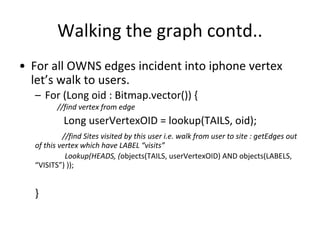
• For all OWNS edges incident into iphone vertex
let’s walk to users.
– For (Long oid : Bitmap.vector()) {
//find vertex from edge
Long userVertexOID = lookup(TAILS, oid);
//find Sites visited by this user i.e. walk from user to site : getEdges out
of this vertex which have LABEL “visits”
Lookup(HEADS, (objects(TAILS, userVertexOID) AND objects(LABELS,
“VISITS”) ));
}
Is that the way to write code?
• No use tinker pop api’s we give, life is easy ☺
• How our implementation gives more power –
Expensive queries optimized through native
apis.
Ingestion at Scale
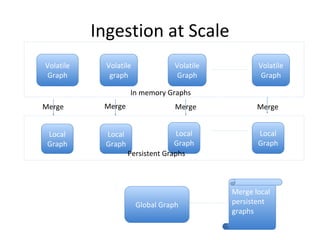
Volatile
Graph
Volatile
graph
Volatile
Graph
Volatile
Graph
In memory Graphs
Local
Graph
Local
Graph
Local
Graph
Local
Graph
Persistent Graphs
Merge MergeMerge Merge
Global Graph
Merge local
persistent
graphs
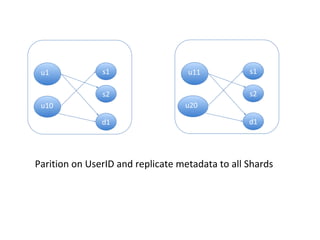
Shard1
u1 s1
s2
d1
u10
Shard2
u11 s1
s2
d1
u20
Parition on UserID and replicate metadata to all Shards
Build up
• KV store : high throughput, low latency for
bigger sized values.
– Evaluated
• LevelDB : Chosen at the moment
• LigthingDB
• Others
Build up contd..
• Bitmap Indexing Library
– Evaluated
• Fastbit : Chosen
• Javaewah
Examples of costly queries
• getEntitiesWithMaxUserCount(startDate, endDate, entityType) – Ex : work
on a batch of sites in parallel. For a site for multiple dates work in parallel.
• getEntitiesWithExclusiveUsers(startDate, endDate, entityType)
• getRepeatingUserDistribution(startDate, endDate, entityType)

Graph store

  • 1.
    Linked data analyticsin an ad- system (Slide outlines) Inder Singh, Srikanth Sundarrajan @inmobi
  • 2.
    User store • Whya store for user data – Just like advertiser or publisher in the network, consumer/user is a very important entity • It is an entity that has associated activity • Not an attribute on a network entity • Value for network, advertiser & publisher by showing ads that are very relevant to users – We need to understand users better – And leverage information about them better
  • 3.
    What do weneed to store? • Activities that a user is involved in • Profile of the user (ex. Demographics) • Besides • Location • Device • Apps etc
  • 4.
    User Data Model User:(Identifier, Age, Gender, Interest, Preference, …)
  • 5.
    User Data Model User:(Identifier, Age, Gender, Interest, Preference, …) Site: Platform, Category … Visits
  • 6.
    User Data Model User:(Identifier, Age, Gender, Interest, Preference, …) Site: Platform, Category … Visits Visit: Time of day, Requests, Impressions, Clicks, Downloads, Burn, Engagement Time…
  • 7.
    User Data Model User:(Identifier, Age, Gender, Interest, Preference, …) Site: Platform, Category … Visits Served: Impressions, Clicks, Downloads, Burn, Engagement Time… AdGrp: Category, Objective … Served
  • 8.
    User Data Model Owns:Request, Impressions, Clicks, Downloads, Burn.… User: (Identifier, Age, Gender, Interest, Preference, …) Site: Platform, Category … Visits AdGrp: Category, Objective … Served Geo: located Device: manufacturer, OS type, … owns
  • 9.
    How does thedata look at scale ? U1 S1 S2 U2 U3 U4 U5 S3 Ad1 Ad2 C1 C2 D1 D2
  • 10.
    What can wedo with this data? • Examples – Get an user’s detail and user’s network activity to infer something about the user – Target segment of users based on user’s attributes or aggregate activity – Understand reach of a targeting criteria • Further – Function of how efficiently can we store this data and how quickly can we retrieve information
  • 11.
    About User Data •Too sparse & High Cardinality (> billion) • Random id (Quality of data) • Some popular network entities are associated with large number of users (> 100 million) • Lot of attributes about Users are inferred and as we have stronger signals, these need to be mutated
  • 12.
    How ? • Storefor Analytics / Insights – Is all about organizing data aligning with retrieval use cases – Retrieval time = Organization / Data Size – What is Organization • Simply put: Trade space for time
  • 13.
    Popular storage structures •Rows & Columns – Relational Table – Indexing ? • Each column ? • Group of columns ? • Ingestion cost • Cardinality – Ideal if the queries/data extraction is reasonably well defined and conforms to set patterns – Appends is the most efficient way of ingestion
  • 14.
    Popular storage structures •Columnar storage (big table / db) – Key based lookup / scan – Optimized for use cases where not all data stored for the key needs to be retrieved – Mutations / Append patterns are both scalable patterns for ingestion
  • 15.
  • 16.
  • 17.
    Dimension User Bitmap Site1+ Adgroup1 1000011001…… Site1 + SFO 0001111000…. Site2 + nexus 1000011110… ….. ….. ….. …. …. …. ….. …. Starting point…. • Can do all kinds of set operations to get you user reach • Found a user for Site1+Adgroup1 combination. Find other apps/devices this user came from during a time interval. – Walking the graph if I had a link from userid to Dimension?
  • 18.
    Dimension User Bitmap Site1+ Adgroup1 1000011001…… Site1 + SFO 0001111000…. Site2 + nexus 1000011110… ….. ….. ….. …. …. …. ….. …. Starting point extended (Logical Diagram) …. UserID u1 u2 u3 u4 • Now we can walk from a userID we found in bitmap back to where all other places it occurs….life is cool ☺
  • 19.
    Engineers, we wantneat abstractions so life is uncool again..
  • 20.
  • 21.
    Buzzwords in Graphworld • Neo4j • Titan • Dex • Pregel • Giraph • Gremlin • Tinker Pop blueprint
  • 22.
    What to do? •Evaluate leading graph db’s neo4j, titan, orientDB, flockdb(twitter), Facebook TAO. • Titan & neo4j – Challenges we faced • SuperNodes • Queries like give me Sites, Devices with exclusive users or in general class of queries requiring lots of edge traversals over lots of super nodes never returned for hours and the DB server goes in GC. • Talk to experts from neo4j, titan. Still not there for huge scale and expensive queries.
  • 23.
    • Research paperof DEX • Formalizes and provides abstractions over our thinking of using bitmaps • Compares class of queries it supports against leading graph DB’s and results are very promising.
  • 24.
    Graph: Formal definition •V = {v1,...,vn} : Finite Set of vertices • E = {e1, ...,em} : Finite Set of Edges • Relation Sets – T = {(e1,t1),...,(em,tm)} is the set of tail pairs (ei , ti ), which indicates that the tail of ei is the vertex ti ∈ V , – H = {(e1,h1),...,(em,hm)} is the set of head pairs (ei , hi ), which indicates that the head of ei is the vertex hi ∈ V .
  • 25.
    Formal definition contd.. •Given an object o, which is either an edge or vertex (o ∈ {V ∪ E}), we map a single label to each object L = {(o,l) | o ∈ (V ∪ E),l ∈ string} • Attributes : Ai = {(o1,c1),...,(or,cr)}, which assign an attribute value ci ∈ D (where D are the valid data types such as int, boolean, timestamp, etc.) • G = (V,E,L,T,H,A1,...,Ap)
  • 26.
    Some things wewant • Store large #objects sets and access efficiently • Given a key, find matching objects (Vertex/Edges) • Given and object retrieve set of values associated with this object.
  • 27.
    Assumptions • Vertex/Edges inthe entire graph have a unique ID called oid (object identifier).
  • 28.
    So what’s thereal deal • Value Sets : Group all objects matching a value together. Similar to inverted index. • Two set of maps : – VALUE_OID : maps a value to a bitmap – OID_VALUE : maps an oid to a value
  • 29.
    LABELS • Two setof maps • Value_oid : alike inverted index • OID_VALUE_MAP : allows to walk Links in graph
  • 30.
    TAILS • Value_oid :invertex index of all edges outgoing from this vertex • Oid_value : given an edgeID what’s the outgoing vertex
  • 31.
    HEADS • Value_oid :inverted index Of all incoming edges on a vertex • Oid_value : go from oid to it’s value
  • 32.
    Attributes • Table name= Attr_KEY_NAME • Value_oid : inverted index of all edge/ Vertex for this value • Oid_value : find value for this attribute Key given oid
  • 33.
    Efficient bitmaps • Parition64 bitmap space into significantly big ranges for each entitytype like device, site, etc. • Results in less sparse bitmaps and better compression.
  • 34.
    Primitive apis :objects • Bitmap Objects(NameSpace n, Value v) : works on VALUE_OID map – Example • Objects(Age, 28) : Table = “Age”, Value = “28” return bitmap of Vertex(User) with age = “28” VALUE BITMAP(OIDS) 28 100111000…. 17 011000……… OID 456 789 645 Objects()
  • 35.
    Primitive apis :lookup • V lookup(Namespace n, Long oid) : works on oid_value table. • Example – Lookup(Age, 456) returns value = 17 VALUE BITMAP(OIDS) 28 100111000…. 17 011000……… OID 456 789 645
  • 36.
    Primitive apis :domain • Iterable<Key, Value> Domain(Namespace n) • Example – Domains(Age) returns an iterator over the value_oid table keys VALUE BITMAP(OIDS) 28 100111000…. 17 011000……… OID 456 789 645
  • 37.
    Primitive apis :insert, remove • Insert(Namespace n, Long oid, Value v) • remove(Namespace n, Long oid, Value v)
  • 38.
    Tinker Pop apis •Let’s look at the code of AbstractGraph, ShadowfaxEdge, ShadowFaxvertex to understand how all of this works together
  • 39.
    Walking the graph •Find all users who own iphone and have 100 clicks in system. Find common sites among these users. • Let’s break it down – Users who own iphone = objects(“label”, “iphone”) – returns a bitmap with one vertex set of iphone.
  • 40.
    Walking the graph •From iphone vertex let’s go to all OWNS edges – Bitmap1 Objects(HEADS, “iphone-vid”) : bitmap for all edges incident into iphone vertex – Bitmap2 Objects(LABELS, “OWNS”) all owns edges – all OWNS edges incident into iphone-vid = Bitmap3 = (Bitmap1 AND bitmap2)
  • 41.
    Walking the graphcontd.. • Find all edges which have “clicks = 100” – Bitmap3 = objects(click, “100”) • Bitmap4 = (Bitmap3 AND bitmap4) All edges incident into iphone vertex and have 100 clicks.
  • 42.
    Walking the graphcontd.. • For all OWNS edges incident into iphone vertex let’s walk to users. – For (Long oid : Bitmap.vector()) { //find vertex from edge Long userVertexOID = lookup(TAILS, oid); //find Sites visited by this user i.e. walk from user to site : getEdges out of this vertex which have LABEL “visits” Lookup(HEADS, (objects(TAILS, userVertexOID) AND objects(LABELS, “VISITS”) )); }
  • 43.
    Is that theway to write code? • No use tinker pop api’s we give, life is easy ☺ • How our implementation gives more power – Expensive queries optimized through native apis.
  • 44.
    Ingestion at Scale Volatile Graph Volatile graph Volatile Graph Volatile Graph Inmemory Graphs Local Graph Local Graph Local Graph Local Graph Persistent Graphs Merge MergeMerge Merge Global Graph Merge local persistent graphs
  • 46.
    Shard1 u1 s1 s2 d1 u10 Shard2 u11 s1 s2 d1 u20 Paritionon UserID and replicate metadata to all Shards
  • 47.
    Build up • KVstore : high throughput, low latency for bigger sized values. – Evaluated • LevelDB : Chosen at the moment • LigthingDB • Others
  • 48.
    Build up contd.. •Bitmap Indexing Library – Evaluated • Fastbit : Chosen • Javaewah
  • 49.
    Examples of costlyqueries • getEntitiesWithMaxUserCount(startDate, endDate, entityType) – Ex : work on a batch of sites in parallel. For a site for multiple dates work in parallel. • getEntitiesWithExclusiveUsers(startDate, endDate, entityType) • getRepeatingUserDistribution(startDate, endDate, entityType)