Policy Primer for Google 
By Irene Pollak
Each time you sign up for a social 
media account or an email account 
or use a search engine you are 
asked to agree to their policies in 
their Terms of Service. 
Here is a brief outline of Google’s Terms of Service and Privacy 
Policy in a 5 minute nutshell. 
And how it impacts you.
Google’s Privacy Policy 
When you sign up for a 
Google account you 
are automatically set 
up with a Gmail 
account and a Google 
Plus (G+) profile. 
Google states; “We 
collect information to 
provide better services 
to all our users” 
(Google web) 
Data is collected from; 
Gmail messages 
G+ profile, photos and videos. 
Browsing History 
Map Searches 
Docs 
And other Google-hosted content. 
(http://www.google.com/policies/priva 
cy/example/collect-information.html)
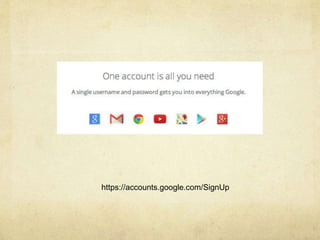
https://accounts.google.com/SignUp
Privacy Key Terms 
Here are some of the terms that Google 
uses to name the different ways they 
collect data from your online activity 
through their search engine and 
other services they provide.
Cookie 
Cookie – a small file 
containing a string of 
characters sent from 
your computer when 
you visit a website. 
What this does is store 
your preferences and 
other information. 
For private browsing you can 
clear your cookies or not 
allow them. 
But ‘do not tract’ isn’t 
guaranteed to always work as 
the value for marketing this 
tracking offers does outweigh 
companies ‘resolve’ to 
enforce this. 
http://www.privacyrights.org/fs 
/fs18-cyb.htm
Types of cookies used by 
Google. 
Preferences; your language, location, how many 
search results you wish to see per page. 
http://www.google.com/intl/en/policies/technologi 
es/types/
More cookies used by Google. 
Security; used to authenticate users. (no third party 
can log into your account without you knowing.) 
Have you noticed when you travel that you need to 
answer security questions to prove that you are who 
you say you are? 
Processes; some websites do not work properly 
unless you have cookies activated.
Even more cookies used by Google. 
Advertising; to track ad effectiveness and to 
allow Google to target market for their 
advertisers. 
Session State; this tracks your actions online; 
which YouTube channels you follow, what 
websites you like, what you buy online.
Most important cookies used by 
Google. 
Analytics; this assists app and website owners 
to understand how ‘users’ use their site by 
monitoring, numbers, time on site, which pages 
they visited and which page they exited on. 
Your online habits can be stored for up two years 
within Google Analytics Cookies. 
https://developers.google.com/analytics/devguide 
s/collection/analyticsjs/cookie-usage
Internet 
Protocol or 
IP Address 
IP address; each 
computer, your 
computer, has an IP 
address. This is a 
special sequence of 
numbers that Google 
uses to help identify 
you, and track your 
online habits.
Server Logs 
Your “web requests” 
aka. search phrase. 
Based on your online 
activities, Google will 
even customised your 
search results, based 
on all the information it 
has collected on you 
based on this data 
collection. 
Server logs track; server 
request, IP address, browser 
type (Google), language 
(English), the date and time 
of your request and one of 
more cookies that may 
uniquely identify your 
browser. 
http://www.google.com/policie 
s/privacy/key-terms/#toc-terms- 
ip
By collecting data on you. 
The can target ads for the commerce side of their 
services. 
Here are their 3 primary targeting they use; 
Contextual targeting; keyword analysis 
Placement targeting; related to the content on a 
page. 
Interest-based targeting; this is affected by your 
search history on Google as to whether you will see 
these ads. 
https://support.google.com/adsense/answer/9713?hl= 
en
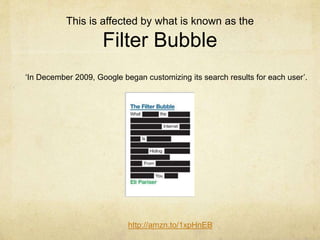
This is affected by what is known as the 
Filter Bubble 
‘In December 2009, Google began customizing its search results for each user’. 
http://amzn.to/1xpHnEB
Eli Pariser: Beware of ‘Filter Bubbles’ Ted Talk. 
In his talk he argues that “we get trapped in a ‘filter bubble’ 
and don’t get exposed to information that could challenge 
and broaden our worldview. 
http://www.ted.com/talks/eli_pariser_beware_online_filter_ 
bubbles?language=en 
This all happens by Google acting as an invisible 
algorithmic gatekeeper, this activity is not isolated to 
Google; Facebook, Yahoo, Twitter…. all do this.
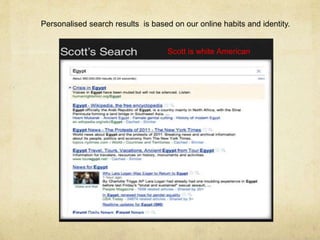
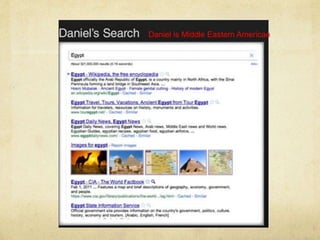
Personalised search results is based on our online habits and identity. 
Scott is white American
Daniel is Middle Eastern American
Filtering Laws vary per country. 
On top of Googles’ filtering 
Australia has filtering laws that are 
affected by; 
Commonwealth Communication 
Act who alongside ACMA can 
enforce takedowns of accounts, 
websites and 
content that break the criteria within 
this Act. (Bambauer, 2008)
ACMA =Australian Communication Media 
Authrority 
Australia has 2 types of filtering; 
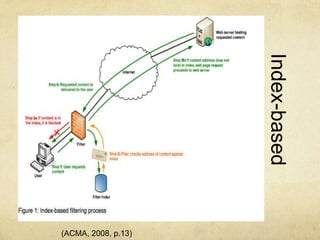
Index Based Filtering; based on a 
Black list (bad sites already 
identified) 
White list (exclusively permitting 
specific content)
Index-based 
Filtering 
(ACMA, 2008, p.13)
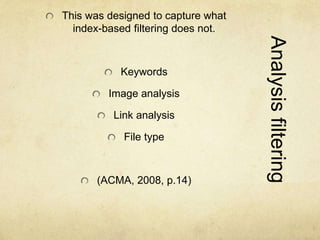
Analysis filtering 
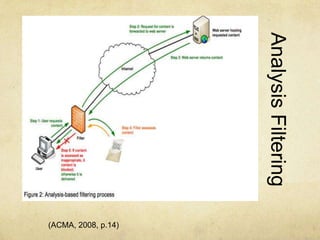
This was designed to capture what 
index-based filtering does not. 
Keywords 
Image analysis 
Link analysis 
File type 
(ACMA, 2008, p.14)
Analysis Filtering 
(ACMA, 2008, p.14)
“the technologies being used are extremely imprecise, 
and often as a by-product block access to very large 
amounts of legitimate material” (Brown, 2007. p.8)
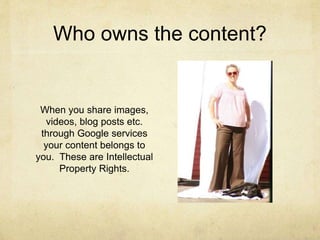
Who owns the content? 
When you share images, 
videos, blog posts etc. 
through Google services 
your content belongs to 
you. These are Intellectual 
Property Rights.
BUT!! 
When you upload your content, “you give Google… a 
worldwide license to use, host, store, reproduce, 
modify, create derivative works” “you grant in this 
license are for the limited purpose of operating, 
promoting and improving our (Google’s) services” this 
continues on even when you stop using Google’s 
services. 
For ever ever, 
For ever, ever, ever! 
http://www.google.com/policies/terms/
The devil is in the detail. 
As laws or Google’s services change, they do 
updates in the Terms of Service (TOS). It is up to 
you the user, to check what these updates are. A 
great way to do that is check the link below. It 
gives you a comparison of what was and is now 
in their TOS. 
http://www.google.com/policies/terms/archive/
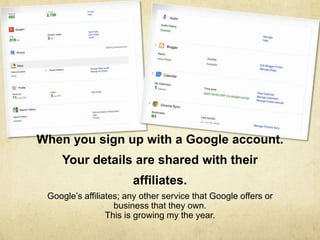
When you sign up with a Google account. 
Your details are shared with their 
affiliates. 
Google’s affiliates; any other service that Google offers or 
business that they own. 
This is growing my the year.
Google uses a reporting system for 
copyright infringement. 
Google does not mediate 
‘rights ownership 
disputes’. 
But it does take down or 
remove content as the 
law requires, when it 
receives a complete and 
valid takedown notice. 
https://support.google.co 
m/legal/answer/3463239? 
hl=en&ref_topic=4558877 http://bit.ly/1rCPSZo
Google works on 
Self Regulatory 
Frameworks 
When it comes to illegal activity online. 
If you are seen to be violating copyright laws and Google 
receives a complaint it will act in accord the Australian code of 
commercial conduct. 
http://www.youronlinechoices.com.au/ 
If you violate any of Googles’ terms and policies or if you are 
being investigated for suspected misconduct Google will 
“suspend or strop providing services” 
http://www.google.com/intl/en/policies/terms/
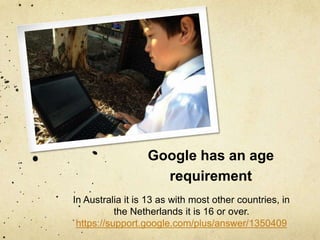
Google has an age 
requirement 
In Australia it is 13 as with most other countries, in 
the Netherlands it is 16 or over. 
https://support.google.com/plus/answer/1350409
To identify you, Google has 
to know a bit about you. 
Your phone number, email 
address, and credit card 
details (Adsense) 
http://www.google.com/intl/en/ 
landing/2step/ 
This allows you to have a two 
step identification process, 
via email confirmation and 
your mobile number as an 
identifier that it is really YOU.
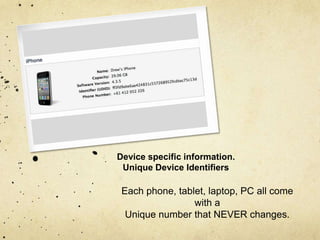
Device specific information. 
Unique Device Identifiers 
Each phone, tablet, laptop, PC all come 
with a 
Unique number that NEVER changes.
Editing your details in 
Google. 
You can choose what to disclose to Google. 
What you can not choose, is the use of the data collected from your activity 
on Google which adds value to their services. 
Google shares ‘non personally identifiable information publicly 
with our partners’ 
And identifiable information ONLY with your consent. 
http://www.google.com/intl/en/policies/privacy/#infochoices
References; 
Ad Targeting; How Ads are Targeted to your Site. [web] Retrieved from; 
https://support.google.com/adsense/answer/9713?hl=en 
Australian Media and Communications Authority (2008) Closed Environment Testing of 
ISP-Level Internet Content Filtering. Report to the Minister for Broadband, 
Communications and the Digital Economy. ACMA. retrieved from; 
http://www.acma.gov.au/webwr/_assets/main/lib310554/isp-level_ 
internet_content_filtering_trial-report.pdf 
Bambauer, D. (2008). Filtering in Oz: Australia's Foray into Internet Censorship. Brooklyn 
Law School, Legal Studies Paper, No. 125. 
Retrived from: http://papers.ssrn.com/sol3/papers.cfm?abstract_id=1319466 
Brown, I. (2007). Internet Filtering - Be Careful What You Ask for. In S. Kirca, & L. Hanson 
(Eds.), Freedom and Prejudice: Approaches to Media and Culture. Istanbul: Bahcesehir 
University Press. 
Available: http://ssrn.com/abstract=1026597 
Google Privacy & Terms. Privacy Policy [web] retrieved from; 
http://www.google.com/policies/privacy/ 
Google Privacy & Terms. “Collect Information” [web]retrieved 
from;http://www.google.com/policies/privacy/example/collect-information.html
References continued. 
Google Privacy & Terms. “Your Content in Our Services” [web]retrieved from; 
http://www.google.com/policies/terms/ 
Privacy Rights Clearinghouse (2008). Privacy and the Internet: Travelling in Cyberspace Safely. 
Available: http://www.privacyrights.org/fs/fs18-cyb.htm 
Slide 16 & 17: Personalised results. TED talk [screen shot] retrieved from; 
http://www.ted.com/talks/eli_pariser_beware_online_filter_bubbles?language=en 
Slide 19; Index Filterering, ACMA [screen shot] retrieved from; 
http://www.acma.gov.au/webwr/_assets/main/lib310554/isp-level_internet_content_filtering_trial-report.pdf 
Slide 21; Analysis Filtering, ACMA [screen shot] retrieved from; 
http://www.acma.gov.au/webwr/_assets/main/lib310554/isp-level_internet_content_filtering_trial-report.pdf 
Slide 25; screen shot of personal Google Account, October 26th, 2014. 
Slide 28; Image; I.Pollak personal photograph, July 31st, 2014. 
Slide 30; Image; iPhone UDID, [iPhone] retrieved from; 
http://www.enflexion.com.au/images/Screen%20Shot%202011-10-12%20at%201.27.06%20PM.png

Google Policy Primer

  • 1.
    Policy Primer forGoogle By Irene Pollak
  • 2.
    Each time yousign up for a social media account or an email account or use a search engine you are asked to agree to their policies in their Terms of Service. Here is a brief outline of Google’s Terms of Service and Privacy Policy in a 5 minute nutshell. And how it impacts you.
  • 3.
    Google’s Privacy Policy When you sign up for a Google account you are automatically set up with a Gmail account and a Google Plus (G+) profile. Google states; “We collect information to provide better services to all our users” (Google web) Data is collected from; Gmail messages G+ profile, photos and videos. Browsing History Map Searches Docs And other Google-hosted content. (http://www.google.com/policies/priva cy/example/collect-information.html)
  • 4.
  • 5.
    Privacy Key Terms Here are some of the terms that Google uses to name the different ways they collect data from your online activity through their search engine and other services they provide.
  • 6.
    Cookie Cookie –a small file containing a string of characters sent from your computer when you visit a website. What this does is store your preferences and other information. For private browsing you can clear your cookies or not allow them. But ‘do not tract’ isn’t guaranteed to always work as the value for marketing this tracking offers does outweigh companies ‘resolve’ to enforce this. http://www.privacyrights.org/fs /fs18-cyb.htm
  • 7.
    Types of cookiesused by Google. Preferences; your language, location, how many search results you wish to see per page. http://www.google.com/intl/en/policies/technologi es/types/
  • 8.
    More cookies usedby Google. Security; used to authenticate users. (no third party can log into your account without you knowing.) Have you noticed when you travel that you need to answer security questions to prove that you are who you say you are? Processes; some websites do not work properly unless you have cookies activated.
  • 9.
    Even more cookiesused by Google. Advertising; to track ad effectiveness and to allow Google to target market for their advertisers. Session State; this tracks your actions online; which YouTube channels you follow, what websites you like, what you buy online.
  • 10.
    Most important cookiesused by Google. Analytics; this assists app and website owners to understand how ‘users’ use their site by monitoring, numbers, time on site, which pages they visited and which page they exited on. Your online habits can be stored for up two years within Google Analytics Cookies. https://developers.google.com/analytics/devguide s/collection/analyticsjs/cookie-usage
  • 11.
    Internet Protocol or IP Address IP address; each computer, your computer, has an IP address. This is a special sequence of numbers that Google uses to help identify you, and track your online habits.
  • 12.
    Server Logs Your“web requests” aka. search phrase. Based on your online activities, Google will even customised your search results, based on all the information it has collected on you based on this data collection. Server logs track; server request, IP address, browser type (Google), language (English), the date and time of your request and one of more cookies that may uniquely identify your browser. http://www.google.com/policie s/privacy/key-terms/#toc-terms- ip
  • 13.
    By collecting dataon you. The can target ads for the commerce side of their services. Here are their 3 primary targeting they use; Contextual targeting; keyword analysis Placement targeting; related to the content on a page. Interest-based targeting; this is affected by your search history on Google as to whether you will see these ads. https://support.google.com/adsense/answer/9713?hl= en
  • 14.
    This is affectedby what is known as the Filter Bubble ‘In December 2009, Google began customizing its search results for each user’. http://amzn.to/1xpHnEB
  • 15.
    Eli Pariser: Bewareof ‘Filter Bubbles’ Ted Talk. In his talk he argues that “we get trapped in a ‘filter bubble’ and don’t get exposed to information that could challenge and broaden our worldview. http://www.ted.com/talks/eli_pariser_beware_online_filter_ bubbles?language=en This all happens by Google acting as an invisible algorithmic gatekeeper, this activity is not isolated to Google; Facebook, Yahoo, Twitter…. all do this.
  • 16.
    Personalised search resultsis based on our online habits and identity. Scott is white American
  • 17.
    Daniel is MiddleEastern American
  • 18.
    Filtering Laws varyper country. On top of Googles’ filtering Australia has filtering laws that are affected by; Commonwealth Communication Act who alongside ACMA can enforce takedowns of accounts, websites and content that break the criteria within this Act. (Bambauer, 2008)
  • 19.
    ACMA =Australian CommunicationMedia Authrority Australia has 2 types of filtering; Index Based Filtering; based on a Black list (bad sites already identified) White list (exclusively permitting specific content)
  • 20.
  • 21.
    Analysis filtering Thiswas designed to capture what index-based filtering does not. Keywords Image analysis Link analysis File type (ACMA, 2008, p.14)
  • 22.
  • 23.
    “the technologies beingused are extremely imprecise, and often as a by-product block access to very large amounts of legitimate material” (Brown, 2007. p.8)
  • 24.
    Who owns thecontent? When you share images, videos, blog posts etc. through Google services your content belongs to you. These are Intellectual Property Rights.
  • 25.
    BUT!! When youupload your content, “you give Google… a worldwide license to use, host, store, reproduce, modify, create derivative works” “you grant in this license are for the limited purpose of operating, promoting and improving our (Google’s) services” this continues on even when you stop using Google’s services. For ever ever, For ever, ever, ever! http://www.google.com/policies/terms/
  • 26.
    The devil isin the detail. As laws or Google’s services change, they do updates in the Terms of Service (TOS). It is up to you the user, to check what these updates are. A great way to do that is check the link below. It gives you a comparison of what was and is now in their TOS. http://www.google.com/policies/terms/archive/
  • 27.
    When you signup with a Google account. Your details are shared with their affiliates. Google’s affiliates; any other service that Google offers or business that they own. This is growing my the year.
  • 28.
    Google uses areporting system for copyright infringement. Google does not mediate ‘rights ownership disputes’. But it does take down or remove content as the law requires, when it receives a complete and valid takedown notice. https://support.google.co m/legal/answer/3463239? hl=en&ref_topic=4558877 http://bit.ly/1rCPSZo
  • 29.
    Google works on Self Regulatory Frameworks When it comes to illegal activity online. If you are seen to be violating copyright laws and Google receives a complaint it will act in accord the Australian code of commercial conduct. http://www.youronlinechoices.com.au/ If you violate any of Googles’ terms and policies or if you are being investigated for suspected misconduct Google will “suspend or strop providing services” http://www.google.com/intl/en/policies/terms/
  • 30.
    Google has anage requirement In Australia it is 13 as with most other countries, in the Netherlands it is 16 or over. https://support.google.com/plus/answer/1350409
  • 31.
    To identify you,Google has to know a bit about you. Your phone number, email address, and credit card details (Adsense) http://www.google.com/intl/en/ landing/2step/ This allows you to have a two step identification process, via email confirmation and your mobile number as an identifier that it is really YOU.
  • 32.
    Device specific information. Unique Device Identifiers Each phone, tablet, laptop, PC all come with a Unique number that NEVER changes.
  • 33.
    Editing your detailsin Google. You can choose what to disclose to Google. What you can not choose, is the use of the data collected from your activity on Google which adds value to their services. Google shares ‘non personally identifiable information publicly with our partners’ And identifiable information ONLY with your consent. http://www.google.com/intl/en/policies/privacy/#infochoices
  • 34.
    References; Ad Targeting;How Ads are Targeted to your Site. [web] Retrieved from; https://support.google.com/adsense/answer/9713?hl=en Australian Media and Communications Authority (2008) Closed Environment Testing of ISP-Level Internet Content Filtering. Report to the Minister for Broadband, Communications and the Digital Economy. ACMA. retrieved from; http://www.acma.gov.au/webwr/_assets/main/lib310554/isp-level_ internet_content_filtering_trial-report.pdf Bambauer, D. (2008). Filtering in Oz: Australia's Foray into Internet Censorship. Brooklyn Law School, Legal Studies Paper, No. 125. Retrived from: http://papers.ssrn.com/sol3/papers.cfm?abstract_id=1319466 Brown, I. (2007). Internet Filtering - Be Careful What You Ask for. In S. Kirca, & L. Hanson (Eds.), Freedom and Prejudice: Approaches to Media and Culture. Istanbul: Bahcesehir University Press. Available: http://ssrn.com/abstract=1026597 Google Privacy & Terms. Privacy Policy [web] retrieved from; http://www.google.com/policies/privacy/ Google Privacy & Terms. “Collect Information” [web]retrieved from;http://www.google.com/policies/privacy/example/collect-information.html
  • 35.
    References continued. GooglePrivacy & Terms. “Your Content in Our Services” [web]retrieved from; http://www.google.com/policies/terms/ Privacy Rights Clearinghouse (2008). Privacy and the Internet: Travelling in Cyberspace Safely. Available: http://www.privacyrights.org/fs/fs18-cyb.htm Slide 16 & 17: Personalised results. TED talk [screen shot] retrieved from; http://www.ted.com/talks/eli_pariser_beware_online_filter_bubbles?language=en Slide 19; Index Filterering, ACMA [screen shot] retrieved from; http://www.acma.gov.au/webwr/_assets/main/lib310554/isp-level_internet_content_filtering_trial-report.pdf Slide 21; Analysis Filtering, ACMA [screen shot] retrieved from; http://www.acma.gov.au/webwr/_assets/main/lib310554/isp-level_internet_content_filtering_trial-report.pdf Slide 25; screen shot of personal Google Account, October 26th, 2014. Slide 28; Image; I.Pollak personal photograph, July 31st, 2014. Slide 30; Image; iPhone UDID, [iPhone] retrieved from; http://www.enflexion.com.au/images/Screen%20Shot%202011-10-12%20at%201.27.06%20PM.png