Google Maps & Mashups
  A Simple Guide to
  Mapping within the
      Classroom
 Created by: Micheale
  Brown, Eric Herr, &
   Charmaine Scott
Maps
 Maps are a vital part of society and are
  needed on a daily basis.
 Students need to be able to utilize maps
  within a variety of settings and for diverse
  purposes.
 When people utilize maps there are times
  the information displayed within a map may
  need to be diversified according to a
  person’s needs or requirements.
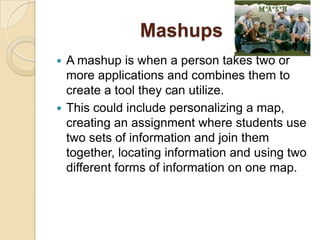
Mashups
 A mashup is when a person takes two or
  more applications and combines them to
  create a tool they can utilize.
 This could include personalizing a map,
  creating an assignment where students use
  two sets of information and join them
  together, locating information and using two
  different forms of information on one map.
The 3 Types of Mashups
 Business mashups-define applications that
  combine their own resources, application
  and data, with other external Web services.
 *Consumer mashups-combines data from
  multiple public resources in the browser
  and organizes it through a simple browser
  user interface.
 Data mashups-are opposite from consumer
  mashups in that they combine similar media
  and information from multiple sources into a
  single representation.
Consumer Mashups
-The consumer mashup is the most
commonly used mashup.
-These mashups are used in both education
and everyday life.
-Google Maps are widely used for this type of
mashup.
RailRadar
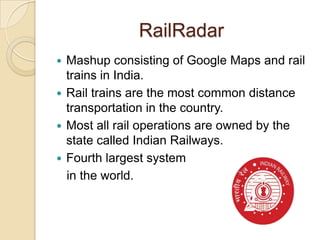
 Mashup consisting of Google Maps and rail
  trains in India.
 Rail trains are the most common distance
  transportation in the country.
 Most all rail operations are owned by the
  state called Indian Railways.
 Fourth largest system
  in the world.
RailRadar
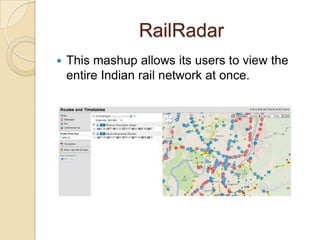
   This mashup allows its users to view the
    entire Indian rail network at once.
RailRadar
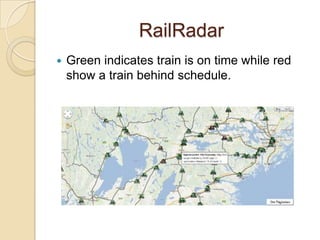
   Green indicates train is on time while red
    show a train behind schedule.
RailRadar
 This is a very useful tool for those who use
  the rail system in India.
 Clicking on a train will show start times and
  expected times of arrival.
 A person can also see overall status of the
  network- percentage of trains on time/late.
RailRadar Educational Uses
 This mashup could be utilized within SS if
  studying transportation around the world or
  even studying the country of India.
 Students could create their own
  transportation mashups for their daily life
  and how they get around to places they
  need to go to make it relevant to their life.
Bird Tracking
 http://www.birdfeeders.com/advice/bird-
  watching/hummingbird-migration
 This website has an interactive mapping
  system allowing Hummingbird migration
  tracking.
 This website relies on users to input
  sighting information.
 Those who view the site can scan
  information based on species and last date
  of sighting.
Bird Tracking
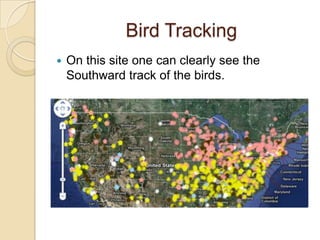
   On this site one can clearly see the
    Southward track of the birds.
Bird Tracking
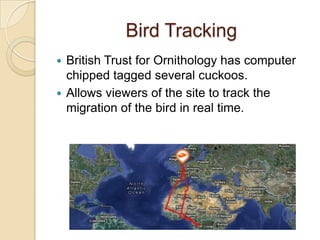
 British Trust for Ornithology has computer
  chipped tagged several cuckoos.
 Allows viewers of the site to track the
  migration of the bird in real time.
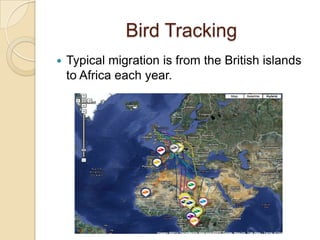
Bird Tracking
   Typical migration is from the British islands
    to Africa each year.
Bird Tracking Educational
              Uses
 This website could be utilized within a
  Science class as they note the migration
  patterns of birds and if it is changing.
 If the migration patterns are changing the
  students can research why is that
  happening? Is it because the food supply
  has changed and they have to fly farther to
  find food?
Google My Maps General
             Purpose
   The website

  http://maps.google.com/help/maps/getmaps/plo
  t-one.html
 This site allows people to create personalized
  maps that can be reflective of their personal needs;
  such as a walking tour of a city, where libraries are
  located, etc…
 When a person creates My map with Google they
  can save it to utilize for future usage.
 This application can be utilized to create a map
  that is personalized for a variety of reasons.
Google My Maps Average
    Usage for this Application
 A person can add an icon to represent a
  place they want to visit or find important.
 It is possible to even get a satellite view of
  their map.
 A person can save the map and add to it
  and even publish it or keep it private
  depending on why they created the My Map
  with Google.
Google My Maps Educational
          Uses
 This could be utilized within the classroom
  setting in regards to researching an area for
  important places and then mapping them
  out for a class presentation in Social
  Studies.
 The advantages could include a deeper
  understanding of important places in
  regards to their place within the map and
  how it is diverse from their country.
 This mapping is interactive and makes the
  information more relevant within the
  student’s understanding.
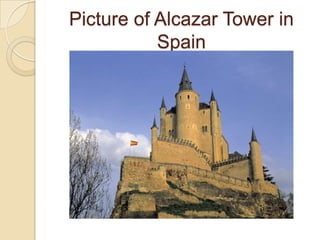
Picture of Alcazar Tower in
           Spain
Google My Maps Educational
     Uses Continued
 Another use within the classroom could be
  part of a research project that includes
  mapping things that a student learned
  about and then presenting that information
  to the class which could apply to almost any
  subject area such as Language Arts.
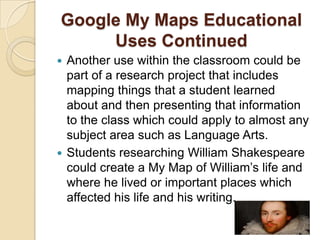
 Students researching William Shakespeare
  could create a My Map of William’s life and
  where he lived or important places which
  affected his life and his writing.
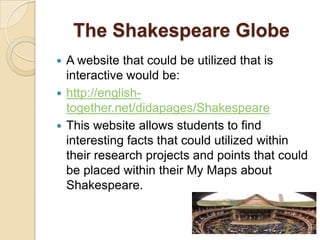
The Shakespeare Globe
 A website that could be utilized that is
  interactive would be:
 http://english-
  together.net/didapages/Shakespeare
 This website allows students to find
  interesting facts that could utilized within
  their research projects and points that could
  be placed within their My Maps about
  Shakespeare.
Programmable Web/ Mapping
      General Purpose
 The website:
  http://www.programmableweb.com/tag/map
  ping
 This site allows people to find API’s, codes
  mashups, coders to utilize for personal
  usage.
 This site also allows a person to track news,
  trends, and players.
Programmable Web/ Mapping
 General Purpose Continued
 This site also allows people to build and
  learn about API’s.
 This website allows people connect with
  other people who are building and creating
  mashups that they prefer to utilize within
  their lives.
 It also allows people to view mashups that
  have been created before.
Programmable Web/ Mapping
      Average Usage
 The average person could utilize this
  website as a good resource to learn about
  how to create a mashup.
 The average person could locate or find the
  codes needed for an API to create their
  mashup.
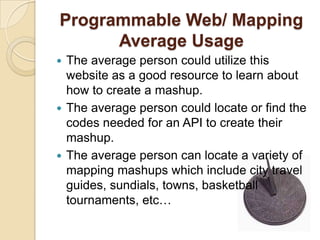
 The average person can locate a variety of
  mapping mashups which include city travel
  guides, sundials, towns, basketball
  tournaments, etc…
Programmable Web/ Mapping
    Educational Benefits
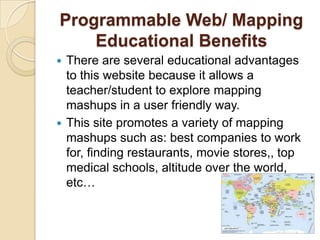
 There are several educational advantages
  to this website because it allows a
  teacher/student to explore mapping
  mashups in a user friendly way.
 This site promotes a variety of mapping
  mashups such as: best companies to work
  for, finding restaurants, movie stores,, top
  medical schools, altitude over the world,
  etc…
Programmable Web/ Mapping
    Educational Benefits
 This site also appears user friendly for
  people that are not as tech savvy as other
  people.
 This site gives a wide variety of mashups to
  view and utilize as a teacher or a student.
 It allows a person an API directory to use
  within a mashup they are creating.
Programmable Web/ Mapping
       Educational Benefits
               Continued site to
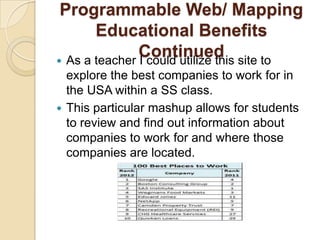
 As a teacher I could utilize this
  explore the best companies to work for in
  the USA within a SS class.
 This particular mashup allows for students
  to review and find out information about
  companies to work for and where those
  companies are located.
Programmable Web/ Mapping
    Educational Benefits
 This website could be useful within a SS
  class to explore Altitude and what the
  Altitude is from anywhere in the world.
 This mashup assists students in connecting
  the places on the map with the altitude in
  connection to where they live.
 The interactive process allows students be
  in control of what altitude they are viewing
  and exploring.
Potential Risks of Google Mashups

  Security Risks
- mashups are Web 2.0 and rely on AJAX
which could create issues for end users
which is why there is the AJAX and Mashup
Security.
 Social Media & Social Networking
- lots of these sites give access to third
parties.
 Passwords and Emails
- mashups may expose these so you must be
sure to open web standards for use
Potential Risks of Google
      Mashups Continued
 Compatibility
- mashups are both applications and
websites and with that being said they may
reach users who use several different
browsers and operating systems. This
may require server-side and client-side
modifications.
-mashups that are designed for one
operating system and browser for a
specific organization are easier to
manage.
Google Map Mashups are
        Useful Tools
They can be used in a variety of ways:
For the elementary students to create a
tour of the neighborhood by identifying the
school, grocery store, firehouse or park
and having the ability to see the actual
building would be a great tool to use in the
classroom.
In a physical education class by tracking
how many calories a student will burn by
having students plan a walking program
for exercise (ex: school to home).
Google Map Mashups are
     Useful Tools Continued
 Health organizations, nursing students, and
  science classes can use them to identify
  diseases on the rise, how they are treated,
  who is affected by it, and which areas are
  most common or likely for the disease to
  spread.
 Geology classes can identify earthquakes
  over the past seven days and study the
  patterns then relate them with plate
  tectonics, and also both the magnitude of
  the earthquake as well as the location.
Google Map Mashups Overall
Are………

Google maps & mashups 4

  • 1.
    Google Maps &Mashups A Simple Guide to Mapping within the Classroom Created by: Micheale Brown, Eric Herr, & Charmaine Scott
  • 2.
    Maps  Maps area vital part of society and are needed on a daily basis.  Students need to be able to utilize maps within a variety of settings and for diverse purposes.  When people utilize maps there are times the information displayed within a map may need to be diversified according to a person’s needs or requirements.
  • 3.
    Mashups  A mashupis when a person takes two or more applications and combines them to create a tool they can utilize.  This could include personalizing a map, creating an assignment where students use two sets of information and join them together, locating information and using two different forms of information on one map.
  • 4.
    The 3 Typesof Mashups  Business mashups-define applications that combine their own resources, application and data, with other external Web services.  *Consumer mashups-combines data from multiple public resources in the browser and organizes it through a simple browser user interface.  Data mashups-are opposite from consumer mashups in that they combine similar media and information from multiple sources into a single representation.
  • 5.
    Consumer Mashups -The consumermashup is the most commonly used mashup. -These mashups are used in both education and everyday life. -Google Maps are widely used for this type of mashup.
  • 6.
    RailRadar  Mashup consistingof Google Maps and rail trains in India.  Rail trains are the most common distance transportation in the country.  Most all rail operations are owned by the state called Indian Railways.  Fourth largest system in the world.
  • 7.
    RailRadar  This mashup allows its users to view the entire Indian rail network at once.
  • 8.
    RailRadar  Green indicates train is on time while red show a train behind schedule.
  • 9.
    RailRadar  This isa very useful tool for those who use the rail system in India.  Clicking on a train will show start times and expected times of arrival.  A person can also see overall status of the network- percentage of trains on time/late.
  • 10.
    RailRadar Educational Uses This mashup could be utilized within SS if studying transportation around the world or even studying the country of India.  Students could create their own transportation mashups for their daily life and how they get around to places they need to go to make it relevant to their life.
  • 11.
    Bird Tracking  http://www.birdfeeders.com/advice/bird- watching/hummingbird-migration  This website has an interactive mapping system allowing Hummingbird migration tracking.  This website relies on users to input sighting information.  Those who view the site can scan information based on species and last date of sighting.
  • 12.
    Bird Tracking  On this site one can clearly see the Southward track of the birds.
  • 13.
    Bird Tracking  BritishTrust for Ornithology has computer chipped tagged several cuckoos.  Allows viewers of the site to track the migration of the bird in real time.
  • 14.
    Bird Tracking  Typical migration is from the British islands to Africa each year.
  • 15.
    Bird Tracking Educational Uses  This website could be utilized within a Science class as they note the migration patterns of birds and if it is changing.  If the migration patterns are changing the students can research why is that happening? Is it because the food supply has changed and they have to fly farther to find food?
  • 16.
    Google My MapsGeneral Purpose  The website  http://maps.google.com/help/maps/getmaps/plo t-one.html  This site allows people to create personalized maps that can be reflective of their personal needs; such as a walking tour of a city, where libraries are located, etc…  When a person creates My map with Google they can save it to utilize for future usage.  This application can be utilized to create a map that is personalized for a variety of reasons.
  • 17.
    Google My MapsAverage Usage for this Application  A person can add an icon to represent a place they want to visit or find important.  It is possible to even get a satellite view of their map.  A person can save the map and add to it and even publish it or keep it private depending on why they created the My Map with Google.
  • 18.
    Google My MapsEducational Uses  This could be utilized within the classroom setting in regards to researching an area for important places and then mapping them out for a class presentation in Social Studies.  The advantages could include a deeper understanding of important places in regards to their place within the map and how it is diverse from their country.  This mapping is interactive and makes the information more relevant within the student’s understanding.
  • 19.
    Picture of AlcazarTower in Spain
  • 20.
    Google My MapsEducational Uses Continued  Another use within the classroom could be part of a research project that includes mapping things that a student learned about and then presenting that information to the class which could apply to almost any subject area such as Language Arts.  Students researching William Shakespeare could create a My Map of William’s life and where he lived or important places which affected his life and his writing.
  • 21.
    The Shakespeare Globe A website that could be utilized that is interactive would be:  http://english- together.net/didapages/Shakespeare  This website allows students to find interesting facts that could utilized within their research projects and points that could be placed within their My Maps about Shakespeare.
  • 22.
    Programmable Web/ Mapping General Purpose  The website: http://www.programmableweb.com/tag/map ping  This site allows people to find API’s, codes mashups, coders to utilize for personal usage.  This site also allows a person to track news, trends, and players.
  • 23.
    Programmable Web/ Mapping General Purpose Continued  This site also allows people to build and learn about API’s.  This website allows people connect with other people who are building and creating mashups that they prefer to utilize within their lives.  It also allows people to view mashups that have been created before.
  • 24.
    Programmable Web/ Mapping Average Usage  The average person could utilize this website as a good resource to learn about how to create a mashup.  The average person could locate or find the codes needed for an API to create their mashup.  The average person can locate a variety of mapping mashups which include city travel guides, sundials, towns, basketball tournaments, etc…
  • 25.
    Programmable Web/ Mapping Educational Benefits  There are several educational advantages to this website because it allows a teacher/student to explore mapping mashups in a user friendly way.  This site promotes a variety of mapping mashups such as: best companies to work for, finding restaurants, movie stores,, top medical schools, altitude over the world, etc…
  • 26.
    Programmable Web/ Mapping Educational Benefits  This site also appears user friendly for people that are not as tech savvy as other people.  This site gives a wide variety of mashups to view and utilize as a teacher or a student.  It allows a person an API directory to use within a mashup they are creating.
  • 27.
    Programmable Web/ Mapping Educational Benefits Continued site to  As a teacher I could utilize this explore the best companies to work for in the USA within a SS class.  This particular mashup allows for students to review and find out information about companies to work for and where those companies are located.
  • 28.
    Programmable Web/ Mapping Educational Benefits  This website could be useful within a SS class to explore Altitude and what the Altitude is from anywhere in the world.  This mashup assists students in connecting the places on the map with the altitude in connection to where they live.  The interactive process allows students be in control of what altitude they are viewing and exploring.
  • 29.
    Potential Risks ofGoogle Mashups  Security Risks - mashups are Web 2.0 and rely on AJAX which could create issues for end users which is why there is the AJAX and Mashup Security.  Social Media & Social Networking - lots of these sites give access to third parties.  Passwords and Emails - mashups may expose these so you must be sure to open web standards for use
  • 30.
    Potential Risks ofGoogle Mashups Continued  Compatibility - mashups are both applications and websites and with that being said they may reach users who use several different browsers and operating systems. This may require server-side and client-side modifications. -mashups that are designed for one operating system and browser for a specific organization are easier to manage.
  • 31.
    Google Map Mashupsare Useful Tools They can be used in a variety of ways: For the elementary students to create a tour of the neighborhood by identifying the school, grocery store, firehouse or park and having the ability to see the actual building would be a great tool to use in the classroom. In a physical education class by tracking how many calories a student will burn by having students plan a walking program for exercise (ex: school to home).
  • 32.
    Google Map Mashupsare Useful Tools Continued  Health organizations, nursing students, and science classes can use them to identify diseases on the rise, how they are treated, who is affected by it, and which areas are most common or likely for the disease to spread.  Geology classes can identify earthquakes over the past seven days and study the patterns then relate them with plate tectonics, and also both the magnitude of the earthquake as well as the location.
  • 33.
    Google Map MashupsOverall Are………