Cool features on the newLexis Nexis AcademicLaura WilsonFramingham State UniversitySeptember 8, 2010
What is Lexis Nexis Academic?Database that offers full-text access to news, business and legal information
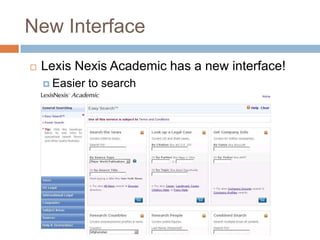
New InterfaceLexis Nexis Academic has a new interface!Easier to search
Easy NavigationQuick access to commonly used contentNews, Legal and Company search boxes easy to find and useResearch famous people or countries in easy-to-search widgets on the main page
Search the News widgetSearch for your keywords in Major world publications, newspapers, magazines, wire services, broadcast transcripts, blogs and all newsChoose a specific newspaperNews widget uses Natural Language searchingNo need to use AND / OR between key termsPut phrases between quotation marks “ ”
More Additions to Searching the News Under the “News” tab on the left of the screen, there are quick access links to search:College & University News Find articles from a specific school’s newspaper, articles on particular topics from many institutions’ newspapers, or search the Chronicle for Higher Education Regional NewsFind news about a particular state or country, or from a particular authorForeign Language NewsFind stories from foreign news outlets (not translated)Dutch, French, German, Spanish, Italian, Portuguese
Look up a Legal Case widget Search for a case by citation number, party name or topicUS Legal tab on left of screen provides other forms for more specific searchingFederal and state cases, landmark cases, supreme court briefs, state codes, legal reference and more!
Get Company Info WidgetSearch for a company profile by company name or ticker symbolUse the “Companies” tab on the left of the screen for more advanced business researchDossier™ Compare Companies
Research Countries WidgetFind up-to-date political and economic information about a countrySelect a country, then select a source that you would like to searchBusiness Monitor International, PRS Country Briefings, Recent News Stories and more!
Research People WidgetEasily find information about public figuresChoose to search either biographies or recent news stories about the person
Combined Search widgetFind information about a particular topic from multiple types of sourcesEasily search for recent news stories and the profile of a particular companySearch US & World News, Company Profiles, SEC Filings, US & State Legal Cases and Law Reviews
Subject Areas tabSearch for information on a topic from specific relevant sourcesSubject areas include:AccountingEnvironmental StudiesHealth & Medical CareGovernment & PoliticsPeopleConsumer Information
Confused?  No Problem!Updated “Help” featureArticles dedicated to database use and features located on an easy to use wikiSearch or browse for your topic“Help and Instructions” tab on the left side of the screen that offers direct access to the wiki as well as video tutorials on using the database  There are question mark symbols throughout the different sections and areas of the database
Thank You!Please take this very brief, 4 question survey about this presentation:Take our survey!Questions or CommentsLaura Wilson, Reference Librarian508-626-4654lwilson2@framingham.eduIf you would like to suggest a topic for a future LibLearn session, please contact the Reference Department508-626-4654reference@framingham.edu

Cool features of the New Lexis Nexis Academic

  • 1.
    Cool features onthe newLexis Nexis AcademicLaura WilsonFramingham State UniversitySeptember 8, 2010
  • 2.
    What is LexisNexis Academic?Database that offers full-text access to news, business and legal information
  • 3.
    New InterfaceLexis NexisAcademic has a new interface!Easier to search
  • 4.
    Easy NavigationQuick accessto commonly used contentNews, Legal and Company search boxes easy to find and useResearch famous people or countries in easy-to-search widgets on the main page
  • 5.
    Search the NewswidgetSearch for your keywords in Major world publications, newspapers, magazines, wire services, broadcast transcripts, blogs and all newsChoose a specific newspaperNews widget uses Natural Language searchingNo need to use AND / OR between key termsPut phrases between quotation marks “ ”
  • 6.
    More Additions toSearching the News Under the “News” tab on the left of the screen, there are quick access links to search:College & University News Find articles from a specific school’s newspaper, articles on particular topics from many institutions’ newspapers, or search the Chronicle for Higher Education Regional NewsFind news about a particular state or country, or from a particular authorForeign Language NewsFind stories from foreign news outlets (not translated)Dutch, French, German, Spanish, Italian, Portuguese
  • 7.
    Look up aLegal Case widget Search for a case by citation number, party name or topicUS Legal tab on left of screen provides other forms for more specific searchingFederal and state cases, landmark cases, supreme court briefs, state codes, legal reference and more!
  • 8.
    Get Company InfoWidgetSearch for a company profile by company name or ticker symbolUse the “Companies” tab on the left of the screen for more advanced business researchDossier™ Compare Companies
  • 9.
    Research Countries WidgetFindup-to-date political and economic information about a countrySelect a country, then select a source that you would like to searchBusiness Monitor International, PRS Country Briefings, Recent News Stories and more!
  • 10.
    Research People WidgetEasilyfind information about public figuresChoose to search either biographies or recent news stories about the person
  • 11.
    Combined Search widgetFindinformation about a particular topic from multiple types of sourcesEasily search for recent news stories and the profile of a particular companySearch US & World News, Company Profiles, SEC Filings, US & State Legal Cases and Law Reviews
  • 12.
    Subject Areas tabSearchfor information on a topic from specific relevant sourcesSubject areas include:AccountingEnvironmental StudiesHealth & Medical CareGovernment & PoliticsPeopleConsumer Information
  • 13.
    Confused? NoProblem!Updated “Help” featureArticles dedicated to database use and features located on an easy to use wikiSearch or browse for your topic“Help and Instructions” tab on the left side of the screen that offers direct access to the wiki as well as video tutorials on using the database There are question mark symbols throughout the different sections and areas of the database
  • 14.
    Thank You!Please takethis very brief, 4 question survey about this presentation:Take our survey!Questions or CommentsLaura Wilson, Reference Librarian508-626-4654lwilson2@framingham.eduIf you would like to suggest a topic for a future LibLearn session, please contact the Reference Department508-626-4654reference@framingham.edu