Going Cloud? Going Mobile?
Don’t Let Your Network Be a Showstopper!
Wes Morgan, ICS SWAT
wes_morgan@us.ibm.com
What We’ll Cover
 Why Are We Here?
 Understanding Data Flow
 Fundamental Change
 Aggregate Effects – Remote Sites
 Security
 Mobile/BYOD – Location, Location, Location
 VPN Users – In or Out?
 Content Delivery Networks
 Testing Network/Carrier Performance
 Setting Expectations
 Q&A
2 3/17/2017
Why Are We Here?

“Applications folks” aren't usually “network folks”

Enterprise networks are increasingly complex

Concerned about application performance

Need to set expectations

“Everywhere Access” can be a challenge

Mobile/BYOD business pressure

Ever-increasing security concerns
3 3/17/2017
Understanding Data Flow

Nothing more than the path of transactions to/from (OR FOR) the
server(s) in question

THIS IS NOT JUST A POINT-TO-POINT QUESTION!

Multiple factors affect data flow
 WAN links
 Proxy/firewall use
 Concentration of users
 Network design
 “Side band” transactions (authentication, document archival/retrieval,
directory, etc.)

Each step can introduce its own latencies

Each step has its own overhead
4 3/17/2017
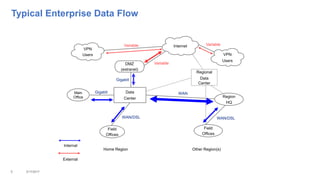
Typical Enterprise Data Flow
5 3/17/2017
Main
Office
Field
Offices
Field
Offices
Data
Center
DMZ
(extranet)
Home Region Other Region(s)
Region
HQ
Gigabit
Gigabit
WAN/DSL WAN/DSL
WAN
VPN
Users
VPN
Users
Regional
Data
Center
Variable
Internal
External
VariableVariable Internet
What’s Your Data Flow Today?

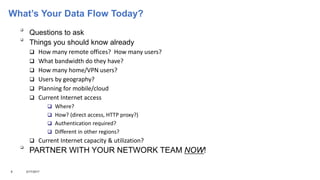
Questions to ask

Things you should know already
 How many remote offices? How many users?
 What bandwidth do they have?
 How many home/VPN users?
 Users by geography?
 Planning for mobile/cloud
 Current Internet access
 Where?
 How? (direct access, HTTP proxy?)
 Authentication required?
 Different in other regions?
 Current Internet capacity & utilization?

PARTNER WITH YOUR NETWORK TEAM NOW!
6 3/17/2017
Moving to the Cloud – A Fundamental Change

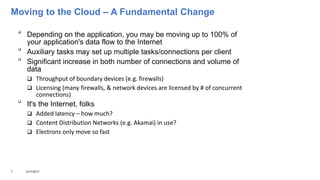
Depending on the application, you may be moving up to 100% of
your application's data flow to the Internet

Auxiliary tasks may set up multiple tasks/connections per client

Significant increase in both number of connections and volume of
data
 Throughput of boundary devices (e.g. firewalls)
 Licensing (many firewalls, & network devices are licensed by # of concurrent
connections)

It's the Internet, folks
 Added latency – how much?
 Content Distribution Networks (e.g. Akamai) in use?
 Electrons only move so fast
7 3/17/2017
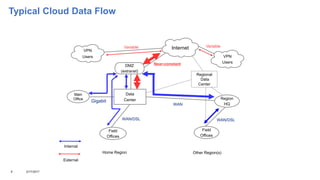
Typical Cloud Data Flow
8 3/17/2017
Main
Office
Field
Offices
Field
Offices
Data
Center
DMZ
(extranet)
Home Region Other Region(s)
Region
HQ
WAN/DSL WAN/DSL
WAN
VPN
Users
VPN
Users
Regional
Data
Center
Near-constant
Internal
External
VariableVariable Internet
Gigabit
Worst-Case Scenario – Think About Remote Sites

Leaf node – a location with only one connection to the
enterprise network
 Still seen in both small and large enterprises
 Largely rendered moot by ISP cloud model – everyone has “one
connection”

Think about low-bandwidth (or high-latency) sites
 DSL
 T1 (1.5 Mbit/s) or lower
 Satellite links
 Geographically remote sites usually suffer higher latency
9 3/17/2017
Worst-Case Scenario – Think About Remote Sites

Old latency = site to network core and back (“ping the data center”)
 Aggregate effect of every link in network path

Cloud latency = site to network core to INTERNET SITE and back

Bandwidth-intensive apps (e.g. audio/video) will suffer even more

Be sure to include such sites in your tests and/or pilot deployment
10 3/17/2017
Security – How Much Is Too Much?

Security policies can have significant impact on cloud performance

Mandatory use of proxies is a known “flashpoint”
 Moving to cloud-based service will potentially add THOUSANDS of
connections/hour to the proxy load
 Stressed proxy servers can introduce very high latency
 If proxies are required, you may need to upgrade/add proxy servers to handle
the load
 Some proxies are licensed by “number of concurrent connections” - may
need upgrade
11 3/17/2017
Security – How Much Is Too Much?
HOWEVER…

Many (if not most) cloud apps use either HTTPS or native encryption
 May be sufficient to meet security policies/concerns
 If so, bypass the proxy for connections to cloud services (PAC file for browser-based apps,
open outbound firewall)
 Some customers have established dedicated proxies

Some firewalls are also licensed by “number of concurrent
connections”

HAVE THIS DISCUSSION NOW!
 Performance problems in these areas are intermittent and difficult to diagnose
12 3/17/2017
Mobile/BYOD – Location, Location, Location!

Placement of servers is key

First question – “which services will be external?”
 These servers should go in your DMZ
 May require receipt of “push notifications”, e.g. Apple APNS
 Don't want external connections coming “all the way in” to the data center
13 3/17/2017
Mobile/BYOD – Location, Location, Location!

Second question - “what MDM will I use?”
 MDM solution necessary to manage access, passwords, appstore access, etc.

Third question - “what has to be open in the firewall?”
 Mix of inbound/outbound connectivity, depending on service
 May need to “come in” to internal servers (e.g. Traveler)

Most purely internal BYOD clients can be treated as any other
internal client

May wind up using reverse proxies to reach internal servers
 e.g. Sametime Proxy Server in DMZ vs. reverse-proxy to internal Sametime
Proxy Server
14 3/17/2017
Mobile/BYOD – Where Are My Back-End Servers?

Mobile provisioning usually doesn't change where the user's data “lives”
HOWEVER...

Now you're establishing a “mobile base” in your DMZ that has to be able to
reach ALL of the internal servers hosting the user's data

Significant increase in firewall traffic, both external-to-DMZ and internal-to-DMZ

Can create additional latency (Traveler server in US DMZ, user's mail server in
European data center)
15 3/17/2017
VPN Users – In or Out?

Many VPNs push ALL traffic to enterprise network

Resulting data flow for VPN user is:
 Remote site to enterprise network via Internet
 Enterprise network routes traffic to Internet for cloud services (perhaps via proxy)
 Response from cloud service returns to enterprise network via Internet (perhaps via proxy)
 Enterprise network returns response to VPN client via Internet

DO YOU SEE THE PROBLEM? (Hint: think overhead!)
16 3/17/2017
VPN Users – In or Out?

Most VPNs allow policy settings per IP address

Some VPNs modify browser settings (like a PAC file)
 Allow VPN clients to reach cloud services directly
 Strips out the “middleman” of the enterprise network
 Reduces latency
 Improves performance
 Reduces load on enterprise network (VPN concentrators, proxy servers, etc.)
17 3/17/2017
VPN Users – In or Out?

Review VPN configuration specifics
 Many optimizations for data-center target introduce problems with
cloud targets, e.g.:
 Nagle algorithm
 Delayed ACKs
 TCP slow start

Consider additional load on VPN server(s)
18 3/17/2017
Understanding Content Delivery Networks

“Front-end” servers at edges of Internet
 Often hosted at ISP level
 May perform caching (e.g. HTTP) or simply provide an accelerated “tunnel” to the cloud
provider (e.g. IMAP)

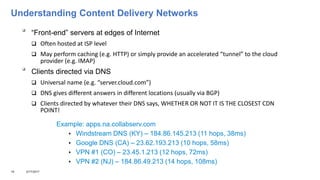
Clients directed via DNS
 Universal name (e.g. “server.cloud.com”)
 DNS gives different answers in different locations (usually via BGP)
 Clients directed by whatever their DNS says, WHETHER OR NOT IT IS THE CLOSEST CDN
POINT!
19 3/17/2017
Example: apps.na.collabserv.com
 Windstream DNS (KY) – 184.86.145.213 (11 hops, 38ms)
 Google DNS (CA) – 23.62.193.213 (10 hops, 58ms)
 VPN #1 (CO) – 23.45.1.213 (12 hops, 72ms)
 VPN #2 (NJ) – 184.86.49.213 (14 hops, 108ms)
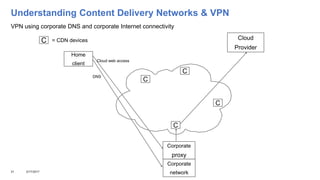
Understanding Content Delivery Networks & VPN
20 3/17/2017
Home
client
Cloud
Provider
Corporate
network
C
C
C
C
C = CDN devices
DNS
Cloud web access
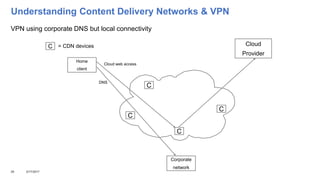
VPN using corporate DNS but local connectivity
Understanding Content Delivery Networks & VPN
21 3/17/2017
VPN using corporate DNS and corporate Internet connectivity
Home
client
Cloud
Provider
Corporate
network
C
C
C
C
C = CDN devices
Corporate
proxy
DNS
Cloud web access
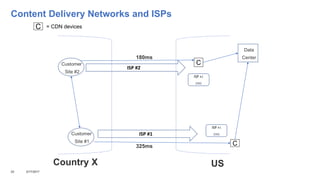
Content Delivery Networks and ISPs
22 3/17/2017
Customer
Site #2
Customer
Site #1
Data
Center
C = CDN devices
C
C
ISP #1
DNS
ISP #2
DNS
ISP #2
ISP #1
180ms
325ms
USCountry X
Content Accelerators – Potential Problem

Also known as Enterprise Distributed Content Network (EDCN) devices

May be protocol-specific

Usually serve as caching/compression engines

Usually work in pairs (remote site to data center/core network)

Fine if you control both endpoints

Can create problems if you access both local and cloud resources with the same
protocol

Should be configured to only accelerate LOCAL conversations
23 3/17/2017
SSL Terminators – Another Point of Overload

Also known as SSL accelerators

Serve as a “man in the middle” to broker SSL connections

Usually hardware-limited to a maximum number of concurrent SSL
sessions (some as low as “10,000 concurrent connections per board”)

Moving to the cloud (or putting mobile resources in your DMZ!) can easily
push tens of thousands of connections through these devices

Symptom – intermittent “Everyone who gets in is fine, but suddenly no new
people can get in”

Discuss SSL capacity with your network team!
24 3/17/2017
Quality of Service (QoS) Can Be Your Friend!

QoS is a network traffic priority scheme

Many (if not most) enterprise networks implement some form of QoS today,
especially if VoIP is deployed

Talk with your network team about QoS consideration for cloud/mobile traffic

From the network's perspective, your cloud/mobile traffic is “just more Internet
traffic”

You don't necessarily need to be #1 on the priority list, but you want to be
higher than the person checking Facebook or Twitter

I recommend an initial QoS treatment of “one step above routine traffic”

Can be ABSOLUTELY critical if/when your Internet connectivity is highly
utilized
25 3/17/2017
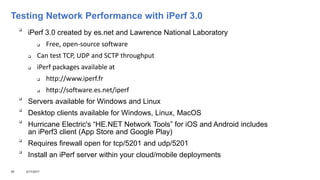
Testing Network Performance with iPerf 3.0

iPerf 3.0 created by es.net and Lawrence National Laboratory
 Free, open-source software
 Can test TCP, UDP and SCTP throughput
 iPerf packages available at
 http://www.iperf.fr
 http://software.es.net/iperf

Servers available for Windows and Linux

Desktop clients available for Windows, Linux, MacOS

Hurricane Electric's “HE.NET Network Tools” for iOS and Android includes
an iPerf3 client (App Store and Google Play)

Requires firewall open for tcp/5201 and udp/5201

Install an iPerf server within your cloud/mobile deployments
26 3/17/2017
Testing Network Performance with iPerf 3.0

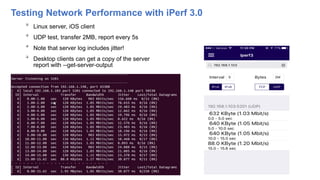
Linux server, iOS client

UDP test, transfer 2MB, report every 5s

Note that server log includes jitter!

Desktop clients can get a copy of the server
report with --get-server-output
27 3/17/2017
Testing Network Performance with iPerf 3.0

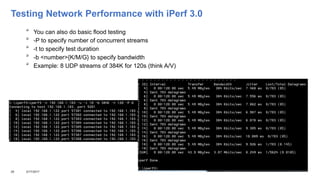
You can also do basic flood testing

-P to specify number of concurrent streams

-t to specify test duration

-b <number>{K/M/G} to specify bandwidth

Example: 8 UDP streams of 384K for 120s (think A/V)
28 3/17/2017
Evaluating Mobile Users (and Carriers!) with GeoIP

GeoIP = cross reference IP addresses with city/country/AS
 Also known as 'IP geolocation'
 AS = Autonomous System (network provider)

GeoIP Legacy databases available free from MaxMind
 http://dev.maxmind.com/geoip
 Not as precise as paid versions

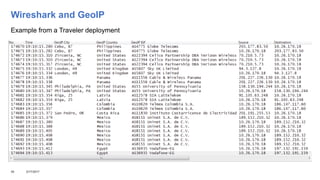
Wireshark supports GeoIP databases

Allows you to find/profile:
 Individual users
 Performance by city/country
 Performance by mobile/network provider
29 3/17/2017
Wireshark and GeoIP
Example from a Traveler deployment
30 3/17/2017
Summary – Setting Expectations

May need to limit features in some locations
 Audio/video
 Database replication

Your network team can do a bandwidth analysis
 Estimated per-user addition to “Internet pipe” consumption

Your testing should accomplish several things
 Baseline performance for well-connected/central sites

 Performance rates for remote or poorly-connected sites (be sure to test them!)
 Identify potential “chokepoints” in your enterprise networks
 Compare against other sites (e.g. from home without VPN, public wifi sites, etc.)
 Estimated per-user addition to proxy load
31 3/17/2017
Summary – Maintaining Expectations

Network upgrades, if indicated, may delay performance improvements
for some users

REPEAT YOUR TESTING PERIODICALLY!
 Network may change around you
 New deployments may affect network performance
32 3/17/2017
Questions
And
Answers
33 3/17/2017
Twitter: @wesmorgan1
Email: wes_morgan@us.ibm.com
Blog: http://wesmorgan.blogspot.com
Notices and disclaimers
• Copyright © 2017 by International Business Machines Corporation (IBM). No part of this document may be reproduced or transmitted in any form without written permission from IBM.
• U.S. Government Users Restricted Rights — Use, duplication or disclosure restricted by GSA ADP Schedule Contract with IBM.
• Information in these presentations (including information relating to products that have not yet been announced by IBM) has been reviewed for accuracy as of the date of initial publication and could include
unintentional technical or typographical errors. IBM shall have no responsibility to update this information. THIS DOCUMENT IS DISTRIBUTED "AS IS" WITHOUT ANY WARRANTY, EITHER EXPRESS OR IMPLIED.
IN NO EVENT SHALL IBM BE LIABLE FOR ANY DAMAGE ARISING FROM THE USE OF THIS INFORMATION, INCLUDING BUT NOT LIMITED TO, LOSS OF DATA, BUSINESS INTERRUPTION, LOSS OF
PROFIT OR LOSS OF OPPORTUNITY. IBM products and services are warranted according to the terms and conditions of the agreements under which they are provided.
• IBM products are manufactured from new parts or new and used parts. In some cases, a product may not be new and may have been previously installed. Regardless, our warranty terms apply.”
• Any statements regarding IBM's future direction, intent or product plans are subject to change or withdrawal without notice.
• Performance data contained herein was generally obtained in a controlled, isolated environments. Customer examples are presented as illustrations of how those customers have used IBM products and the results
they may have achieved. Actual performance, cost, savings or other results in other operating environments may vary.
• References in this document to IBM products, programs, or services does not imply that IBM intends to make such products, programs or services available in all countries in which IBM operates or does business.
• Workshops, sessions and associated materials may have been prepared by independent session speakers, and do not necessarily reflect the views of IBM. All materials and discussions are provided for informational
purposes only, and are neither intended to, nor shall constitute legal or other guidance or advice to any individual participant or their specific situation.
• It is the customer’s responsibility to insure its own compliance with legal requirements and to obtain advice of competent legal counsel as to the identification and interpretation of any relevant laws and regulatory
requirements that may affect the customer’s business and any actions the customer may need to take to comply with such laws. IBM does not provide legal advice or represent or warrant that its services or products
will ensure that the customer is in compliance with any law
3/17/201734
Notices and disclaimers continued
• Information concerning non-IBM products was obtained from the suppliers of those products, their published announcements or other publicly available sources. IBM has not tested those products in connection with
this publication and cannot confirm the accuracy of performance, compatibility or any other claims related to non-IBM products. Questions on the capabilities of non-IBM products should be addressed to the suppliers
of those products. IBM does not warrant the quality of any third-party products, or the ability of any such third-party products to interoperate with IBM’s products. IBM EXPRESSLY DISCLAIMS ALL WARRANTIES,
EXPRESSED OR IMPLIED, INCLUDING BUT NOT LIMITED TO, THE IMPLIED WARRANTIES OF MERCHANTABILITY AND FITNESS FOR A PARTICULAR PURPOSE.
• The provision of the information contained herein is not intended to, and does not, grant any right or license under any IBM patents, copyrights, trademarks or other intellectual property right.
• IBM, the IBM logo, ibm.com, Aspera®, Bluemix, Blueworks Live, CICS, Clearcase, Cognos®, DOORS®, Emptoris®, Enterprise Document Management System™, FASP®, FileNet®, Global Business Services ®,
Global Technology Services ®, IBM ExperienceOne™, IBM SmartCloud®, IBM Social Business®, Information on Demand, ILOG, Maximo®, MQIntegrator®, MQSeries®, Netcool®, OMEGAMON, OpenPower,
PureAnalytics™, PureApplication®, pureCluster™, PureCoverage®, PureData®, PureExperience®, PureFlex®, pureQuery®, pureScale®, PureSystems®, QRadar®, Rational®, Rhapsody®, Smarter Commerce®,
SoDA, SPSS, Sterling Commerce®, StoredIQ, Tealeaf®, Tivoli®, Trusteer®, Unica®, urban{code}®, Watson, WebSphere®, Worklight®, X-Force® and System z® Z/OS, are trademarks of International Business
Machines Corporation, registered in many jurisdictions worldwide. Other product and service names might be trademarks of IBM or other companies. A current list of IBM trademarks is available on the Web at
"Copyright and trademark information" at: www.ibm.com/legal/copytrade.shtml.
3/17/201735
36 1/17/17
THANK YOU FOR BEING HERE!
Please complete a session survey...

Going Cloud? Going Mobile? Don't Let Your Network Be A Showstopper!

  • 1.
    Going Cloud? GoingMobile? Don’t Let Your Network Be a Showstopper! Wes Morgan, ICS SWAT wes_morgan@us.ibm.com
  • 2.
    What We’ll Cover Why Are We Here?  Understanding Data Flow  Fundamental Change  Aggregate Effects – Remote Sites  Security  Mobile/BYOD – Location, Location, Location  VPN Users – In or Out?  Content Delivery Networks  Testing Network/Carrier Performance  Setting Expectations  Q&A 2 3/17/2017
  • 3.
    Why Are WeHere?  “Applications folks” aren't usually “network folks”  Enterprise networks are increasingly complex  Concerned about application performance  Need to set expectations  “Everywhere Access” can be a challenge  Mobile/BYOD business pressure  Ever-increasing security concerns 3 3/17/2017
  • 4.
    Understanding Data Flow  Nothingmore than the path of transactions to/from (OR FOR) the server(s) in question  THIS IS NOT JUST A POINT-TO-POINT QUESTION!  Multiple factors affect data flow  WAN links  Proxy/firewall use  Concentration of users  Network design  “Side band” transactions (authentication, document archival/retrieval, directory, etc.)  Each step can introduce its own latencies  Each step has its own overhead 4 3/17/2017
  • 5.
    Typical Enterprise DataFlow 5 3/17/2017 Main Office Field Offices Field Offices Data Center DMZ (extranet) Home Region Other Region(s) Region HQ Gigabit Gigabit WAN/DSL WAN/DSL WAN VPN Users VPN Users Regional Data Center Variable Internal External VariableVariable Internet
  • 6.
    What’s Your DataFlow Today?  Questions to ask  Things you should know already  How many remote offices? How many users?  What bandwidth do they have?  How many home/VPN users?  Users by geography?  Planning for mobile/cloud  Current Internet access  Where?  How? (direct access, HTTP proxy?)  Authentication required?  Different in other regions?  Current Internet capacity & utilization?  PARTNER WITH YOUR NETWORK TEAM NOW! 6 3/17/2017
  • 7.
    Moving to theCloud – A Fundamental Change  Depending on the application, you may be moving up to 100% of your application's data flow to the Internet  Auxiliary tasks may set up multiple tasks/connections per client  Significant increase in both number of connections and volume of data  Throughput of boundary devices (e.g. firewalls)  Licensing (many firewalls, & network devices are licensed by # of concurrent connections)  It's the Internet, folks  Added latency – how much?  Content Distribution Networks (e.g. Akamai) in use?  Electrons only move so fast 7 3/17/2017
  • 8.
    Typical Cloud DataFlow 8 3/17/2017 Main Office Field Offices Field Offices Data Center DMZ (extranet) Home Region Other Region(s) Region HQ WAN/DSL WAN/DSL WAN VPN Users VPN Users Regional Data Center Near-constant Internal External VariableVariable Internet Gigabit
  • 9.
    Worst-Case Scenario –Think About Remote Sites  Leaf node – a location with only one connection to the enterprise network  Still seen in both small and large enterprises  Largely rendered moot by ISP cloud model – everyone has “one connection”  Think about low-bandwidth (or high-latency) sites  DSL  T1 (1.5 Mbit/s) or lower  Satellite links  Geographically remote sites usually suffer higher latency 9 3/17/2017
  • 10.
    Worst-Case Scenario –Think About Remote Sites  Old latency = site to network core and back (“ping the data center”)  Aggregate effect of every link in network path  Cloud latency = site to network core to INTERNET SITE and back  Bandwidth-intensive apps (e.g. audio/video) will suffer even more  Be sure to include such sites in your tests and/or pilot deployment 10 3/17/2017
  • 11.
    Security – HowMuch Is Too Much?  Security policies can have significant impact on cloud performance  Mandatory use of proxies is a known “flashpoint”  Moving to cloud-based service will potentially add THOUSANDS of connections/hour to the proxy load  Stressed proxy servers can introduce very high latency  If proxies are required, you may need to upgrade/add proxy servers to handle the load  Some proxies are licensed by “number of concurrent connections” - may need upgrade 11 3/17/2017
  • 12.
    Security – HowMuch Is Too Much? HOWEVER…  Many (if not most) cloud apps use either HTTPS or native encryption  May be sufficient to meet security policies/concerns  If so, bypass the proxy for connections to cloud services (PAC file for browser-based apps, open outbound firewall)  Some customers have established dedicated proxies  Some firewalls are also licensed by “number of concurrent connections”  HAVE THIS DISCUSSION NOW!  Performance problems in these areas are intermittent and difficult to diagnose 12 3/17/2017
  • 13.
    Mobile/BYOD – Location,Location, Location!  Placement of servers is key  First question – “which services will be external?”  These servers should go in your DMZ  May require receipt of “push notifications”, e.g. Apple APNS  Don't want external connections coming “all the way in” to the data center 13 3/17/2017
  • 14.
    Mobile/BYOD – Location,Location, Location!  Second question - “what MDM will I use?”  MDM solution necessary to manage access, passwords, appstore access, etc.  Third question - “what has to be open in the firewall?”  Mix of inbound/outbound connectivity, depending on service  May need to “come in” to internal servers (e.g. Traveler)  Most purely internal BYOD clients can be treated as any other internal client  May wind up using reverse proxies to reach internal servers  e.g. Sametime Proxy Server in DMZ vs. reverse-proxy to internal Sametime Proxy Server 14 3/17/2017
  • 15.
    Mobile/BYOD – WhereAre My Back-End Servers?  Mobile provisioning usually doesn't change where the user's data “lives” HOWEVER...  Now you're establishing a “mobile base” in your DMZ that has to be able to reach ALL of the internal servers hosting the user's data  Significant increase in firewall traffic, both external-to-DMZ and internal-to-DMZ  Can create additional latency (Traveler server in US DMZ, user's mail server in European data center) 15 3/17/2017
  • 16.
    VPN Users –In or Out?  Many VPNs push ALL traffic to enterprise network  Resulting data flow for VPN user is:  Remote site to enterprise network via Internet  Enterprise network routes traffic to Internet for cloud services (perhaps via proxy)  Response from cloud service returns to enterprise network via Internet (perhaps via proxy)  Enterprise network returns response to VPN client via Internet  DO YOU SEE THE PROBLEM? (Hint: think overhead!) 16 3/17/2017
  • 17.
    VPN Users –In or Out?  Most VPNs allow policy settings per IP address  Some VPNs modify browser settings (like a PAC file)  Allow VPN clients to reach cloud services directly  Strips out the “middleman” of the enterprise network  Reduces latency  Improves performance  Reduces load on enterprise network (VPN concentrators, proxy servers, etc.) 17 3/17/2017
  • 18.
    VPN Users –In or Out?  Review VPN configuration specifics  Many optimizations for data-center target introduce problems with cloud targets, e.g.:  Nagle algorithm  Delayed ACKs  TCP slow start  Consider additional load on VPN server(s) 18 3/17/2017
  • 19.
    Understanding Content DeliveryNetworks  “Front-end” servers at edges of Internet  Often hosted at ISP level  May perform caching (e.g. HTTP) or simply provide an accelerated “tunnel” to the cloud provider (e.g. IMAP)  Clients directed via DNS  Universal name (e.g. “server.cloud.com”)  DNS gives different answers in different locations (usually via BGP)  Clients directed by whatever their DNS says, WHETHER OR NOT IT IS THE CLOSEST CDN POINT! 19 3/17/2017 Example: apps.na.collabserv.com  Windstream DNS (KY) – 184.86.145.213 (11 hops, 38ms)  Google DNS (CA) – 23.62.193.213 (10 hops, 58ms)  VPN #1 (CO) – 23.45.1.213 (12 hops, 72ms)  VPN #2 (NJ) – 184.86.49.213 (14 hops, 108ms)
  • 20.
    Understanding Content DeliveryNetworks & VPN 20 3/17/2017 Home client Cloud Provider Corporate network C C C C C = CDN devices DNS Cloud web access VPN using corporate DNS but local connectivity
  • 21.
    Understanding Content DeliveryNetworks & VPN 21 3/17/2017 VPN using corporate DNS and corporate Internet connectivity Home client Cloud Provider Corporate network C C C C C = CDN devices Corporate proxy DNS Cloud web access
  • 22.
    Content Delivery Networksand ISPs 22 3/17/2017 Customer Site #2 Customer Site #1 Data Center C = CDN devices C C ISP #1 DNS ISP #2 DNS ISP #2 ISP #1 180ms 325ms USCountry X
  • 23.
    Content Accelerators –Potential Problem  Also known as Enterprise Distributed Content Network (EDCN) devices  May be protocol-specific  Usually serve as caching/compression engines  Usually work in pairs (remote site to data center/core network)  Fine if you control both endpoints  Can create problems if you access both local and cloud resources with the same protocol  Should be configured to only accelerate LOCAL conversations 23 3/17/2017
  • 24.
    SSL Terminators –Another Point of Overload  Also known as SSL accelerators  Serve as a “man in the middle” to broker SSL connections  Usually hardware-limited to a maximum number of concurrent SSL sessions (some as low as “10,000 concurrent connections per board”)  Moving to the cloud (or putting mobile resources in your DMZ!) can easily push tens of thousands of connections through these devices  Symptom – intermittent “Everyone who gets in is fine, but suddenly no new people can get in”  Discuss SSL capacity with your network team! 24 3/17/2017
  • 25.
    Quality of Service(QoS) Can Be Your Friend!  QoS is a network traffic priority scheme  Many (if not most) enterprise networks implement some form of QoS today, especially if VoIP is deployed  Talk with your network team about QoS consideration for cloud/mobile traffic  From the network's perspective, your cloud/mobile traffic is “just more Internet traffic”  You don't necessarily need to be #1 on the priority list, but you want to be higher than the person checking Facebook or Twitter  I recommend an initial QoS treatment of “one step above routine traffic”  Can be ABSOLUTELY critical if/when your Internet connectivity is highly utilized 25 3/17/2017
  • 26.
    Testing Network Performancewith iPerf 3.0  iPerf 3.0 created by es.net and Lawrence National Laboratory  Free, open-source software  Can test TCP, UDP and SCTP throughput  iPerf packages available at  http://www.iperf.fr  http://software.es.net/iperf  Servers available for Windows and Linux  Desktop clients available for Windows, Linux, MacOS  Hurricane Electric's “HE.NET Network Tools” for iOS and Android includes an iPerf3 client (App Store and Google Play)  Requires firewall open for tcp/5201 and udp/5201  Install an iPerf server within your cloud/mobile deployments 26 3/17/2017
  • 27.
    Testing Network Performancewith iPerf 3.0  Linux server, iOS client  UDP test, transfer 2MB, report every 5s  Note that server log includes jitter!  Desktop clients can get a copy of the server report with --get-server-output 27 3/17/2017
  • 28.
    Testing Network Performancewith iPerf 3.0  You can also do basic flood testing  -P to specify number of concurrent streams  -t to specify test duration  -b <number>{K/M/G} to specify bandwidth  Example: 8 UDP streams of 384K for 120s (think A/V) 28 3/17/2017
  • 29.
    Evaluating Mobile Users(and Carriers!) with GeoIP  GeoIP = cross reference IP addresses with city/country/AS  Also known as 'IP geolocation'  AS = Autonomous System (network provider)  GeoIP Legacy databases available free from MaxMind  http://dev.maxmind.com/geoip  Not as precise as paid versions  Wireshark supports GeoIP databases  Allows you to find/profile:  Individual users  Performance by city/country  Performance by mobile/network provider 29 3/17/2017
  • 30.
    Wireshark and GeoIP Examplefrom a Traveler deployment 30 3/17/2017
  • 31.
    Summary – SettingExpectations  May need to limit features in some locations  Audio/video  Database replication  Your network team can do a bandwidth analysis  Estimated per-user addition to “Internet pipe” consumption  Your testing should accomplish several things  Baseline performance for well-connected/central sites  Performance rates for remote or poorly-connected sites (be sure to test them!)  Identify potential “chokepoints” in your enterprise networks  Compare against other sites (e.g. from home without VPN, public wifi sites, etc.)  Estimated per-user addition to proxy load 31 3/17/2017
  • 32.
    Summary – MaintainingExpectations  Network upgrades, if indicated, may delay performance improvements for some users  REPEAT YOUR TESTING PERIODICALLY!  Network may change around you  New deployments may affect network performance 32 3/17/2017
  • 33.
    Questions And Answers 33 3/17/2017 Twitter: @wesmorgan1 Email:wes_morgan@us.ibm.com Blog: http://wesmorgan.blogspot.com
  • 34.
    Notices and disclaimers •Copyright © 2017 by International Business Machines Corporation (IBM). No part of this document may be reproduced or transmitted in any form without written permission from IBM. • U.S. Government Users Restricted Rights — Use, duplication or disclosure restricted by GSA ADP Schedule Contract with IBM. • Information in these presentations (including information relating to products that have not yet been announced by IBM) has been reviewed for accuracy as of the date of initial publication and could include unintentional technical or typographical errors. IBM shall have no responsibility to update this information. THIS DOCUMENT IS DISTRIBUTED "AS IS" WITHOUT ANY WARRANTY, EITHER EXPRESS OR IMPLIED. IN NO EVENT SHALL IBM BE LIABLE FOR ANY DAMAGE ARISING FROM THE USE OF THIS INFORMATION, INCLUDING BUT NOT LIMITED TO, LOSS OF DATA, BUSINESS INTERRUPTION, LOSS OF PROFIT OR LOSS OF OPPORTUNITY. IBM products and services are warranted according to the terms and conditions of the agreements under which they are provided. • IBM products are manufactured from new parts or new and used parts. In some cases, a product may not be new and may have been previously installed. Regardless, our warranty terms apply.” • Any statements regarding IBM's future direction, intent or product plans are subject to change or withdrawal without notice. • Performance data contained herein was generally obtained in a controlled, isolated environments. Customer examples are presented as illustrations of how those customers have used IBM products and the results they may have achieved. Actual performance, cost, savings or other results in other operating environments may vary. • References in this document to IBM products, programs, or services does not imply that IBM intends to make such products, programs or services available in all countries in which IBM operates or does business. • Workshops, sessions and associated materials may have been prepared by independent session speakers, and do not necessarily reflect the views of IBM. All materials and discussions are provided for informational purposes only, and are neither intended to, nor shall constitute legal or other guidance or advice to any individual participant or their specific situation. • It is the customer’s responsibility to insure its own compliance with legal requirements and to obtain advice of competent legal counsel as to the identification and interpretation of any relevant laws and regulatory requirements that may affect the customer’s business and any actions the customer may need to take to comply with such laws. IBM does not provide legal advice or represent or warrant that its services or products will ensure that the customer is in compliance with any law 3/17/201734
  • 35.
    Notices and disclaimerscontinued • Information concerning non-IBM products was obtained from the suppliers of those products, their published announcements or other publicly available sources. IBM has not tested those products in connection with this publication and cannot confirm the accuracy of performance, compatibility or any other claims related to non-IBM products. Questions on the capabilities of non-IBM products should be addressed to the suppliers of those products. IBM does not warrant the quality of any third-party products, or the ability of any such third-party products to interoperate with IBM’s products. IBM EXPRESSLY DISCLAIMS ALL WARRANTIES, EXPRESSED OR IMPLIED, INCLUDING BUT NOT LIMITED TO, THE IMPLIED WARRANTIES OF MERCHANTABILITY AND FITNESS FOR A PARTICULAR PURPOSE. • The provision of the information contained herein is not intended to, and does not, grant any right or license under any IBM patents, copyrights, trademarks or other intellectual property right. • IBM, the IBM logo, ibm.com, Aspera®, Bluemix, Blueworks Live, CICS, Clearcase, Cognos®, DOORS®, Emptoris®, Enterprise Document Management System™, FASP®, FileNet®, Global Business Services ®, Global Technology Services ®, IBM ExperienceOne™, IBM SmartCloud®, IBM Social Business®, Information on Demand, ILOG, Maximo®, MQIntegrator®, MQSeries®, Netcool®, OMEGAMON, OpenPower, PureAnalytics™, PureApplication®, pureCluster™, PureCoverage®, PureData®, PureExperience®, PureFlex®, pureQuery®, pureScale®, PureSystems®, QRadar®, Rational®, Rhapsody®, Smarter Commerce®, SoDA, SPSS, Sterling Commerce®, StoredIQ, Tealeaf®, Tivoli®, Trusteer®, Unica®, urban{code}®, Watson, WebSphere®, Worklight®, X-Force® and System z® Z/OS, are trademarks of International Business Machines Corporation, registered in many jurisdictions worldwide. Other product and service names might be trademarks of IBM or other companies. A current list of IBM trademarks is available on the Web at "Copyright and trademark information" at: www.ibm.com/legal/copytrade.shtml. 3/17/201735
  • 36.
    36 1/17/17 THANK YOUFOR BEING HERE! Please complete a session survey...