How to Create a Glogster 
            Poster
              By:
            Ms Irving


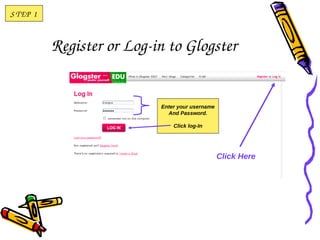
S T EP  1


            Register or Log­in to Glogster


                             Enter your username
                               And Password.

                                 Click log-In


                                                   Click Here
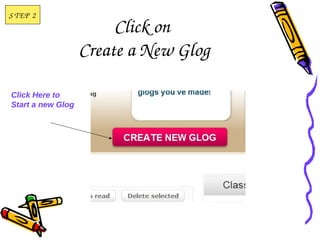
S T EP  2
                        Click on 
                   Create a New Glog

Click Here to
Start a new Glog
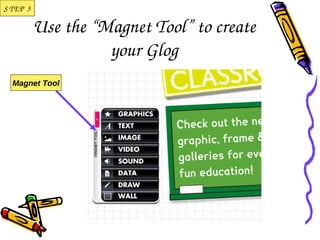
S T EP  3

            Use the “Magnet Tool” to create 
                      your Glog
   Magnet Tool
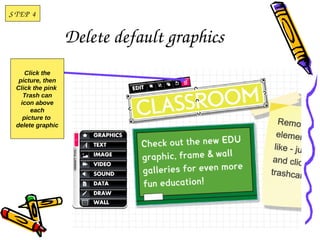
S T EP  4


                   Delete default graphics
      Click the
   picture, then
  Click the pink
     Trash can
    icon above
        each
     picture to
  delete graphic
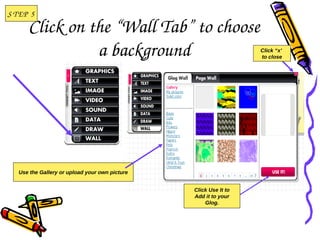
S T EP  5
       Click on the “Wall Tab” to choose 
                 a background                                     Click “x’
                                                                  to close


   Use the Gallery or upload your own picture


                                                Click Use It to
                                                Add it to your
                                                    Glog.
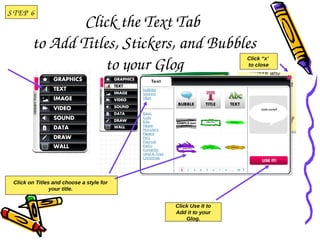
S T EP  6
                 Click the Text Tab 
         to Add Titles, Stickers, and Bubbles 
                    to your Glog
                                                             Click “x’
                                                             to close


  Click on Titles and choose a style for
                 your title.


                                           Click Use It to
                                           Add it to your
                                               Glog.
S T EP  7


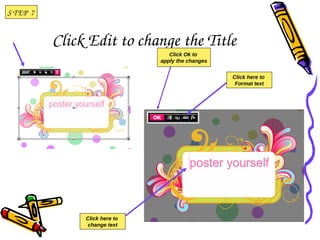
            Click Edit to change the Title
                                    Click Ok to
                                 apply the changes


                                                     Click here to
                                                      Format text


                 Click here to
                  change text
S T EP  8

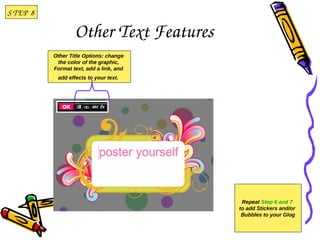
                    Other Text Features
            Other Title Options: change
             the color of the graphic,
            Format text, add a link, and
             add effects to your text. 


                                            Repeat Step 6 and 7
                                           to add Stickers and/or
                                            Bubbles to your Glog
STEP 9


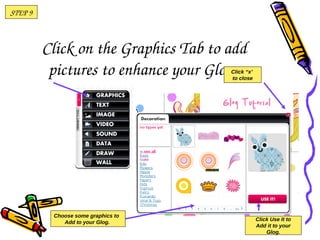
         Click on the Graphics Tab to add 
          pictures to enhance your Glog. 
                                      Click “x’
                                      to close


          Choose some graphics to
                                                  Click Use It to
             Add to your Glog.
                                                  Add it to your
                                                      Glog.
S T EP  1 0

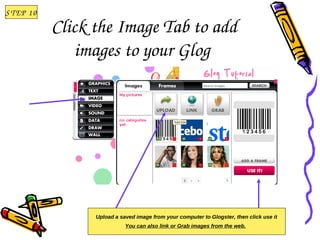
              Click the Image Tab to add 
                 images to your Glog 


                    Upload a saved image from your computer to Glogster, then click use it
                               You can also link or Grab images from the web.
S T EP  1 1


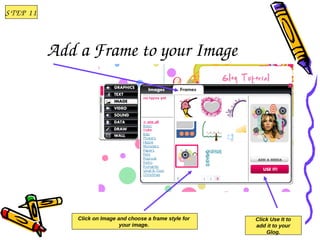
              Add a Frame to your Image 


                  Click on Image and choose a frame style for   Click Use It to
                                  your image.                   add it to your
                                                                    Glog.
S T EP  1 2

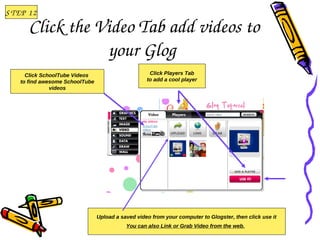
        Click the Video Tab add videos to 
                   your Glog 
       Click SchoolTube Videos                        Click Players Tab
     to find awesome SchoolTube                      to add a cool player
                videos


                                  Upload a saved video from your computer to Glogster, then click use it
                                             You can also Link or Grab Video from the web.
S T EP  1 3

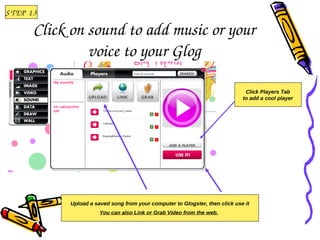
         Click on sound to add music or your 
                  voice to your Glog

                                                                                 Click Players Tab
                                                                                to add a cool player


              Upload a saved song from your computer to Glogster, then click use it
                         You can also Link or Grab Video from the web.
S T EP  1 4


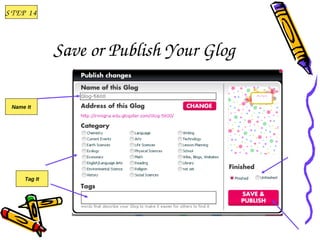
               Save or Publish Your Glog

  Name It


      Tag It
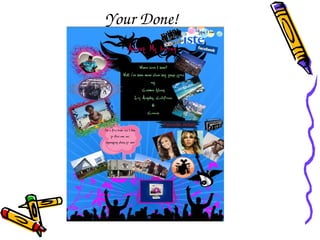
Your Done!

Glogster poster-tutorial

  • 1.
    How to Create a Glogster  Poster By: Ms Irving    
  • 2.
    S T EP 1 Register or Log­in to Glogster Enter your username And Password. Click log-In Click Here
  • 3.
    S T EP 2 Click on  Create a New Glog Click Here to Start a new Glog
  • 4.
    S T EP 3 Use the “Magnet Tool” to create  your Glog Magnet Tool
  • 5.
    S T EP 4 Delete default graphics Click the picture, then Click the pink Trash can icon above each picture to delete graphic
  • 6.
    S T EP 5 Click on the “Wall Tab” to choose  a background Click “x’ to close Use the Gallery or upload your own picture Click Use It to Add it to your Glog.
  • 7.
    S T EP 6 Click the Text Tab  to Add Titles, Stickers, and Bubbles  to your Glog Click “x’ to close Click on Titles and choose a style for your title. Click Use It to Add it to your Glog.
  • 8.
    S T EP 7 Click Edit to change the Title Click Ok to apply the changes Click here to Format text Click here to change text
  • 9.
    S T EP 8 Other Text Features Other Title Options: change the color of the graphic, Format text, add a link, and add effects to your text.  Repeat Step 6 and 7 to add Stickers and/or Bubbles to your Glog
  • 10.
    STEP 9 Click on the Graphics Tab to add  pictures to enhance your Glog.  Click “x’ to close Choose some graphics to Click Use It to Add to your Glog. Add it to your Glog.
  • 11.
    S T EP 1 0 Click the Image Tab to add  images to your Glog  Upload a saved image from your computer to Glogster, then click use it You can also link or Grab images from the web.
  • 12.
    S T EP 1 1 Add a Frame to your Image  Click on Image and choose a frame style for Click Use It to your image. add it to your Glog.
  • 13.
    S T EP 1 2 Click the Video Tab add videos to  your Glog  Click SchoolTube Videos Click Players Tab to find awesome SchoolTube to add a cool player videos Upload a saved video from your computer to Glogster, then click use it You can also Link or Grab Video from the web.
  • 14.
    S T EP 1 3 Click on sound to add music or your  voice to your Glog Click Players Tab to add a cool player Upload a saved song from your computer to Glogster, then click use it You can also Link or Grab Video from the web.
  • 15.
    S T EP 1 4 Save or Publish Your Glog Name It Tag It
  • 16.