WI Global Web System
   Basic Presentation
        April 2012
Wetlands International


The Global Web System is made with
 DotNetNuke (freeware)

This system is aimed at:
• Having one ‘look and feel’
 (it has been updated in 2011, and not all office websites joined in – although this needs to
 be done soon)

• Easy usability
This means that:

• All websites share the same design

• All websites are connected to the global
  homepage databases for:
  - Projects
  - Publications
  - Images

• When updating the database on the
  global website, automatically the sub-
  websites are updated too
Extra features:
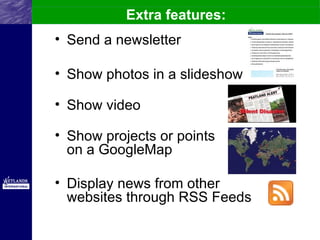
• Send a newsletter

• Show photos in a slideshow

• Show video

• Show projects or points
  on a GoogleMap

• Display news from other
  websites through RSS Feeds
Design of a webpage
The Basics:

• The design of a web page is called a
  “skin”

• The elements to fill a page are called
  “modules”

• There are many modules;
  each different module displays its
  content in a different way
Design of a webpage

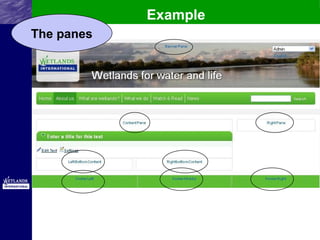
• The modules are placed in different
sections of a web page: a “pane”
• Generally, these are the sections or
panes:
BannerPane, Rightpane, ContentPane
(incl. Left- and RightBottom) and
Footer (-Left, -Middle, -Right) Pane
• You can move the modules from one
pane to another
Example
The panes
Example
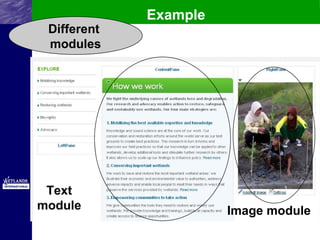
 Different
 modules


 Text
module                 Image module
Multilanguage website
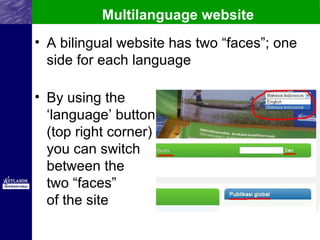
• A bilingual website has two “faces”; one
  side for each language

• By using the
  ‘language’ button
  (top right corner)
  you can switch
  between the
  two “faces”
  of the site
Bilingual pages
Bilingual pages can be made
in two ways:
• Double-sided page (simple):
use ML-HTML text modules for all
the text.
These you can make yourself!

• Double paged: two different pages
connected to each other
(complicated)
Used for homepages with lots of modules,
made by HQ Comm. Officer
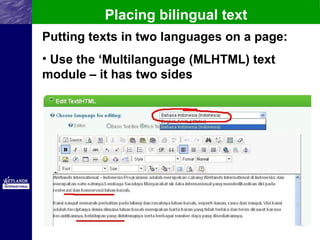
Placing bilingual text
Putting texts in two languages on a page:
• Use the ‘Multilanguage (MLHTML) text
module – it has two sides
Module titles

• Titles of many modules are not
  bilingual.

• Therefore, on top of such a
  (project, publication, etc.) module,
  always place a MLHTML Text
  module with the title text in both
  languages
Making a simple bilingual page

Instead the MLHTML text module
    above it does have a title


 The Image module cannot be
  bilingual, so it has no title.
Making a simple bilingual page
Page name translation

• Page titles can be made bilingual
  on: ‘About Us – Page name
  translations’

• You can select the page and
  change the title in each language,
  similar to using a MLHTML text
  module
Page name translation
                               It is set to French: you can
                                see the French page title


 Now switch to English:
add the English page title
WI Global Web System
After this presentation:

• Study the Website Manual for
  Beginners and start practicing

• If you have any questions, direct
  them at the responsible HQ
  Communications Officer through
  Skype, email or by telephone.

• Good luck in managing your own
  website!

Global Website System Introduction

  • 1.
    WI Global WebSystem Basic Presentation April 2012
  • 2.
    Wetlands International The GlobalWeb System is made with DotNetNuke (freeware) This system is aimed at: • Having one ‘look and feel’ (it has been updated in 2011, and not all office websites joined in – although this needs to be done soon) • Easy usability
  • 3.
    This means that: •All websites share the same design • All websites are connected to the global homepage databases for: - Projects - Publications - Images • When updating the database on the global website, automatically the sub- websites are updated too
  • 4.
    Extra features: • Senda newsletter • Show photos in a slideshow • Show video • Show projects or points on a GoogleMap • Display news from other websites through RSS Feeds
  • 5.
    Design of awebpage The Basics: • The design of a web page is called a “skin” • The elements to fill a page are called “modules” • There are many modules; each different module displays its content in a different way
  • 6.
    Design of awebpage • The modules are placed in different sections of a web page: a “pane” • Generally, these are the sections or panes: BannerPane, Rightpane, ContentPane (incl. Left- and RightBottom) and Footer (-Left, -Middle, -Right) Pane • You can move the modules from one pane to another
  • 7.
  • 8.
    Example Different modules Text module Image module
  • 9.
    Multilanguage website • Abilingual website has two “faces”; one side for each language • By using the ‘language’ button (top right corner) you can switch between the two “faces” of the site
  • 10.
    Bilingual pages Bilingual pagescan be made in two ways: • Double-sided page (simple): use ML-HTML text modules for all the text. These you can make yourself! • Double paged: two different pages connected to each other (complicated) Used for homepages with lots of modules, made by HQ Comm. Officer
  • 11.
    Placing bilingual text Puttingtexts in two languages on a page: • Use the ‘Multilanguage (MLHTML) text module – it has two sides
  • 12.
    Module titles • Titlesof many modules are not bilingual. • Therefore, on top of such a (project, publication, etc.) module, always place a MLHTML Text module with the title text in both languages
  • 13.
    Making a simplebilingual page Instead the MLHTML text module above it does have a title The Image module cannot be bilingual, so it has no title.
  • 14.
    Making a simplebilingual page
  • 15.
    Page name translation •Page titles can be made bilingual on: ‘About Us – Page name translations’ • You can select the page and change the title in each language, similar to using a MLHTML text module
  • 16.
    Page name translation It is set to French: you can see the French page title Now switch to English: add the English page title
  • 17.
    WI Global WebSystem After this presentation: • Study the Website Manual for Beginners and start practicing • If you have any questions, direct them at the responsible HQ Communications Officer through Skype, email or by telephone. • Good luck in managing your own website!