
Getting Creative with Adobe AIR
   Peter Elst - The ActionScript Conference 2009
Who is Peter?

✤ Freelance Flash Platform Consultant
✤ Adobe Community Expert for RIA
✤ Adobe Certified Instructor
✤ Author to a number of ActionScript books including
  “Object-Oriented ActionScript 3.0”
This was last year...
RIA meets Desktop

✤ Introduction to Adobe AIR
✤ How to build AIR applications
✤ Network, Windowing, HTML, FileSystem, SQLite,
  Drag ‘n Drop, Clipboard access, Update API’s,...


  What else could I possibly talk about?
Thinking outside the box
Creative uses of the technology
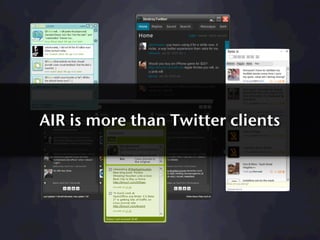
AIR is more than Twitter clients
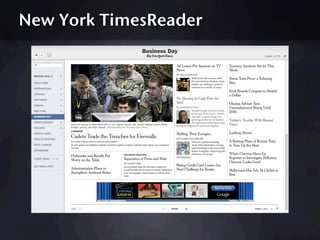
New York TimesReader
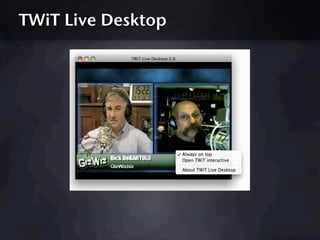
TWiT Live Desktop
web + desktop = ?
a new paradigm to be explored
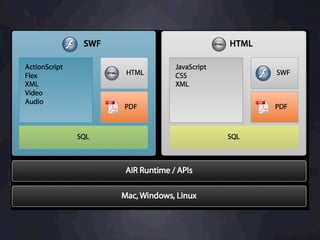
What makes Adobe AIR so special

✤ Allows you to use your existing web development skills
✤ Free tools, no costs involved to develop apps
✤ Cross platform (Windows, Mac OS X, Linux) and support
  for mobile and devices is on the roadmap
✤ Bridges web and desktop environments in a secure way


  Its fun to play around with!
HelloWorld in AIR
Detecting if AIR is installed
Launching apps from the browser
Record streaming audio
Screensaver
Screensaver (Windows only)

✤ Inspired by Keith Peters
✤ Make a full screen AIR application
✤ Export the AIR application and install
✤ Rename the .exe to .scr and distribute

  Note: bypassing the AIR installer is not recommended
  practice (but works most of the time) ;)
SQLite wrapper
SQLite wrapper (top secret)

✤ To be announced at Flash on the Beach later this month
✤ Make it (very) easy to work with local databases
✤ Features so far included setting up and querying databases
✤ New release will have support for basic online/offline
  synchronization
Conclusion

✤ Don’t let technology limit your imagination
✤ Don’t see desktop and web as separate environments
✤ Do experiment with features and hack around
✤ Do things you love and share them with the community
Q&A

✤ Have you played with Adobe AIR?
✤ What do you like about it?
✤ How do you see the web and desktop converging?
Thank you!

 Feel free to get in touch with questions,
 feedback or ideas for projects!


 blog:    www.peterelst.com
 email: info@peterelst.com
 twitter: @peterelst

Getting Creative with Adobe AIR

  • 1.
    Getting Creative withAdobe AIR Peter Elst - The ActionScript Conference 2009
  • 2.
    Who is Peter? ✤Freelance Flash Platform Consultant ✤ Adobe Community Expert for RIA ✤ Adobe Certified Instructor ✤ Author to a number of ActionScript books including “Object-Oriented ActionScript 3.0”
  • 3.
  • 4.
    RIA meets Desktop ✤Introduction to Adobe AIR ✤ How to build AIR applications ✤ Network, Windowing, HTML, FileSystem, SQLite, Drag ‘n Drop, Clipboard access, Update API’s,... What else could I possibly talk about?
  • 5.
  • 6.
    Creative uses ofthe technology
  • 7.
    AIR is morethan Twitter clients
  • 8.
  • 9.
  • 10.
  • 11.
    a new paradigmto be explored
  • 12.
    What makes AdobeAIR so special ✤ Allows you to use your existing web development skills ✤ Free tools, no costs involved to develop apps ✤ Cross platform (Windows, Mac OS X, Linux) and support for mobile and devices is on the roadmap ✤ Bridges web and desktop environments in a secure way Its fun to play around with!
  • 14.
  • 15.
    Detecting if AIRis installed
  • 16.
  • 17.
  • 18.
  • 19.
    Screensaver (Windows only) ✤Inspired by Keith Peters ✤ Make a full screen AIR application ✤ Export the AIR application and install ✤ Rename the .exe to .scr and distribute Note: bypassing the AIR installer is not recommended practice (but works most of the time) ;)
  • 20.
  • 21.
    SQLite wrapper (topsecret) ✤ To be announced at Flash on the Beach later this month ✤ Make it (very) easy to work with local databases ✤ Features so far included setting up and querying databases ✤ New release will have support for basic online/offline synchronization
  • 22.
    Conclusion ✤ Don’t lettechnology limit your imagination ✤ Don’t see desktop and web as separate environments ✤ Do experiment with features and hack around ✤ Do things you love and share them with the community
  • 23.
    Q&A ✤ Have youplayed with Adobe AIR? ✤ What do you like about it? ✤ How do you see the web and desktop converging?
  • 24.
    Thank you! Feelfree to get in touch with questions, feedback or ideas for projects! blog: www.peterelst.com email: info@peterelst.com twitter: @peterelst