GEOPAPARAZZI	AND
GVSIG	MOBILE
STATE	OF	THE	ART
Andrea	Antonello,	Silvia	Franceschi
HydroloGIS	-	gvSIG	Association
13as	Jornadas	Internacionales	gvSIG
18-20	Oct	2017
WHO	AM	I?
cofounder	of	
HydroloGIS	is	member	of	
	Charter	Member	and	GFOSS	advocate
develop	and	coordinate	
develop	 and	 coordinate	 the	
(former	JGrasstools)
working	 on	 integration	 of	 the	 HortonMachine	 and
Geopaparazzi	in	gvSIG
HydroloGIS
GvSIG	Association
Osgeo
Geopaparazzi
HortonMachine	 project
I	AM	A	DEVELOPER,	BUT	I	DO
SUVERYS…​	SOMETIMES	;-)
…
…
​
​
THE	RUGGED	PANASONIC	XPLORE
…
…
​
​
THE	RUGGED	PANASONIC	XPLORE
…
…
​
​
THE	RUGGED	PANASONIC	XPLORE
……​​THE	RUGGED	PANASONIC	XPLORETHE	RUGGED	PANASONIC	XPLORE
TABLET
TABLET
TABLET
TABLET
TABLET
TABLET
TABLETTABLET
…
…
​
​
THE	ULTRALIGHT	ASUS
THE	ULTRALIGHT	ASUS
…
…
​
​
THE	ULTRALIGHT	ASUS
THE	ULTRALIGHT	ASUS
…
…
​
​
THE	ULTRALIGHT	ASUS
THE	ULTRALIGHT	ASUS
……​​THE	ULTRALIGHT	ASUSTHE	ULTRALIGHT	ASUS
…
…
​
​
THE	TRIMBLE	JUNO
THE	TRIMBLE	JUNO
…
…
​
​
THE	TRIMBLE	JUNO
THE	TRIMBLE	JUNO
…
…
​
​
THE	TRIMBLE	JUNO
THE	TRIMBLE	JUNO
……​​THE	TRIMBLE	JUNOTHE	TRIMBLE	JUNO
BUT	NONE	OF	THEM	TURNED	OUT
RIGHT	FOR	US
AND	THEN	ANDROID	CAME	AND
MADE	IT	POSSIBLE	TO	EASILY
SURVEY	IN	PRACTICALLY…​
ANY	CONDITION
ANY	CONDITION
ANY	CONDITION
ANY	CONDITION
ANY	CONDITION
ANY	CONDITION
ANY	CONDITIONANY	CONDITION
AND	I	MEAN:	ANY	CONDITION
AND	I	MEAN:	ANY	CONDITIONAND	I	MEAN:	ANY	CONDITION
WHAT	WILL	I	TALK	ABOUT?
Geopaparazzi	&	gvSIG	Mobile
For	Users
For	Developers	(very	short,	I	promise)
For	Decision	Makers
FOR	USERS
FOR	USERS
FOR	USERS
FOR	USERS
FOR	USERS
FOR	USERS
FOR	USERSFOR	USERS
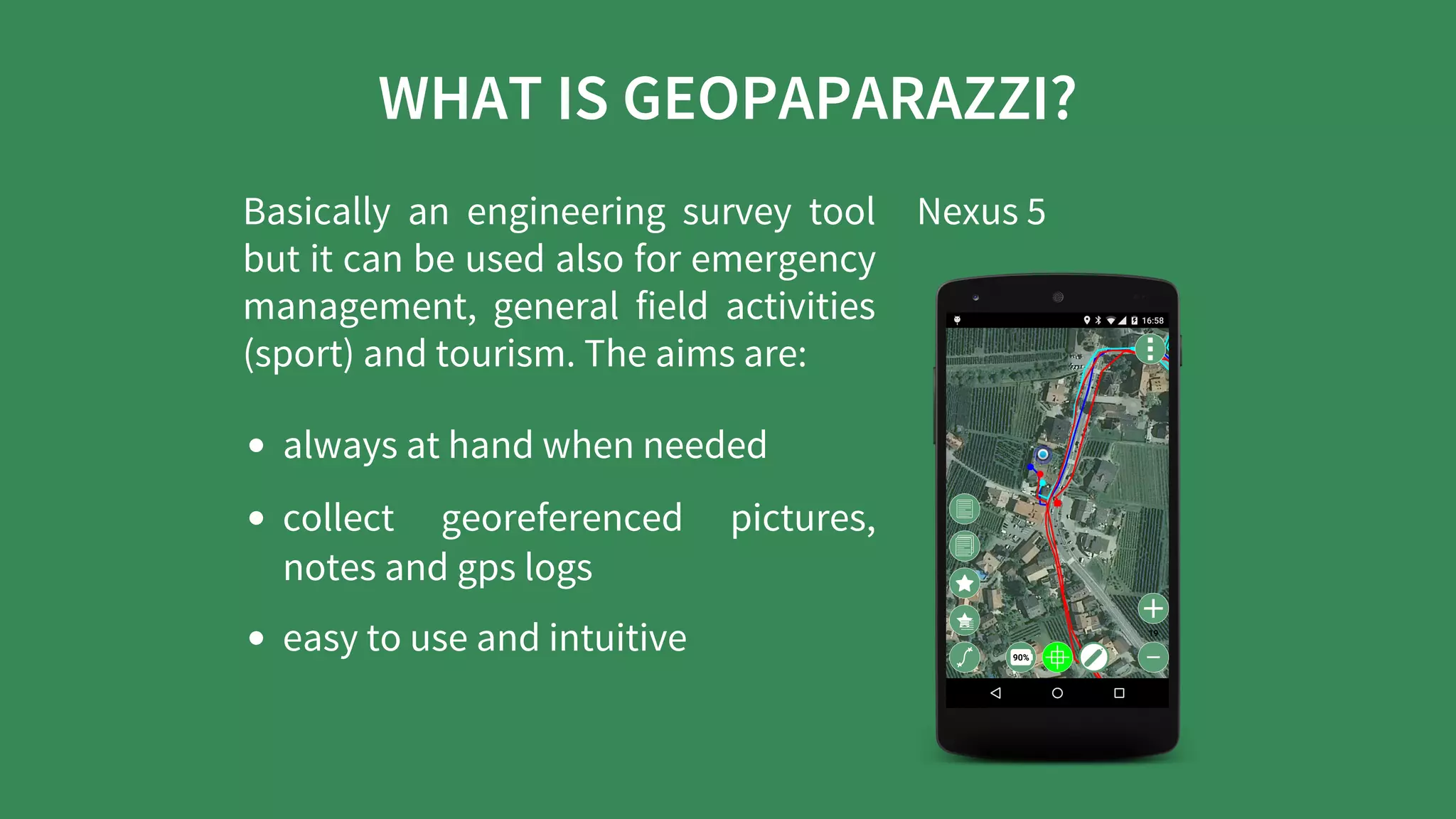
WHAT	IS	GEOPAPARAZZI?
Basically	 an	 engineering	 survey	 tool
but	it	can	be	used	also	for	emergency
management,	 general	 field	 activities
(sport)	and	tourism.	The	aims	are:
always	at	hand	when	needed
collect	 georeferenced	 pictures,
notes	and	gps	logs
easy	to	use	and	intuitive
Nexus	5
BASE	FUNCTIONALITIES
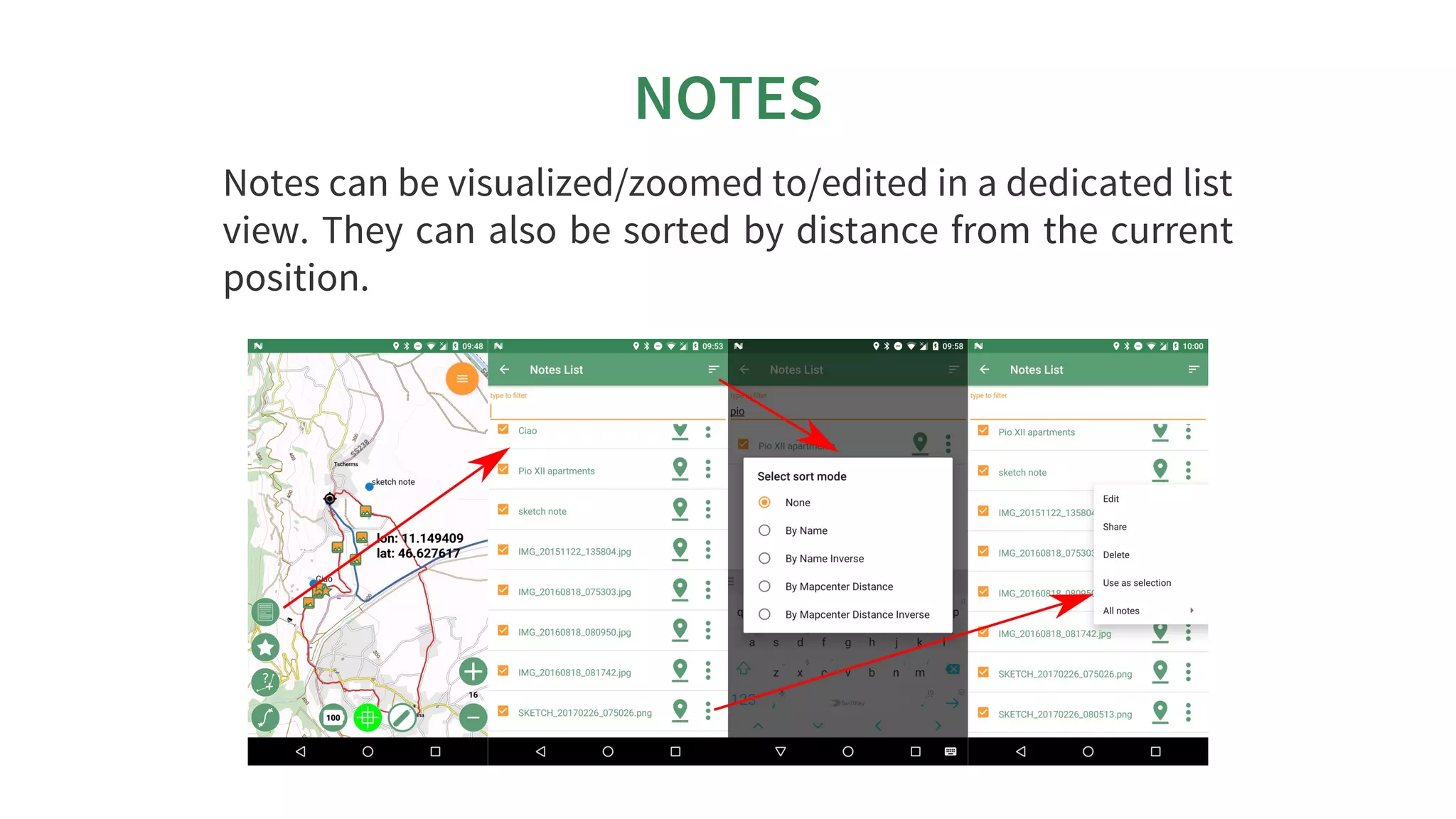
NOTES
Notes	can	be	visualized/zoomed	to/edited	in	a	dedicated	list
view.	They	can	also	be	sorted	by	distance	from	the	current
position.
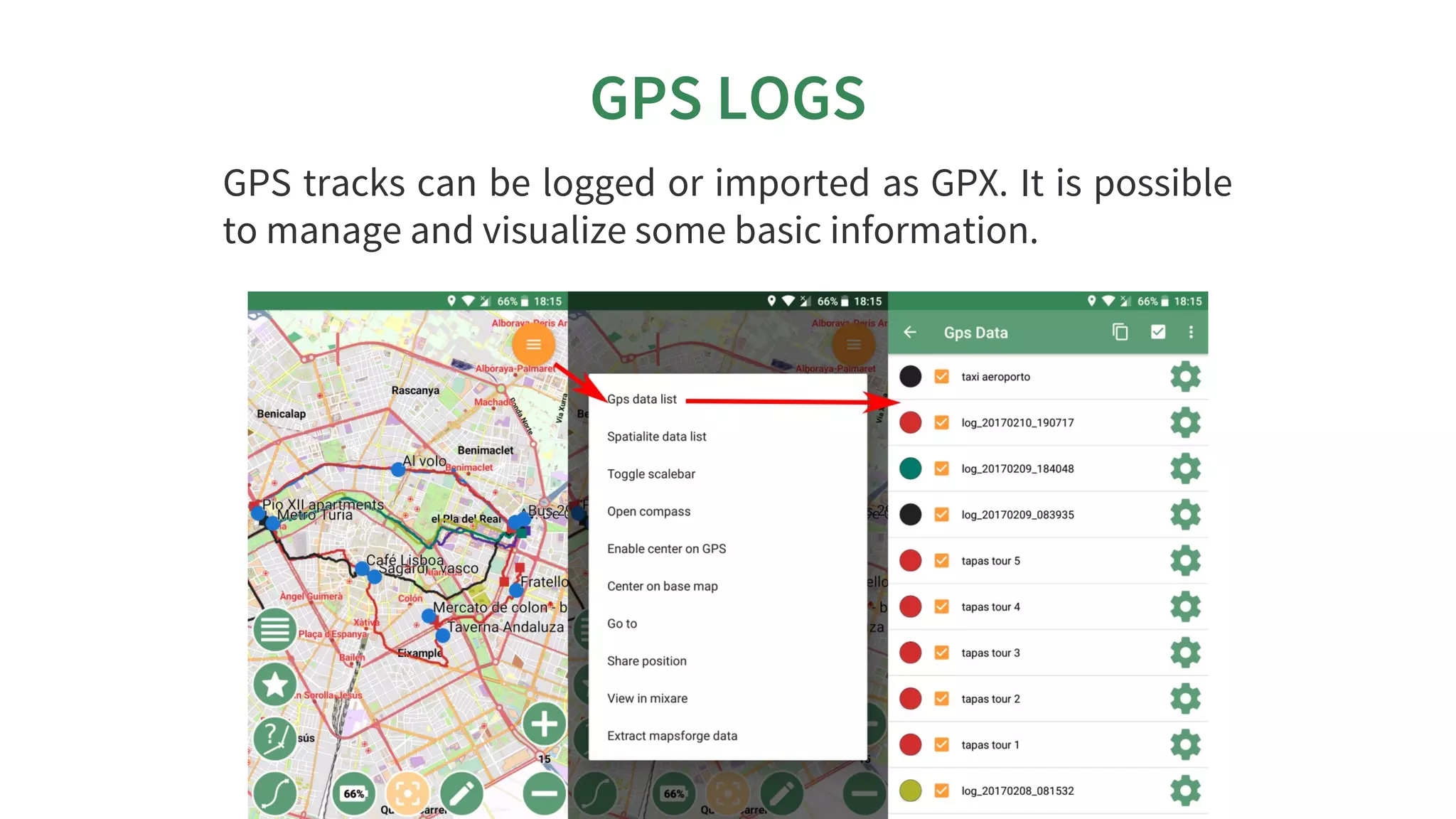
GPS	LOGS
GPS	tracks	can	be	logged	or	imported	as	GPX.	It	is	possible
to	manage	and	visualize	some	basic	information.
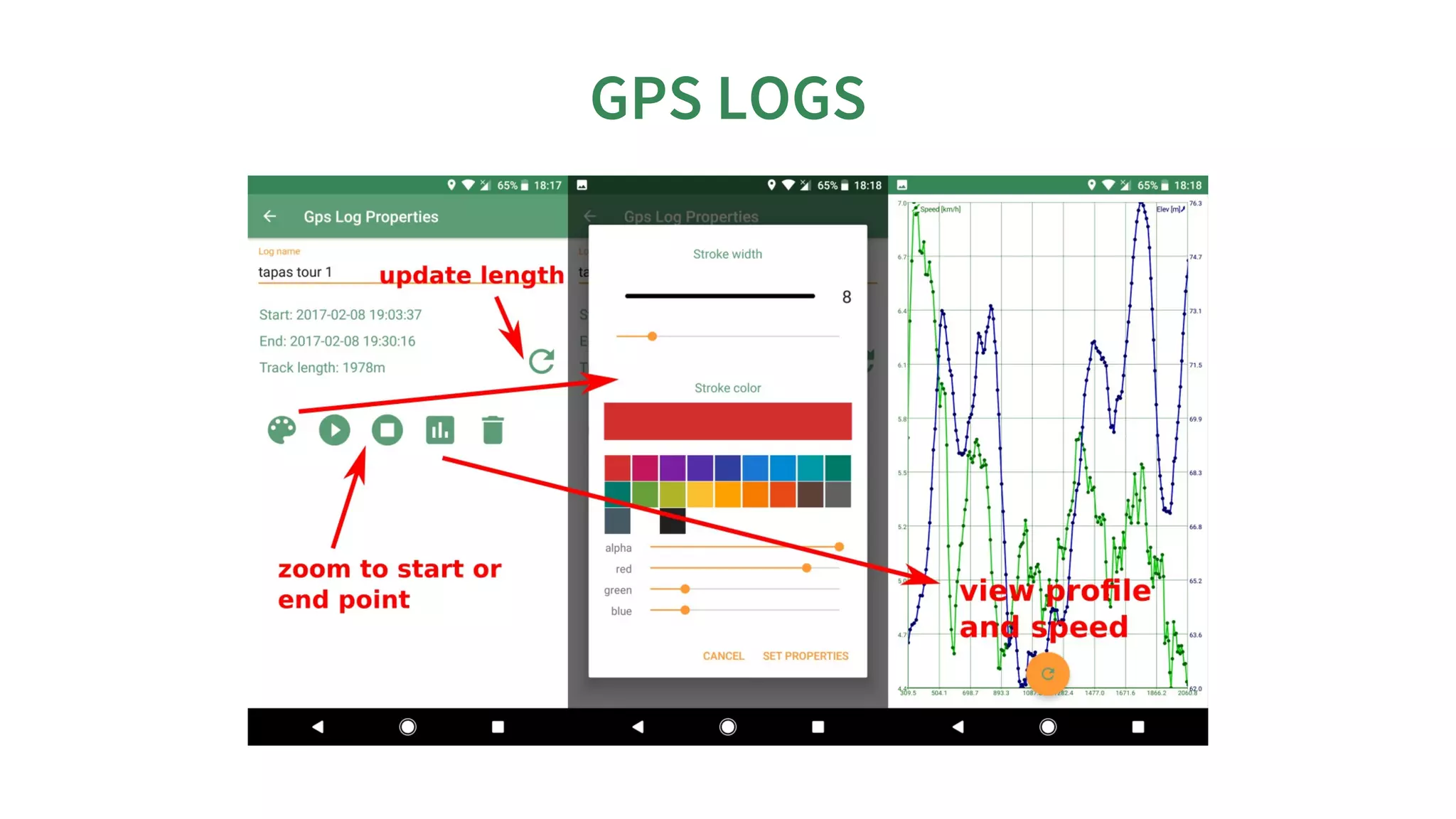
GPS	LOGS
SUPPORTED	BASEMAPS
Mapsforge	 map	 files	 (vector,	 1	 nation	 in	 500MB),	 MBtiles
databases,	TMS	online/offline,	WMS,	Rasterlite2	databases
SPATIALITE:	LOAD	DATABASES
SPATIALITE:	STYLE	DATASETS
FOR	ADVANCED	USERS
FOR	ADVANCED	USERS
FOR	ADVANCED	USERS
FOR	ADVANCED	USERS
FOR	ADVANCED	USERS
FOR	ADVANCED	USERS
FOR	ADVANCED	USERSFOR	ADVANCED	USERS
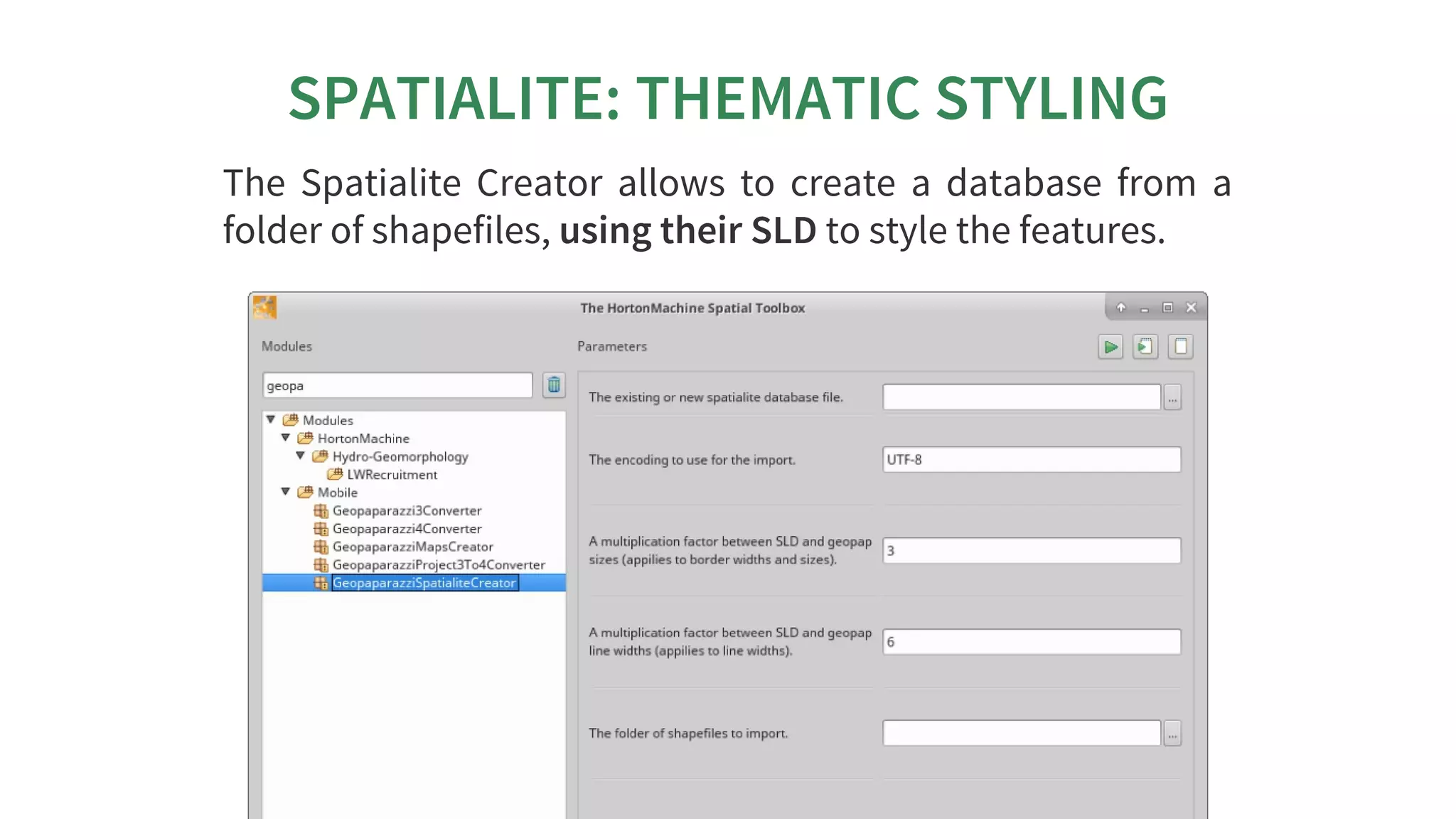
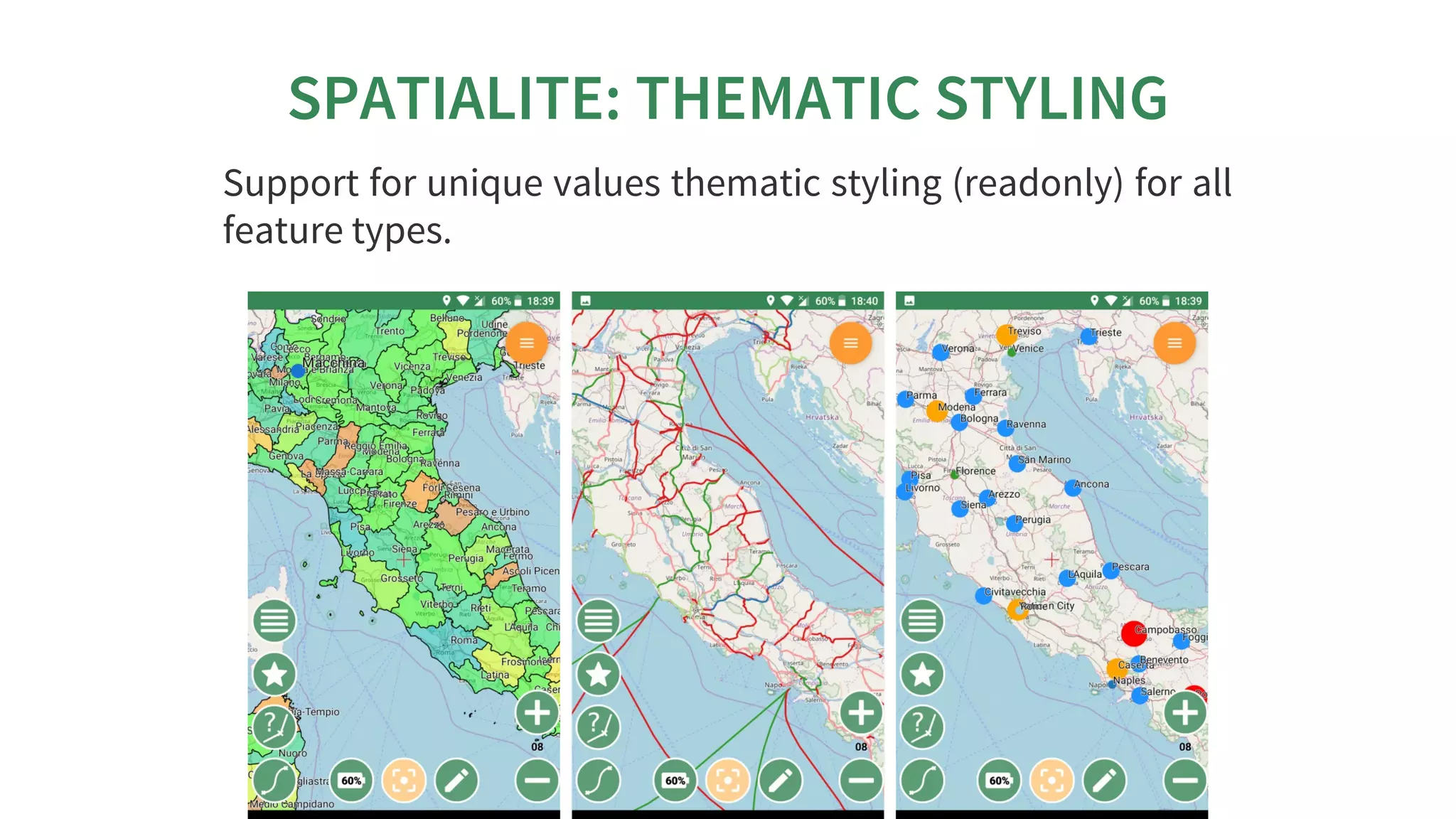
SPATIALITE:	THEMATIC	STYLING
The	 Spatialite	 Creator	 allows	 to	 create	 a	 database	 from	 a
folder	of	shapefiles,	using	their	SLD	to	style	the	features.
SPATIALITE:	THEMATIC	STYLING
Support	for	unique	values	thematic	styling	(readonly)	for	all
feature	types.
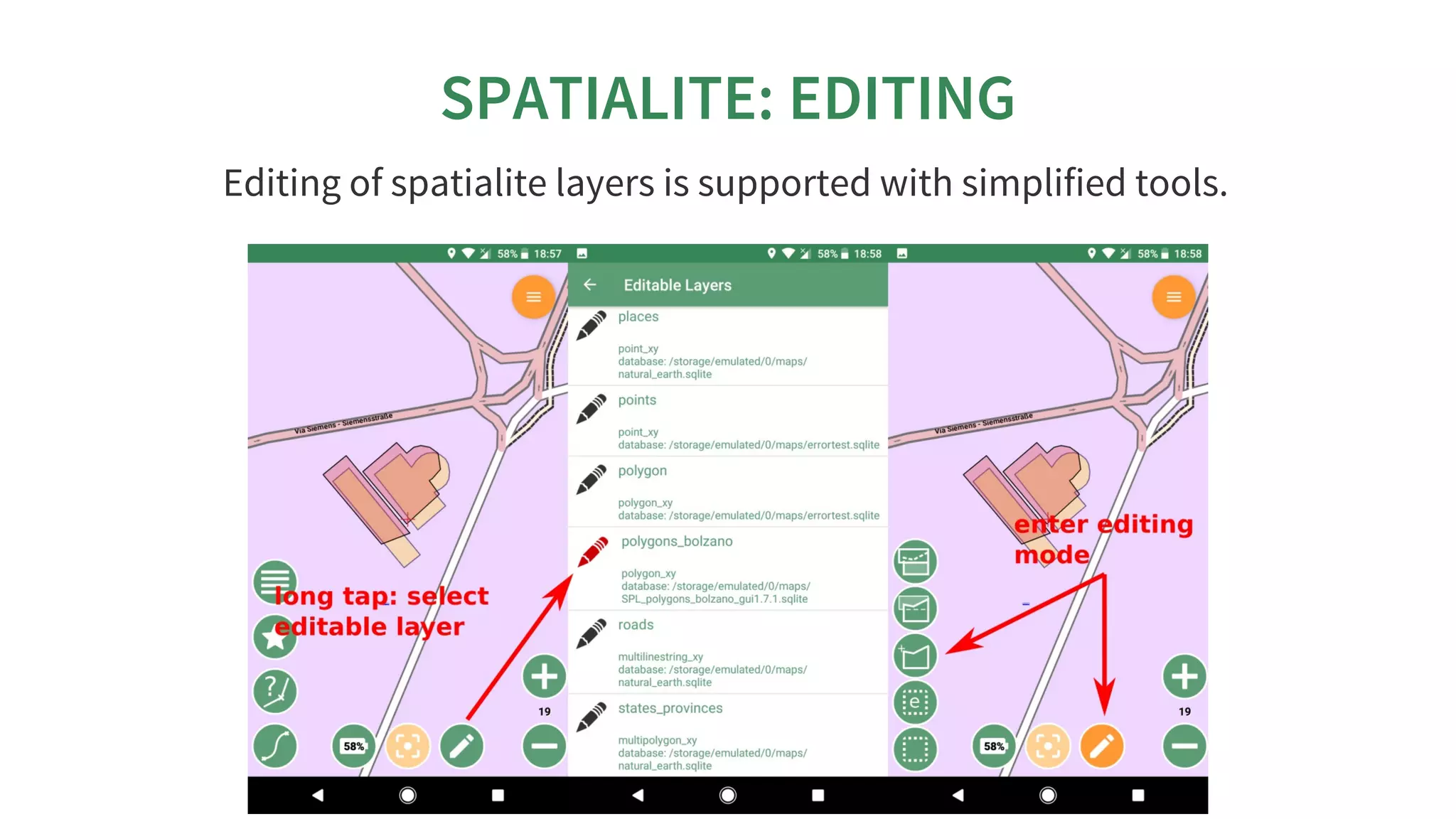
SPATIALITE:	EDITING
Editing	of	spatialite	layers	is	supported	with	simplified	tools.
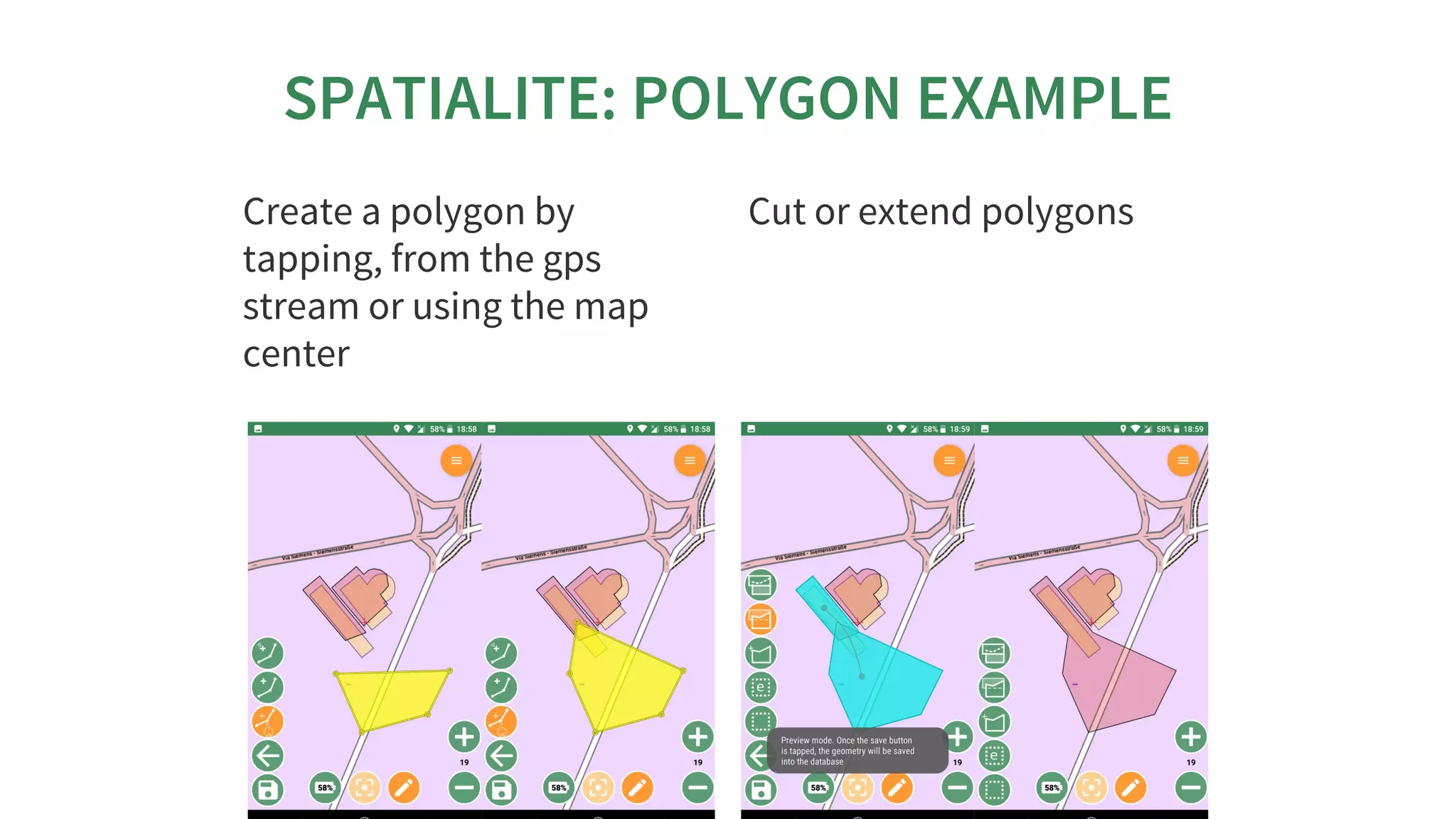
SPATIALITE:	POLYGON	EXAMPLE
Create	a	polygon	by
tapping,	from	the	gps
stream	or	using	the	map
center
Cut	or	extend	polygons
IMPORT	/	EXPORT
Geopaparazzi	supports	some	simple	import	-	export	directly
from	the	device.
NEW:	complex	notes	(forms)	can	be	exported	to	pdf.
ARE	YOU	A	GIS	USER?	WE	HAVE	THE
ARE	YOU	A	GIS	USER?	WE	HAVE	THEARE	YOU	A	GIS	USER?	WE	HAVE	THE
RIGHT	TOOLS	FOR	YOU!
RIGHT	TOOLS	FOR	YOU!RIGHT	TOOLS	FOR	YOU!
GEOPAPARAZZI	TOOLS	FOR	GVSIG
in	gvSIG	it	is	possible	to:
create	the	map	background	data	as	.mbtile
export	 all	 the	 data	 contained	 in	 the	 project	 as
shapefiles
and	browse	the	images	linked	in	the	shapefiles
the	plugins	are	avaliable	in	the	 	of	the
project
updated	documentation	and	an	installation	guide	for	the
plugins	is	avaliable	at	
github	releases	page
http://www.hortonmachine.org
CREATE	BACKGROUND	MAPS
Create	 Geopaparazzi	 Tiles	 is	 a	 tool	 to	 create	 background
maps	for	Geopaparazzi:
 Vectors	are	styled	based	on	the	SLD	file	they	have
(not	the	gvSIG	legend)!
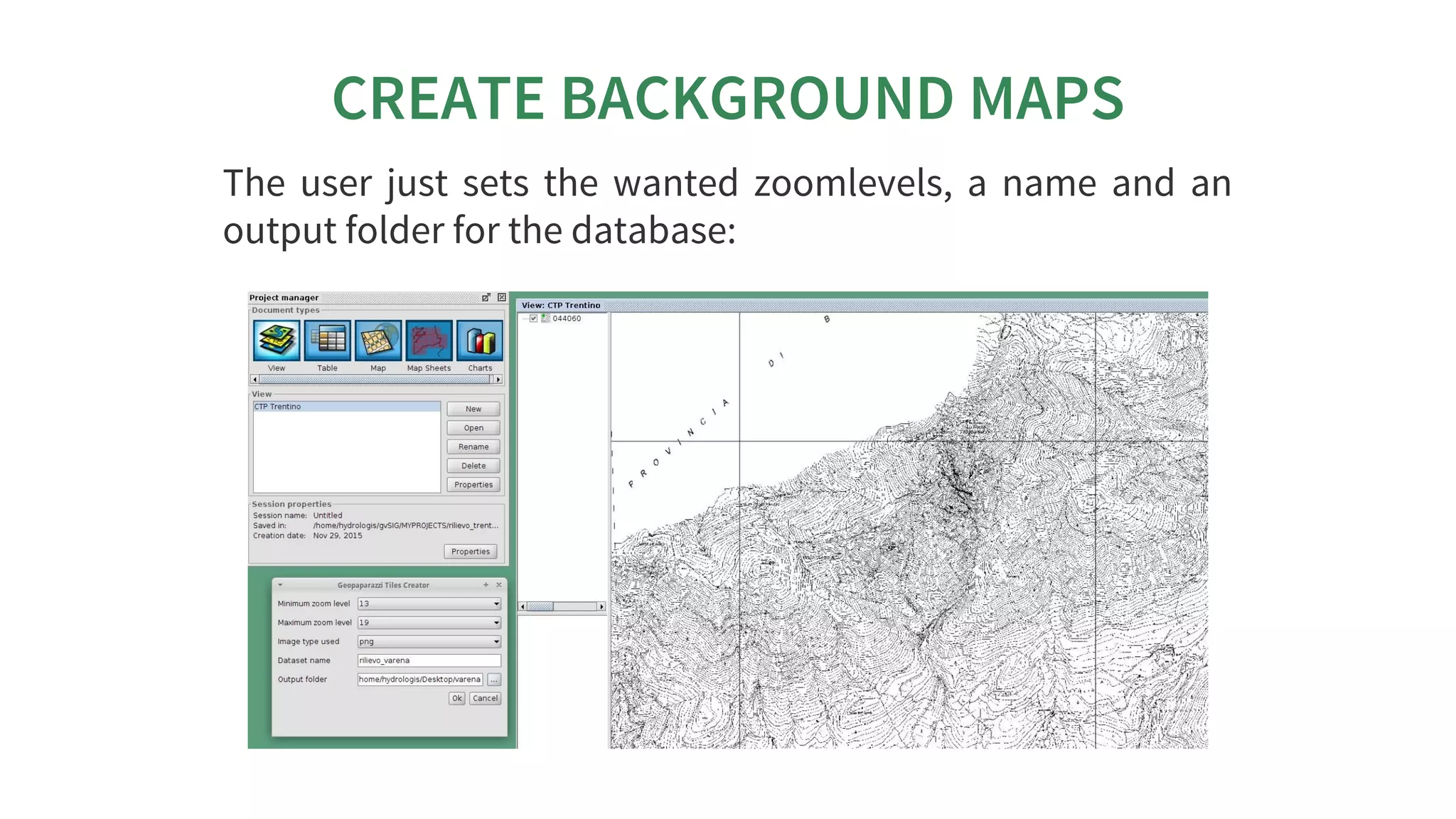
CREATE	BACKGROUND	MAPS
The	 user	 just	 sets	 the	 wanted	 zoomlevels,	 a	 name	 and	 an
output	folder	for	the	database:
CREATE	BACKGROUND	MAPS
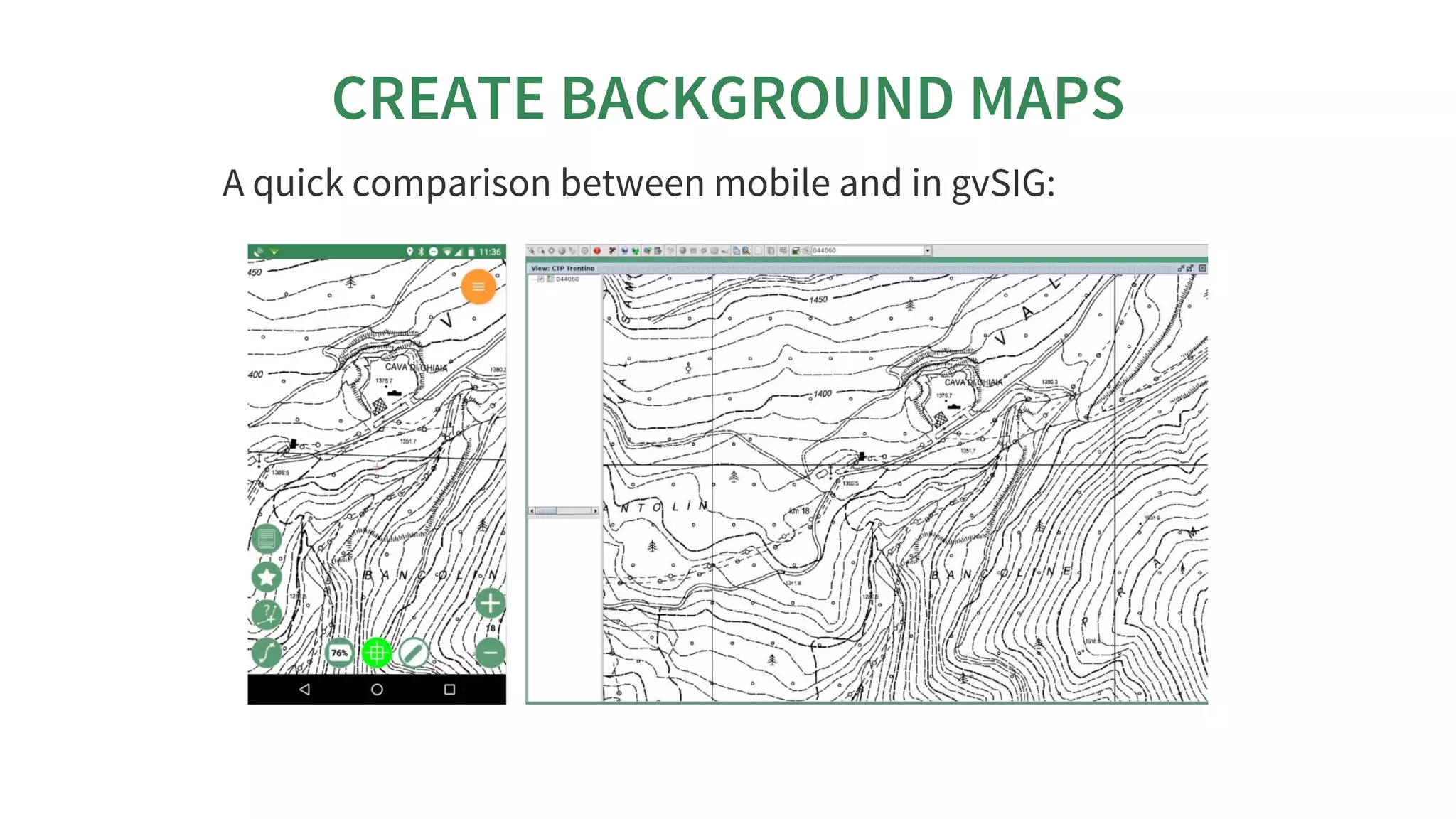
Once	launched	it	takes	the	current	view	and	active	layers
(rasters	&	vectors)	and	generates	an	mbtiles	database.
CREATE	BACKGROUND	MAPS
A	quick	comparison	between	mobile	and	in	gvSIG:
CONVERT	A	PROJECT	TO	GIS	DATA
In	 gvSIG	 the	 ADD	 LAYER	 command	 will	 present	 you
Geopaparazzi	as	an	option	(new	tab).
CONVERT	A	PROJECT	TO	GIS	DATA
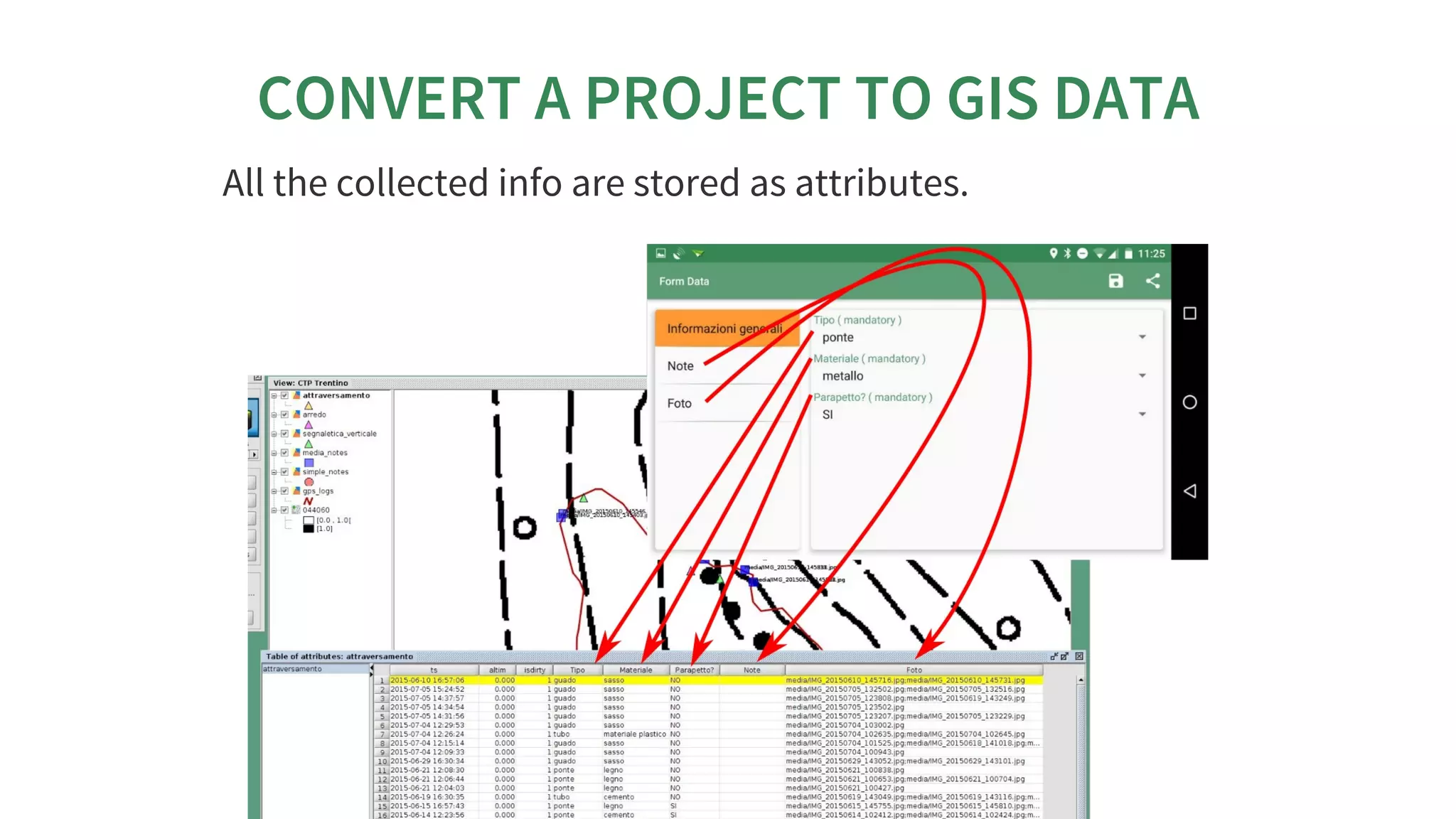
All	the	data	will	be	exported	in	different	shapefiles	+	a	folder
for	media	files.
CONVERT	A	PROJECT	TO	GIS	DATA
All	the	collected	info	are	stored	as	attributes.
CONVERT	A	PROJECT	TO	GIS	DATA
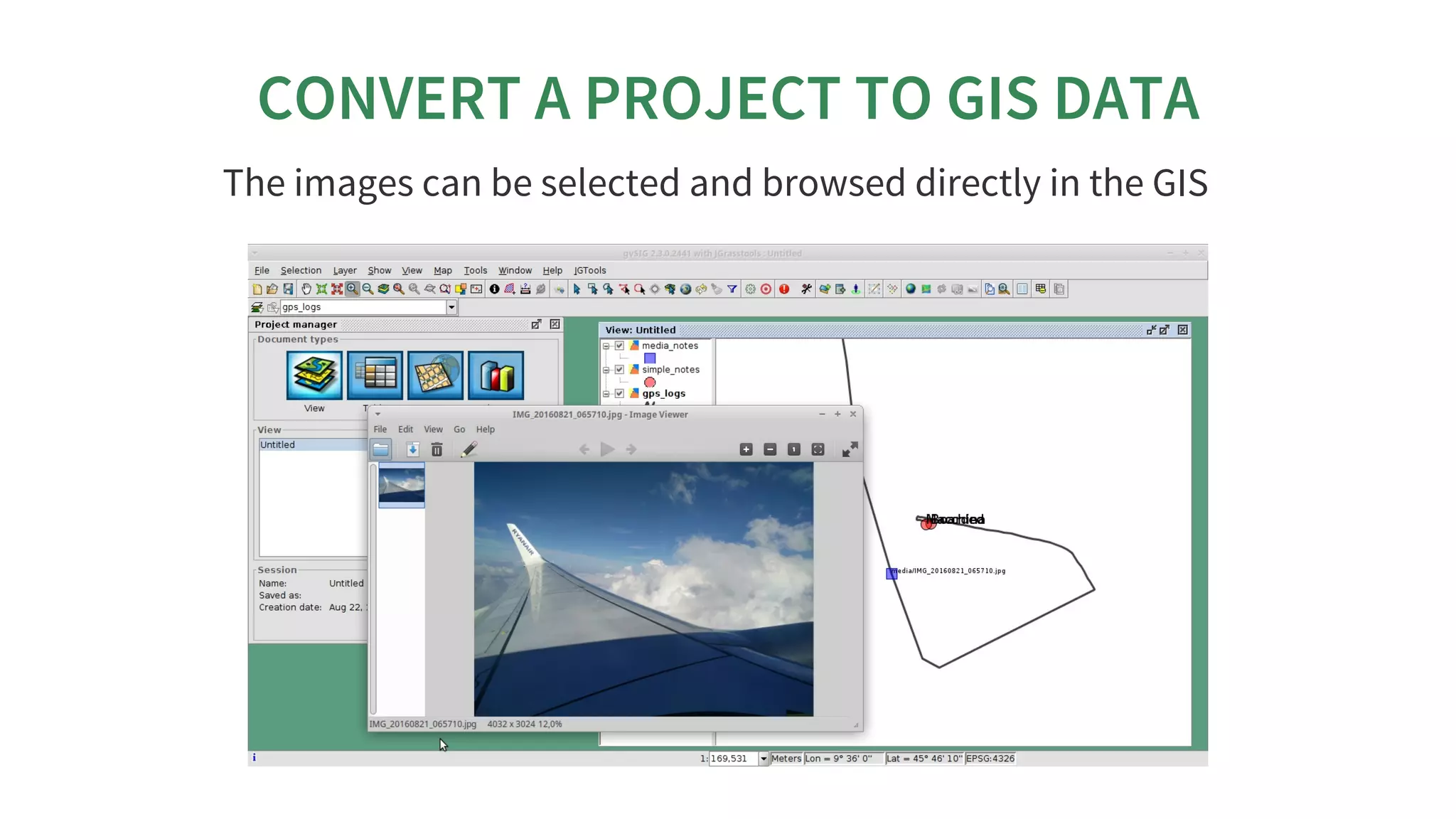
The	images	can	be	selected	and	browsed	directly	in	the	GIS
PROJECT	BROWSER
 Unfortunately	this	tool	didn’t	make	it	into	this
release	due	to	some	incompatibilities	with	the
current	gvSIG	Nasa	Worldwind	plugin	version.	We	are
working	on	it,	time	permitting.	The	following
describes	how	it	looks	like	in	the	HortonMachine
standalone	version.
PROJECT	BROWSER
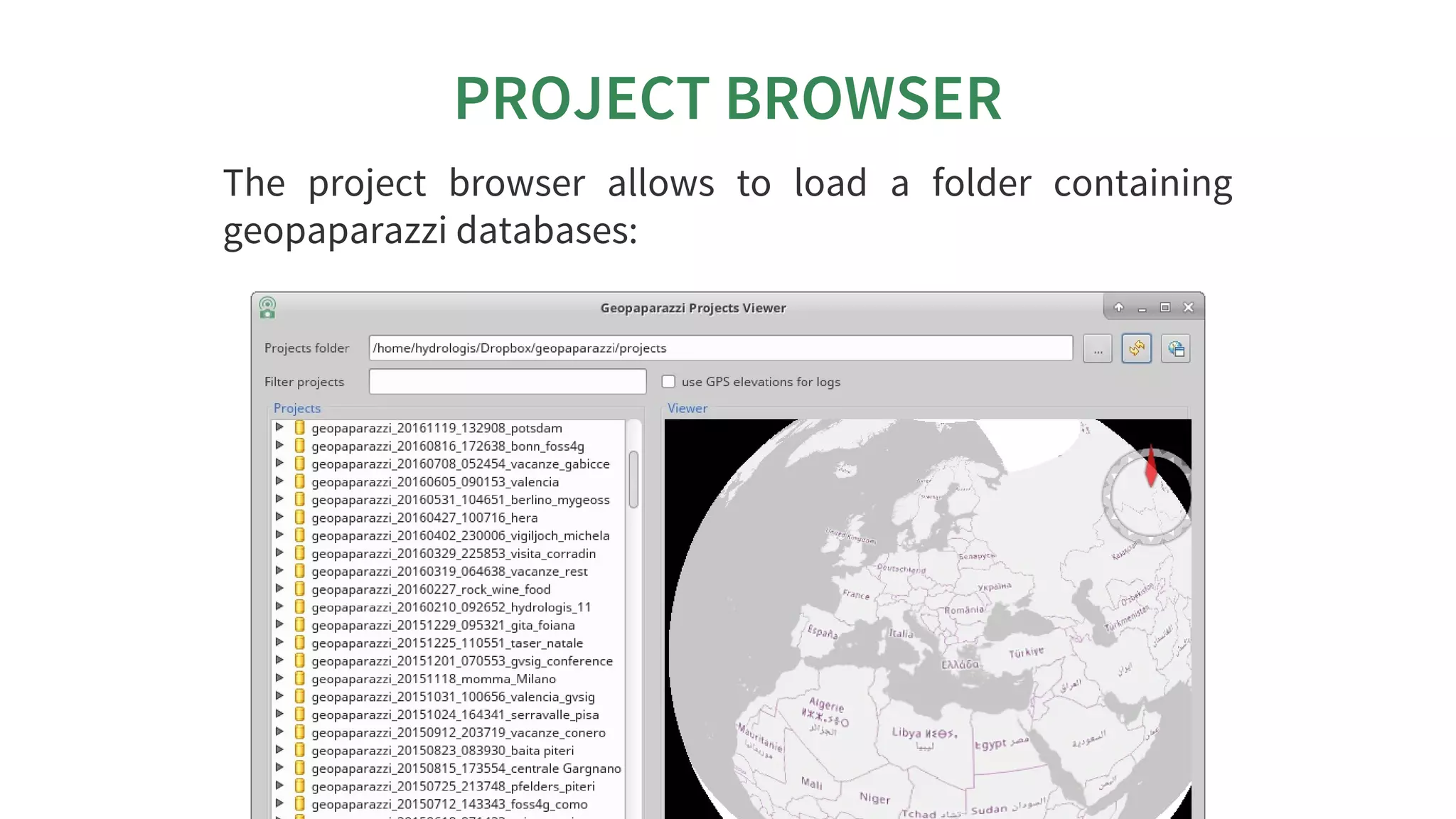
The	 project	 browser	 allows	 to	 load	 a	 folder	 containing
geopaparazzi	databases:
PROJECT	BROWSER
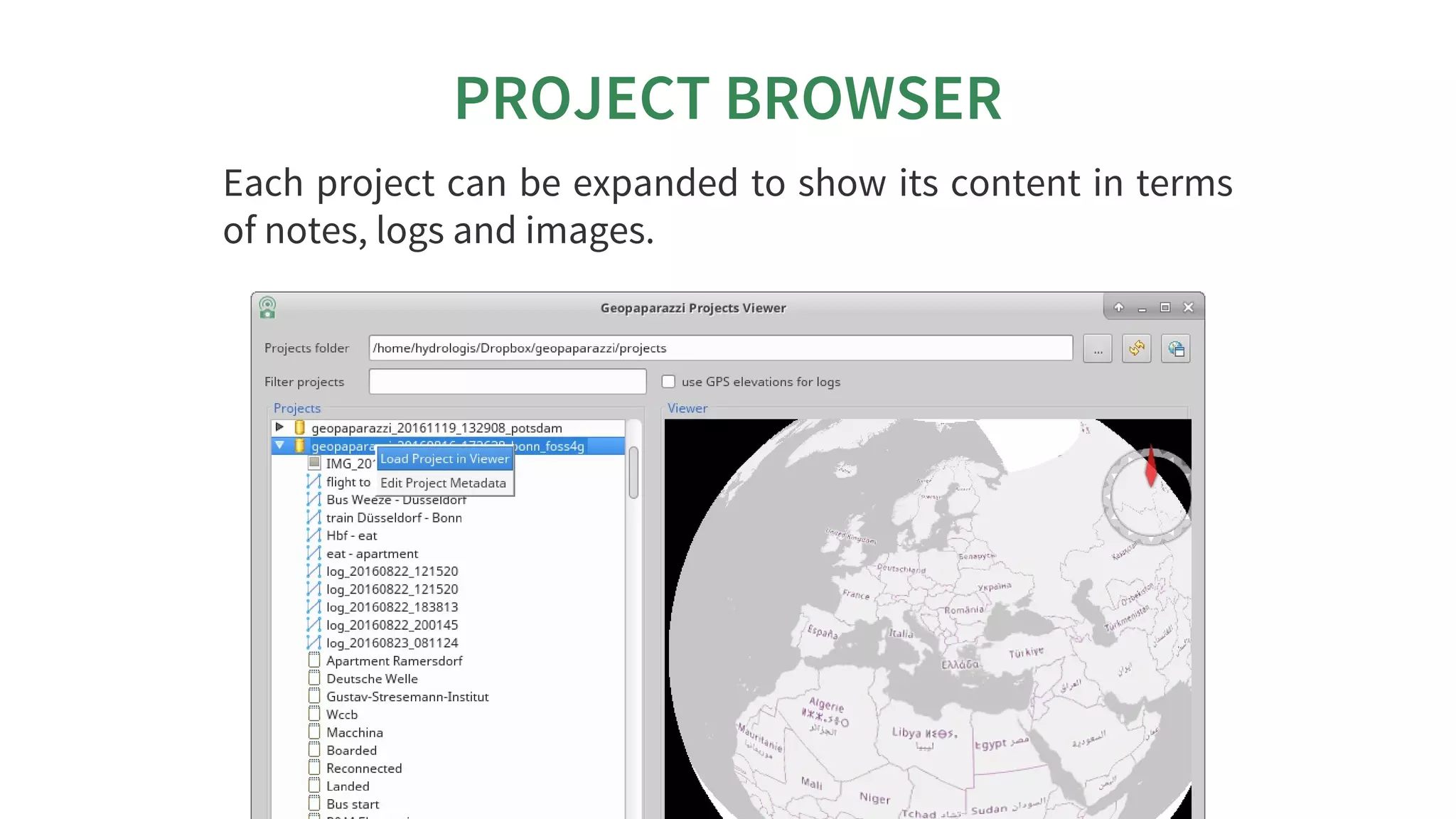
Each	project	can	be	expanded	to	show	its	content	in	terms
of	notes,	logs	and	images.
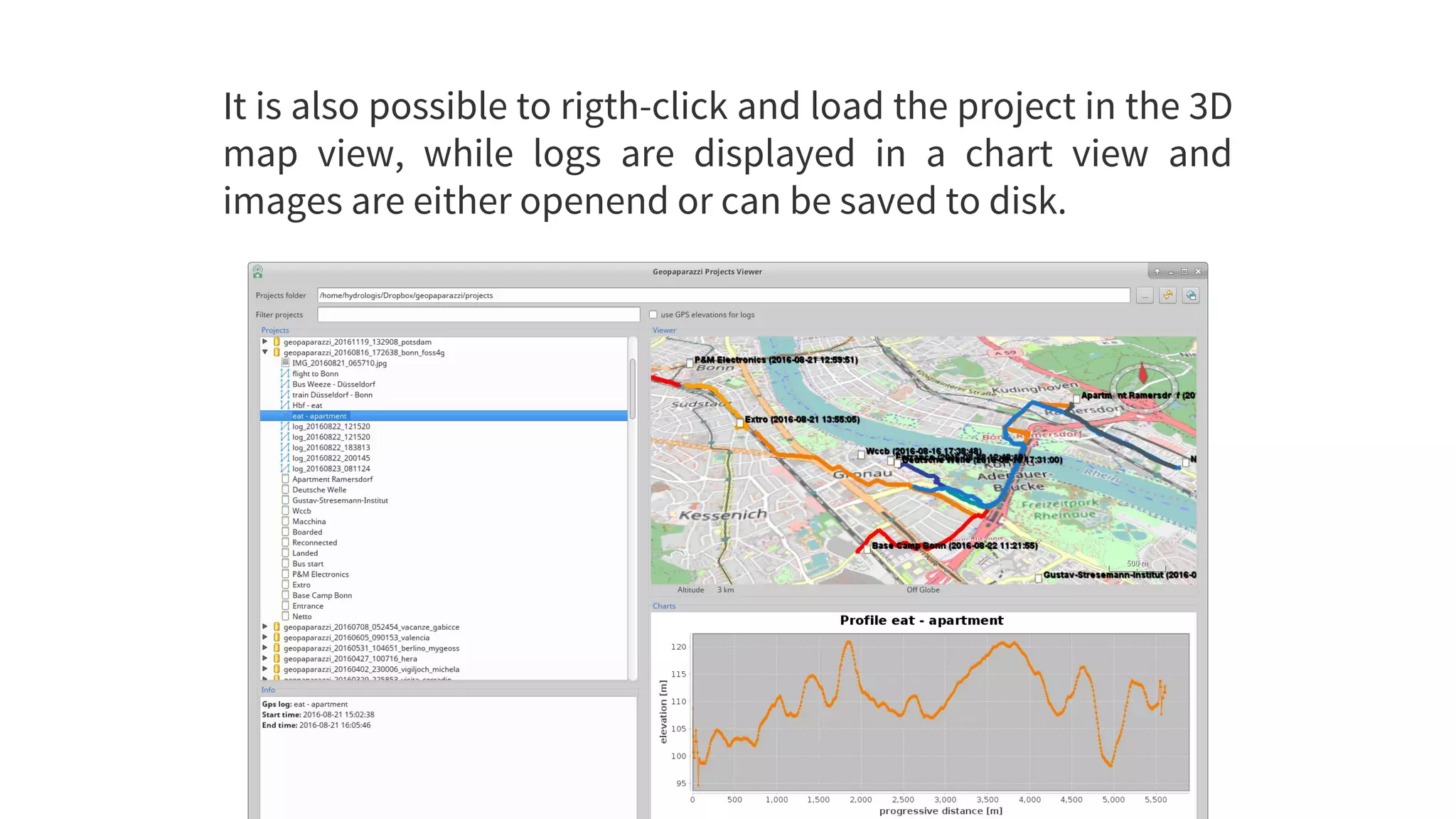
It	is	also	possible	to	rigth-click	and	load	the	project	in	the	3D
map	 view,	 while	 logs	 are	 displayed	 in	 a	 chart	 view	 and
images	are	either	openend	or	can	be	saved	to	disk.
GEOPAPARAZZI	SERVER
	 The	 most	 right	 button
enables	 the	 server	 mode.
Once	pushed	it	askes	for	a
port	to	use	and	then	starts
a	server	application	that	is
listening	 to	 connections
from	geopaparazzi.
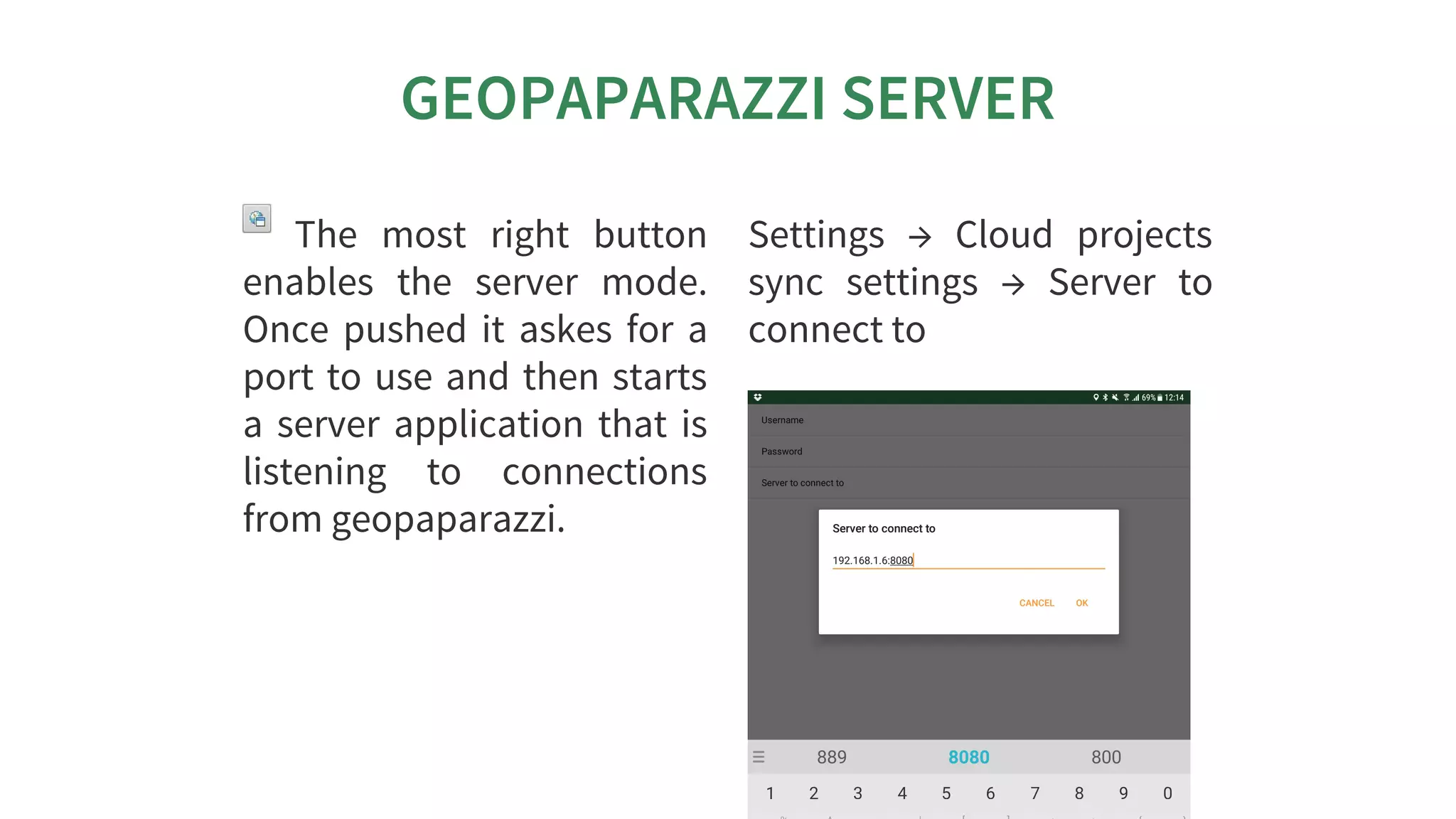
Settings	 →	 Cloud	 projects
sync	 settings	 →	 Server	 to
connect	to
GEOPAPARAZZI	SERVER
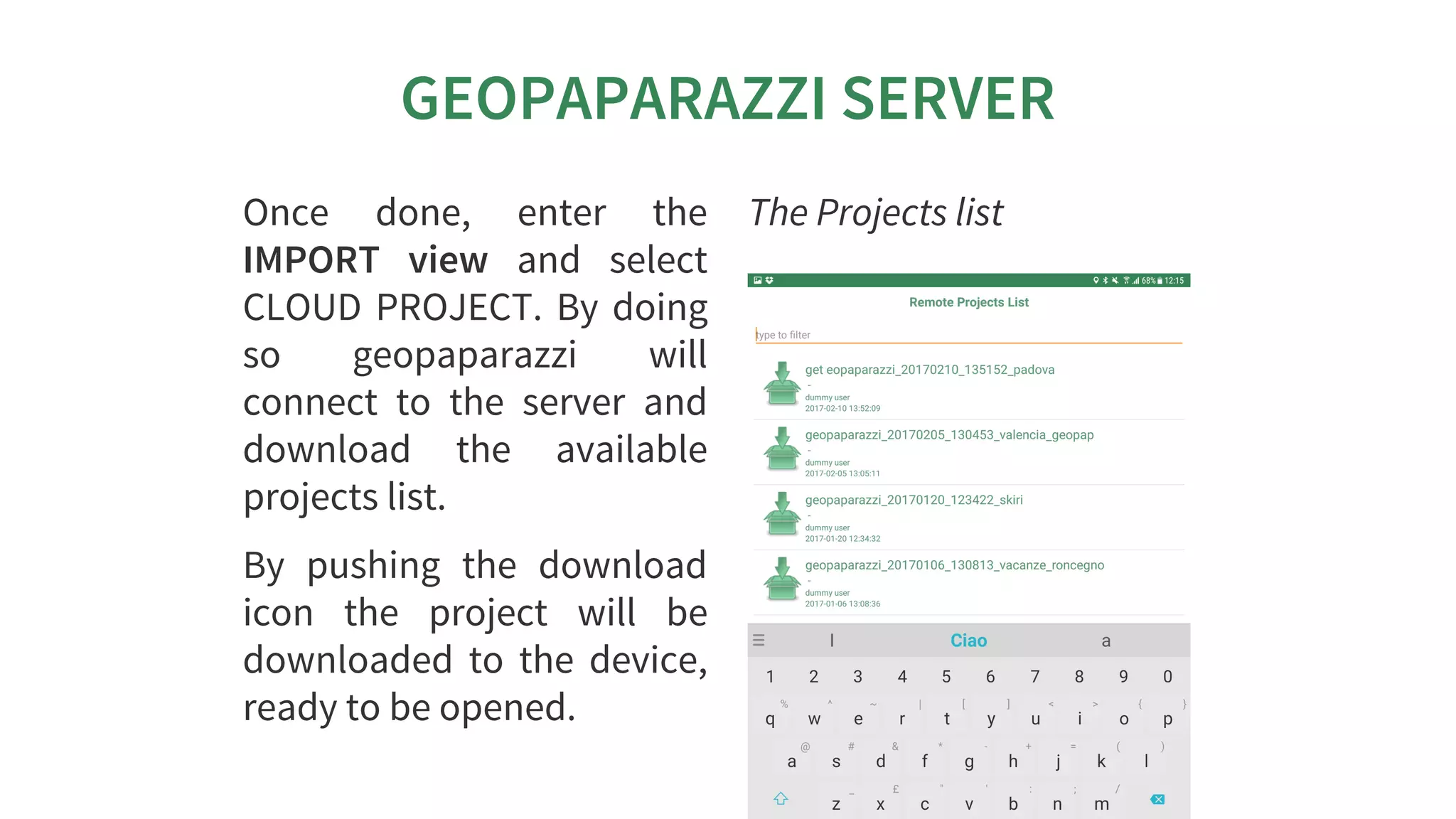
Once	 done,	 enter	 the
IMPORT	 view	 and	 select
CLOUD	PROJECT.	By	doing
so	 geopaparazzi	 will
connect	 to	 the	 server	 and
download	 the	 available
projects	list.
By	 pushing	 the	 download
icon	 the	 project	 will	 be
downloaded	 to	 the	 device,
ready	to	be	opened.
The	Projects	list
GEOPAPARAZZI	SERVER
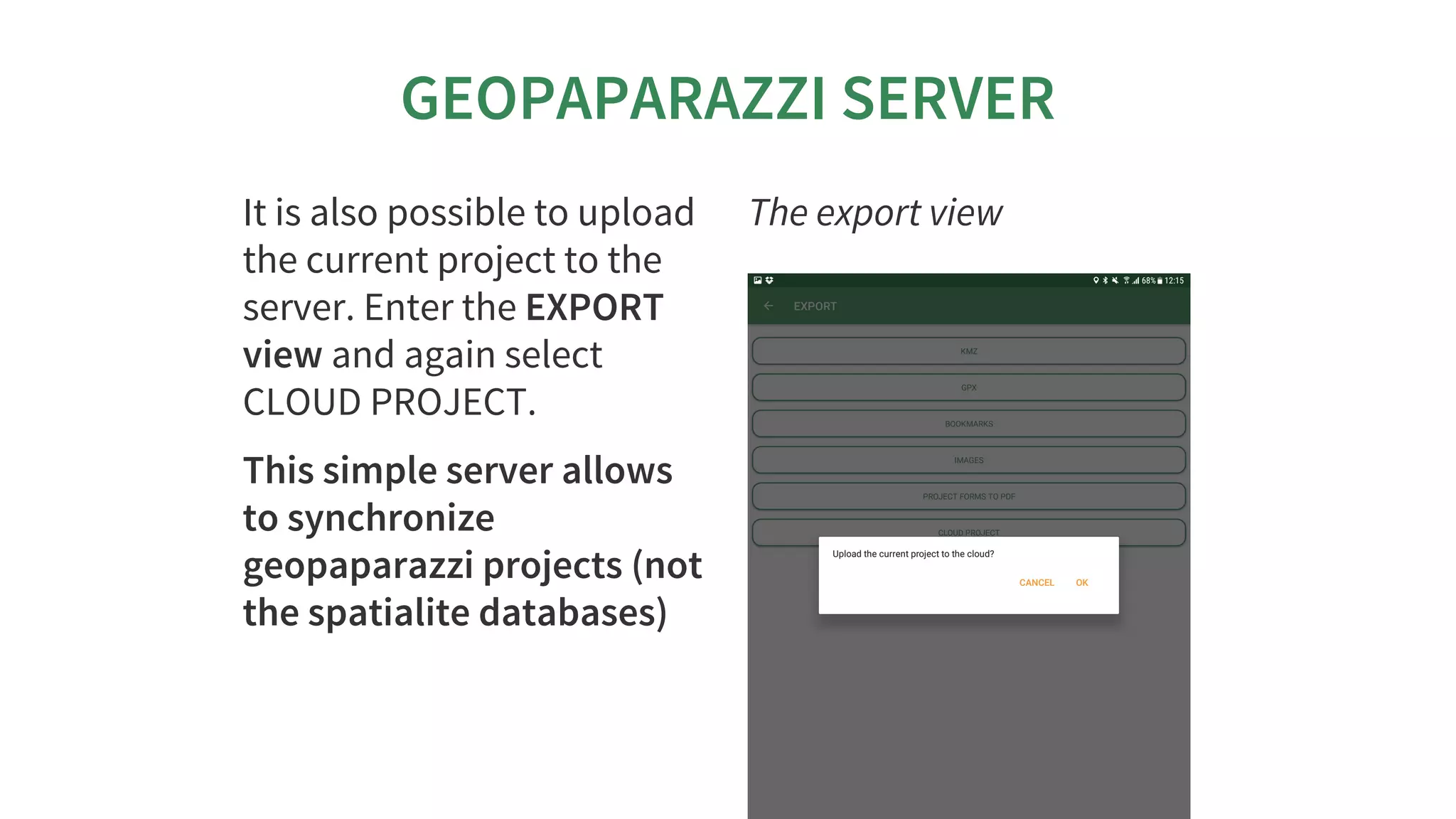
It	is	also	possible	to	upload
the	current	project	to	the
server.	Enter	the	EXPORT
view	and	again	select
CLOUD	PROJECT.
This	simple	server	allows
to	synchronize
geopaparazzi	projects	(not
the	spatialite	databases)
The	export	view
FOR	DEVELOPERS
FOR	DEVELOPERS
FOR	DEVELOPERS
FOR	DEVELOPERS
FOR	DEVELOPERS
FOR	DEVELOPERS
FOR	DEVELOPERSFOR	DEVELOPERS
THE	NEW	PLUGIN	SYSTEM
In	 the	 last	 year	 HydroloGIS	 and	 Scolab	 have	 worked
together	to	make	the	geopaparazzi	application	pluggable.
We	 are	 in	 an	 early	 stage	 but	 some	 things	 can	 be	 done
already:
the	application	can	be	branded	easily
through	plugins	we	can	add	entries	to	the	import/export
menus
THERE	IS	DOCUMENTATION	AT
THERE	IS	DOCUMENTATION	ATTHERE	IS	DOCUMENTATION	AT
WWW.GEOPAPARAZZI.EU
WWW.GEOPAPARAZZI.EU
WWW.GEOPAPARAZZI.EU
WWW.GEOPAPARAZZI.EU
WWW.GEOPAPARAZZI.EU
WWW.GEOPAPARAZZI.EU
WWW.GEOPAPARAZZI.EUWWW.GEOPAPARAZZI.EU
AN	EXAMPLE
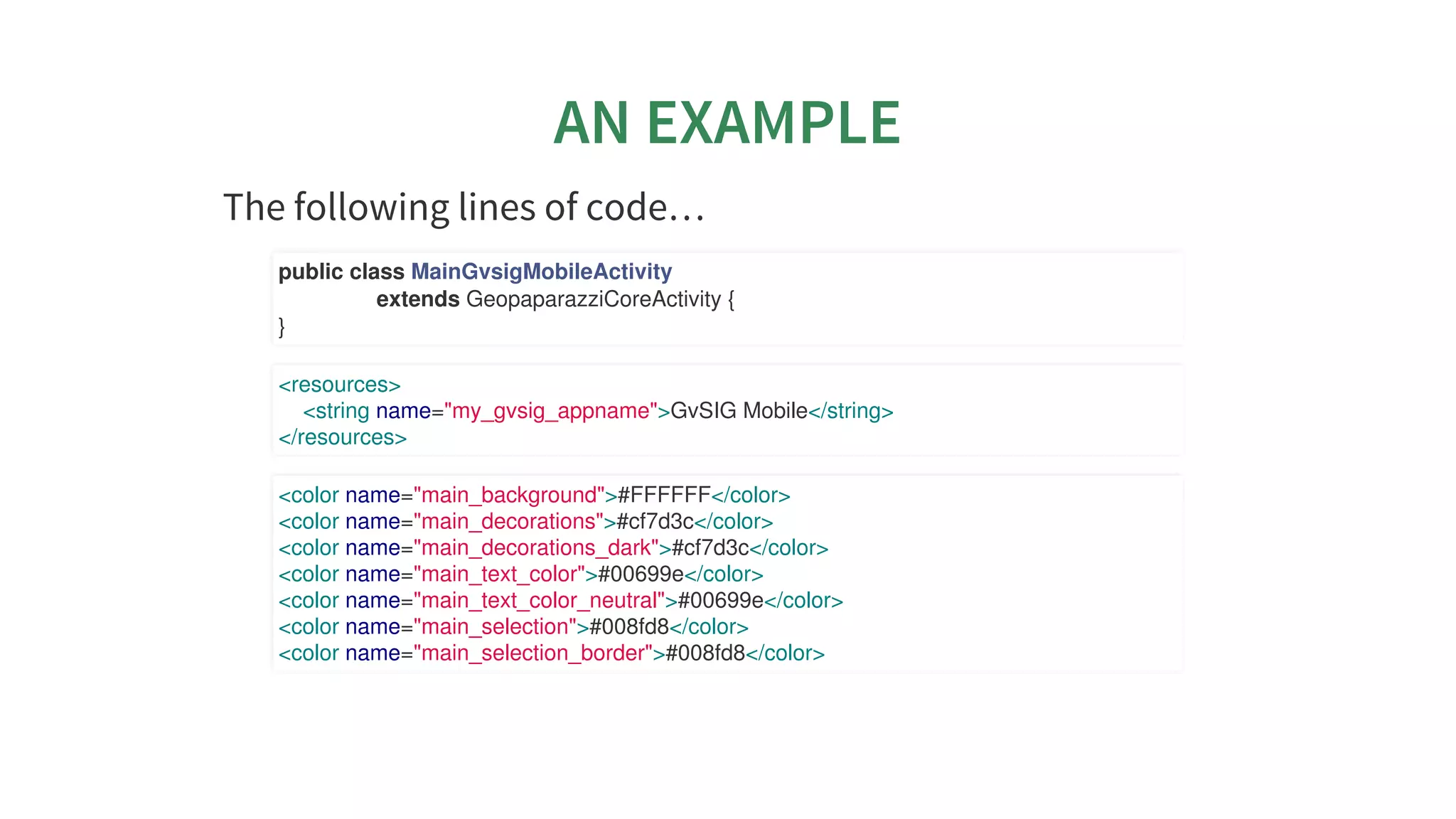
The	following	lines	of	code…​
public	class	MainGvsigMobileActivity
																extends	GeopaparazziCoreActivity	{
}
<resources>
				<string	name="my_gvsig_appname">GvSIG	Mobile</string>
</resources>
<color	name="main_background">#FFFFFF</color>
<color	name="main_decorations">#cf7d3c</color>
<color	name="main_decorations_dark">#cf7d3c</color>
<color	name="main_text_color">#00699e</color>
<color	name="main_text_color_neutral">#00699e</color>
<color	name="main_selection">#008fd8</color>
<color	name="main_selection_border">#008fd8</color>
AN	EXAMPLE
…​allow	for	this	branding
FOR	DECISIONMAKERS
FOR	DECISIONMAKERS
FOR	DECISIONMAKERS
FOR	DECISIONMAKERS
FOR	DECISIONMAKERS
FOR	DECISIONMAKERS
FOR	DECISIONMAKERSFOR	DECISIONMAKERS
WHAT	IS	THE	DIFFERENCE	BETWEEN
GEOPAPARAZZI	AND	GVSIG	MOBILE?
Geopaparazzi
has	been	around	for	about	10	years	now
is	 experiencing	 a	 good	 response	 from	 the	 open	 source
community.	While	the	most	updated	plugins	are	in	gvSIG
(maintained	 by	 the	 Geopaparazzi	 developers,	 there	 are
plugins	also	for	 	and	even	for	
has	several	thousands	of	active	installations
is	and	will	remaing	the	generic	digital	field	mapping	tool	it
has	always	been
QGIS GRASS
WHAT	IS	THE	DIFFERENCE	BETWEEN
GEOPAPARAZZI	AND	GVSIG	MOBILE?
gvSIG	Mobile
the	first	release	has	been	in	2017
see	 it	 as	 the	 enterprise	 edition	 released	 by	 the	 gvSIG
Association
connects	 to	 gvSIG	 Online	 for	 spatialite	 data
synchronization
shares	the	same	codebase,	so	both	projects	contribute!
USE	CASES	EXPLAIN	THINGS	BETTER
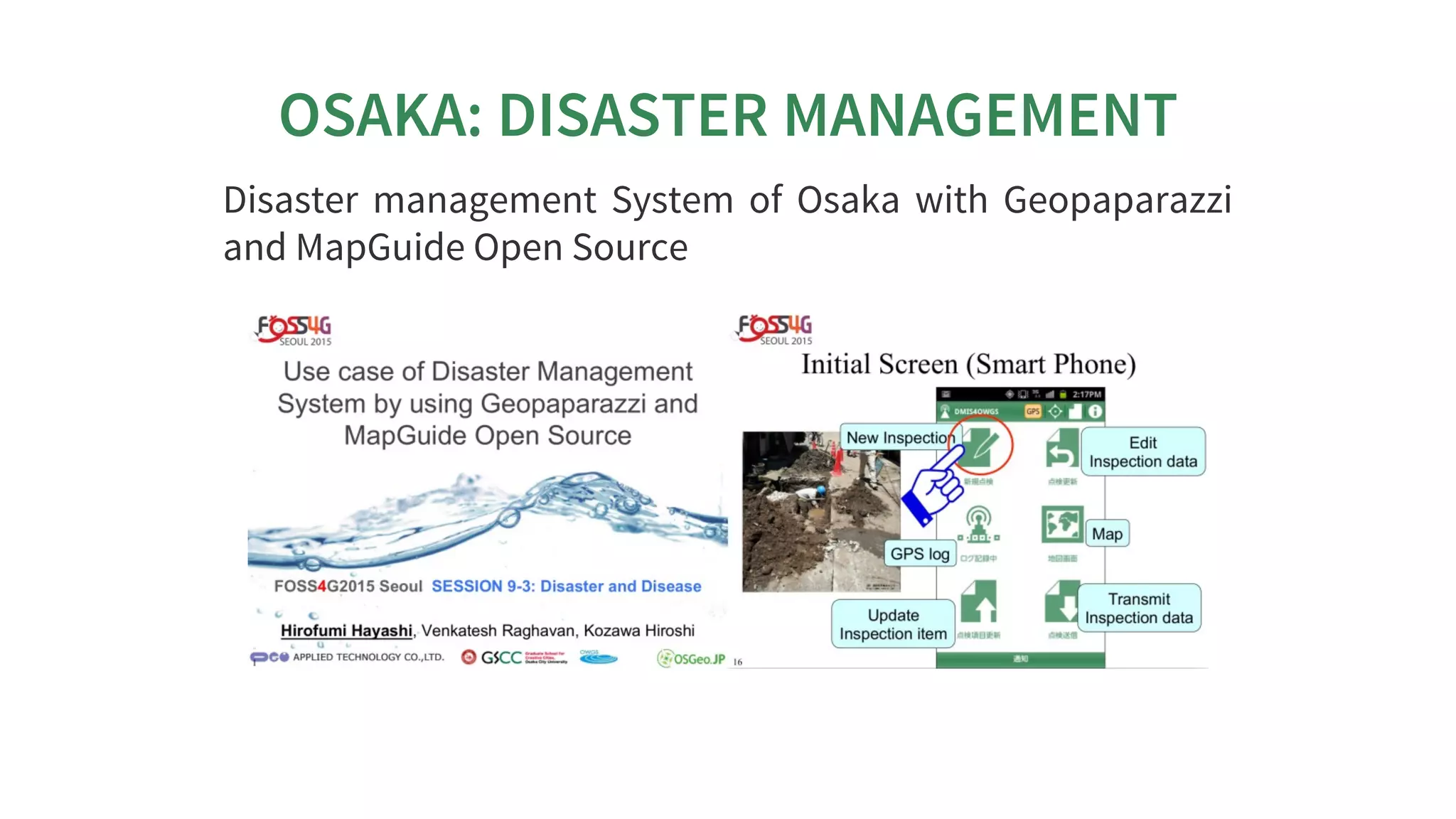
OSAKA:	DISASTER	MANAGEMENT
Disaster	 management	 System	 of	 Osaka	 with	 Geopaparazzi
and	MapGuide	Open	Source
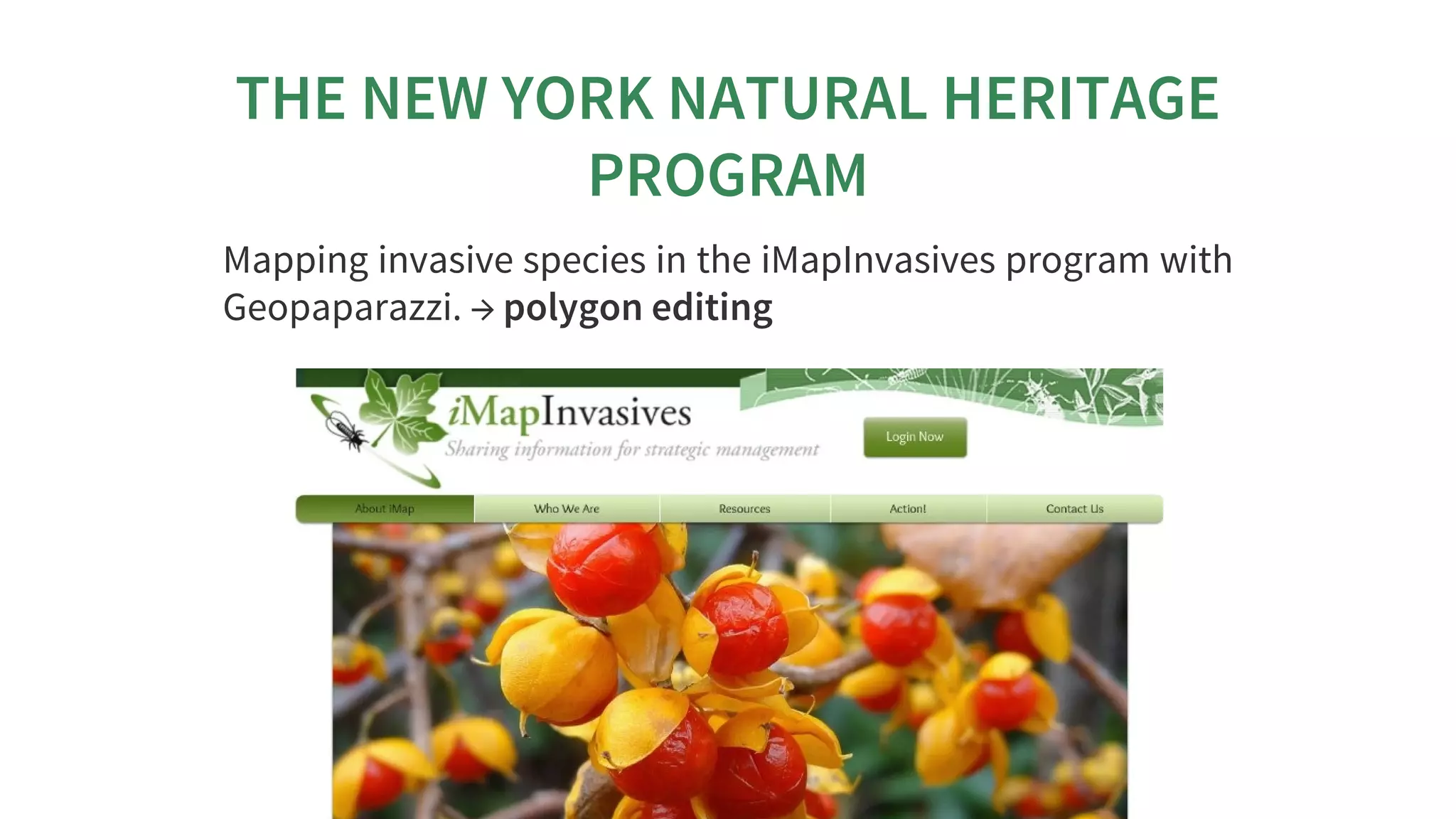
THE	NEW	YORK	NATURAL	HERITAGE
PROGRAM
Mapping	invasive	species	in	the	iMapInvasives	program	with
Geopaparazzi.	→	polygon	editing
IUCN
gvSIG	 Online	 &	 gvSIG	 Mobile:	 SDI	 for	 the	 International
Union	for	Conservation	of	Nature	(IUCN)
The	simple	workflow:
download	 layers	 list	 →	 select	 layers	 to	 download	 →
download	the	dataset	→	local	editing	→	upload	of	modified
dataset
RILIEVO	ELETTRICO	CASTELLO
Survey	 of	 the	 electric	 network	 of	 Castello,	 use	 of	 complex
forms	for	all	the	connected	information	and	images,	direct
server	upload	for	its	visualization.	→	line	editing
INEGI:	FIELD	DATA	COLLECTION
The	Instituto	Nacional	de	Estadística	y	Geografía	(INEGI)	of
Mexico	is	financing	some	development	to	support	geological
and	hydraulics	surveys.	→	beyond	other	things	pdf	export	+
thematic	styling	of	spatialite	layers
FAO	LANDUSE	SURVEY	IN	ZIMBABWE
The	FAO	is	investigating	apps	to	use	them	for	the	creation	of
a	landuse	survey	crowdsource	application.
With	 this	 goal	 they	 sponsored	 some	 geopaparazzi
customization	to	test	it.
During	the	last	week	the	app	has	been	tested	in	Zimbabwe
for	this	purpose.
FAO	LANDUSE	SURVEY	IN	ZIMBABWE
The	app	gives	the	possibility	to	survey	form-based	data	with
pictures	and	insert	them	in	a	spatialite	database.
FAO	LANDUSE	SURVEY	IN	ZIMBABWE
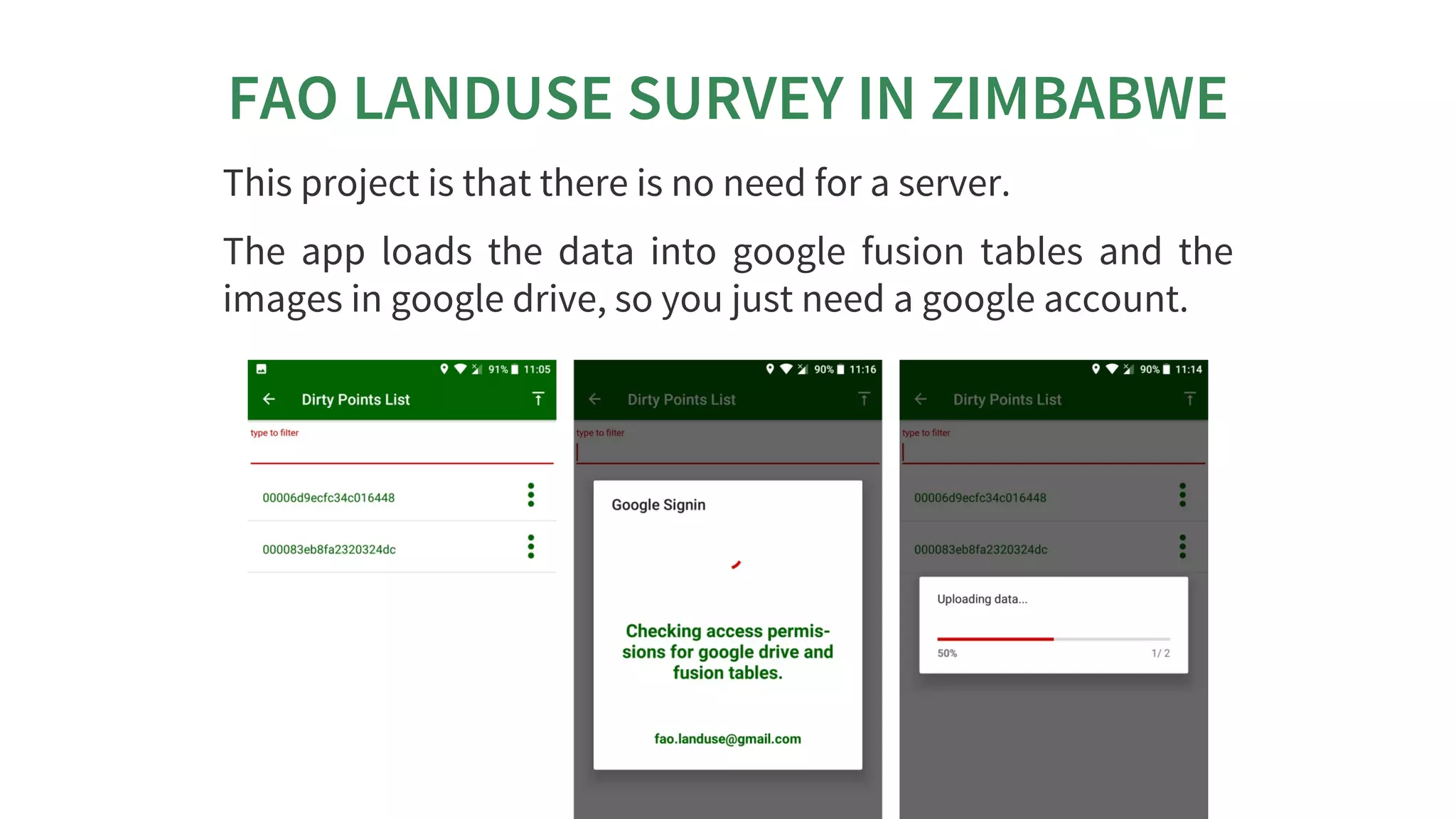
This	project	is	that	there	is	no	need	for	a	server.
The	 app	 loads	 the	 data	 into	 google	 fusion	 tables	 and	 the
images	in	google	drive,	so	you	just	need	a	google	account.
FAO	LANDUSE	SURVEY	IN	ZIMBABWE
In	the	fusion	table	all	the	data	are	available	and	can	be	seen
in	a	map.
The	timestamp	of	the	upload	or	modification	are	shown,	as
well	as	the	id	of	the	device	that	did	the	upload.
THANKS	FOR	YOUR	ATTENTION!
Homepage:	
Need	help?	Join	the	Mailinglist.
Have	cool	userstories	to	share?	Join	the	facebook	group:
Geopaparazzi	Users	Around	The	World!
Want	to	translate	it	in	your	language?
News	about	Geopaparazzi:
http://www.geopaparazzi.eu
http://groups.google.com/group/geopaparazzi-users
https://www.facebook.com/groups/350587351732480/
https://www.transifex.com/projects/p/geopaparazzi/
http://jgrasstechtips.blogspot.it/search/label/geopaparazzi

Geopaparazzi & gvSIG Mobile - state of the art