Prepared by
ENG SOON CHEAH
Microsoft MVP
11/23/2015 Prepared by ENG SOON CHEAH
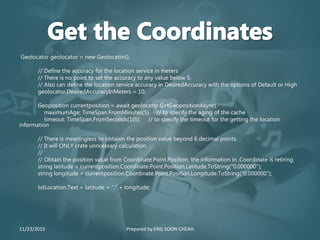
Geolocator geolocator = new Geolocator();
// Define the accuracy for the location service in meters
// There is no point to set the accuracy to any value below 5;
// Also can define the location service accuracy in DesiredAccuracy with the options of Default or High
geolocator.DesiredAccuracyInMeters = 10;
Geoposition currentposition = await geolocator.GetGeopositionAsync(
maximumAge: TimeSpan.FromMinutes(5), // to specify the aging of the cache
timeout: TimeSpan.FromSeconds(10)); // to specify the timeout for the getting the location
information
// There is meaningless to obtaion the position value beyond 6 decimal points.
// It will ONLY crate unncessary calculation.
//
// Obtain the position value from Coordinate.Point.Position, the information in .Coordinate is retiring.
string latitude = currentposition.Coordinate.Point.Position.Latitude.ToString("0.000000");
string longitude = currentposition.Coordinate.Point.Position.Longitude.ToString("0.000000");
txtLocation.Text = latitude + "," + longitude;
11/23/2015 Prepared by ENG SOON CHEAH
var geolocator = new Geolocator();
geolocator.DesiredAccuracyInMeters = 100;
geolocator.DesiredAccuracy = PositionAccuracy.High;
Geoposition position = await geolocator.GetGeopositionAsync();
// reverse geocoding
BasicGeoposition myLocation = new BasicGeoposition
{
Longitude = position.Coordinate.Point.Position.Longitude,
Latitude = position.Coordinate.Point.Position.Latitude
};
Geopoint pointToReverseGeocode = new Geopoint(myLocation);
MapLocationFinderResult result = await MapLocationFinder.FindLocationsAtAsync(pointToReverseGeocode);
if (result.Status == MapLocationFinderStatus.Success)
{
if (result.Locations.Count != 0)
{
// here also it should be checked if there result isn't null and what to do in such a case
string country = result.Locations[0].Address.FormattedAddress;
txtLocation.Text += country.ToString();
}
}
11/23/2015 Prepared by ENG SOON CHEAH
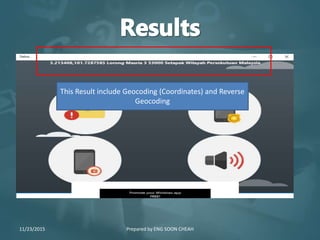
This Result include Geocoding (Coordinates) and Reverse
Geocoding
11/23/2015 Prepared by ENG SOON CHEAH
• Microsoft Virtual Academy
https://mva.microsoft.com/en-US/training-courses/a-developer-
s-guide-to-windows-10-12618?l=o3HUevpRB_8105095281
• Channel 9
https://channel9.msdn.com/Series/Windows-10-development-
for-absolute-beginners
• GitHub
https://github.com/cheahengsoon/
• SlideShare
http://www.slideshare.net/cheahengsoon/
11/23/2015 Prepared by ENG SOON CHEAH

Geocoding and Reverse Geocoding

  • 1.
    Prepared by ENG SOONCHEAH Microsoft MVP 11/23/2015 Prepared by ENG SOON CHEAH
  • 2.
    11/23/2015 Prepared byENG SOON CHEAH
  • 3.
    Geolocator geolocator =new Geolocator(); // Define the accuracy for the location service in meters // There is no point to set the accuracy to any value below 5; // Also can define the location service accuracy in DesiredAccuracy with the options of Default or High geolocator.DesiredAccuracyInMeters = 10; Geoposition currentposition = await geolocator.GetGeopositionAsync( maximumAge: TimeSpan.FromMinutes(5), // to specify the aging of the cache timeout: TimeSpan.FromSeconds(10)); // to specify the timeout for the getting the location information // There is meaningless to obtaion the position value beyond 6 decimal points. // It will ONLY crate unncessary calculation. // // Obtain the position value from Coordinate.Point.Position, the information in .Coordinate is retiring. string latitude = currentposition.Coordinate.Point.Position.Latitude.ToString("0.000000"); string longitude = currentposition.Coordinate.Point.Position.Longitude.ToString("0.000000"); txtLocation.Text = latitude + "," + longitude; 11/23/2015 Prepared by ENG SOON CHEAH
  • 4.
    11/23/2015 Prepared byENG SOON CHEAH
  • 5.
    var geolocator =new Geolocator(); geolocator.DesiredAccuracyInMeters = 100; geolocator.DesiredAccuracy = PositionAccuracy.High; Geoposition position = await geolocator.GetGeopositionAsync(); // reverse geocoding BasicGeoposition myLocation = new BasicGeoposition { Longitude = position.Coordinate.Point.Position.Longitude, Latitude = position.Coordinate.Point.Position.Latitude }; Geopoint pointToReverseGeocode = new Geopoint(myLocation); MapLocationFinderResult result = await MapLocationFinder.FindLocationsAtAsync(pointToReverseGeocode); if (result.Status == MapLocationFinderStatus.Success) { if (result.Locations.Count != 0) { // here also it should be checked if there result isn't null and what to do in such a case string country = result.Locations[0].Address.FormattedAddress; txtLocation.Text += country.ToString(); } } 11/23/2015 Prepared by ENG SOON CHEAH
  • 6.
    This Result includeGeocoding (Coordinates) and Reverse Geocoding 11/23/2015 Prepared by ENG SOON CHEAH
  • 7.
    • Microsoft VirtualAcademy https://mva.microsoft.com/en-US/training-courses/a-developer- s-guide-to-windows-10-12618?l=o3HUevpRB_8105095281 • Channel 9 https://channel9.msdn.com/Series/Windows-10-development- for-absolute-beginners • GitHub https://github.com/cheahengsoon/ • SlideShare http://www.slideshare.net/cheahengsoon/ 11/23/2015 Prepared by ENG SOON CHEAH