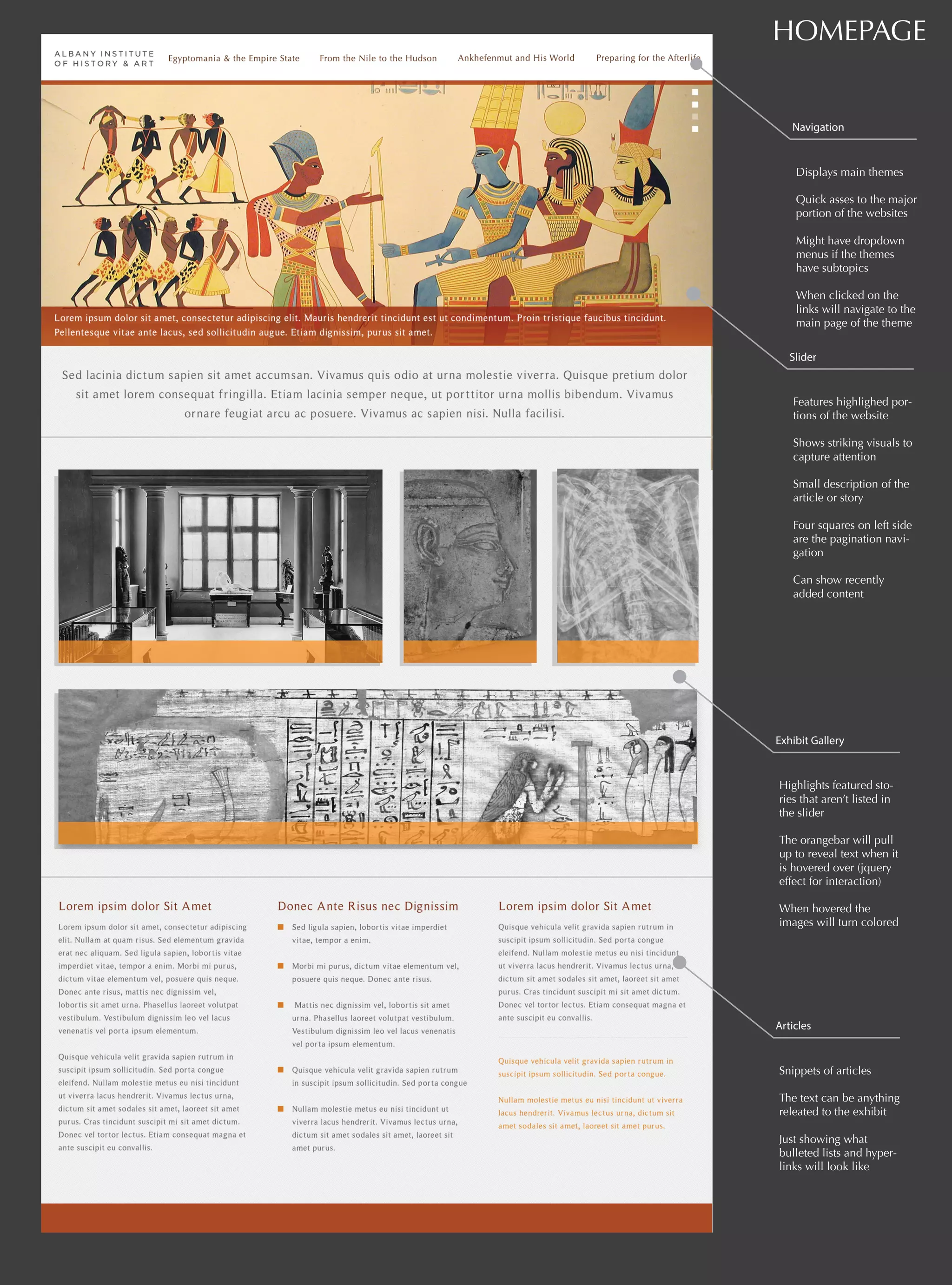
HOMEPAGE 
Navigation 
Displays main themes 
Quick asses to the major 
portion of the websites 
Might have dropdown 
menus if the themes 
have subtopics 
When clicked on the 
links will navigate to the 
main page of the theme 
Slider 
Features highlighed por-tions 
of the website 
Shows striking visuals to 
capture attention 
Small description of the 
article or story 
Four squares on left side 
are the pagination navi-gation 
Can show recently 
added content 
Exhibit Gallery 
Highlights featured sto-ries 
that aren’t listed in 
the slider 
The orangebar will pull 
up to reveal text when it 
is hovered over (jquery 
effect for interaction) 
When hovered the 
images will turn colored 
Articles 
Snippets of articles 
The text can be anything 
releated to the exhibit 
Just showing what 
bulleted lists and hyper-links 
will look like
WEB PAGE 
Featured header 
Shows the name of the 
theme & a brief, catchy 
description 
The background is an 
image relating to the 
theme 
Can also include a link 
to a feature portion of 
the theme 
Content Slider 
Serves as a small gallery 
of information that dis-plays 
an image and de-scriptive 
text 
The user can navigate 
through it using the pag-ination 
buttons at the 
bottom 
Dynamic content, stays 
on same page 
Content Text 
History of the theme 
General overview of the 
theme and what it en-compasses 
Sub-Navigation 
Navigation to access dif-ferent 
portions of the 
theme 
Highlights which page 
the user is currently on 
Will show submenu if 
there are multiple links 
under a category
Timeline Lightbox 
The lightbox allows an image to be viewed and explored in further detail. It loads as a new screen in the same tab window in the user’s web browser 
- Displays paragraph of information 
- Includes a snippet of the timeline in further detail 
- Magnifiying glass allows the user to view the image in further detail
Timeline 
The timeline is not the main focus of the this concept but an additional feature that enhances the user experience. As an educational tool, the timeline will help 
frame the time periods and how the stories overlap in a graphic format. It will color-coordinate the items listed on the timeline with respective color of the theme. 
- Displays image thumbnails with a brief description of what time period they took place in 
- Eras are divided by ta “three dimensional wall” 
- Timeline will scroll through when the user slides the bar to the next time period 
- When a thumbnail is clicked on it will bring up a lightbox of the respective image
Concept One 
Albany Institute of History & Art 
Designed by Adriana Morales

Albany Institue of History and Art Gallery storyboard

  • 1.
    HOMEPAGE Navigation Displaysmain themes Quick asses to the major portion of the websites Might have dropdown menus if the themes have subtopics When clicked on the links will navigate to the main page of the theme Slider Features highlighed por-tions of the website Shows striking visuals to capture attention Small description of the article or story Four squares on left side are the pagination navi-gation Can show recently added content Exhibit Gallery Highlights featured sto-ries that aren’t listed in the slider The orangebar will pull up to reveal text when it is hovered over (jquery effect for interaction) When hovered the images will turn colored Articles Snippets of articles The text can be anything releated to the exhibit Just showing what bulleted lists and hyper-links will look like
  • 2.
    WEB PAGE Featuredheader Shows the name of the theme & a brief, catchy description The background is an image relating to the theme Can also include a link to a feature portion of the theme Content Slider Serves as a small gallery of information that dis-plays an image and de-scriptive text The user can navigate through it using the pag-ination buttons at the bottom Dynamic content, stays on same page Content Text History of the theme General overview of the theme and what it en-compasses Sub-Navigation Navigation to access dif-ferent portions of the theme Highlights which page the user is currently on Will show submenu if there are multiple links under a category
  • 3.
    Timeline Lightbox Thelightbox allows an image to be viewed and explored in further detail. It loads as a new screen in the same tab window in the user’s web browser - Displays paragraph of information - Includes a snippet of the timeline in further detail - Magnifiying glass allows the user to view the image in further detail
  • 4.
    Timeline The timelineis not the main focus of the this concept but an additional feature that enhances the user experience. As an educational tool, the timeline will help frame the time periods and how the stories overlap in a graphic format. It will color-coordinate the items listed on the timeline with respective color of the theme. - Displays image thumbnails with a brief description of what time period they took place in - Eras are divided by ta “three dimensional wall” - Timeline will scroll through when the user slides the bar to the next time period - When a thumbnail is clicked on it will bring up a lightbox of the respective image
  • 5.
    Concept One AlbanyInstitute of History & Art Designed by Adriana Morales