FUNDAMENTALS OF
DATA STORAGE –
BASIC FILE
STRUCTURES
MEHANAZ FATHIMA .J
M.TECH (GEOINFORMATICS)
DEPARTMENT OF GEOGRAPHY
BHARATHIDASAN UNIVERSITY
INTRODUCTION
 To fully understand the nature of the data stored in any
GISytem, two issues are important:
 The relationship between the stored data and the real
world it depicts.
 The characteristics of data storage within computer
systems.
RELATIONSHIP BETWEEN REAL
WORLD AND DATA IN GISYSTEM
 GISystems depict the world as being comprised of
geometric objects: points, lines and areas for vector
data models, and pixels for raster data models.
 In particular, the point, line and polygon model utilises
objects with sharply defined boundaries.
 In many ways the data in a GISystems give a
simplified view of the real world.
It depicts the real world, but has three procedures:
 Selection.
 Representation in a standard way.
 Quantification.
NATURE OF THE DATA
 The nature of the data is important, as different
types of mathematical operations can be performed
on different data. Numerical values can be defined
with respect to nominal, ordinal, interval or ratio
scales of measurement.
 NOMINAL :- On a nominal scale numbers merely
establish identity. No mathematical operations can
sensibly be carried out on this data.
 ORDINAL:- On an ordinal scale numbers establish
order only. Comparisons of size can be made but no
other mathematical operations can be performed.
 INTERVAL:- On interval scales the difference between
numbers is meaningful, but the numbering scale does
not start at zero.
 RATIO:-On a ratio scale measurement has an absolute
zero, and the difference between numbers is significant.
Mathematical operations can be performed.
STORAGE OF DIGITAL DATA
WITHIN COMPUTER SYSTEM
 BYTES:-
 One byte of storage is 8 bits, and so can hold
integer numbers in the range 0 to 255. This is a
very useful range of data. Much (but certainly not
all) non- spatial data in a GIS, falls in this range.
 Remote sensing data is designed to fall into this
range for ease of transmission from the sensors in
the satellite back to earth.
ASCII CODING SYSTEM
 The ASCII coding system is another important use of
bytes of data.
 Every letter and number key on a keyboard has a
unique code.
 Data should be converted to ASCII before transfer, as
all computers correctly interpret ASCII codes. Most
GISystem software offer "export" options which
produce ASCII files. The disadvantage to ASCII
coding, is that GIS data files are very much larger
coded this way.
STORAGE OF NUMERICAL DATA
 In a GISystem most spatial data, which may be in
decimal degrees or UTM coordinates, will include data
with decimal places. In computer systems this is
usually called floating point data.
 In choosing a storage type, users should consider, the
intended uses of the data stored in the GISystem, and
the types of values that will need to be represented.
STORAGE OF CHARACTER DATA
 Character data stored in a GIS may be single letters or
characters (for example * or a space), single words, or
groups of words such as a property owner's name or
vegetation species. Groups of letters or characters are
usually called character strings.
STORAGE MEDIA- REMOVABLE
AND NON REMOVABLE
 Removable forms are of magnetic and optical
storage media that may be taken away from data
source and used elsewhere.
 The main media are Floppy disk, Pendrives, CD
ROM’s.
NON REMOVABLE MEDIA
 Gigabytes of data may now be stored on a single
computer hard disk. The main problem associated with
this is sharing of data; users will have to either use
only the computers on which they stored data or make
copies of the data.
 There are mainly two types of network – Local Area
Network, Wide Area Network, LAN’s are where
computers are linked together at one site, WAN’s are
where networks which link geographically remote
sites.
CONFIGURATION OF
COMPUTER’S ON A NETWORK
 Peer-to-peer:- where two computers are joined for
sharing files.
 Client-server:- there are one or more dedicated
servers which are used to store the data and
software. The computers linked to the server have
their own processing power but access the data and
software from the server.
 Central Processing Systems:- these are principally
associated with the main frame systems. They consist
of a powerful central processing computer which stores
all the data and the software. All the processing is done
by the main computer.
 Networks used with GIS are of Client server and the
Central processing Systems with a general move
towards the Client – server approach.
 Network based storage is associated with its own
problems, the principal ones’ are associated with
multiple accessing of data and ensuring latest version
is always made available.
 Problems are encountered if more than one user is
updating or using the version of same database at the
same time.
 There are also problems associated with giving a large
number of people access and the ability to change the
valuable data resource.
BASIC FILE STRUCTURES
FLAT FILE STRUCTURE
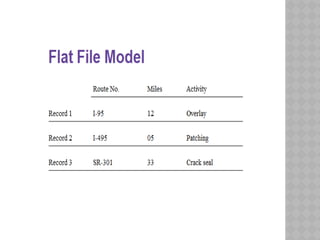
 A flat file structure is a database that stores data in a
plain text file. Each line of the text file holds one
record, with fields separated by delimiters, such as
commas or tabs.
 Flat file is also a type of computer file system that
stores all data in a single directory. There are no
folders or paths used organize the data. While this is a
simple way to store files, a flat file system becomes
increasingly inefficient as more data is added.
SEQUENTIAL FILE STRUCTURE
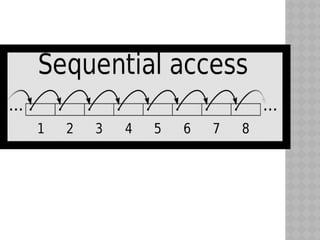
 A very natural way to store a file is in the form of an
array, or a linked list of the records. In these
representations, the entire file may be traversed in a
linear fashion. This file structure is called sequential
file. It is simple to implement and can be economic in
space.
 On the negative side, most search operations in such a
file are likely to be inefficient, since searching requires
traversing of the sequence of records according to the
storage sequence.
INDEXED FILE STRUCTURES
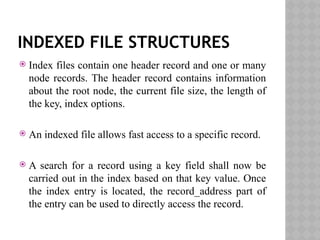
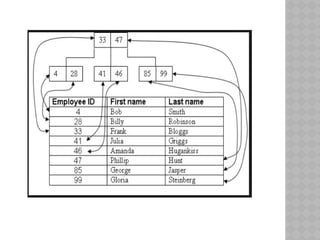
 Index files contain one header record and one or many
node records. The header record contains information
about the root node, the current file size, the length of
the key, index options.
 An indexed file allows fast access to a specific record.
 A search for a record using a key field shall now be
carried out in the index based on that key value. Once
the index entry is located, the record_address part of
the entry can be used to directly access the record.
REFERENCES
 Principles of Geographical Information systems –
Peter A. Burrough and Rachael A. McDonnnell.
 http://www.ncgia.ucsb.edu/education/curricula/
giscc/units/u037/u037_f.html
 http://www.geo.hunter.cuny.edu/~mpavlov/
Courses/GisSG/
W03_1GISFileStructuresLectureDemo.htm#GIS_F
ILE_STRUCTURES
 http://www.giscentrum.lu.se/english/
whatisgisfileformat.htm
 http://www.businessdictionary.com/definition/file-
format.html
THANK YOU

Fundamentals of data storage – basic file structures (1).pptx

  • 1.
    FUNDAMENTALS OF DATA STORAGE– BASIC FILE STRUCTURES MEHANAZ FATHIMA .J M.TECH (GEOINFORMATICS) DEPARTMENT OF GEOGRAPHY BHARATHIDASAN UNIVERSITY
  • 2.
    INTRODUCTION  To fullyunderstand the nature of the data stored in any GISytem, two issues are important:  The relationship between the stored data and the real world it depicts.  The characteristics of data storage within computer systems.
  • 3.
    RELATIONSHIP BETWEEN REAL WORLDAND DATA IN GISYSTEM  GISystems depict the world as being comprised of geometric objects: points, lines and areas for vector data models, and pixels for raster data models.  In particular, the point, line and polygon model utilises objects with sharply defined boundaries.  In many ways the data in a GISystems give a simplified view of the real world.
  • 4.
    It depicts thereal world, but has three procedures:  Selection.  Representation in a standard way.  Quantification.
  • 5.
    NATURE OF THEDATA  The nature of the data is important, as different types of mathematical operations can be performed on different data. Numerical values can be defined with respect to nominal, ordinal, interval or ratio scales of measurement.
  • 6.
     NOMINAL :-On a nominal scale numbers merely establish identity. No mathematical operations can sensibly be carried out on this data.  ORDINAL:- On an ordinal scale numbers establish order only. Comparisons of size can be made but no other mathematical operations can be performed.  INTERVAL:- On interval scales the difference between numbers is meaningful, but the numbering scale does not start at zero.  RATIO:-On a ratio scale measurement has an absolute zero, and the difference between numbers is significant. Mathematical operations can be performed.
  • 7.
    STORAGE OF DIGITALDATA WITHIN COMPUTER SYSTEM  BYTES:-  One byte of storage is 8 bits, and so can hold integer numbers in the range 0 to 255. This is a very useful range of data. Much (but certainly not all) non- spatial data in a GIS, falls in this range.  Remote sensing data is designed to fall into this range for ease of transmission from the sensors in the satellite back to earth.
  • 8.
    ASCII CODING SYSTEM The ASCII coding system is another important use of bytes of data.  Every letter and number key on a keyboard has a unique code.  Data should be converted to ASCII before transfer, as all computers correctly interpret ASCII codes. Most GISystem software offer "export" options which produce ASCII files. The disadvantage to ASCII coding, is that GIS data files are very much larger coded this way.
  • 9.
    STORAGE OF NUMERICALDATA  In a GISystem most spatial data, which may be in decimal degrees or UTM coordinates, will include data with decimal places. In computer systems this is usually called floating point data.  In choosing a storage type, users should consider, the intended uses of the data stored in the GISystem, and the types of values that will need to be represented.
  • 10.
    STORAGE OF CHARACTERDATA  Character data stored in a GIS may be single letters or characters (for example * or a space), single words, or groups of words such as a property owner's name or vegetation species. Groups of letters or characters are usually called character strings.
  • 11.
    STORAGE MEDIA- REMOVABLE ANDNON REMOVABLE  Removable forms are of magnetic and optical storage media that may be taken away from data source and used elsewhere.  The main media are Floppy disk, Pendrives, CD ROM’s.
  • 12.
    NON REMOVABLE MEDIA Gigabytes of data may now be stored on a single computer hard disk. The main problem associated with this is sharing of data; users will have to either use only the computers on which they stored data or make copies of the data.  There are mainly two types of network – Local Area Network, Wide Area Network, LAN’s are where computers are linked together at one site, WAN’s are where networks which link geographically remote sites.
  • 13.
    CONFIGURATION OF COMPUTER’S ONA NETWORK  Peer-to-peer:- where two computers are joined for sharing files.  Client-server:- there are one or more dedicated servers which are used to store the data and software. The computers linked to the server have their own processing power but access the data and software from the server.
  • 14.
     Central ProcessingSystems:- these are principally associated with the main frame systems. They consist of a powerful central processing computer which stores all the data and the software. All the processing is done by the main computer.  Networks used with GIS are of Client server and the Central processing Systems with a general move towards the Client – server approach.
  • 15.
     Network basedstorage is associated with its own problems, the principal ones’ are associated with multiple accessing of data and ensuring latest version is always made available.  Problems are encountered if more than one user is updating or using the version of same database at the same time.  There are also problems associated with giving a large number of people access and the ability to change the valuable data resource.
  • 16.
  • 17.
    FLAT FILE STRUCTURE A flat file structure is a database that stores data in a plain text file. Each line of the text file holds one record, with fields separated by delimiters, such as commas or tabs.  Flat file is also a type of computer file system that stores all data in a single directory. There are no folders or paths used organize the data. While this is a simple way to store files, a flat file system becomes increasingly inefficient as more data is added.
  • 19.
    SEQUENTIAL FILE STRUCTURE A very natural way to store a file is in the form of an array, or a linked list of the records. In these representations, the entire file may be traversed in a linear fashion. This file structure is called sequential file. It is simple to implement and can be economic in space.  On the negative side, most search operations in such a file are likely to be inefficient, since searching requires traversing of the sequence of records according to the storage sequence.
  • 21.
    INDEXED FILE STRUCTURES Index files contain one header record and one or many node records. The header record contains information about the root node, the current file size, the length of the key, index options.  An indexed file allows fast access to a specific record.  A search for a record using a key field shall now be carried out in the index based on that key value. Once the index entry is located, the record_address part of the entry can be used to directly access the record.
  • 23.
    REFERENCES  Principles ofGeographical Information systems – Peter A. Burrough and Rachael A. McDonnnell.  http://www.ncgia.ucsb.edu/education/curricula/ giscc/units/u037/u037_f.html  http://www.geo.hunter.cuny.edu/~mpavlov/ Courses/GisSG/ W03_1GISFileStructuresLectureDemo.htm#GIS_F ILE_STRUCTURES  http://www.giscentrum.lu.se/english/ whatisgisfileformat.htm  http://www.businessdictionary.com/definition/file- format.html
  • 24.