FUNCTIONS OF THE
OPERATING
SYSTEM
SECOND FORM
FILES AND MEMORY MANAGEMENT
A file system is organized into directories for efficient or easy
navigation and usage. These directories may contain other directories
and other files.
The OS manages all the files on a computer. An Operating System
carries out the following file management activities. It keeps track of
the locations where programs and data are stored in the computer’s
memory.
MAINTAINING SECURITY
In networks and larger computers each user is given a username or ID
and password to gain access to the computer system.
The OS keeps a register of all these names so that only persons with
valid username or ID’s and passwords can access the system.
MANAGING TASKS
This is the ability of the OS to maneuver the series of
tasks sent to the computer.
Multitasking is the ability of the computer to appear
to run more than one program at the same time.
Multiprocessing is the computers ability to support
more than one process/program at the same time. This
is normally done in real-time where fast processing
speed are important.
DEVICE /PROGRAM MANAGEMENT
Device communication is carried out with the help of drivers. The
devices connected to the system are tracked and monitored well.
A program is made responsible for the devices connected which are
called input/output controller. The access to the device by the
programs and the time duration is decided by OS.
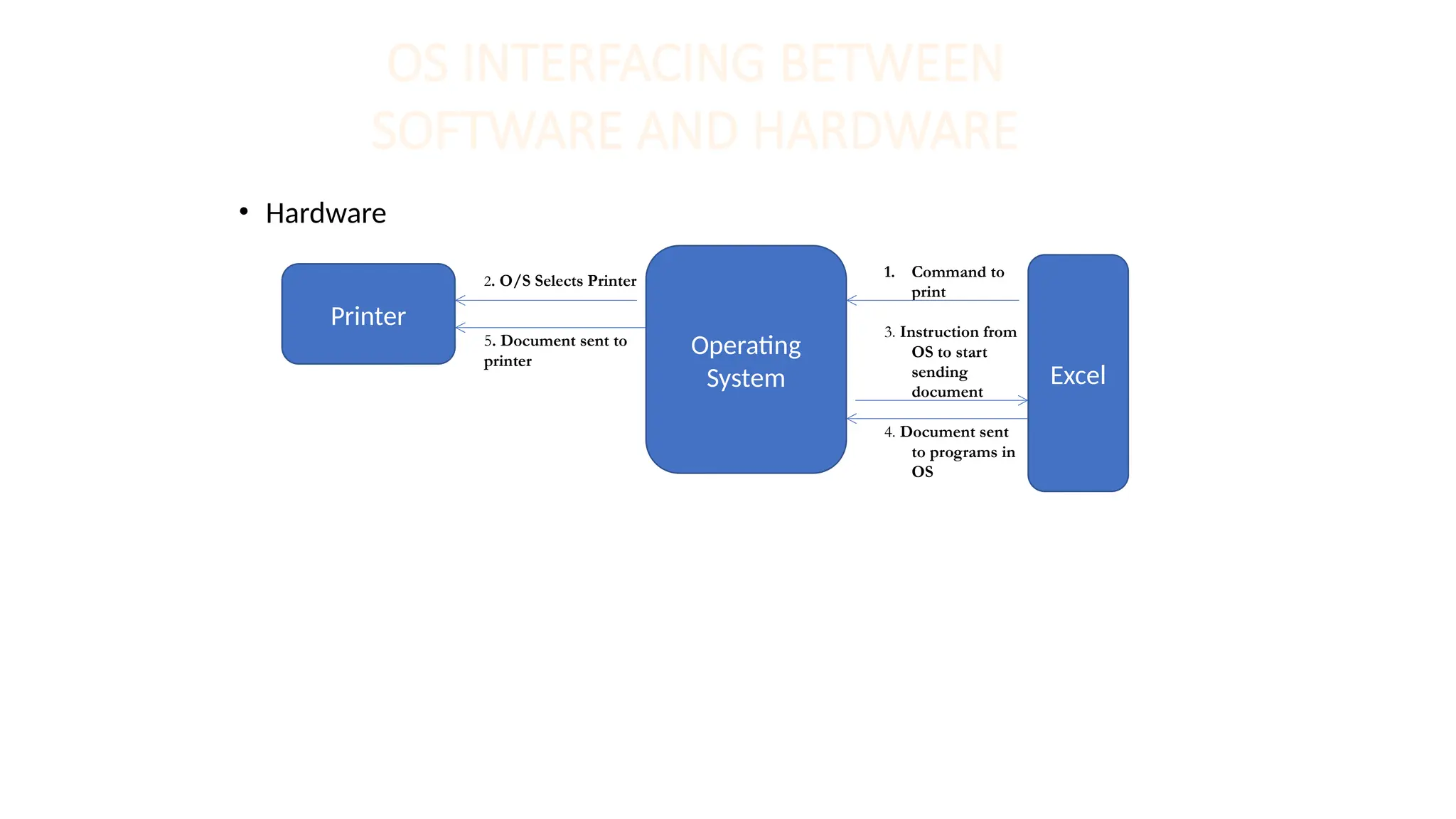
OS INTERFACING BETWEEN
SOFTWARE AND HARDWARE
• Hardware
Printer
2. O/S Selects Printer
5. Document sent to
printer
Operating
System
1. Command to
print
3. Instruction from
OS to start
sending
document
4. Document sent
to programs in
OS
Excel
PROVIDING USER
INTERFACE
• This is the user controllable part of
the operating system which allows
you to communicate or interact with
it.
• Types of user interface:
Menu Driven
Command driven
Graphical user interface

FUNCTIONS OF THE OPERATING SYSTEM Grade 8.pptx

  • 1.
  • 2.
    FILES AND MEMORYMANAGEMENT A file system is organized into directories for efficient or easy navigation and usage. These directories may contain other directories and other files. The OS manages all the files on a computer. An Operating System carries out the following file management activities. It keeps track of the locations where programs and data are stored in the computer’s memory.
  • 3.
    MAINTAINING SECURITY In networksand larger computers each user is given a username or ID and password to gain access to the computer system. The OS keeps a register of all these names so that only persons with valid username or ID’s and passwords can access the system.
  • 4.
    MANAGING TASKS This isthe ability of the OS to maneuver the series of tasks sent to the computer. Multitasking is the ability of the computer to appear to run more than one program at the same time. Multiprocessing is the computers ability to support more than one process/program at the same time. This is normally done in real-time where fast processing speed are important.
  • 5.
    DEVICE /PROGRAM MANAGEMENT Devicecommunication is carried out with the help of drivers. The devices connected to the system are tracked and monitored well. A program is made responsible for the devices connected which are called input/output controller. The access to the device by the programs and the time duration is decided by OS.
  • 6.
    OS INTERFACING BETWEEN SOFTWAREAND HARDWARE • Hardware Printer 2. O/S Selects Printer 5. Document sent to printer Operating System 1. Command to print 3. Instruction from OS to start sending document 4. Document sent to programs in OS Excel
  • 7.
    PROVIDING USER INTERFACE • Thisis the user controllable part of the operating system which allows you to communicate or interact with it. • Types of user interface: Menu Driven Command driven Graphical user interface