Operating Systems
Concepts
LECTURE 1 - INTRODUCTION
Definitions
 A program that acts as an intermediary between a user of a
computer and the computer hardware.
 An operating system (OS) is the program that, after being initially
loaded into the computer by a boot program, manages all the
other programs in a computer.
 The application programs must be written to run on top of a particular
operating system.
Objectives
 Convenience
 Make the computer convenient to use
 Efficiency
 Allows computer resources to be used in an efficient manner
 Ability to evolve
 Due to Hardware Upgrades
 For incorporating new features/enhancements
 Fixes for bugs and errors
Computer System Architecture
Contd.
 Computer system can be divided into four components:
 Hardware – provides basic computing resources
 CPU, memory, I/O devices
 Operating system
 Controls and coordinates use of hardware among various applications and users
 Application programs – define the ways in which the system resources are
used to solve the computing problems of the users
 Word processors, compilers, web browsers, database systems, video games
 Users
 People, machines, other computers
What does it do?
 Computer operating systems perform basic tasks, such as:
 Recognizing input from the keyboard
 Sending output to the display screen
 Keeping track of files and directories on the storage drives
 Controlling peripheral devices, such as printers.
 For large systems, the operating system has even greater
responsibilities and powers.
 It is like a traffic cop — it makes sure that different programs and users
running at the same time do not interfere with each other.
 It is also responsible for security
Roles of an Operating System
 As a User Interface
 OS is an interface between a computer hardware and a user.
 As a Resource Manager / As a control program
 Manages all resources
 Decides between conflicting requests for efficient and fair resource use
OS a User Interface
 Provides following services
 Program Development (Editors, debuggers, etc.)
 Program Execution
 Access to I/O Devices
 Controlled access to Files
 System Access (Protection of resources & data in shared/public
systems)
 Error detection & reporting (Hardware & Software errors both)
 Job Accounting
OS as a Resource Manager
 The OS system provides an orderly and controlled allocation of
the processors, memories and I/O devices. When a computer
has multiple users the need for managing and protecting the
memory, I/O devices and other devices is greater. Thus the
primary task of OS is to keep track of who is using which
resource, to grant resource requests, to mediate conflicting
requests from different programs etc.
Kernel
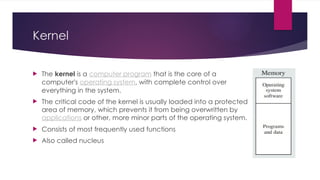
 The kernel is a computer program that is the core of a
computer's operating system, with complete control over
everything in the system.
 The critical code of the kernel is usually loaded into a protected
area of memory, which prevents it from being overwritten by
applications or other, more minor parts of the operating system.
 Consists of most frequently used functions
 Also called nucleus
Modes of Operation
 Kernel Mode
 In Kernel mode, the executing code has complete and unrestricted
access to the underlying hardware. It can execute any CPU instruction and
reference any memory address. Kernel mode is generally reserved for the
lowest-level, most trusted functions of the operating system.
 User Mode
 In User mode, the executing code has no ability to directly access hardware
or reference memory. Code running in user mode must delegate to system
APIs to access hardware or memory. Due to the protection afforded by this
sort of isolation, crashes in user mode are always recoverable. Most of the
code running on your computer will execute in user mode.
Important Functions/Services Elaborated
 Memory Management
 Processor Management
 Device Management
 File Management
 Security
 Control over system performance
 Job accounting
 Error detecting aids
 Coordination between other software and users
Memory Management
 Memory management refers to management of Primary Memory or Main
Memory. Main memory is a large array of words or bytes where each word or
byte has its own address.
 Main memory provides a fast storage that can be accessed directly by the CPU.
For a program to be executed, it must in the main memory. An Operating
System does the following activities for memory management
 Keeps tracks of primary memory, i.e., what part of it are in use by whom, what part
are not in use.
 In multiprogramming, the OS decides which process will get memory when and how
much.
 Allocates the memory when a process requests it to do so.
 De-allocates the memory when a process no longer needs it or has been terminated.
Processor Management
 In multiprogramming environment, the OS decides which process
gets the processor when and for how much time. This function is
called process scheduling. An Operating System does the
following activities for processor management
 Keeps tracks of processor and status of process. The program
responsible for this task is known as traffic controller.
 Allocates the processor (CPU) to a process.
 De-allocates processor when a process is no longer required.
Device Management
 An Operating System manages device communication via their
respective drivers. It does the following activities for device
management −
 Keeps tracks of all devices. Program responsible for this task is known as
the I/O controller.
 Decides which process gets the device when and for how much time.
 Allocates the device in the efficient way.
 De-allocates devices.
File Management
 A file system is normally organized into directories for easy
navigation and usage. These directories may contain files and
other directions. An Operating System does the following activities
for file management:
 Keeps track of information, location, uses, status etc. The collective
facilities are often known as file system.
 Decides who gets the resources.
 Allocates the resources.
 De-allocates the resources.
Other important services
 Following are some of the other important activities that an Operating System
performs:
 Security − By means of password and similar other techniques, it prevents
unauthorized access to programs and data.
 Control over system performance − Recording delays between request for a service
and response from the system.
 Job accounting − Keeping track of time and resources used by various jobs and users.
 Error detecting aids − Production of dumps, traces, error messages, and other
debugging and error detecting aids.
 Coordination between other softwares and users − Coordination and assignment of
compilers, interpreters, assemblers and other software to the various users of the
computer systems.
THANK YOU!

Introduction to operating system,OS.pptx

  • 1.
  • 2.
    Definitions  A programthat acts as an intermediary between a user of a computer and the computer hardware.  An operating system (OS) is the program that, after being initially loaded into the computer by a boot program, manages all the other programs in a computer.  The application programs must be written to run on top of a particular operating system.
  • 3.
    Objectives  Convenience  Makethe computer convenient to use  Efficiency  Allows computer resources to be used in an efficient manner  Ability to evolve  Due to Hardware Upgrades  For incorporating new features/enhancements  Fixes for bugs and errors
  • 4.
  • 5.
    Contd.  Computer systemcan be divided into four components:  Hardware – provides basic computing resources  CPU, memory, I/O devices  Operating system  Controls and coordinates use of hardware among various applications and users  Application programs – define the ways in which the system resources are used to solve the computing problems of the users  Word processors, compilers, web browsers, database systems, video games  Users  People, machines, other computers
  • 6.
    What does itdo?  Computer operating systems perform basic tasks, such as:  Recognizing input from the keyboard  Sending output to the display screen  Keeping track of files and directories on the storage drives  Controlling peripheral devices, such as printers.  For large systems, the operating system has even greater responsibilities and powers.  It is like a traffic cop — it makes sure that different programs and users running at the same time do not interfere with each other.  It is also responsible for security
  • 7.
    Roles of anOperating System  As a User Interface  OS is an interface between a computer hardware and a user.  As a Resource Manager / As a control program  Manages all resources  Decides between conflicting requests for efficient and fair resource use
  • 8.
    OS a UserInterface  Provides following services  Program Development (Editors, debuggers, etc.)  Program Execution  Access to I/O Devices  Controlled access to Files  System Access (Protection of resources & data in shared/public systems)  Error detection & reporting (Hardware & Software errors both)  Job Accounting
  • 9.
    OS as aResource Manager  The OS system provides an orderly and controlled allocation of the processors, memories and I/O devices. When a computer has multiple users the need for managing and protecting the memory, I/O devices and other devices is greater. Thus the primary task of OS is to keep track of who is using which resource, to grant resource requests, to mediate conflicting requests from different programs etc.
  • 10.
    Kernel  The kernelis a computer program that is the core of a computer's operating system, with complete control over everything in the system.  The critical code of the kernel is usually loaded into a protected area of memory, which prevents it from being overwritten by applications or other, more minor parts of the operating system.  Consists of most frequently used functions  Also called nucleus
  • 11.
    Modes of Operation Kernel Mode  In Kernel mode, the executing code has complete and unrestricted access to the underlying hardware. It can execute any CPU instruction and reference any memory address. Kernel mode is generally reserved for the lowest-level, most trusted functions of the operating system.  User Mode  In User mode, the executing code has no ability to directly access hardware or reference memory. Code running in user mode must delegate to system APIs to access hardware or memory. Due to the protection afforded by this sort of isolation, crashes in user mode are always recoverable. Most of the code running on your computer will execute in user mode.
  • 12.
    Important Functions/Services Elaborated Memory Management  Processor Management  Device Management  File Management  Security  Control over system performance  Job accounting  Error detecting aids  Coordination between other software and users
  • 13.
    Memory Management  Memorymanagement refers to management of Primary Memory or Main Memory. Main memory is a large array of words or bytes where each word or byte has its own address.  Main memory provides a fast storage that can be accessed directly by the CPU. For a program to be executed, it must in the main memory. An Operating System does the following activities for memory management  Keeps tracks of primary memory, i.e., what part of it are in use by whom, what part are not in use.  In multiprogramming, the OS decides which process will get memory when and how much.  Allocates the memory when a process requests it to do so.  De-allocates the memory when a process no longer needs it or has been terminated.
  • 14.
    Processor Management  Inmultiprogramming environment, the OS decides which process gets the processor when and for how much time. This function is called process scheduling. An Operating System does the following activities for processor management  Keeps tracks of processor and status of process. The program responsible for this task is known as traffic controller.  Allocates the processor (CPU) to a process.  De-allocates processor when a process is no longer required.
  • 15.
    Device Management  AnOperating System manages device communication via their respective drivers. It does the following activities for device management −  Keeps tracks of all devices. Program responsible for this task is known as the I/O controller.  Decides which process gets the device when and for how much time.  Allocates the device in the efficient way.  De-allocates devices.
  • 16.
    File Management  Afile system is normally organized into directories for easy navigation and usage. These directories may contain files and other directions. An Operating System does the following activities for file management:  Keeps track of information, location, uses, status etc. The collective facilities are often known as file system.  Decides who gets the resources.  Allocates the resources.  De-allocates the resources.
  • 17.
    Other important services Following are some of the other important activities that an Operating System performs:  Security − By means of password and similar other techniques, it prevents unauthorized access to programs and data.  Control over system performance − Recording delays between request for a service and response from the system.  Job accounting − Keeping track of time and resources used by various jobs and users.  Error detecting aids − Production of dumps, traces, error messages, and other debugging and error detecting aids.  Coordination between other softwares and users − Coordination and assignment of compilers, interpreters, assemblers and other software to the various users of the computer systems.
  • 18.

Editor's Notes

  • #7 Suppose a situation where different programs gives command to print at same time. The printer will not able to differentiate between them and print unwanted data.