E-nova Technologies Pvt. Ltd.

     Functional Training Day 1
    Author: Satyamitra Maan
Functional Training Day 1
•   Ubuntu installation ( Practical )
•   Introduction to ERP and OpenERP
•   OpenERP installation
•   Guided Tour initial
•   About addons and exaddons
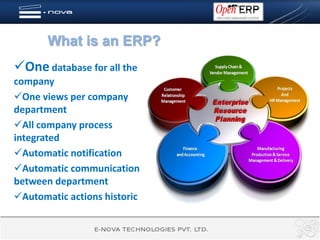
What is an ERP?
One database for all the
company
One views per company
department
All company process
integrated
Automatic notification
Automatic communication
between department
Automatic actions historic
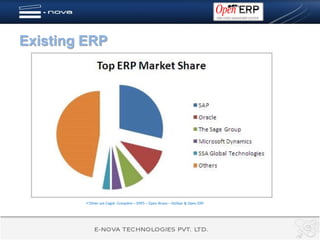
Existing ERP


         Other are Cegid- Compière – ERP5 – Open Bravo – Dolibar & Open ERP
What is “Open Source”
Open Source usage:    Open Source business
                      models:
No license fee
                      Can’t charge for license
Free source code     Can’t sell with another name
Free to distribute   You can only provide services
Free to modify       like:
Large community            Installation
                            Settings
Pool of developers
                            Formations
Easy support
                            Maintenance
Facts about open source technologies
85 % of enterprises use     Open ERP is based on python and
open source (Nov 2008)       XML Framework and using Open
                             object
NASA use python, which is
an open source language      In US 85 % of education is imparted
                             through Moodel which is also open
                             source .
Microsoft also going the
open source way .
Why
Open ERP ?


  An all in one solution!
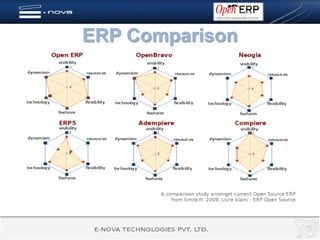
ERP Comparison
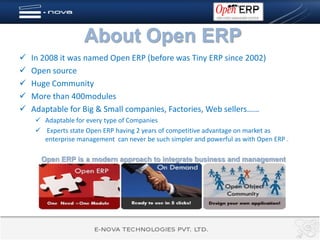
About Open ERP
   In 2008 it was named Open ERP (before was Tiny ERP since 2002)
   Open source
   Huge Community
   More than 400modules
   Adaptable for Big & Small companies, Factories, Web sellers……
      Adaptable for every type of Companies
      Experts state Open ERP having 2 years of competitive advantage on market as
       enterprise management can never be such simpler and powerful as with Open ERP .

      Open ERP is a modern approach to integrate business and management
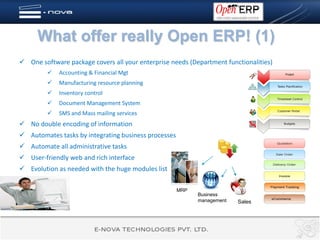
What offer really Open ERP! (1)
 One software package covers all your enterprise needs (Department functionalities)
            Accounting & Financial Mgt
            Manufacturing resource planning
            Inventory control
            Document Management System
            SMS and Mass mailing services
 No double encoding of information
 Automates tasks by integrating business processes
 Automate all administrative tasks
 User-friendly web and rich interface
 Evolution as needed with the huge modules list

                                                      MRP
                                                            Business
                                                            management   Sales
What offer really Open ERP! (2)


           Get The Information When
         you need it, where you need it
   Integrated Business Intelligence
   Dynamic dashboards
   Consolidation of data in real time
   Custom report designer
   Statistics available from any document
But you think ERP’s are risky to
integrate ………Not Open ERP !
   You can start with one module for a specific need.
   No licence cost for you.
   Light
   Fast
   Easy to set
   Easy to use
   Start playing with our demo data and be ready to work!
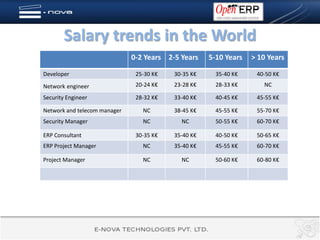
Salary trends in the World
                              0-2 Years 2-5 Years    5-10 Years   > 10 Years

Developer                      25-30 K€   30-35 K€     35-40 K€    40-50 K€
Network engineer               20-24 K€   23-28 K€     28-33 K€      NC

Security Engineer              28-32 K€   33-40 K€     40-45 K€    45-55 K€

Network and telecom manager      NC       38-45 K€     45-55 K€    55-70 K€
Security Manager                 NC         NC         50-55 K€    60-70 K€

ERP Consultant                 30-35 K€   35-40 K€     40-50 K€    50-65 K€
ERP Project Manager              NC       35-40 K€     45-55 K€    60-70 K€

Project Manager                  NC         NC         50-60 K€    60-80 K€
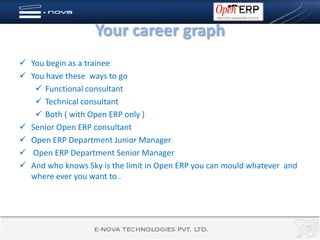
Your career graph
 You begin as a trainee
 You have these ways to go
    Functional consultant
    Technical consultant
    Both ( with Open ERP only )
 Senior Open ERP consultant
 Open ERP Department Junior Manager
 Open ERP Department Senior Manager
 And who knows Sky is the limit in Open ERP you can mould whatever and
  where ever you want to .
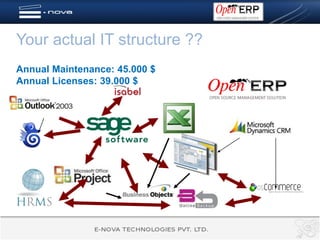
Your actual IT structure ??
Annual Maintenance: 45.000 $
Annual Licenses: 39.000 $
After implementation of Open ERP, this is your new
IT structure!!


A fully integrated management system:
Annual Maintenance: 10.000 $
Annual Licenses: 0 $
OpenERP is quiet easy to install in windows you just need to install
OpenERP all in one .exe and its done .
Here we will cover OpenERP installation on UBUNTU

OPEN ERP INSTALLATION
Installing database and creating User
• With OpenERP we use PostgreSql database we need to
  install the database.
   – On Ubuntu, install the postgresql package:
      • sudo apt-get install postgresql
   – Add a user
      • The default superuser for PostgreSQL is called postgres. If you wish to
        use it as well, you may need to login as this user first.
          – smaan$ sudo su – postgres
          – password: XXXXXXXXXX
          – postgres$ createuser --createdb --username postgres --no-createrole –
            pwprompt smaan
          – Enter password for new role: XXXXXXXXXX
          – Enter it again: XXXXXXXXXX
          – Shall the new role be a superuser? (y/n) y
          – CREATE ROLE
          – postgres$
OpenERP dependencies installation
• Server dependencies
   – sudo apt-get install python python-psycopg2 python-reportlab 
     python-egenix-mxdatetime python-tz python-pychart  python-
     pydot python-lxml python-vobject
• Client dependencies
   – sudo apt-get install python python-gtk2 python-glade2 
     python-matplotlib python-egenix-mxdatetime python-xml
     python-hippocanvas
• Web client dependencies
   – $ sudo apt-get install python python-dev build-essential
   – $ sudo apt-get install python-setuptools
   – There are few more dependencies of webclient will be installed
     through ./populate.sh under openerp-web../lib/
   – sudo apt-get install flashplugin-nonfree
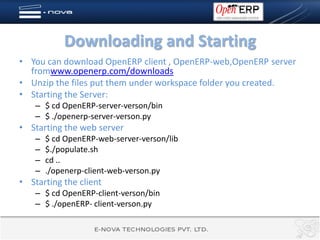
Downloading and Starting
• You can download OpenERP client , OpenERP-web,OpenERP server
  fromwww.openerp.com/downloads
• Unzip the files put them under workspace folder you created.
• Starting the Server:
    – $ cd OpenERP-server-verson/bin
    – $ ./openerp-server-verson.py
• Starting the web server
    –   $ cd OpenERP-web-server-verson/lib
    –   $./populate.sh
    –   cd ..
    –   ./openerp-client-web-verson.py
• Starting the client
    – $ cd OpenERP-client-verson/bin
    – $ ./openERP- client-verson.py
Congratulation that’s all fox

   Welcome to OpenERP world
Guided tour(1)
Starting to discover Open ERP,
   using demonstration data
   supplied with the system, is a
   good way to familiarize
   yourself with the user
   interface. This guided tour
   provides     you    with     an
   introduction to many of the
   available system features. We
   are going to cover the
   following with demo data
• New Database Creation
• Installing pre defined profiles
• Configuring the profiles
Guided tour(2)
• Preference Toolbar functionalities
• Internal communication through
  OpenERP.
• Configuring users
• Managing partners
• Installing new functionality
    – Updating the module list
    – Installing independent modules
    – Installing a module with its
      dependencies
• Uninstalling the new functionality
    – Uninstalling the independent
      modules
    – Uninstalling the modules with
      dependencies
To know more about Open ERP
         Contact us
          E-nova Technologies Pvt. Ltd.
          www.enova-tech.net
                 Address :
         D 88/2 , Okhla Phase-1
                  New Delhi
       satyamitra.maan@enova-tech.net
           Ph :- (+91)99.90.53.94.14
                 (+91)11.45.75.91.17

Functional training day1

  • 1.
    E-nova Technologies Pvt.Ltd. Functional Training Day 1 Author: Satyamitra Maan
  • 2.
    Functional Training Day1 • Ubuntu installation ( Practical ) • Introduction to ERP and OpenERP • OpenERP installation • Guided Tour initial • About addons and exaddons
  • 3.
    What is anERP? One database for all the company One views per company department All company process integrated Automatic notification Automatic communication between department Automatic actions historic
  • 4.
    Existing ERP Other are Cegid- Compière – ERP5 – Open Bravo – Dolibar & Open ERP
  • 5.
    What is “OpenSource” Open Source usage: Open Source business models: No license fee Can’t charge for license Free source code Can’t sell with another name Free to distribute You can only provide services Free to modify like: Large community Installation Settings Pool of developers Formations Easy support Maintenance
  • 6.
    Facts about opensource technologies 85 % of enterprises use Open ERP is based on python and open source (Nov 2008) XML Framework and using Open object NASA use python, which is an open source language In US 85 % of education is imparted through Moodel which is also open source . Microsoft also going the open source way .
  • 7.
    Why Open ERP ? An all in one solution!
  • 8.
  • 9.
    About Open ERP  In 2008 it was named Open ERP (before was Tiny ERP since 2002)  Open source  Huge Community  More than 400modules  Adaptable for Big & Small companies, Factories, Web sellers……  Adaptable for every type of Companies  Experts state Open ERP having 2 years of competitive advantage on market as enterprise management can never be such simpler and powerful as with Open ERP . Open ERP is a modern approach to integrate business and management
  • 10.
    What offer reallyOpen ERP! (1)  One software package covers all your enterprise needs (Department functionalities)  Accounting & Financial Mgt  Manufacturing resource planning  Inventory control  Document Management System  SMS and Mass mailing services  No double encoding of information  Automates tasks by integrating business processes  Automate all administrative tasks  User-friendly web and rich interface  Evolution as needed with the huge modules list MRP Business management Sales
  • 11.
    What offer reallyOpen ERP! (2) Get The Information When you need it, where you need it  Integrated Business Intelligence  Dynamic dashboards  Consolidation of data in real time  Custom report designer  Statistics available from any document
  • 12.
    But you thinkERP’s are risky to integrate ………Not Open ERP !  You can start with one module for a specific need.  No licence cost for you.  Light  Fast  Easy to set  Easy to use  Start playing with our demo data and be ready to work!
  • 13.
    Salary trends inthe World 0-2 Years 2-5 Years 5-10 Years > 10 Years Developer 25-30 K€ 30-35 K€ 35-40 K€ 40-50 K€ Network engineer 20-24 K€ 23-28 K€ 28-33 K€ NC Security Engineer 28-32 K€ 33-40 K€ 40-45 K€ 45-55 K€ Network and telecom manager NC 38-45 K€ 45-55 K€ 55-70 K€ Security Manager NC NC 50-55 K€ 60-70 K€ ERP Consultant 30-35 K€ 35-40 K€ 40-50 K€ 50-65 K€ ERP Project Manager NC 35-40 K€ 45-55 K€ 60-70 K€ Project Manager NC NC 50-60 K€ 60-80 K€
  • 14.
    Your career graph You begin as a trainee  You have these ways to go  Functional consultant  Technical consultant  Both ( with Open ERP only )  Senior Open ERP consultant  Open ERP Department Junior Manager  Open ERP Department Senior Manager  And who knows Sky is the limit in Open ERP you can mould whatever and where ever you want to .
  • 15.
    Your actual ITstructure ?? Annual Maintenance: 45.000 $ Annual Licenses: 39.000 $
  • 16.
    After implementation ofOpen ERP, this is your new IT structure!! A fully integrated management system: Annual Maintenance: 10.000 $ Annual Licenses: 0 $
  • 17.
    OpenERP is quieteasy to install in windows you just need to install OpenERP all in one .exe and its done . Here we will cover OpenERP installation on UBUNTU OPEN ERP INSTALLATION
  • 18.
    Installing database andcreating User • With OpenERP we use PostgreSql database we need to install the database. – On Ubuntu, install the postgresql package: • sudo apt-get install postgresql – Add a user • The default superuser for PostgreSQL is called postgres. If you wish to use it as well, you may need to login as this user first. – smaan$ sudo su – postgres – password: XXXXXXXXXX – postgres$ createuser --createdb --username postgres --no-createrole – pwprompt smaan – Enter password for new role: XXXXXXXXXX – Enter it again: XXXXXXXXXX – Shall the new role be a superuser? (y/n) y – CREATE ROLE – postgres$
  • 19.
    OpenERP dependencies installation •Server dependencies – sudo apt-get install python python-psycopg2 python-reportlab python-egenix-mxdatetime python-tz python-pychart python- pydot python-lxml python-vobject • Client dependencies – sudo apt-get install python python-gtk2 python-glade2 python-matplotlib python-egenix-mxdatetime python-xml python-hippocanvas • Web client dependencies – $ sudo apt-get install python python-dev build-essential – $ sudo apt-get install python-setuptools – There are few more dependencies of webclient will be installed through ./populate.sh under openerp-web../lib/ – sudo apt-get install flashplugin-nonfree
  • 20.
    Downloading and Starting •You can download OpenERP client , OpenERP-web,OpenERP server fromwww.openerp.com/downloads • Unzip the files put them under workspace folder you created. • Starting the Server: – $ cd OpenERP-server-verson/bin – $ ./openerp-server-verson.py • Starting the web server – $ cd OpenERP-web-server-verson/lib – $./populate.sh – cd .. – ./openerp-client-web-verson.py • Starting the client – $ cd OpenERP-client-verson/bin – $ ./openERP- client-verson.py
  • 21.
    Congratulation that’s allfox Welcome to OpenERP world
  • 22.
    Guided tour(1) Starting todiscover Open ERP, using demonstration data supplied with the system, is a good way to familiarize yourself with the user interface. This guided tour provides you with an introduction to many of the available system features. We are going to cover the following with demo data • New Database Creation • Installing pre defined profiles • Configuring the profiles
  • 23.
    Guided tour(2) • PreferenceToolbar functionalities • Internal communication through OpenERP. • Configuring users • Managing partners • Installing new functionality – Updating the module list – Installing independent modules – Installing a module with its dependencies • Uninstalling the new functionality – Uninstalling the independent modules – Uninstalling the modules with dependencies
  • 24.
    To know moreabout Open ERP Contact us E-nova Technologies Pvt. Ltd. www.enova-tech.net Address : D 88/2 , Okhla Phase-1 New Delhi satyamitra.maan@enova-tech.net Ph :- (+91)99.90.53.94.14 (+91)11.45.75.91.17