
Open source supply chain planning software
Introduction for supply planners
© 2016 frepple.com
Agenda
 Supply planning workflow
 Initial plan generation
 Plan review, adjustment and approval
 Export to ERP system
 A day in the life of a supply planner
© 2016 frepple.com
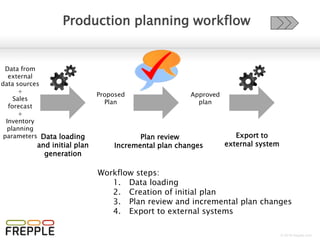
Supply planning workflow
Data from
external
data sources
+
Sales
forecast
+
Inventory
planning
parameters
Proposed
Plan
Approved
plan
Initial plan
generation
Plan review, adjustment
and approval
Export to
external system
Workflow steps:
1. Creation of initial plan
2. Plan review, adjustment and approval
3. Export to external systems
© 2016 frepple.com
Supply planning workflow
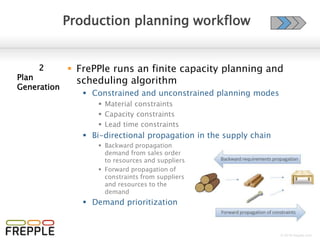
 FrePPle runs an finite capacity planning and
scheduling algorithm
 Constrained and unconstrained planning modes
 Material constraints
 Capacity constraints
 Lead time constraints
 Synchronize material and capacity plans
 Buy components to follow the
pace of the bottleneck
resources and materials
 Align capacity allocation
with material availability
 Smart allocations
 Allocate scarce material
and capacity to the
priority demands
1
Initial plan
generation
© 2016 frepple.com
Supply planning workflow
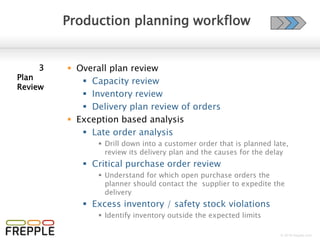
 Overall plan review
 Capacity review
 Inventory review
 Delivery plan review of sales orders
 Plan adjustment
 Gantt chart plan editor
 Inventory planning screen
 Exception based analysis
 Late order analysis
 Drill down into a customer order that is planned late,
review its delivery plan and the causes for the delay
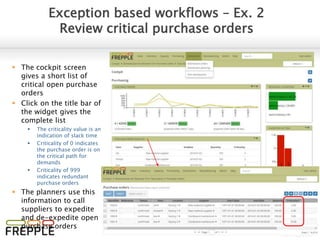
 Critical purchase order review
 Understand for which open purchase orders the
planner should contact the supplier to expedite the
delivery
2
Plan
review,
adjustment
and approval
© 2016 frepple.com
Supply planning workflow
 Approval of the proposed plan:
 Purchase orders
 Distribution orders
 Manufacturing orders
 Transactions status:
 Proposed
New suggestion by frePPLe
 Approved
Reviewed by the planner
 Confirmed
Execution is ongoing in the ERP
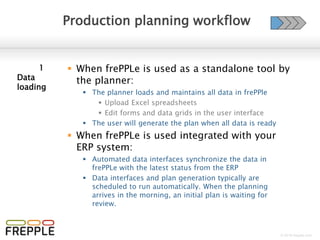
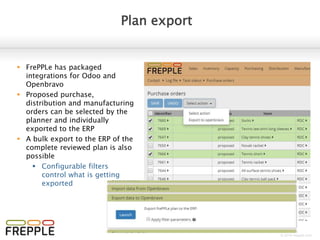
 Exporting to ERP can happen in 2 modes:
 Incremental export capability for individual proposals
manually selected by the planners
 Automated bulk export of all proposals (using configurable
filters) after approval of the overall plan
3
Export to
ERP system
for execution
Proposed
Approved
Confirmed
Closed
Planner review
Export to ERP
Execute in ERP
PlannedinfrePPLeExecutedinERP
© 2016 frepple.com
Agenda
 Supply planning workflow
 A day in the life of a supply planner
 Cockpit
 Plan generation
 Plan review
 Resource report
 Inventory report
 Demand plan
 Plan adjustment
 Plan editor – manufacturing environments
 Inventory planning screen – distribution environments
 Purchase/distribution/manufacturing order approval
© 2016 frepple.com
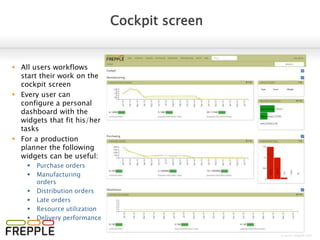
Cockpit screen
 All users workflows
start their work on the
cockpit screen
 Every user can
configure a personal
dashboard with the
widgets that fit his/her
tasks
 For a production
planner the following
widgets can be useful:
 Purchase orders
 Manufacturing
orders
 Distribution orders
 Late orders
 Resource utilization
 Delivery performance
© 2016 frepple.com
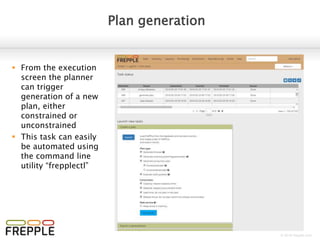
Plan generation
 From the execution
screen the planner
can trigger
generation of a new
plan
 This task can also be
automated using the
command line utility
“frepplectl”
© 2016 frepple.com
Plan review - Resource report
 Shows the resource
utilization per time bucket
 Time buckets and horizon
are configurable
 Toggle between grid and
graph display
 Drill down to resource detail
report for details on each
planned operation
© 2016 frepple.com
Plan review - Inventory report
 Shows the material
production and consumption
per time bucket
 Time buckets and horizon
are configurable
 Toggle between grid and
graph display
 Drill down to inventory detail
report for details on each
planned operation
© 2016 frepple.com
Plan review - Demand plan
 Sales order list shows
the list of all customer
sales orders
 Quickly identify
late orders
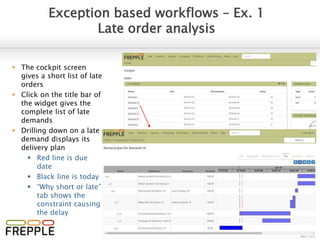
 Drilling down on a late
demand displays its
delivery plan
 Red line is due
date
 Black line is today
 “Why short or late”
tab shows the
constraint causing
the delay
© 2016 frepple.com
Plan adjustment – manufacturing
Plan editor
 Visually review the plan
 Use colors for criticality,
delay, priority, item
category, operation
category
 Adjust the plan
 Replan customer orders
 Adjust operation date
and quantity
 Change operation status
 Plan changes are
automatically propagated
 Move an assembly operation
=> schedule for its subassemblies
also moves
 Add a new assembly operation
=> the plan for its subassemblies is updated
 Delete an assembly => some customer orders can no longer be satisfied
© 2016 frepple.com
Plan adjustment – distribution
Inventory planning screen
 Adjust inventory plan
for critical item x
locations
 Sort and filter in
the top section
 Edit selected
intersection in the
bottom section
 Simulate demand
and supply changes
 Override inventory
plan in specific
periods
 Edit and approve
transactions
© 2016 frepple.com
Plan approval
Purchase/distribution/manufacturing orders
 Review a prioritized list of
planned operations:
 Intuitive color coding to
identify most critical and
urgent operations
 Select a single transaction
to see the details at the
bottom
 Editable dates, status and
quantity
 Select multiple
transactions to see an
aggregated summary at
the bottom
 Action dropdown to
change the status of the
selected transactions, or
export to the ERP system
© 2016 frepple.com
 Other screens used for occasional review and analysis, depending on the
production planners responsabilities:
Other screens
 Inventory planning screen
 Allows editing of the forecast and inventory
planning parameters
 Also has the capability to review and approve
transactions
 Forecast editor
 Allows updating of the sales forecast
 Order quoting screen
 Displays the expected delivery date for a new
customer order you are about to enter in the ERP
system
 Computes a feasible delivery date considering all
capacity, material and lead time constraints
© 2016 frepple.com
Try it out yourself
Online demos can be accessed at:
https://manufacturing.frepple.com
https://distribution.frepple.com
User : admin
Password : admin
Hint:
Use the “guided tour” to walk through
the “day-in-the-life” workflows

Frepple overview for production planners

  • 1.
    Open source supplychain planning software Introduction for supply planners
  • 2.
    © 2016 frepple.com Agenda Supply planning workflow  Initial plan generation  Plan review, adjustment and approval  Export to ERP system  A day in the life of a supply planner
  • 3.
    © 2016 frepple.com Supplyplanning workflow Data from external data sources + Sales forecast + Inventory planning parameters Proposed Plan Approved plan Initial plan generation Plan review, adjustment and approval Export to external system Workflow steps: 1. Creation of initial plan 2. Plan review, adjustment and approval 3. Export to external systems
  • 4.
    © 2016 frepple.com Supplyplanning workflow  FrePPle runs an finite capacity planning and scheduling algorithm  Constrained and unconstrained planning modes  Material constraints  Capacity constraints  Lead time constraints  Synchronize material and capacity plans  Buy components to follow the pace of the bottleneck resources and materials  Align capacity allocation with material availability  Smart allocations  Allocate scarce material and capacity to the priority demands 1 Initial plan generation
  • 5.
    © 2016 frepple.com Supplyplanning workflow  Overall plan review  Capacity review  Inventory review  Delivery plan review of sales orders  Plan adjustment  Gantt chart plan editor  Inventory planning screen  Exception based analysis  Late order analysis  Drill down into a customer order that is planned late, review its delivery plan and the causes for the delay  Critical purchase order review  Understand for which open purchase orders the planner should contact the supplier to expedite the delivery 2 Plan review, adjustment and approval
  • 6.
    © 2016 frepple.com Supplyplanning workflow  Approval of the proposed plan:  Purchase orders  Distribution orders  Manufacturing orders  Transactions status:  Proposed New suggestion by frePPLe  Approved Reviewed by the planner  Confirmed Execution is ongoing in the ERP  Exporting to ERP can happen in 2 modes:  Incremental export capability for individual proposals manually selected by the planners  Automated bulk export of all proposals (using configurable filters) after approval of the overall plan 3 Export to ERP system for execution Proposed Approved Confirmed Closed Planner review Export to ERP Execute in ERP PlannedinfrePPLeExecutedinERP
  • 7.
    © 2016 frepple.com Agenda Supply planning workflow  A day in the life of a supply planner  Cockpit  Plan generation  Plan review  Resource report  Inventory report  Demand plan  Plan adjustment  Plan editor – manufacturing environments  Inventory planning screen – distribution environments  Purchase/distribution/manufacturing order approval
  • 8.
    © 2016 frepple.com Cockpitscreen  All users workflows start their work on the cockpit screen  Every user can configure a personal dashboard with the widgets that fit his/her tasks  For a production planner the following widgets can be useful:  Purchase orders  Manufacturing orders  Distribution orders  Late orders  Resource utilization  Delivery performance
  • 9.
    © 2016 frepple.com Plangeneration  From the execution screen the planner can trigger generation of a new plan  This task can also be automated using the command line utility “frepplectl”
  • 10.
    © 2016 frepple.com Planreview - Resource report  Shows the resource utilization per time bucket  Time buckets and horizon are configurable  Toggle between grid and graph display  Drill down to resource detail report for details on each planned operation
  • 11.
    © 2016 frepple.com Planreview - Inventory report  Shows the material production and consumption per time bucket  Time buckets and horizon are configurable  Toggle between grid and graph display  Drill down to inventory detail report for details on each planned operation
  • 12.
    © 2016 frepple.com Planreview - Demand plan  Sales order list shows the list of all customer sales orders  Quickly identify late orders  Drilling down on a late demand displays its delivery plan  Red line is due date  Black line is today  “Why short or late” tab shows the constraint causing the delay
  • 13.
    © 2016 frepple.com Planadjustment – manufacturing Plan editor  Visually review the plan  Use colors for criticality, delay, priority, item category, operation category  Adjust the plan  Replan customer orders  Adjust operation date and quantity  Change operation status  Plan changes are automatically propagated  Move an assembly operation => schedule for its subassemblies also moves  Add a new assembly operation => the plan for its subassemblies is updated  Delete an assembly => some customer orders can no longer be satisfied
  • 14.
    © 2016 frepple.com Planadjustment – distribution Inventory planning screen  Adjust inventory plan for critical item x locations  Sort and filter in the top section  Edit selected intersection in the bottom section  Simulate demand and supply changes  Override inventory plan in specific periods  Edit and approve transactions
  • 15.
    © 2016 frepple.com Planapproval Purchase/distribution/manufacturing orders  Review a prioritized list of planned operations:  Intuitive color coding to identify most critical and urgent operations  Select a single transaction to see the details at the bottom  Editable dates, status and quantity  Select multiple transactions to see an aggregated summary at the bottom  Action dropdown to change the status of the selected transactions, or export to the ERP system
  • 16.
    © 2016 frepple.com Other screens used for occasional review and analysis, depending on the production planners responsabilities: Other screens  Inventory planning screen  Allows editing of the forecast and inventory planning parameters  Also has the capability to review and approve transactions  Forecast editor  Allows updating of the sales forecast  Order quoting screen  Displays the expected delivery date for a new customer order you are about to enter in the ERP system  Computes a feasible delivery date considering all capacity, material and lead time constraints
  • 17.
    © 2016 frepple.com Tryit out yourself Online demos can be accessed at: https://manufacturing.frepple.com https://distribution.frepple.com User : admin Password : admin Hint: Use the “guided tour” to walk through the “day-in-the-life” workflows