FP512 
WEB PROGRAMMING I 
COOKIES 
& 
SESSION 
Prepared by: PN. ZATI HANANI ZAINAL
UNDERSTAND COOKIES & SESSIONS 
Define Cookies 
Create Cookies 
Retrieve the value of a cookies 
Delete cookies 
Define sessions 
Create session 
Delete session 
Prepared by: PN. ZATI HANANI ZAINAL
COOKIES 
Prepared by: PN. ZATI HANANI ZAINAL
WHAT IS COOKIES? 
A cookie is often used to identify a user. 
Embed on user PC (client). 
To track certain user details like (No. Of Visits, names, 
last visit, etc). 
The client machine stores such information and sends 
it to the web server whenever there is a request. 
 Cookies data are sent along with the HTTP headers. 
Prepared by: PN. ZATI HANANI ZAINAL
COOKIES ARE POPULAR?? 
Most popular uses of cookies? 
To store username/password information so user 
doesn't have to log in every time ("remember me"). 
To simply remember the user's name. 
To keep track of a users progress during a specified 
process. 
To remember a users theme. 
Prepared by: PN. ZATI HANANI ZAINAL
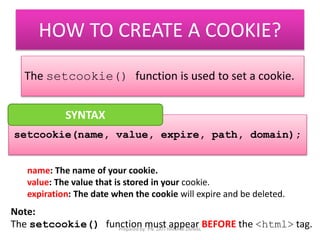
HOW TO CREATE A COOKIE? 
The setcookie() function is used to set a cookie. 
SYNTAX 
setcookie(name, value, expire, path, domain); 
name: The name of your cookie. 
value: The value that is stored in your cookie. 
expiration: The date when the cookie will expire and be deleted. 
Note: 
The setcookie() function must appear BEFORE the <html> tag. 
Prepared by: PN. ZATI HANANI ZAINAL
HOW TO CREATE A COOKIE? 
Example 
setcookie(name, value, expire); 
setcookies(“user”,”fiza”,time()+300); 
If(isset(&_COOKIE[“user”])) 
echo “Hai” . &_COOKIE[“user”] . “<br>” 
else 
echo “Welcome guest!!<br>”; 
NOTE : If you do not set this expiration date, the 
cookie will removed when the browser is restarted. Prepared by: PN. ZATI HANANI ZAINAL
HOW TO CREATE A COOKIE? 
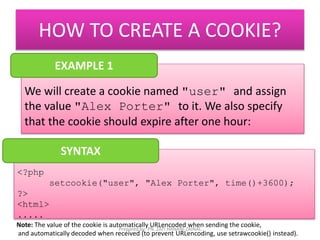
EXAMPLE 1 
We will create a cookie named "user" and assign 
the value "Alex Porter" to it. We also specify 
that the cookie should expire after one hour: 
<?php 
setcookie("user", "Alex Porter", time()+3600); 
?> 
<html> 
..... 
SYNTAX 
Note: The value of the cookie is automatically URLencoded when sending the cookie, 
Prepared by: PN. ZATI HANANI ZAINAL 
and automatically decoded when received (to prevent URLencoding, use setrawcookie() instead).
HOW TO CREATE A COOKIE? 
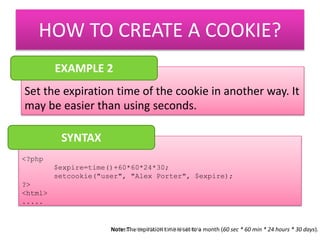
EXAMPLE 2 
Set the expiration time of the cookie in another way. It 
may be easier than using seconds. 
<?php 
$expire=time()+60*60*24*30; 
setcookie("user", "Alex Porter", $expire); 
?> 
<html> 
..... 
SYNTAX 
Note: The expiration time is set to a month (Prepared by: PN. ZATI HANANI ZAINAL 60 sec * 60 min * 24 hours * 30 days).
HOW TO RETRIEVE A COOKIE VALUE? 
The PHP $_COOKIE variable is used to retrieve a 
cookie value. 
<?php 
// Print a cookie 
echo $_COOKIE["user"]; 
// A way to view all cookies 
print_r($_COOKIE); 
?> 
SYNTAX 
Prepared by: PN. ZATI HANANI ZAINAL
HOW TO RETRIEVE A COOKIE VALUE? 
EXAMPLE 2 
Use the isset() function to find out if a cookie has 
been set 
<html> 
<body> 
<?php 
if (isset($_COOKIE["user"])) 
echo "Welcome " . $_COOKIE["user"] . "!<br />"; 
else 
echo "Welcome guest!<br />"; 
?> 
</body> 
</html> 
SYNTAX 
Prepared by: PN. ZATI HANANI ZAINAL
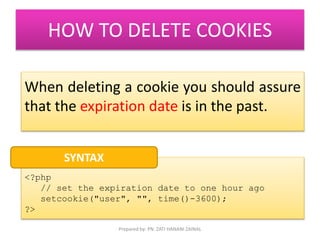
HOW TO DELETE COOKIES 
When deleting a cookie you should assure 
that the expiration date is in the past. 
<?php 
// set the expiration date to one hour ago 
setcookie("user", "", time()-3600); 
?> 
SYNTAX 
Prepared by: PN. ZATI HANANI ZAINAL
SESSIONS 
Prepared by: PN. ZATI HANANI ZAINAL
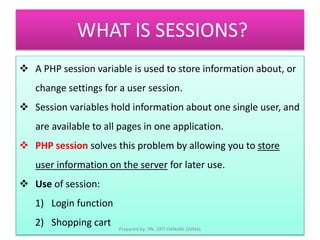
WHAT IS SESSIONS? 
 A PHP session variable is used to store information about, or 
change settings for a user session. 
 Session variables hold information about one single user, and 
are available to all pages in one application. 
 PHP session solves this problem by allowing you to store 
user information on the server for later use. 
 Use of session: 
1) Login function 
2) Shopping cart 
Prepared by: PN. ZATI HANANI ZAINAL
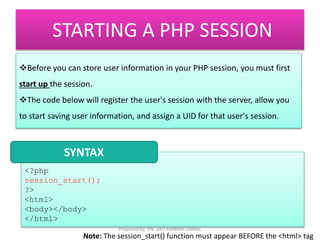
STARTING A PHP SESSION 
Before you can store user information in your PHP session, you must first 
start up the session. 
The code below will register the user's session with the server, allow you 
to start saving user information, and assign a UID for that user's session. 
SYNTAX 
<?php 
session_start(); 
?> 
<html> 
<body></body> 
</html> 
Prepared by: PN. ZATI HANANI ZAINAL 
Note: The session_start() function must appear BEFORE the <html> tag
STORING SESSION VARIABLE 
<?php 
EXAMPLE 
session_start(); 
$_SESSION['views']=1; // store session data 
?> 
<html> 
<body> 
<?php 
//retrieve session data 
echo "Pageviews=". $_SESSION['views']; 
?> 
</body> 
</html> 
Prepared by: PN. ZATI HANANI ZAINAL
DESTROYING A SESSIONS 
To delete some session data, you can use the unset() or the 
session_destroy() function. 
The unset() function is used to free the specified session variable 
<?php 
unset($_SESSION['views']); 
?> 
SYNTAX 
Prepared by: PN. ZATI HANANI ZAINAL
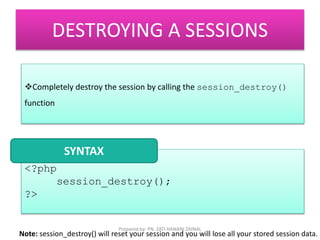
DESTROYING A SESSIONS 
Completely destroy the session by calling the session_destroy() 
function 
<?php 
session_destroy(); 
?> 
SYNTAX 
Prepared by: PN. ZATI HANANI ZAINAL 
Note: session_destroy() will reset your session and you will lose all your stored session data.
THE END 
Prepared by: PN. ZATI HANANI ZAINAL

FP512 Cookies sessions

  • 1.
    FP512 WEB PROGRAMMINGI COOKIES & SESSION Prepared by: PN. ZATI HANANI ZAINAL
  • 2.
    UNDERSTAND COOKIES &SESSIONS Define Cookies Create Cookies Retrieve the value of a cookies Delete cookies Define sessions Create session Delete session Prepared by: PN. ZATI HANANI ZAINAL
  • 3.
    COOKIES Prepared by:PN. ZATI HANANI ZAINAL
  • 4.
    WHAT IS COOKIES? A cookie is often used to identify a user. Embed on user PC (client). To track certain user details like (No. Of Visits, names, last visit, etc). The client machine stores such information and sends it to the web server whenever there is a request.  Cookies data are sent along with the HTTP headers. Prepared by: PN. ZATI HANANI ZAINAL
  • 5.
    COOKIES ARE POPULAR?? Most popular uses of cookies? To store username/password information so user doesn't have to log in every time ("remember me"). To simply remember the user's name. To keep track of a users progress during a specified process. To remember a users theme. Prepared by: PN. ZATI HANANI ZAINAL
  • 6.
    HOW TO CREATEA COOKIE? The setcookie() function is used to set a cookie. SYNTAX setcookie(name, value, expire, path, domain); name: The name of your cookie. value: The value that is stored in your cookie. expiration: The date when the cookie will expire and be deleted. Note: The setcookie() function must appear BEFORE the <html> tag. Prepared by: PN. ZATI HANANI ZAINAL
  • 7.
    HOW TO CREATEA COOKIE? Example setcookie(name, value, expire); setcookies(“user”,”fiza”,time()+300); If(isset(&_COOKIE[“user”])) echo “Hai” . &_COOKIE[“user”] . “<br>” else echo “Welcome guest!!<br>”; NOTE : If you do not set this expiration date, the cookie will removed when the browser is restarted. Prepared by: PN. ZATI HANANI ZAINAL
  • 8.
    HOW TO CREATEA COOKIE? EXAMPLE 1 We will create a cookie named "user" and assign the value "Alex Porter" to it. We also specify that the cookie should expire after one hour: <?php setcookie("user", "Alex Porter", time()+3600); ?> <html> ..... SYNTAX Note: The value of the cookie is automatically URLencoded when sending the cookie, Prepared by: PN. ZATI HANANI ZAINAL and automatically decoded when received (to prevent URLencoding, use setrawcookie() instead).
  • 9.
    HOW TO CREATEA COOKIE? EXAMPLE 2 Set the expiration time of the cookie in another way. It may be easier than using seconds. <?php $expire=time()+60*60*24*30; setcookie("user", "Alex Porter", $expire); ?> <html> ..... SYNTAX Note: The expiration time is set to a month (Prepared by: PN. ZATI HANANI ZAINAL 60 sec * 60 min * 24 hours * 30 days).
  • 10.
    HOW TO RETRIEVEA COOKIE VALUE? The PHP $_COOKIE variable is used to retrieve a cookie value. <?php // Print a cookie echo $_COOKIE["user"]; // A way to view all cookies print_r($_COOKIE); ?> SYNTAX Prepared by: PN. ZATI HANANI ZAINAL
  • 11.
    HOW TO RETRIEVEA COOKIE VALUE? EXAMPLE 2 Use the isset() function to find out if a cookie has been set <html> <body> <?php if (isset($_COOKIE["user"])) echo "Welcome " . $_COOKIE["user"] . "!<br />"; else echo "Welcome guest!<br />"; ?> </body> </html> SYNTAX Prepared by: PN. ZATI HANANI ZAINAL
  • 12.
    HOW TO DELETECOOKIES When deleting a cookie you should assure that the expiration date is in the past. <?php // set the expiration date to one hour ago setcookie("user", "", time()-3600); ?> SYNTAX Prepared by: PN. ZATI HANANI ZAINAL
  • 13.
    SESSIONS Prepared by:PN. ZATI HANANI ZAINAL
  • 14.
    WHAT IS SESSIONS?  A PHP session variable is used to store information about, or change settings for a user session.  Session variables hold information about one single user, and are available to all pages in one application.  PHP session solves this problem by allowing you to store user information on the server for later use.  Use of session: 1) Login function 2) Shopping cart Prepared by: PN. ZATI HANANI ZAINAL
  • 15.
    STARTING A PHPSESSION Before you can store user information in your PHP session, you must first start up the session. The code below will register the user's session with the server, allow you to start saving user information, and assign a UID for that user's session. SYNTAX <?php session_start(); ?> <html> <body></body> </html> Prepared by: PN. ZATI HANANI ZAINAL Note: The session_start() function must appear BEFORE the <html> tag
  • 16.
    STORING SESSION VARIABLE <?php EXAMPLE session_start(); $_SESSION['views']=1; // store session data ?> <html> <body> <?php //retrieve session data echo "Pageviews=". $_SESSION['views']; ?> </body> </html> Prepared by: PN. ZATI HANANI ZAINAL
  • 17.
    DESTROYING A SESSIONS To delete some session data, you can use the unset() or the session_destroy() function. The unset() function is used to free the specified session variable <?php unset($_SESSION['views']); ?> SYNTAX Prepared by: PN. ZATI HANANI ZAINAL
  • 18.
    DESTROYING A SESSIONS Completely destroy the session by calling the session_destroy() function <?php session_destroy(); ?> SYNTAX Prepared by: PN. ZATI HANANI ZAINAL Note: session_destroy() will reset your session and you will lose all your stored session data.
  • 19.
    THE END Preparedby: PN. ZATI HANANI ZAINAL