Rohit Sinha
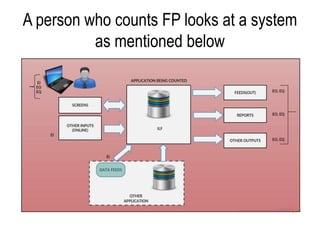
A person who counts FP looks at a system
as mentioned below
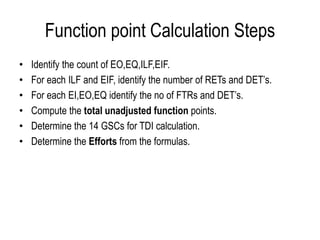
Function point Calculation Steps
• Identify the count of EO,EQ,ILF,EIF.
• For each ILF and EIF, identify the number of RETs and DET’s.
• For each EI,EO,EQ identify the no of FTRs and DET’s.
• Compute the total unadjusted function points.
• Determine the 14 GSCs for TDI calculation.
• Determine the Efforts from the formulas.
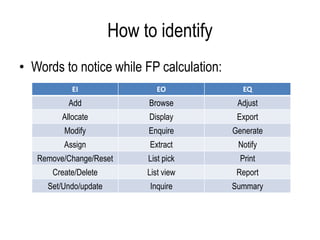
How to identify
• Words to notice while FP calculation:
EI EO EQ
Add Browse Adjust
Allocate Display Export
Modify Enquire Generate
Assign Extract Notify
Remove/Change/Reset List pick Print
Create/Delete List view Report
Set/Undo/update Inquire Summary
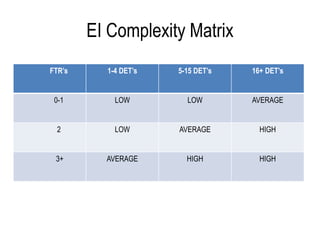
EI Complexity Matrix
FTR’s 1-4 DET’s 5-15 DET’s 16+ DET’s
0-1 LOW LOW AVERAGE
2 LOW AVERAGE HIGH
3+ AVERAGE HIGH HIGH
EO and EQ Complexity Matrix
FTR’s 1-5 DET’s 6-9 DET’s 20+ DET’s
0-1 LOW LOW AVERAGE
2-3 LOW AVERAGE HIGH
3+ AVERAGE HIGH HIGH
ILF and EIF Complexity matrix
RET’s 1-19 DET’s 20-50 DET’s 51+ DET’s
1 LOW LOW AVERAGE
2-5 LOW AVERAGE HIGH
6+ AVERAGE HIGH HIGH
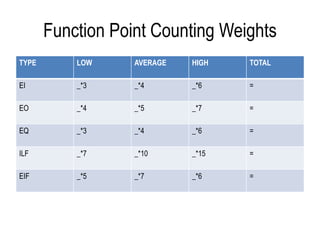
Function Point Counting Weights
TYPE LOW AVERAGE HIGH TOTAL
EI _*3 _*4 _*6 =
EO _*4 _*5 _*7 =
EQ _*3 _*4 _*6 =
ILF _*7 _*10 _*15 =
EIF _*5 _*7 _*6 =
Formulas
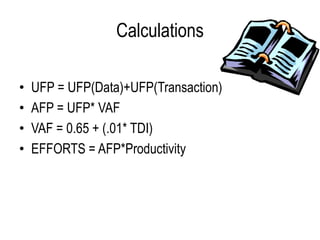
Calculations
• UFP = UFP(Data)+UFP(Transaction)
• AFP = UFP* VAF
• VAF = 0.65 + (.01* TDI)
• EFFORTS = AFP*Productivity
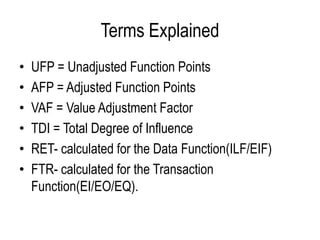
Terms Explained
• UFP = Unadjusted Function Points
• AFP = Adjusted Function Points
• VAF = Value Adjustment Factor
• TDI = Total Degree of Influence
• RET- calculated for the Data Function(ILF/EIF)
• FTR- calculated for the Transaction
Function(EI/EO/EQ).
Terms Explained
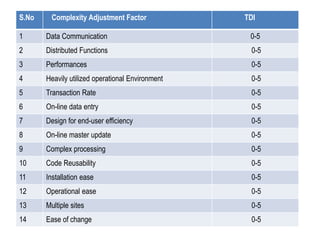
• TDI is calculated based on the 14 GSC’s(General
System Characteristics) on a scale of 0-5.
S.No Complexity Adjustment Factor TDI
1 Data Communication 0-5
2 Distributed Functions 0-5
3 Performances 0-5
4 Heavily utilized operational Environment 0-5
5 Transaction Rate 0-5
6 On-line data entry 0-5
7 Design for end-user efficiency 0-5
8 On-line master update 0-5
9 Complex processing 0-5
10 Code Reusability 0-5
11 Installation ease 0-5
12 Operational ease 0-5
13 Multiple sites 0-5
14 Ease of change 0-5
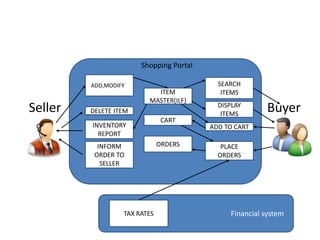
Seller Buyer
t
ADD,MODIFYA
INVENTORY
REPORT
INFORM
ORDER TO
SELLER
PLACE
ORDERS
ADD TO CART
DISPLAY
ITEMS
SEARCH
ITEMS
DELETE ITEM
ITEM
MASTER(ILF)
CART
ORDERS
Financial systemTAX RATES
Shopping Portal
Income Tax
Reports-
includes several
Calculated
fields........
EO
Employee
EMP No.
Dept No
Name
Basic Salary...
ILF
Employee Detail
Dept No XXXXX
Emp# Name Sal
A01 AAAA 12
P54 PQRS 32
..... ....... ...
..... ....... ...
EQ
EI
Tax Rate
Tax Slab
Tax Rate
.........
.............
................
EIF
Other ApplicationApplication Boundary
USER 1
USER 2
Practical Example
• Counting Radio alarm clock
• Inputs(EI’s) Outputs(EO’s/EQ’s)
Set time, Set alarm, Set Alarm, Sound, Display time
type of alarm, Set volume,
St am/pm, Set snooze,
Set On/Off alarm.
• Internal Logical files(ILF)
Time data(alarm data/ time data)
Radio data
• External Interface File(EIF’s)
Radio frequency
Fp analysis (counting functional points)

Fp analysis (counting functional points)

  • 1.
  • 2.
    A person whocounts FP looks at a system as mentioned below
  • 3.
    Function point CalculationSteps • Identify the count of EO,EQ,ILF,EIF. • For each ILF and EIF, identify the number of RETs and DET’s. • For each EI,EO,EQ identify the no of FTRs and DET’s. • Compute the total unadjusted function points. • Determine the 14 GSCs for TDI calculation. • Determine the Efforts from the formulas.
  • 4.
    How to identify •Words to notice while FP calculation: EI EO EQ Add Browse Adjust Allocate Display Export Modify Enquire Generate Assign Extract Notify Remove/Change/Reset List pick Print Create/Delete List view Report Set/Undo/update Inquire Summary
  • 6.
    EI Complexity Matrix FTR’s1-4 DET’s 5-15 DET’s 16+ DET’s 0-1 LOW LOW AVERAGE 2 LOW AVERAGE HIGH 3+ AVERAGE HIGH HIGH
  • 7.
    EO and EQComplexity Matrix FTR’s 1-5 DET’s 6-9 DET’s 20+ DET’s 0-1 LOW LOW AVERAGE 2-3 LOW AVERAGE HIGH 3+ AVERAGE HIGH HIGH
  • 8.
    ILF and EIFComplexity matrix RET’s 1-19 DET’s 20-50 DET’s 51+ DET’s 1 LOW LOW AVERAGE 2-5 LOW AVERAGE HIGH 6+ AVERAGE HIGH HIGH
  • 9.
    Function Point CountingWeights TYPE LOW AVERAGE HIGH TOTAL EI _*3 _*4 _*6 = EO _*4 _*5 _*7 = EQ _*3 _*4 _*6 = ILF _*7 _*10 _*15 = EIF _*5 _*7 _*6 =
  • 10.
  • 11.
    Calculations • UFP =UFP(Data)+UFP(Transaction) • AFP = UFP* VAF • VAF = 0.65 + (.01* TDI) • EFFORTS = AFP*Productivity
  • 12.
    Terms Explained • UFP= Unadjusted Function Points • AFP = Adjusted Function Points • VAF = Value Adjustment Factor • TDI = Total Degree of Influence • RET- calculated for the Data Function(ILF/EIF) • FTR- calculated for the Transaction Function(EI/EO/EQ).
  • 13.
    Terms Explained • TDIis calculated based on the 14 GSC’s(General System Characteristics) on a scale of 0-5.
  • 14.
    S.No Complexity AdjustmentFactor TDI 1 Data Communication 0-5 2 Distributed Functions 0-5 3 Performances 0-5 4 Heavily utilized operational Environment 0-5 5 Transaction Rate 0-5 6 On-line data entry 0-5 7 Design for end-user efficiency 0-5 8 On-line master update 0-5 9 Complex processing 0-5 10 Code Reusability 0-5 11 Installation ease 0-5 12 Operational ease 0-5 13 Multiple sites 0-5 14 Ease of change 0-5
  • 15.
    Seller Buyer t ADD,MODIFYA INVENTORY REPORT INFORM ORDER TO SELLER PLACE ORDERS ADDTO CART DISPLAY ITEMS SEARCH ITEMS DELETE ITEM ITEM MASTER(ILF) CART ORDERS Financial systemTAX RATES Shopping Portal
  • 16.
    Income Tax Reports- includes several Calculated fields........ EO Employee EMPNo. Dept No Name Basic Salary... ILF Employee Detail Dept No XXXXX Emp# Name Sal A01 AAAA 12 P54 PQRS 32 ..... ....... ... ..... ....... ... EQ EI Tax Rate Tax Slab Tax Rate ......... ............. ................ EIF Other ApplicationApplication Boundary USER 1 USER 2
  • 17.
    Practical Example • CountingRadio alarm clock • Inputs(EI’s) Outputs(EO’s/EQ’s) Set time, Set alarm, Set Alarm, Sound, Display time type of alarm, Set volume, St am/pm, Set snooze, Set On/Off alarm. • Internal Logical files(ILF) Time data(alarm data/ time data) Radio data • External Interface File(EIF’s) Radio frequency