#ASFnFlow @JosePaumard @delabassee
Asynchronous Systems
with Fn Flow
2
@delabassee
@JosePaumard
@JosePaumard
https://github.com/JosePaumard
https://www.slideshare.net/jpaumard
https://www.youtube.com/user/JPaumard
start
#ASFnFlow @JosePaumard @delabassee
Questions?
#ASFnFlow
@JosePaumard @delabassee#ASFnFlow
Agenda
Asynchronous Systems with Fn Flow
#ASFnFlow @JosePaumard @delabassee
An Open Source Container Native FaaS Platform
https://github.com/fnproject
@JosePaumard @delabassee#ASFnFlow
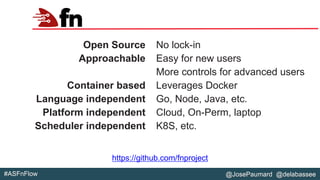
Fn
Open Source
Approachable
Container based
Language independent
Platform independent
Scheduler independent
No lock-in
Easy for new users
More controls for advanced users
Leverages Docker
Go, Node, Java, etc.
Cloud, On-Perm, laptop
K8S, etc.
https://github.com/fnproject
@JosePaumard @delabassee#ASFnFlow
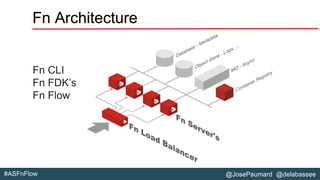
Fn Architecture
Fn CLI
Fn FDK’s
Fn Flow
#ASFnFlow @JosePaumard @delabassee
Setting up Fn
@JosePaumard @delabassee#ASFnFlow
Setting Up Fn
1) Works on Linux, Windows and Mac
@JosePaumard @delabassee#ASFnFlow
Setting Up Fn
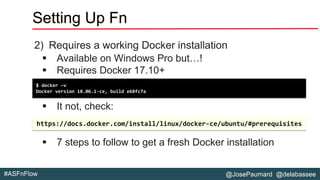
2) Requires a working Docker installation
▪ Available on Windows Pro but…!
▪ Requires Docker 17.10+
▪ It not, check:
▪ 7 steps to follow to get a fresh Docker installation
$ docker –v
Docker version 18.06.1-ce, build e68fc7a
https://docs.docker.com/install/linux/docker-ce/ubuntu/#prerequisites
@JosePaumard @delabassee#ASFnFlow
Setting Up Fn
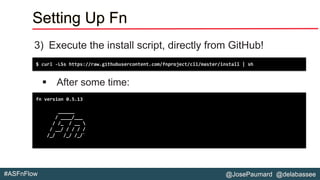
3) Execute the install script, directly from GitHub!
▪ After some time:
$ curl -LSs https://raw.githubusercontent.com/fnproject/cli/master/install | sh
fn version 0.5.13
______
/ ____/___
/ /_ / __ 
/ __/ / / / /
/_/ /_/ /_/`
@JosePaumard @delabassee#ASFnFlow
Setting Up Fn
4) Launch Fn Server
$ fn start
@JosePaumard @delabassee#ASFnFlow
Setting Up Fn
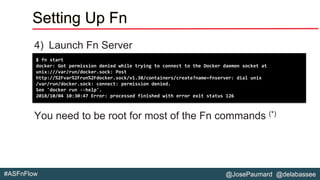
4) Launch Fn Server
You need to be root for most of the Fn commands (*)
$ fn start
docker: Got permission denied while trying to connect to the Docker daemon socket at
unix:///var/run/docker.sock: Post
http://%2Fvar%2Frun%2Fdocker.sock/v1.38/containers/create?name=fnserver: dial unix
/var/run/docker.sock: connect: permission denied.
See 'docker run --help'.
2018/10/04 10:30:47 Error: processed finished with error exit status 126
@JosePaumard @delabassee#ASFnFlow
Setting Up Fn
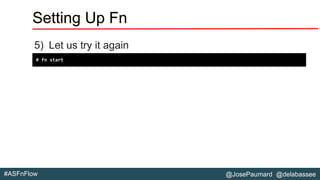
5) Let us try it again
# fn start
@JosePaumard @delabassee#ASFnFlow
Setting Up Fn
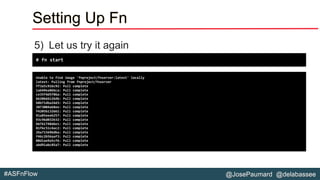
5) Let us try it again
# fn start
Unable to find image 'fnproject/fnserver:latest' locally
latest: Pulling from fnproject/fnserver
ff3a5c916c92: Pull complete
1a649ea86bca: Pull complete
ce35f4d5f86a: Pull complete
b6206661264b: Pull complete
b8b71dba24d3: Pull complete
3873004a68ee: Pull complete
f4205b132661: Pull complete
91a85eeeb257: Pull complete
93c96d032b32: Pull complete
bb761748d6e1: Pull complete
81f6c51c4ac2: Pull complete
2ba715696dba: Pull complete
f46c2b56aaf3: Pull complete
08d1ae9a5cf6: Pull complete
abd91abc85a7: Pull complete
@JosePaumard @delabassee#ASFnFlow
Setting Up Fn
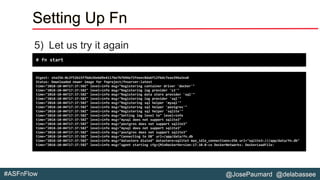
5) Let us try it again
# fn start
Digest: sha256:0c2f52b15f7bde26e6d9e4117be7b7b94e72feeec8da6f12f6dc7eae294a2ea8
Status: Downloaded newer image for fnproject/fnserver:latest
time="2018-10-04T17:37:58Z" level=info msg="Registering container driver 'docker'"
time="2018-10-04T17:37:58Z" level=info msg="Registering log provider 's3'"
time="2018-10-04T17:37:58Z" level=info msg="Registering data store provider 'sql'"
time="2018-10-04T17:37:58Z" level=info msg="Registering log provider 'sql'"
time="2018-10-04T17:37:58Z" level=info msg="Registering sql helper 'mysql'"
time="2018-10-04T17:37:58Z" level=info msg="Registering sql helper 'postgres'"
time="2018-10-04T17:37:58Z" level=info msg="Registering sql helper 'sqlite'"
time="2018-10-04T17:37:58Z" level=info msg="Setting log level to" level=info
time="2018-10-04T17:37:58Z" level=info msg="mysql does not support sqlite3"
time="2018-10-04T17:37:58Z" level=info msg="postgres does not support sqlite3"
time="2018-10-04T17:37:58Z" level=info msg="mysql does not support sqlite3"
time="2018-10-04T17:37:58Z" level=info msg="postgres does not support sqlite3"
time="2018-10-04T17:37:58Z" level=info msg="Connecting to DB" url=/app/data/fn.db
time="2018-10-04T17:37:58Z" level=info msg="datastore dialed" datastore=sqlite3 max_idle_connections=256 url="sqlite3:///app/data/fn.db"
time="2018-10-04T17:37:58Z" level=info msg="agent starting cfg={MinDockerVersion:17.10.0-ce DockerNetworks: DockerLoadFile:
@JosePaumard @delabassee#ASFnFlow
Setting Up Fn
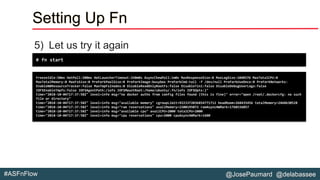
5) Let us try it again
# fn start
FreezeIdle:50ms HotPoll:200ms HotLauncherTimeout:1h0m0s AsyncChewPoll:1m0s MaxResponseSize:0 MaxLogSize:1048576 MaxTotalCPU:0
MaxTotalMemory:0 MaxFsSize:0 PreForkPoolSize:0 PreForkImage:busybox PreForkCmd:tail -f /dev/null PreForkUseOnce:0 PreForkNetworks:
EnableNBResourceTracker:false MaxTmpFsInodes:0 DisableReadOnlyRootFs:false DisableTini:false DisableDebugUserLogs:false
IOFSEnableTmpfs:false IOFSAgentPath:/iofs IOFSMountRoot:/home/ubuntu/.fn/iofs IOFSOpts:}"
time="2018-10-04T17:37:58Z" level=info msg="no docker auths from config files found (this is fine)" error="open /root/.dockercfg: no such
file or directory"
time="2018-10-04T17:37:58Z" level=info msg="available memory" cgroupLimit=9223372036854771712 headRoom=268435456 totalMemory=2468630528
time="2018-10-04T17:37:58Z" level=info msg="ram reservations" availMemory=2200195072 ramAsyncHWMark=1760156057
time="2018-10-04T17:37:58Z" level=info msg="available cpu" availCPU=2000 totalCPU=2000
time="2018-10-04T17:37:58Z" level=info msg="cpu reservations" cpu=2000 cpuAsyncHWMark=1600
@JosePaumard @delabassee#ASFnFlow
Setting Up Fn
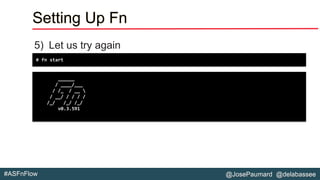
5) Let us try again
# fn start
______
/ ____/___
/ /_ / __ 
/ __/ / / / /
/_/ /_/ /_/
v0.3.591
@JosePaumard @delabassee#ASFnFlow
Setting Up Fn
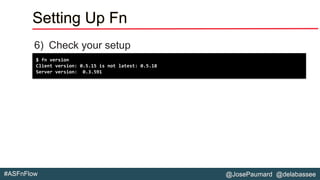
6) Check your setup
$ fn version
Client version: 0.5.15 is not latest: 0.5.18
Server version: 0.3.591
#ASFnFlow @JosePaumard @delabassee
Fn Concepts
@JosePaumard @delabassee#ASFnFlow
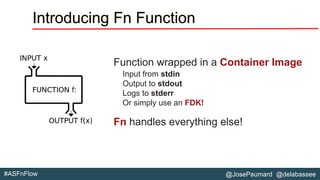
Introducing Fn Function
Function wrapped in a Container Image
Input from stdin
Output to stdout
Logs to stderr
Or simply use an FDK!
Fn handles everything else!
@JosePaumard @delabassee#ASFnFlow
Fn Concepts
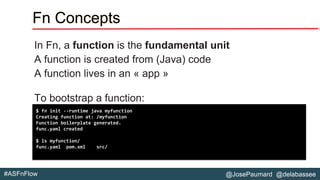
In Fn, a function is the fundamental unit
A function is created from (Java) code
A function lives in an « app »
To bootstrap a function:
$ fn init --runtime java myfunction
Creating function at: /myfunction
Function boilerplate generated.
func.yaml created
$ ls myfunction/
func.yaml pom.xml src/
@JosePaumard @delabassee#ASFnFlow
Fn Concepts
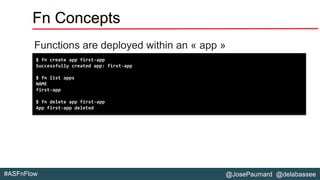
Functions are deployed within an « app »
$ fn create app first-app
Successfully created app: first-app
$ fn list apps
NAME
first-app
$ fn delete app first-app
App first-app deleted
@JosePaumard @delabassee#ASFnFlow
Fn Concepts
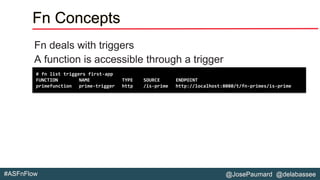
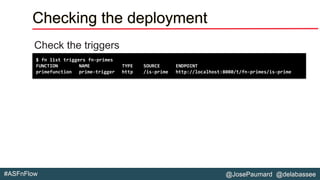
Fn deals with triggers
A function is accessible through a trigger
# fn list triggers first-app
FUNCTION NAME TYPE SOURCE ENDPOINT
primefunction prime-trigger http /is-prime http://localhost:8080/t/fn-primes/is-prime
#ASFnFlow @JosePaumard @delabassee
Setting up a Fn Java Project
@JosePaumard @delabassee#ASFnFlow
Setting Up a Function
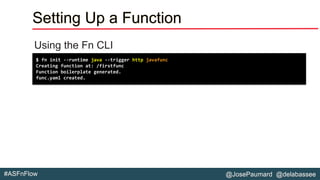
Using the Fn CLI
$ fn init --runtime java --trigger http javafunc
Creating function at: /firstfunc
Function boilerplate generated.
func.yaml created.
@JosePaumard @delabassee#ASFnFlow
Setting Up a Function
Using the Fn CLI
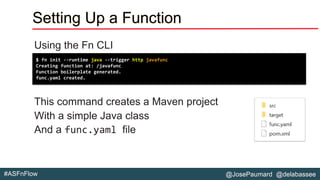
This command creates a Maven project
With a simple Java class
And a func.yaml file
$ fn init --runtime java --trigger http javafunc
Creating function at: /javafunc
Function boilerplate generated.
func.yaml created.
@JosePaumard @delabassee#ASFnFlow
The func.yaml file
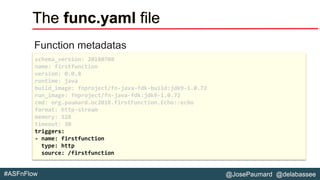
Function metadatas
https://github.com/fnproject/docs/blob/master/fn/develop/func-file.md
@JosePaumard @delabassee#ASFnFlow
The func.yaml file
Function metadatas
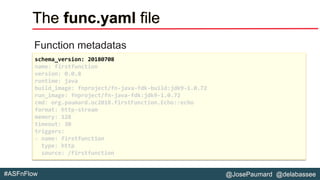
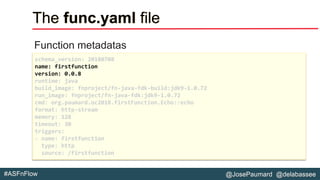
schema_version: 20180708
name: firstfunction
version: 0.0.8
runtime: java
build_image: fnproject/fn-java-fdk-build:jdk9-1.0.72
run_image: fnproject/fn-java-fdk:jdk9-1.0.72
cmd: org.paumard.oc2018.firstFunction.Echo::echo
format: http-stream
memory: 128
timeout: 30
triggers:
- name: firstfunction
type: http
source: /firstfunction
@JosePaumard @delabassee#ASFnFlow
The func.yaml file
Function metadatas
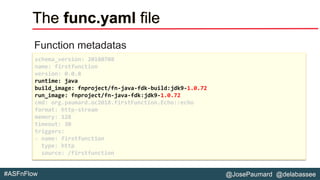
schema_version: 20180708
name: firstfunction
version: 0.0.8
runtime: java
build_image: fnproject/fn-java-fdk-build:jdk9-1.0.72
run_image: fnproject/fn-java-fdk:jdk9-1.0.72
cmd: org.paumard.oc2018.firstFunction.Echo::echo
format: http-stream
memory: 128
timeout: 30
triggers:
- name: firstfunction
type: http
source: /firstfunction
@JosePaumard @delabassee#ASFnFlow
The func.yaml file
Function metadatas
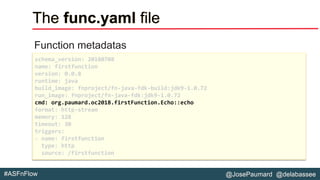
schema_version: 20180708
name: firstfunction
version: 0.0.8
runtime: java
build_image: fnproject/fn-java-fdk-build:jdk9-1.0.72
run_image: fnproject/fn-java-fdk:jdk9-1.0.72
cmd: org.paumard.oc2018.firstFunction.Echo::echo
format: http-stream
memory: 128
timeout: 30
triggers:
- name: firstfunction
type: http
source: /firstfunction
@JosePaumard @delabassee#ASFnFlow
The func.yaml file
Function metadatas
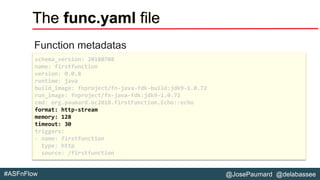
schema_version: 20180708
name: firstfunction
version: 0.0.8
runtime: java
build_image: fnproject/fn-java-fdk-build:jdk9-1.0.72
run_image: fnproject/fn-java-fdk:jdk9-1.0.72
cmd: org.paumard.oc2018.firstFunction.Echo::echo
format: http-stream
memory: 128
timeout: 30
triggers:
- name: firstfunction
type: http
source: /firstfunction
@JosePaumard @delabassee#ASFnFlow
The func.yaml file
Function metadatas
schema_version: 20180708
name: firstfunction
version: 0.0.8
runtime: java
build_image: fnproject/fn-java-fdk-build:jdk9-1.0.72
run_image: fnproject/fn-java-fdk:jdk9-1.0.72
cmd: org.paumard.oc2018.firstFunction.Echo::echo
format: http-stream
memory: 128
timeout: 30
triggers:
- name: firstfunction
type: http
source: /firstfunction
@JosePaumard @delabassee#ASFnFlow
The func.yaml file
Function metadatas
schema_version: 20180708
name: firstfunction
version: 0.0.8
runtime: java
build_image: fnproject/fn-java-fdk-build:jdk9-1.0.72
run_image: fnproject/fn-java-fdk:jdk9-1.0.72
cmd: org.paumard.oc2018.firstFunction.Echo::echo
format: http-stream
memory: 128
timeout: 30
triggers:
- name: firstfunction
type: http
source: /firstfunction
@JosePaumard @delabassee#ASFnFlow
The pom.xml file
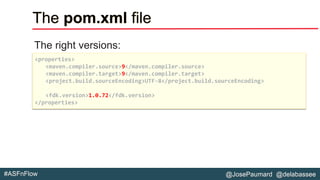
The right versions:
<properties>
<maven.compiler.source>9</maven.compiler.source>
<maven.compiler.target>9</maven.compiler.target>
<project.build.sourceEncoding>UTF-8</project.build.sourceEncoding>
<fdk.version>1.0.72</fdk.version>
</properties>
@JosePaumard @delabassee#ASFnFlow
The pom.xml file
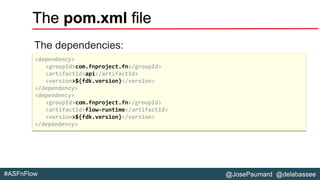
The dependencies:
<dependency>
<groupId>com.fnproject.fn</groupId>
<artifactId>api</artifactId>
<version>${fdk.version}</version>
</dependency>
<dependency>
<groupId>com.fnproject.fn</groupId>
<artifactId>flow-runtime</artifactId>
<version>${fdk.version}</version>
</dependency>
@JosePaumard @delabassee#ASFnFlow
The pom.xml file
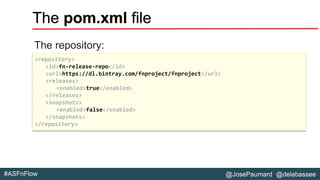
The repository:
<repository>
<id>fn-release-repo</id>
<url>https://dl.bintray.com/fnproject/fnproject</url>
<releases>
<enabled>true</enabled>
</releases>
<snapshots>
<enabled>false</enabled>
</snapshots>
</repository>
@JosePaumard @delabassee#ASFnFlow
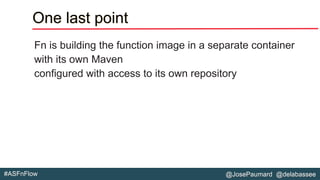
One last point
Fn is building the function image in a separate container
with its own Maven
configured with access to its own repository
@JosePaumard @delabassee#ASFnFlow
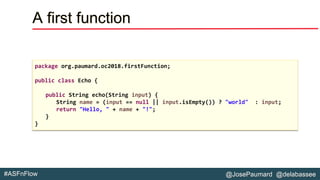
A first function
package org.paumard.oc2018.firstFunction;
public class Echo {
public String echo(String input) {
String name = (input == null || input.isEmpty()) ? "world" : input;
return "Hello, " + name + "!";
}
}
@JosePaumard @delabassee#ASFnFlow
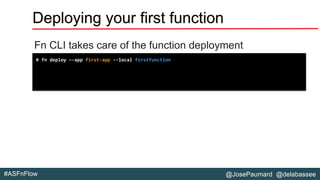
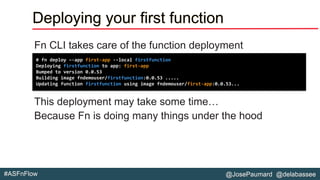
Deploying your first function
Fn CLI takes care of the function deployment
# fn deploy –-app first-app --local firstfunction
@JosePaumard @delabassee#ASFnFlow
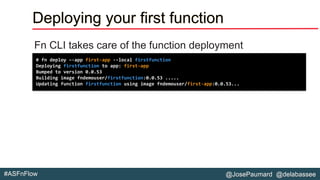
Deploying your first function
Fn CLI takes care of the function deployment
# fn deploy –-app first-app --local firstfunction
Deploying firstfunction to app: first-app
Bumped to version 0.0.53
Building image fndemouser/firstfunction:0.0.53 .....
Updating function firstfunction using image fndemouser/first-app:0.0.53...
@JosePaumard @delabassee#ASFnFlow
Deploying your first function
Fn CLI takes care of the function deployment
This deployment may take some time…
Because Fn is doing many things under the hood
# fn deploy –-app first-app --local firstfunction
Deploying firstfunction to app: first-app
Bumped to version 0.0.53
Building image fndemouser/firstfunction:0.0.53 .....
Updating function firstfunction using image fndemouser/first-app:0.0.53...
@JosePaumard @delabassee#ASFnFlow
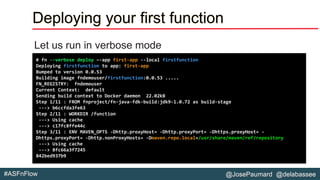
Deploying your first function
Let us run in verbose mode
# fn --verbose deploy –-app first-app --local firstfunction
Deploying firstfunction to app: first-app
Bumped to version 0.0.53
Building image fndemouser/firstfunction:0.0.53 .....
FN_REGISTRY: fndemouser
Current Context: default
Sending build context to Docker daemon 22.02kB
Step 1/11 : FROM fnproject/fn-java-fdk-build:jdk9-1.0.72 as build-stage
---> b6ccfda3fe63
Step 2/11 : WORKDIR /function
---> Using cache
---> c17fc8ffe44c
Step 3/11 : ENV MAVEN_OPTS -Dhttp.proxyHost= -Dhttp.proxyPort= -Dhttps.proxyHost= -
Dhttps.proxyPort= -Dhttp.nonProxyHosts= -Dmaven.repo.local=/usr/share/maven/ref/repository
---> Using cache
---> 8fc66a3f7245
842bed937b9
@JosePaumard @delabassee#ASFnFlow
Deploying your first function
Let us run in verbose mode
Step 4/11 : ADD pom.xml /function/pom.xml
---> Using cache
---> 1cdf0a511da1
Step 5/11 : RUN ["mvn", "package", "dependency:copy-dependencies", "-DincludeScope=runtime", "-
DskipTests=true", "-Dmdep.prependGroupId=true", "-DoutputDirectory=target", "--fail-never"]
---> Using cache
---> 3c9c6b613843
Step 6/11 : ADD src /function/src
---> Using cache
---> 8842bed937b9
Step 7/11 : RUN ["mvn", "package"]
---> Running in 27c78d8e9bd3
@JosePaumard @delabassee#ASFnFlow
Deploying your first function
Let us run in verbose mode
[INFO] Scanning for projects...
[INFO]
[INFO] ---------------------< org.paumard:main-function >----------------------
[INFO] Building main-function 1.0-SNAPSHOT
[INFO] --------------------------------[ jar ]---------------------------------
[INFO]
[INFO] --- maven-resources-plugin:2.6:resources (default-resources) @ main-function ---
[INFO] Using 'UTF-8' encoding to copy filtered resources.
[INFO] Copying 0 resource
[INFO]
[INFO] --- maven-compiler-plugin:3.1:compile (default-compile) @ main-function ---
[INFO] Changes detected - recompiling the module!
[INFO] Compiling 2 source files to /function/target/classes
[INFO]
[INFO] --- maven-resources-plugin:2.6:testResources (default-testResources) @ main-function ---
[INFO] Using 'UTF-8' encoding to copy filtered resources.
[INFO] skip non existing resourceDirectory /function/src/test/resources
[INFO]
[INFO] --- maven-compiler-plugin:3.1:testCompile (default-testCompile) @ main-function ---
[INFO] Nothing to compile - all classes are up to date
[INFO]
[INFO] --- maven-surefire-plugin:2.12.4:test (default-test) @ main-function ---
[INFO] No tests to run.
[INFO]
[INFO] --- maven-jar-plugin:2.4:jar (default-jar) @ main-function ---
[INFO] Building jar: /function/target/main-function-1.0-SNAPSHOT.jar
[INFO] ------------------------------------------------------------------------
[INFO] BUILD SUCCESS
[INFO] ------------------------------------------------------------------------
[INFO] Total time: 42.379 s
[INFO] Finished at: 2018-10-18T14:33:09Z
[INFO] ------------------------------------------------------------------------
@JosePaumard @delabassee#ASFnFlow
Deploying your first function
Let us run in verbose mode
Removing intermediate container 27c78d8e9bd3
---> 85e15d82caf4
Step 8/11 : FROM fnproject/fn-java-fdk:jdk9-1.0.72
---> d23b2ab9ca0a
Step 9/11 : WORKDIR /function
---> Using cache
---> 6172132f0ccb
Step 10/11 : COPY --from=build-stage /function/target/*.jar /function/app/
---> cc5f53168459
Step 11/11 : CMD ["org.paumard.oc2018.firstFunction.Echo::echo"]
---> Running in 094ae9918e3e
Removing intermediate container 094ae9918e3e
---> e2e55466ff99
Successfully built e2e55466ff99
Successfully tagged fndemouser/firstfunction:0.0.56
#ASFnFlow @JosePaumard @delabassee
Checking the deployment
@JosePaumard @delabassee#ASFnFlow
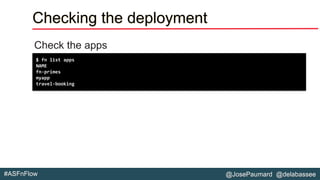
Checking the deployment
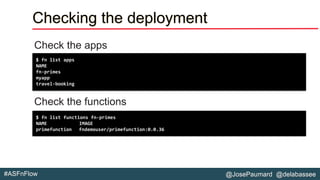
Check the apps
$ fn list apps
NAME
fn-primes
myapp
travel-booking
@JosePaumard @delabassee#ASFnFlow
Checking the deployment
Check the apps
Check the functions
$ fn list apps
NAME
fn-primes
myapp
travel-booking
$ fn list functions fn-primes
NAME IMAGE
primefunction fndemouser/primefunction:0.0.36
@JosePaumard @delabassee#ASFnFlow
Checking the deployment
Check the triggers
$ fn list triggers fn-primes
FUNCTION NAME TYPE SOURCE ENDPOINT
primefunction prime-trigger http /is-prime http://localhost:8080/t/fn-primes/is-prime
@JosePaumard @delabassee#ASFnFlow
Checking the deployment
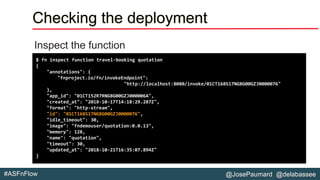
Inspect the function
$ fn inspect function travel-booking quotation
{
"annotations": {
"fnproject.io/fn/invokeEndpoint":
"http://localhost:8080/invoke/01CT168S17NG8G00GZJ0000076"
},
"app_id": "01CT152R7RNG8G00GZJ000006A",
"created_at": "2018-10-17T14:18:29.287Z",
"format": "http-stream",
"id": "01CT168S17NG8G00GZJ0000076",
"idle_timeout": 30,
"image": "fndemouser/quotation:0.0.13",
"memory": 128,
"name": "quotation",
"timeout": 30,
"updated_at": "2018-10-21T16:35:07.894Z"
}
@JosePaumard @delabassee#ASFnFlow
Checking the deployment
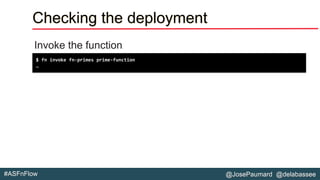
Invoke the function
$ fn invoke fn-primes prime-function
…
@JosePaumard @delabassee#ASFnFlow
Function Client
Writing a function client is a matter of writing an HTTP client
We have a nice API for that in Java 11 (*)
https://docs.oracle.com/en/java/javase/11/docs/api/java.net.http/java/net/http/HttpClient.html
@JosePaumard @delabassee#ASFnFlow
Function Client
public static void main(String[] args) throws IOException, InterruptedException {
HttpClient httpClient = HttpClient.newHttpClient();
HttpRequest.BodyPublisher bodyPublisher = HttpRequest.BodyPublishers.ofString("3");
HttpRequest request =
HttpRequest.newBuilder()
.POST(bodyPublisher)
.uri(URI.create("http://localhost:8080/t/fn-primes/is-prime"))
.build();
HttpResponse.BodyHandler<Stream<String>> responseBodyHandler =
HttpResponse.BodyHandlers.ofLines();
HttpResponse<Stream<String>> response = httpClient.send(request, responseBodyHandler);
List<String> list = response.body().collect(Collectors.toList());
System.out.println("list = " + list);
}
#ASFnFlow @JosePaumard @delabassee
Fn Flow
@JosePaumard @delabassee#ASFnFlow
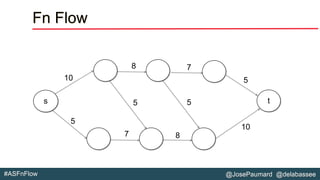
Fn Flow
ts
10
5
5 5
5
8 7
7 8
10
@JosePaumard @delabassee#ASFnFlow
Fn Flow
• For long-running, reliable, scalable functions with
primitives for fork-join, chaining, delays & error handling
• Java support « based » on Java CompletableFuture API
• Additonal languages support on the way
• Work in progress
#ASFnFlow @JosePaumard @delabassee
A simple Flow example
@JosePaumard @delabassee#ASFnFlow
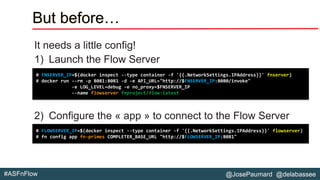
But before…
It needs a little config!
1) Launch the Flow Server
2) Configure the « app » to connect to the Flow Server
# FNSERVER_IP=$(docker inspect --type container -f '{{.NetworkSettings.IPAddress}}' fnserver)
# docker run --rm -p 8081:8081 -d -e API_URL="http://$FNSERVER_IP:8080/invoke"
-e LOG_LEVEL=debug -e no_proxy=$FNSERVER_IP
--name flowserver fnproject/flow:latest
# FLOWSERVER_IP=$(docker inspect --type container -f '{{.NetworkSettings.IPAddress}}' flowserver)
# fn config app fn-primes COMPLETER_BASE_URL "http://$FLOWSERVER_IP:8081"
#ASFnFlow @JosePaumard @delabassee
A real Flow example
@JosePaumard @delabassee#ASFnFlow
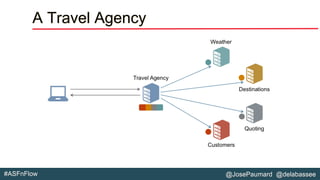
A Travel Agency
@JosePaumard @delabassee#ASFnFlow
Resources
• https://github.com/JosePaumard/fn-demo-oracle-code-one-2018
• https://github.com/fnproject/tutorials/blob/master/JavaFDKIntroduction
• https://fnproject.slack.com/
#ASFnFlow @JosePaumard @delabassee
Merci!
#ASFnFlow @JosePaumard @delabassee
Questions?

Asynchronous Systems with Fn Flow

  • 1.
  • 2.
  • 3.
  • 4.
  • 6.
  • 7.
  • 8.
    #ASFnFlow @JosePaumard @delabassee AnOpen Source Container Native FaaS Platform https://github.com/fnproject
  • 9.
    @JosePaumard @delabassee#ASFnFlow Fn Open Source Approachable Containerbased Language independent Platform independent Scheduler independent No lock-in Easy for new users More controls for advanced users Leverages Docker Go, Node, Java, etc. Cloud, On-Perm, laptop K8S, etc. https://github.com/fnproject
  • 10.
  • 11.
  • 12.
    @JosePaumard @delabassee#ASFnFlow Setting UpFn 1) Works on Linux, Windows and Mac
  • 13.
    @JosePaumard @delabassee#ASFnFlow Setting UpFn 2) Requires a working Docker installation ▪ Available on Windows Pro but…! ▪ Requires Docker 17.10+ ▪ It not, check: ▪ 7 steps to follow to get a fresh Docker installation $ docker –v Docker version 18.06.1-ce, build e68fc7a https://docs.docker.com/install/linux/docker-ce/ubuntu/#prerequisites
  • 14.
    @JosePaumard @delabassee#ASFnFlow Setting UpFn 3) Execute the install script, directly from GitHub! ▪ After some time: $ curl -LSs https://raw.githubusercontent.com/fnproject/cli/master/install | sh fn version 0.5.13 ______ / ____/___ / /_ / __ / __/ / / / / /_/ /_/ /_/`
  • 15.
    @JosePaumard @delabassee#ASFnFlow Setting UpFn 4) Launch Fn Server $ fn start
  • 16.
    @JosePaumard @delabassee#ASFnFlow Setting UpFn 4) Launch Fn Server You need to be root for most of the Fn commands (*) $ fn start docker: Got permission denied while trying to connect to the Docker daemon socket at unix:///var/run/docker.sock: Post http://%2Fvar%2Frun%2Fdocker.sock/v1.38/containers/create?name=fnserver: dial unix /var/run/docker.sock: connect: permission denied. See 'docker run --help'. 2018/10/04 10:30:47 Error: processed finished with error exit status 126
  • 17.
    @JosePaumard @delabassee#ASFnFlow Setting UpFn 5) Let us try it again # fn start
  • 18.
    @JosePaumard @delabassee#ASFnFlow Setting UpFn 5) Let us try it again # fn start Unable to find image 'fnproject/fnserver:latest' locally latest: Pulling from fnproject/fnserver ff3a5c916c92: Pull complete 1a649ea86bca: Pull complete ce35f4d5f86a: Pull complete b6206661264b: Pull complete b8b71dba24d3: Pull complete 3873004a68ee: Pull complete f4205b132661: Pull complete 91a85eeeb257: Pull complete 93c96d032b32: Pull complete bb761748d6e1: Pull complete 81f6c51c4ac2: Pull complete 2ba715696dba: Pull complete f46c2b56aaf3: Pull complete 08d1ae9a5cf6: Pull complete abd91abc85a7: Pull complete
  • 19.
    @JosePaumard @delabassee#ASFnFlow Setting UpFn 5) Let us try it again # fn start Digest: sha256:0c2f52b15f7bde26e6d9e4117be7b7b94e72feeec8da6f12f6dc7eae294a2ea8 Status: Downloaded newer image for fnproject/fnserver:latest time="2018-10-04T17:37:58Z" level=info msg="Registering container driver 'docker'" time="2018-10-04T17:37:58Z" level=info msg="Registering log provider 's3'" time="2018-10-04T17:37:58Z" level=info msg="Registering data store provider 'sql'" time="2018-10-04T17:37:58Z" level=info msg="Registering log provider 'sql'" time="2018-10-04T17:37:58Z" level=info msg="Registering sql helper 'mysql'" time="2018-10-04T17:37:58Z" level=info msg="Registering sql helper 'postgres'" time="2018-10-04T17:37:58Z" level=info msg="Registering sql helper 'sqlite'" time="2018-10-04T17:37:58Z" level=info msg="Setting log level to" level=info time="2018-10-04T17:37:58Z" level=info msg="mysql does not support sqlite3" time="2018-10-04T17:37:58Z" level=info msg="postgres does not support sqlite3" time="2018-10-04T17:37:58Z" level=info msg="mysql does not support sqlite3" time="2018-10-04T17:37:58Z" level=info msg="postgres does not support sqlite3" time="2018-10-04T17:37:58Z" level=info msg="Connecting to DB" url=/app/data/fn.db time="2018-10-04T17:37:58Z" level=info msg="datastore dialed" datastore=sqlite3 max_idle_connections=256 url="sqlite3:///app/data/fn.db" time="2018-10-04T17:37:58Z" level=info msg="agent starting cfg={MinDockerVersion:17.10.0-ce DockerNetworks: DockerLoadFile:
  • 20.
    @JosePaumard @delabassee#ASFnFlow Setting UpFn 5) Let us try it again # fn start FreezeIdle:50ms HotPoll:200ms HotLauncherTimeout:1h0m0s AsyncChewPoll:1m0s MaxResponseSize:0 MaxLogSize:1048576 MaxTotalCPU:0 MaxTotalMemory:0 MaxFsSize:0 PreForkPoolSize:0 PreForkImage:busybox PreForkCmd:tail -f /dev/null PreForkUseOnce:0 PreForkNetworks: EnableNBResourceTracker:false MaxTmpFsInodes:0 DisableReadOnlyRootFs:false DisableTini:false DisableDebugUserLogs:false IOFSEnableTmpfs:false IOFSAgentPath:/iofs IOFSMountRoot:/home/ubuntu/.fn/iofs IOFSOpts:}" time="2018-10-04T17:37:58Z" level=info msg="no docker auths from config files found (this is fine)" error="open /root/.dockercfg: no such file or directory" time="2018-10-04T17:37:58Z" level=info msg="available memory" cgroupLimit=9223372036854771712 headRoom=268435456 totalMemory=2468630528 time="2018-10-04T17:37:58Z" level=info msg="ram reservations" availMemory=2200195072 ramAsyncHWMark=1760156057 time="2018-10-04T17:37:58Z" level=info msg="available cpu" availCPU=2000 totalCPU=2000 time="2018-10-04T17:37:58Z" level=info msg="cpu reservations" cpu=2000 cpuAsyncHWMark=1600
  • 21.
    @JosePaumard @delabassee#ASFnFlow Setting UpFn 5) Let us try again # fn start ______ / ____/___ / /_ / __ / __/ / / / / /_/ /_/ /_/ v0.3.591
  • 22.
    @JosePaumard @delabassee#ASFnFlow Setting UpFn 6) Check your setup $ fn version Client version: 0.5.15 is not latest: 0.5.18 Server version: 0.3.591
  • 23.
  • 24.
    @JosePaumard @delabassee#ASFnFlow Introducing FnFunction Function wrapped in a Container Image Input from stdin Output to stdout Logs to stderr Or simply use an FDK! Fn handles everything else!
  • 25.
    @JosePaumard @delabassee#ASFnFlow Fn Concepts InFn, a function is the fundamental unit A function is created from (Java) code A function lives in an « app » To bootstrap a function: $ fn init --runtime java myfunction Creating function at: /myfunction Function boilerplate generated. func.yaml created $ ls myfunction/ func.yaml pom.xml src/
  • 26.
    @JosePaumard @delabassee#ASFnFlow Fn Concepts Functionsare deployed within an « app » $ fn create app first-app Successfully created app: first-app $ fn list apps NAME first-app $ fn delete app first-app App first-app deleted
  • 27.
    @JosePaumard @delabassee#ASFnFlow Fn Concepts Fndeals with triggers A function is accessible through a trigger # fn list triggers first-app FUNCTION NAME TYPE SOURCE ENDPOINT primefunction prime-trigger http /is-prime http://localhost:8080/t/fn-primes/is-prime
  • 28.
  • 29.
    @JosePaumard @delabassee#ASFnFlow Setting Upa Function Using the Fn CLI $ fn init --runtime java --trigger http javafunc Creating function at: /firstfunc Function boilerplate generated. func.yaml created.
  • 30.
    @JosePaumard @delabassee#ASFnFlow Setting Upa Function Using the Fn CLI This command creates a Maven project With a simple Java class And a func.yaml file $ fn init --runtime java --trigger http javafunc Creating function at: /javafunc Function boilerplate generated. func.yaml created.
  • 31.
    @JosePaumard @delabassee#ASFnFlow The func.yamlfile Function metadatas https://github.com/fnproject/docs/blob/master/fn/develop/func-file.md
  • 32.
    @JosePaumard @delabassee#ASFnFlow The func.yamlfile Function metadatas schema_version: 20180708 name: firstfunction version: 0.0.8 runtime: java build_image: fnproject/fn-java-fdk-build:jdk9-1.0.72 run_image: fnproject/fn-java-fdk:jdk9-1.0.72 cmd: org.paumard.oc2018.firstFunction.Echo::echo format: http-stream memory: 128 timeout: 30 triggers: - name: firstfunction type: http source: /firstfunction
  • 33.
    @JosePaumard @delabassee#ASFnFlow The func.yamlfile Function metadatas schema_version: 20180708 name: firstfunction version: 0.0.8 runtime: java build_image: fnproject/fn-java-fdk-build:jdk9-1.0.72 run_image: fnproject/fn-java-fdk:jdk9-1.0.72 cmd: org.paumard.oc2018.firstFunction.Echo::echo format: http-stream memory: 128 timeout: 30 triggers: - name: firstfunction type: http source: /firstfunction
  • 34.
    @JosePaumard @delabassee#ASFnFlow The func.yamlfile Function metadatas schema_version: 20180708 name: firstfunction version: 0.0.8 runtime: java build_image: fnproject/fn-java-fdk-build:jdk9-1.0.72 run_image: fnproject/fn-java-fdk:jdk9-1.0.72 cmd: org.paumard.oc2018.firstFunction.Echo::echo format: http-stream memory: 128 timeout: 30 triggers: - name: firstfunction type: http source: /firstfunction
  • 35.
    @JosePaumard @delabassee#ASFnFlow The func.yamlfile Function metadatas schema_version: 20180708 name: firstfunction version: 0.0.8 runtime: java build_image: fnproject/fn-java-fdk-build:jdk9-1.0.72 run_image: fnproject/fn-java-fdk:jdk9-1.0.72 cmd: org.paumard.oc2018.firstFunction.Echo::echo format: http-stream memory: 128 timeout: 30 triggers: - name: firstfunction type: http source: /firstfunction
  • 36.
    @JosePaumard @delabassee#ASFnFlow The func.yamlfile Function metadatas schema_version: 20180708 name: firstfunction version: 0.0.8 runtime: java build_image: fnproject/fn-java-fdk-build:jdk9-1.0.72 run_image: fnproject/fn-java-fdk:jdk9-1.0.72 cmd: org.paumard.oc2018.firstFunction.Echo::echo format: http-stream memory: 128 timeout: 30 triggers: - name: firstfunction type: http source: /firstfunction
  • 37.
    @JosePaumard @delabassee#ASFnFlow The func.yamlfile Function metadatas schema_version: 20180708 name: firstfunction version: 0.0.8 runtime: java build_image: fnproject/fn-java-fdk-build:jdk9-1.0.72 run_image: fnproject/fn-java-fdk:jdk9-1.0.72 cmd: org.paumard.oc2018.firstFunction.Echo::echo format: http-stream memory: 128 timeout: 30 triggers: - name: firstfunction type: http source: /firstfunction
  • 38.
    @JosePaumard @delabassee#ASFnFlow The pom.xmlfile The right versions: <properties> <maven.compiler.source>9</maven.compiler.source> <maven.compiler.target>9</maven.compiler.target> <project.build.sourceEncoding>UTF-8</project.build.sourceEncoding> <fdk.version>1.0.72</fdk.version> </properties>
  • 39.
    @JosePaumard @delabassee#ASFnFlow The pom.xmlfile The dependencies: <dependency> <groupId>com.fnproject.fn</groupId> <artifactId>api</artifactId> <version>${fdk.version}</version> </dependency> <dependency> <groupId>com.fnproject.fn</groupId> <artifactId>flow-runtime</artifactId> <version>${fdk.version}</version> </dependency>
  • 40.
    @JosePaumard @delabassee#ASFnFlow The pom.xmlfile The repository: <repository> <id>fn-release-repo</id> <url>https://dl.bintray.com/fnproject/fnproject</url> <releases> <enabled>true</enabled> </releases> <snapshots> <enabled>false</enabled> </snapshots> </repository>
  • 41.
    @JosePaumard @delabassee#ASFnFlow One lastpoint Fn is building the function image in a separate container with its own Maven configured with access to its own repository
  • 42.
    @JosePaumard @delabassee#ASFnFlow A firstfunction package org.paumard.oc2018.firstFunction; public class Echo { public String echo(String input) { String name = (input == null || input.isEmpty()) ? "world" : input; return "Hello, " + name + "!"; } }
  • 43.
    @JosePaumard @delabassee#ASFnFlow Deploying yourfirst function Fn CLI takes care of the function deployment # fn deploy –-app first-app --local firstfunction
  • 44.
    @JosePaumard @delabassee#ASFnFlow Deploying yourfirst function Fn CLI takes care of the function deployment # fn deploy –-app first-app --local firstfunction Deploying firstfunction to app: first-app Bumped to version 0.0.53 Building image fndemouser/firstfunction:0.0.53 ..... Updating function firstfunction using image fndemouser/first-app:0.0.53...
  • 45.
    @JosePaumard @delabassee#ASFnFlow Deploying yourfirst function Fn CLI takes care of the function deployment This deployment may take some time… Because Fn is doing many things under the hood # fn deploy –-app first-app --local firstfunction Deploying firstfunction to app: first-app Bumped to version 0.0.53 Building image fndemouser/firstfunction:0.0.53 ..... Updating function firstfunction using image fndemouser/first-app:0.0.53...
  • 46.
    @JosePaumard @delabassee#ASFnFlow Deploying yourfirst function Let us run in verbose mode # fn --verbose deploy –-app first-app --local firstfunction Deploying firstfunction to app: first-app Bumped to version 0.0.53 Building image fndemouser/firstfunction:0.0.53 ..... FN_REGISTRY: fndemouser Current Context: default Sending build context to Docker daemon 22.02kB Step 1/11 : FROM fnproject/fn-java-fdk-build:jdk9-1.0.72 as build-stage ---> b6ccfda3fe63 Step 2/11 : WORKDIR /function ---> Using cache ---> c17fc8ffe44c Step 3/11 : ENV MAVEN_OPTS -Dhttp.proxyHost= -Dhttp.proxyPort= -Dhttps.proxyHost= - Dhttps.proxyPort= -Dhttp.nonProxyHosts= -Dmaven.repo.local=/usr/share/maven/ref/repository ---> Using cache ---> 8fc66a3f7245 842bed937b9
  • 47.
    @JosePaumard @delabassee#ASFnFlow Deploying yourfirst function Let us run in verbose mode Step 4/11 : ADD pom.xml /function/pom.xml ---> Using cache ---> 1cdf0a511da1 Step 5/11 : RUN ["mvn", "package", "dependency:copy-dependencies", "-DincludeScope=runtime", "- DskipTests=true", "-Dmdep.prependGroupId=true", "-DoutputDirectory=target", "--fail-never"] ---> Using cache ---> 3c9c6b613843 Step 6/11 : ADD src /function/src ---> Using cache ---> 8842bed937b9 Step 7/11 : RUN ["mvn", "package"] ---> Running in 27c78d8e9bd3
  • 48.
    @JosePaumard @delabassee#ASFnFlow Deploying yourfirst function Let us run in verbose mode [INFO] Scanning for projects... [INFO] [INFO] ---------------------< org.paumard:main-function >---------------------- [INFO] Building main-function 1.0-SNAPSHOT [INFO] --------------------------------[ jar ]--------------------------------- [INFO] [INFO] --- maven-resources-plugin:2.6:resources (default-resources) @ main-function --- [INFO] Using 'UTF-8' encoding to copy filtered resources. [INFO] Copying 0 resource [INFO] [INFO] --- maven-compiler-plugin:3.1:compile (default-compile) @ main-function --- [INFO] Changes detected - recompiling the module! [INFO] Compiling 2 source files to /function/target/classes [INFO] [INFO] --- maven-resources-plugin:2.6:testResources (default-testResources) @ main-function --- [INFO] Using 'UTF-8' encoding to copy filtered resources. [INFO] skip non existing resourceDirectory /function/src/test/resources [INFO] [INFO] --- maven-compiler-plugin:3.1:testCompile (default-testCompile) @ main-function --- [INFO] Nothing to compile - all classes are up to date [INFO] [INFO] --- maven-surefire-plugin:2.12.4:test (default-test) @ main-function --- [INFO] No tests to run. [INFO] [INFO] --- maven-jar-plugin:2.4:jar (default-jar) @ main-function --- [INFO] Building jar: /function/target/main-function-1.0-SNAPSHOT.jar [INFO] ------------------------------------------------------------------------ [INFO] BUILD SUCCESS [INFO] ------------------------------------------------------------------------ [INFO] Total time: 42.379 s [INFO] Finished at: 2018-10-18T14:33:09Z [INFO] ------------------------------------------------------------------------
  • 49.
    @JosePaumard @delabassee#ASFnFlow Deploying yourfirst function Let us run in verbose mode Removing intermediate container 27c78d8e9bd3 ---> 85e15d82caf4 Step 8/11 : FROM fnproject/fn-java-fdk:jdk9-1.0.72 ---> d23b2ab9ca0a Step 9/11 : WORKDIR /function ---> Using cache ---> 6172132f0ccb Step 10/11 : COPY --from=build-stage /function/target/*.jar /function/app/ ---> cc5f53168459 Step 11/11 : CMD ["org.paumard.oc2018.firstFunction.Echo::echo"] ---> Running in 094ae9918e3e Removing intermediate container 094ae9918e3e ---> e2e55466ff99 Successfully built e2e55466ff99 Successfully tagged fndemouser/firstfunction:0.0.56
  • 50.
  • 51.
    @JosePaumard @delabassee#ASFnFlow Checking thedeployment Check the apps $ fn list apps NAME fn-primes myapp travel-booking
  • 52.
    @JosePaumard @delabassee#ASFnFlow Checking thedeployment Check the apps Check the functions $ fn list apps NAME fn-primes myapp travel-booking $ fn list functions fn-primes NAME IMAGE primefunction fndemouser/primefunction:0.0.36
  • 53.
    @JosePaumard @delabassee#ASFnFlow Checking thedeployment Check the triggers $ fn list triggers fn-primes FUNCTION NAME TYPE SOURCE ENDPOINT primefunction prime-trigger http /is-prime http://localhost:8080/t/fn-primes/is-prime
  • 54.
    @JosePaumard @delabassee#ASFnFlow Checking thedeployment Inspect the function $ fn inspect function travel-booking quotation { "annotations": { "fnproject.io/fn/invokeEndpoint": "http://localhost:8080/invoke/01CT168S17NG8G00GZJ0000076" }, "app_id": "01CT152R7RNG8G00GZJ000006A", "created_at": "2018-10-17T14:18:29.287Z", "format": "http-stream", "id": "01CT168S17NG8G00GZJ0000076", "idle_timeout": 30, "image": "fndemouser/quotation:0.0.13", "memory": 128, "name": "quotation", "timeout": 30, "updated_at": "2018-10-21T16:35:07.894Z" }
  • 55.
    @JosePaumard @delabassee#ASFnFlow Checking thedeployment Invoke the function $ fn invoke fn-primes prime-function …
  • 56.
    @JosePaumard @delabassee#ASFnFlow Function Client Writinga function client is a matter of writing an HTTP client We have a nice API for that in Java 11 (*) https://docs.oracle.com/en/java/javase/11/docs/api/java.net.http/java/net/http/HttpClient.html
  • 57.
    @JosePaumard @delabassee#ASFnFlow Function Client publicstatic void main(String[] args) throws IOException, InterruptedException { HttpClient httpClient = HttpClient.newHttpClient(); HttpRequest.BodyPublisher bodyPublisher = HttpRequest.BodyPublishers.ofString("3"); HttpRequest request = HttpRequest.newBuilder() .POST(bodyPublisher) .uri(URI.create("http://localhost:8080/t/fn-primes/is-prime")) .build(); HttpResponse.BodyHandler<Stream<String>> responseBodyHandler = HttpResponse.BodyHandlers.ofLines(); HttpResponse<Stream<String>> response = httpClient.send(request, responseBodyHandler); List<String> list = response.body().collect(Collectors.toList()); System.out.println("list = " + list); }
  • 58.
  • 59.
  • 60.
    @JosePaumard @delabassee#ASFnFlow Fn Flow •For long-running, reliable, scalable functions with primitives for fork-join, chaining, delays & error handling • Java support « based » on Java CompletableFuture API • Additonal languages support on the way • Work in progress
  • 61.
  • 62.
    @JosePaumard @delabassee#ASFnFlow But before… Itneeds a little config! 1) Launch the Flow Server 2) Configure the « app » to connect to the Flow Server # FNSERVER_IP=$(docker inspect --type container -f '{{.NetworkSettings.IPAddress}}' fnserver) # docker run --rm -p 8081:8081 -d -e API_URL="http://$FNSERVER_IP:8080/invoke" -e LOG_LEVEL=debug -e no_proxy=$FNSERVER_IP --name flowserver fnproject/flow:latest # FLOWSERVER_IP=$(docker inspect --type container -f '{{.NetworkSettings.IPAddress}}' flowserver) # fn config app fn-primes COMPLETER_BASE_URL "http://$FLOWSERVER_IP:8081"
  • 63.
  • 64.
  • 66.
    @JosePaumard @delabassee#ASFnFlow Resources • https://github.com/JosePaumard/fn-demo-oracle-code-one-2018 •https://github.com/fnproject/tutorials/blob/master/JavaFDKIntroduction • https://fnproject.slack.com/
  • 67.
  • 68.