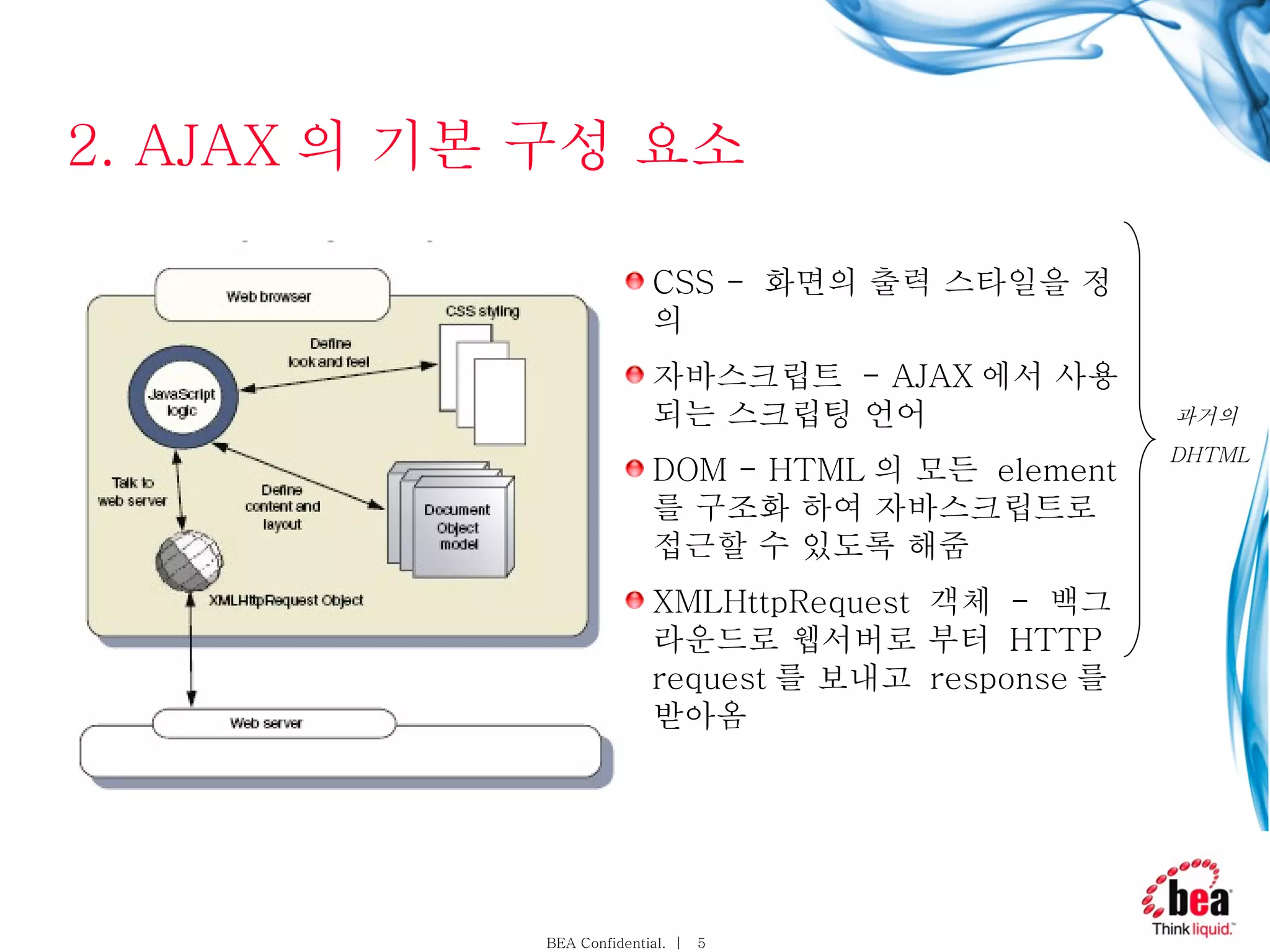
2. AJAX 의기본 구성 요소 CSS - 화면의 출력 스타일을 정의 자바스크립트 - AJAX 에서 사용되는 스크립팅 언어 DOM - HTML 의 모든 element 를 구조화 하여 자바스크립트로 접근할 수 있도록 해줌 XMLHttpRequest 객체 - 백그라운드로 웹서버로 부터 HTTP request 를 보내고 response 를 받아옴 과거의 DHTML
6.
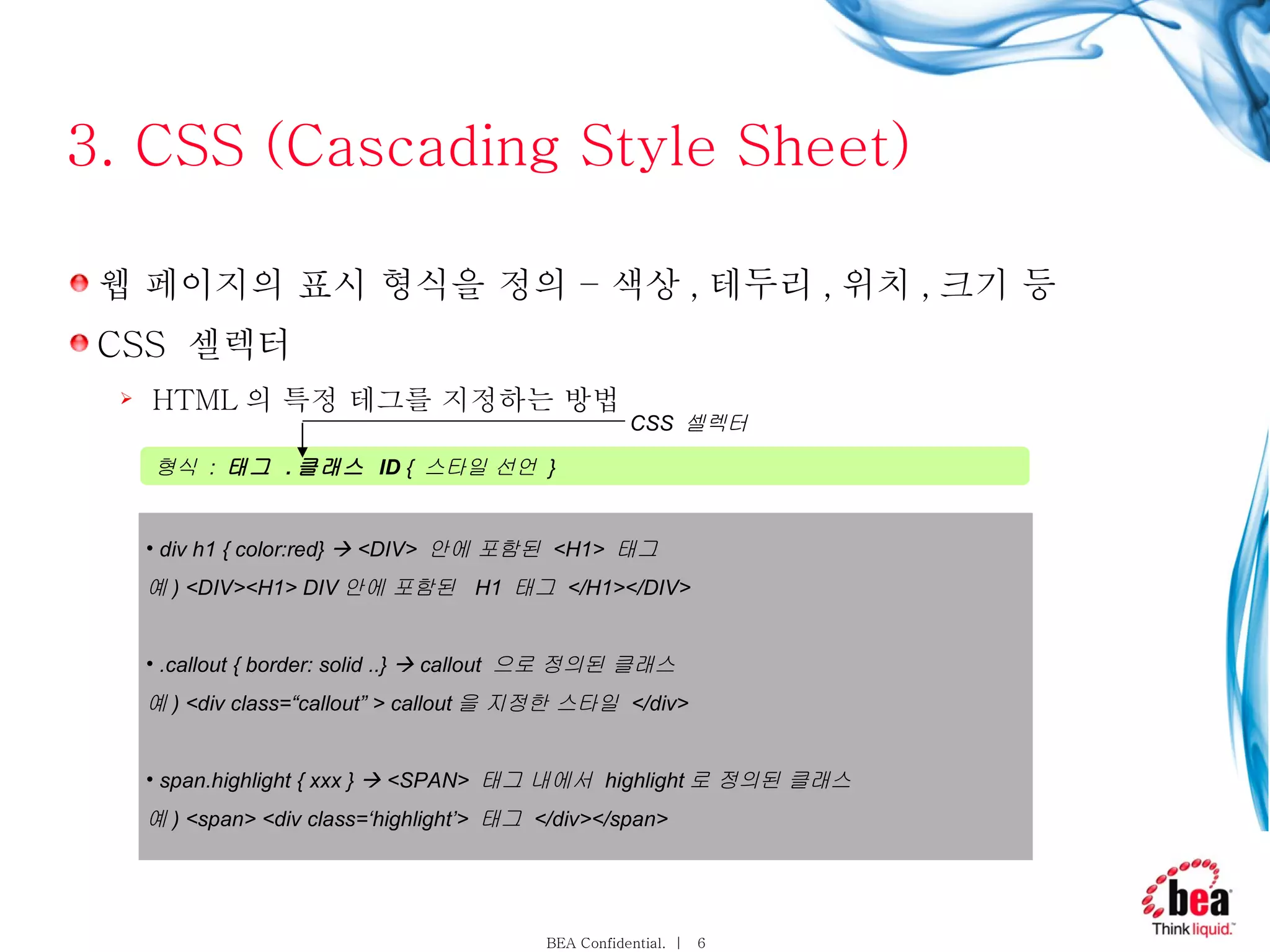
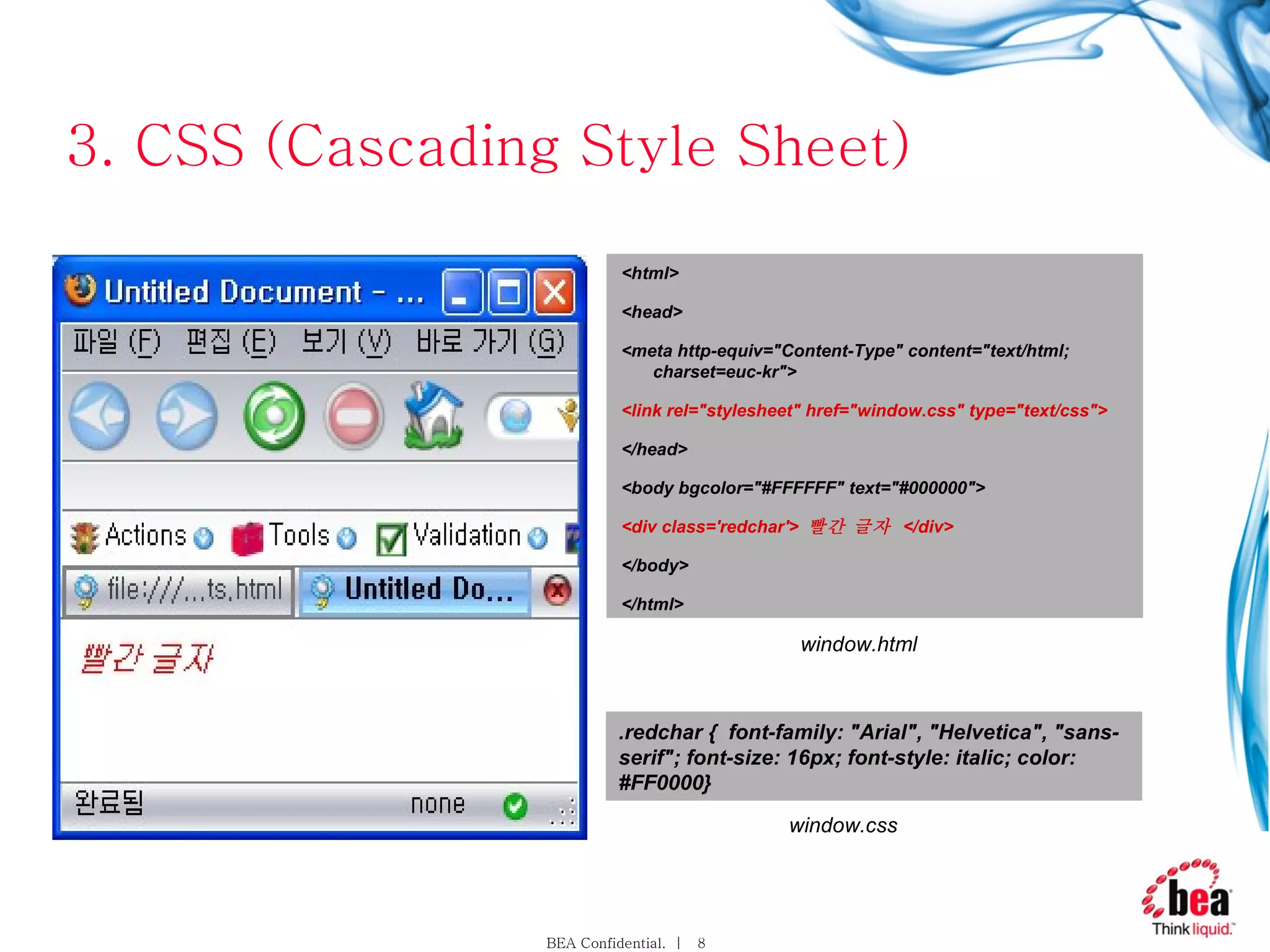
3. CSS (CascadingStyle Sheet) 웹 페이지의 표시 형식을 정의 – 색상 , 테두리 , 위치 , 크기 등 CSS 셀렉터 HTML 의 특정 테그를 지정하는 방법 형식 : 태그 . 클래스 ID { 스타일 선언 } div h1 { color:red} <DIV> 안에 포함된 <H1> 태그 예 ) <DIV><H1> DIV 안에 포함된 H1 태그 </H1></DIV> .callout { border: solid ..} callout 으로 정의된 클래스 예 ) <div class=“callout” > callout 을 지정한 스타일 </div> span.highlight { xxx } <SPAN> 태그 내에서 highlight 로 정의된 클래스 예 ) <span> <div class=‘highlight’> 태그 </div></span> CSS 셀렉터
7.
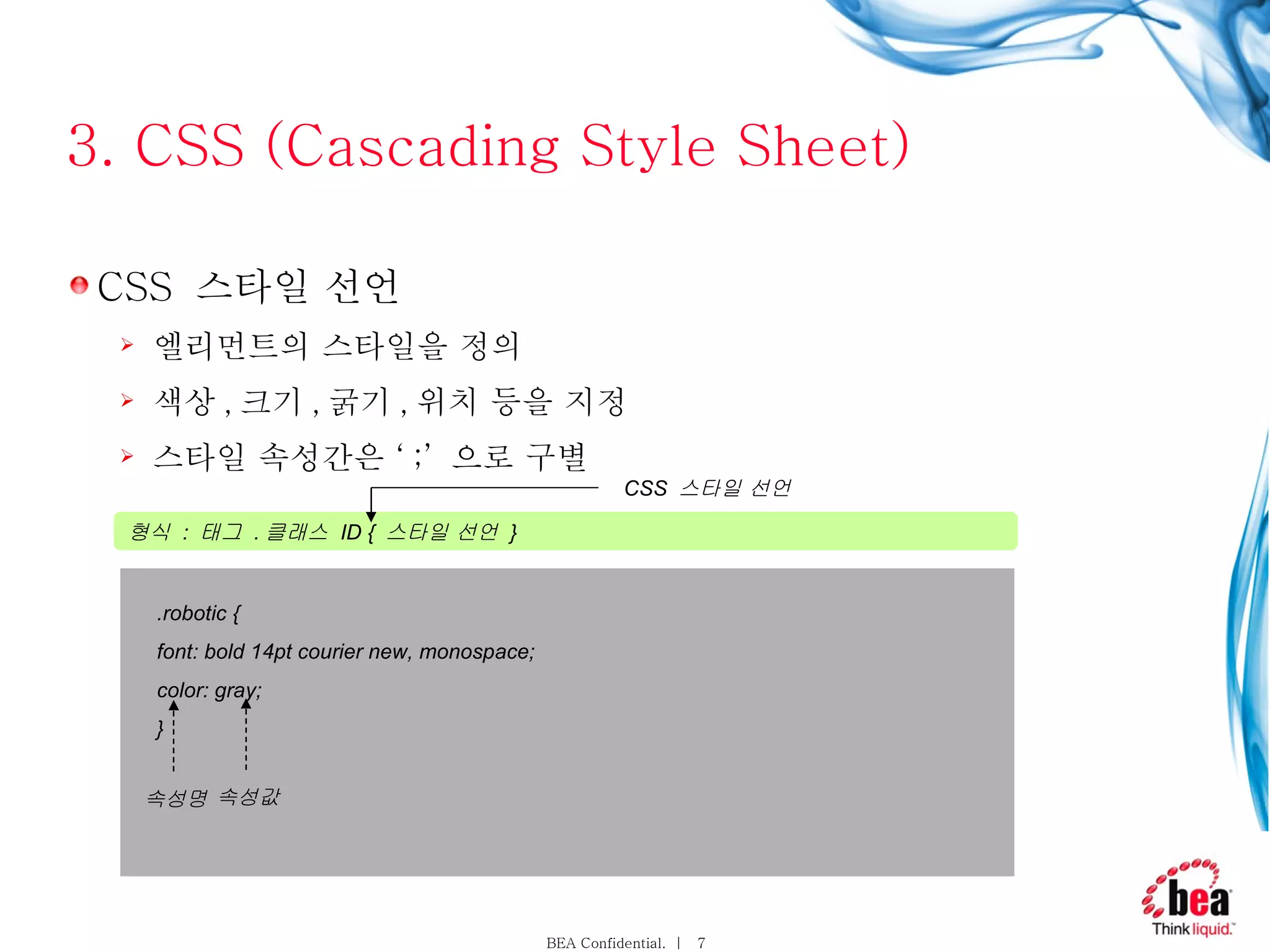
3. CSS (CascadingStyle Sheet) CSS 스타일 선언 엘리먼트의 스타일을 정의 색상 , 크기 , 굵기 , 위치 등을 지정 스타일 속성간은 ‘ ;’ 으로 구별 형식 : 태그 . 클래스 ID { 스타일 선언 } CSS 스타일 선언 . robotic { font: bold 14pt courier new, monospace; color: gray; } 속성명 속성값
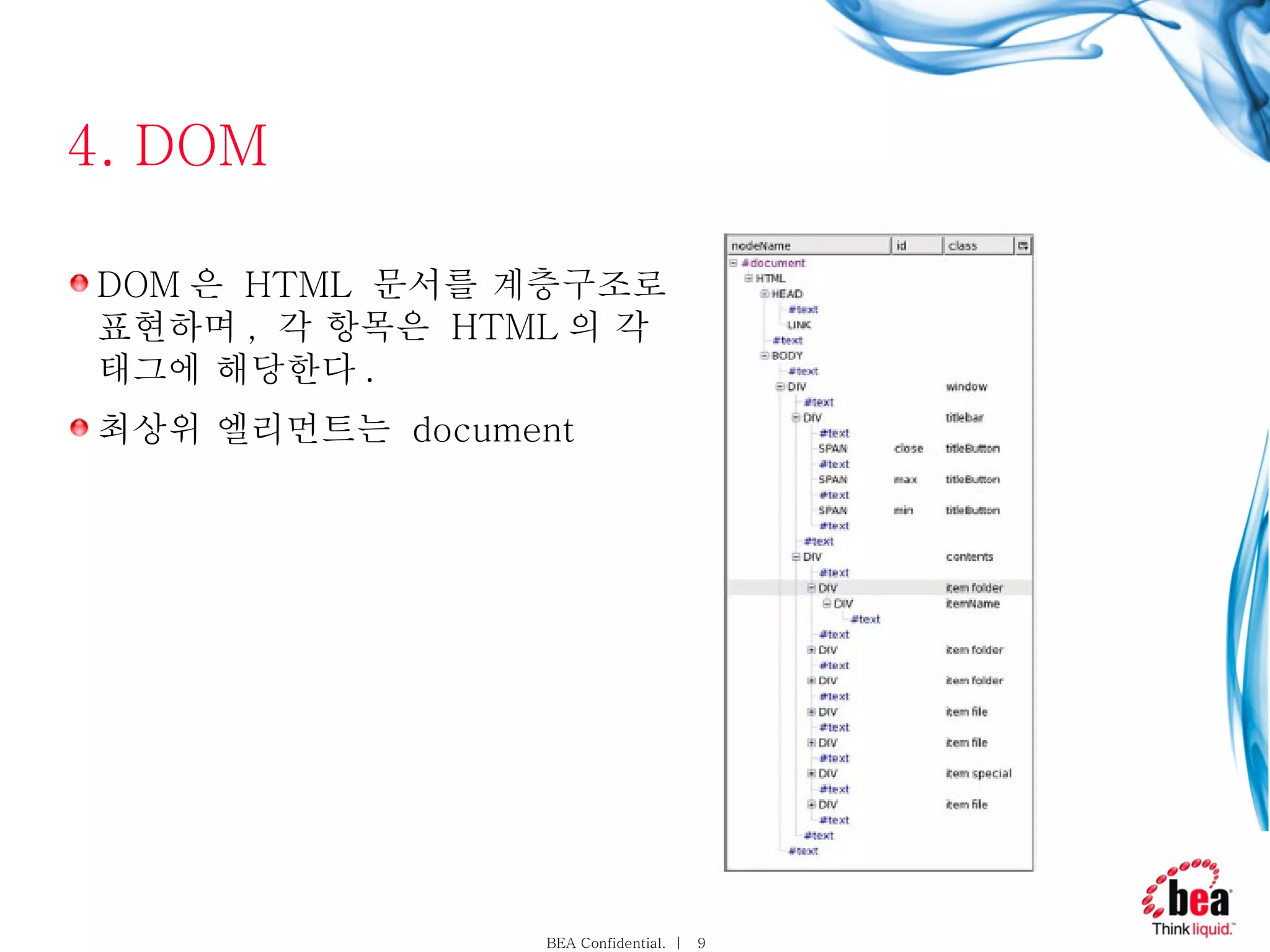
4. DOM DOM 은 HTML 문서를 계층구조로 표현하며 , 각 항목은 HTML 의 각 태그에 해당한다 . 최상위 엘리먼트는 document
10.
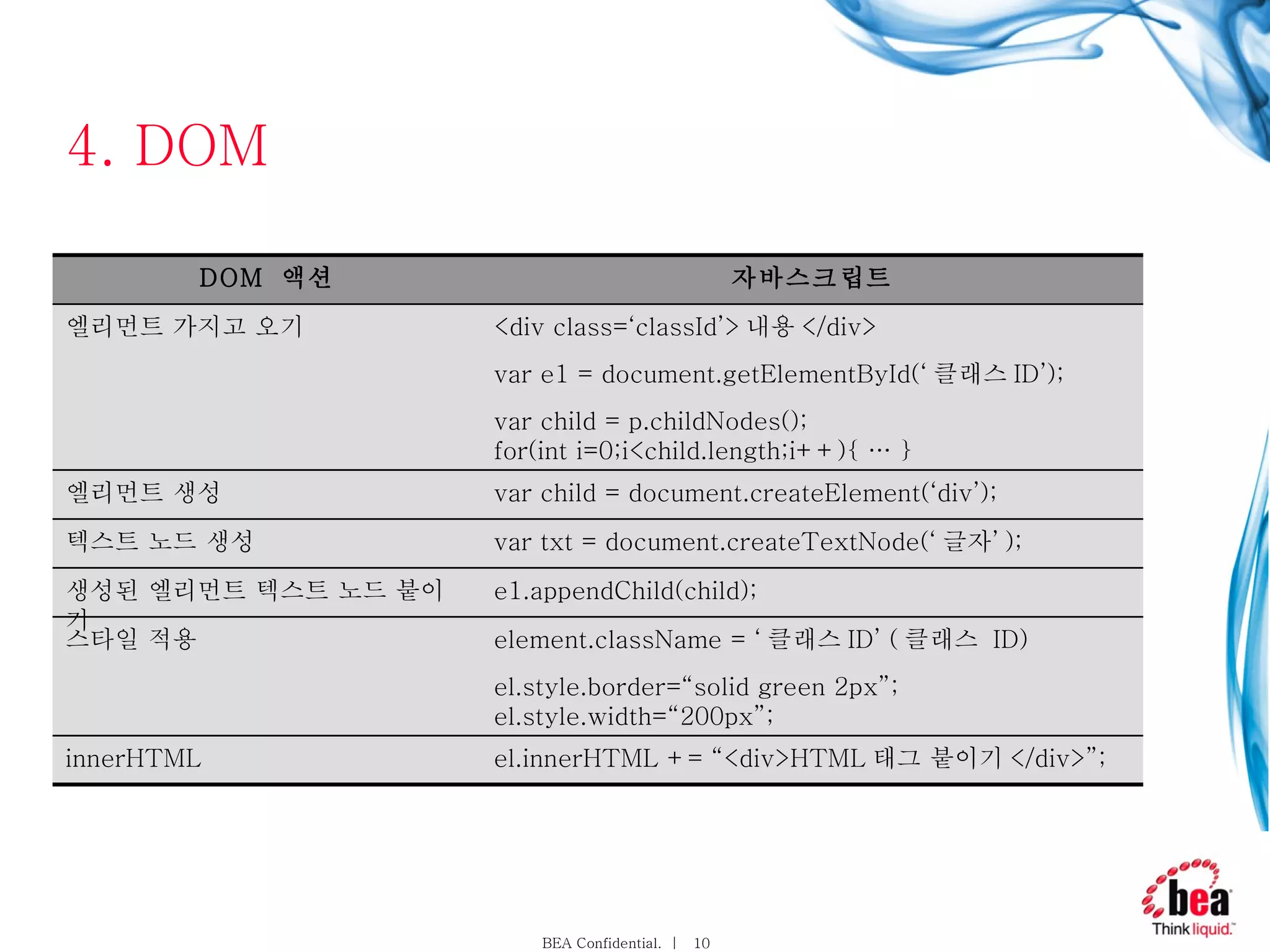
4. DOM el.innerHTML+= “<div>HTML 태그 붙이기 </div>”; innerHTML element.className = ‘ 클래스 ID’ ( 클래스 ID) el.style.border=“solid green 2px”; el.style.width=“200px”; 스타일 적용 <div class=‘classId’> 내용 </div> var e1 = document.getElementById(‘ 클래스 ID’); var child = p.childNodes(); for(int i=0;i<child.length;i++){ … } 엘리먼트 가지고 오기 var child = document.createElement(‘div’); 엘리먼트 생성 var txt = document.createTextNode(‘ 글자’ ); 텍스트 노드 생성 e1.appendChild(child); 생성된 엘리먼트 텍스트 노드 붙이기 자바스크립트 DOM 액션
11.
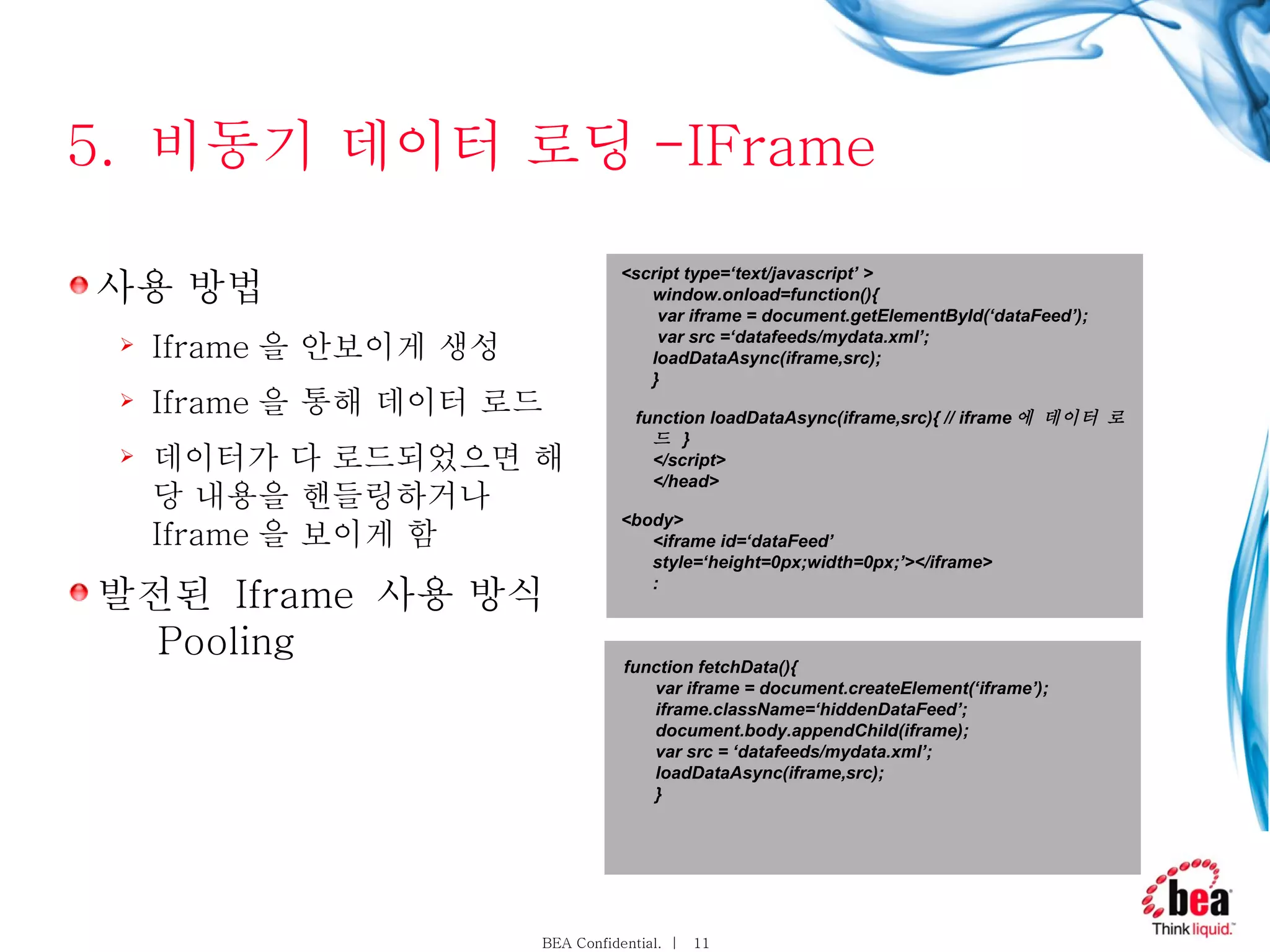
5. 비동기데이터 로딩 -IFrame 사용 방법 Iframe 을 안보이게 생성 Iframe 을 통해 데이터 로드 데이터가 다 로드되었으면 해당 내용을 핸들링하거나 Iframe 을 보이게 함 발전된 Iframe 사용 방식 Pooling <script type=‘text/javascript’ > window.onload=function(){ var iframe = document.getElementById(‘dataFeed’); var src =‘datafeeds/mydata.xml’; loadDataAsync(iframe,src); } function loadDataAsync(iframe,src){ // iframe 에 데이터 로드 } </script> </head> <body> <iframe id=‘dataFeed’ style=‘height=0px;width=0px;’></iframe> : function fetchData(){ var iframe = document.createElement(‘iframe’); iframe.className=‘hiddenDataFeed’; document.body.appendChild(iframe); var src = ‘datafeeds/mydata.xml’; loadDataAsync(iframe,src); }
12.
5. 비동기데이터 로딩 - XmlDocument & HttpRequest function getXMLDocument(){ var xDoc = null; if(document.implementation && document.implementation.createDocument){ xDoc = document.implementation.createDocument( “”,””,null); Mozila }else if(typeof ActiveXObject != “undefined”){ var msXmlAx=null; try{ msXmlAx = new ActiveXObject(“Msxml12.DOMDocument”); }catch(e){ msXmlAx = new ActiveXObject(“Msxml.DOMDocument”); } xDoc = msXmlAx; } if(xDoc == null || type of xDoc.load==“undefined”){ xDoc == null; } return xDoc; } getXMLDocument function getXMLRequest(){ var xRequest = null; if(window.XMLHttpRequest){ xRequest = new XMLHttpRequest(); Mozila } else if (typeof ActiveXObject != “undefined”){ xRequest = new ActiveXObject(“Microsoft.XMLHTTP”); IE } return xRequest; } getXMLHTTPRequest
13.
5. 비동기데이터 로딩 - XmlDocument & HttpRequest <html> <head> <script type='text/javascript'> var req=null; var console=null; var READY_STATE_UNINITIALIZED=0; var READY_STATE_LOADING=1; var READY_STATE_LOADED=2; var READY_STATE_INTERACTIVE=3; var READY_STATE_COMPLETE=4; function loadXMLDoc(url) { if (window.XMLHttpRequest) { req = new XMLHttpRequest(); } else if (window.ActiveXObject) { req = new ActiveXObject("Microsoft.XMLHTTP"); } if (req) { req.onreadystatechange = processReqChange; req.open("GET", url, true); req.send(null); } } function processReqChange(){ var ready=req.readyState; var data=null; if (ready==READY_STATE_COMPLETE){ data=req.responseText; }else{ data="loading...["+ready+"]"; } toConsole(data); } function toConsole(data){ if (console!=null){ var newline=document.createElement("div"); console.appendChild(newline); var txt=document.createTextNode(data); newline.appendChild(txt); } } window.onload=function(){ console=document.getElementById('console'); loadXMLDoc("data.txt"); } </script> </head> <body> <div id='console'></div> </body> </html>
14.
5. 비동기데이터 로딩 - XmlDocument & HttpRequest Parameter 에 대한 한글 문제




![5. 비동기 데이터 로딩 - XmlDocument & HttpRequest <html> <head> <script type='text/javascript'> var req=null; var console=null; var READY_STATE_UNINITIALIZED=0; var READY_STATE_LOADING=1; var READY_STATE_LOADED=2; var READY_STATE_INTERACTIVE=3; var READY_STATE_COMPLETE=4; function loadXMLDoc(url) { if (window.XMLHttpRequest) { req = new XMLHttpRequest(); } else if (window.ActiveXObject) { req = new ActiveXObject("Microsoft.XMLHTTP"); } if (req) { req.onreadystatechange = processReqChange; req.open("GET", url, true); req.send(null); } } function processReqChange(){ var ready=req.readyState; var data=null; if (ready==READY_STATE_COMPLETE){ data=req.responseText; }else{ data="loading...["+ready+"]"; } toConsole(data); } function toConsole(data){ if (console!=null){ var newline=document.createElement("div"); console.appendChild(newline); var txt=document.createTextNode(data); newline.appendChild(txt); } } window.onload=function(){ console=document.getElementById('console'); loadXMLDoc("data.txt"); } </script> </head> <body> <div id='console'></div> </body> </html>](https://image.slidesharecdn.com/firststepinajaxkorean-123923935644-phpapp01/75/First-Step-In-Ajax-Korean-13-2048.jpg)



![[Week5]R_scraping](https://cdn.slidesharecdn.com/ss_thumbnails/week5rscraping-150902002731-lva1-app6891-thumbnail.jpg?width=640&height=640&fit=bounds)


