www.javaspecialist.co.kr
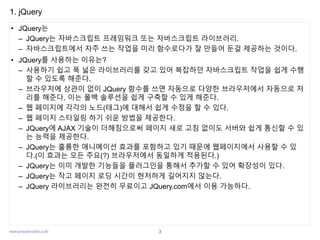
0. 자바스크립트 프레임워크
•Jindo Framework
– NHN에서 개발한 JavaScript Framework
– http://www.naver.com 에서 사용
– http://jindo.dev.naver.com/jindo_home/
– License : LGPL v2
• Jigu Framework
– Daum에서 개발한 JavaScript Framework
– http://www.daum.net 에서 사용
– Sizzle CSS Selector Engine을 사용함
– License : Daum Common License
• jQuery Framework
– 호환성을 갖춘 JavaScript Framework(write once, do more)
– http://www.jquery.com
– Sizzle CSS Selector Engine을 사용함
– License : MIT License
• Enyo Framework
– WebOS의 Web UI Framework
– http://enyojs.com
– License : Apache License, Version 2.0.
• Sencha Touch Framework
– http://sencha.com
– License : GPL v3
GPL과 LGPL은 오
픈소스 라이선스
이지만 2차적 저작
물의 공개 의무가
있다.
2차적 저작물의
공개 의무가 없는
라이선스는 EPL,
MIT, BSD license,
Apache license 이
다.
오픈소스
2
3.
www.javaspecialist.co.kr
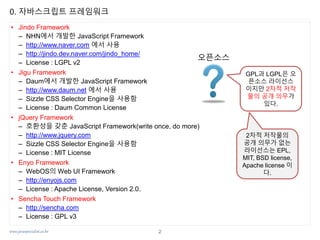
1. jQuery
• JQuery는
–JQuery는 자바스크립트 프레임워크 또는 자바스크립트 라이브러리.
– 자바스크립트에서 자주 쓰는 작업을 미리 함수로다가 잘 만들어 둔걸 제공하는 것이다.
• JQuery를 사용하는 이유는?
– 사용하기 쉽고 폭 넓은 라이브러리를 갖고 있어 복잡하던 자바스크립트 작업을 쉽게 수행
할 수 있도록 해준다.
– 브라우저에 상관이 없이 JQuery 함수를 쓰면 자동으로 다양한 브라우저에서 자동으로 처
리를 해준다. 이는 폴백 솔루션을 쉽게 구축할 수 있게 해준다.
– 웹 페이지에 각각의 노드(태그)에 대해서 쉽게 수정을 할 수 있다.
– 웹 페이지 스타일링 하기 쉬운 방법을 제공한다.
– JQuery에 AJAX 기술이 더해짐으로써 페이지 새로 고침 없이도 서버와 쉽게 통신할 수 있
는 능력을 제공한다.
– JQuery는 훌륭한 애니메이션 효과를 포함하고 있기 때문에 웹페이지에서 사용할 수 있
다.(이 효과는 모든 주요(?) 브라우저에서 동일하게 적용된다.)
– JQuery는 이미 개발한 기능들을 플러그인을 통해서 추가할 수 있어 확장성이 있다.
– JQuery는 작고 페이지 로딩 시간이 현저하게 길어지지 않는다.
– JQuery 라이브러리는 완전히 무료이고 JQuery.com에서 이용 가능하다.
3
4.
www.javaspecialist.co.kr
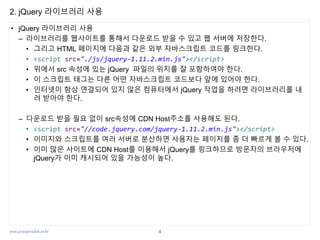
2. jQuery 라이브러리사용
• jQuery 라이브러리 사용
– 라이브러리를 웹사이트를 통해서 다운로드 받을 수 있고 웹 서버에 저장한다.
• 그리고 HTML 페이지에 다음과 같은 외부 자바스크립트 코드를 링크한다.
• <script src="./js/jquery-1.11.2.min.js"></script>
• 위에서 src 속성에 있는 jQuery 파일의 위치를 잘 포함하여야 한다.
• 이 스크립트 태그는 다른 어떤 자바스크립트 코드보다 앞에 있어야 한다.
• 인터넷이 항상 연결되어 있지 않은 컴퓨터에서 jQuery 작업을 하려면 라이브러리를 내
려 받아야 한다.
– 다운로드 받을 필요 없이 src속성에 CDN Host주소를 사용해도 된다.
• <script src="//code.jquery.com/jquery-1.11.2.min.js"></script>
• 이미지와 스크립트를 여러 서버로 분산하면 사용자는 페이지를 좀 더 빠르게 볼 수 있다.
• 이미 많은 사이트에 CDN Host를 이용해서 jQuery를 링크하므로 방문자의 브라우저에
jQuery가 이미 캐시되어 있을 가능성이 높다.
4
5.
www.javaspecialist.co.kr
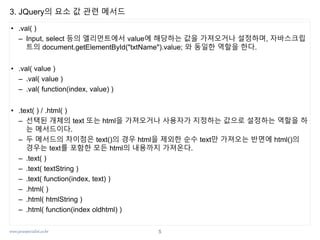
3. JQuery의 요소값 관련 메서드
• .val( )
– Input, select 등의 엘리먼트에서 value에 해당하는 값을 가져오거나 설정하며, 자바스크립
트의 document.getElementById("txtName").value; 와 동일한 역할을 한다.
• .val( value )
– .val( value )
– .val( function(index, value) )
• .text( ) / .html( )
– 선택된 개체의 text 또는 html을 가져오거나 사용자가 지정하는 값으로 설정하는 역할을 하
는 메서드이다.
– 두 메서드의 차이점은 text()의 경우 html을 제외한 순수 text만 가져오는 반면에 html()의
경우는 text를 포함한 모든 html의 내용까지 가져온다.
– .text( )
– .text( textString )
– .text( function(index, text) )
– .html( )
– .html( htmlString )
– .html( function(index oldhtml) )
5
6.
www.javaspecialist.co.kr
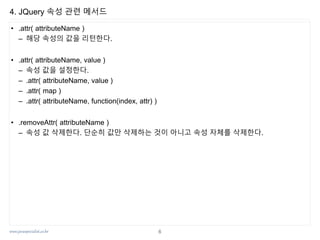
4. JQuery 속성관련 메서드
• .attr( attributeName )
– 해당 속성의 값을 리턴한다.
• .attr( attributeName, value )
– 속성 값을 설정한다.
– .attr( attributeName, value )
– .attr( map )
– .attr( attributeName, function(index, attr) )
• .removeAttr( attributeName )
– 속성 값 삭제한다. 단순히 값만 삭제하는 것이 아니고 속성 자체를 삭제한다.
6
7.
www.javaspecialist.co.kr
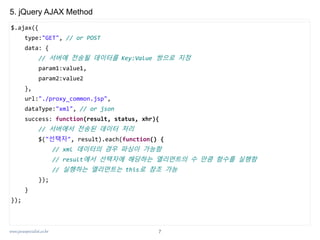
5. jQuery AJAXMethod
$.ajax({
type:"GET", // or POST
data: {
// 서버에 전송될 데이터를 Key:Value 쌍으로 지정
param1:value1,
param2:value2
},
url:"./proxy_common.jsp",
dataType:"xml", // or json
success: function(result, status, xhr){
// 서버에서 전송된 데이터 처리
$("선택자", result).each(function() {
// xml 데이터의 경우 파싱이 가능함
// result에서 선택자에 해당하는 엘리먼트의 수 만큼 함수를 실행함
// 실행하는 엘리먼트는 this로 참조 가능
});
}
});
7
8.
www.javaspecialist.co.kr
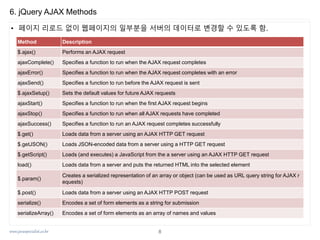
6. jQuery AJAXMethods
• 페이지 리로드 없이 웹페이지의 일부분을 서버의 데이터로 변경할 수 있도록 함.
Method Description
$.ajax() Performs an AJAX request
ajaxComplete() Specifies a function to run when the AJAX request completes
ajaxError() Specifies a function to run when the AJAX request completes with an error
ajaxSend() Specifies a function to run before the AJAX request is sent
$.ajaxSetup() Sets the default values for future AJAX requests
ajaxStart() Specifies a function to run when the first AJAX request begins
ajaxStop() Specifies a function to run when all AJAX requests have completed
ajaxSuccess() Specifies a function to run an AJAX request completes successfully
$.get() Loads data from a server using an AJAX HTTP GET request
$.getJSON() Loads JSON-encoded data from a server using a HTTP GET request
$.getScript() Loads (and executes) a JavaScript from the a server using an AJAX HTTP GET request
load() Loads data from a server and puts the returned HTML into the selected element
$.param()
Creates a serialized representation of an array or object (can be used as URL query string for AJAX r
equests)
$.post() Loads data from a server using an AJAX HTTP POST request
serialize() Encodes a set of form elements as a string for submission
serializeArray() Encodes a set of form elements as an array of names and values
8
9.
www.javaspecialist.co.kr
7. JavaScript vsjQuery
JavaScript jQuery 비고
DOM요소 선택
document.getElementyById("ID값") 등…
document.querySelector("선택자")
document.querySelectorAll("선택자")
$("선택자")
리턴하는 객체의
타입이 다름
이벤트 처리 요소객체.addEventListener("이벤트명", 콜백) $.bind("이벤트명", 콜백)
onxxx 이벤트 핸
들러 이용 가능
엘리먼트 값
태그를 포함하는 컨텐트 : innerHTML
텍스트 컨텐트 : textContent
input 요소의 값 : value
태그를 포함하는 컨텐트 : html()
텍스트 컨텐트 : text()
input 요소의 값 : val()
JavaScript는 속성
jQuery는 메서드
DOM 로드 후 실
행
(function() {
//코드
})();
HTML 문서에서 defer 속성 추가
$(function() {
//코드
});
스타일 변경 $객체.css("속성이름", "속성 값")
반복
for(var i; elements.length; i++) {
elements[i].addEventListener('click', …);
}
$.each(elements, function(index, item)
{ …})
메서드 체인 대부분 속성으로 정의돼있어 안됨
대부분이 함수로 정의되어 있어 메서
드 체인 사용 가능
9
www.javaspecialist.co.kr
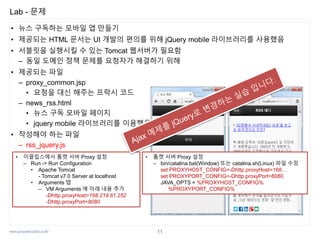
Lab - 문제
•뉴스 구독하는 모바일 앱 만들기
• 제공되는 HTML 문서는 UI 개발의 편의를 위해 jQuery mobile 라이브러리를 사용했음
• 서블릿을 실행시킬 수 있는 Tomcat 웹서버가 필요함
– 동일 도메인 정책 문제를 요청자가 해결하기 위해
• 제공되는 파일
– proxy_common.jsp
• 요청을 대신 해주는 프락시 코드
– news_rss.html
• 뉴스 구독 모바일 페이지
• jquery mobile 라이브러리를 이용했음
• 작성해야 하는 파일
– rss_jquery.js
• 이클립스에서 톰캣 서버 Proxy 설정
– Run -> Run Configuration
• Apache Tomcat
- Tomcat v7.0 Server at localhost
• Arguments 탭
– VM Arguments 에 아래 내용 추가
-Dhttp.proxyHost=168.219.61.252
-Dhttp.proxyPort=8080
• 톰캣 서버 Proxy 설정
– bin/catalina.bat(Window) 또는 catalina.sh(Linux) 파일 수정
set PROXYHOST_CONFIG=-Dhttp.proxyHost=168…
set PROXYPORT_CONFIG=-Dhttp.proxyPort=8080
JAVA_OPTS = %PROXYHOST_CONFIG%
%PROXYPORT_CONFIG%
11
12.
www.javaspecialist.co.kr
Lab - Solution(Ajax/end_jquery/rss_jquery.js)
1. var links = $("div[data-role='content'] p > a");
2. links.each(function(index, item) {
3. $(this).bind('click', function getRssData(event) {
4. $.ajax({
5. type:"GET",
6. data: {
7. rssurl:$(this).attr("data-rssurl")
8. },
9. url:"./proxy_common.jsp",
10. dataType:"xml",
11. success: function(data, status){
12. var target = $("#news_rss div[data-role=content] .content-list");
13. target.html("");
14. $("item", data).each(function(index, item) {
15. var title = $('title', item).text();
16. var link = $('link', item).text();
17. var desc = $('description', this).text(); //this로 참조 가능함
18. target.append("<p>"+ ++index +". <a href='" + link + "'>" + title +
"</a><span>" + desc + "</span></p>");
19. });
20. } //end success callback
21. }); //end ajax
22. }) //end click event
23.}); //end each
12
![www.javaspecialist.co.kr
7. JavaScript vs jQuery
JavaScript jQuery 비고
DOM요소 선택
document.getElementyById("ID값") 등…
document.querySelector("선택자")
document.querySelectorAll("선택자")
$("선택자")
리턴하는 객체의
타입이 다름
이벤트 처리 요소객체.addEventListener("이벤트명", 콜백) $.bind("이벤트명", 콜백)
onxxx 이벤트 핸
들러 이용 가능
엘리먼트 값
태그를 포함하는 컨텐트 : innerHTML
텍스트 컨텐트 : textContent
input 요소의 값 : value
태그를 포함하는 컨텐트 : html()
텍스트 컨텐트 : text()
input 요소의 값 : val()
JavaScript는 속성
jQuery는 메서드
DOM 로드 후 실
행
(function() {
//코드
})();
HTML 문서에서 defer 속성 추가
$(function() {
//코드
});
스타일 변경 $객체.css("속성이름", "속성 값")
반복
for(var i; elements.length; i++) {
elements[i].addEventListener('click', …);
}
$.each(elements, function(index, item)
{ …})
메서드 체인 대부분 속성으로 정의돼있어 안됨
대부분이 함수로 정의되어 있어 메서
드 체인 사용 가능
9](https://image.slidesharecdn.com/4-3-150922025844-lva1-app6891/85/4-3-jquery-9-320.jpg)
![www.javaspecialist.co.kr
8. jQuery ajax Sample - req.html & res.jsp
10
<!DOCTYPE html>
<html>
<head>
<meta charset="UTF-8">
<title></title>
<script src="//code.jquery.com/jquery-1.11.2.min.js"></script>
<script type="text/javascript">
$(function() {
$("input[type='button']").click(function() {
$.get("res.jsp", function(data, status) {
var oldValue = $("#result").text();
$("#result").text(oldValue + " " + data);
});
});
});
</script>
</head>
<body>
<input type="button" value=" 요청 ">
<div id="result"></div>
</body>
</html>
<%@ page contentType="text/html; charset=UTF-8"%>
<%= (int)(Math.random() * 45) + 1 %>
res.jsp](https://image.slidesharecdn.com/4-3-150922025844-lva1-app6891/85/4-3-jquery-10-320.jpg)
![www.javaspecialist.co.kr
Lab - Solution (Ajax/end_jquery/rss_jquery.js)
1. var links = $("div[data-role='content'] p > a");
2. links.each(function(index, item) {
3. $(this).bind('click', function getRssData(event) {
4. $.ajax({
5. type:"GET",
6. data: {
7. rssurl:$(this).attr("data-rssurl")
8. },
9. url:"./proxy_common.jsp",
10. dataType:"xml",
11. success: function(data, status){
12. var target = $("#news_rss div[data-role=content] .content-list");
13. target.html("");
14. $("item", data).each(function(index, item) {
15. var title = $('title', item).text();
16. var link = $('link', item).text();
17. var desc = $('description', this).text(); //this로 참조 가능함
18. target.append("<p>"+ ++index +". <a href='" + link + "'>" + title +
"</a><span>" + desc + "</span></p>");
19. });
20. } //end success callback
21. }); //end ajax
22. }) //end click event
23.}); //end each
12](https://image.slidesharecdn.com/4-3-150922025844-lva1-app6891/85/4-3-jquery-12-320.jpg)


![[162] jpa와 모던 자바 데이터 저장 기술](https://cdn.slidesharecdn.com/ss_thumbnails/162jpa-150914054532-lva1-app6891-thumbnail.jpg?width=640&height=640&fit=bounds)


![[하코사세미나] 한 시간 만에 배우는 Jquery](https://cdn.slidesharecdn.com/ss_thumbnails/jquery-151208015421-lva1-app6891-thumbnail.jpg?width=640&height=640&fit=bounds)


![[ 하코사세미나] 의외로 쉬운 D3 그래프 퍼블리싱](https://cdn.slidesharecdn.com/ss_thumbnails/2015-12-05-d3-151208015226-lva1-app6891-thumbnail.jpg?width=640&height=640&fit=bounds)


![[115] clean fe development_윤지수](https://cdn.slidesharecdn.com/ss_thumbnails/115cleanfedevelopment-161023163916-thumbnail.jpg?width=640&height=640&fit=bounds)
![[111015/아꿈사] HTML5를 여행하는 비(非) 웹 개발자를 위한 안내서 - 1부 웹소켓.](https://cdn.slidesharecdn.com/ss_thumbnails/111015-111017005159-phpapp02-thumbnail.jpg?width=640&height=640&fit=bounds)


