Higher Colleges of Technology
Abu Dhabi Women’s College
Computer Information and Science
I – Computer Forensics And Investigations
Team Project
	
  
Submitted by:
Shaima Abdulla – H00211573
Hawaa Ahmed – H00205635
Aisha Obaid – H00234158
Submitted to:
Wissam Safeh
Date of Project Submission:
June 1, 2015
Academic Honesty
ACADEMIC HONESTY
Academic Honesty is a serious issue at
the Higher Colleges of Technology. Any
student who attempts to gain marks on
their Project dishonestly by presenting
another person’s work as their own
without acknowledging the source of
the information (including the internet)
is considered to have plagiarized. When
submitting a project or major
assignment, students must identify every
source that has been consulted and
used for the project or assignment. The
penalty for plagiarism is severe and
includes permanent dismissal from the
College.
I have read the above information and
understand my responsibilities with
regard to Academic Honesty while
completing this assessment.
Student’s Signature 1 Student’s
Signature 2 Student’s Signature 3
Student’s Signature 4
name : Shaima Abdulla
hawed ahmed
Aisha obaid
‫ﺍاﻝلﺃأﻡمﺍاﻥنﺓة‬ ‫ﺍاﻝلﺃأﻙكﺍاﺩدﯼیﻡمﯼیﺓة‬
‫ﻥن‬ٕ‫ﺍا‬ ‫ﺍاﻝلﺃأﻡمﺍاﻥنﺓة‬ ‫ﺍاﻝلﺃأﻙكﺍاﺩدﯼیﻡمﯼیﺓة‬
‫ﻡمﻭوﺽضﻭوﻉع‬ ‫ﺥخﻁطﯼیﺭر‬ ‫ﺝجﺩدﺍا‬ ‫ﻑفﻱي‬
‫ﻙكﻝلﯼیﺍاﺕت‬ ‫ﺍاﻝلﺕتﻕقﻥنﯼیﺓة‬ ‫.ﺍاﻝلﻉعﻝلﯼیﺍا‬
‫ﻭوﻝلﻫﮬﮪھﺫذﺍا‬ ‫ﻑفﺇإﻥن‬ ‫ﻳﯾﺔ‬ٔ‫ٴ‬‫ﺍا‬ ‫ﺏبﺓةﻁطﺍاﻝل‬
‫ﺕتﺡحﺍاﻭوﻝل‬ ‫ﻥن‬ٔ‫ٴ‬‫ﺍا‬ ‫ﺕتﺱسﺕتﺥخﺩدﻡم‬ ‫ﻉعﻡمﻝل‬
‫ﺍاﻝلﺁآﺥخﺭرﯼیﻥن‬ ‫ﻑفﻱي‬ ‫ﺕتﻕقﺩدﯼیﻡم‬
‫ﻡمﺵشﺭرﻭوﻉع‬ ‫ﻭو‬ٔ‫ٴ‬‫ﺍا‬ ‫ﻭوﺍاﺝجﺏب‬ ‫ﻉعﻝلﻯى‬ ‫ﻧﻬﮭ‬ٔ‫ٴ‬‫ﺍا‬
‫ﺝجﻫﮬﮪھﺩدﻫﮬﮪھﺍا‬ ‫ﺍاﻝلﺵشﺥخﺹصﻱي‬ ،٬ ‫ﺩدﻭوﻥن‬ ‫ﺫذﻙكﺭر‬
‫ﻡمﺹصﺩدﺭر‬ ‫ﺍاﻝلﻡمﻉعﻝلﻭوﻡمﺍاﺕت‬ )‫ﺡحﺕتﻯى‬
‫ﻭوﻝلﻭو‬ ‫ﻙكﺍاﻥن‬ ‫ﻡمﻭوﻕقﻉعﺍا‬ ‫ﻉعﻝلﻯى‬ ‫ﺵشﺏبﻙكﺓة‬
‫(ﺍاﻝلﺍاﻥنﺕتﺭرﻥنﺕت‬ ‫ﻑفﻫﮬﮪھﺫذﺍا‬ ‫ﯼیﻉعﺕتﺏبﺭر‬
‫ﻧﺘﺤﺎﻻ‬ٕ‫ﺍا‬. )‫ﺍاﻝلﺍاﻥنﺕتﺡحﺍاﻝل‬ ‫ﻫﮬﮪھﻭو‬ ‫ﻉعﺩدﻡم‬
‫ﺫذﻙكﺭر‬ ‫ﻡمﺹصﺩدﺭر‬ ‫.(ﺍاﻝلﻡمﻉعﻝلﻭوﻡمﺍاﺕت‬
‫"ﻭوﺏبﻥنﺍاء‬ ،٬‫ﻉعﻝلﯼیﻫﮬﮪھ‬ ‫ﻑفﺇإﻥن‬ ‫ﻉعﻝلﻯى‬
‫ﻙكﻝل‬ ‫ﻁطﺍاﻝلﺏبﺓة‬ ‫ﺕتﻕقﺩدﻡم‬ ‫ﺏبﺡحﺙثﺍا‬ ‫ﻭو‬ٔ‫ٴ‬‫ﺍا‬
‫ﻡمﺵشﺭرﻭوﻉعﺍا‬ ‫ﻭو‬ٔ‫ٴ‬‫ﺍا‬ ‫ﺍاﺝجﺏبﺍاﻭو‬ ‫ﻥن‬ٔ‫ٴ‬‫ﺍا‬
‫ﺕتﺫذﻙكﺭرﺍاﻝلﻡمﺭرﺝجﻉع‬ ‫ﺳﻢ‬ٕ‫ﺍا‬‫ﻭو‬ ‫ﺹصﺍاﺡحﺏبﻫﮬﮪھ‬
‫ﻭوﺍاﻝلﺹصﻑفﺡحﺍاﺕت‬ ‫ﺍاﻝلﺕتﻱي‬ ‫ﺧﺬﺕت‬ٔ‫ٴ‬‫ﺍا‬
‫ﻡمﻥنﻫﮬﮪھﺍا‬ ‫ﺛﻨﺎء‬ٔ‫ٴ‬‫ﺍا‬
‫ﻋﺪﺍاﺩدﻫﮬﮪھﺎ‬ٕ‫ﺍا‬ ‫ﻝلﻝلﻡمﺵشﺭرﻭوﻉع‬ ‫ﻭو‬ٔ‫ٴ‬‫ﺍا‬
‫.ﺍاﻝلﻭوﺍاﺝجﺏب‬ ‫ﻥن‬ٕ‫ﺍا‬ ‫ﻉعﻕقﻭوﺏبﺓة‬
‫ﺍاﻝلﺍاﻥنﺕتﺡحﺍاﻝل‬ ‫ﻕقﺍاﺱسﯼیﺓة‬ ‫ﻭوﺕتﺅؤﺩدﻱي‬
‫ﻟﻰ‬ٕ‫ﺍا‬ ‫ﻁطﺭرﺩد‬ ‫ﺍاﻝلﻁطﺍاﻝلﺏبﺓة‬ ‫ﻡمﻥن‬
‫.ﺍاﻝلﻙكﻝلﯼیﺓة‬
‫ﺕت‬ٔ‫ٴ‬‫ﻗﺮﺍا‬ ‫ﺍاﻝلﻡمﻉعﻝلﻭوﻡمﺍاﺕت‬ ‫ﺍاﻝلﻡمﺩدﻭوﻥنﺓة‬
،٬‫ﻋﻼﻩه‬ٔ‫ٴ‬‫ﺍا‬ ‫ﻭوﻑفﻫﮬﮪھﻡمﺕت‬ ‫ﻡمﺩدﻯى‬
‫ﻡمﺱسﺅؤﻭوﻝلﯼیﺕتﻱي‬ ‫ﺕتﺝجﺍاﻩه‬ ‫ﺍاﻝلﺃأﻡمﺍاﻥنﺓة‬
‫ﺍاﻝلﺃأﻙكﺍاﺩدﯼیﻡمﯼیﺓة‬ ‫ﺛﻨﺎء‬ٔ‫ٴ‬‫ﺍا‬ ‫ﺕتﺃأﺩدﯼیﺓة‬ ‫ﻫﮬﮪھﺫذﺍا‬
‫ﺍاﻝلﺍاﻡمﺕتﺡحﺍاﻥن‬ ‫ﻉعﻝلﯼیﻫﮬﮪھﻭو‬ ‫ﻭوﻗﻊ‬ٔ‫ٴ‬‫.ﺍا‬
____________________
________________
‫ﺕتﻭوﻕقﯼیﻉع‬ ‫ﺍاﻝلﻁطﺍاﻝلﺏب‬
Table of contents
Table of Contents
Introduction	
  	
  .............................................................................................................	
  	
  
Statement	
  problem	
  	
  .................................................................................................	
  4	
  
	
  Literature	
  review	
  	
  ....................................................................................................	
  5	
  
What is a Digital Evidence	
  	
  	
  ........................................................................................................................	
  5	
  
Determine the Course of Action.	
  	
  ................................................................................................	
  7
Narrowing the Scope ……………………………………………………….………… 8
Starting Points …………………………………………………………………….………… 8
Interview Persons of Interest :……………………………………………..…….. . 9
Documenting the Scene  Seizing the Digital Evidence ………………………….10
Chain of Custody…………………………………………………………………………..11
Methodology	


  .......................................................................................................	
  12	
  
Results	
  and	
  Analysis	
  ...............................................................................................	
  13	
  
Imaging by use FTK imager ………….......................................................................13
Deleted file………………………………………………………………………………… 22
Examining evidence by using AccessData Forensics Toolki ……………………27
Steganography……………………………………………………………………………35
Encryption………………………………………………………………………………….36
Decrypted file using PRTK tools…………………………………………………………40
Deleted Email ……………………………………………………………………………..51
Internet browsing files……………………………………………………………………..56
Registry file …………………………………………………………………………………58
Discussion	
  ..............................................................................................................	
  62	
  
Conclusion	
  ..............................................................................................................	
  64	
  
References	
  .............................................................................................................	
  65	


Introduction
Nowadays, using the electronic devices and servers to save our confidential
transactions and information is increasing. And this is giving great chances to
committing civil or criminal crimes by using these computers and any other
electronic devices. So, we need a computer forensic because it's very essential
for the safety of the organization, government...etc. Computer forensics is process
using for collecting, and analyzing digital information for use as evidence in civil,
criminal, or administrative cases. There are different forensic tools that can be
used to analyze digital data, Such as, Guidance Software Encase, and the open
source suite SANS Investigative Forensic Toolkit, Autopsy, and Access Data FTK
and this is the tool we will focus on to use. Moreover, the purpose of this project is
to show how the various tools can be used to recover and analyze digital data,
and procedure for the collection of electronic evidence will also be discussed. In
addition, we will discuss some actual cases in which computer forensics was
successfully used to recover evidence.
Problem Statement
Sam is an active employee of ADMIN company, He is honest and loyal in his
work. In addition, all members of the organization depends on Sam. In addition,
Sam heard that there is confidential information leaked and spread to another
company which is competition to them, by using the USB Flash and Email. At the
same time he noted that there are some changes occurring in his office
computer. However, , he immediately doubts to one of the company's staff his
named Mohammed. Because everyone knows that Mohammad is the last person
that exit from the company. The company decided to investigate the case and
collect evidence from the Mohammed office to see if there is confidential data
on it. Also, to know there is leaking confidential information has spread by Email
to another organization. So based on that the company decides to use Forensics
tools suite to help in solving the issue and to detect if Mohammed is innocent or
not.
Literature review
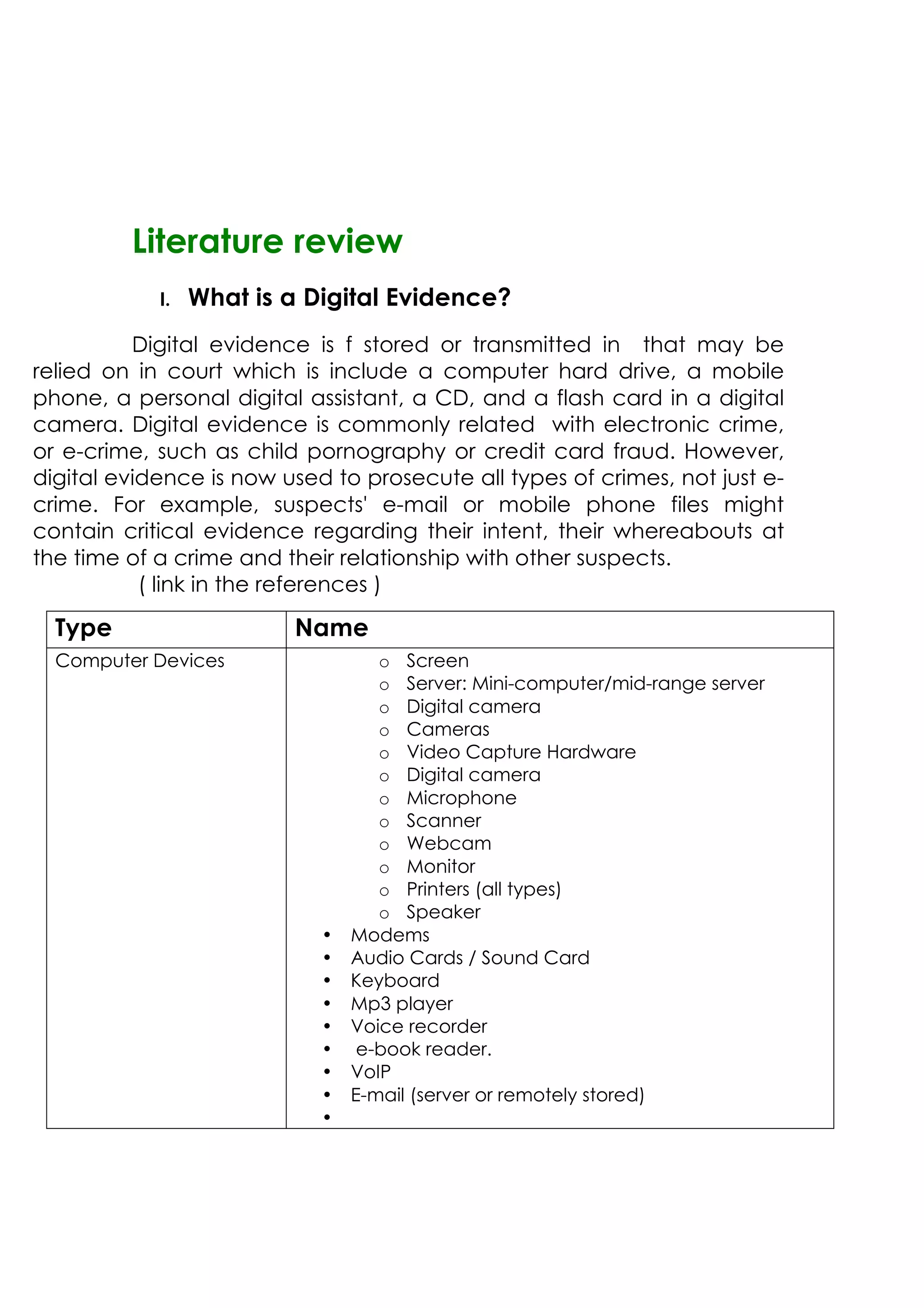
I. What is a Digital Evidence?
Digital evidence is f stored or transmitted in that may be
relied on in court which is include a computer hard drive, a mobile
phone, a personal digital assistant, a CD, and a flash card in a digital
camera. Digital evidence is commonly related with electronic crime,
or e-crime, such as child pornography or credit card fraud. However,
digital evidence is now used to prosecute all types of crimes, not just e-
crime. For example, suspects' e-mail or mobile phone files might
contain critical evidence regarding their intent, their whereabouts at
the time of a crime and their relationship with other suspects.
( link in the references )
Type Name
Computer Devices o Screen
o Server: Mini-computer/mid-range server
o Digital camera
o Cameras
o Video Capture Hardware
o Digital camera
o Microphone
o Scanner
o Webcam
o Monitor
o Printers (all types)
o Speaker
• Modems
• Audio Cards / Sound Card
• Keyboard
• Mp3 player
• Voice recorder
• e-book reader.
• VoIP
• E-mail (server or remotely stored)
•
(Steven, 2009)The collection of digital evidence can be one of the most
important initial steps in a case. Mistakes made during this phase can close a
case. It’s important for investigators to understand at least the basics of
collection and the importance of having an expert in digital forensics involved
in the process. So, investigator must visit the company and to ask certain
questions concerning the case to determine which is best method of data
acquisition.
The first step was taking picture situation with about touch any thing, then
investigators has check if the computer off or still running. If the computer still
alive, investigators keep it and he didn’t pulling the plug or shitting down
because would effectively destroy some of your best evidence in the case
and take time for case. Than move the mouse without press any thing to
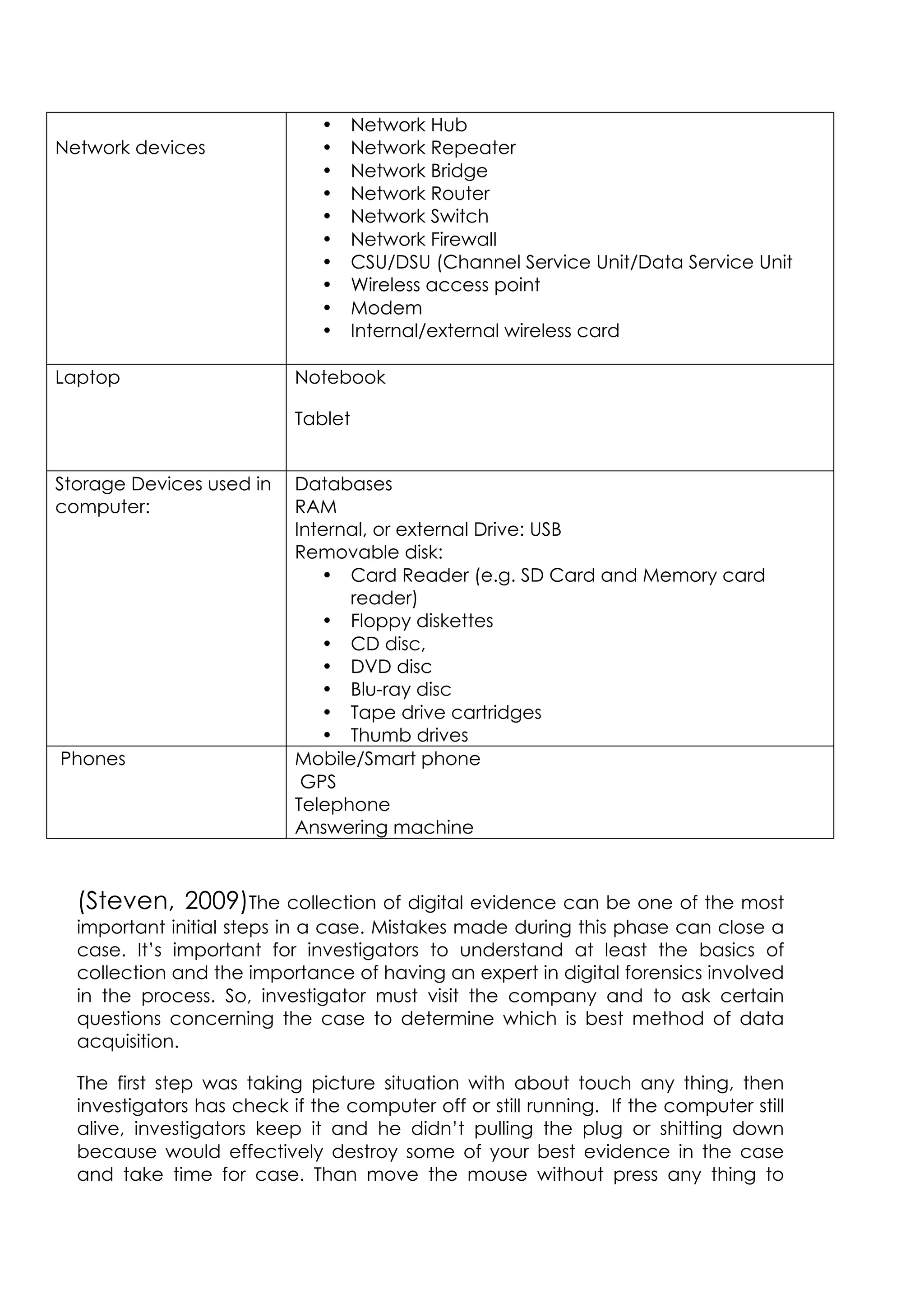
Network devices
• Network Hub
• Network Repeater
• Network Bridge
• Network Router
• Network Switch
• Network Firewall
• CSU/DSU (Channel Service Unit/Data Service Unit
• Wireless access point
• Modem
• Internal/external wireless card
Laptop Notebook
Tablet
Storage Devices used in
computer:
Databases
RAM
Internal, or external Drive: USB
Removable disk:
• Card Reader (e.g. SD Card and Memory card
reader)
• Floppy diskettes
• CD disc,
• DVD disc
• Blu-ray disc
• Tape drive cartridges
• Thumb drives
Phones Mobile/Smart phone
GPS
Telephone
Answering machine
maintain data and recording the information displayed on screen. Starting
imaging hard disk quickly to preserve and collect digital evidence before it
can be damaged degraded or destroyed and increases the chance of a
successful outcome to a case. Finally, investigator will take USB flash as
evidence
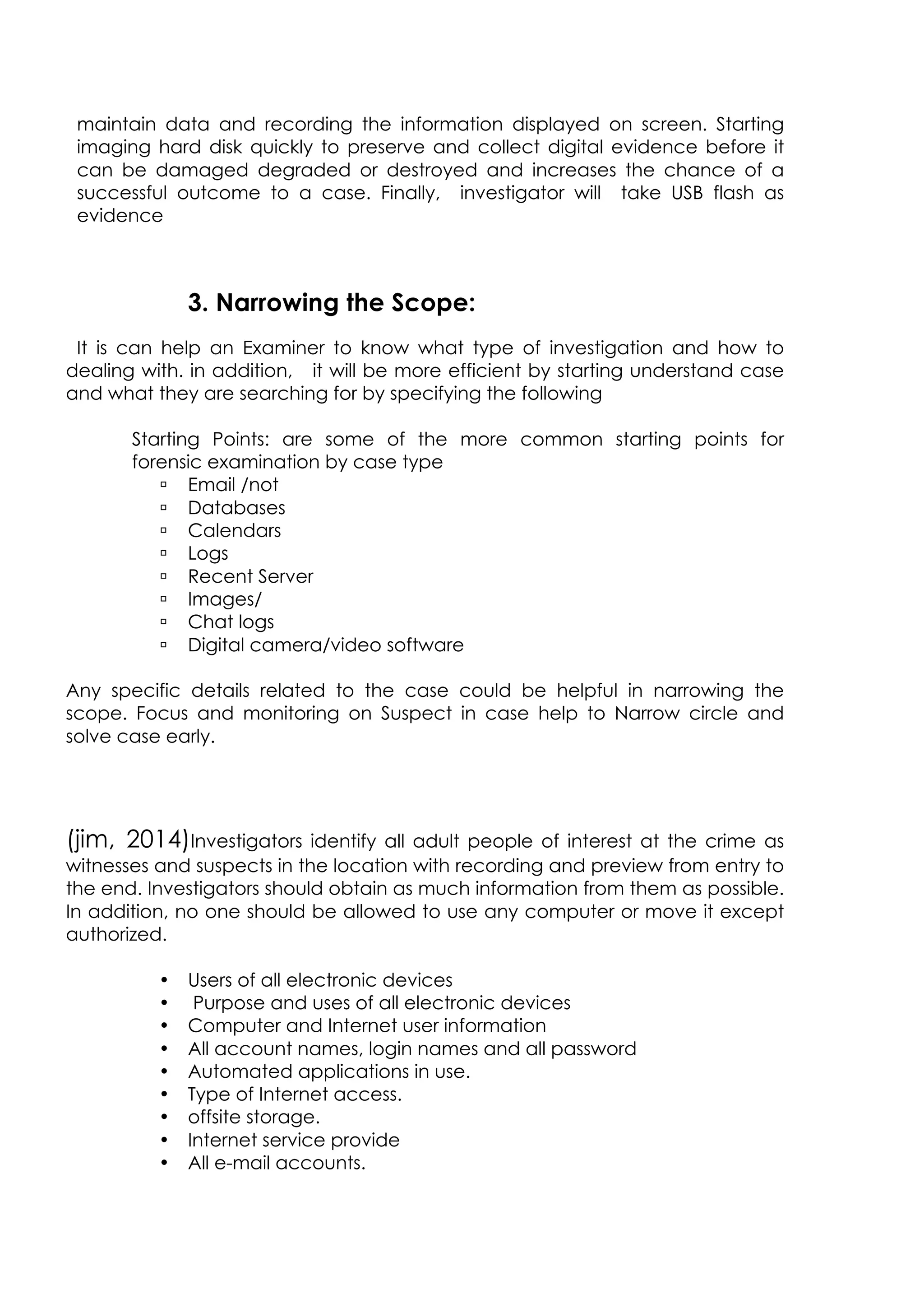
3. Narrowing the Scope:
It is can help an Examiner to know what type of investigation and how to
dealing with. in addition, it will be more efficient by starting understand case
and what they are searching for by specifying the following
Starting Points: are some of the more common starting points for
forensic examination by case type
ú Email /not
ú Databases
ú Calendars
ú Logs
ú Recent Server
ú Images/
ú Chat logs
ú Digital camera/video software
Any specific details related to the case could be helpful in narrowing the
scope. Focus and monitoring on Suspect in case help to Narrow circle and
solve case early.
(jim, 2014)Investigators identify all adult people of interest at the crime as
witnesses and suspects in the location with recording and preview from entry to
the end. Investigators should obtain as much information from them as possible.
In addition, no one should be allowed to use any computer or move it except
authorized.
• Users of all electronic devices
• Purpose and uses of all electronic devices
• Computer and Internet user information
• All account names, login names and all password
• Automated applications in use.
• Type of Internet access.
• offsite storage.
• Internet service provide
• All e-mail accounts.
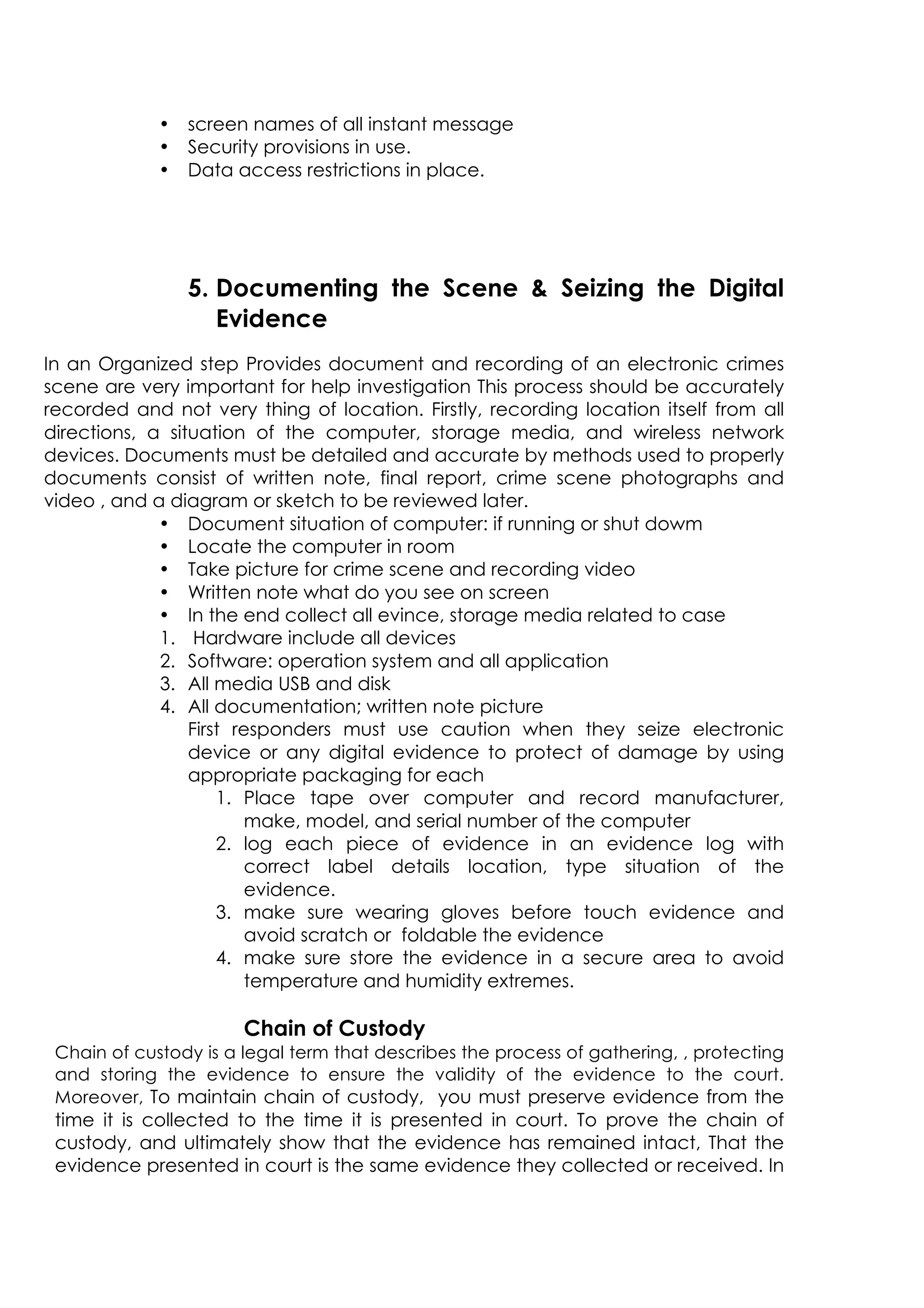
• screen names of all instant message
• Security provisions in use.
• Data access restrictions in place.
5. Documenting the Scene  Seizing the Digital
Evidence
In an Organized step Provides document and recording of an electronic crimes
scene are very important for help investigation This process should be accurately
recorded and not very thing of location. Firstly, recording location itself from all
directions, a situation of the computer, storage media, and wireless network
devices. Documents must be detailed and accurate by methods used to properly
documents consist of written note, final report, crime scene photographs and
video , and a diagram or sketch to be reviewed later.
• Document situation of computer: if running or shut dowm
• Locate the computer in room
• Take picture for crime scene and recording video
• Written note what do you see on screen
• In the end collect all evince, storage media related to case
1. Hardware include all devices
2. Software: operation system and all application
3. All media USB and disk
4. All documentation; written note picture
First responders must use caution when they seize electronic
device or any digital evidence to protect of damage by using
appropriate packaging for each
1. Place tape over computer and record manufacturer,
make, model, and serial number of the computer
2. log each piece of evidence in an evidence log with
correct label details location, type situation of the
evidence.
3. make sure wearing gloves before touch evidence and
avoid scratch or foldable the evidence
4. make sure store the evidence in a secure area to avoid
temperature and humidity extremes.
Chain of Custody
Chain of custody is a legal term that describes the process of gathering, , protecting
and storing the evidence to ensure the validity of the evidence to the court.
Moreover, To maintain chain of custody, you must preserve evidence from the
time it is collected to the time it is presented in court. To prove the chain of
custody, and ultimately show that the evidence has remained intact, That the
evidence presented in court is the same evidence they collected or received. In
addition, the time and date the evidence was received or transferred to
another provider and there was no tampering with the item while it was in
custody. Every step in the process is monitored and documented. However, it's
important for the investigator to make two images the first one which will be the
most similar to the original hard disk and it should be stored in a fire proof
cabinet and joint with chain of custody form. Also, the second copy will be the
copy that the investigation will be conducted on it .
Transporting Evidence
The actual collection of evidence is a critical step in the investigative
process. In addition, each piece of evidence collected must be handled in
a way that preserves its integrity and that provides for a detailed record of
its whereabouts from the time of collection to the time it arrives in a court
room. Every step in the process is observed and documented. However,
failure to pay proper attention to any one of these areas can easily result in
one or more pieces of evidence having no value in court or in
administrative proceedings. Moreover, once the object is identified as
evidence, it must be tagged. Evidence tagging helps identify the collected
item. The tag can contain of as little as a sticker with the date, time, control
number, and name or initials of the investigator. Using a control number is
an easy way to identify a piece of evidence in documentation such as a
chain of custody. A tag can also be an actual document that contains
general information about the item and the incident under investigation.
At the lab
In the lab we have several processes that we need to follow it to reach the
end of the investigation . Once we finish collecting digital evidence from
the scene and transport it to the forensics lab. these evidences should be in
a controlled environment that ensures the security and integrity of digital
evidence. So we decide to use forensic tools to analyze the digital data and
finding results by using an Access Data FTK suite of tools. we will work on a
process known as imaging in which an exact duplicate of the digital
information is created and used for analysis.in addition, this process insures
the original evidence and its data are never disturbed. The image is
validated to make sure an exact duplicate has been created and then
analysis of the duplicate data begins. However, In computer forensics lab it is
essential to examine and analyze file slack space, which is the space
between the end of a file and the end of the disk cluster it is stored in. we
examined because it provides a wealth of information and additional
investigative leads. Moreover, it is very important to examine the Host
Protected Area (HPA) it also referred to as hidden protected area which is an area
of a hard drive that is not normally visible to an operating system at the same time it
and inaccessible to the user. The HPA contains a version of everything that
has come in and out of the computer, so it will show whether the user has
hide sensitive data or used any illegal files or programs. This digital
information will helps computer forensics analyst to incriminate the suspect
by having a enough evidence to convict them and identify their illegal
activity.
Methodology
1) Assessing the Scene:
This process involves interviewing the key contacts who are
present and documenting the scene. The forensics teams
typically use two methods: photography and field notes.
2) Acquiring the Evidence:
Collection of digital evidence and this is follows a simple four-step
methodology:
• Identify Sources
• Collecting Evidence
• Authenticating Evidence
• Maintaining a Documented Chain of Custody
3) Analyzing Evidence:
There are two steps in analysis process:
• Obtain the evidence from the storage area, and
performing a physical authentication.
• Copy of the evidence for analysis and the original is
returned to storage; it is very important that the analysis
never take place on the original evidence.
• Forensic Toolkit (FTK) from Access Data is the most common
tool used in forensic analysis.
• Searching for Evidence
4) Presentation and Reporting the Findings:
After the analysis is complete, the findings must be reported. The
report given to those who will use the report, including the following
groups:
• Upper management
• Forensic expert retained by the opposition
• Attorneys, judges, and juries
• Other professionals (auditors, heads of human resources
departments, and others).
Results and Analysis (Case analysis and
reporting using Access Data FTK suite)
Analysis Evidences by Forensics tools:-
Imaging by use FTK imager
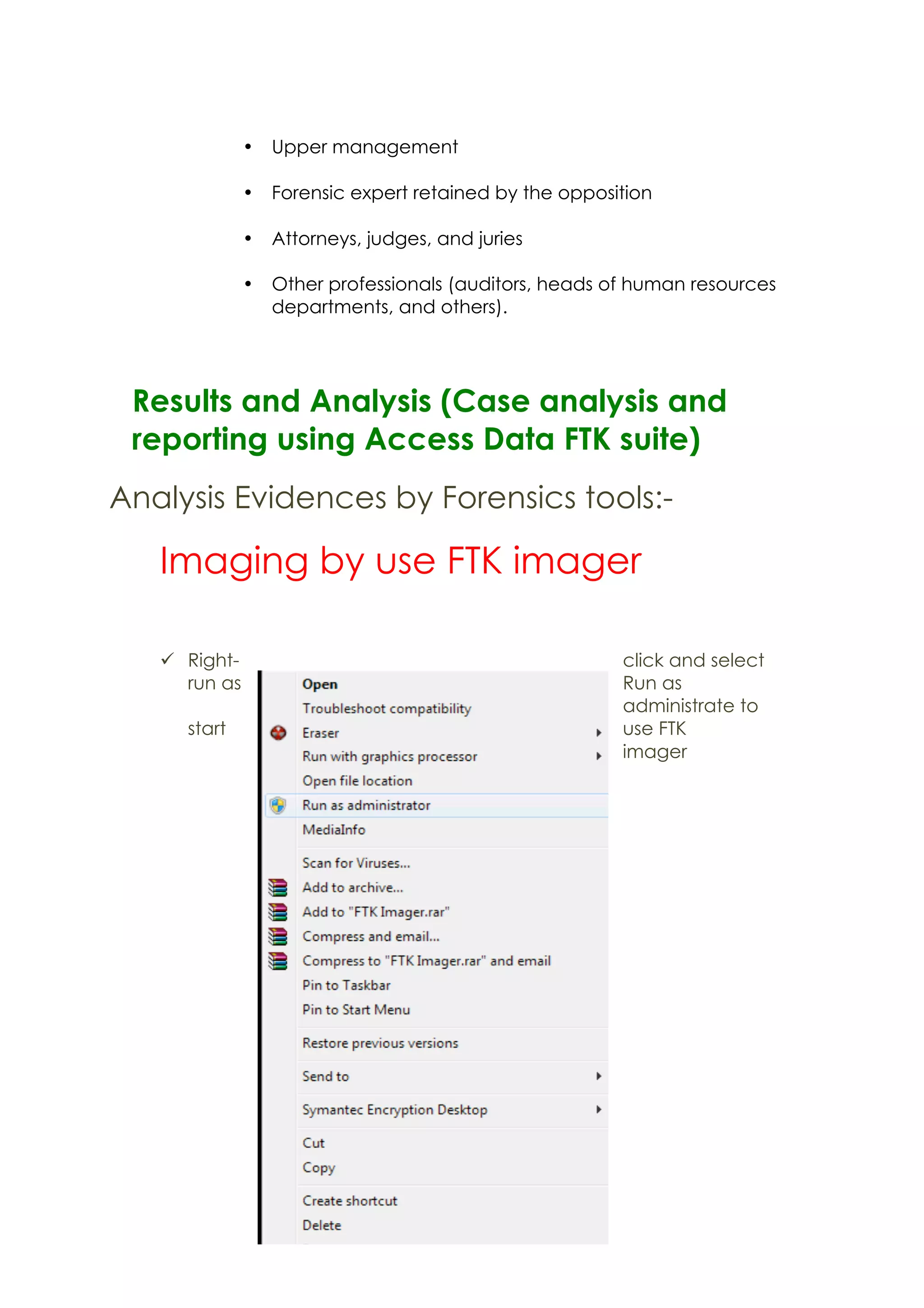
ü Right- click and select
run as Run as
administrate to
start use FTK
imager
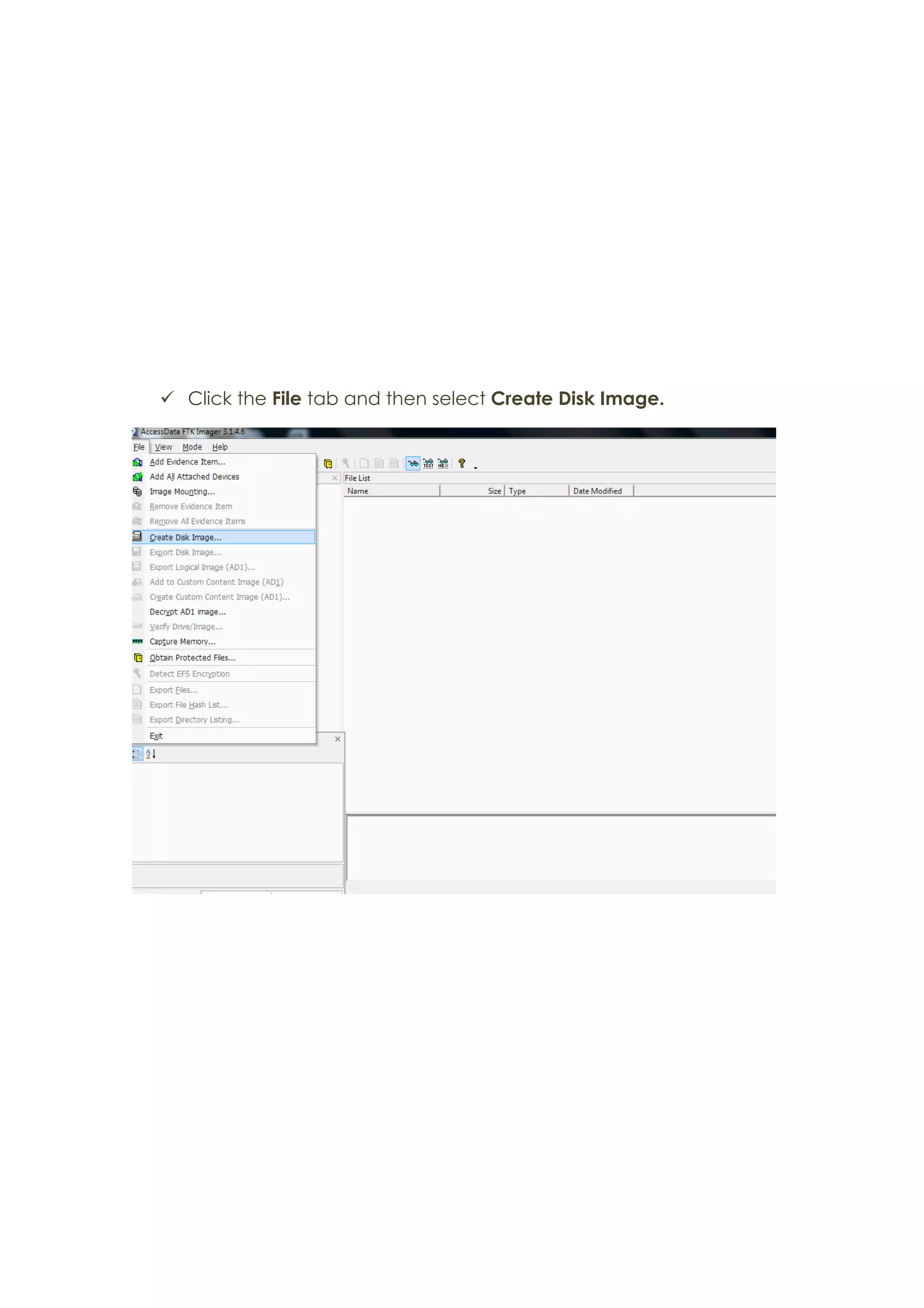
ü Click the File tab and then select Create Disk Image.
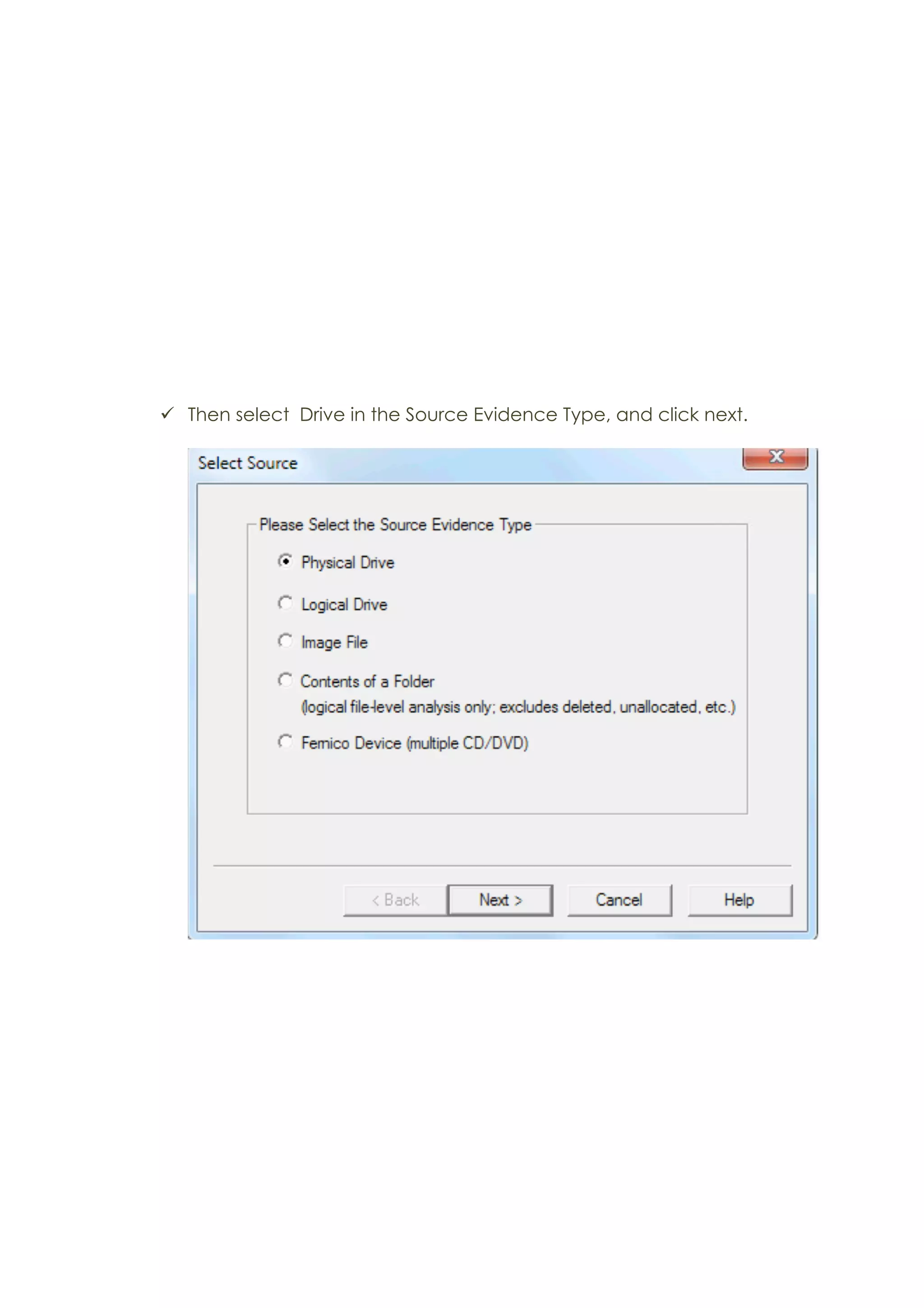
ü Then select Drive in the Source Evidence Type, and click next.
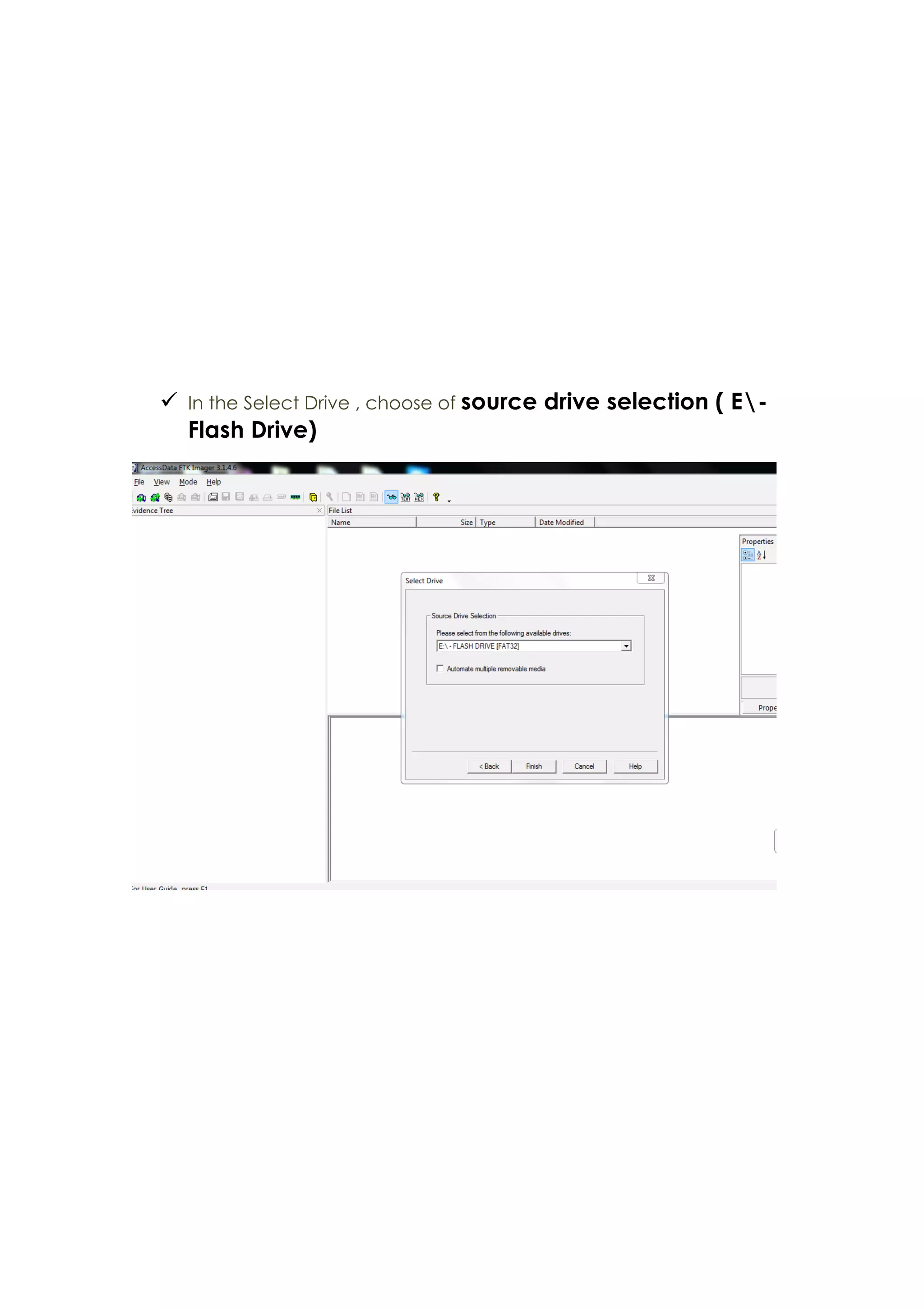
ü In the Select Drive , choose of source drive selection ( E-
Flash Drive)
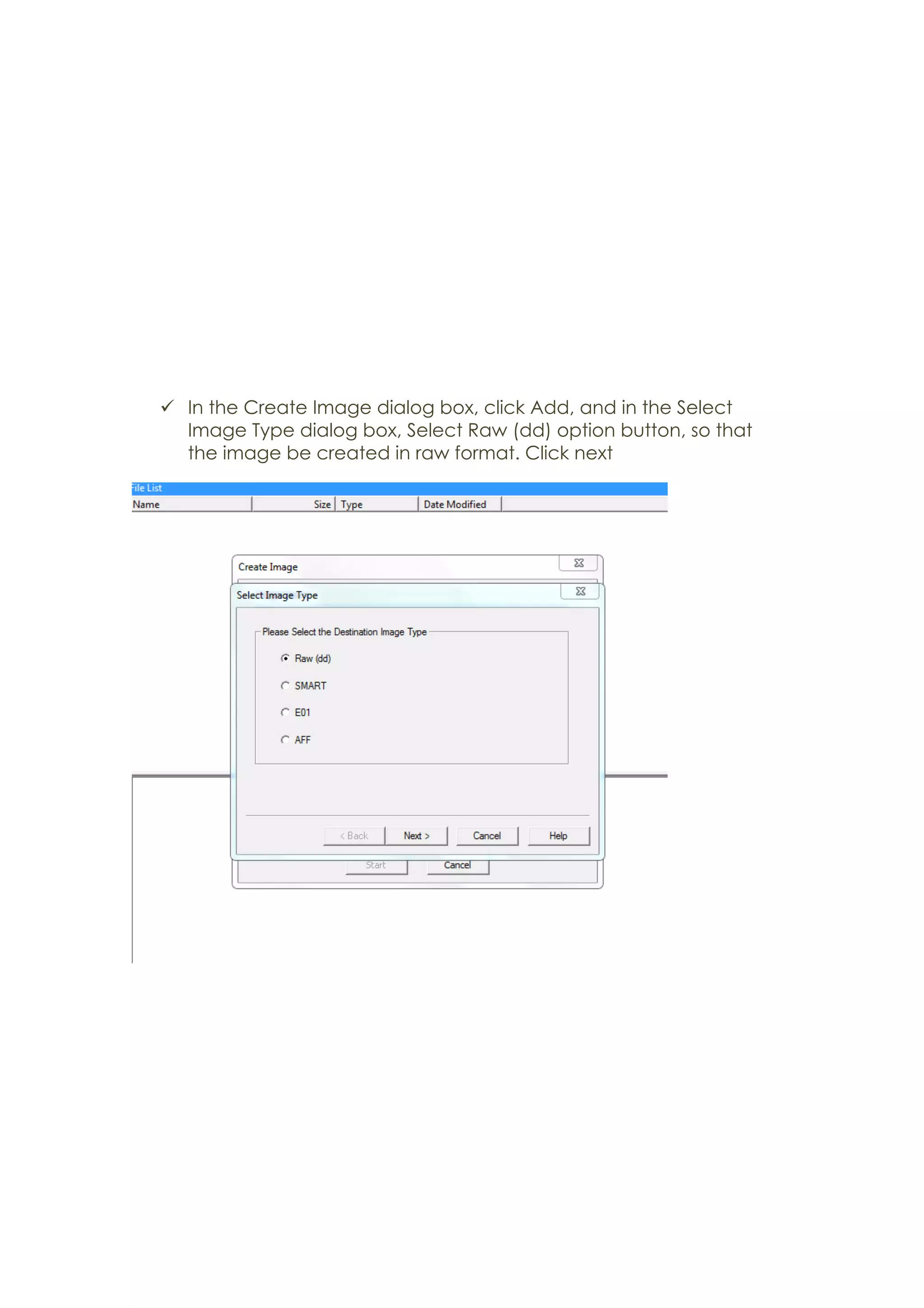
ü In the Create Image dialog box, click Add, and in the Select
Image Type dialog box, Select Raw (dd) option button, so that
the image be created in raw format. Click next
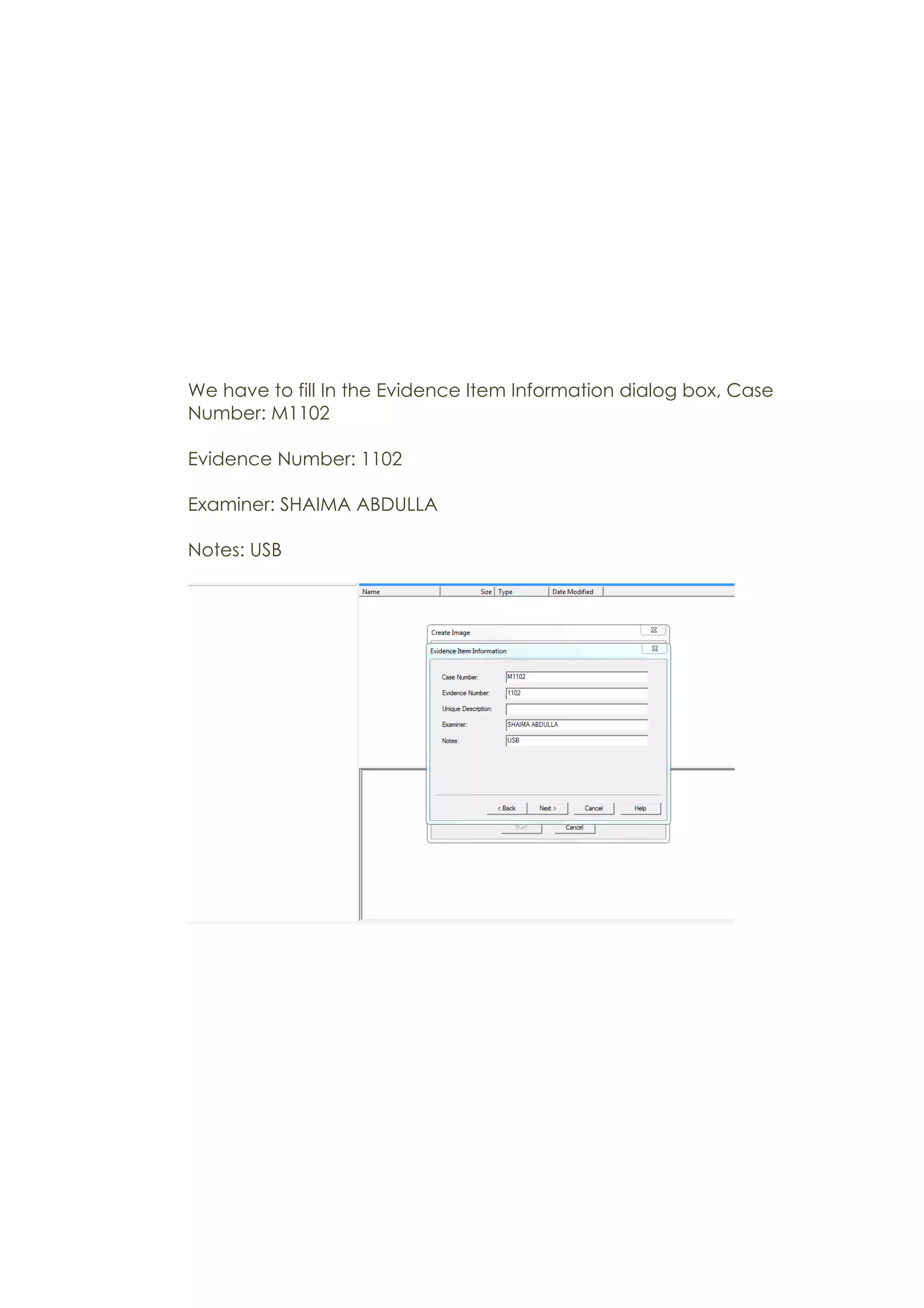
We have to fill In the Evidence Item Information dialog box, Case
Number: M1102
Evidence Number: 1102
Examiner: SHAIMA ABDULLA
Notes: USB
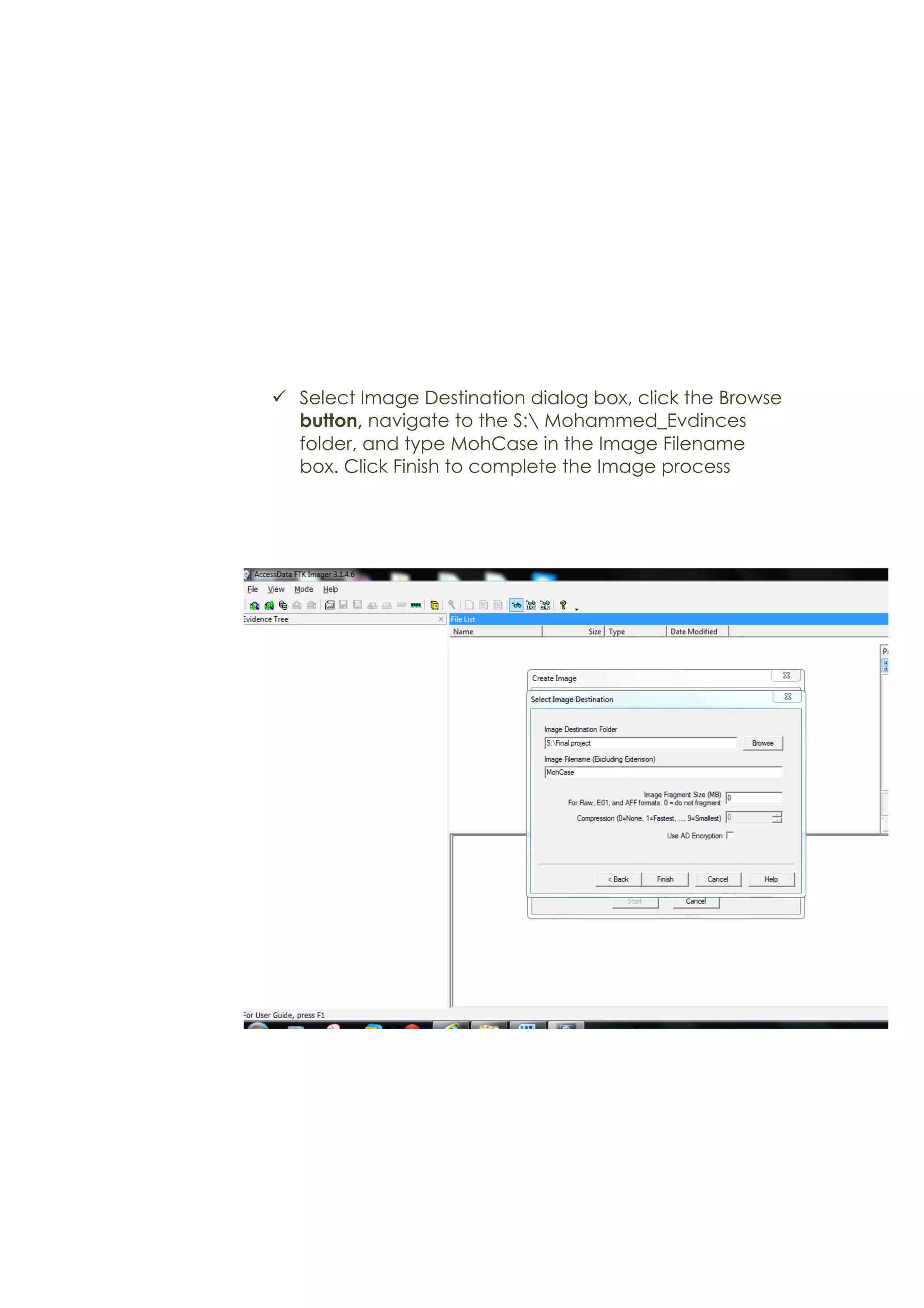
ü Select Image Destination dialog box, click the Browse
button, navigate to the S: Mohammed_Evdinces
folder, and type MohCase in the Image Filename
box. Click Finish to complete the Image process
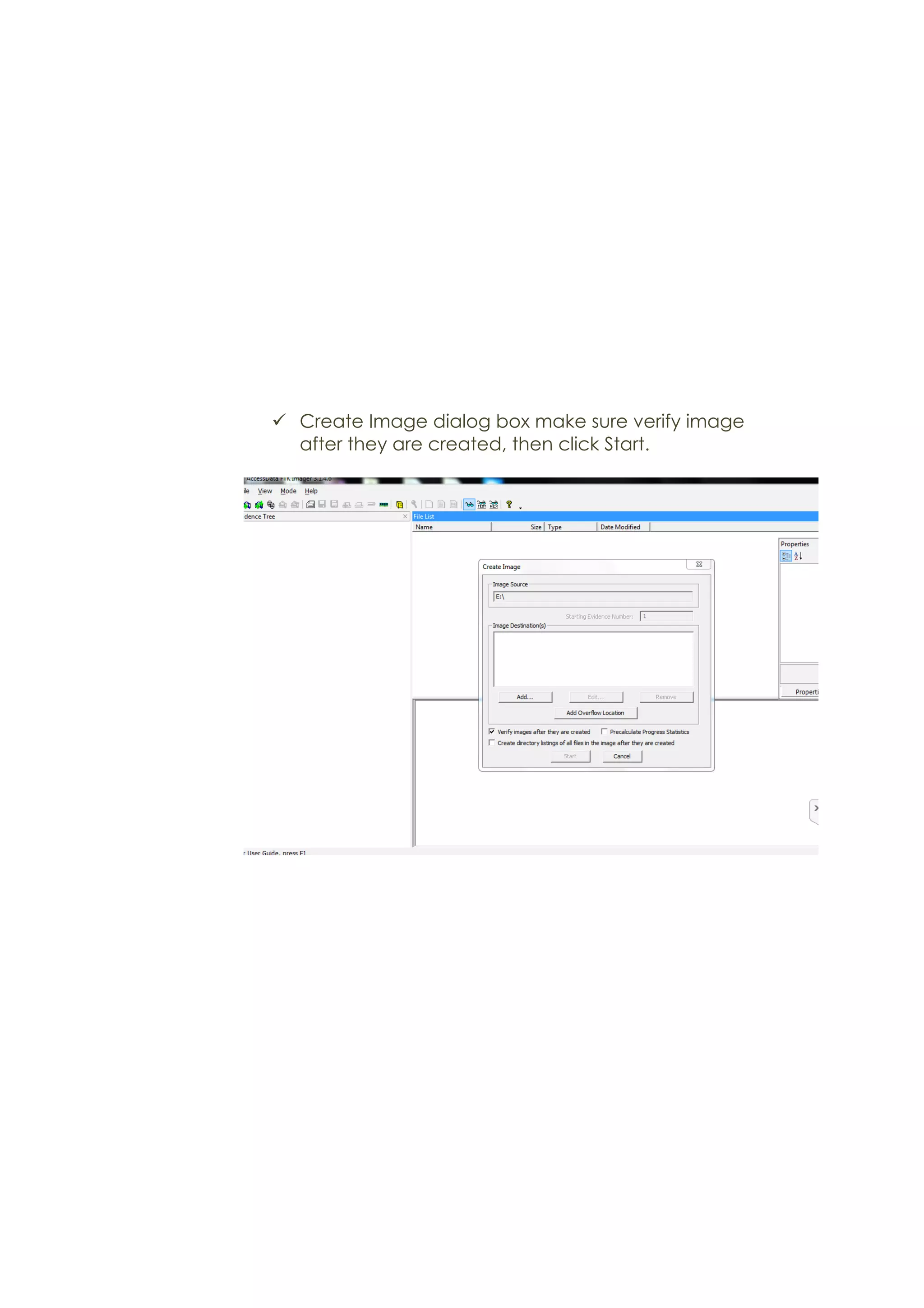
ü Create Image dialog box make sure verify image
after they are created, then click Start.
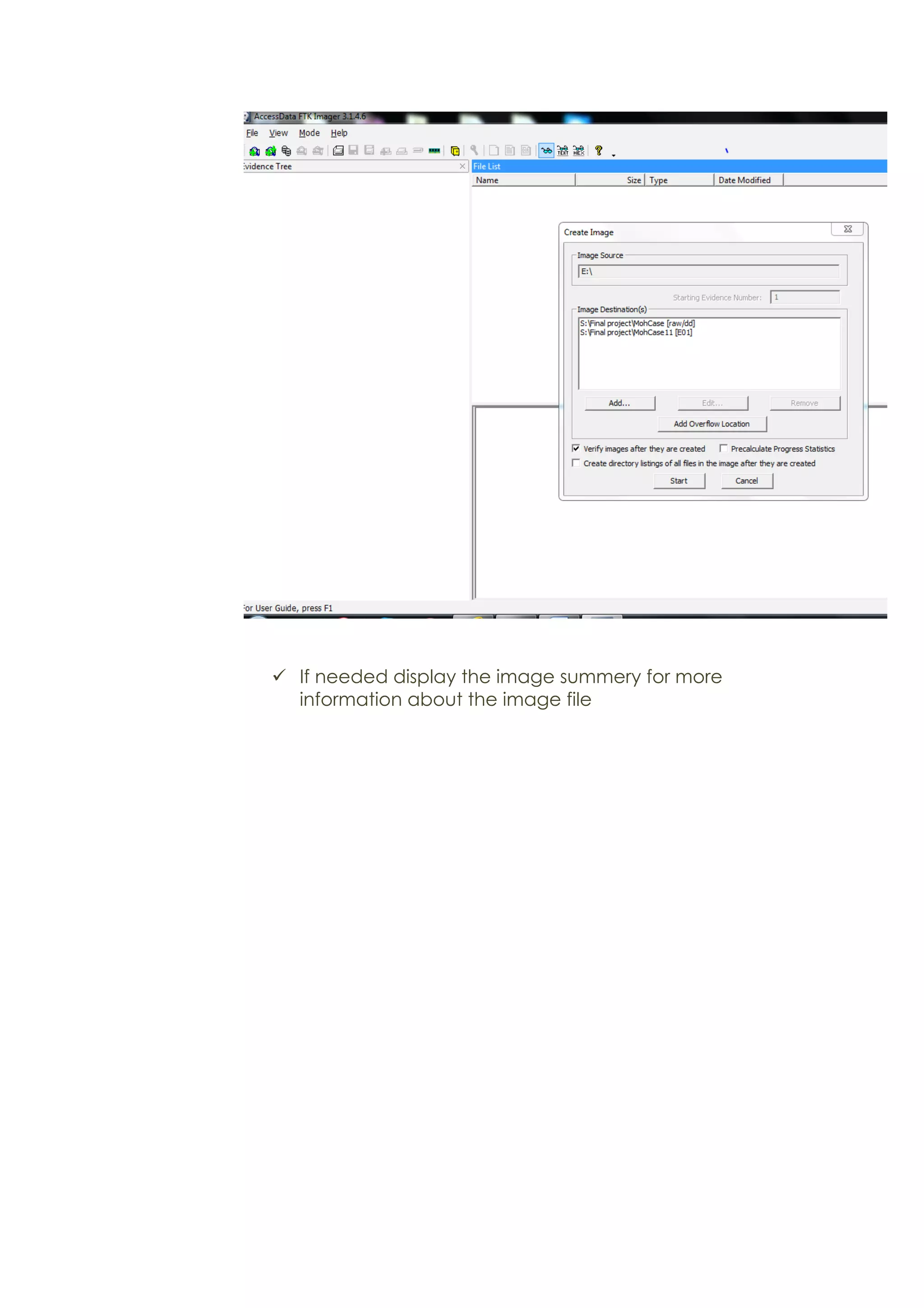
ü If needed display the image summery for more
information about the image file
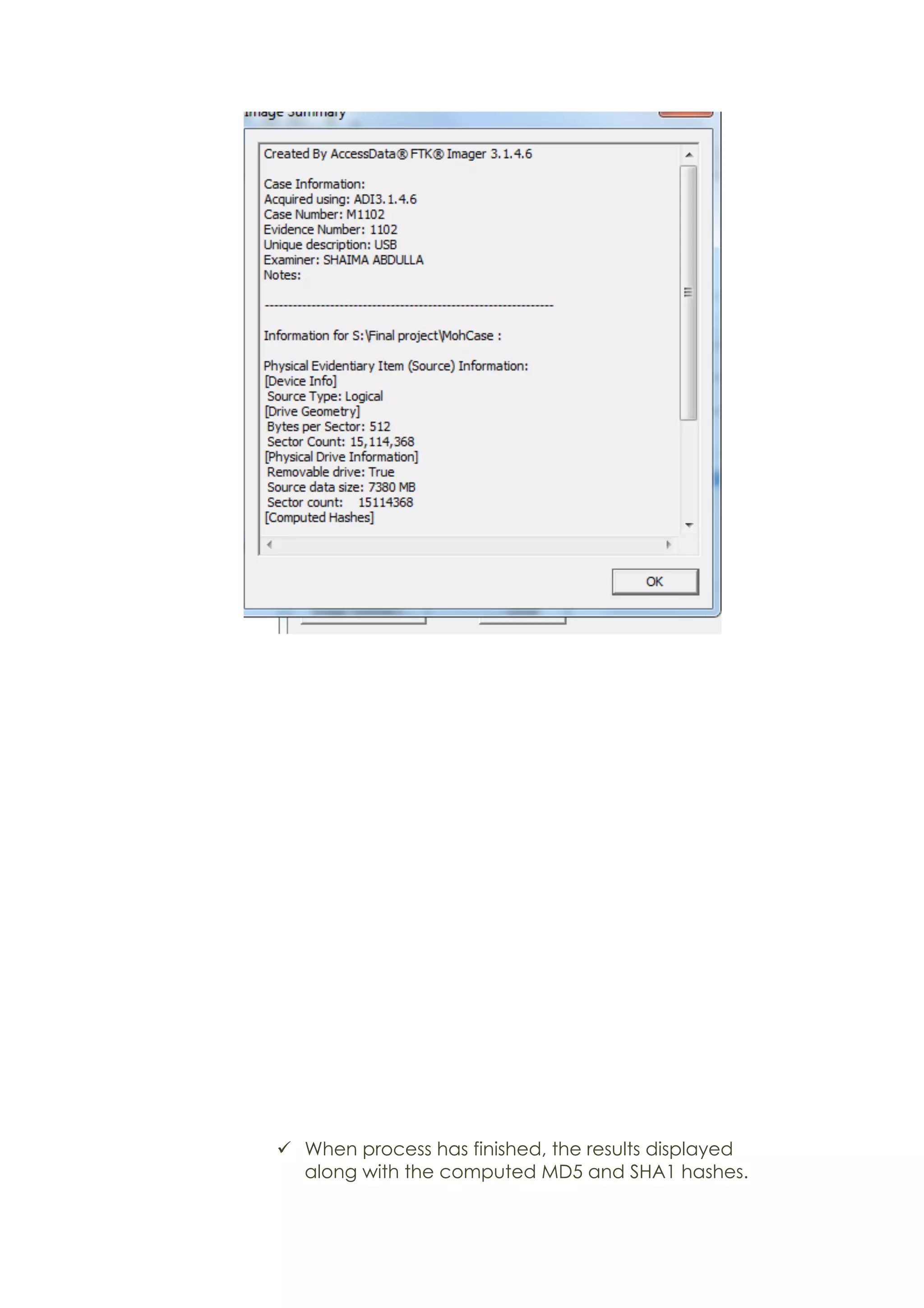
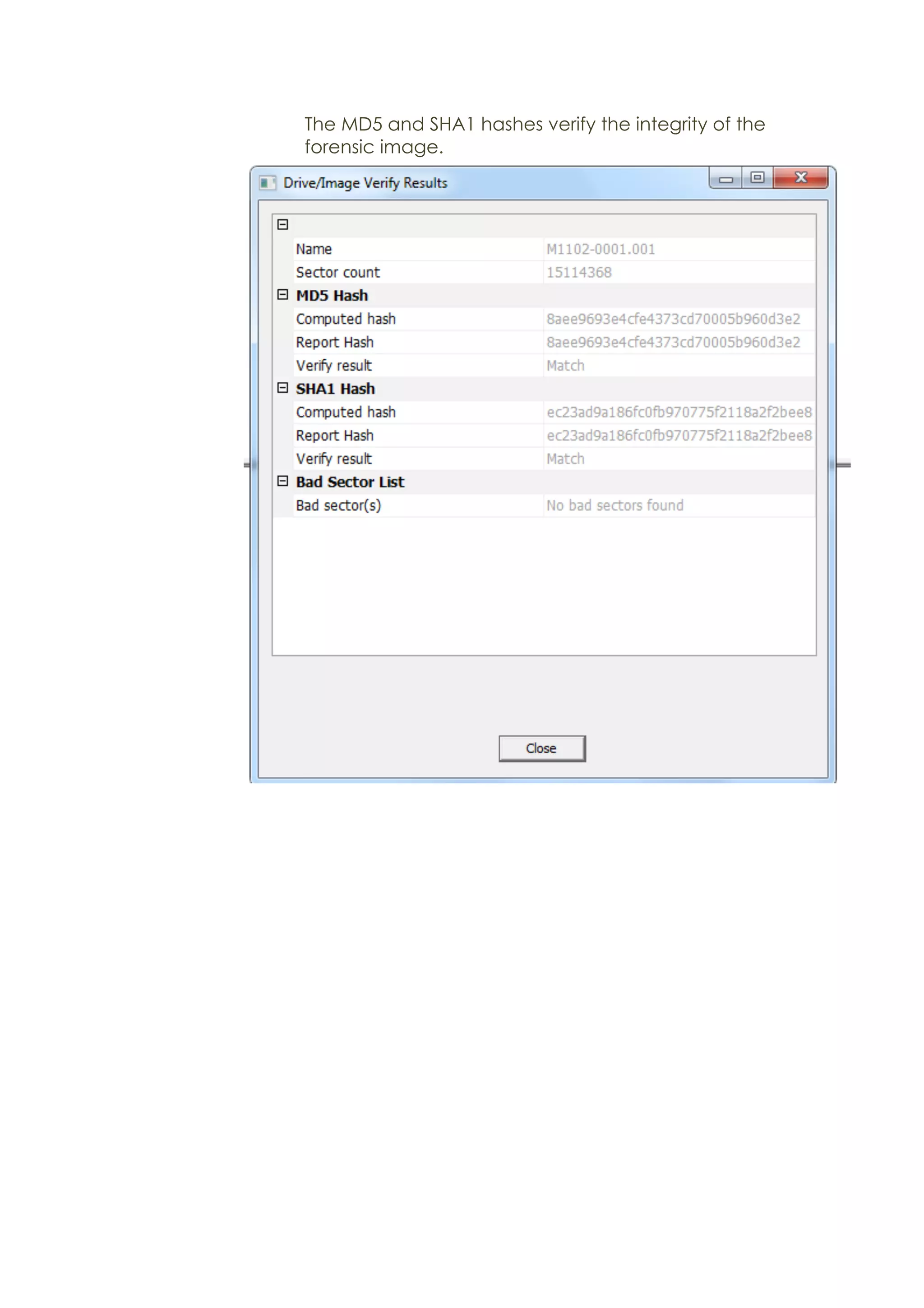
ü When process has finished, the results displayed
along with the computed MD5 and SHA1 hashes.
The MD5 and SHA1 hashes verify the integrity of the
forensic image.
Ø Deleted file
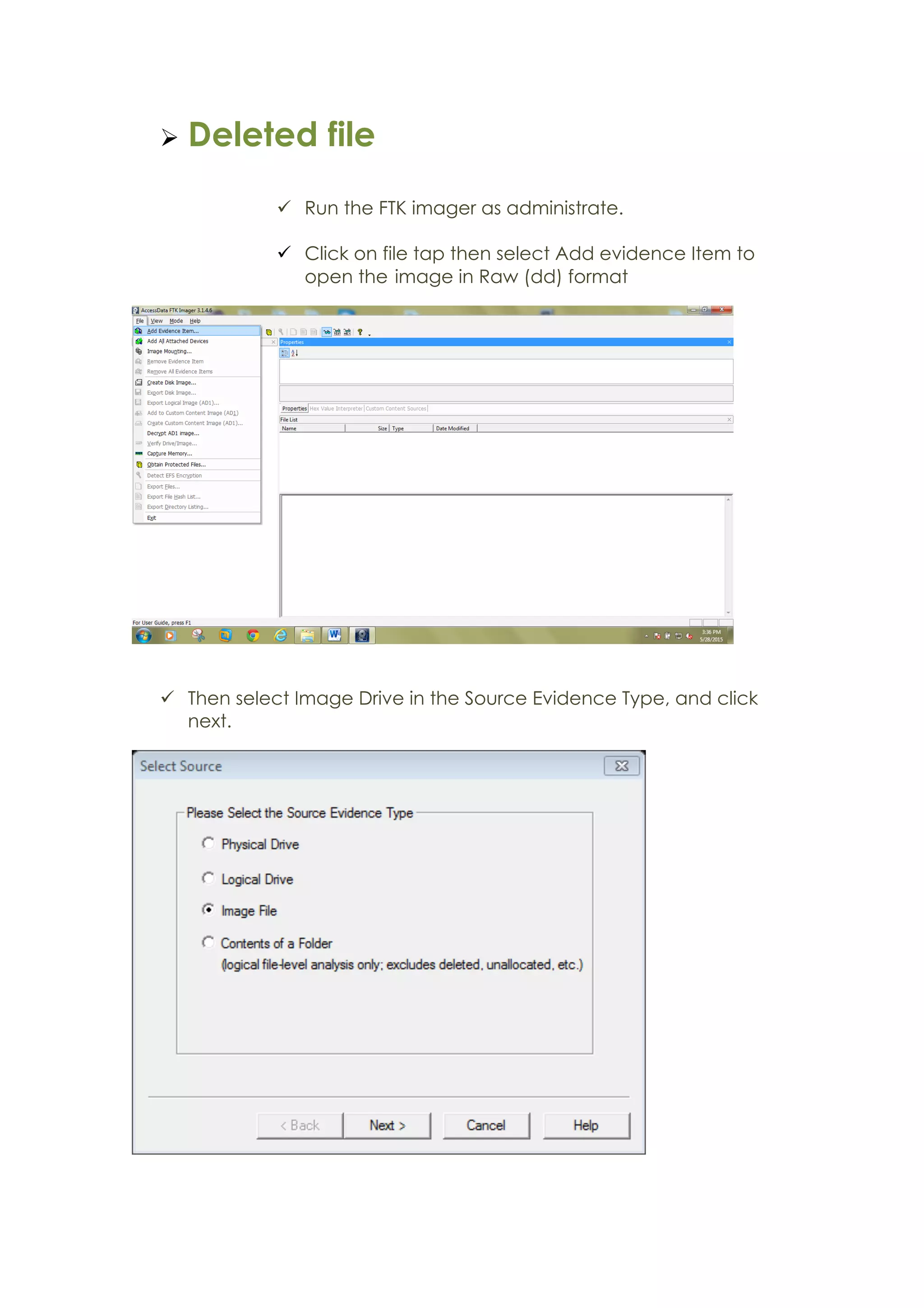
ü Run the FTK imager as administrate.
ü Click on file tap then select Add evidence Item to
open the image in Raw (dd) format
ü Then select Image Drive in the Source Evidence Type, and click
next.
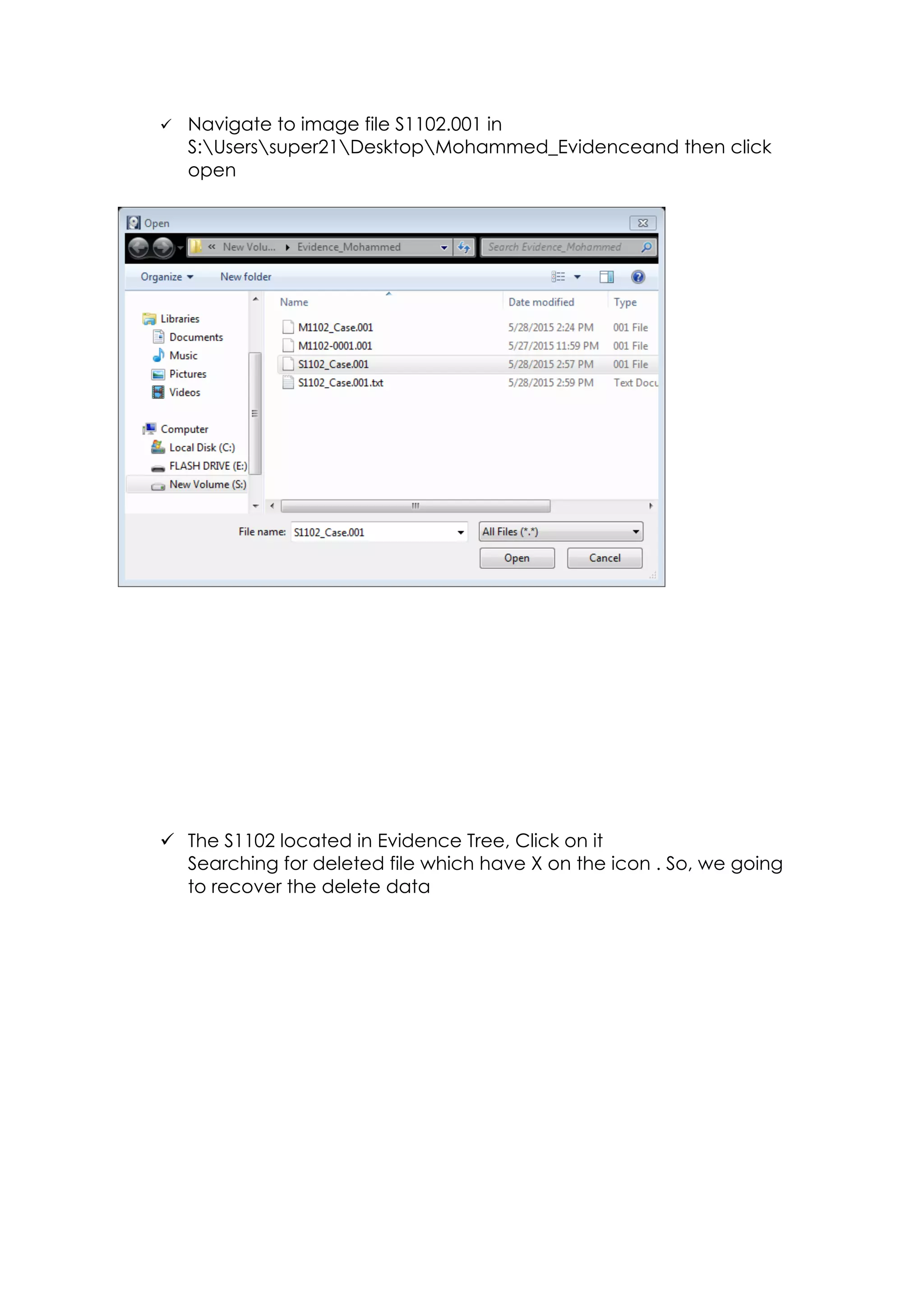
ü Navigate to image file S1102.001 in
S:Userssuper21DesktopMohammed_Evidenceand then click
open
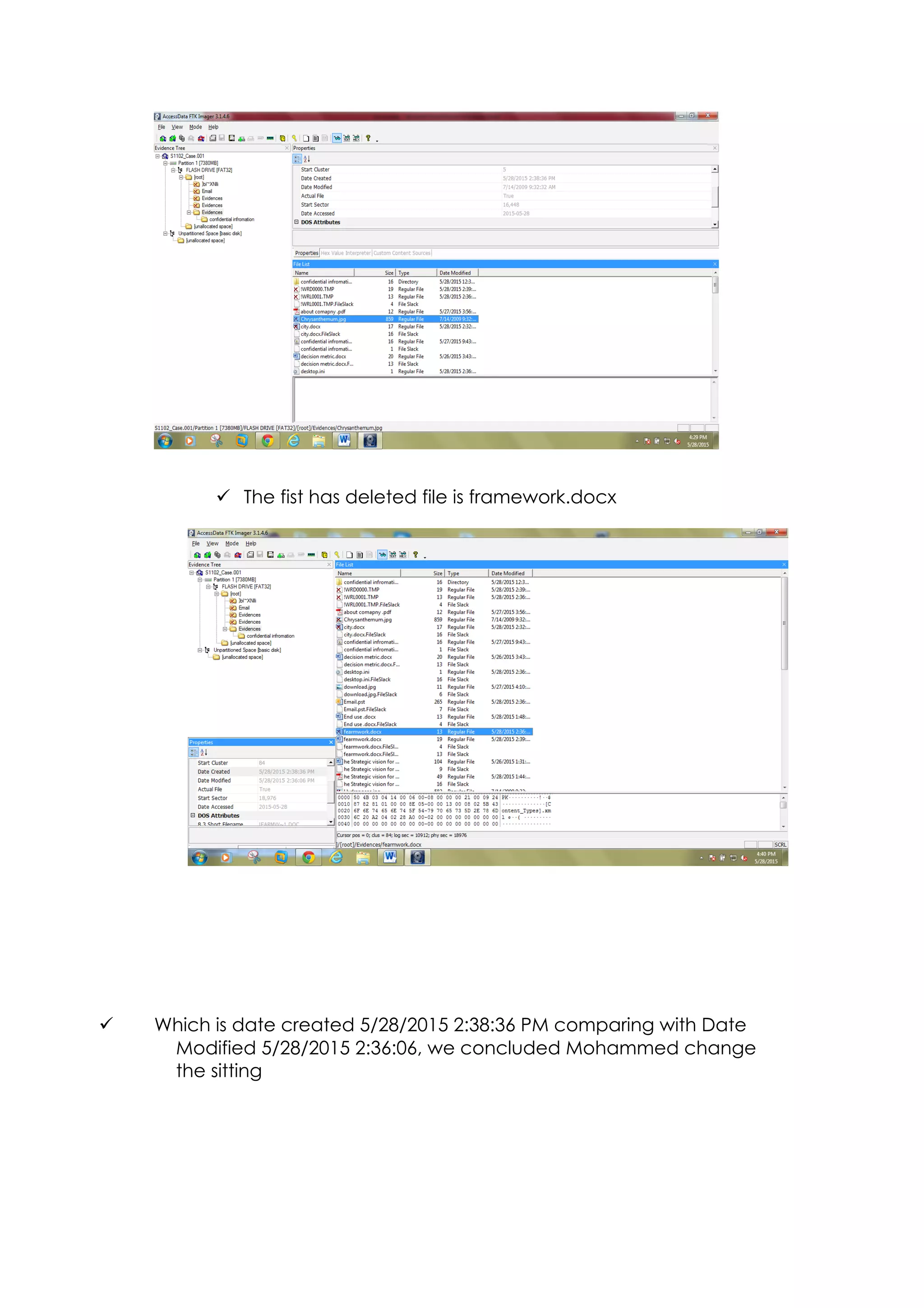
ü The S1102 located in Evidence Tree, Click on it
Searching for deleted file which have X on the icon . So, we going
to recover the delete data
ü The fist has deleted file is framework.docx
ü Which is date created 5/28/2015 2:38:36 PM comparing with Date
Modified 5/28/2015 2:36:06, we concluded Mohammed change
the sitting
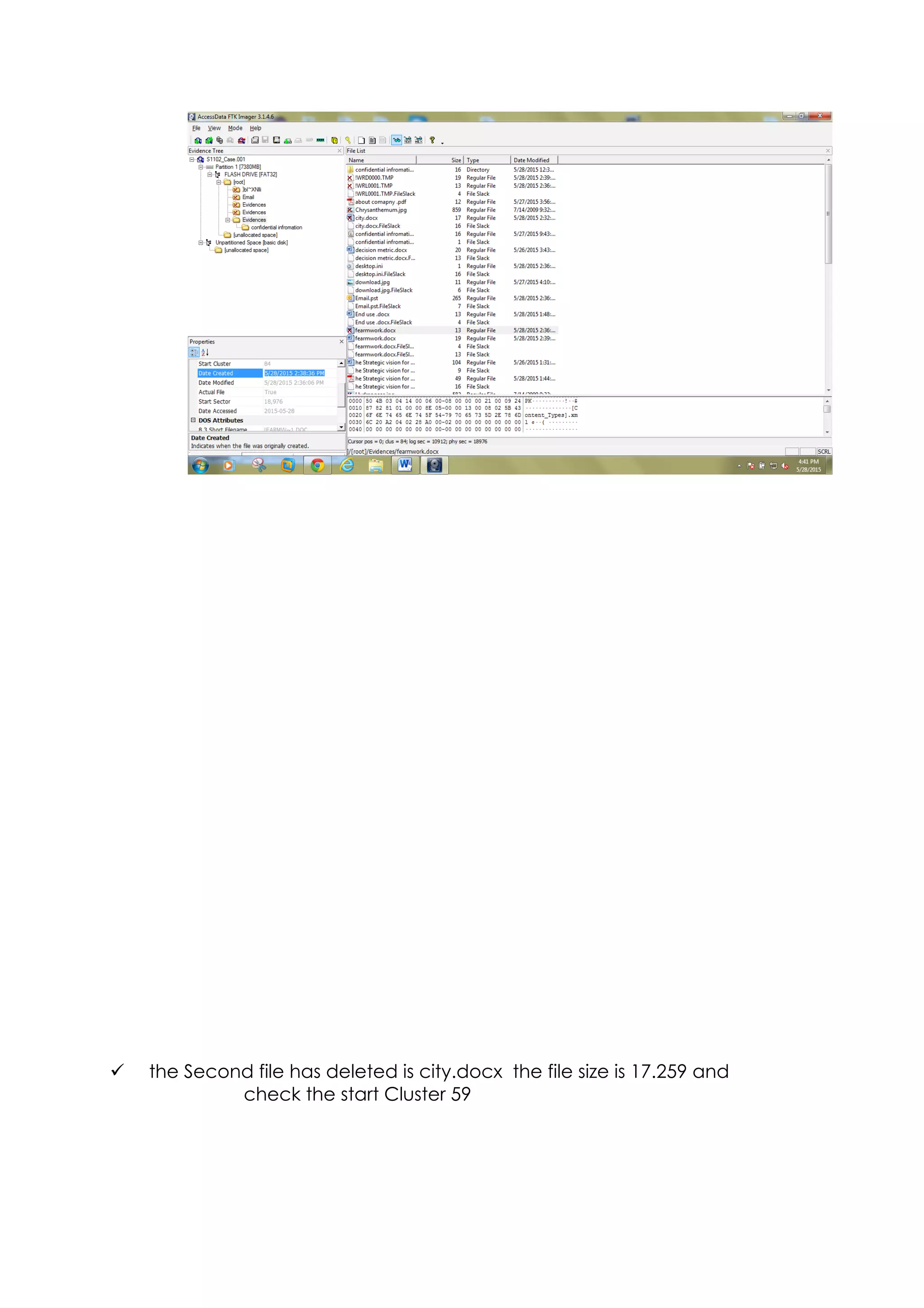
ü the Second file has deleted is city.docx the file size is 17.259 and
check the start Cluster 59


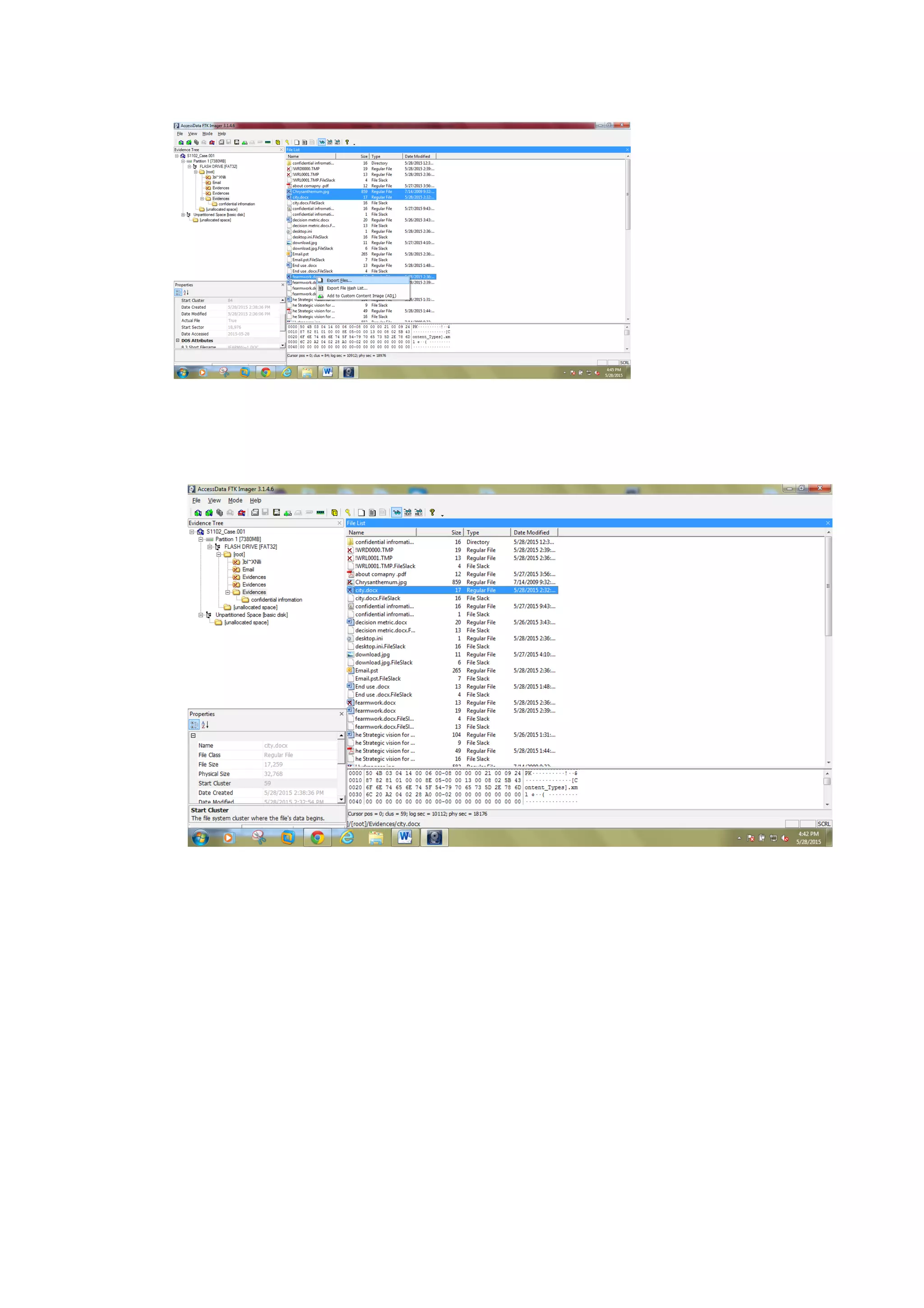
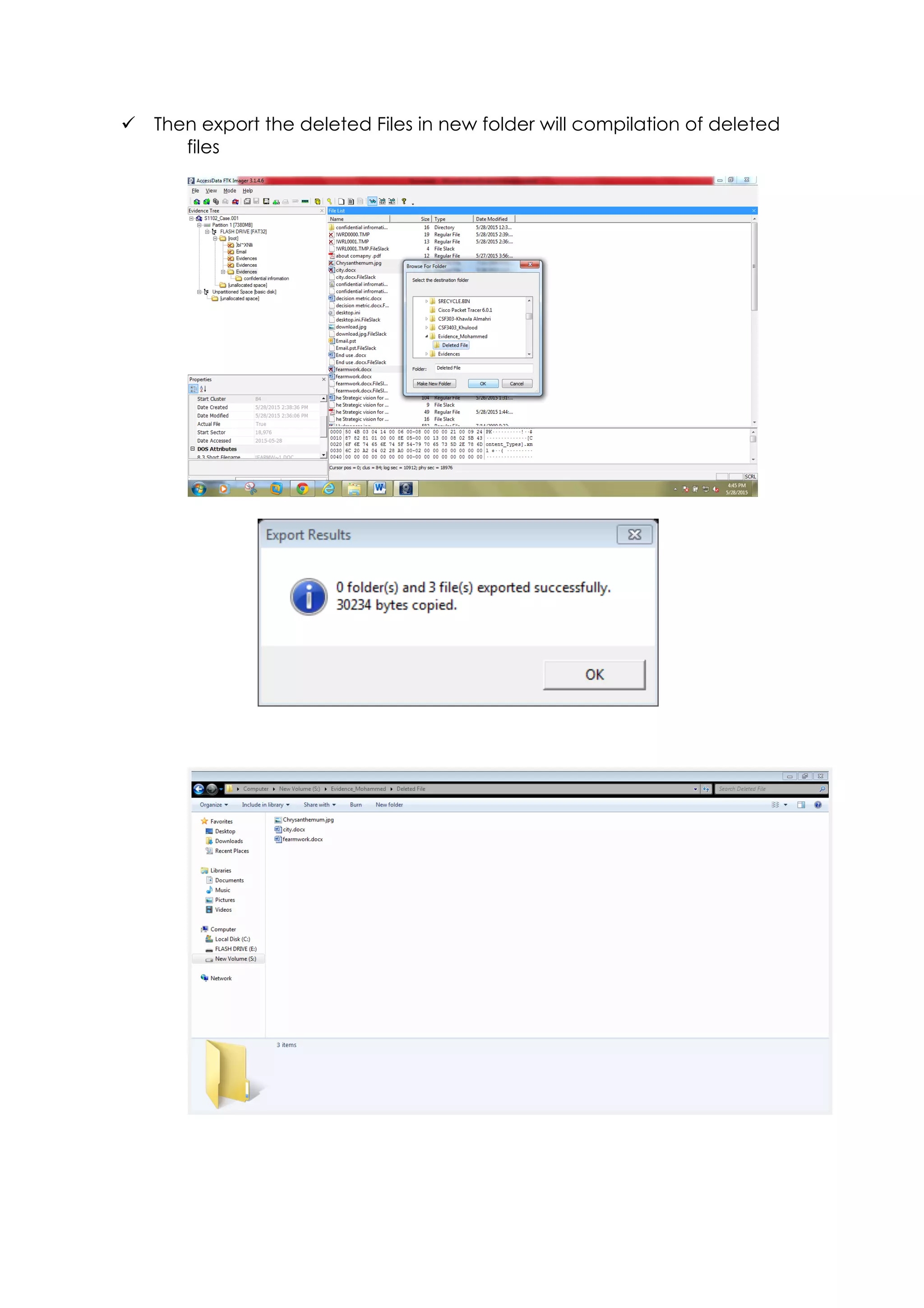
ü Then export the deleted Files in new folder will compilation of deleted
files
Examining evidence by using AccessData
Forensics Toolki
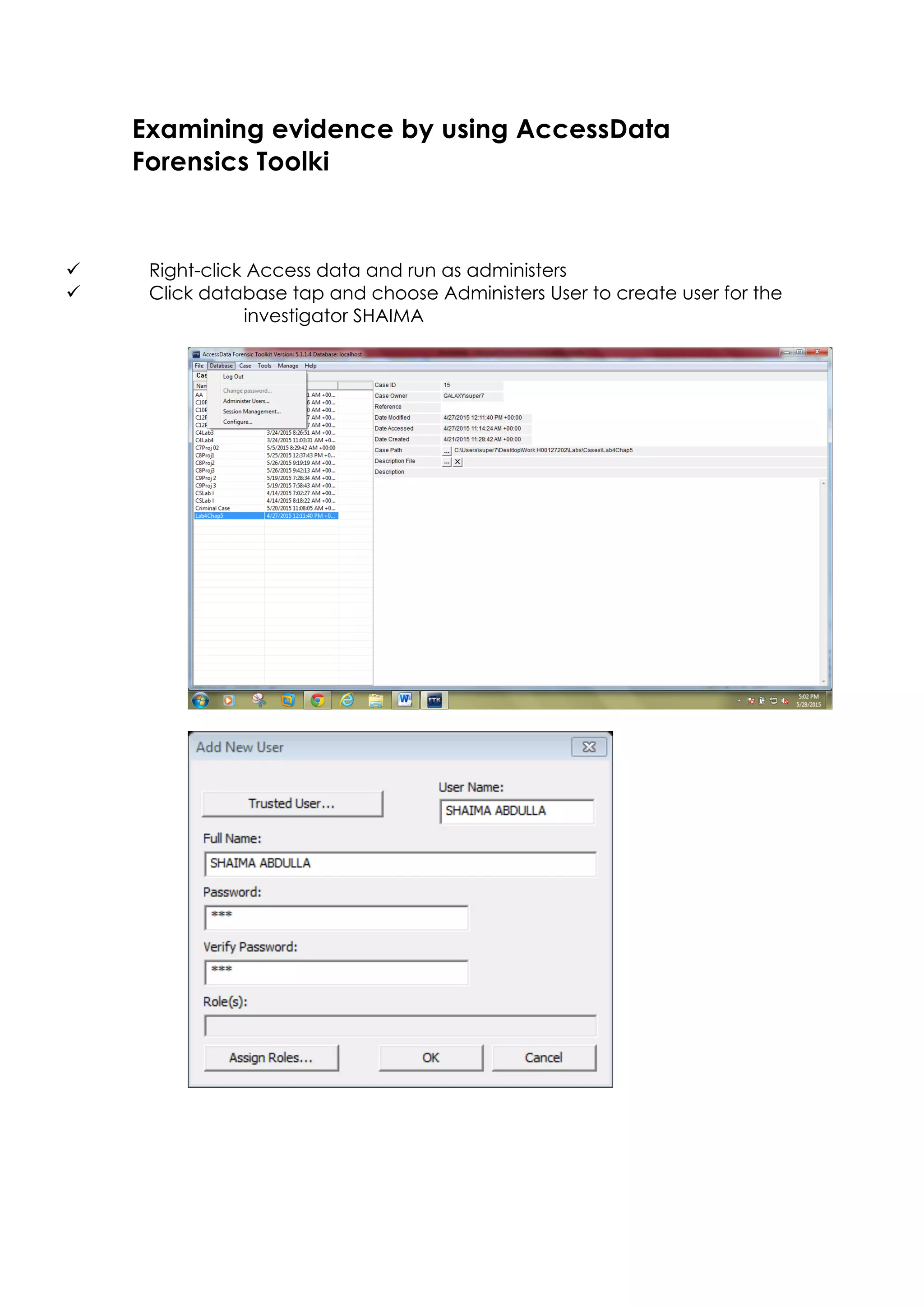
ü Right-click Access data and run as administers
ü Click database tap and choose Administers User to create user for the
investigator SHAIMA
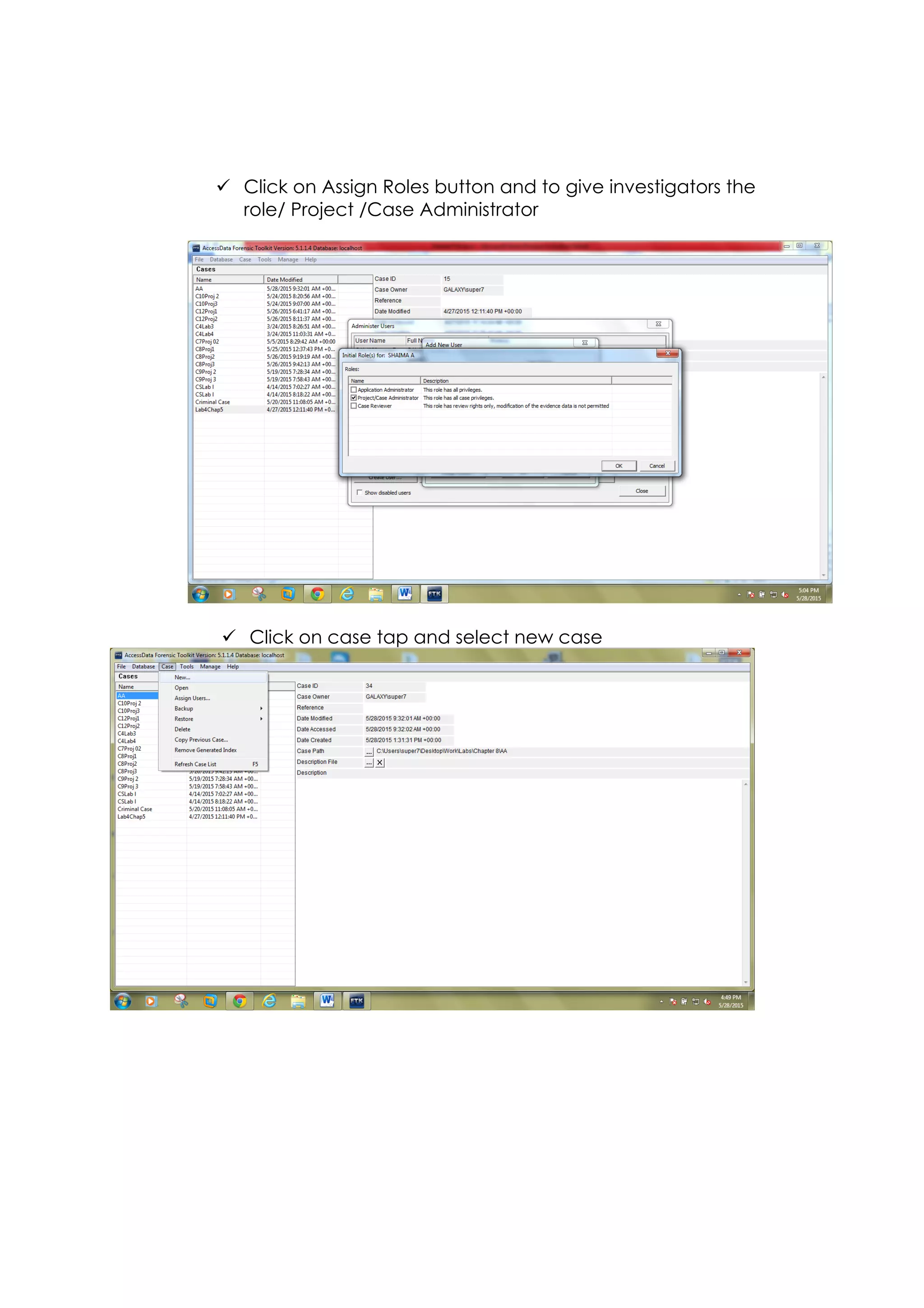
ü Click on Assign Roles button and to give investigators the
role/ Project /Case Administrator
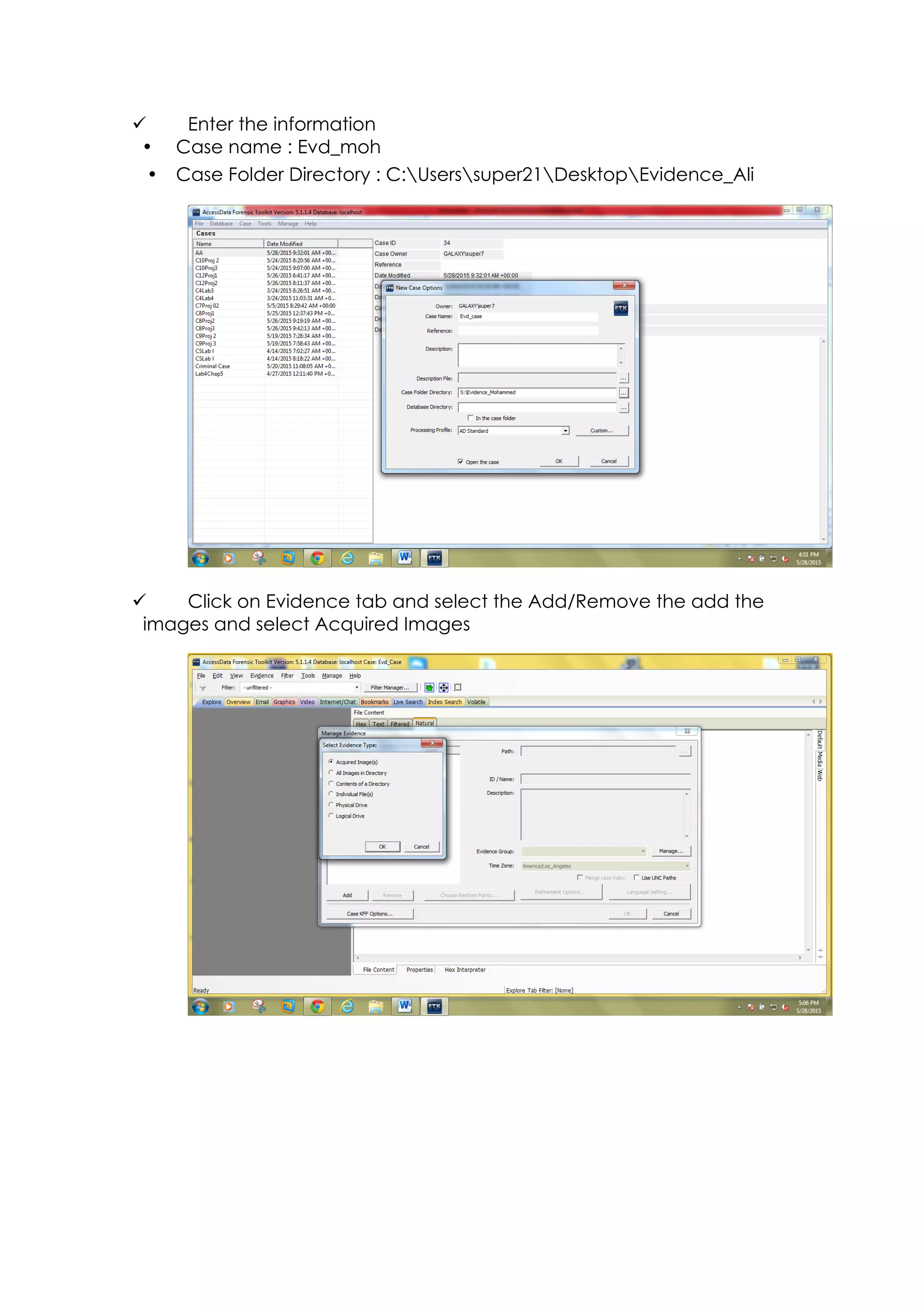
ü Click on case tap and select new case
ü Enter the information
• Case name : Evd_moh
• Case Folder Directory : C:Userssuper21DesktopEvidence_Ali
ü Click on Evidence tab and select the Add/Remove the add the
images and select Acquired Images
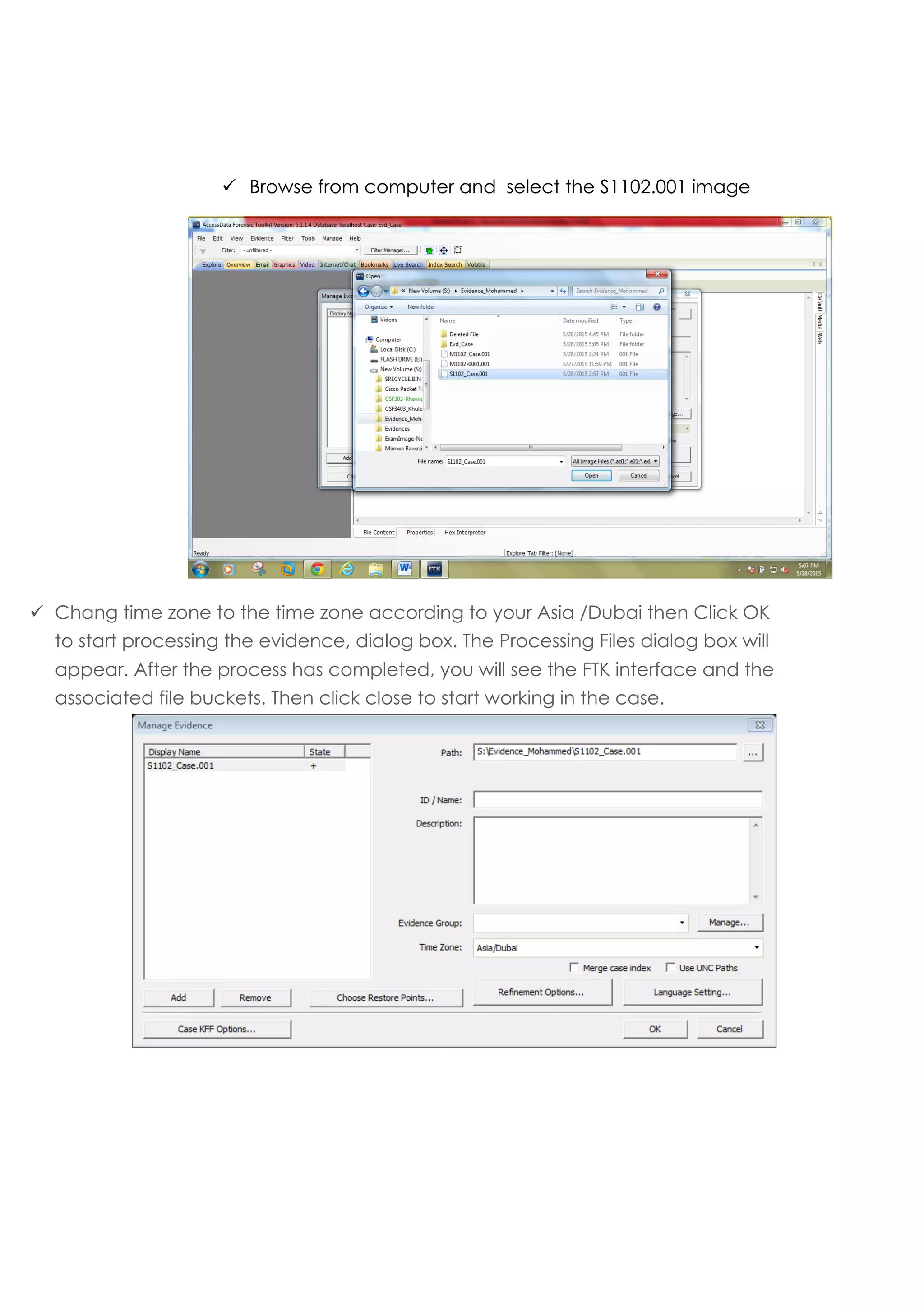
ü Browse from computer and select the S1102.001 image
ü Chang time zone to the time zone according to your Asia /Dubai then Click OK
to start processing the evidence, dialog box. The Processing Files dialog box will
appear. After the process has completed, you will see the FTK interface and the
associated file buckets. Then click close to start working in the case.
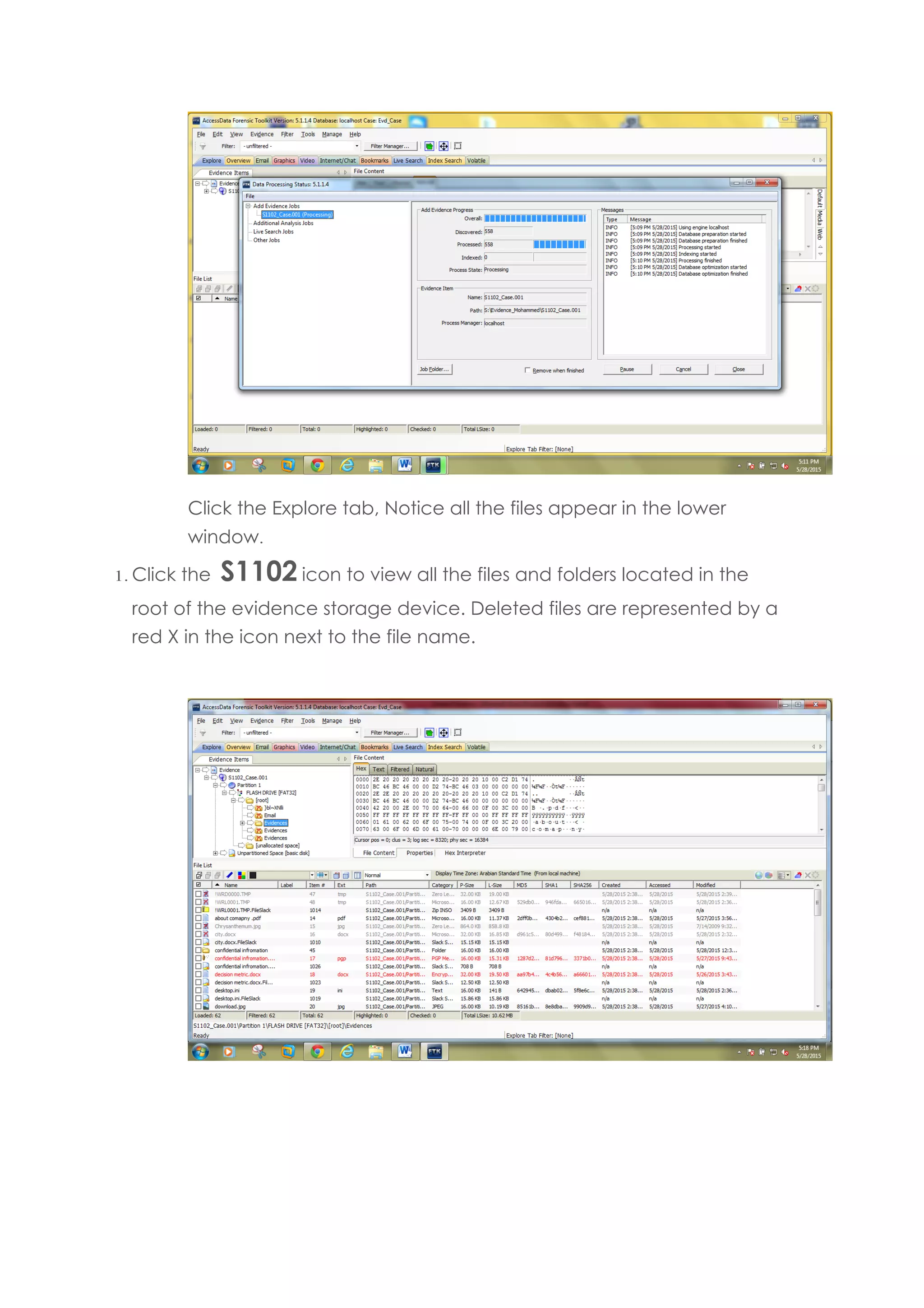
Click the Explore tab, Notice all the files appear in the lower
window.
1. Click the S1102 icon to view all the files and folders located in the
root of the evidence storage device. Deleted files are represented by a
red X in the icon next to the file name.
Noticed that deleted file has red X
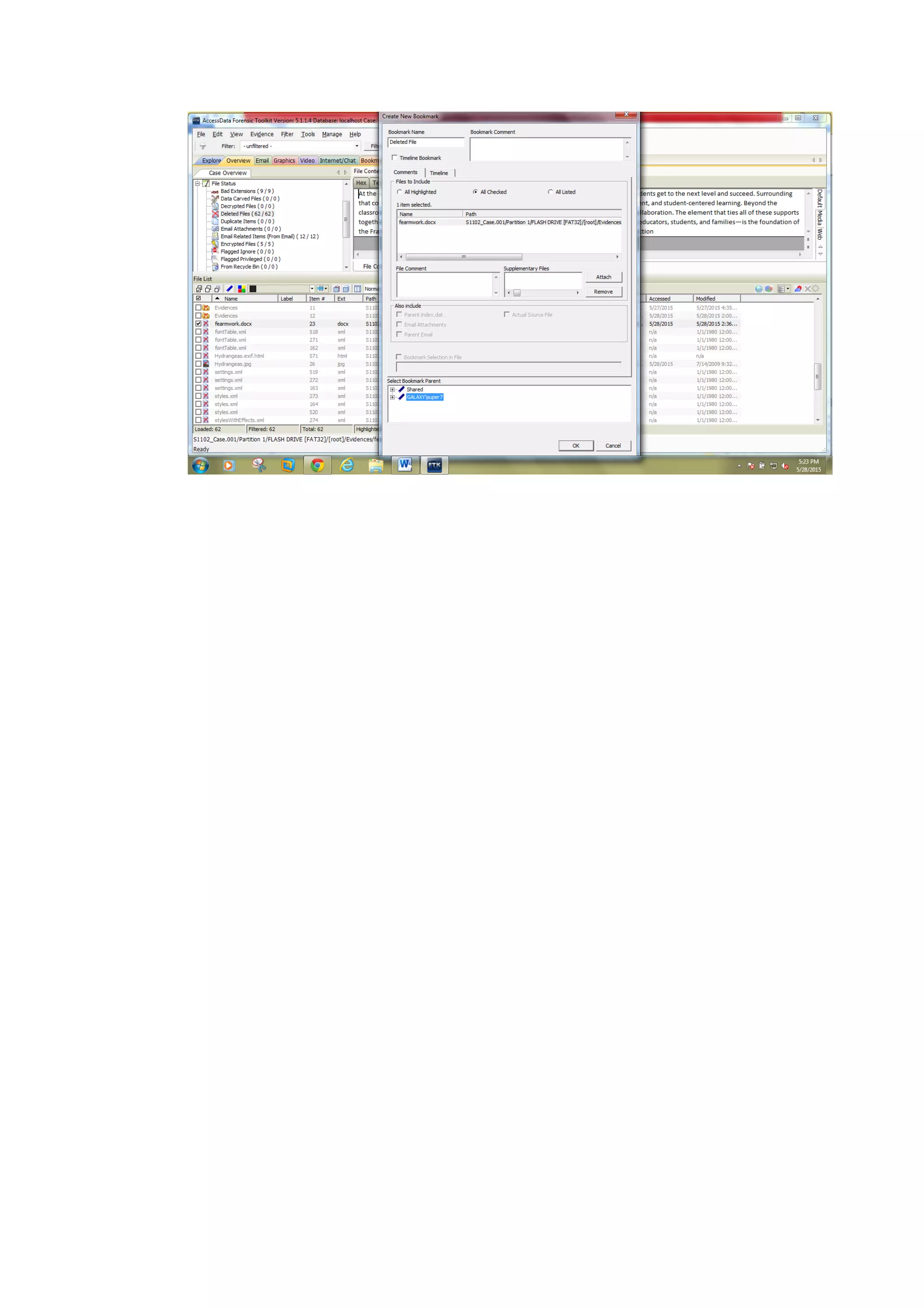
Click the check box next to Framework , right-click the file, and
click Create Bookmark. Type Evidence in the Bookmark name box.
Click All checked items then click ok
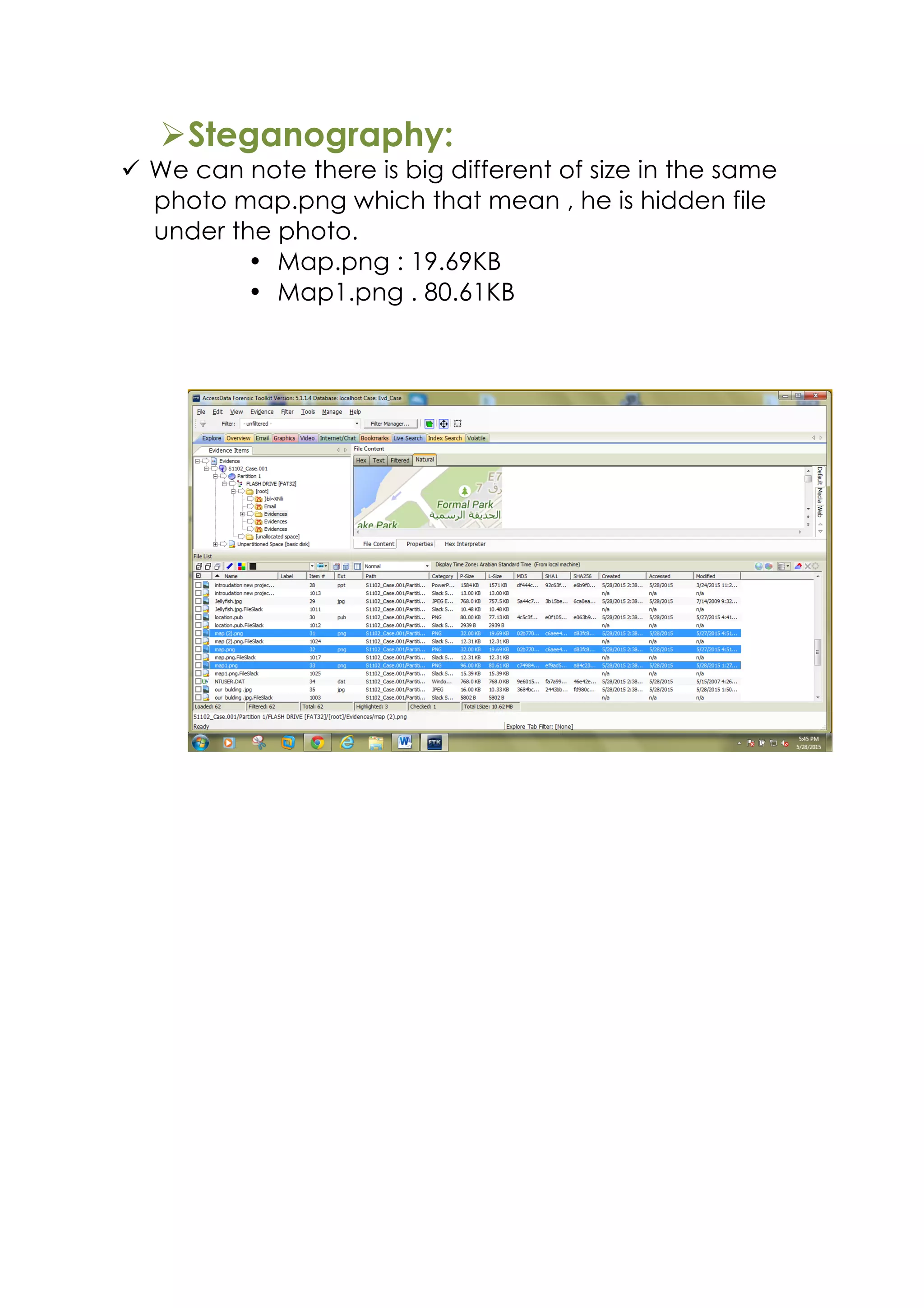
ØSteganography:
ü We can note there is big different of size in the same
photo map.png which that mean , he is hidden file
under the photo.
• Map.png : 19.69KB
• Map1.png . 80.61KB
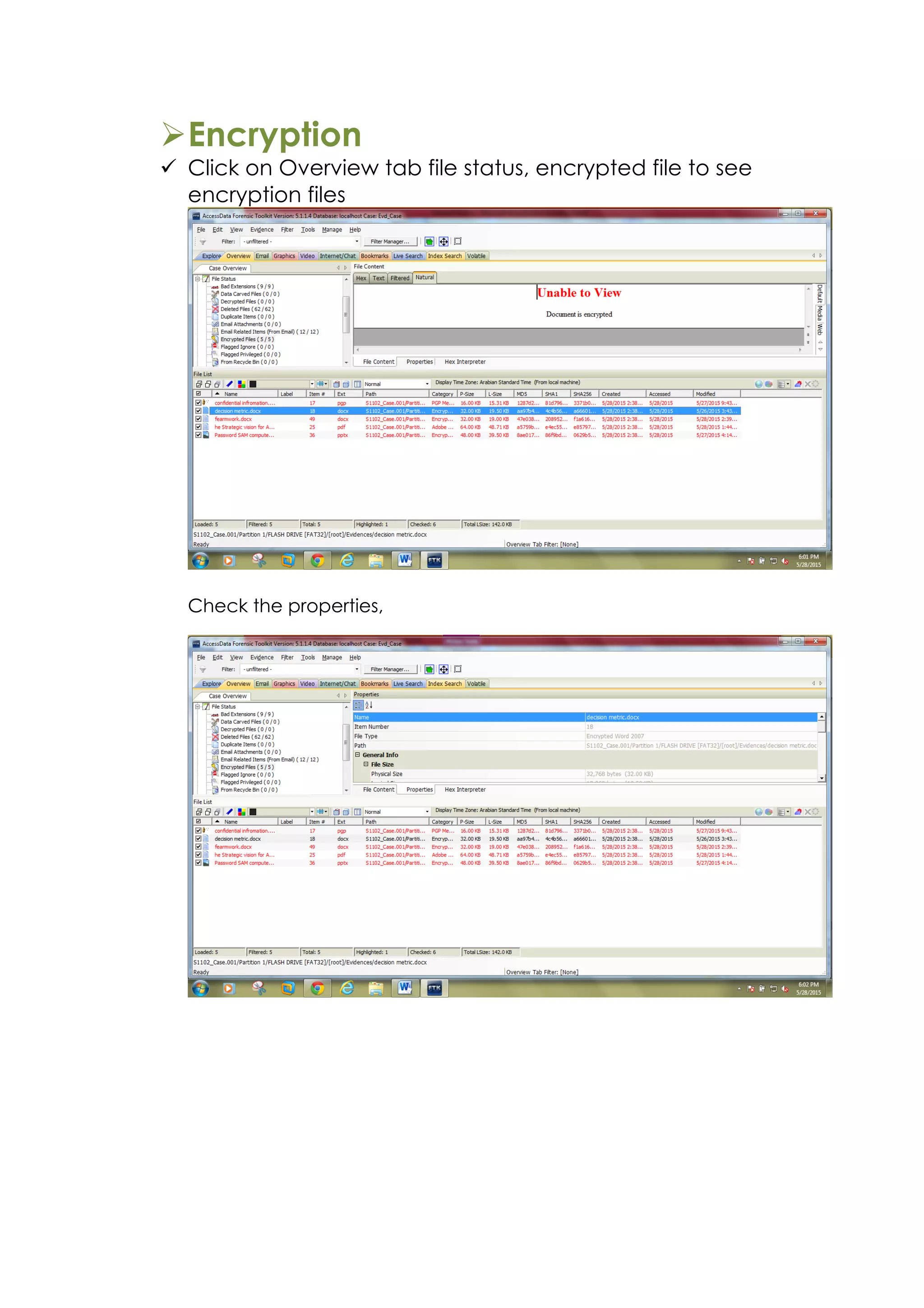
ØEncryption
ü Click on Overview tab file status, encrypted file to see
encryption files
Check the properties,
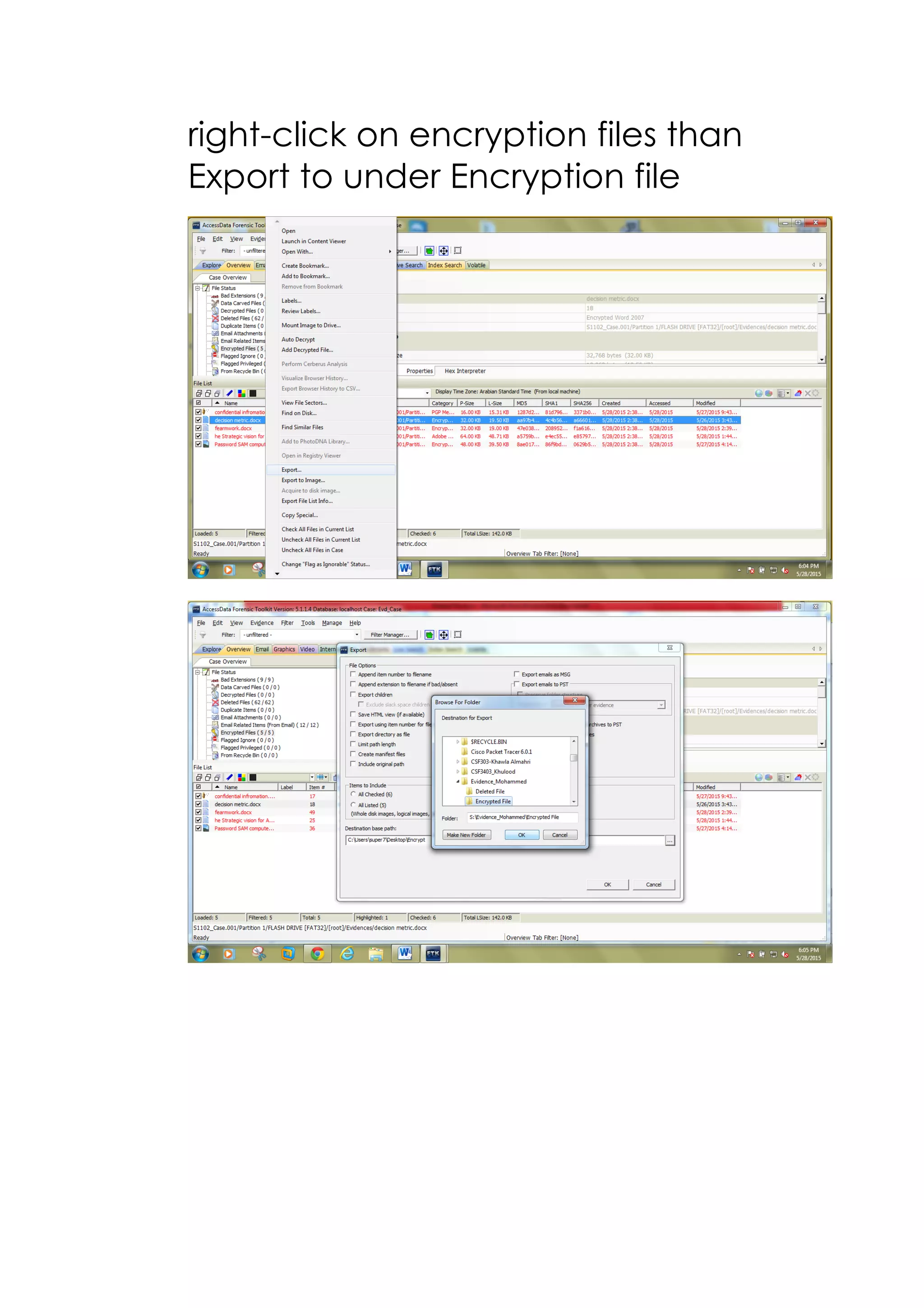
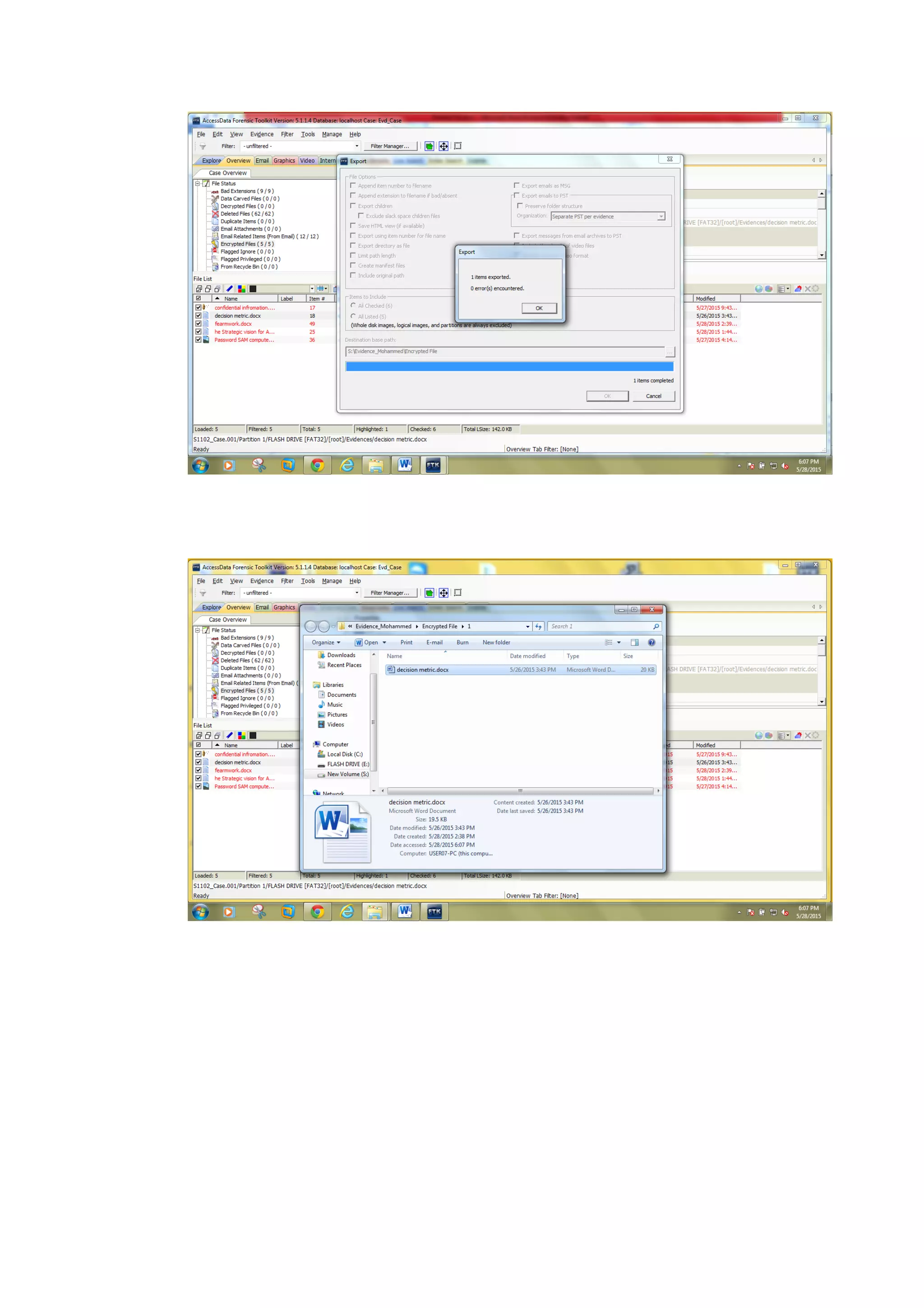
right-click on encryption files than
Export to under Encryption file
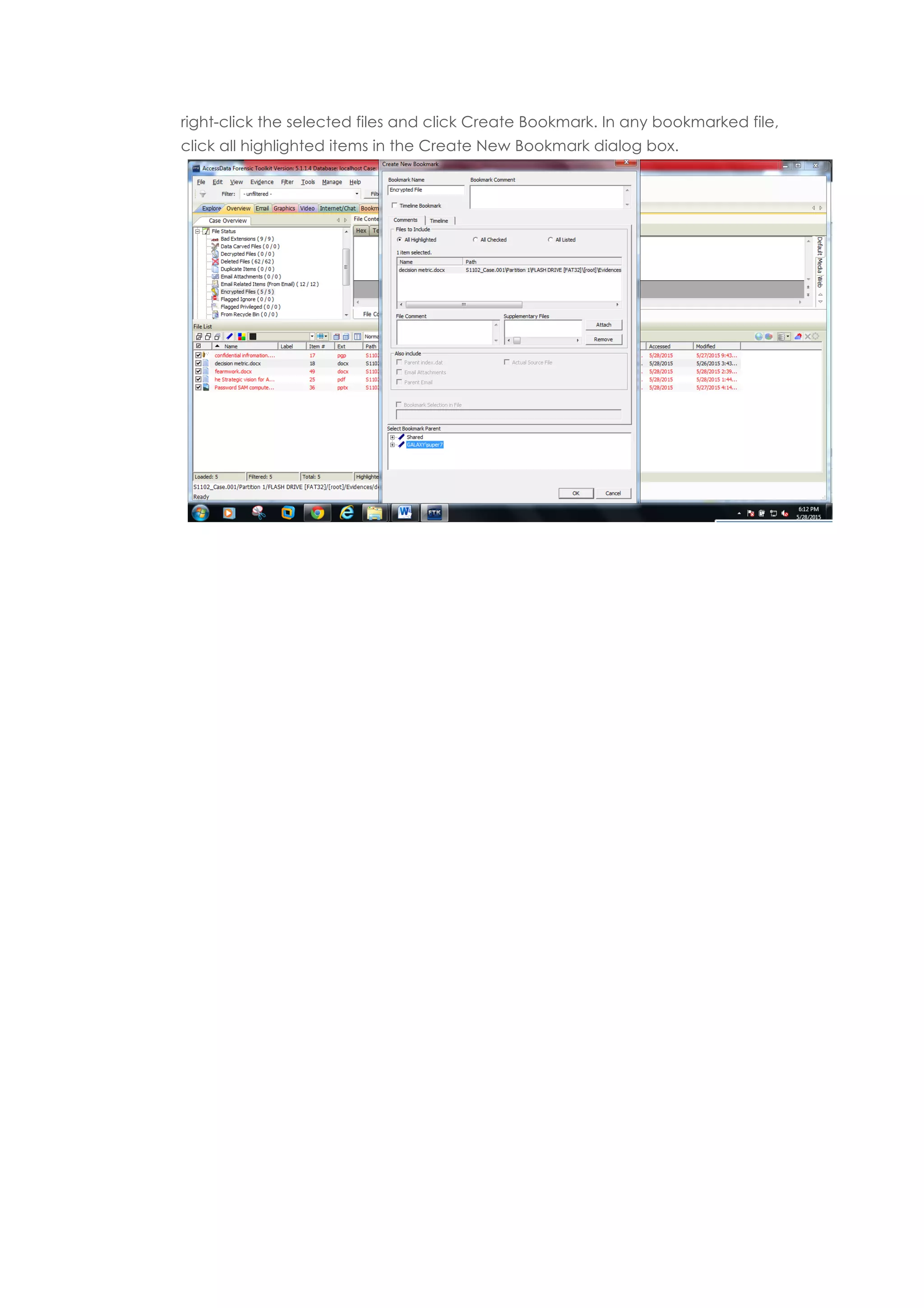
right-click the selected files and click Create Bookmark. In any bookmarked file,
click all highlighted items in the Create New Bookmark dialog box.
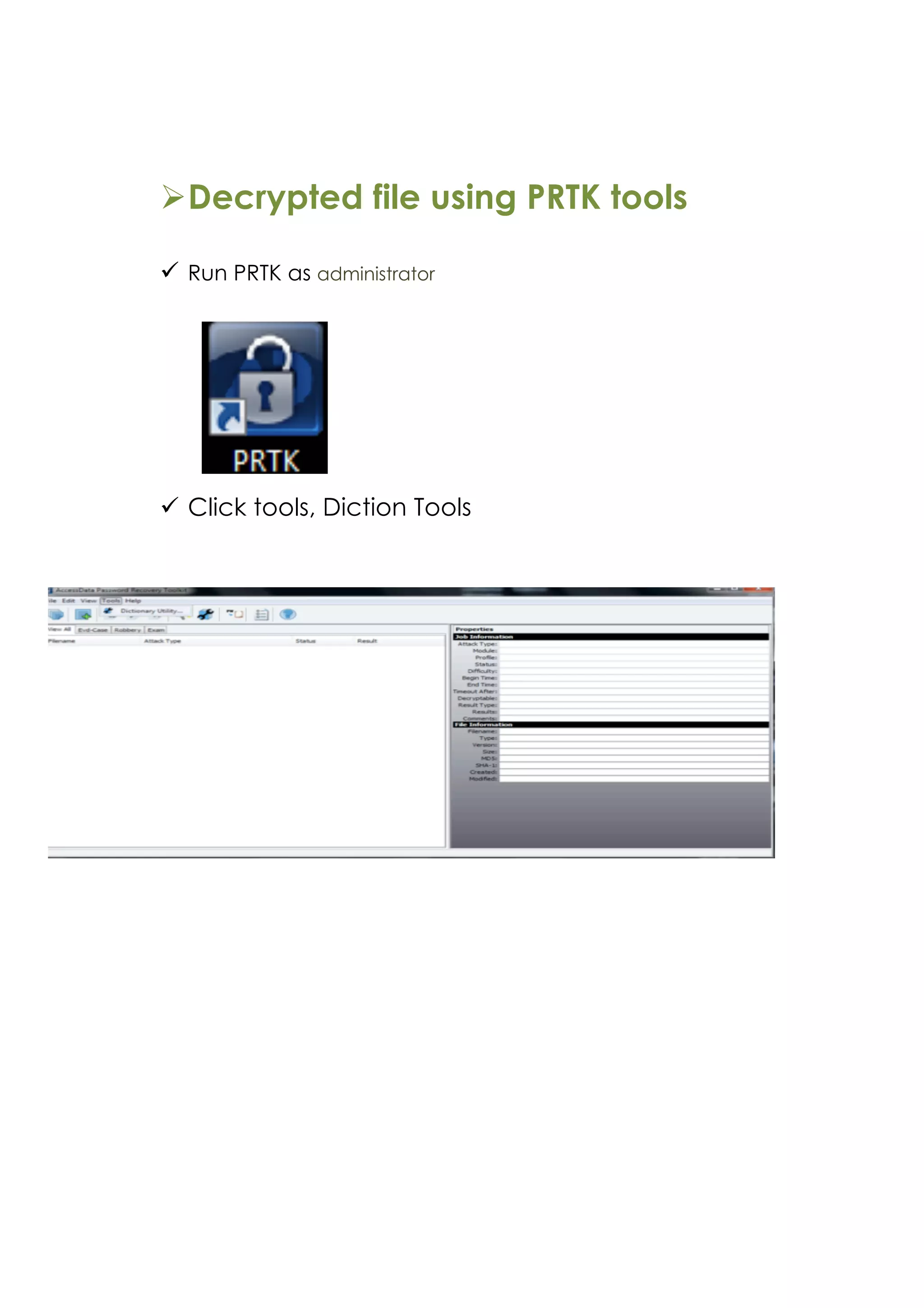
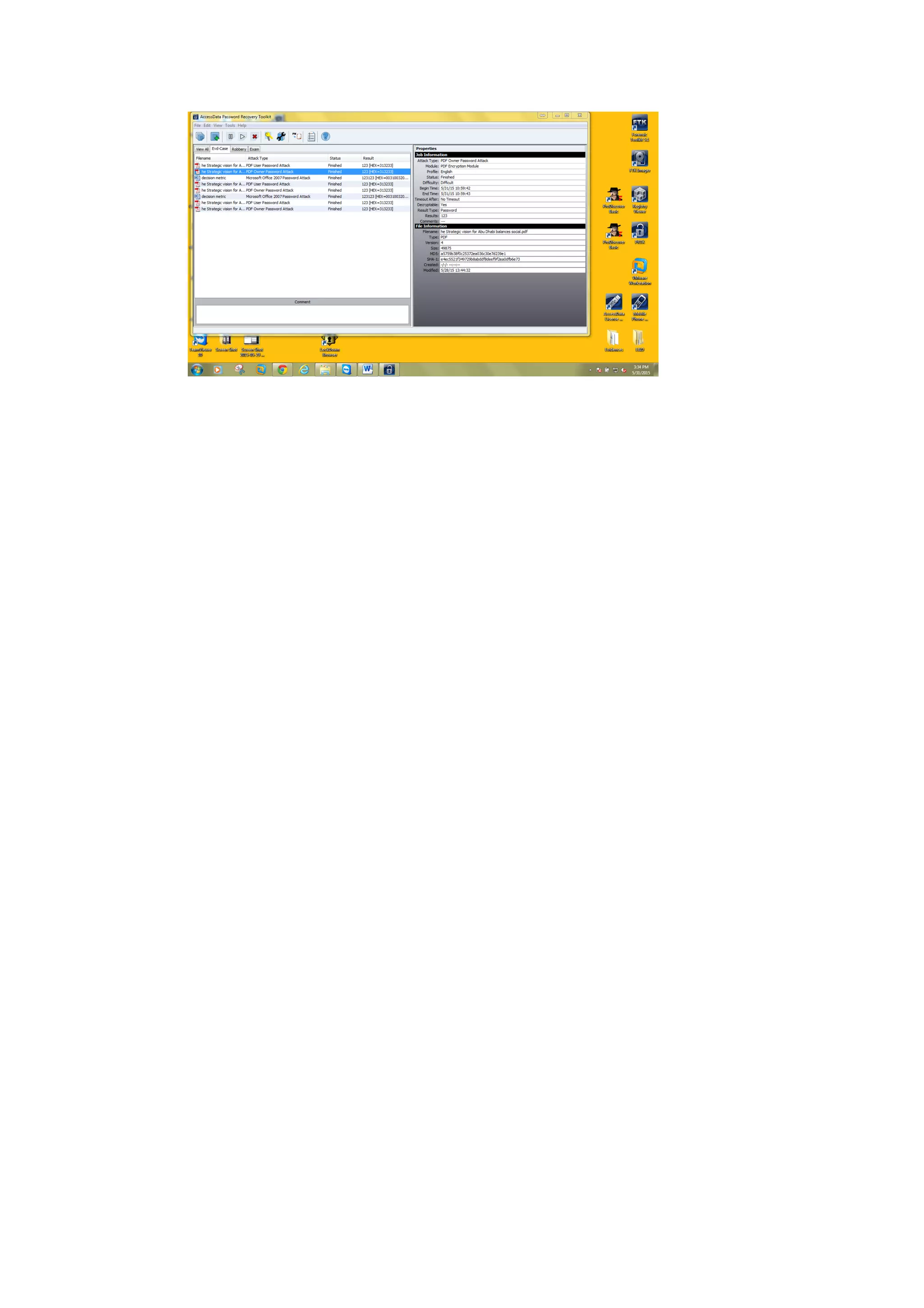
ØDecrypted file using PRTK tools
ü Run PRTK as administrator
ü Click tools, Diction Tools
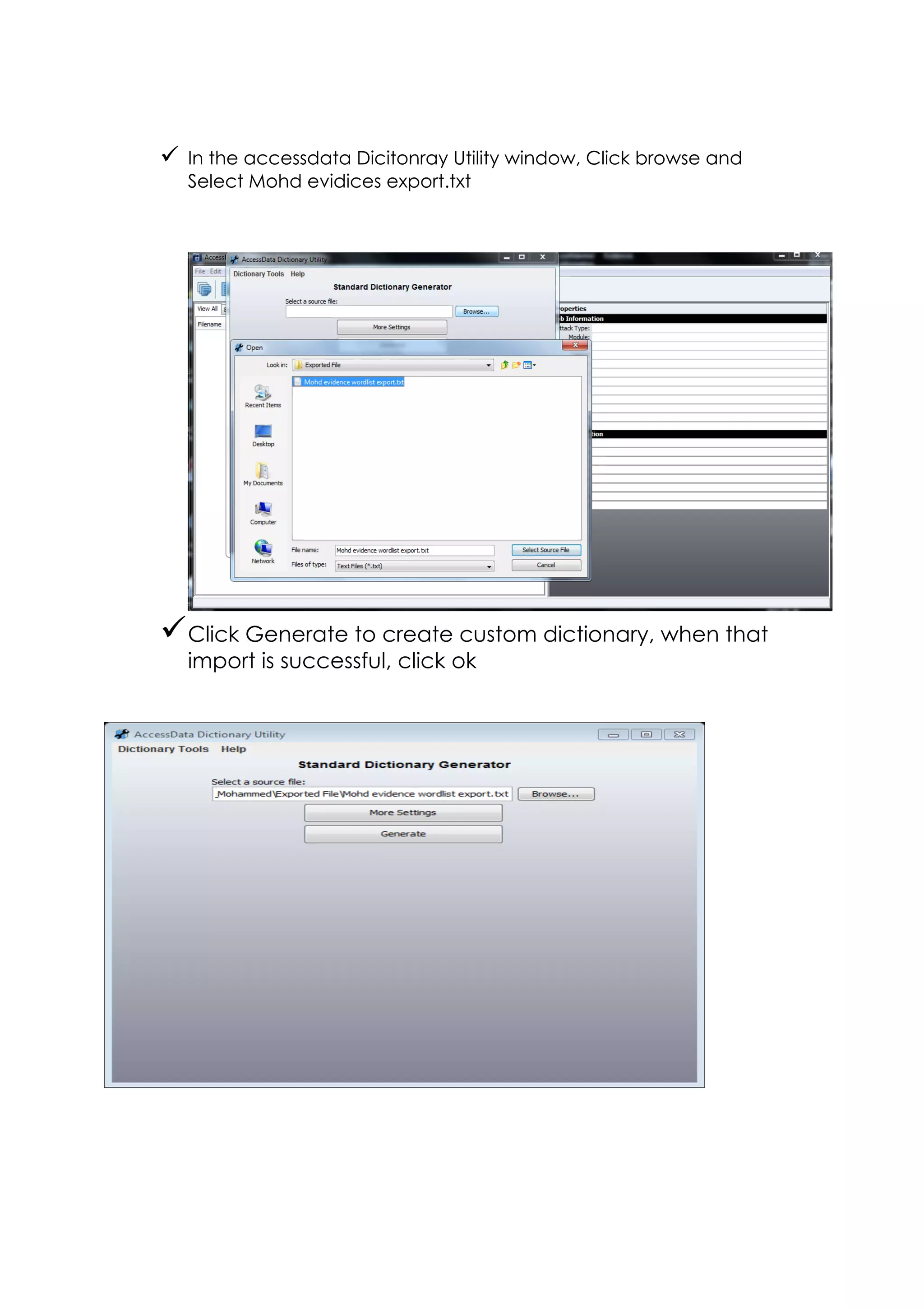
ü In the accessdata Dicitonray Utility window, Click browse and
Select Mohd evidices export.txt
üClick Generate to create custom dictionary, when that
import is successful, click ok
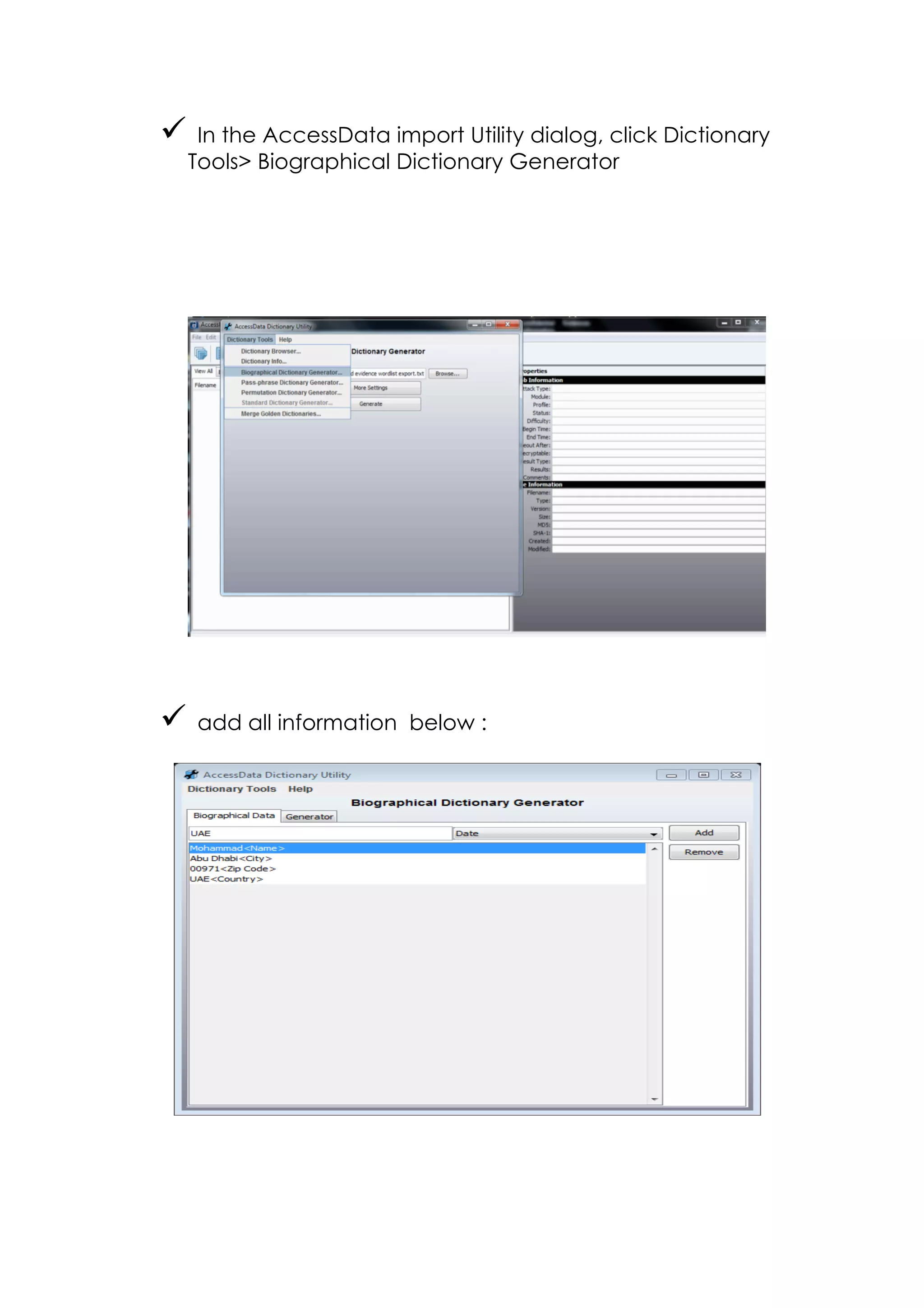
ü In the AccessData import Utility dialog, click Dictionary
Tools Biographical Dictionary Generator
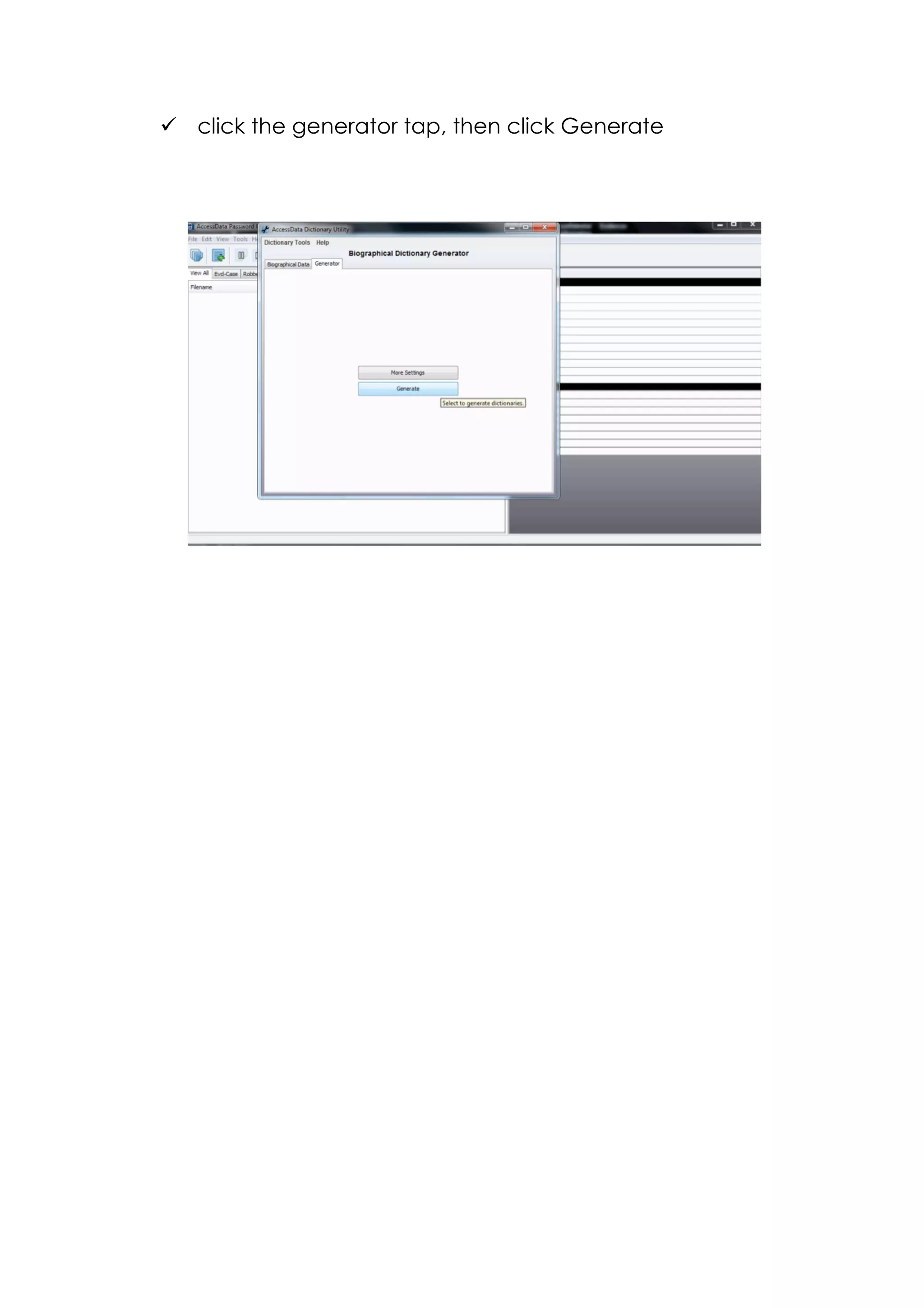
ü add all information below :
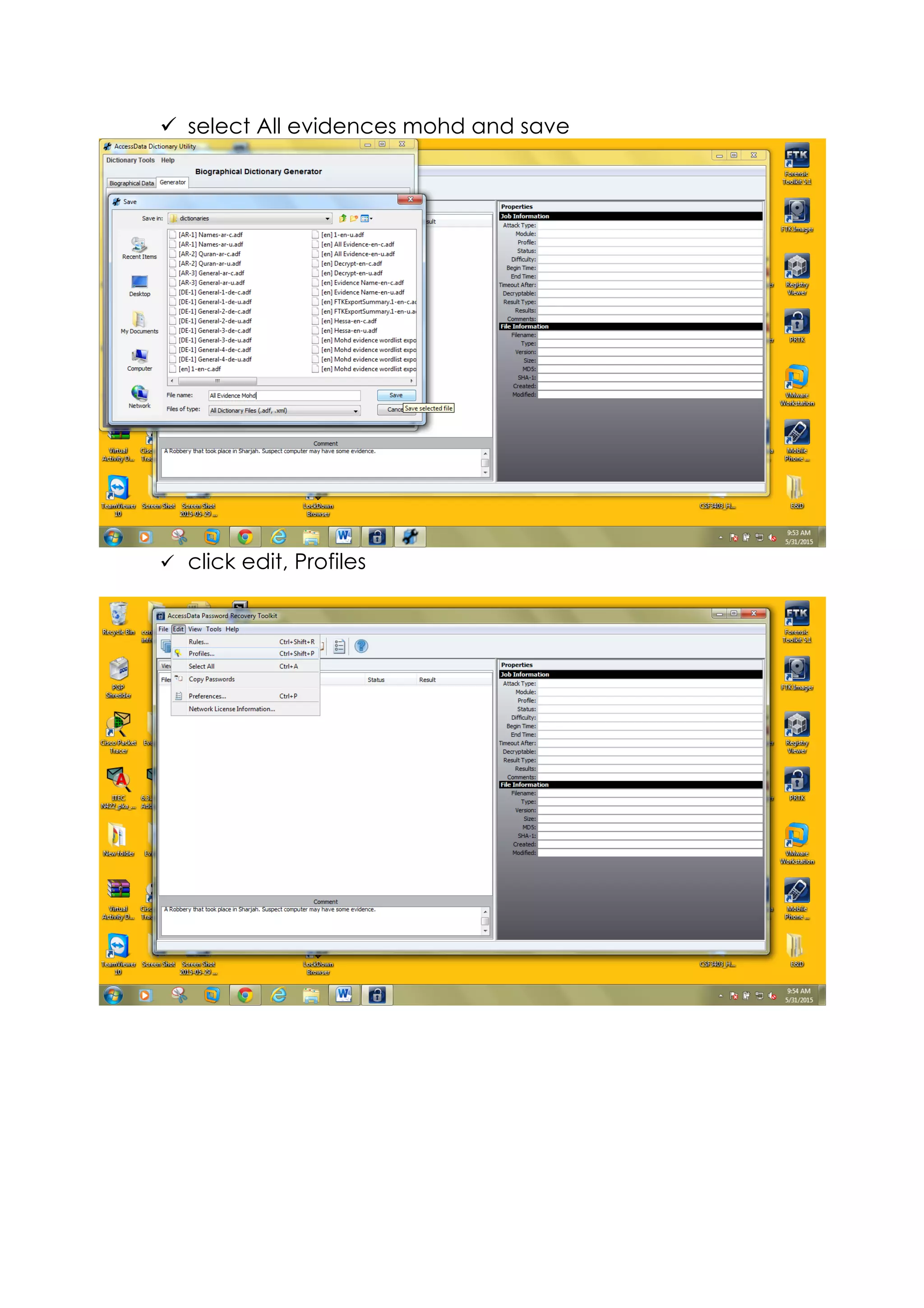
ü click the generator tap, then click Generate
ü select All evidences mohd and save
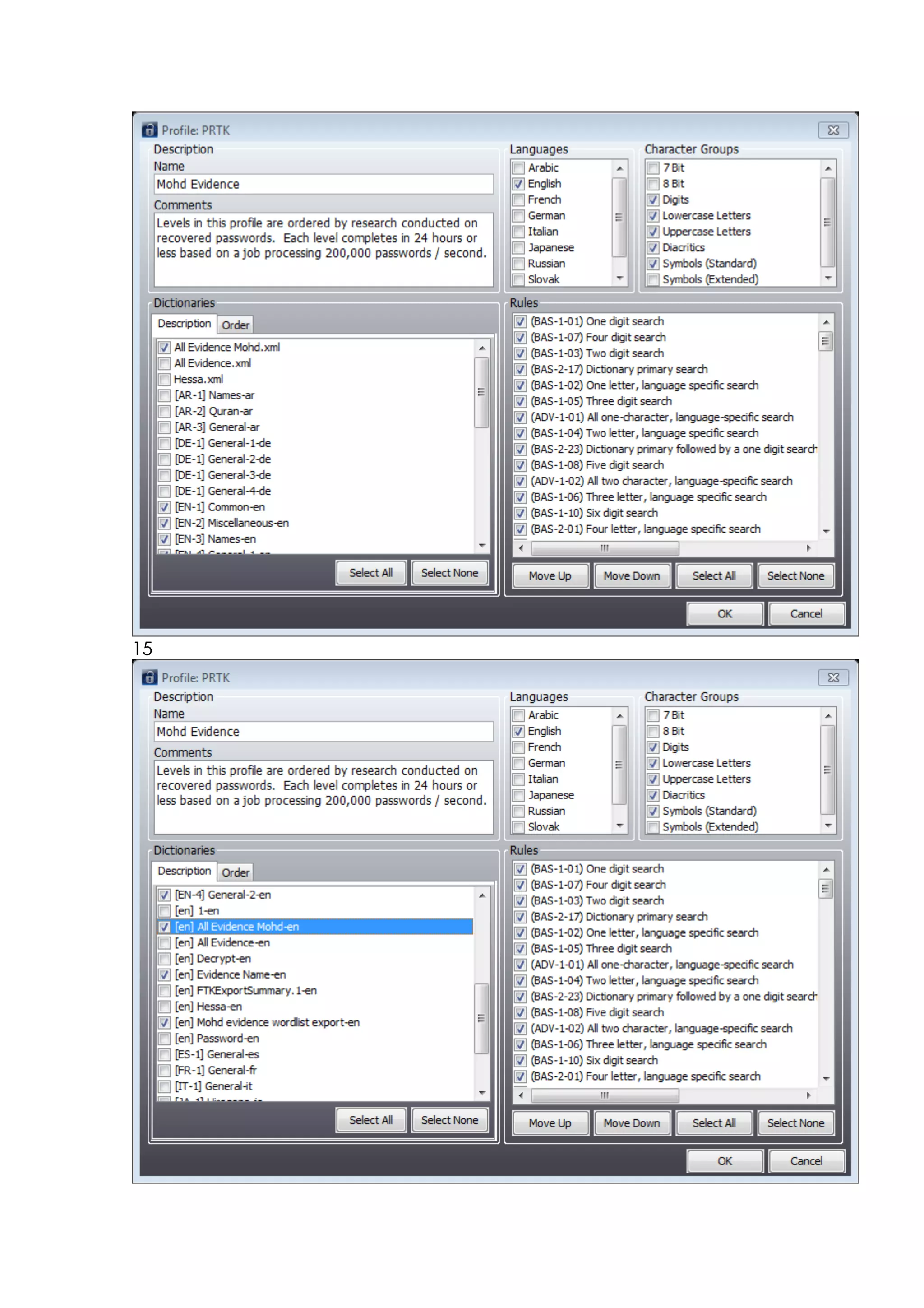
ü click edit, Profiles
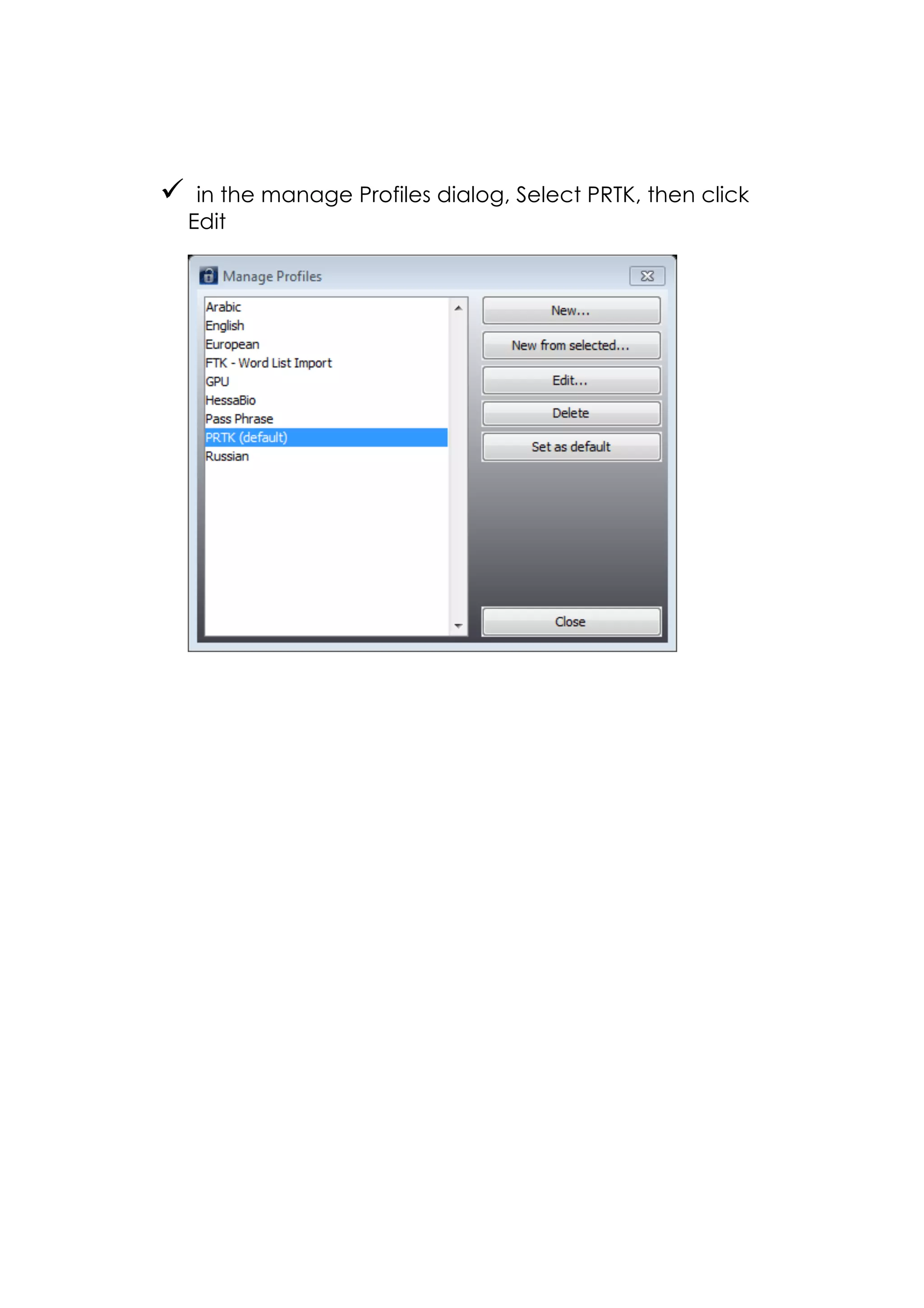
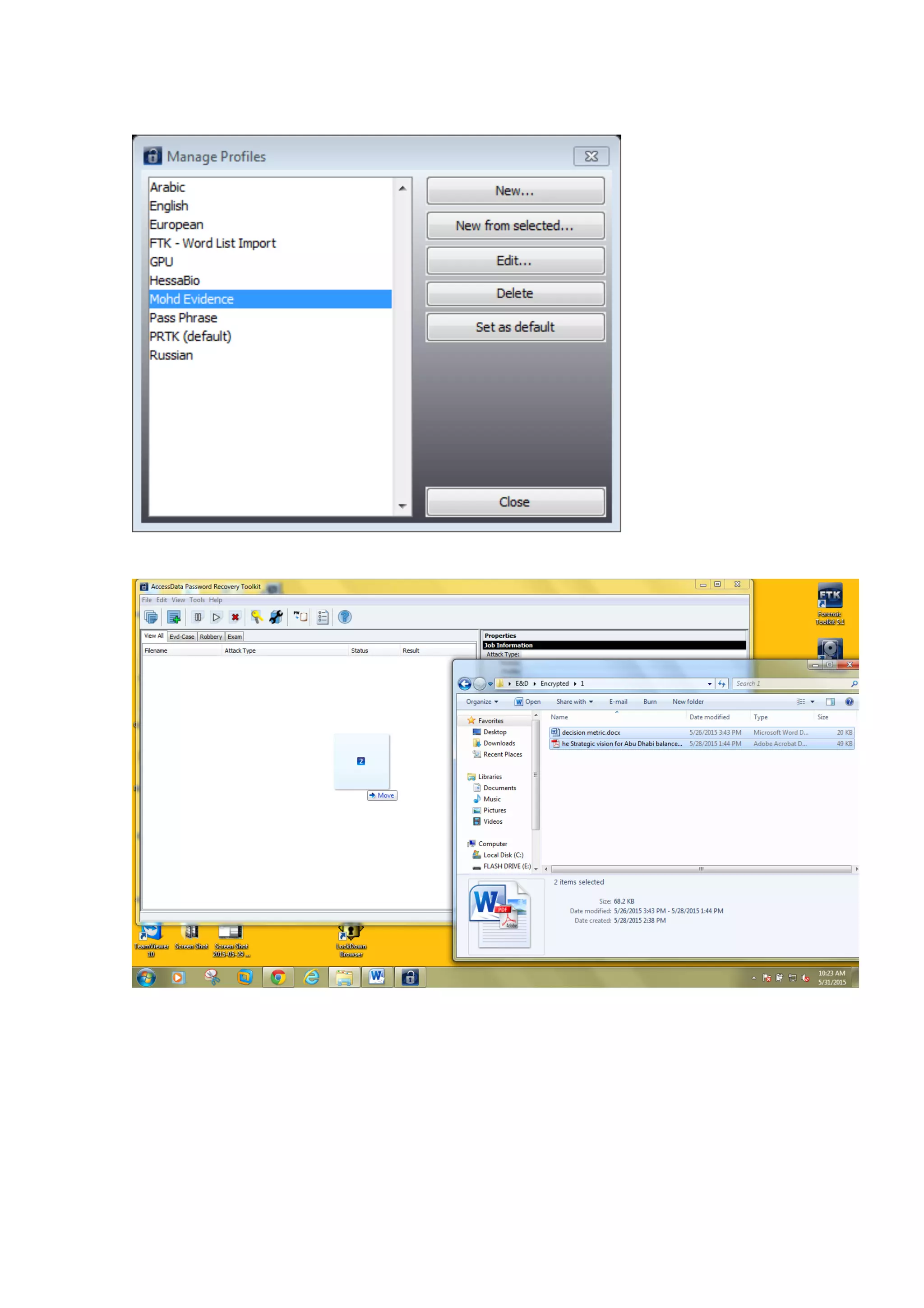
ü in the manage Profiles dialog, Select PRTK, then click
Edit
15
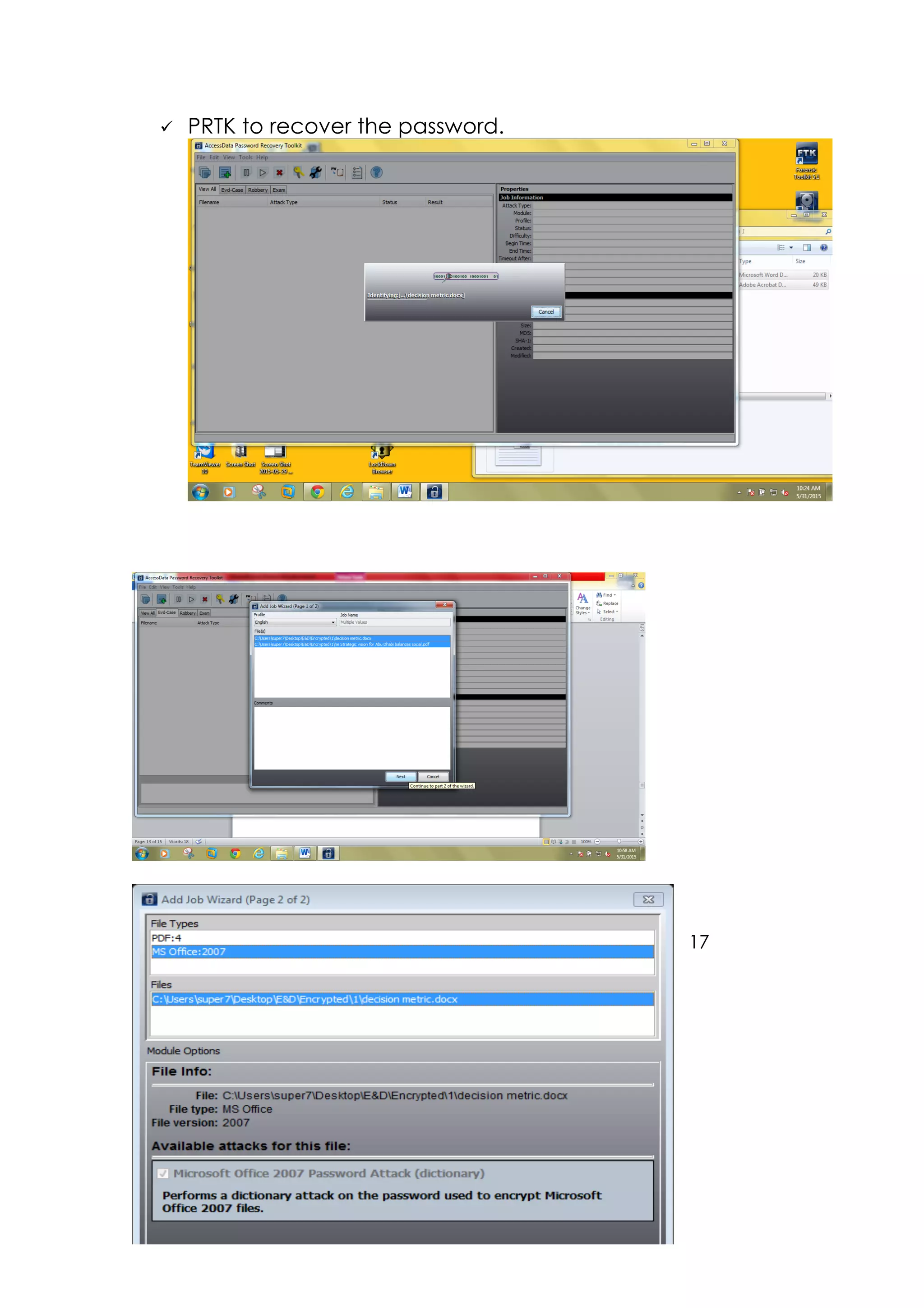
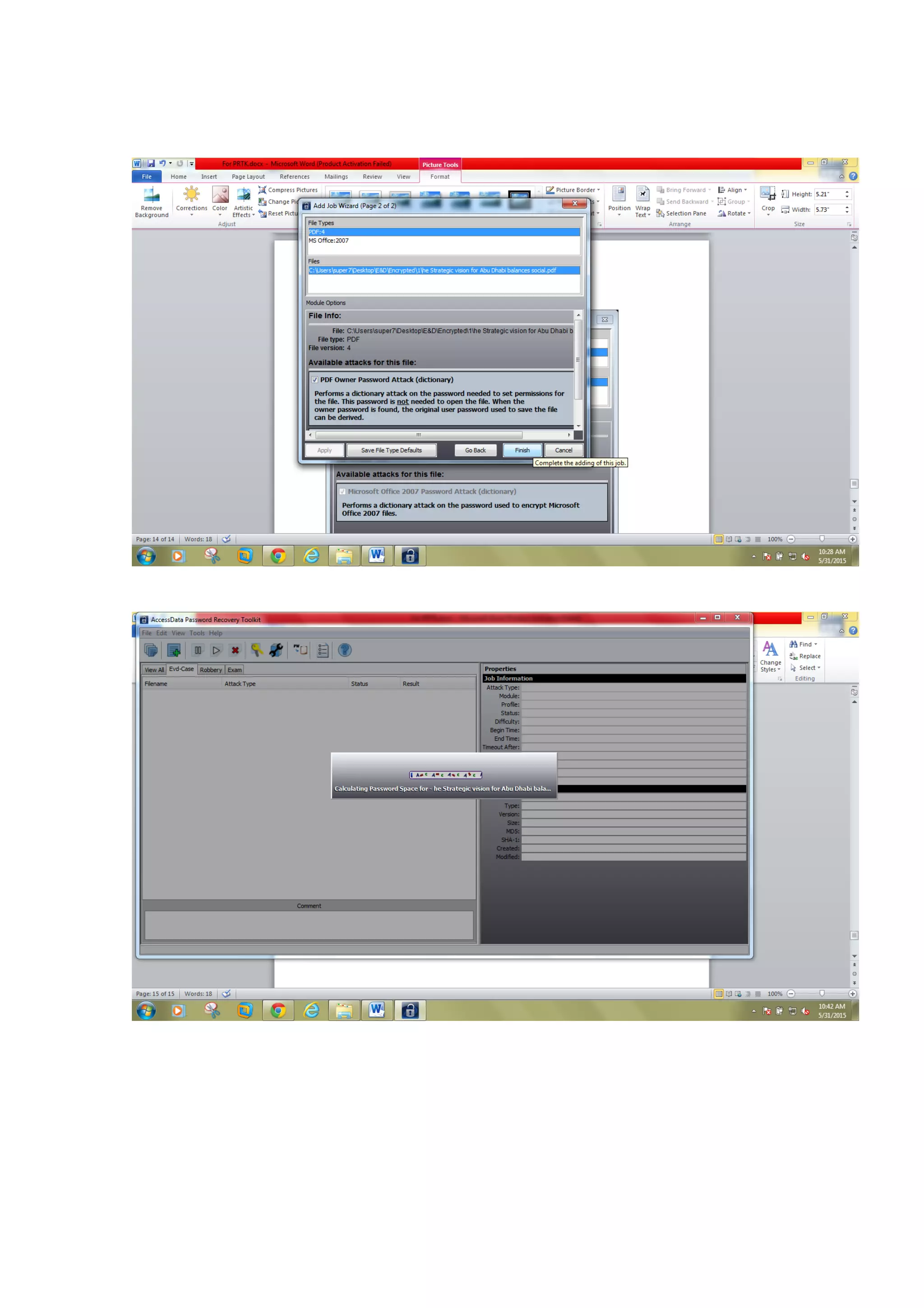
ü PRTK to recover the password.
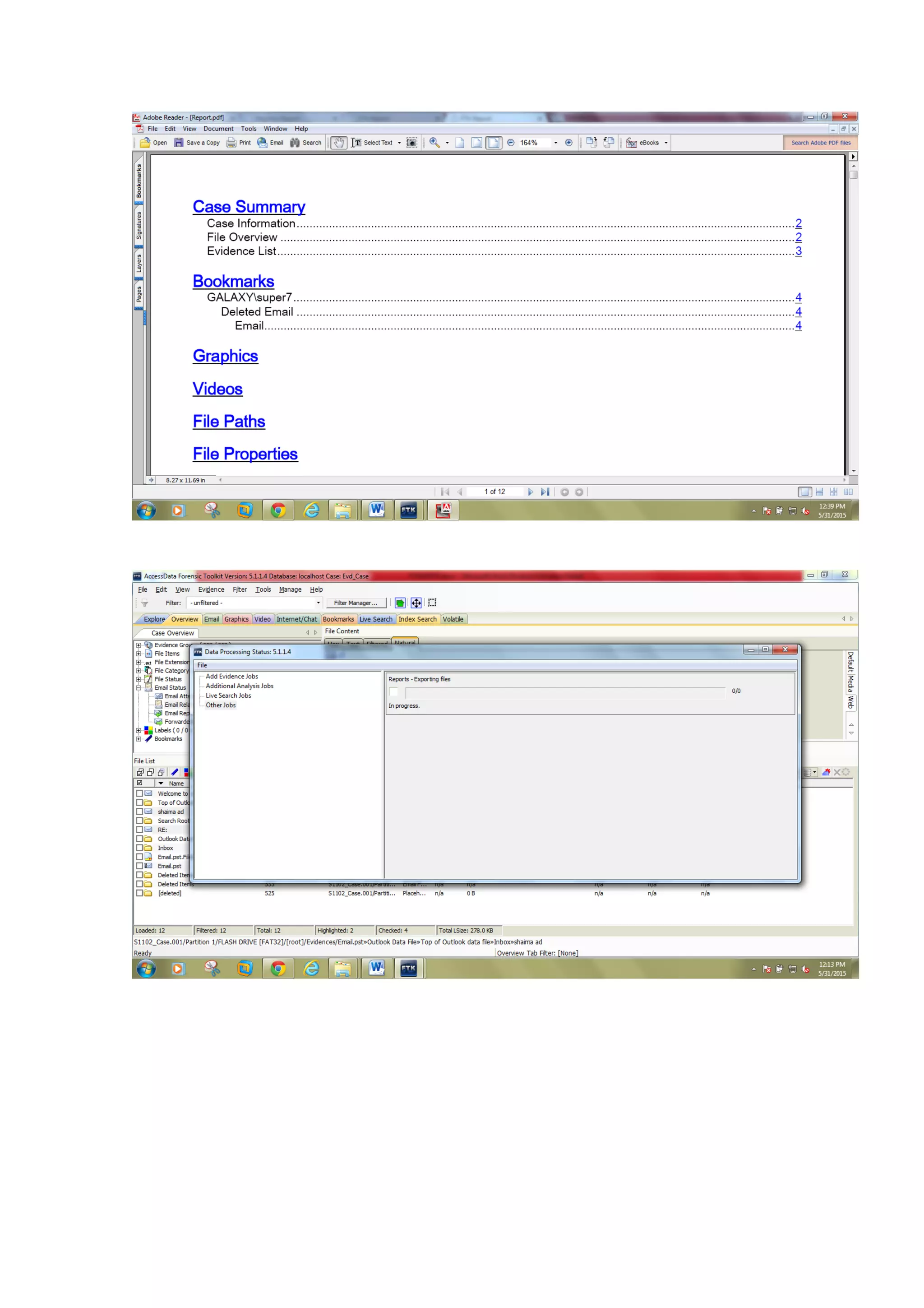
17
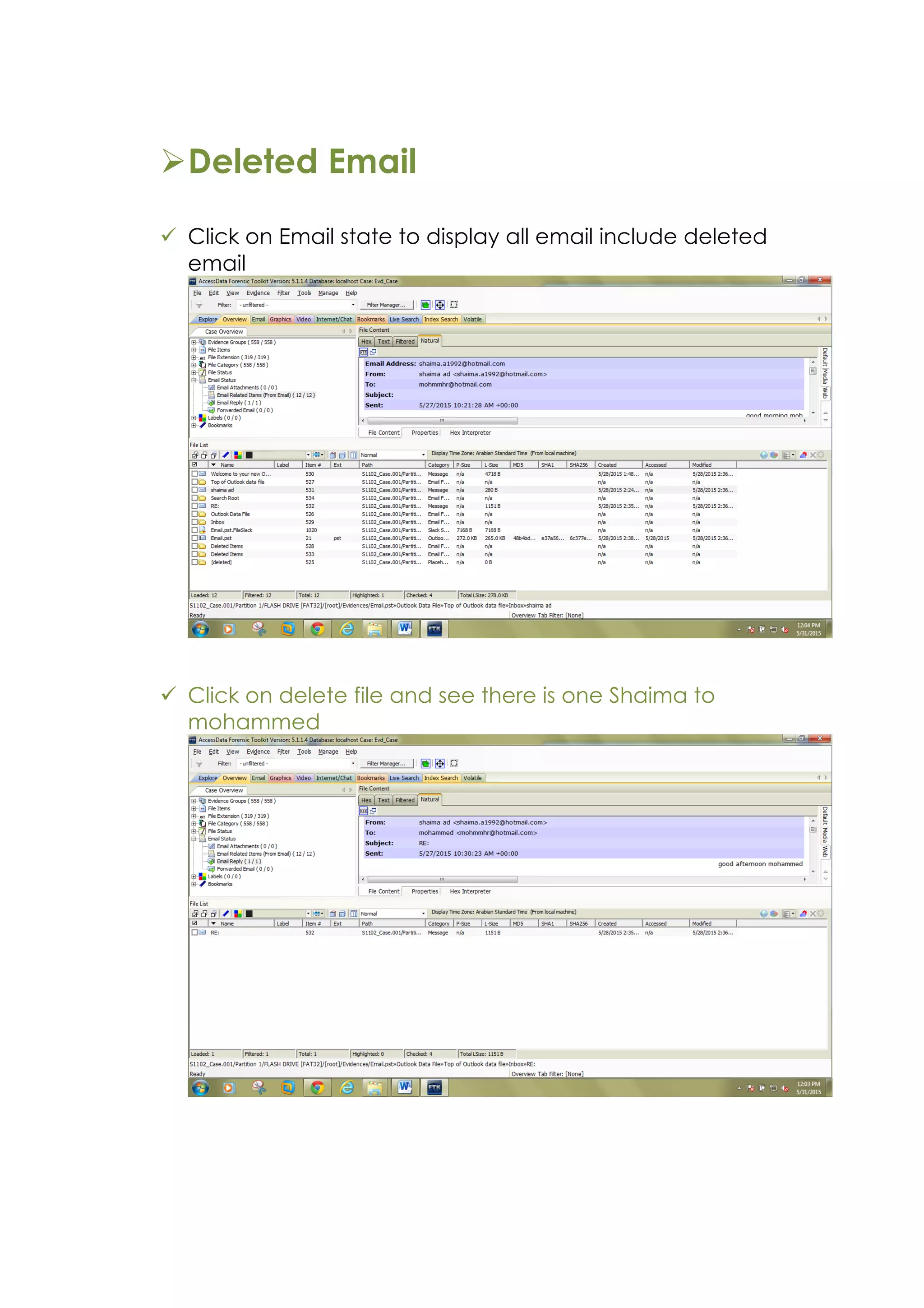
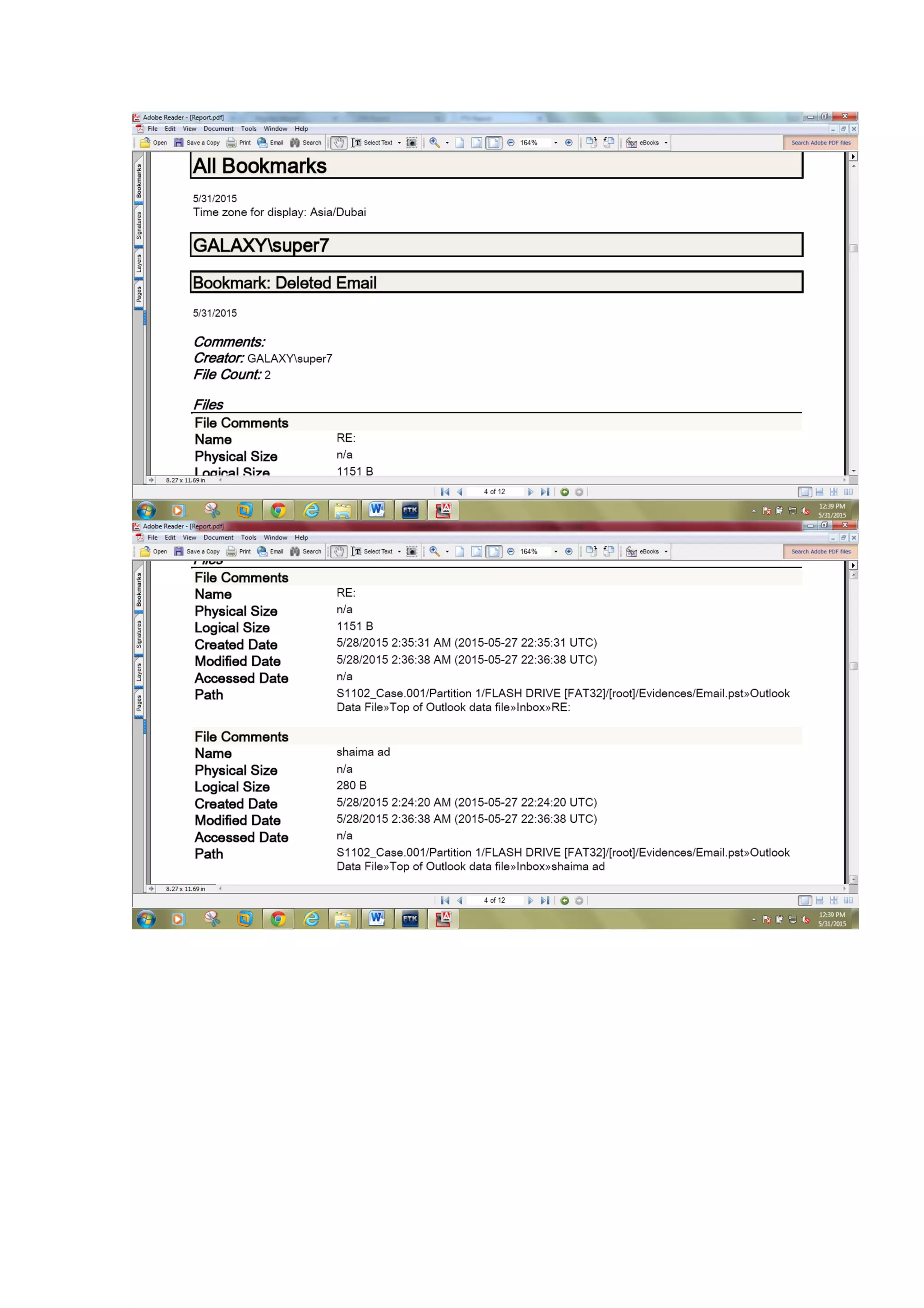
ØDeleted Email
ü Click on Email state to display all email include deleted
email
ü Click on delete file and see there is one Shaima to
mohammed
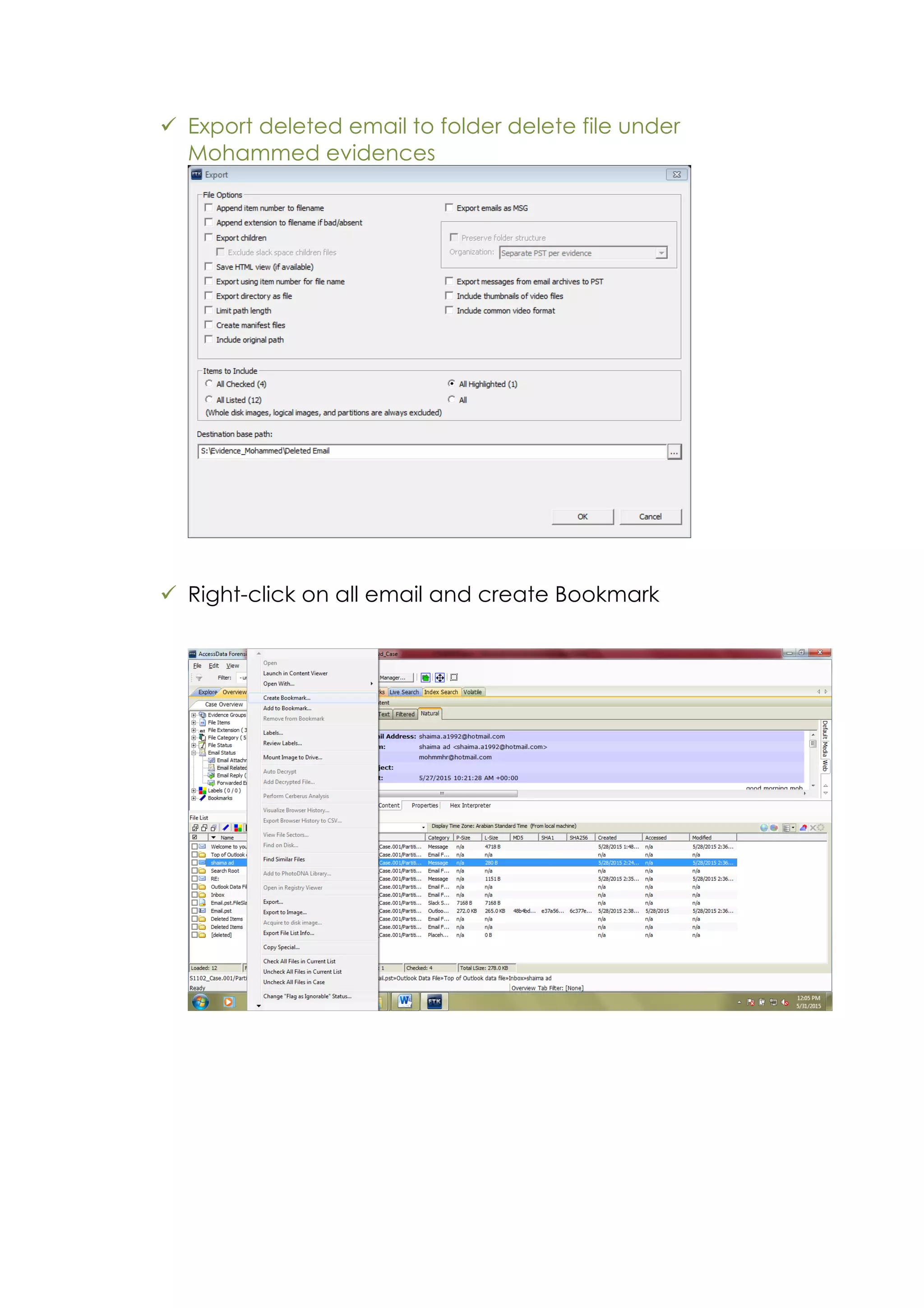
ü Export deleted email to folder delete file under
Mohammed evidences
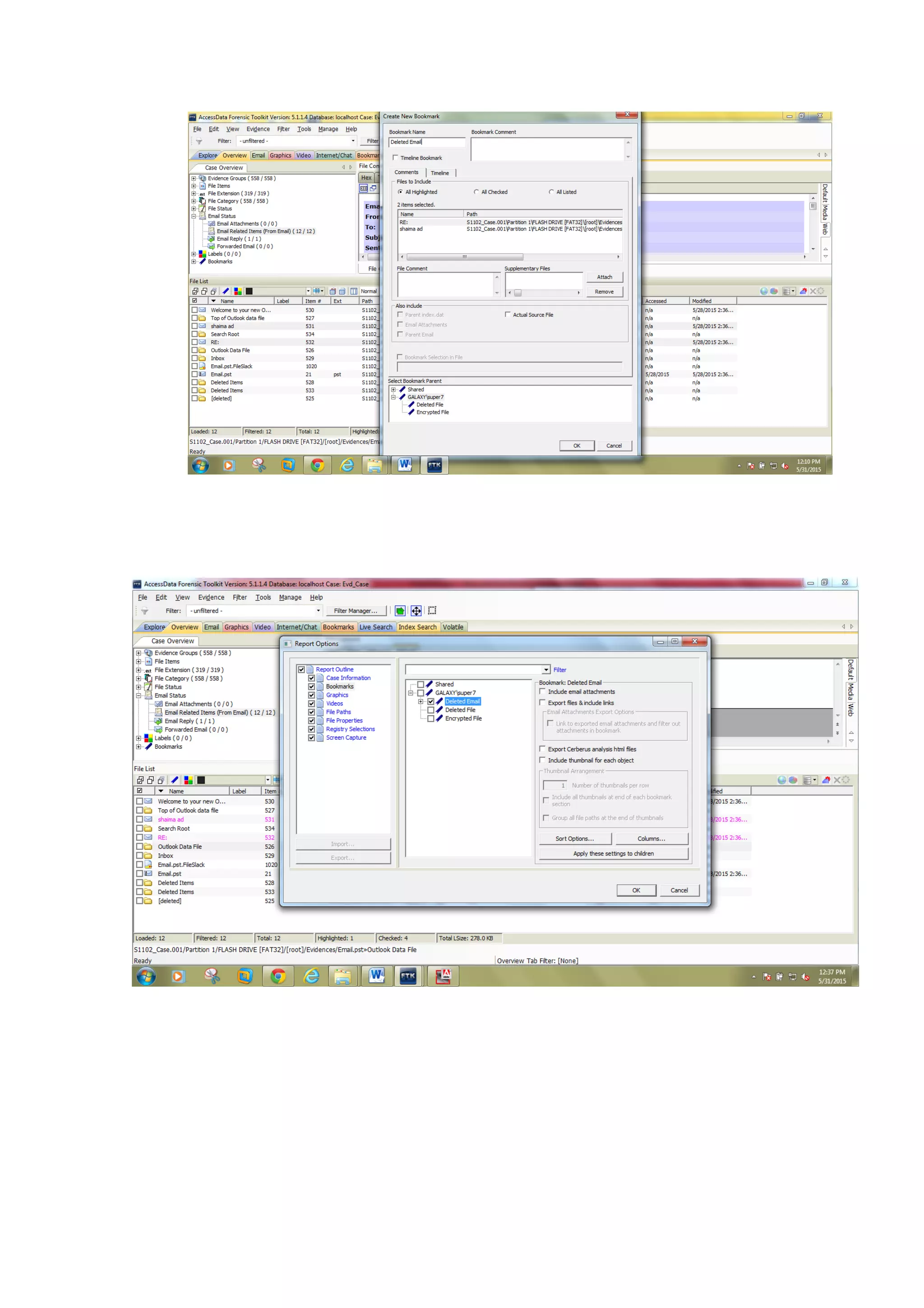
ü Right-click on all email and create Bookmark
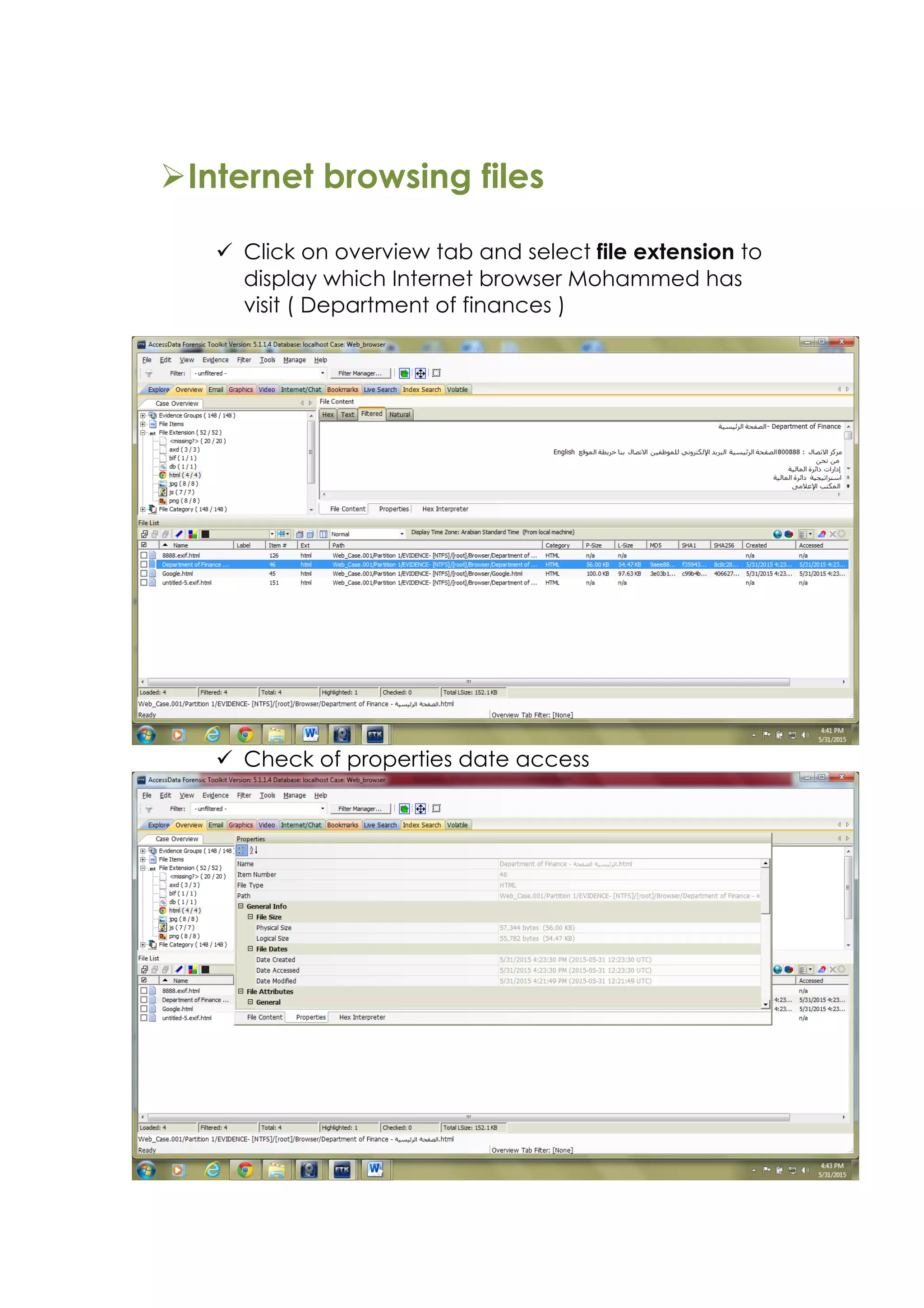
ØInternet browsing files
ü Click on overview tab and select file extension to
display which Internet browser Mohammed has
visit ( Department of finances )
ü Check of properties date access
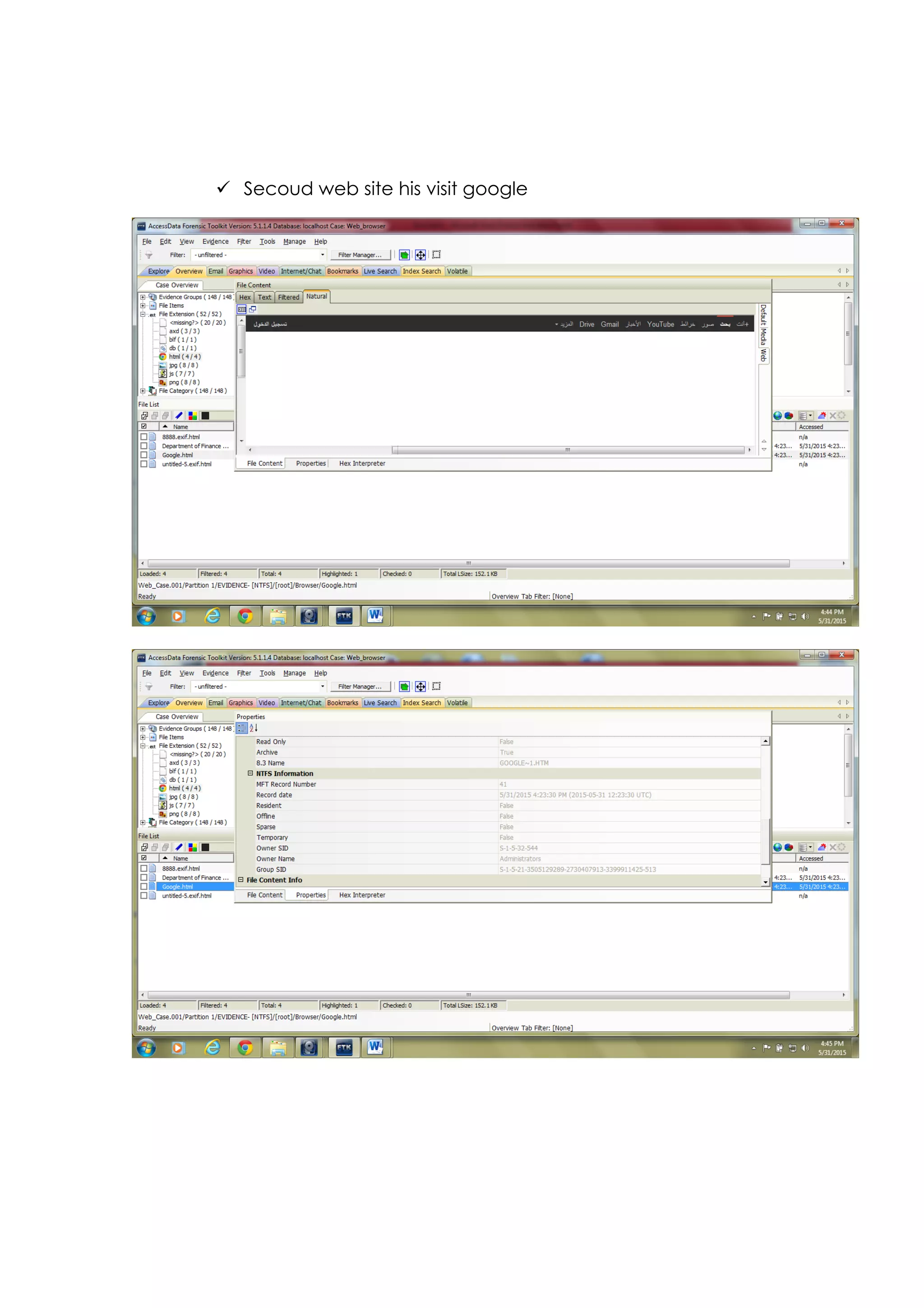
ü Secoud web site his visit google
ØRegistry file
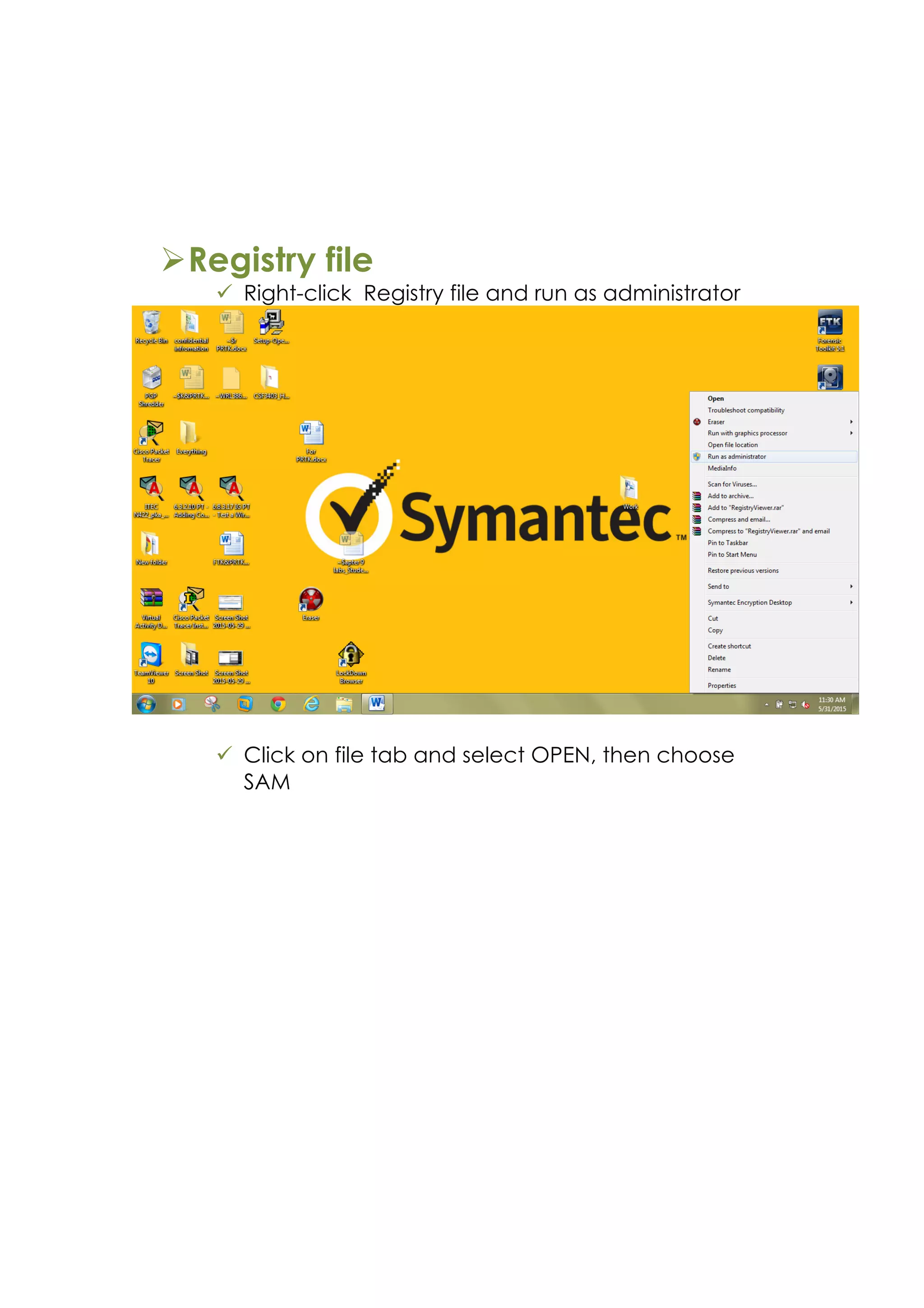
ü Right-click Registry file and run as administrator
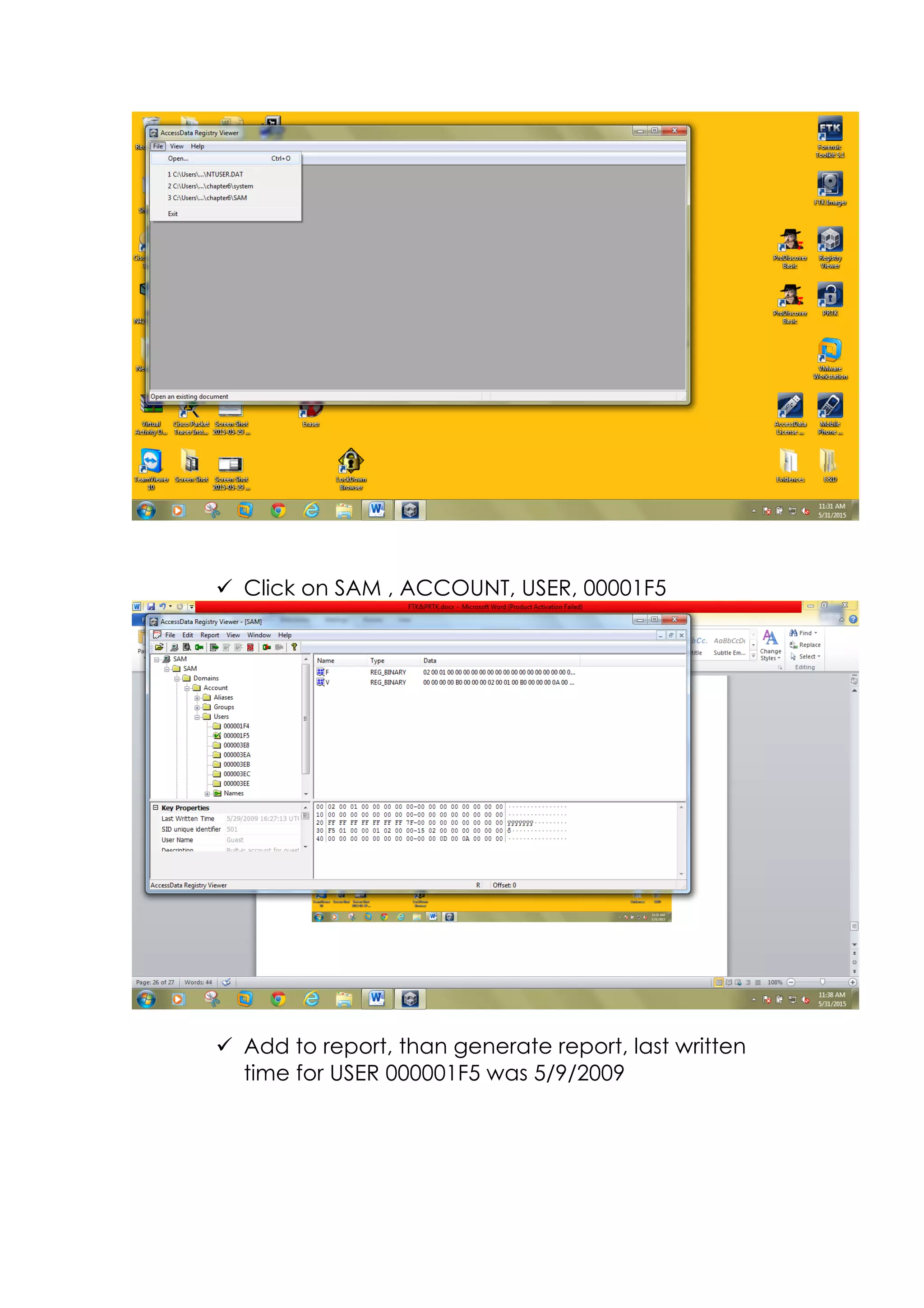
ü Click on file tab and select OPEN, then choose
SAM
ü Click on SAM , ACCOUNT, USER, 00001F5
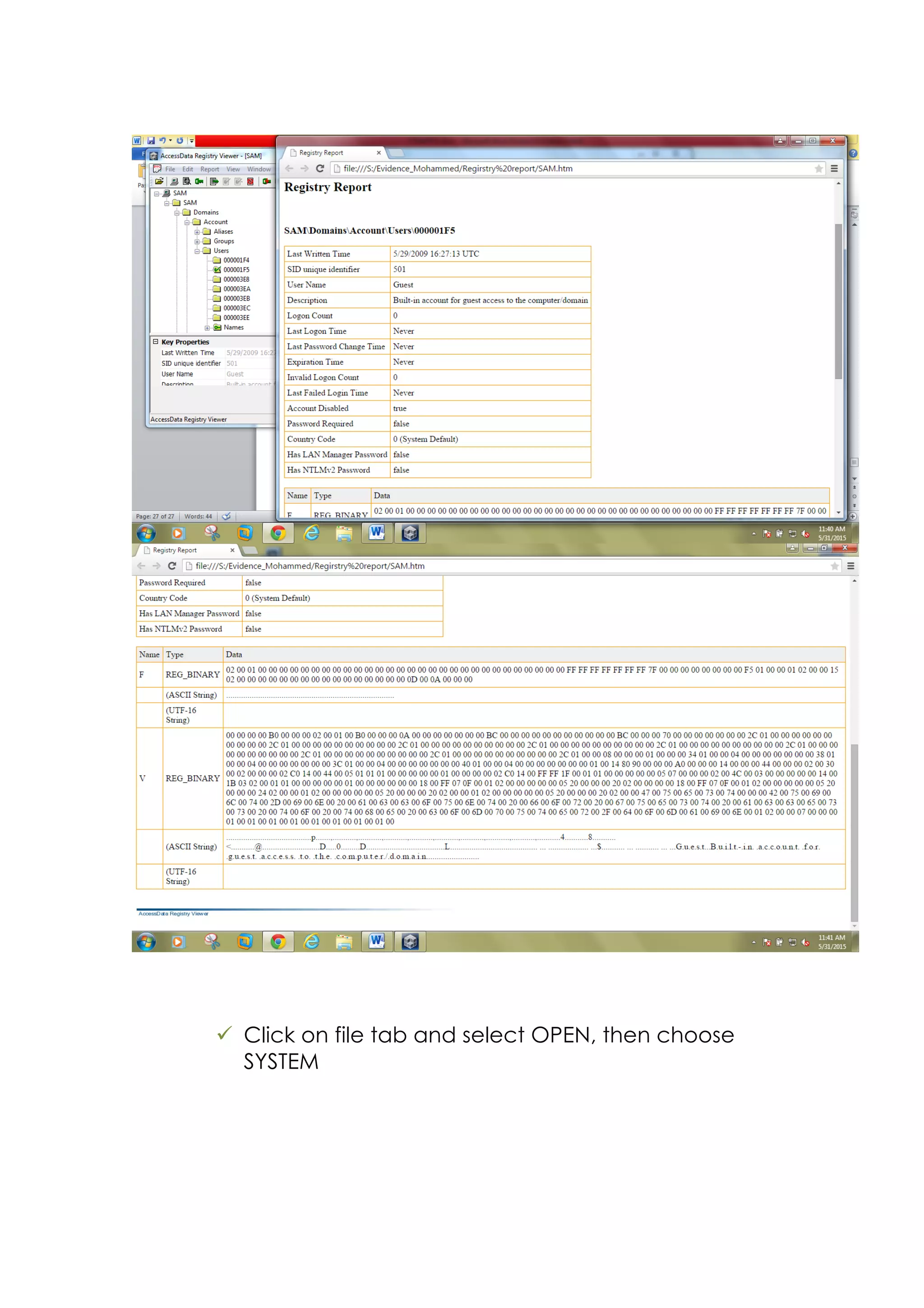
ü Add to report, than generate report, last written
time for USER 000001F5 was 5/9/2009
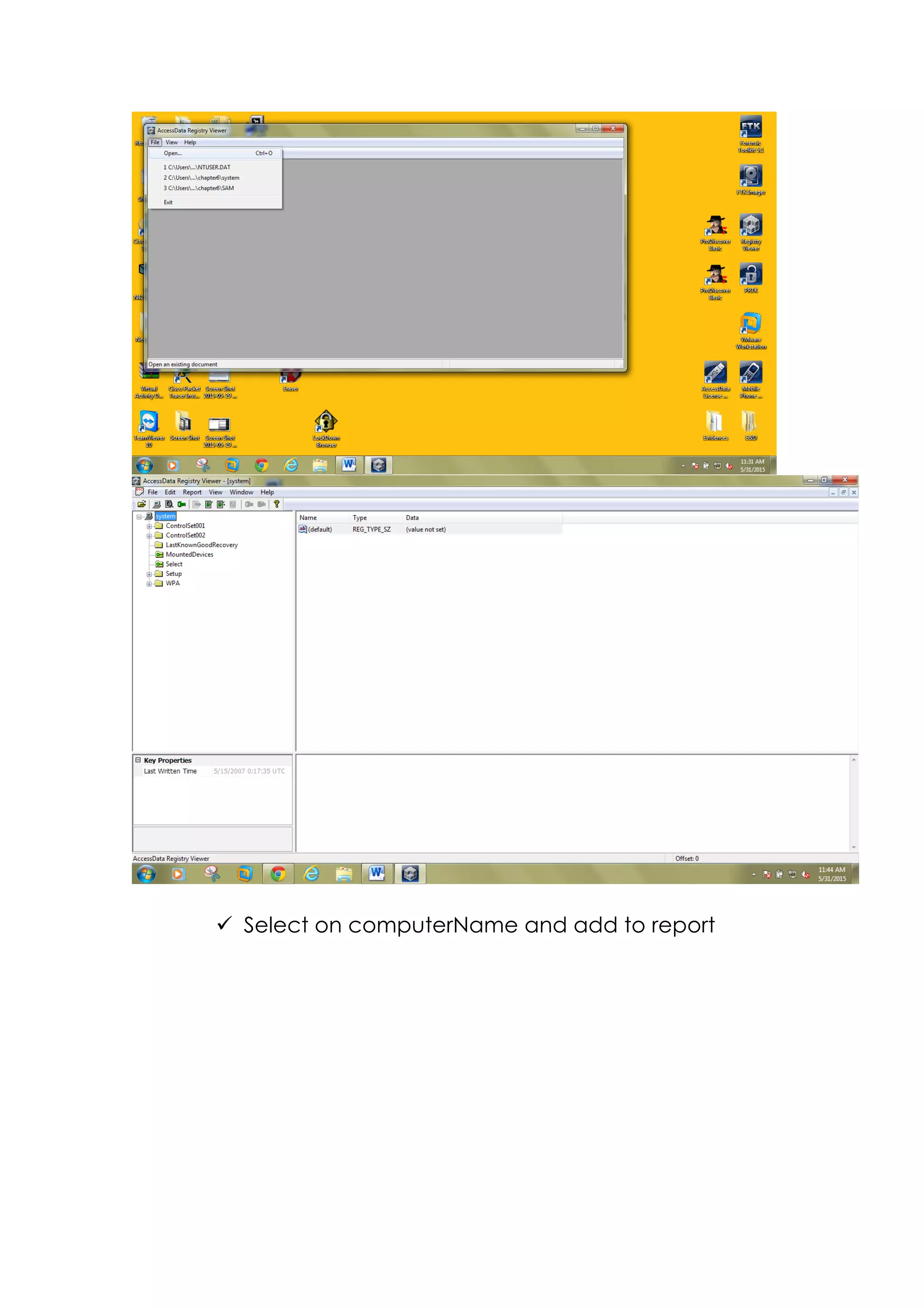
ü Click on file tab and select OPEN, then choose
SYSTEM
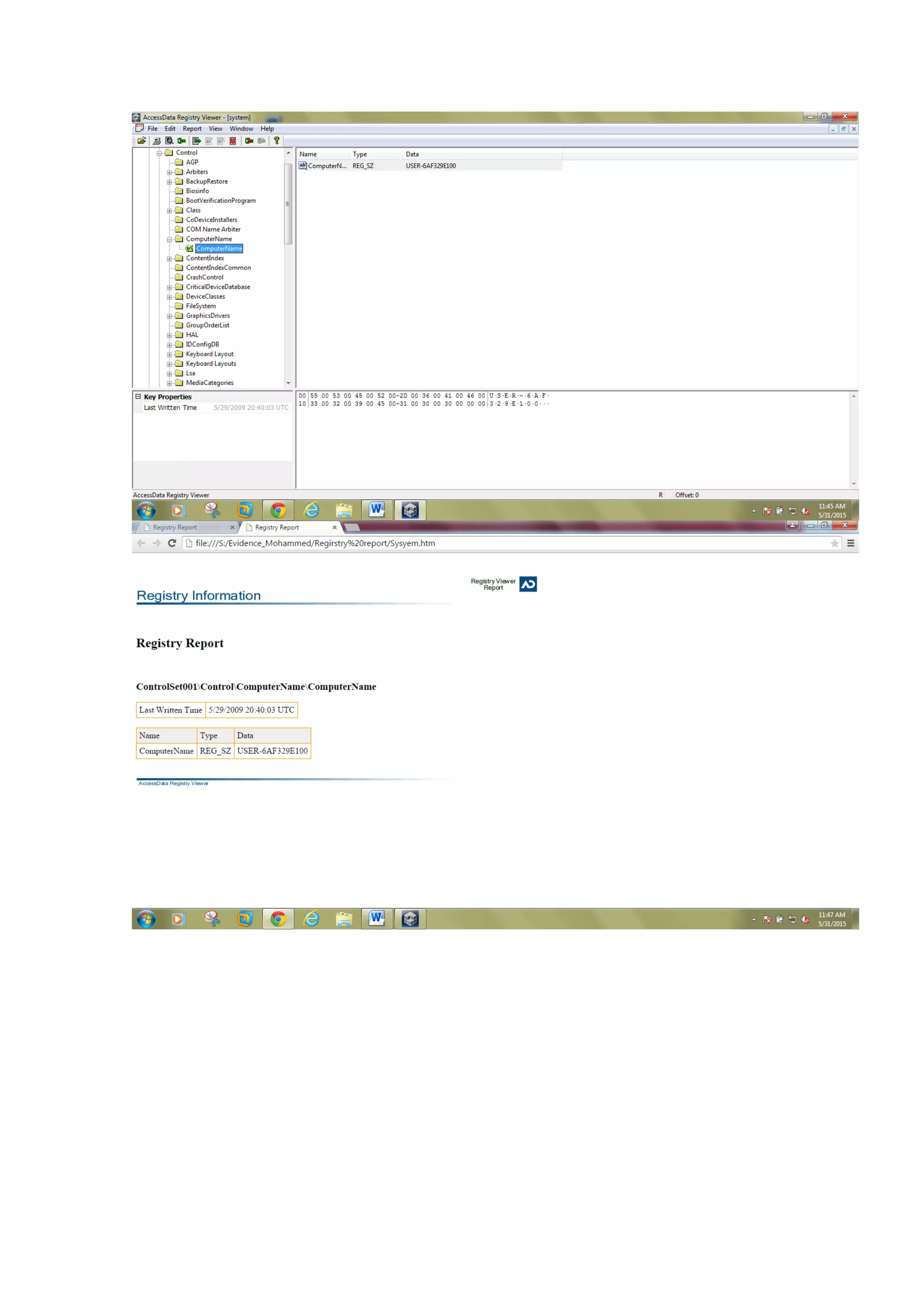
ü Select on computerName and add to report
Discussion :
Our problem statement required to analysis the evidences to know who is
the accused by using forensics tools such as : FTK imager, FTK AccessData,
Registry viewer and PRTK. For each one of this tool has task to display the
analysis.
FTK imager:
• We used FTK imager to create images of evidences (USB flash) and
select type of image Raw format (dd)
• We add image (dd) to showing which file has delete from flash and
recover it by export deleted file to the computer
FTK AccessData:
• We used FTK AccessData to examine the evidences, so we
created new case then add the image S1102.001
• Firstly, Encrypted files display encryption files with password.
• In addition to File status view all files that their extension
• On Deleted file Category view all files and email has
deleted of Mohammed, from the prorates we can find the
dilates of delete files or email as when create, time ,
mediation then export files to our PS
• file extension show all browser as HTML who Mohammed visit
browser and display which time
Registry viewer:
• We using Registry viewer to registry files
• Open SAM then select Users folder view all user add to report
• Final report display user name, create account, password and last
written time -lhhjlk
PRTK:
We use PRTK to decryption file with password and display password
Conclusion
Analyzing process of computer evidence properly is a difficult process
requiring an important amount of planning, technical, and resources
skills. In addition, Creating computer forensics lab is an active part of the
computer security process ,so It displays how the real process of forensic
and it is a not an option it is should to be on safe side. However, FTK has
made it very easier to draw valid conclusions and make meaningful
reports without missing critical attributes It is a truly remarkable and
versatile piece of software. For example , an AccessData FTK suite that
includes FTK imager, AccessData Forensics Toolkit, and Register viewer
is unique work solutions also more knowledge is obtained about how
crimes are committed with the use of computers, forensic tools can be
fine-tuned to gather evidence more professionally and combat the
crime technology. Here are our recommendations for using FTK
Ø FTK can make a keyword index of the entire image at the start of
the process which makes futures searches easy for finding the
evidence
Ø FTK allows you to view e-mails in a user-friendly and its recognizes
the source of the e-mail messages based on e-mail archives and
special
Ø FTK assistance us to find Password Dictionary Creation
Ø FTK creates a case log file, it supports options and advanced
searching techniques.
References


Bibliography	
  
(n.d.).	
  
host	
  protected	
  area.	
  (n.d.).	
  (shaima,	
  Producer)	
  Retrieved	
  5	
  26,	
  2015,	
  from	
  
wikipeda	
  :	
  http://en.wikipedia.org/wiki/Host_protected_area	


jim.	
  (2014,	
  9	
  4).	
  pesron	
  of	
  interet	
  .	
  Retrieved	
  5	
  15,	
  2015,	
  from	
  buddyTV:	
  
http://www.buddytv.com/articles/person-­‐of-­‐interest/poi-­‐interview-­‐jim-­‐
caviezel-­‐54454.aspx	


NIJ.	
  (2010,	
  7	
  23).	
  Retrieved	
  5	
  10,	
  2015,	
  from	
  Digital	
  Evidence	
  and	
  Forensics	
  :	
  
http://www.nij.gov/	


Steven.	
  (2009,	
  10	
  7).	
  action	
  of	
  couser	
  .	
  Retrieved	
  5	
  20,	
  2015,	
  from	
  goable	
  security	
  :	


http://www.globalsecurity.org/military/library/report/call/call_93-­‐3_ch4.htm	
  
tom	
  ,	
  s.	
  (2013,	
  4	
  12).	
  Types	
  of	
  Network	
  Devices.	
  (shaima,	
  Producer,	
  	
  hct)	
  
Retrieved	
  5	
  1,	
  2015,	
  from	
  IT	
  word:	
  http://info-­‐it.net/Basic-­‐Network/nbcon_1.php	


Webmaster.	
  (2012,	
  July	
  16).	
  NIST.	
  (Department	
  of	
  Commerce.)	
  Retrieved	
  may	
  5,	
  
2015,	
  from	
  Digital	
  Evidence:	
  
http://www.nist.gov/oles/forensics/digital_evidence.cfm	


Final Forensics Project

  • 1.
    Higher Colleges ofTechnology Abu Dhabi Women’s College Computer Information and Science I – Computer Forensics And Investigations Team Project   Submitted by: Shaima Abdulla – H00211573 Hawaa Ahmed – H00205635 Aisha Obaid – H00234158 Submitted to: Wissam Safeh Date of Project Submission: June 1, 2015
  • 2.
    Academic Honesty ACADEMIC HONESTY AcademicHonesty is a serious issue at the Higher Colleges of Technology. Any student who attempts to gain marks on their Project dishonestly by presenting another person’s work as their own without acknowledging the source of the information (including the internet) is considered to have plagiarized. When submitting a project or major assignment, students must identify every source that has been consulted and used for the project or assignment. The penalty for plagiarism is severe and includes permanent dismissal from the College. I have read the above information and understand my responsibilities with regard to Academic Honesty while completing this assessment. Student’s Signature 1 Student’s Signature 2 Student’s Signature 3 Student’s Signature 4 name : Shaima Abdulla hawed ahmed Aisha obaid ‫ﺍاﻝلﺃأﻡمﺍاﻥنﺓة‬ ‫ﺍاﻝلﺃأﻙكﺍاﺩدﯼیﻡمﯼیﺓة‬ ‫ﻥن‬ٕ‫ﺍا‬ ‫ﺍاﻝلﺃأﻡمﺍاﻥنﺓة‬ ‫ﺍاﻝلﺃأﻙكﺍاﺩدﯼیﻡمﯼیﺓة‬ ‫ﻡمﻭوﺽضﻭوﻉع‬ ‫ﺥخﻁطﯼیﺭر‬ ‫ﺝجﺩدﺍا‬ ‫ﻑفﻱي‬ ‫ﻙكﻝلﯼیﺍاﺕت‬ ‫ﺍاﻝلﺕتﻕقﻥنﯼیﺓة‬ ‫.ﺍاﻝلﻉعﻝلﯼیﺍا‬ ‫ﻭوﻝلﻫﮬﮪھﺫذﺍا‬ ‫ﻑفﺇإﻥن‬ ‫ﻳﯾﺔ‬ٔ‫ٴ‬‫ﺍا‬ ‫ﺏبﺓةﻁطﺍاﻝل‬ ‫ﺕتﺡحﺍاﻭوﻝل‬ ‫ﻥن‬ٔ‫ٴ‬‫ﺍا‬ ‫ﺕتﺱسﺕتﺥخﺩدﻡم‬ ‫ﻉعﻡمﻝل‬ ‫ﺍاﻝلﺁآﺥخﺭرﯼیﻥن‬ ‫ﻑفﻱي‬ ‫ﺕتﻕقﺩدﯼیﻡم‬ ‫ﻡمﺵشﺭرﻭوﻉع‬ ‫ﻭو‬ٔ‫ٴ‬‫ﺍا‬ ‫ﻭوﺍاﺝجﺏب‬ ‫ﻉعﻝلﻯى‬ ‫ﻧﻬﮭ‬ٔ‫ٴ‬‫ﺍا‬ ‫ﺝجﻫﮬﮪھﺩدﻫﮬﮪھﺍا‬ ‫ﺍاﻝلﺵشﺥخﺹصﻱي‬ ،٬ ‫ﺩدﻭوﻥن‬ ‫ﺫذﻙكﺭر‬ ‫ﻡمﺹصﺩدﺭر‬ ‫ﺍاﻝلﻡمﻉعﻝلﻭوﻡمﺍاﺕت‬ )‫ﺡحﺕتﻯى‬ ‫ﻭوﻝلﻭو‬ ‫ﻙكﺍاﻥن‬ ‫ﻡمﻭوﻕقﻉعﺍا‬ ‫ﻉعﻝلﻯى‬ ‫ﺵشﺏبﻙكﺓة‬ ‫(ﺍاﻝلﺍاﻥنﺕتﺭرﻥنﺕت‬ ‫ﻑفﻫﮬﮪھﺫذﺍا‬ ‫ﯼیﻉعﺕتﺏبﺭر‬ ‫ﻧﺘﺤﺎﻻ‬ٕ‫ﺍا‬. )‫ﺍاﻝلﺍاﻥنﺕتﺡحﺍاﻝل‬ ‫ﻫﮬﮪھﻭو‬ ‫ﻉعﺩدﻡم‬ ‫ﺫذﻙكﺭر‬ ‫ﻡمﺹصﺩدﺭر‬ ‫.(ﺍاﻝلﻡمﻉعﻝلﻭوﻡمﺍاﺕت‬ ‫"ﻭوﺏبﻥنﺍاء‬ ،٬‫ﻉعﻝلﯼیﻫﮬﮪھ‬ ‫ﻑفﺇإﻥن‬ ‫ﻉعﻝلﻯى‬ ‫ﻙكﻝل‬ ‫ﻁطﺍاﻝلﺏبﺓة‬ ‫ﺕتﻕقﺩدﻡم‬ ‫ﺏبﺡحﺙثﺍا‬ ‫ﻭو‬ٔ‫ٴ‬‫ﺍا‬ ‫ﻡمﺵشﺭرﻭوﻉعﺍا‬ ‫ﻭو‬ٔ‫ٴ‬‫ﺍا‬ ‫ﺍاﺝجﺏبﺍاﻭو‬ ‫ﻥن‬ٔ‫ٴ‬‫ﺍا‬ ‫ﺕتﺫذﻙكﺭرﺍاﻝلﻡمﺭرﺝجﻉع‬ ‫ﺳﻢ‬ٕ‫ﺍا‬‫ﻭو‬ ‫ﺹصﺍاﺡحﺏبﻫﮬﮪھ‬ ‫ﻭوﺍاﻝلﺹصﻑفﺡحﺍاﺕت‬ ‫ﺍاﻝلﺕتﻱي‬ ‫ﺧﺬﺕت‬ٔ‫ٴ‬‫ﺍا‬ ‫ﻡمﻥنﻫﮬﮪھﺍا‬ ‫ﺛﻨﺎء‬ٔ‫ٴ‬‫ﺍا‬ ‫ﻋﺪﺍاﺩدﻫﮬﮪھﺎ‬ٕ‫ﺍا‬ ‫ﻝلﻝلﻡمﺵشﺭرﻭوﻉع‬ ‫ﻭو‬ٔ‫ٴ‬‫ﺍا‬ ‫.ﺍاﻝلﻭوﺍاﺝجﺏب‬ ‫ﻥن‬ٕ‫ﺍا‬ ‫ﻉعﻕقﻭوﺏبﺓة‬ ‫ﺍاﻝلﺍاﻥنﺕتﺡحﺍاﻝل‬ ‫ﻕقﺍاﺱسﯼیﺓة‬ ‫ﻭوﺕتﺅؤﺩدﻱي‬ ‫ﻟﻰ‬ٕ‫ﺍا‬ ‫ﻁطﺭرﺩد‬ ‫ﺍاﻝلﻁطﺍاﻝلﺏبﺓة‬ ‫ﻡمﻥن‬ ‫.ﺍاﻝلﻙكﻝلﯼیﺓة‬ ‫ﺕت‬ٔ‫ٴ‬‫ﻗﺮﺍا‬ ‫ﺍاﻝلﻡمﻉعﻝلﻭوﻡمﺍاﺕت‬ ‫ﺍاﻝلﻡمﺩدﻭوﻥنﺓة‬ ،٬‫ﻋﻼﻩه‬ٔ‫ٴ‬‫ﺍا‬ ‫ﻭوﻑفﻫﮬﮪھﻡمﺕت‬ ‫ﻡمﺩدﻯى‬ ‫ﻡمﺱسﺅؤﻭوﻝلﯼیﺕتﻱي‬ ‫ﺕتﺝجﺍاﻩه‬ ‫ﺍاﻝلﺃأﻡمﺍاﻥنﺓة‬ ‫ﺍاﻝلﺃأﻙكﺍاﺩدﯼیﻡمﯼیﺓة‬ ‫ﺛﻨﺎء‬ٔ‫ٴ‬‫ﺍا‬ ‫ﺕتﺃأﺩدﯼیﺓة‬ ‫ﻫﮬﮪھﺫذﺍا‬ ‫ﺍاﻝلﺍاﻡمﺕتﺡحﺍاﻥن‬ ‫ﻉعﻝلﯼیﻫﮬﮪھﻭو‬ ‫ﻭوﻗﻊ‬ٔ‫ٴ‬‫.ﺍا‬ ____________________ ________________ ‫ﺕتﻭوﻕقﯼیﻉع‬ ‫ﺍاﻝلﻁطﺍاﻝلﺏب‬
  • 3.
    Table of contents Tableof Contents Introduction    .............................................................................................................     Statement  problem    .................................................................................................  4    Literature  review    ....................................................................................................  5   What is a Digital Evidence      ........................................................................................................................  5   Determine the Course of Action.    ................................................................................................  7 Narrowing the Scope ……………………………………………………….………… 8 Starting Points …………………………………………………………………….………… 8 Interview Persons of Interest :……………………………………………..…….. . 9 Documenting the Scene Seizing the Digital Evidence ………………………….10 Chain of Custody…………………………………………………………………………..11 Methodology        .......................................................................................................  12   Results  and  Analysis  ...............................................................................................  13   Imaging by use FTK imager ………….......................................................................13 Deleted file………………………………………………………………………………… 22 Examining evidence by using AccessData Forensics Toolki ……………………27 Steganography……………………………………………………………………………35 Encryption………………………………………………………………………………….36 Decrypted file using PRTK tools…………………………………………………………40 Deleted Email ……………………………………………………………………………..51 Internet browsing files……………………………………………………………………..56 Registry file …………………………………………………………………………………58 Discussion  ..............................................................................................................  62   Conclusion  ..............................................................................................................  64   References  .............................................................................................................  65              
  • 4.
    Introduction Nowadays, using theelectronic devices and servers to save our confidential transactions and information is increasing. And this is giving great chances to committing civil or criminal crimes by using these computers and any other electronic devices. So, we need a computer forensic because it's very essential for the safety of the organization, government...etc. Computer forensics is process using for collecting, and analyzing digital information for use as evidence in civil, criminal, or administrative cases. There are different forensic tools that can be used to analyze digital data, Such as, Guidance Software Encase, and the open source suite SANS Investigative Forensic Toolkit, Autopsy, and Access Data FTK and this is the tool we will focus on to use. Moreover, the purpose of this project is to show how the various tools can be used to recover and analyze digital data, and procedure for the collection of electronic evidence will also be discussed. In addition, we will discuss some actual cases in which computer forensics was successfully used to recover evidence. Problem Statement Sam is an active employee of ADMIN company, He is honest and loyal in his work. In addition, all members of the organization depends on Sam. In addition, Sam heard that there is confidential information leaked and spread to another company which is competition to them, by using the USB Flash and Email. At the same time he noted that there are some changes occurring in his office computer. However, , he immediately doubts to one of the company's staff his named Mohammed. Because everyone knows that Mohammad is the last person that exit from the company. The company decided to investigate the case and collect evidence from the Mohammed office to see if there is confidential data on it. Also, to know there is leaking confidential information has spread by Email to another organization. So based on that the company decides to use Forensics tools suite to help in solving the issue and to detect if Mohammed is innocent or not.
  • 5.
    Literature review I. Whatis a Digital Evidence? Digital evidence is f stored or transmitted in that may be relied on in court which is include a computer hard drive, a mobile phone, a personal digital assistant, a CD, and a flash card in a digital camera. Digital evidence is commonly related with electronic crime, or e-crime, such as child pornography or credit card fraud. However, digital evidence is now used to prosecute all types of crimes, not just e- crime. For example, suspects' e-mail or mobile phone files might contain critical evidence regarding their intent, their whereabouts at the time of a crime and their relationship with other suspects. ( link in the references ) Type Name Computer Devices o Screen o Server: Mini-computer/mid-range server o Digital camera o Cameras o Video Capture Hardware o Digital camera o Microphone o Scanner o Webcam o Monitor o Printers (all types) o Speaker • Modems • Audio Cards / Sound Card • Keyboard • Mp3 player • Voice recorder • e-book reader. • VoIP • E-mail (server or remotely stored) •
  • 6.
    (Steven, 2009)The collectionof digital evidence can be one of the most important initial steps in a case. Mistakes made during this phase can close a case. It’s important for investigators to understand at least the basics of collection and the importance of having an expert in digital forensics involved in the process. So, investigator must visit the company and to ask certain questions concerning the case to determine which is best method of data acquisition. The first step was taking picture situation with about touch any thing, then investigators has check if the computer off or still running. If the computer still alive, investigators keep it and he didn’t pulling the plug or shitting down because would effectively destroy some of your best evidence in the case and take time for case. Than move the mouse without press any thing to Network devices • Network Hub • Network Repeater • Network Bridge • Network Router • Network Switch • Network Firewall • CSU/DSU (Channel Service Unit/Data Service Unit • Wireless access point • Modem • Internal/external wireless card Laptop Notebook Tablet Storage Devices used in computer: Databases RAM Internal, or external Drive: USB Removable disk: • Card Reader (e.g. SD Card and Memory card reader) • Floppy diskettes • CD disc, • DVD disc • Blu-ray disc • Tape drive cartridges • Thumb drives Phones Mobile/Smart phone GPS Telephone Answering machine
  • 7.
    maintain data andrecording the information displayed on screen. Starting imaging hard disk quickly to preserve and collect digital evidence before it can be damaged degraded or destroyed and increases the chance of a successful outcome to a case. Finally, investigator will take USB flash as evidence 3. Narrowing the Scope: It is can help an Examiner to know what type of investigation and how to dealing with. in addition, it will be more efficient by starting understand case and what they are searching for by specifying the following Starting Points: are some of the more common starting points for forensic examination by case type ú Email /not ú Databases ú Calendars ú Logs ú Recent Server ú Images/ ú Chat logs ú Digital camera/video software Any specific details related to the case could be helpful in narrowing the scope. Focus and monitoring on Suspect in case help to Narrow circle and solve case early. (jim, 2014)Investigators identify all adult people of interest at the crime as witnesses and suspects in the location with recording and preview from entry to the end. Investigators should obtain as much information from them as possible. In addition, no one should be allowed to use any computer or move it except authorized. • Users of all electronic devices • Purpose and uses of all electronic devices • Computer and Internet user information • All account names, login names and all password • Automated applications in use. • Type of Internet access. • offsite storage. • Internet service provide • All e-mail accounts.
  • 8.
    • screen namesof all instant message • Security provisions in use. • Data access restrictions in place. 5. Documenting the Scene Seizing the Digital Evidence In an Organized step Provides document and recording of an electronic crimes scene are very important for help investigation This process should be accurately recorded and not very thing of location. Firstly, recording location itself from all directions, a situation of the computer, storage media, and wireless network devices. Documents must be detailed and accurate by methods used to properly documents consist of written note, final report, crime scene photographs and video , and a diagram or sketch to be reviewed later. • Document situation of computer: if running or shut dowm • Locate the computer in room • Take picture for crime scene and recording video • Written note what do you see on screen • In the end collect all evince, storage media related to case 1. Hardware include all devices 2. Software: operation system and all application 3. All media USB and disk 4. All documentation; written note picture First responders must use caution when they seize electronic device or any digital evidence to protect of damage by using appropriate packaging for each 1. Place tape over computer and record manufacturer, make, model, and serial number of the computer 2. log each piece of evidence in an evidence log with correct label details location, type situation of the evidence. 3. make sure wearing gloves before touch evidence and avoid scratch or foldable the evidence 4. make sure store the evidence in a secure area to avoid temperature and humidity extremes. Chain of Custody Chain of custody is a legal term that describes the process of gathering, , protecting and storing the evidence to ensure the validity of the evidence to the court. Moreover, To maintain chain of custody, you must preserve evidence from the time it is collected to the time it is presented in court. To prove the chain of custody, and ultimately show that the evidence has remained intact, That the evidence presented in court is the same evidence they collected or received. In
  • 9.
    addition, the timeand date the evidence was received or transferred to another provider and there was no tampering with the item while it was in custody. Every step in the process is monitored and documented. However, it's important for the investigator to make two images the first one which will be the most similar to the original hard disk and it should be stored in a fire proof cabinet and joint with chain of custody form. Also, the second copy will be the copy that the investigation will be conducted on it . Transporting Evidence The actual collection of evidence is a critical step in the investigative process. In addition, each piece of evidence collected must be handled in a way that preserves its integrity and that provides for a detailed record of its whereabouts from the time of collection to the time it arrives in a court room. Every step in the process is observed and documented. However, failure to pay proper attention to any one of these areas can easily result in one or more pieces of evidence having no value in court or in administrative proceedings. Moreover, once the object is identified as evidence, it must be tagged. Evidence tagging helps identify the collected item. The tag can contain of as little as a sticker with the date, time, control number, and name or initials of the investigator. Using a control number is an easy way to identify a piece of evidence in documentation such as a chain of custody. A tag can also be an actual document that contains general information about the item and the incident under investigation. At the lab In the lab we have several processes that we need to follow it to reach the end of the investigation . Once we finish collecting digital evidence from the scene and transport it to the forensics lab. these evidences should be in a controlled environment that ensures the security and integrity of digital evidence. So we decide to use forensic tools to analyze the digital data and finding results by using an Access Data FTK suite of tools. we will work on a process known as imaging in which an exact duplicate of the digital information is created and used for analysis.in addition, this process insures the original evidence and its data are never disturbed. The image is validated to make sure an exact duplicate has been created and then analysis of the duplicate data begins. However, In computer forensics lab it is essential to examine and analyze file slack space, which is the space between the end of a file and the end of the disk cluster it is stored in. we examined because it provides a wealth of information and additional investigative leads. Moreover, it is very important to examine the Host Protected Area (HPA) it also referred to as hidden protected area which is an area of a hard drive that is not normally visible to an operating system at the same time it and inaccessible to the user. The HPA contains a version of everything that has come in and out of the computer, so it will show whether the user has hide sensitive data or used any illegal files or programs. This digital information will helps computer forensics analyst to incriminate the suspect by having a enough evidence to convict them and identify their illegal activity.
  • 10.
    Methodology 1) Assessing theScene: This process involves interviewing the key contacts who are present and documenting the scene. The forensics teams typically use two methods: photography and field notes. 2) Acquiring the Evidence: Collection of digital evidence and this is follows a simple four-step methodology: • Identify Sources • Collecting Evidence • Authenticating Evidence • Maintaining a Documented Chain of Custody 3) Analyzing Evidence: There are two steps in analysis process: • Obtain the evidence from the storage area, and performing a physical authentication. • Copy of the evidence for analysis and the original is returned to storage; it is very important that the analysis never take place on the original evidence. • Forensic Toolkit (FTK) from Access Data is the most common tool used in forensic analysis. • Searching for Evidence 4) Presentation and Reporting the Findings: After the analysis is complete, the findings must be reported. The report given to those who will use the report, including the following groups:
  • 11.
    • Upper management •Forensic expert retained by the opposition • Attorneys, judges, and juries • Other professionals (auditors, heads of human resources departments, and others). Results and Analysis (Case analysis and reporting using Access Data FTK suite) Analysis Evidences by Forensics tools:- Imaging by use FTK imager ü Right- click and select run as Run as administrate to start use FTK imager
  • 12.
    ü Click theFile tab and then select Create Disk Image.
  • 13.
    ü Then selectDrive in the Source Evidence Type, and click next.
  • 14.
    ü In theSelect Drive , choose of source drive selection ( E- Flash Drive)
  • 15.
    ü In theCreate Image dialog box, click Add, and in the Select Image Type dialog box, Select Raw (dd) option button, so that the image be created in raw format. Click next
  • 16.
    We have tofill In the Evidence Item Information dialog box, Case Number: M1102 Evidence Number: 1102 Examiner: SHAIMA ABDULLA Notes: USB
  • 17.
    ü Select ImageDestination dialog box, click the Browse button, navigate to the S: Mohammed_Evdinces folder, and type MohCase in the Image Filename box. Click Finish to complete the Image process
  • 18.
    ü Create Imagedialog box make sure verify image after they are created, then click Start.
  • 19.
    ü If neededdisplay the image summery for more information about the image file
  • 20.
    ü When processhas finished, the results displayed along with the computed MD5 and SHA1 hashes.
  • 21.
    The MD5 andSHA1 hashes verify the integrity of the forensic image.
  • 22.
    Ø Deleted file üRun the FTK imager as administrate. ü Click on file tap then select Add evidence Item to open the image in Raw (dd) format ü Then select Image Drive in the Source Evidence Type, and click next.
  • 23.
    ü Navigate toimage file S1102.001 in S:Userssuper21DesktopMohammed_Evidenceand then click open ü The S1102 located in Evidence Tree, Click on it Searching for deleted file which have X on the icon . So, we going to recover the delete data
  • 24.
    ü The fisthas deleted file is framework.docx ü Which is date created 5/28/2015 2:38:36 PM comparing with Date Modified 5/28/2015 2:36:06, we concluded Mohammed change the sitting
  • 25.
    ü the Secondfile has deleted is city.docx the file size is 17.259 and check the start Cluster 59
  • 26.
                               
  • 27.
    ü Then exportthe deleted Files in new folder will compilation of deleted files
  • 28.
    Examining evidence byusing AccessData Forensics Toolki ü Right-click Access data and run as administers ü Click database tap and choose Administers User to create user for the investigator SHAIMA
  • 29.
    ü Click onAssign Roles button and to give investigators the role/ Project /Case Administrator ü Click on case tap and select new case
  • 30.
    ü Enter theinformation • Case name : Evd_moh • Case Folder Directory : C:Userssuper21DesktopEvidence_Ali ü Click on Evidence tab and select the Add/Remove the add the images and select Acquired Images
  • 31.
    ü Browse fromcomputer and select the S1102.001 image ü Chang time zone to the time zone according to your Asia /Dubai then Click OK to start processing the evidence, dialog box. The Processing Files dialog box will appear. After the process has completed, you will see the FTK interface and the associated file buckets. Then click close to start working in the case.
  • 32.
    Click the Exploretab, Notice all the files appear in the lower window. 1. Click the S1102 icon to view all the files and folders located in the root of the evidence storage device. Deleted files are represented by a red X in the icon next to the file name.
  • 33.
    Noticed that deletedfile has red X Click the check box next to Framework , right-click the file, and click Create Bookmark. Type Evidence in the Bookmark name box. Click All checked items then click ok
  • 35.
    ØSteganography: ü We cannote there is big different of size in the same photo map.png which that mean , he is hidden file under the photo. • Map.png : 19.69KB • Map1.png . 80.61KB
  • 36.
    ØEncryption ü Click onOverview tab file status, encrypted file to see encryption files Check the properties,
  • 37.
    right-click on encryptionfiles than Export to under Encryption file
  • 39.
    right-click the selectedfiles and click Create Bookmark. In any bookmarked file, click all highlighted items in the Create New Bookmark dialog box.
  • 40.
    ØDecrypted file usingPRTK tools ü Run PRTK as administrator ü Click tools, Diction Tools
  • 41.
    ü In theaccessdata Dicitonray Utility window, Click browse and Select Mohd evidices export.txt üClick Generate to create custom dictionary, when that import is successful, click ok
  • 42.
    ü In theAccessData import Utility dialog, click Dictionary Tools Biographical Dictionary Generator ü add all information below :
  • 43.
    ü click thegenerator tap, then click Generate
  • 44.
    ü select Allevidences mohd and save ü click edit, Profiles
  • 45.
    ü in themanage Profiles dialog, Select PRTK, then click Edit
  • 46.
  • 48.
    ü PRTK torecover the password. 17
  • 51.
    ØDeleted Email ü Clickon Email state to display all email include deleted email ü Click on delete file and see there is one Shaima to mohammed
  • 52.
    ü Export deletedemail to folder delete file under Mohammed evidences ü Right-click on all email and create Bookmark
  • 56.
    ØInternet browsing files üClick on overview tab and select file extension to display which Internet browser Mohammed has visit ( Department of finances ) ü Check of properties date access
  • 57.
    ü Secoud website his visit google
  • 58.
    ØRegistry file ü Right-clickRegistry file and run as administrator ü Click on file tab and select OPEN, then choose SAM
  • 59.
    ü Click onSAM , ACCOUNT, USER, 00001F5 ü Add to report, than generate report, last written time for USER 000001F5 was 5/9/2009
  • 60.
    ü Click onfile tab and select OPEN, then choose SYSTEM
  • 61.
    ü Select oncomputerName and add to report
  • 63.
    Discussion : Our problemstatement required to analysis the evidences to know who is the accused by using forensics tools such as : FTK imager, FTK AccessData, Registry viewer and PRTK. For each one of this tool has task to display the analysis. FTK imager: • We used FTK imager to create images of evidences (USB flash) and select type of image Raw format (dd) • We add image (dd) to showing which file has delete from flash and recover it by export deleted file to the computer FTK AccessData: • We used FTK AccessData to examine the evidences, so we created new case then add the image S1102.001 • Firstly, Encrypted files display encryption files with password. • In addition to File status view all files that their extension • On Deleted file Category view all files and email has deleted of Mohammed, from the prorates we can find the dilates of delete files or email as when create, time , mediation then export files to our PS • file extension show all browser as HTML who Mohammed visit browser and display which time Registry viewer: • We using Registry viewer to registry files • Open SAM then select Users folder view all user add to report • Final report display user name, create account, password and last written time -lhhjlk PRTK: We use PRTK to decryption file with password and display password
  • 64.
    Conclusion Analyzing process ofcomputer evidence properly is a difficult process requiring an important amount of planning, technical, and resources skills. In addition, Creating computer forensics lab is an active part of the computer security process ,so It displays how the real process of forensic and it is a not an option it is should to be on safe side. However, FTK has made it very easier to draw valid conclusions and make meaningful reports without missing critical attributes It is a truly remarkable and versatile piece of software. For example , an AccessData FTK suite that includes FTK imager, AccessData Forensics Toolkit, and Register viewer is unique work solutions also more knowledge is obtained about how crimes are committed with the use of computers, forensic tools can be fine-tuned to gather evidence more professionally and combat the crime technology. Here are our recommendations for using FTK Ø FTK can make a keyword index of the entire image at the start of the process which makes futures searches easy for finding the evidence Ø FTK allows you to view e-mails in a user-friendly and its recognizes the source of the e-mail messages based on e-mail archives and special Ø FTK assistance us to find Password Dictionary Creation Ø FTK creates a case log file, it supports options and advanced searching techniques.
  • 65.
    References     Bibliography   (n.d.).   host  protected  area.  (n.d.).  (shaima,  Producer)  Retrieved  5  26,  2015,  from   wikipeda  :  http://en.wikipedia.org/wiki/Host_protected_area       jim.  (2014,  9  4).  pesron  of  interet  .  Retrieved  5  15,  2015,  from  buddyTV:   http://www.buddytv.com/articles/person-­‐of-­‐interest/poi-­‐interview-­‐jim-­‐ caviezel-­‐54454.aspx     NIJ.  (2010,  7  23).  Retrieved  5  10,  2015,  from  Digital  Evidence  and  Forensics  :   http://www.nij.gov/     Steven.  (2009,  10  7).  action  of  couser  .  Retrieved  5  20,  2015,  from  goable  security  :       http://www.globalsecurity.org/military/library/report/call/call_93-­‐3_ch4.htm   tom  ,  s.  (2013,  4  12).  Types  of  Network  Devices.  (shaima,  Producer,    hct)   Retrieved  5  1,  2015,  from  IT  word:  http://info-­‐it.net/Basic-­‐Network/nbcon_1.php     Webmaster.  (2012,  July  16).  NIST.  (Department  of  Commerce.)  Retrieved  may  5,   2015,  from  Digital  Evidence:   http://www.nist.gov/oles/forensics/digital_evidence.cfm