Gandhinagar Institute
of technology
AlA Presentation
Subject:- CAD (2161903)
Topic name:-Fillet feature in solidworks
Prepared by:- jani Parth
(150120119051)
 Contents
1.Introduction
2.Creating Fillets
3.Fillet type
I. Constant radius fillets
II.Variable radius fillets
III.Face fillets
IV.Full round fillets
4.Recommendations for Fillets
1. introduction
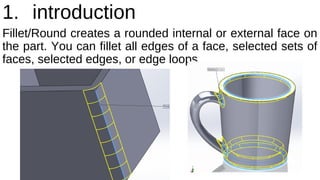
Fillet/Round creates a rounded internal or external face on
the part. You can fillet all edges of a face, selected sets of
faces, selected edges, or edge loops.
2. Creating Fillets
To create a fillet:
1.Click Fillet    (Features toolbar) 
or Insert > Features > Fillet/Round.
2.Set the Property Manager options.
For constant radius fillets only, you can use the Fillet 
Xpert to add or modify fillets and to manage fillet corners.
3.Click   
3. FILLET TYPE
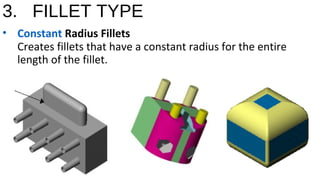
• Constant Radius Fillets
Creates fillets that have a constant radius for the entire 
length of the fillet.
…
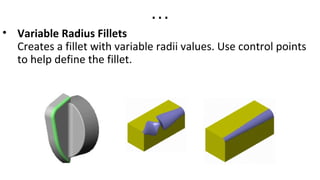
• Variable Radius Fillets
Creates a fillet with variable radii values. Use control points 
to help define the fillet.
…
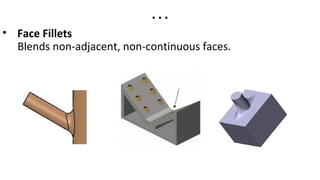
• Face Fillets
Blends non-adjacent, non-continuous faces.
…
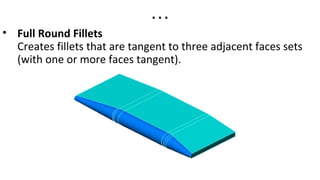
• Full Round Fillets
Creates fillets that are tangent to three adjacent faces sets
(with one or more faces tangent).
4. Recommendations for fillets
• In general, it is best to follow these rules when
making fillets:add larger fillets before smaller ones.
When several fillets converge at a vertex, create
the larger fillets first.
• Add drafts before fillets. If you are creating a
molded or cast part with many filleted edges and
drafted surfaces, in most cases you should add
the draft features before the fillets.
…
• Save cosmetic fillets for last. Try to add cosmetic
fillets after most other geometry is in place. If you
add them earlier, it takes longer to rebuild the part.
• To enable a part to rebuild more rapidly, use a
single fillet operation to treat several edges that
require equal radius fillets. However, if you change
the radius of that fillet, all the fillets created in the
same operation change
Fillet feature in solid works

Fillet feature in solid works

  • 1.
    Gandhinagar Institute of technology AlAPresentation Subject:- CAD (2161903) Topic name:-Fillet feature in solidworks Prepared by:- jani Parth (150120119051)
  • 2.
     Contents 1.Introduction 2.Creating Fillets 3.Fillettype I. Constant radius fillets II.Variable radius fillets III.Face fillets IV.Full round fillets 4.Recommendations for Fillets
  • 3.
    1. introduction Fillet/Round createsa rounded internal or external face on the part. You can fillet all edges of a face, selected sets of faces, selected edges, or edge loops.
  • 4.
    2. Creating Fillets Tocreate a fillet: 1.Click Fillet    (Features toolbar)  or Insert > Features > Fillet/Round. 2.Set the Property Manager options. For constant radius fillets only, you can use the Fillet  Xpert to add or modify fillets and to manage fillet corners. 3.Click   
  • 5.
    3. FILLET TYPE •Constant Radius Fillets Creates fillets that have a constant radius for the entire  length of the fillet.
  • 6.
    … • Variable RadiusFillets Creates a fillet with variable radii values. Use control points  to help define the fillet.
  • 7.
    … • Face Fillets Blendsnon-adjacent, non-continuous faces.
  • 8.
    … • Full RoundFillets Creates fillets that are tangent to three adjacent faces sets (with one or more faces tangent).
  • 9.
    4. Recommendations forfillets • In general, it is best to follow these rules when making fillets:add larger fillets before smaller ones. When several fillets converge at a vertex, create the larger fillets first. • Add drafts before fillets. If you are creating a molded or cast part with many filleted edges and drafted surfaces, in most cases you should add the draft features before the fillets.
  • 10.
    … • Save cosmeticfillets for last. Try to add cosmetic fillets after most other geometry is in place. If you add them earlier, it takes longer to rebuild the part. • To enable a part to rebuild more rapidly, use a single fillet operation to treat several edges that require equal radius fillets. However, if you change the radius of that fillet, all the fillets created in the same operation change