File Naming
Conventions
By:
Narendra Singh Shekhawat
Narendraa.singhshekhawat@gmail.com
+91-7737777476
ONLY USE LETTERS,
NUMBERS, DASHES,
OR UNDERSCORES
IN FILE OR FOLDER
NAMES
• Avoid spaces use-a-dash-or-an–
underscore_where_you_would_ha
ve_put_a_space_between_words
• Periods can still be used in the
middle of a filename or folder
name, but should never be put at
the end of the name
• Many current filenames have
"yyyy.mm.dd" at the end of the file
– this is OK!
How can we
differentiate
country and a non
country specific
file?
• Non Country-Specific
File:
• “Filename-v#-yyyy-mm-dd-initials”
• Country Specific File:
• “PMACC-Filename-v#-yyyy-mm-dd-
initials”
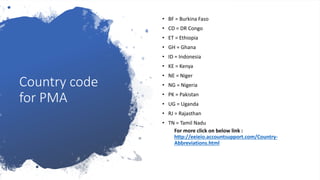
Country code
for PMA
• BF = Burkina Faso
• CD = DR Congo
• ET = Ethiopia
• GH = Ghana
• ID = Indonesia
• KE = Kenya
• NE = Niger
• NG = Nigeria
• PK = Pakistan
• UG = Uganda
• RJ = Rajasthan
• TN = Tamil Nadu
For more click on below link :
http://eeieio.accountsupport.com/Country-
Abbreviations.html
Components of
file name
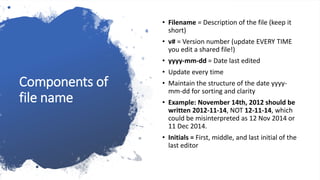
• Filename = Description of the file (keep it
short)
• v# = Version number (update EVERY TIME
you edit a shared file!)
• yyyy-mm-dd = Date last edited
• Update every time
• Maintain the structure of the date yyyy-
mm-dd for sorting and clarity
• Example: November 14th, 2012 should be
written 2012-11-14, NOT 12-11-14, which
could be misinterpreted as 12 Nov 2014 or
11 Dec 2014.
• Initials = First, middle, and last initial of the
last editor
File naming
best practices:
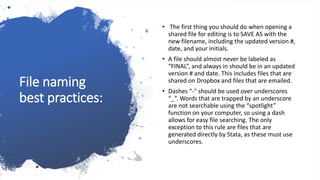
• The first thing you should do when opening a
shared file for editing is to SAVE AS with the
new filename, including the updated version #,
date, and your initials.
• A file should almost never be labeled as
“FINAL”, and always in should be in an updated
version # and date. This includes files that are
shared on Dropbox and files that are emailed.
• Dashes “-" should be used over underscores
“_”. Words that are trapped by an underscore
are not searchable using the “spotlight”
function on your computer, so using a dash
allows for easy file searching. The only
exception to this rule are files that are
generated directly by Stata, as these must use
underscores.

File Naming Conventions

  • 1.
    File Naming Conventions By: Narendra SinghShekhawat Narendraa.singhshekhawat@gmail.com +91-7737777476
  • 2.
    ONLY USE LETTERS, NUMBERS,DASHES, OR UNDERSCORES IN FILE OR FOLDER NAMES • Avoid spaces use-a-dash-or-an– underscore_where_you_would_ha ve_put_a_space_between_words • Periods can still be used in the middle of a filename or folder name, but should never be put at the end of the name • Many current filenames have "yyyy.mm.dd" at the end of the file – this is OK!
  • 3.
    How can we differentiate countryand a non country specific file? • Non Country-Specific File: • “Filename-v#-yyyy-mm-dd-initials” • Country Specific File: • “PMACC-Filename-v#-yyyy-mm-dd- initials”
  • 4.
    Country code for PMA •BF = Burkina Faso • CD = DR Congo • ET = Ethiopia • GH = Ghana • ID = Indonesia • KE = Kenya • NE = Niger • NG = Nigeria • PK = Pakistan • UG = Uganda • RJ = Rajasthan • TN = Tamil Nadu For more click on below link : http://eeieio.accountsupport.com/Country- Abbreviations.html
  • 5.
    Components of file name •Filename = Description of the file (keep it short) • v# = Version number (update EVERY TIME you edit a shared file!) • yyyy-mm-dd = Date last edited • Update every time • Maintain the structure of the date yyyy- mm-dd for sorting and clarity • Example: November 14th, 2012 should be written 2012-11-14, NOT 12-11-14, which could be misinterpreted as 12 Nov 2014 or 11 Dec 2014. • Initials = First, middle, and last initial of the last editor
  • 6.
    File naming best practices: •The first thing you should do when opening a shared file for editing is to SAVE AS with the new filename, including the updated version #, date, and your initials. • A file should almost never be labeled as “FINAL”, and always in should be in an updated version # and date. This includes files that are shared on Dropbox and files that are emailed. • Dashes “-" should be used over underscores “_”. Words that are trapped by an underscore are not searchable using the “spotlight” function on your computer, so using a dash allows for easy file searching. The only exception to this rule are files that are generated directly by Stata, as these must use underscores.