System z
Maintenance Information for Fiber Optic Links (ESCON,
FICON,
Coupling Links, and Open System Adapters)
SY27-2597-15
System z
Maintenance Information for Fiber Optic Links (ESCON,
FICON,
Coupling Links, and Open System Adapters)
SY27-2597-15
Note!
Before using this information and the product it supports, be sure to read the information under
“Safety” on page v, Appendix F, “Notices,” on page 133, and IBM Systems Environmental Notices and
User Guide, Z125–5823.
This edition, SY27-2597-15, applies to the IBM®
System z®
processors, and replaces SY27-2597-14.
There may be a newer version of this document in PDF format available on Resource Link. Go to
http://www.ibm.com/servers/resourcelink and click on Library on the navigation bar. A newer version is indicated by a
lower-case, alphabetic letter following the form number suffix (for example: 00a, 00b, 01a, 01b).
© Copyright IBM Corporation 1990, 2011.
US Government Users Restricted Rights – Use, duplication or disclosure restricted by GSA ADP Schedule Contract
with IBM Corp.
Contents
Safety . . . . . . . . . . . . . . . v
Safety notices . . . . . . . . . . . . . . v
World trade safety information . . . . . . . v
Laser safety information . . . . . . . . . v
Laser compliance . . . . . . . . . . . . v
About this publication . . . . . . . . vii
Who should use this publication . . . . . . . vii
What is included in this publication . . . . . . vii
Prerequisite publications . . . . . . . . . . ix
Where to find more information . . . . . . . ix
How to send your comments . . . . . . . . ix
Accessibility . . . . . . . . . . . . . . ix
Chapter 1. Introduction to fiber optic
links . . . . . . . . . . . . . . . . 1
Unidirectional fiber optic information transfer . . . 1
Bidirectional fiber optic information transfer . . . . 1
Optical fiber elements and optical cable . . . . . 2
Optical cable connectors . . . . . . . . . . 3
Physical-contact connectors . . . . . . . . 3
Nonphysical-contact connectors . . . . . . . 4
Connector color coding . . . . . . . . . . 6
IBM jumper cables . . . . . . . . . . . . 7
Trunk cable . . . . . . . . . . . . . . . 8
Splices . . . . . . . . . . . . . . . . 8
Distribution panels . . . . . . . . . . . . 8
Couplers and adapters . . . . . . . . . . . 8
Mode conditioning patch cables . . . . . . . 13
Splitter tool . . . . . . . . . . . . . . 14
Fiber optic channel link configuration . . . . . 15
FDDI service limitations . . . . . . . . . . 17
Jumper cable . . . . . . . . . . . . . 17
Link bandwidth . . . . . . . . . . . . 17
Link error conditions . . . . . . . . . . . 17
Link error analysis . . . . . . . . . . . . 17
Examples of link error analysis . . . . . . . 18
Dispersion. . . . . . . . . . . . . . 18
Chapter 2. Service Strategy and
Maintenance Activities . . . . . . . . 21
Link problem determination summary . . . . . 21
Link service activities . . . . . . . . . . . 21
Installation activities . . . . . . . . . . 21
Repair activities . . . . . . . . . . . . 21
Test activities . . . . . . . . . . . . . 21
Link training topics. . . . . . . . . . . . 21
Keying and installing an IBM FDDI connector. . . 22
IBM FDDI connector keys . . . . . . . . 22
Cleaning the connector . . . . . . . . . 23
Installing and removing the connector . . . . 23
Typical link configurations . . . . . . . . . 24
Common link failures . . . . . . . . . . . 26
FICON Express8 fiber optic cable requirements . . 27
Determining the direction of light propagation . . 28
Link verification summary . . . . . . . . . 30
Chapter 3. Problem Determination
Procedures . . . . . . . . . . . . . 31
Start link problem determination . . . . . . . 31
MAP 0300: Start . . . . . . . . . . . . . 32
Link problem determination using MAPs . . . . 33
MAP 0310: Testing a link . . . . . . . . . . 37
MAP 0320: Testing fiber 1 . . . . . . . . . 38
MAP 0330: Fiber 1 loss unacceptable . . . . . . 40
MAP 0340: Testing fiber 2 . . . . . . . . . 43
MAP 0350: Fiber 2 loss unacceptable . . . . . . 45
MAP 0360: Jumper cable verification . . . . . . 48
Link problem determination using the fast-path
method . . . . . . . . . . . . . . . . 51
Obtaining reference levels and attaching test
equipment to a link. . . . . . . . . . . . 57
Obtaining PO for a multi-mode link. . . . . 58
Obtaining P1 and attaching test equipment to a
multi-mode link . . . . . . . . . . . . 60
Obtaining P2 for a multi-mode link. . . . . 63
Obtaining P3 for a multi-mode link. . . . . 65
Obtaining P0 for a single-mode link . . . . 67
Obtaining P1 and attaching test equipment to a
single–mode link . . . . . . . . . . . 68
Chapter 4. Jumper Cable Handling and
Installation Summary . . . . . . . . 71
Jumper cable handling precautions . . . . . . 71
Pre-installation checklist . . . . . . . . . . 71
Cable inventory . . . . . . . . . . . . 71
Jumper cable installation summary . . . . . . 72
Jumper cable labeling . . . . . . . . . . 72
Safety equipment . . . . . . . . . . . 72
Test equipment . . . . . . . . . . . . 72
Documentation . . . . . . . . . . . . 73
Cable routing. . . . . . . . . . . . . 73
Cable layout, slack management, and strain relief 73
Connector protection . . . . . . . . . . 73
Chapter 5. Documentation . . . . . . 75
Cable administration information . . . . . . . 75
Link installation documentation . . . . . . . 75
Documentation for new installations . . . . . 75
Documentation for all installations . . . . . 76
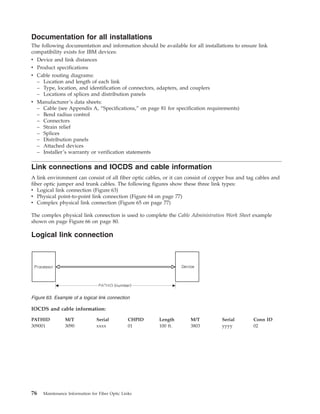
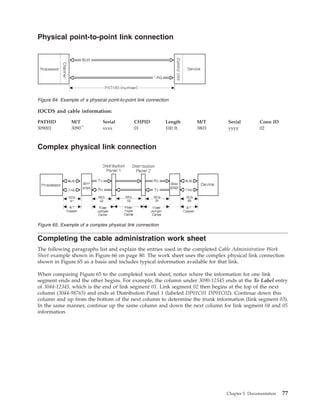
Link connections and IOCDS and cable information 76
Logical link connection . . . . . . . . . 76
Physical point-to-point link connection . . . . 77
Complex physical link connection . . . . . . 77
Completing the cable administration work sheet . . 77
Product information . . . . . . . . . . 78
Jumper cable information. . . . . . . . . 78
Trunk information . . . . . . . . . . . 79
Loss measurements. . . . . . . . . . . 79
© Copyright IBM Corp. 1990, 2011 iii
Service comments . . . . . . . . . . . 79
Appendix A. Specifications . . . . . . 81
Link specifications . . . . . . . . . . . . 82
Typical optical component loss values . . . . . 86
Appendix B. Tools, Test Equipment,
and Parts . . . . . . . . . . . . . 87
Appendix C. Measuring Device
Transmit and Receive Levels . . . . . 89
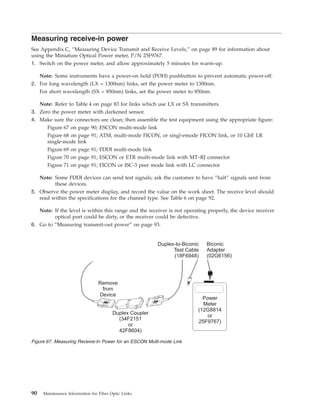
Measuring receive-in power . . . . . . . . . 90
Measuring transmit-out power . . . . . . . . 93
Coupling links (InterSystem Channel - ISCs)
multi-mode power level measurement procedures . 95
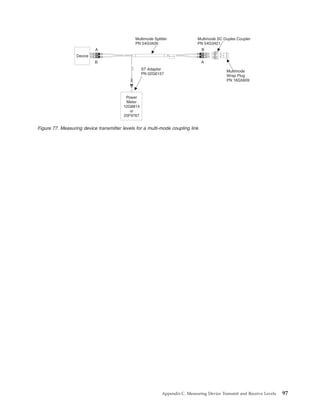
Measuring device transmitter and receiver levels 96
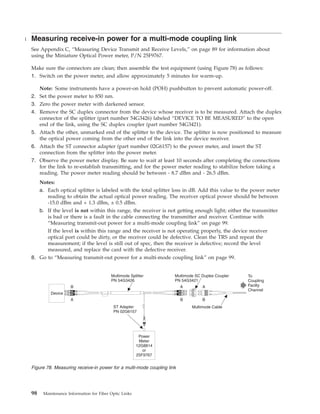
Measuring receive-in power for a multi-mode
coupling link . . . . . . . . . . . . . . 98
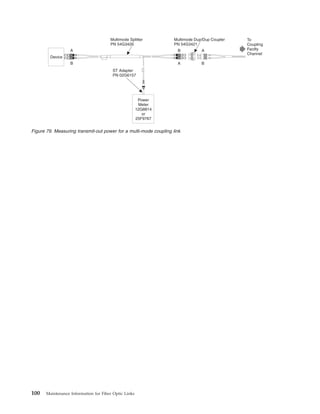
Measuring transmit-out power for a multi-mode
coupling link . . . . . . . . . . . . . . 99
Coupling links (InterSystem Channel - ISCs)
single-mode power level measurement procedures . 101
Measuring device transmitter and receiver levels 101
Measuring receive-in power for a single-mode
coupling link . . . . . . . . . . . . . 103
Measuring transmit-out power for a single-mode
coupling link . . . . . . . . . . . . . 105
Isolating link segments using the splitter tool. . . 107
ETR link multi-mode power level measurement
procedures . . . . . . . . . . . . . . 108
Measuring transmit-out power for an ETR link 108
Appendix D. Measurement Conversion
Tables . . . . . . . . . . . . . . 111
English-to-metric conversion table . . . . . . 111
Metric-to-english conversion table . . . . . . 111
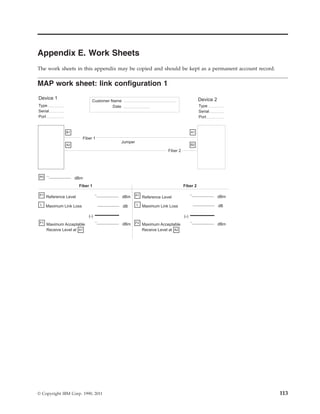
Appendix E. Work Sheets . . . . . . 113
MAP work sheet: link configuration 1 . . . . . 113
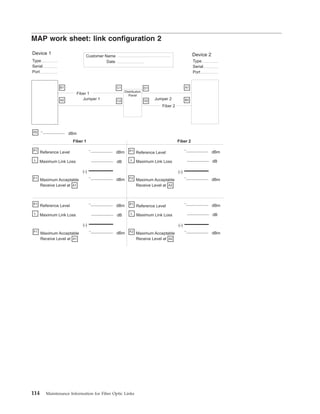
MAP work sheet: link configuration 2 . . . . . 114
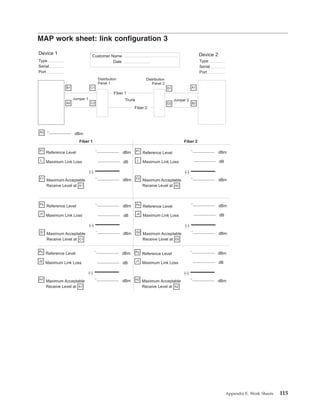
MAP work sheet: link configuration 3 . . . . . 115
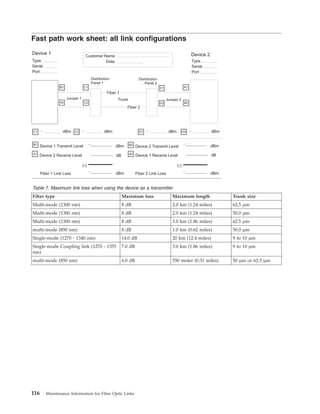
Fast path work sheet: all link configurations . . . 116
Multi-mode calculated link loss work sheet . . . 119
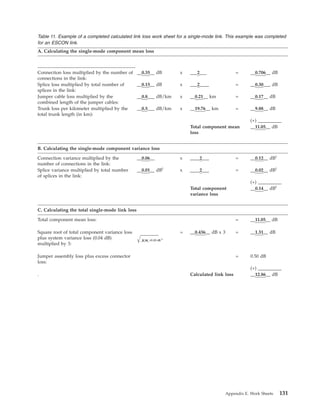
Single-mode calculated link loss work sheet . . . 120
Calculating the loss in a multi-mode link . . . 121
Completing a loss work sheet for a multi-mode
link. . . . . . . . . . . . . . . . 121
Dispersion . . . . . . . . . . . . . 121
Link limitations . . . . . . . . . . . 121
Loss calculation . . . . . . . . . . . 122
Section A: Calculating the multi-mode
component mean loss . . . . . . . . . 122
Section B: Calculating the multi-mode
component variance loss . . . . . . . . 122
Section C: Calculating the total multi-mode link
loss. . . . . . . . . . . . . . . . 122
Loss calculation example for a multi-mode ESCON
link. . . . . . . . . . . . . . . . . 124
Loss calculation for an FDDI multi-mode link 126
Calculating the loss in a single-mode link . . . . 128
Completing a loss work sheet for a single-mode
link. . . . . . . . . . . . . . . . 128
Section A: Calculating the single-mode
component mean loss . . . . . . . . . 128
Section B: Calculating the single-mode
component variance loss . . . . . . . . 128
Section C: Calculating the total single-mode link
loss. . . . . . . . . . . . . . . . 129
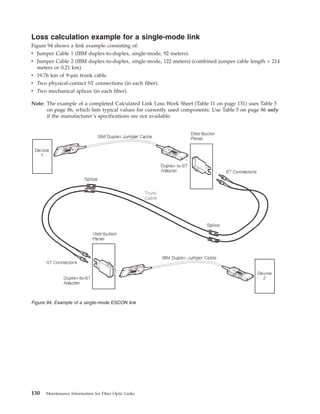
Loss calculation example for a single-mode link 130
Appendix F. Notices . . . . . . . . 133
Trademarks . . . . . . . . . . . . . . 134
Electronic emission notices . . . . . . . . . 134
Index . . . . . . . . . . . . . . . 139
iv Maintenance Information for Fiber Optic Links
|
||
Safety
Safety notices
Safety notices may be printed throughout this guide. DANGER notices warn you of conditions or
procedures that can result in death or severe personal injury. CAUTION notices warn you of conditions
or procedures that can cause personal injury that is neither lethal nor extremely hazardous. Attention
notices warn you of conditions or procedures that can cause damage to machines, equipment, or
programs.
World trade safety information
Several countries require the safety information contained in product publications to be presented in their
translation. If this requirement applies to your country, a safety information booklet is included in the
publications package shipped with the product. The booklet contains the translated safety information
with references to the US English source. Before using a US English publication to install, operate, or
service this IBM®
product, you must first become familiar with the related safety information in the
Systems Safety Notices, G229-9054. You should also refer to the booklet any time you do not clearly
understand any safety information in the US English publications.
Laser safety information
All System z®
models can use I/O cards such as PCI adapters, ESCON®
, FICON®
, Open Systems Adapter
(OSA), InterSystem Coupling-3 (ISC-3), or other I/O features which are fiber optic based and utilize
lasers or LEDs.
Laser compliance
All lasers are certified in the US to conform to the requirements of DHHS 21 CFR Subchapter J for Class
1 or Class 1M laser products. Outside the US, they are certified to be in compliance with IEC 60825 as a
Class 1 or Class 1M laser product. Consult the label on each part for laser certification numbers and
approval information.
CAUTION:
Data processing environments can contain equipment transmitting on system links with laser modules
that operate at greater than Class 1 power levels. For this reason, never look into the end of an optical
fiber cable or open receptacle. (C027)
CAUTION:
This product contains a Class 1M laser. Do not view directly with optical instruments. (C028)
© Copyright IBM Corp. 1990, 2011 v
vi Maintenance Information for Fiber Optic Links
About this publication
This publication provides problem determination, verification, and repair procedures for IBM fiber optic
channel links. This designation includes:
v IBM coupling facility channels
v IBM Enterprise Systems Connection (ESCON) links, and
v Fibre Channel Connection (FICON) and fiber optic interfaces for Open System Adapters (OSA),
including:
– Fiber Distributed Data Interface (FDDI)
– Asynchronous Transfer Mode (ATM), and
– Gigabit Ethernet (GbE)
Although this publication covers fiber optic cable types and environments in general. The specific
information includes only what is supported for IBM fiber optic channel links. Although the ANSI Fibre
Channel Standard does not include the use of long wavelength (1300 nm) lasers on multi-mode fiber,
System z will support this combination.
A technical change to the text or illustration is indicated by a vertical line to the left of the change.
Note: This publication, with the publication Planning for Fiber Optic Channel Links, GA23-0367, replaces the
publication IBM 3044 Fiber-Optic Channel Extender Link Models C02 and D02: Fiber-Optic Cable Planning,
Installation, and Maintenance Guide, GC22-7130, and makes it obsolete.
Who should use this publication
This publication should be used by service representatives who need to perform problem determination
on a fiber optic link.
What is included in this publication
This publication contains five chapters and five appendixes:
v Chapter 1, “Introduction to Fiber Optic Links”, provides a brief introduction to fiber optic information
transfer and optical link components, and shows a typical fiber optic channel link configuration.
v Chapter 2, “Service Strategy and Maintenance Activities,” contains a summary of the service tasks,
strategy, and activities associated with fiber optic channel links. It also shows typical link
configurations, describes some common link failures, and shows how to determine the direction of
light propagation in an IBM jumper cable and in a fiber optic channel link. This chapter also provides a
summary for the link verification procedures performed using the MAPs in Chapter 3.
v Chapter 3, “Problem Determination Procedures,” provides information that can be used to isolate link
failures between two devices. It is divided into two sections: the first section provides the maintenance
analysis procedures (MAPs) used to perform step-by-step problem determination; the second section
provides information for using the “fast-path” method.
v Chapter 4, “Jumper Cable Handling and Installation Summary,” provides guidance for handling fiber
optic jumper cables and summarizes the tasks associated with their installation.
v Chapter 5, “Documentation,” summarizes the information used to document link installations. It
provides instructions and a sample work sheet for recording link specifications and physical
characteristics.
v Appendix A, “Specifications,” lists the specifications and optical properties required for components
used in a fiber optic channel link.
v Appendix B, “Tools, Test Equipment, and Parts,” lists the tools, test equipment, and parts used to
perform problem determination and testing for fiber optic channel links.
© Copyright IBM Corp. 1990, 2011 vii
|
|
|
|
v Appendix C, “Measuring Device Transmit and Receive Levels,” contains procedures on how to
determine if the transmit and receive signals are within specification. Although these procedures are

also contained in the maintenance information for each device, they are included here for convenience.
v Appendix D, “Measurement Conversion Tables,” contains conversion tables from English
measurements to metric and from metric measurements to English.
v Appendix E, “Work Sheets,” provides work sheets that may be reproduced and used for problem
determination or to provide a permanent account record.
viii Maintenance Information for Fiber Optic Links
Prerequisite publications
Before you perform link problem determination using this publication, perform the maintenance
procedures contained in the following publications:
v Use Enterprise Systems Connection Link Fault Isolation, SY22-9533, to isolate ESCON link problems at a
system level.
v Use the applicable maintenance or service information publications for all ESCON devices installed on
the link to determine proper operation of those devices.
When this publication and other maintenance or service publications direct you to clean the fiber optic
components, use the publication Fiber Optic Cleaning Procedures, SY27-2604.
Where to find more information
The following publications contain information related to the information in this publication:
v Planning for Fiber Optic Channel Links, GA23-0367, provides information that can be used when
planning for ESCON links.
v Technical Service Letter No. 147 Fiber Optic Tools and Test Equipment (Revised 2/19/96 or later), contains a
complete list of fiber optic support tools and test equipment.
v Maintenance Information for the 9037 Model 002 Sysplex Timer, SY27-2641.
Coupling links are designed to be optically compatible with the F0 or physical layer industry standard
ANSI Fiber Channel Physical Interfaces (FC-PI-2), published by the American National Standards Institute,
New York, NY.
The open fiber control (OFC) timing for 531 megabits per second links follows this ANSI standard. The
OFC timing for 1.0625 gigabits per second links uses the same timing as specified in the ANSI standard
for 266 megabits per second links, which allows longer distances for gigabit links.
How to send your comments
Your feedback is important in helping to provide the most accurate and high-quality information. Send
your comments by using Resource Link®
at http://www.ibm.com/servers/resourcelink. Click Feedback on the
Navigation bar on the left. You can also send an email to reslink@us.ibm.com. Be sure to include the
name of the book, the form number of the book, the version of the book, if applicable, and the specific
location of the text you are commenting on (for example, a page number, table number, or a heading).
Accessibility
This publication is in Adobe Portable Document Format (PDF) and should be compliant with accessibility
standards. If you experience difficulties using this PDF file you can request a web-based format of this
publication. Go to Resource Link at http://www.ibm.com/servers/resourcelink and click Feedback from the
Navigation bar on the left. In the Comments input area, state your request, the publication title and
number, choose General comment as the category and click Submit. You can also send an email to
reslink@us.ibm.com providing the same information.
When you send information to IBM, you grant IBM a nonexclusive right to use or distribute the
information in any way it believes appropriate without incurring any obligation to you.
About this publication ix
|
|
|
|
|
x Maintenance Information for Fiber Optic Links
Chapter 1. Introduction to fiber optic links
This chapter provides a brief introduction to fiber optic information transfer, lists the components that
can be included in an IBM fiber optic channel link, and shows an example of a fiber optic channel link.
For more information on fiber connectors and adapters, refer to http://rtpgsa.ibm.com/home/i/t/itstesc/web/
public.
Unidirectional fiber optic information transfer
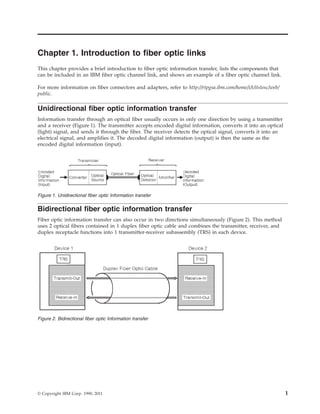
Information transfer through an optical fiber usually occurs in only one direction by using a transmitter
and a receiver (Figure 1). The transmitter accepts encoded digital information, converts it into an optical
(light) signal, and sends it through the fiber. The receiver detects the optical signal, converts it into an
electrical signal, and amplifies it. The decoded digital information (output) is then the same as the
encoded digital information (input).
Bidirectional fiber optic information transfer
Fiber optic information transfer can also occur in two directions simultaneously (Figure 2). This method
uses 2 optical fibers contained in 1 duplex fiber optic cable and combines the transmitter, receiver, and
duplex receptacle functions into 1 transmitter-receiver subassembly (TRS) in each device.
Figure 1. Unidirectional fiber optic Information transfer
Figure 2. Bidirectional fiber optic Information transfer
© Copyright IBM Corp. 1990, 2011 1
Optical fiber elements and optical cable
Note that the term Fibre is used in the ANSI Fibre Channel Standard documents to denote both copper
and optical fiber media.
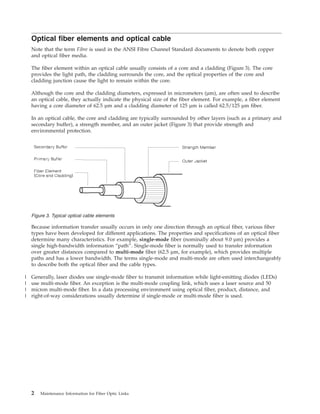
The fiber element within an optical cable usually consists of a core and a cladding (Figure 3). The core
provides the light path, the cladding surrounds the core, and the optical properties of the core and
cladding junction cause the light to remain within the core.
Although the core and the cladding diameters, expressed in micrometers (µm), are often used to describe
an optical cable, they actually indicate the physical size of the fiber element. For example, a fiber element
having a core diameter of 62.5 µm and a cladding diameter of 125 µm is called 62.5/125 µm fiber.
In an optical cable, the core and cladding are typically surrounded by other layers (such as a primary and
secondary buffer), a strength member, and an outer jacket (Figure 3) that provide strength and
environmental protection.
Because information transfer usually occurs in only one direction through an optical fiber, various fiber
types have been developed for different applications. The properties and specifications of an optical fiber
determine many characteristics. For example, single-mode fiber (nominally about 9.0 µm) provides a
single high-bandwidth information “path”. Single-mode fiber is normally used to transfer information
over greater distances compared to multi-mode fiber (62.5 µm, for example), which provides multiple
paths and has a lower bandwidth. The terms single-mode and multi-mode are often used interchangeably
to describe both the optical fiber and the cable types.
Generally, laser diodes use single-mode fiber to transmit information while light-emitting diodes (LEDs)
use multi-mode fiber. An exception is the multi-mode coupling link, which uses a laser source and 50
micron multi-mode fiber. In a data processing environment using optical fiber, product, distance, and
right-of-way considerations usually determine if single-mode or multi-mode fiber is used.
Figure 3. Typical optical cable elements
2 Maintenance Information for Fiber Optic Links
|
|
|
|
Optical cable connectors
Optical cable connectors allow manual coupling and uncoupling of the fibers but contribute to link
attenuation (loss). Although several connector types have been developed to minimize this loss, all
connectors can be classified as either physical-contact or nonphysical-contact connectors.
Physical-contact connectors
Physical-contact connectors, sometimes referred to as butt-coupled connectors, have a polished end-face
surface with a slight outward (convex) curvature. When inserted into the receptacle, the fibers are
precisely aligned and touch each other, thereby allowing maximum light transfer and minimum return
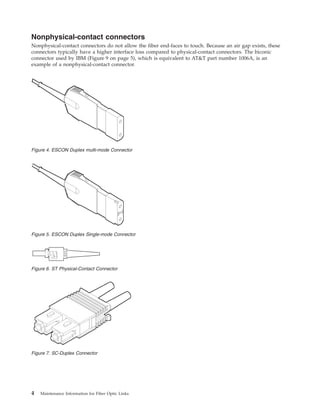
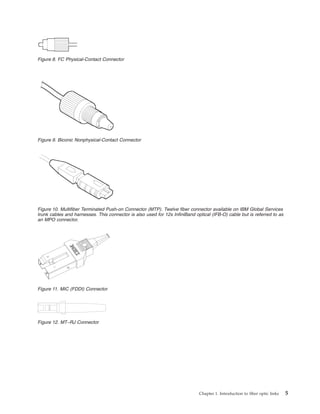
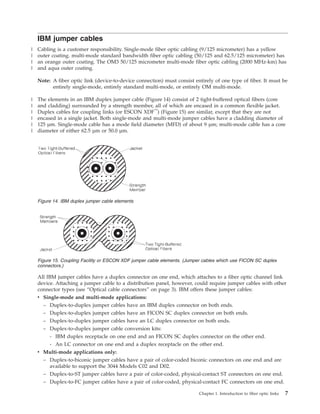
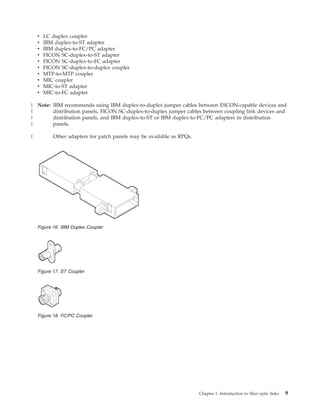
loss. The IBM duplex connector (Figure 4 on page 4), the ST connector (Figure 6 on page 4), the Fiber
Channel Connection (FICON) SC-duplex connector (Figure 7 on page 4), the FC connector (Figure 8 on
page 5), the IBM FDDI connector, also known as a Media Interface Connector (MIC) (Figure 11 on page
5), the MT–RJ connector (Figure 12 on page 5) and the LC connector (Figure 13 on page 6) are types of
physical-contact connectors.
IBM duplex connectors, which combine the transmit and receive signals in one housing, provide high
reliability and have low loss characteristics. They are keyed to provide correct orientation and use release
tabs to prevent accidental removal.
Some IBM duplex connectors and receptacles used for single-mode fiber have additional keying. This
prevents the plugging of multi-mode IBM duplex connectors into IBM products having single-mode
receptacles.
The Fiber Channel Connection (FICON) SC-duplex connector is another type of connector which may be
keyed to prevent accidental plugging of a multi-mode fiber into a single-mode receptacle, and to provide
correct orientation to the TRS. The FDDI MIC connector uses special keys to provide correct orientation
(Figure 11 on page 5).
The MT–RJ connector has distinct male ends (with metal guide pins) and female ends (with guide holes).
Only male to female connections will transmit optical signals. Since all MT–RJ transceivers have a male
interface, only female jumper cables are required for most installations.
For single-mode ESCON links, the SC-duplex connector may be used on both the transceiver receptacle
and the fiber optic cable as an alternative to the single-mode ESCON connector and receptacle. The
SC-duplex connector and receptacle are defined as part of the ANSI Fiber Channel Standard Physical and
Signaling Interface (FC-PH) ref. X3T9.3/755D. The connector is shown in Figure 7 on page 4; it is the
same connector which has been adopted for other industry standard data links including FICON, ATM,
and low cost (LC) FDDI. For single-mode ESCON links, the transceiver receptacle and connector is gray
and the optical fiber cable is yellow, conforming to the established color coding for single-mode ESCON
channels. The SC-duplex receptacle and connector are keyed to prevent accidental plugging of a
multi-mode fiber into a single-mode receptacle. All of the physical layer characteristics for the
single-mode ESCON interface must still be maintained by transceivers and cables using this alternative
interface.
Chapter 1. Introduction to fiber optic links 3
Nonphysical-contact connectors
Nonphysical-contact connectors do not allow the fiber end-faces to touch. Because an air gap exists, these
connectors typically have a higher interface loss compared to physical-contact connectors. The biconic
connector used by IBM (Figure 9 on page 5), which is equivalent to AT&T part number 1006A, is an
example of a nonphysical-contact connector.
Figure 4. ESCON Duplex multi-mode Connector
Figure 5. ESCON Duplex Single-mode Connector
Figure 6. ST Physical-Contact Connector
Figure 7. SC-Duplex Connector
4 Maintenance Information for Fiber Optic Links
Figure 8. FC Physical-Contact Connector
Figure 9. Biconic Nonphysical-Contact Connector
Figure 10. Multifiber Terminated Push-on Connector (MTP). Twelve fiber connector available on IBM Global Services
trunk cables and harnesses. This connector is also used for 12x InfiniBand optical (IFB-O) cable but is referred to as
an MPO connector.
Figure 11. MIC (FDDI) Connector
Figure 12. MT–RJ Connector
Chapter 1. Introduction to fiber optic links 5
Connector color coding
IBM simplex connectors use color-coding to show the direction that light travels through a link (see
“Determining the direction of light propagation” on page 28). These connectors are black (or use a black
marking) and white (or use a white marking).
IBM duplex cable connectors use color-coding to differentiate between multi-mode and single-mode.
multi-mode cables have black connectors and single-mode cables have gray connectors. They do not
require color coding to determine the direction that light travels, or propagates, through the cable because
the connectors are physically keyed. This provides proper orientation and allows the fibers to be labeled
“A” and “B”, which is shown on the connector. See“Determining the direction of light propagation” on
page 28.
The FICON SC-duplex connector is an industry standard optical connector (as defined in ANSI Fiber
Channel Standard Physical and Signaling Interface (FC-PH), published by the American National Standards
Institute. Since it may be purchased from a variety of vendors, there is no consistent scheme of color
coding or labeling the ends of a simplex cable with FICON SC connectors. These connectors can be
identified by their shape (see Figure 7 on page 4) and the direction of light propagation must be verified
from the vendor specifications. For IBM supplied cables, the single-mode FICON jumper has a yellow
connector with grey clip and a yellow cable jacket, while the multi-mode has a blue connector with black
clip and an orange jacket. This is the same color scheme used for ESCON connectors and cables.
Figure 13. LC Duplex Connector
6 Maintenance Information for Fiber Optic Links
IBM jumper cables
Cabling is a customer responsibility. Single-mode fiber optic cabling (9/125 micrometer) has a yellow
outer coating. multi-mode standard bandwidth fiber optic cabling (50/125 and 62.5/125 micrometer) has
an orange outer coating. The OM3 50/125 micrometer multi-mode fiber optic cabling (2000 MHz-km) has
and aqua outer coating.
Note: A fiber optic link (device-to-device connection) must consist entirely of one type of fiber. It must be
entirely single-mode, entirely standard multi-mode, or entirely OM multi-mode.
The elements in an IBM duplex jumper cable (Figure 14) consist of 2 tight-buffered optical fibers (core
and cladding) surrounded by a strength member, all of which are encased in a common flexible jacket.
Duplex cables for coupling links (or ESCON XDF™
) (Figure 15) are similar, except that they are not
encased in a single jacket. Both single-mode and multi-mode jumper cables have a cladding diameter of
125 µm. Single-mode cable has a mode field diameter (MFD) of about 9 µm; multi-mode cable has a core
diameter of either 62.5 µm or 50.0 µm.
All IBM jumper cables have a duplex connector on one end, which attaches to a fiber optic channel link
device. Attaching a jumper cable to a distribution panel, however, could require jumper cables with other
connector types (see “Optical cable connectors” on page 3). IBM offers these jumper cables:
v Single-mode and multi-mode applications:
– Duplex-to-duplex jumper cables have an IBM duplex connector on both ends.
– Duplex-to-duplex jumper cables have an FICON SC duplex connector on both ends.
– Duplex-to-duplex jumper cables have an LC duplex connector on both ends.
– Duplex-to-duplex jumper cable conversion kits:
- IBM duplex receptacle on one end and an FICON SC duplex connector on the other end.
- An LC connector on one end and a duplex receptacle on the other end.
v Multi-mode applications only:
– Duplex-to-biconic jumper cables have a pair of color-coded biconic connectors on one end and are
available to support the 3044 Models C02 and D02.
– Duplex-to-ST jumper cables have a pair of color-coded, physical-contact ST connectors on one end.
– Duplex-to-FC jumper cables have a pair of color-coded, physical-contact FC connectors on one end.
Figure 14. IBM duplex jumper cable elements
Figure 15. Coupling Facility or ESCON XDF jumper cable elements. (Jumper cables which use FICON SC duplex
connectors.)
Chapter 1. Introduction to fiber optic links 7
|
|
|
|
|
|
|
|
|
|
– Duplex-to-unterminated jumper cables have an unterminated end (no connector) that allows the
attachment of any connector type.
– Duplex-to-duplex jumper cables with female MT–RJ on both ends.
– Duplex-to-duplex jumper cables with male MT–RJ on both ends.
– Adapter kits:
- ESCON receptacle to female MT–RJ connector
- ESCON connector to female MT–RJ connector
Note: If a single-mode ESCON XDF link using the SC-duplex connector interface must be connected to a
single-mode ESCON XDF connector interface, use the ESCON XDF Adapter Kit (46H9223). The kit
consists of a 2-meter single-mode jumper cable with SC-duplex-to-ST connectors (46H9222)
assembled to the single-mode ESCON-to-ST adapter. Instructions are provided with each kit.
Trunk cable
Fiber optic trunk cable is generally used for longer links, such as between floors or buildings. It should
also be used in single-floor fiber optic channel link environments when many jumper cables and
connections are required. If trunk cable is used, distribution panels must provide the hardware used to
attach the IBM jumper cables.
A trunk cable typically contains from 12 to 144 fibers and has a strength member and an outer jacket.
Each fiber optic channel link requires trunk fibers. The physical trunk cable configuration varies and
depends on user requirements, environmental conditions, and the type of installation required (for
example, above ground or underground).
Splices
Fiber optic trunk cables can be joined by two splicing methods. Either method, when performed by a
trained technician using high-quality materials, can produce a splice having a very low optical power
loss.
v Fusion splices are joined by an electric arc.
v Mechanical splices are joined within a holder and sometimes use epoxy to bond the fibers.
Distribution panels
Many types of distribution panels exist. They are available in various sizes and styles and are called
different names, depending primarily on their application or use. For example, they can be called central
distribution panels, main distribution panels, zone panels, patch panels, building interface panels,
enclosures, or cabinets. In a fiber optic channel link, they provide the hardware attachment capability
between trunk cables and IBM jumper cables. They can also be used for floor-to-floor cable connections
within a building or for connections between buildings. For more information about distribution panel
requirements, contact your IBM marketing representative.
Couplers and adapters
Distribution panels must provide couplers or adapters to allow attachment of IBM jumper cables.
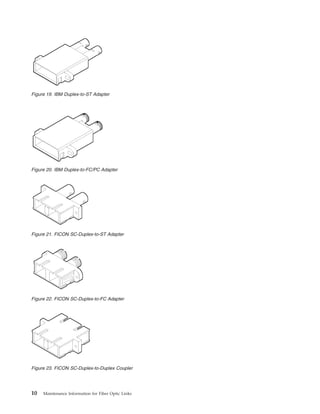
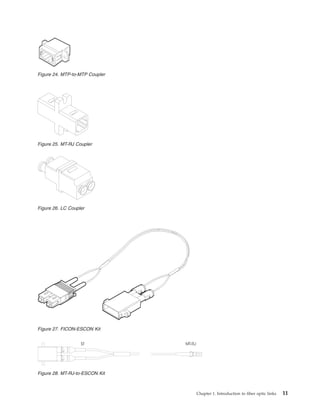
Couplers join the same connector types, while adapters join different connector types. The following
couplers and adapters, available from IBM, are shown in Figures Figure 16 through Figure 23. Other types
of adapters for patch panels may be available as RPQs, including the FICON SC-duplex-to-ST adapter. A
conversion kit is available to adapt an FICON duplex interface to an ESCON duplex interface.
v IBM duplex coupler
v ST coupler
v FC/PC coupler
v MT–RJ duplex coupler (joins male to female MT–RJ)
8 Maintenance Information for Fiber Optic Links
v LC duplex coupler
v IBM duplex-to-ST adapter
v IBM duplex-to-FC/PC adapter
v FICON SC-duplex-to-ST adapter
v FICON SC-duplex-to-FC adapter
v FICON SC-duplex-to-duplex coupler
v MTP-to-MTP coupler
v MIC coupler
v MIC-to-ST adapter
v MIC-to-FC adapter
Note: IBM recommends using IBM duplex-to-duplex jumper cables between ESCON-capable devices and
distribution panels, FICON SC-duplex-to-duplex jumper cables between coupling link devices and
distribution panels, and IBM duplex-to-ST or IBM duplex-to-FC/PC adapters in distribution
panels.
Other adapters for patch panels may be available as RPQs.
Figure 16. IBM Duplex Coupler
Figure 17. ST Coupler
Figure 18. FC/PC Coupler
Chapter 1. Introduction to fiber optic links 9
|
|
|
|
|
Figure 19. IBM Duplex-to-ST Adapter
Figure 20. IBM Duplex-to-FC/PC Adapter
Figure 21. FICON SC-Duplex-to-ST Adapter
Figure 22. FICON SC-Duplex-to-FC Adapter
Figure 23. FICON SC-Duplex-to-Duplex Coupler
10 Maintenance Information for Fiber Optic Links
Figure 24. MTP-to-MTP Coupler
Figure 25. MT-RJ Coupler
Figure 26. LC Coupler
Figure 27. FICON-ESCON Kit
ST MT-RJ
Figure 28. MT-RJ-to-ESCON Kit
Chapter 1. Introduction to fiber optic links 11
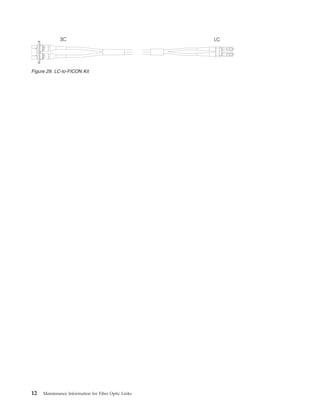
SC LC
Figure 29. LC-to-FICON Kit
12 Maintenance Information for Fiber Optic Links
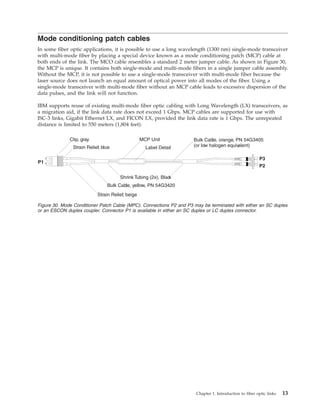
Mode conditioning patch cables
In some fiber optic applications, it is possible to use a long wavelength (1300 nm) single-mode transceiver
with multi-mode fiber by placing a special device known as a mode conditioning patch (MCP) cable at
both ends of the link. The MCO cable resembles a standard 2 meter jumper cable. As shown in Figure 30,
the MCP is unique. It contains both single-mode and multi-mode fibers in a single jumper cable assembly.
Without the MCP, it is not possible to use a single-mode transceiver with multi-mode fiber because the
laser source does not launch an equal amount of optical power into all modes of the fiber. Using a
single-mode transceiver with multi-mode fiber without an MCP cable leads to excessive dispersion of the
data pulses, and the link will not function.
IBM supports reuse of existing multi-mode fiber optic cabling with Long Wavelength (LX) transceivers, as
a migration aid, if the link data rate does not exceed 1 Gbps. MCP cables are supported for use with
ISC-3 links, Gigabit Ethernet LX, and FICON LX, provided the link data rate is 1 Gbps. The unrepeated
distance is limited to 550 meters (1,804 feet).
Clip, gray
Strain Relief, blue
Strain Relief, beige
Bulk Cable, yellow, PN 54G3420
Bulk Cable, orange, PN 54G3405
(or low halogen equivalent)
Shrink Tubing (2x), Black
P3
P2
P1
MCP Unit
Label Detail
Figure 30. Mode Conditioner Patch Cable (MPC). Connections P2 and P3 may be terminated with either an SC duplex
or an ESCON duplex coupler. Connector P1 is available in either an SC duplex or LC duplex connector.
Chapter 1. Introduction to fiber optic links 13
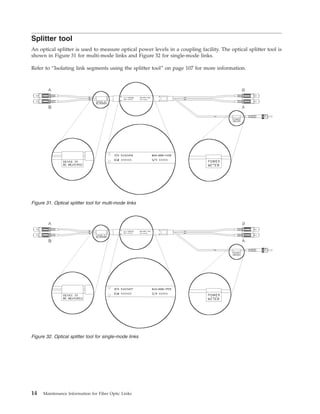
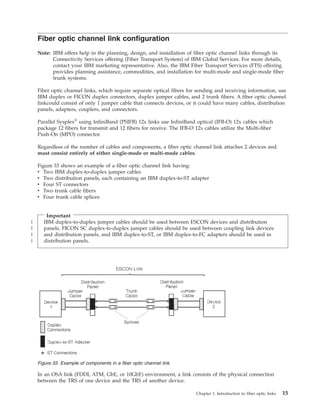
Splitter tool
An optical splitter is used to measure optical power levels in a coupling facility. The optical splitter tool is
shown in Figure 31 for multi-mode links and Figure 32 for single-mode links.
Refer to “Isolating link segments using the splitter tool” on page 107 for more information.
Figure 31. Optical splitter tool for multi-mode links
Figure 32. Optical splitter tool for single-mode links
14 Maintenance Information for Fiber Optic Links
Fiber optic channel link configuration
Note: IBM offers help in the planning, design, and installation of fiber optic channel links through its
Connectivity Services offering (Fiber Transport System) of IBM Global Services. For more details,
contact your IBM marketing representative. Also, the IBM Fiber Transport Services (FTS) offering
provides planning assistance, commodities, and installation for multi-mode and single-mode fiber
trunk systems.
Fiber optic channel links, which require separate optical fibers for sending and receiving information, use
IBM duplex or FICON duplex connectors, duplex jumper cables, and 2 trunk fibers. A fiber optic channel
linkcould consist of only 1 jumper cable that connects devices, or it could have many cables, distribution
panels, adapters, couplers, and connectors.
Parallel Sysplex®
using InfiniBand (PSIFB) 12x links use InfiniBand optical (IFB-O) 12x cables which
package 12 fibers for transmit and 12 fibers for receive. The IFB-O 12x cables utilize the Multi-fiber
Push-On (MPO) connector.
Regardless of the number of cables and components, a fiber optic channel link attaches 2 devices and
must consist entirely of either single-mode or multi-mode cables.
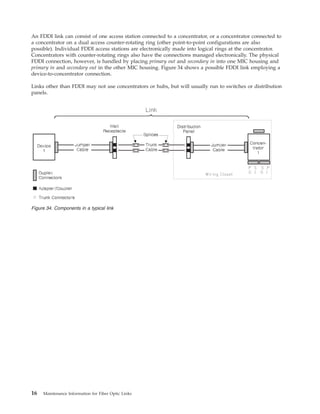
Figure 33 shows an example of a fiber optic channel link having:
v Two IBM duplex-to-duplex jumper cables
v Two distribution panels, each containing an IBM duplex-to-ST adapter
v Four ST connectors
v Two trunk cable fibers
v Four trunk cable splices
Important
IBM duplex-to-duplex jumper cables should be used between ESCON devices and distribution
panels, FICON SC duplex-to-duplex jumper cables should be used between coupling link devices
and distribution panels, and IBM duplex-to-ST, or IBM duplex-to-FC adapters should be used in
distribution panels.
In an OSA link (FDDI, ATM, GbE, or 10GbE) environment, a link consists of the physical connection
between the TRS of one device and the TRS of another device.
Figure 33. Example of components in a fiber optic channel link.
Chapter 1. Introduction to fiber optic links 15
|
|
|
|
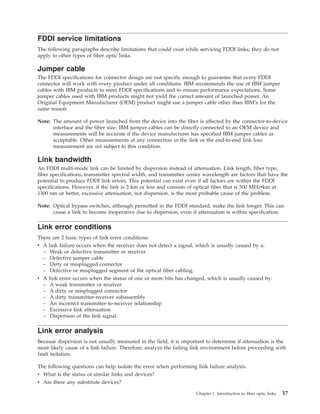
An FDDI link can consist of one access station connected to a concentrator, or a concentrator connected to
a concentrator on a dual access counter-rotating ring (other point-to-point configurations are also
possible). Individual FDDI access stations are electronically made into logical rings at the concentrator.
Concentrators with counter-rotating rings also have the connections managed electronically. The physical
FDDI connection, however, is handled by placing primary out and secondary in into one MIC housing and
primary in and secondary out in the other MIC housing. Figure 34 shows a possible FDDI link employing a
device-to-concentrator connection.
Links other than FDDI may not use concentrators or hubs, but will usually run to switches or distribution
panels.
Figure 34. Components in a typical link
16 Maintenance Information for Fiber Optic Links
FDDI service limitations
The following paragraphs describe limitations that could exist while servicing FDDI links; they do not
apply to other types of fiber optic links.
Jumper cable
The FDDI specifications for connector design are not specific enough to guarantee that every FDDI
connector will work with every product under all conditions. IBM recommends the use of IBM jumper
cables with IBM products to meet FDDI specifications and to ensure performance expectations. Some
jumper cables used with IBM products might not yield the correct amount of launched power. An
Original Equipment Manufacturer (OEM) product might use a jumper cable other than IBM’s for the
same reason.
Note: The amount of power launched from the device into the fiber is affected by the connector-to-device
interface and the fiber size. IBM jumper cables can be directly connected to an OEM device and
measurements will be accurate if the device manufacturer has specified IBM jumper cables as
acceptable. Other measurements at any connection in the link or the end-to-end link loss
measurement are not subject to this condition.
Link bandwidth
An FDDI multi-mode link can be limited by dispersion instead of attenuation. Link length, fiber type,
fiber specifications, transmitter spectral width, and transmitter center wavelength are factors that have the
potential to produce FDDI link errors. This potential can exist even if all factors are within the FDDI
specifications. However, if the link is 2 km or less and consists of optical fiber that is 500 MHzvkm at
1300 nm or better, excessive attenuation, not dispersion, is the most probable cause of the problem.
Note: Optical bypass switches, although permitted in the FDDI standard, make the link longer. This can
cause a link to become inoperative due to dispersion, even if attenuation is within specification.
Link error conditions
There are 2 basic types of link error conditions:
v A link failure occurs when the receiver does not detect a signal, which is usually caused by a:
– Weak or defective transmitter or receiver
– Defective jumper cable
– Dirty or misplugged connector
– Defective or misplugged segment of the optical fiber cabling.
v A link error occurs when the status of one or more bits has changed, which is usually caused by:
– A weak transmitter or receiver
– A dirty or misplugged connector
– A dirty transmitter-receiver subassembly
– An incorrect transmitter-to-receiver relationship
– Excessive link attenuation
– Dispersion of the link signal.
Link error analysis
Because dispersion is not usually measured in the field, it is important to determine if attenuation is the
most likely cause of a link failure. Therefore, analyze the failing link environment before proceeding with
fault isolation.
The following questions can help isolate the error when performing link failure analysis.
v What is the status of similar links and devices?
v Are there any substitute devices?
Chapter 1. Introduction to fiber optic links 17
v Are there any spare optical fiber pairs?
v Is this the first time that the failing link or links have been used?
v Has this cabling combination been used before?
v If it is an FDDI link, has an optical bypass switch been installed in the link?
v Has this cabling combination been used for another application that had a different wavelength?
v Is the cabling plant a new installation?
v Was the cabling plant installed to support an ESCON, ATM, FICON, or FDDI environment?
v Was the cabling plant installed over a period of time?
v Was the cabling plant previously used to support other applications?
v Is there a mixture of fiber types within the cabling plant?
v Is there a mixture of fiber types within the same distribution panel?
v Is there a mixture of applications using the same distribution panel?
v Is this the first time that part of the cabling plant was configured in the link?
v Are the cabling plant lengths and specifications available?
Examples of link error analysis
The following examples show how experience and good diagnostic judgment can aid in error analysis for
a link environment.
v The failing link uses the same cabling components, has approximately the same length, and attaches
the same device types as another link that is currently operational. It is most likely that attenuation,
not dispersion, caused the link error.
v The failing link operates correctly when a substitute device is attached. Again, attenuation is probably
the cause of the error.
v The failing link operates correctly when substitute link components (spare or backup cables) are used.
Attenuation is usually the cause of the error.
v All links with this configuration are failing. If attenuation measurements are within specifications, the
length of the link and optical fiber specifications should be checked.
v The failing link has never been used before. The length of the link and optical fiber specifications
should be checked if attenuation measurements are within specifications.
v The failing link is the only link in this location. If attenuation measurements are within specifications,
the length of link and fiber plant specifications should be checked.
v The failing link was previously used for an entirely different type of system. If a customer determines
that the link was optimized for an application employing a wavelength other than 1300 nm, then
excessive dispersion could be the cause of the error.
Dispersion
Under some conditions (in an FDDI link only), it is difficult to determine if the most probable cause of an
error is attenuation or dispersion (for example, a link of 2.1 km with an attenuation of 11.3 dB). Because
dispersion testing is an expensive procedure, it might be more cost-effective for the customer to
reconfigure the link or replace the fiber rather than determine the exact cause of the failure. The
following items can aid in this analysis:
v Customer records of the measurements done by cabling installation personnel can be checked. These
records often include attenuation measurements from a power meter, as well as a copy of Optical Time
Domain Reflectometer (OTDR) data.
v It is possible that a given pair of attached devices meets FDDI specifications because of a “hot”
transmitter and a sensitive receiver. This combination could allow satisfactory operation for a specific
link, but the individual link components are still not within specifications. This combination is not
possible under the ATM or FICON specification.
18 Maintenance Information for Fiber Optic Links
v Similarly, a weak transmitter and receiver pair could meet FDDI specifications but still not operate
correctly on the link.
Chapter 1. Introduction to fiber optic links 19
20 Maintenance Information for Fiber Optic Links
Chapter 2. Service Strategy and Maintenance Activities
This chapter summarizes the service strategy and activities associated with Fiber Optic Channel link
installation, maintenance, problem determination, verification, repair, and testing. See Chapter 3 for
specific maintenance procedures.
Additional services, including design, installation connectivity, and link restoration are available through
the IBM Global Services offering.
Link problem determination summary
Service representatives can use either the maintenance analysis procedures (MAPs) or a “fast-path”
method to perform problem determination, and return a link to operational status for ESCON links. For
coupling links, only the Fast-Path method may be used because these links use a different type of laser
safety control that does not permit use of the MAPs. This problem determination also includes IBM
jumper cables.
Both procedures consist of measuring the end-to-end link loss (attenuation) using an optical source and a
power meter. Since the safety controls for the coupling links do not permit the laser to remain operational
when the link is open, the device transmitter must be used along with an optical splitter to measure the
end-to-end link loss. See Appendix B, “Tools, Test Equipment, and Parts,” on page 87 for the part
numbers of all service tools, materials, and test equipment.
Link service activities
The following paragraphs summarize the link activities performed by service representatives.
Installation activities
Service representatives install and connect IBM jumper cables to devices and distribution panels. For
installations that use connectors or cables other than those supported by IBM, IBM Marketing and
Services must provide recommendations to the customer and to IBM planning and service personnel.
Repair activities
Service representatives perform either major or minor repair actions:
v A major repair action consists of replacing an IBM jumper cable.
v A minor repair action consists of replacing the spring and connector shroud on the IBM duplex
connector.
Test activities
Service representatives also perform test activities on IBM fiber optic cables and components.
For non-IBM components, the customer must provide test cables and adapters. IBM will perform
activities relating to these components, but this service could be billable.
Link training topics
The base level of link training for IBM CEs includes:
v Basic fiber optic theory
v Light budget concepts
v General link commodities information
v Link loss calculations
© Copyright IBM Corp. 1990, 2011 21
|
|
|
|
|
|
|
|
|
|
v Link operational characteristics
v Fiber optic cable handling and cleaning procedures
v Power meter and light source usage procedures
v Basic fiber optic test procedures
v Problem determination for a major link component
v Minor repair of the IBM duplex connector.
Keying and installing an IBM FDDI connector
This section describes how to install FDDI keys and labels. It also lists some potentially serious cabling
errors and explains the keying techniques that could prevent these errors. (LC FDDI, FICON and ATM do
not use these keying methods.)
Note: Retain all protective covers and unused keys. When connectors and receptacles are not being used,
all protective covers should be installed because dirt can cause excessive loss and prevent correct
operation of the link.
Using FDDI cable keying can also prevent system cabling defects that are difficult to detect and diagnose.
Three serious defects are:
v The reversal of a dual-attachment station within the ring trunk such that what was intended to be the
A connection is the B, and what was intended to be the B connection is the A. This causes the station
media access controls (MACs) to be inserted in the opposite position of the intended trunk ring.
v The connection of a single attachment station directly to the trunk ring by connecting it to either an A
or B receptacle. This results in a break in the trunk ring.
v The connection of the M receptacle of a concentrator directly into the trunk ring by connecting it to
either an A or B receptacle. This also results in a break in the trunk ring.
IBM FDDI connector keys
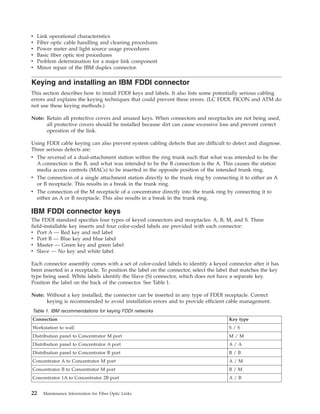
The FDDI standard specifies four types of keyed connectors and receptacles: A, B, M, and S. Three
field-installable key inserts and four color-coded labels are provided with each connector:
v Port A — Red key and red label
v Port B — Blue key and blue label
v Master — Green key and green label
v Slave — No key and white label.
Each connector assembly comes with a set of color-coded labels to identify a keyed connector after it has
been inserted in a receptacle. To position the label on the connector, select the label that matches the key
type being used. White labels identify the Slave (S) connector, which does not have a separate key.
Position the label on the back of the connector. See Table 1.
Note: Without a key installed, the connector can be inserted in any type of FDDI receptacle. Correct
keying is recommended to avoid installation errors and to provide efficient cable management.
Table 1. IBM recommendations for keying FDDI networks
Connection Key type
Workstation to wall S / S
Distribution panel to Concentrator M port M / M
Distribution panel to Concentrator A port A / A
Distribution panel to Concentrator B port B / B
Concentrator A to Concentrator M port A / M
Concentrator B to Concentrator M port B / M
Concentrator 1A to Concentrator 2B port A / B
22 Maintenance Information for Fiber Optic Links
Table 1. IBM recommendations for keying FDDI networks (continued)
Connection Key type
Concentrator 1B to Concentrator 2A port B / A
Workstation to Concentrator M port S / M
Installing the key
To install a key:
1. Remove the selected color-coded key from the protective cover of the connector.
2. Insert the tab on the key in the slot on the top of the connector.
3. Push firmly on the key until it snaps into place.
Removing the key
To remove a key:
1. Insert the tip of a paper clip or narrow mechanical pen into the small hole in the bottom of the
connector.
2. Push firmly until the key pops out of its locked position.
3. Put the key in the protective cover attached to the connector.
Cleaning the connector
The connector should be cleaned before inserting it in the receptacle to avoid possible contamination from
dirt and dust particles. Refer to Fiber Optic Cleaning Procedures, SY27-2601.
Installing and removing the connector
Insert the connector by pushing it into the receptacle until it clicks into place. Do not force the connector.
If it binds, make sure that the receptacle and connector keys are aligned and that they are of the same
type.
To remove the connector from the receptacle, simply pull back on the connector housing. Replace all
protective covers on the connector and the receptacle to avoid contamination or damage.
Chapter 2. Service Strategy and Maintenance Activities 23
Typical link configurations
To perform problem determination, a fiber optic channel link should be considered as one of the
following configurations:
v One jumper cable between 2 devices (Figure 35)
v Two jumper cables connected through 1 distribution panel (Figure 36)
v Two jumper cables, each connected to a distribution panel, and a trunk cable (Figure 37).
Note: The trunk cable in this configuration could be a short length of fiber optic cable (within a single
distribution panel) that joins the 2 jumper cables.
Figure 35. Link configuration 1 consisting of 1 jumper cable between 2 devices
Figure 36. Link configuration 2 consisting of 2 jumper cables and 1 distribution panel
Figure 37. Link configuration 3 consisting of 2 jumper cables, a trunk cable, and 1 or 2 distribution panels
24 Maintenance Information for Fiber Optic Links
FDDI links connect devices in logical rings, but are physically connected in a star configuration. Devices
could contain only a single pair of fibers, such as a device to a concentrator. Critical devices, such as
concentrators, contain 2 pairs of fibers formed into counter-rotating rings. From this description, a
concentrator would contain multiple single-station interfaces to multiple devices and a pair of interfaces
to possibly another concentrator. It is likely, therefore, that several devices within a rack would be
connected by jumpers only within an equipment closet, whereas 2 ports would exit the closet on
counter-rotational links to other concentrators.
Other fiber optic links may be configured in a wide variety of ways, including star and ring
configurations. Figure 38 shows a closet-connected concentrator.
Figure 38. Link configuration–—2 jumper cables in a counter-rotating ring
Chapter 2. Service Strategy and Maintenance Activities 25
Common link failures
Before performing problem determination, you should consider the following failure possibilities, which
are typical during and after installation. If the problem, symptom, or condition exists, perform the action
suggested.
v For a “no-light” condition during an installation or after a reconfiguration, the link could have 2 device
transmitters connected rather than having each transmitter connected to a receiver. Make sure an odd
number of link crossovers exists. See “Determining the direction of light propagation” on page 28 for
more detailed information.
If jumper cables with FICON SC-duplex connectors are provided by a vendor other than IBM, consult
the vendor’s specifications to determine the correct direction of light propagation.
After determining that a “no-light” condition exists and with the optical source and power meter
attached, swap the biconic test cable connectors on the power meter. If the “no-light” condition
disappears, the link is not properly connected.
v The quality and cleanliness of connections can be a large source of loss. Check for dirty or broken
connectors at the devices and distribution panel(s). These problems can be found by isolating each link
segment. See the publication Fiber Optic Cleaning Procedures, SY27-2604, and use the supplies contained
in the fiber optic cleaning kit (IBM part number 5453521).
v Patch cords (used to attach 1 distribution panel position to another) can cause additional link loss in a
configuration using multiple distribution panels. Isolating each link segment can determine if the IBM
jumper cables are within specifications.
v Device distance limitations exist. If I/O overruns or timeouts occur, check the distance specifications of
the I/O device.
v Link distance limitations also exist. See Table 4 on page 83 for maximum link lengths.
26 Maintenance Information for Fiber Optic Links
FICON Express8 fiber optic cable requirements
The FICON Express8 10KM LX and SX features utilize the latest high bandwidth Fibre Channel
technology and autonegotiate to 8 Gbps, 4 Gbps, or 2 Gbps based on the link data rate capability of the
attached transceiver. Negotiation to 1 Gbps is not supported.
The FICON Express8 features utilize the existing single mode and multi-mode cable plants. However, the
8 Gbps channel is more sensitive to the condition of the cable plant. The cable plant must satisfy the
industry standard specification to minimize connector reflections and maintain link loss budget
specification...
It is highly recommended that the fiber optic link be thoroughly analyzed to ensure the cable plant
specifications (total cable plant optical loss as well as connectors/splices return loss) are being met for
that link length. For example, the Fibre Channel standard requires all connectors and splices to have a
return loss greater than 26 dB as measured by the methods of IEC 61300-2-6.
The most common source of cable plant optical link problems is associated with the various connections
and splices in the optical link. Dust, dirt, oil or defective connections may cause a problem with high
speed channels, such as 8 Gbps, whereas, lower link data rates, such as 1, 2, or 4 Gbps may be
unaffected.
If you are experiencing excessive bit errors, it is recommended that you first clean and reassemble the
connections, using the IBM Fiber Optic Cleaning Procedure (SY27-2604). The document includes the
procedure and materials required. The cleaning is best performed by skilled personnel. The cleaning
procedure may need to be performed more than once to ensure all dust, dirt, or oil is removed.
Chapter 2. Service Strategy and Maintenance Activities 27
Determining the direction of light propagation
Before performing problem determination, an understanding of light travel (propagation) is necessary to
allow measurement of:
v Transmit levels
v Receive levels
v End-to-end link loss
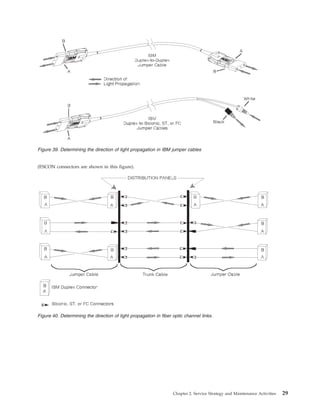
The transmitter (output) of each Fiber Optic Channel link device propagates light to the receiver (input)
of the next device. For this to occur, an odd number of physical crossovers must exist for each fiber.
Figure 39 on page 29 shows the direction of light propagation through an IBM jumper cable, which is
keyed to maintain this crossover requirement.
Figure 39 on page 29 also shows that an IBM duplex connector has A and B embossed on the plastic
housing and that IBM’s biconic, ST, and FC connectors are color-coded.
v For IBM duplex-to-duplex jumper cables, the transmit signal enters 1 connector at B and exits the other
connector at A.
v For IBM duplex-to-biconic, duplex-to-ST, and duplex-to-FC jumper cables, the transmit signal enters
the duplex connector at B and exits the other end at the black connector.
Figure 40 on page 29 shows three examples of physical fiber connections that satisfy the crossover
requirement for device-to-device attachment.
Notes:
1. In a Fiber Optic Channel environment containing duplex-to-duplex jumper cables and a trunk cable,
the trunk must incorporate a crossover.
2. Fiber Optic Cables using FICON SC-duplex connectors obtained from vendors other than IBM may
not have a built-in crossover or be labeled according to the conventions above. Consult the
manufacturer’s specifications.
3. The coupling facility link is serviced using either the multi-mode splitter tool (IBM part number
54G3426) or the single-mode splitter tool (54G3427). These splitters may be inserted anywhere in an
operating link without affecting link functions.
4. IBM’s biconic, ST, and FC connectors are color-coded (white and black). The MIC duplex connector
has the letters R and T embossed on the plastic housing.
5. Industry standard color coding for single-mode links is a yellow cable jacket with a blue duplex
connector; multi-mode links use an orange cable jacket with a beige duplex connector. Not all
connectors will conform to these color coding standards.
28 Maintenance Information for Fiber Optic Links
Figure 39. Determining the direction of light propagation in IBM jumper cables
(ESCON connectors are shown in this figure).
Figure 40. Determining the direction of light propagation in fiber optic channel links.
Chapter 2. Service Strategy and Maintenance Activities 29
Link verification summary
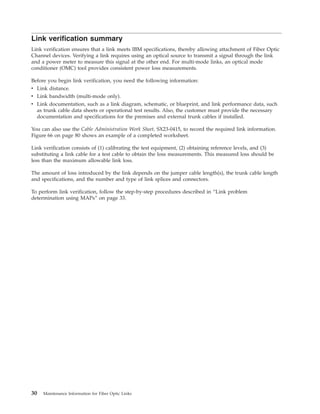
Link verification ensures that a link meets IBM specifications, thereby allowing attachment of Fiber Optic
Channel devices. Verifying a link requires using an optical source to transmit a signal through the link
and a power meter to measure this signal at the other end. For multi-mode links, an optical mode
conditioner (OMC) tool provides consistent power loss measurements.
Before you begin link verification, you need the following information:
v Link distance.
v Link bandwidth (multi-mode only).
v Link documentation, such as a link diagram, schematic, or blueprint, and link performance data, such
as trunk cable data sheets or operational test results. Also, the customer must provide the necessary
documentation and specifications for the premises and external trunk cables if installed.
You can also use the Cable Administration Work Sheet, SX23-0415, to record the required link information.
Figure 66 on page 80 shows an example of a completed worksheet.
Link verification consists of (1) calibrating the test equipment, (2) obtaining reference levels, and (3)
substituting a link cable for a test cable to obtain the loss measurements. This measured loss should be
less than the maximum allowable link loss.
The amount of loss introduced by the link depends on the jumper cable length(s), the trunk cable length
and specifications, and the number and type of link splices and connectors.
To perform link verification, follow the step-by-step procedures described in “Link problem
determination using MAPs” on page 33.
30 Maintenance Information for Fiber Optic Links
Chapter 3. Problem Determination Procedures
This chapter contains link problem determination that can be performed by using either the maintenance
analysis procedures (MAPs) or the “fast-path” method. The procedure you use depends on the amount of
guidance you require and the type of link you are servicing.
v Use the MAPs and follow the step-by-step instructions to perform link problem determination, link
verification, and jumper cable verification.
v Use the fast-path method (see “Link problem determination using the fast-path method” on page 51) if
you know how to perform Fiber Optic Channel link problem determination and do not want to use the
MAPs, or if you are working on a coupling link.
Notes:
1. The MAPs use the optical mode conditioner (OMC) tool for multi-mode ESCON link measurements;
the fast-path method does not.
2. The MAPs use the term simplex when referring to non-duplex connectors or connections such as ST,
FC, or biconic. Most figures, however, show only biconic or duplex components.
3. Before beginning this section, network problem determination should have isolated the problem to a
specific link and device maintenance procedures should have been completed.
4. An optical power meter reading LO indicates that no light has been detected by the meter. There are
several possible causes for this condition:
v A jumper cable is either unplugged or plugged in the wrong direction.
v A jumper cable terminated with simplex connectors could be plugged as transmit-to-transmit and
receive-to-receive instead of transmit-to-receive.
v The entire link does not have an odd number of crossovers.
v A link component is damaged and a connector or coupler has failed.
Start link problem determination
During fiber optic channel link problem determination, the devices at each end of the link are identified
as device 1 and device 2. Always refer to the device where you start these procedures as device 1.
Problem determination consists of measuring the link at specific points. These measured values are then
compared to acceptable or maximum values to determine if the link loss is within specifications. Table 2
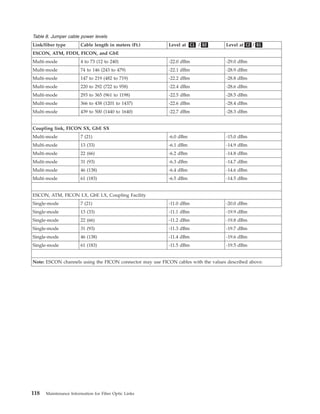
on page 34 and Table 3 on page 36 contain these values for the MAP procedures; Table 8 on page 118
contains the fast-path values. If it is determined that a device transmitter or receiver is not within
specifications and the device is maintained by IBM, replace the transceiver card according to the device
maintenance procedure and verify correct link operation. If the device is not maintained by IBM, inform
the customer that the transceiver is out of specification and that this is the probable source of the error,
then return to the IBM device that generated the call and follow its maintenance procedures for end of
call. If the problem still exists after replacing the transceiver card, go to “MAP 0300: Start” on page 32 to
perform link problem determination or verification.
Go to “MAP 0300: Start” on page 32 to perform link problem determination or verification.
© Copyright IBM Corp. 1990, 2011 31
|
|
|
MAP 0300: Start
001
Do you want to use the maintenance analysis procedures (MAPs) to perform link problem
determination or verification?
Note: You must use the fast path procedures if you are working on coupling links.
If yes go to step 3. If no, continue with the next step.
002
Go to “Link problem determination using the fast-path method” on page 51
003
Go to “Link problem determination using MAPs” on page 33
32 Maintenance Information for Fiber Optic Links
|
Link problem determination using MAPs
Begin at “MAP 0310: Testing a link” on page 37 to perform step-by-step problem determination or
verification of a link segment or component. Before you begin, see “Common link failures” on page 26
for additional information.
Chapter 3. Problem Determination Procedures 33
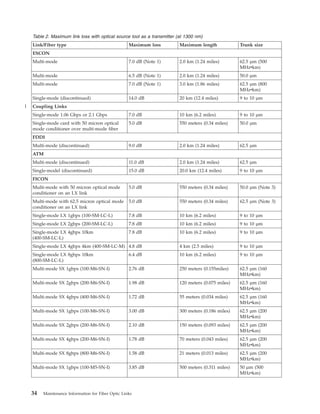
Table 2. Maximum link loss with optical source tool as a transmitter (at 1300 nm)
Link/Fiber type Maximum loss Maximum length Trunk size
ESCON
Multi-mode 7.0 dB (Note 1) 2.0 km (1.24 miles) 62.5 µm (500
MHzvkm)
Multi-mode 6.5 dB (Note 1) 2.0 km (1.24 miles) 50.0 µm
Multi-mode 7.0 dB (Note 1) 3.0 km (1.86 miles) 62.5 µm (800
MHzvkm)
Single-mode (discontinued) 14.0 dB 20 km (12.4 miles) 9 to 10 µm
Coupling Links
Single-mode 1.06 Gbps or 2.1 Gbps 7.0 dB 10 km (6.2 miles) 9 to 10 µm
Single-mode card with 50 micron optical
mode conditioner over multi-mode fiber
5.0 dB 550 meters (0.34 miles) 50.0 µm
FDDI
Multi-mode (discontinued) 9.0 dB 2.0 km (1.24 miles) 62.5 µm
ATM
Multi-mode (discontinued) 11.0 dB 2.0 km (1.24 miles) 62.5 µm
Single-model (discontinued) 15.0 dB 20.0 km (12.4 miles) 9 to 10 µm
FICON
Multi-mode with 50 micron optical mode
conditioner on an LX link
5.0 dB 550 meters (0.34 miles) 50.0 µm (Note 3)
Multi-mode with 62.5 micron optical mode
conditioner on an LX link
5.0 dB 550 meters (0.34 miles) 62.5 µm (Note 3)
Single-mode LX 1gbps (100-SM-LC-L) 7.8 dB 10 km (6.2 miles) 9 to 10 µm
Single-mode LX 2gbps (200-SM-LC-L) 7.8 dB 10 km (6.2 miles) 9 to 10 µm
Single-mode LX 4gbps 10km
(400-SM-LC-L)
7.8 dB 10 km (6.2 miles) 9 to 10 µm
Single-mode LX 4gbps 4km (400-SM-LC-M) 4.8 dB 4 km (2.5 miles) 9 to 10 µm
Single-mode LX 8gbps 10km
(800-SM-LC-L)
6.4 dB 10 km (6.2 miles) 9 to 10 µm
Multi-mode SX 1gbps (100-M6-SN-I) 2.76 dB 250 meters (0.155miles) 62.5 µm (160
MHzvkm)
Multi-mode SX 2gbps (200-M6-SN-I) 1.98 dB 120 meters (0.075 miles) 62.5 µm (160
MHzvkm)
Multi-mode SX 4gbps (400-M6-SN-I) 1.72 dB 55 meters (0.034 miles) 62.5 µm (160
MHzvkm)
Multi-mode SX 1gbps (100-M6-SN-I) 3.00 dB 300 meters (0.186 miles) 62.5 µm (200
MHzvkm)
Multi-mode SX 2gbps (200-M6-SN-I) 2.10 dB 150 meters (0.093 miles) 62.5 µm (200
MHzvkm)
Multi-mode SX 4gbps (200-M6-SN-I) 1.78 dB 70 meters (0.043 miles) 62.5 µm (200
MHzvkm)
Multi-mode SX 8gbps (800-M6-SN-I) 1.58 dB 21 meters (0.013 miles) 62.5 µm (200
MHzvkm)
Multi-mode SX 1gbps (100-M5-SN-I) 3.85 dB 500 meters (0.311 miles) 50 µm (500
MHzvkm)
34 Maintenance Information for Fiber Optic Links
|
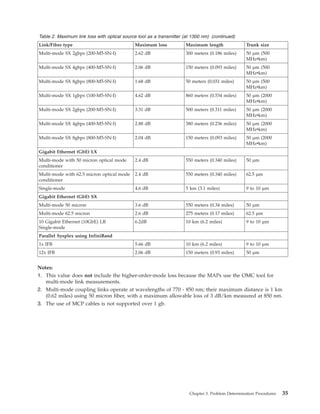
Table 2. Maximum link loss with optical source tool as a transmitter (at 1300 nm) (continued)
Link/Fiber type Maximum loss Maximum length Trunk size
Multi-mode SX 2gbps (200-M5-SN-I) 2.62 dB 300 meters (0.186 miles) 50 µm (500
MHzvkm)
Multi-mode SX 4gbps (400-M5-SN-I) 2.06 dB 150 meters (0.093 miles) 50 µm (500
MHzvkm)
Multi-mode SX 8gbps (800-M5-SN-I) 1.68 dB 50 meters (0.031 miles) 50 µm (500
MHzvkm)
Multi-mode SX 1gbps (100-M5-SN-I) 4.62 dB 860 meters (0.534 miles) 50 µm (2000
MHzvkm)
Multi-mode SX 2gbps (200-M5-SN-I) 3.31 dB 500 meters (0.311 miles) 50 µm (2000
MHzvkm)
Multi-mode SX 4gbps (400-M5-SN-I) 2.88 dB 380 meters (0.236 miles) 50 µm (2000
MHzvkm)
Multi-mode SX 8gbps (800-M5-SN-I) 2.04 dB 150 meters (0.093 miles) 50 µm (2000
MHzvkm)
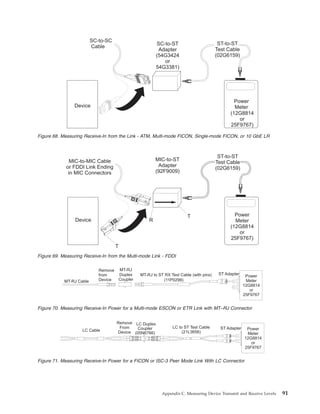
Gigabit Ethernet (GbE) LX
Multi-mode with 50 micron optical mode
conditioner
2.4 dB 550 meters (0.340 miles) 50 µm
Multi-mode with 62.5 micron optical mode
conditioner
2.4 dB 550 meters (0.340 miles) 62.5 µm
Single-mode 4.6 dB 5 km (3.1 miles) 9 to 10 µm
Gigabit Ethernet (GbE) SX
Multi-mode 50 micron 3.6 dB 550 meters (0.34 miles) 50 µm
Multi-mode 62.5 micron 2.6 dB 275 meters (0.17 miles) 62.5 µm
10 Gigabit Ethernet (10GbE) LR
Single-mode
6.2dB 10 km (6.2 miles) 9 to 10 µm
Parallel Sysplex using InfiniBand
1x IFB 5.66 dB 10 km (6.2 miles) 9 to 10 µm
12x IFB 2.06 dB 150 meters (0.93 miles) 50 µm
Notes:
1. This value does not include the higher-order-mode loss because the MAPs use the OMC tool for
multi-mode link measurements.
2. Multi-mode coupling links operate at wavelengths of 770 - 850 nm; their maximum distance is 1 km
(0.62 miles) using 50 micron fiber, with a maximum allowable loss of 3 dB/km measured at 850 nm.
3. The use of MCP cables is not supported over 1 gb.
Chapter 3. Problem Determination Procedures 35
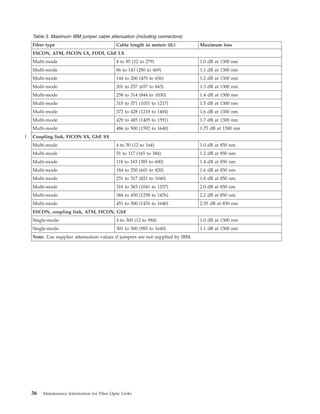
Table 3. Maximum IBM jumper cable attenuation (including connectors)
Fiber type Cable length in meters (ft.) Maximum loss
ESCON, ATM, FICON LX, FDDI, GbE LX
Multi-mode 4 to 85 (12 to 279) 1.0 dB at 1300 nm
Multi-mode 86 to 143 (280 to 469) 1.1 dB at 1300 nm
Multi-mode 144 to 200 (470 to 656) 1.2 dB at 1300 nm
Multi-mode 201 to 257 (657 to 843) 1.3 dB at 1300 nm
Multi-mode 258 to 314 (844 to 1030) 1.4 dB at 1300 nm
Multi-mode 315 to 371 (1031 to 1217) 1.5 dB at 1300 nm
Multi-mode 372 to 428 (1218 to 1404) 1.6 dB at 1300 nm
Multi-mode 429 to 485 (1405 to 1591) 1.7 dB at 1300 nm
Multi-mode 486 to 500 (1592 to 1640) 1.75 dB at 1300 nm
Coupling link, FICON SX, GbE SX
Multi-mode 4 to 50 (12 to 164) 1.0 dB at 850 nm
Multi-mode 51 to 117 (165 to 384) 1.2 dB at 850 nm
Multi-mode 118 to 183 (385 to 600) 1.4 dB at 850 nm
Multi-mode 184 to 250 (601 to 820) 1.6 dB at 850 nm
Multi-mode 251 to 317 (821 to 1040) 1.8 dB at 850 nm
Multi-mode 318 to 383 (1041 to 1257) 2.0 dB at 850 nm
Multi-mode 384 to 450 (1258 to 1476) 2.2 dB at 850 nm
Multi-mode 451 to 500 (1476 to 1640) 2.35 dB at 850 nm
ESCON, coupling link, ATM, FICON, GbE
Single-mode 4 to 300 (12 to 984) 1.0 dB at 1300 nm
Single-mode 301 to 500 (985 to 1640) 1.1 dB at 1300 nm
Note: Use supplier attenuation values if jumpers are not supplied by IBM.
36 Maintenance Information for Fiber Optic Links
|
MAP 0310: Testing a link
001
1. Compare the configuration of the link you want to test to those shown on page 24; then select a work
sheet from Appendix E, “Work Sheets,” on page 113 that most resembles this configuration.
2. Go to Step 002.
002
1. Record the device 1 and device 2 identification information on the work sheet. Remember that you
are at device 1.
2. Test both fibers in the link, starting with “MAP 0320: Testing fiber 1” on page 38.
Chapter 3. Problem Determination Procedures 37
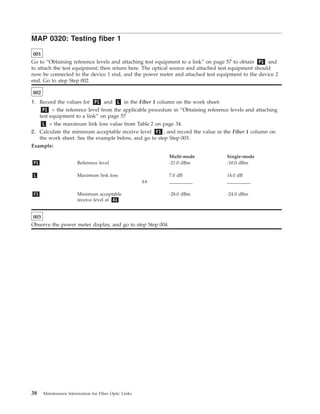
MAP 0320: Testing fiber 1
001
Go to “Obtaining reference levels and attaching test equipment to a link” on page 57 to obtain P1 and
to attach the test equipment; then return here. The optical source and attached test equipment should
now be connected to the device 1 end, and the power meter and attached test equipment to the device 2
end. Go to step Step 002.
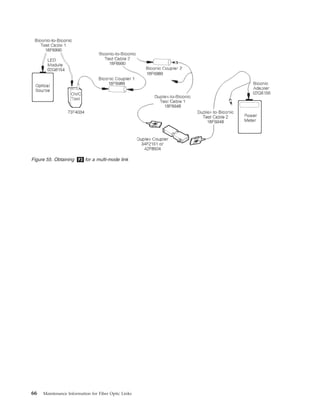
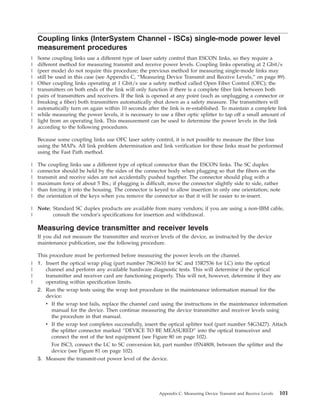
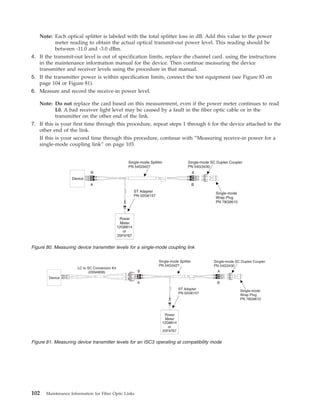
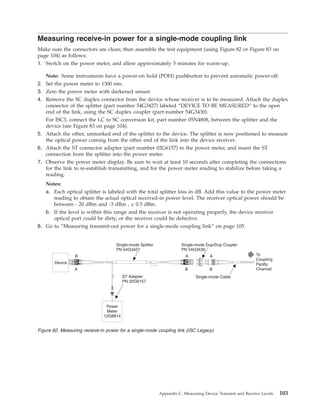
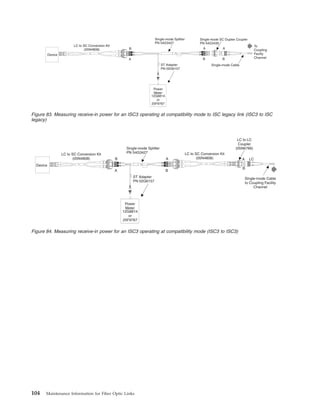
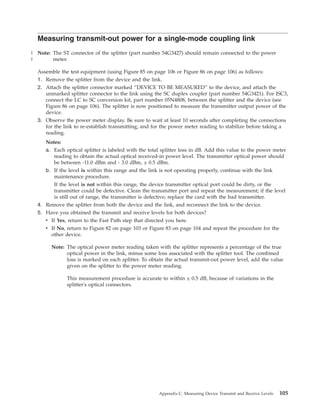
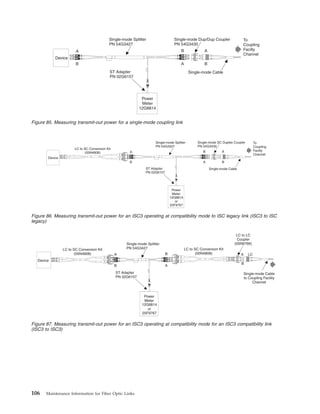
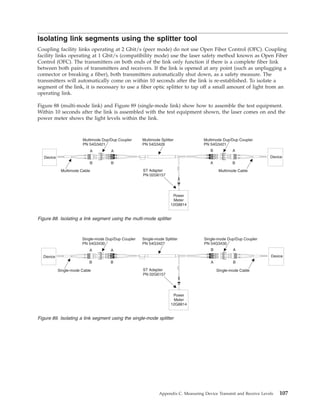
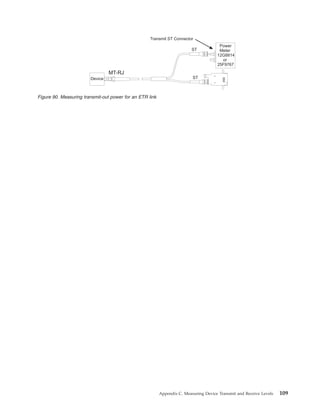
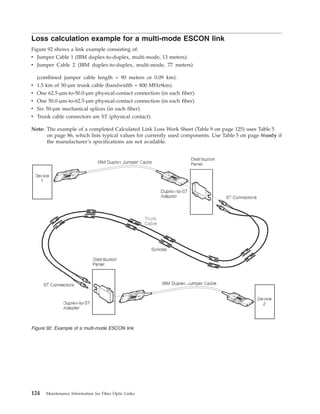
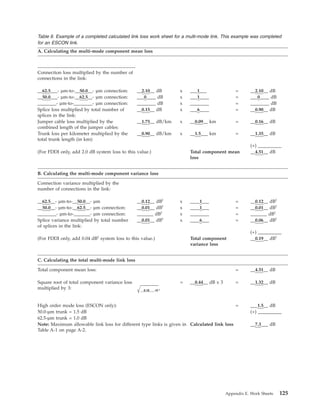
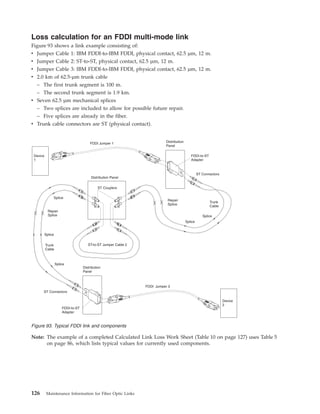
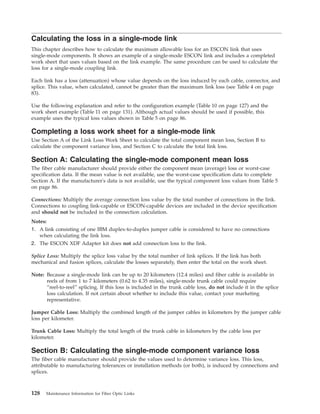
002
1. Record the values for P1 and L in the Fiber 1 column on the work sheet:
P1 = the reference level from the applicable procedure in “Obtaining reference levels and attaching
test equipment to a link” on page 57
L = the maximum link loss value from Table 2 on page 34.
2. Calculate the minimum acceptable receive level F1 , and record the value in the Fiber 1 column on
the work sheet. See the example below, and go to step Step 003.
Example:
Multi-mode Single-mode
P1 Reference level -21.0 dBm -10.0 dBm
L Maximum link loss 7.0 dB 14.0 dB
(-) __________ __________
F1 Minimum acceptable
receive level at A1
-28.0 dBm -24.0 dBm
003
Observe the power meter display, and go to step Step 004.
38 Maintenance Information for Fiber Optic Links
004
Is the meter reading at A1 less than the minimum acceptable receive level F1 ? (Example: -32.0 dBm
is less than -29.0 dBm.)
If yes go to step 6. If no continue with next step.
005
Fiber 1 loss is within specifications. Fiber 2 must now be tested. Go to “MAP 0340: Testing fiber 2” on
page 43.
006
Fiber 1 loss is not within specifications. Go to step Step 007.
007
Does this link configuration consist of only 1 jumper cable?
If yes go to step 11. If no continue with next step.
008
Take the power meter and attached test equipment to C1 .
Is jumper 1 duplex-to-duplex?
If yes, go to step 10. If no, continue with next step.
009
Go to “Obtaining P2 for a multi-mode link” on page 63. Record the P2 value in the area labeled Px
in the Fiber 1 column on the work sheet; then go to “MAP 0330: Fiber 1 loss unacceptable” on page 40.
010
Record the value P1 in the area labeled Px in the Fiber 1 column on the work sheet; then go to “MAP
0330: Fiber 1 loss unacceptable” on page 40.
011
Replace the jumper cable, and verify the repair using the maintenance procedures that directed you here
if the devices are available. If the problem still exists, contact your next level of support.
MAP 0320 (continued)
Chapter 3. Problem Determination Procedures 39
MAP 0330: Fiber 1 loss unacceptable
001
You are here because:
The receive level for fiber 1 is less than the minimum acceptable receive level. Possible causes could
be a:
v Loose or dirty connector
v Cut or damaged jumper cable or trunk cable
v Defective adapter, coupler, or distribution panel
1. The value P1 or P2 obtained in the reference level procedure should have been recorded in the
area labeled Px in the Fiber 1 column on the work sheet.
2. Obtain the maximum jumper cable dB loss values for both jumper 1 and jumper 2 from Table 3 on
page 36. Record these values in the areas labeled J1 and J2 in the Fiber 1 column on the work
sheet as required for your configuration.
3. Calculate the minimum acceptable receive level G1 , and record this value in the Fiber 1 column on
the work sheet. See the example below, and go to step 2.
Example:
Multi-mode Single-mode
Px Reference level -20.2 dBm -10.0 dBm
J1 Maximum jumper loss 1.2 dB 1.1 dB
(-) __________ __________
G1 Minimum acceptable
receive level at C1
-21.4 dBm -11.1 dBm
002
1. If disconnected in a previous step, connect the optical source and attached test equipment to jumper 1
at B1 .
2. Disconnect jumper 1 from the distribution panel at C1 . If jumper 1 has simplex connectors, remove
only the black-coded connector from the distribution panel.
3. Connect the power meter and attached test equipment to jumper 1 at C1 . If jumper 1 has simplex
connectors, attach the black-coded connector to the test equipment.
4. Observe the power meter display, and go to Step 003 on page 41.
40 Maintenance Information for Fiber Optic Links
003
Is the meter reading at C1 less than the minimum acceptable receive level G1 ? (Example: -22.5 dBm
is less than -21.4 dBm.)
If yes, go to Step 007. If no, go to Step 004.
004
Does this configuration consist of 2 jumper cables and 1 distribution panel (no trunk)?
If yes, go to Step 006. If no, go to Step 005.
005
1. Disconnect the power meter and attached test equipment from jumper 1 at C1 .
2. Reconnect jumper 1 to the distribution panel at C1 .
3. Disconnect the optical source and attached test equipment from B1 .
4. Take the optical source, power meter, and all attached test equipment to D1 ; then go to Step 008.
006
Jumper 2 loss is not within specifications. Replace jumper 2, and verify the repair using the maintenance
procedures that directed you here if the devices are available. If the problem still exists, contact your next
level of support.
007
Jumper 1 loss is not within specifications. Replace jumper 1, and verify the repair using the maintenance
procedures that directed you here if the devices are available. If the problem still exists, contact your next
level of support.
008
Is jumper 2 duplex-to-duplex?
If yes go to Step 010. If no go to Step 009
009
Go to “Obtaining reference levels and attaching test equipment to a link” on page 57, and obtain P3 .
Record this value in the area labeled Py in the Fiber 1 column on the work sheet; then go to Step 011 on
page 42.
010
Record the value P1 in the area labeled Py in the Fiber 1 column on the work sheet; then go to
Step 011 on page 42.
MAP 0330 (continued)
Chapter 3. Problem Determination Procedures 41
011
Calculate the minimum acceptable receive level H1 , and record the value in the Fiber 1 column on the
work sheet. See the example below, and go to Step 012.
Example:
Multi-mode Single-mode
Py Reference level -20.0 dBm -10.0 dBm
J2 Maximum jumper loss 1.2 dB 1.1 dB
(-) __________ __________
H1 Minimum acceptable
receive level at A1
-21.2 dBm -11.1 dBm
012
1. Disconnect jumper 2 from the distribution panel at D1 . If jumper 2 has simplex connectors, remove
only the white-coded connector.
2. Connect the optical source and attached test equipment to jumper 2 at D1 . If jumper 2 has simplex
connectors, attach the white-coded connector to the test equipment.
3. Take the power meter and attached test equipment to A1 ; then connect it to jumper 2.
4. Observe the power meter display, and go to Step 013.
013
Is the meter reading at A1 less than the minimum acceptable receive level H1 ? (Example: -25.0 dBm
is less than -21.2 dBm.)
If yes, go to Step 015. If no, go to Step 014.
014
The problem is in the trunk or distribution panel(s). If this link segment includes:
v Fiber Transport Services (FTS) components, contact your local Availability Services Marketing
Specialist.
v Components covered by another service agreement or maintenance offering, contact the IBM marketing
representative
v Components not covered by any service agreement or maintenance offering, inform the customer
015
Jumper 2 loss is not within specifications. Replace jumper 2, and verify the repair using the maintenance
procedures that directed you here if the devices are available. If the problem still exists, contact your next
level of support.
MAP 0330 (continued)
42 Maintenance Information for Fiber Optic Links
MAP 0340: Testing fiber 2
001
Note: When using this MAP, the optical source and attached test equipment should be connected to the
device 2 end, and the power meter and attached test equipment should be connected to the device
1 end.
Have you obtained P1 and not switched off power to the optical source?
If yes, go to Step 003. If no, go to Step 002.
002
Go to “Obtaining reference levels and attaching test equipment to a link” on page 57 to obtain P1 , and
attach the test equipment; then go to step Step 004.
003
Go to step Step 004.
004
Make sure the optical source and attached test equipment are connected at the device 2 end, and the
power meter and attached test equipment are connected at the device 1 end.
1. Record the values for P1 and L in the Fiber 2 column on the work sheet:
P1 = the reference level from the applicable procedure in “Obtaining reference levels and attaching
test equipment to a link” on page 57
L = the maximum link loss value from Table 2 on page 34.
2. Calculate the minimum acceptable receive level F2 , and record the value in the Fiber 2 column on
the work sheet. See the example below, and go to step Step 005.
Example:
Multi-mode Single-mode
P1 Reference level -21.0 dBm -10.0 dBm
L Maximum link loss 7.0 dB 14.0 dB
(-) __________ __________
F2 Minimum acceptable
receive level at A2
-28.0 dBm -24.0 dBm
005
Observe the power meter display, and go to Step 006 on page 44.
Chapter 3. Problem Determination Procedures 43
006
Is the meter reading at A2 less than the minimum acceptable receive level F2 ? (Example: -32.0 dBm
is less than -29.0 dBm.)
If yes, go to Step 008. If no, go to Step 007.
007
Fiber 2 loss is within specifications. If you have already tested fiber 1, the test procedure is complete.
Return to the procedure that directed you here. If the problem still exists, contact your next level of
support.
008
Fiber 2 loss is not within specifications. Go to step Step 009.
009
Does this link configuration consist of only 1 jumper cable?
If yes, go to Step 013. If no, go to Step 010.
010
Take the power meter and attached test equipment to D2 .
Is jumper 2 duplex-to-duplex?
If yes, go to Step 012. If no, go to Step 011.
011
Go to “Obtaining P2 for a multi-mode link” on page 63. Record the P2 value in the area labeled Px
in the Fiber 2 column on the work sheet; then go to “MAP 0350: Fiber 2 loss unacceptable” on page 45.
012
Record the value P1 in the area labeled Px in the Fiber 2 column on the work sheet; then go to “MAP
0350: Fiber 2 loss unacceptable” on page 45.
013
Replace the jumper cable, and verify the repair using the maintenance procedures that directed you here
if the devices are available. If the problem still exists, contact your next level of support.
MAP 0340 (continued)
44 Maintenance Information for Fiber Optic Links
MAP 0350: Fiber 2 loss unacceptable
001
You are here because:
The receive level for fiber 2 is less than the minimum acceptable receive level. Possible causes could
be a:
v Loose or dirty connector
v Cut or damaged jumper cable or trunk cable
v Defective adapter, coupler, or distribution panel
1. The value P1 or P2 obtained in the reference level procedure should have been recorded in the
area labeled Px in the Fiber 2 column on the work sheet.
2. Obtain the maximum jumper cable dB loss values for both jumper 2 and jumper 1 from Table 3 on
page 36. Record these values in the areas labeled J2 and J1 in the Fiber 2 column on the work
sheet as required for your configuration.
3. Calculate the minimum acceptable receive level G2 , and record this value in the Fiber 2 column on
the work sheet. See the example below, and go to step Step 002.
Example:
Multi-mode Single-mode
Px Reference level -21.5 dBm -10.0 dBm
J2 Maximum jumper loss 1.4 dB 1.1 dB
(-) __________ __________
G2 Minimum acceptable
receive level at D2
-22.9 dBm -11.1 dBm
002
1. If disconnected in a previous step, connect the optical source and attached test equipment to jumper 2
at B2 .
2. Disconnect jumper 2 from the distribution panel at D2 . If jumper 2 has simplex connectors, remove
only the black-coded connector from the distribution panel.
3. Connect the power meter and attached test equipment to jumper 2 at D2 . If jumper 2 has simplex
connectors, attach the black-coded connector to the test equipment.
4. Observe the power meter display, and go to step Step 003.
Chapter 3. Problem Determination Procedures 45
003
Is the meter reading at D2 less than the minimum acceptable receive level G2 ? (Example: -30.5 dBm
is less than -22.9 dBm.)
If yes, go to Step 007. If no, go to Step 004.
004
Does this configuration consist of 2 jumper cables and 1 distribution panel (no trunk)?
If yes, go to Step 006. If no, go to Step 005.
005
1. Disconnect the power meter and attached test equipment from jumper 2 at D2 .
2. Reconnect jumper 2 to the distribution panel at D2 .
3. Disconnect the optical source and attached test equipment from B2 .
4. Take the optical source, power meter, and all attached test equipment to C2 ; then go to step
Step 008.
006
Jumper 1 loss is not within specifications. Replace jumper 1, and verify the repair using the maintenance
procedures that directed you here if the devices are available. If the problem still exists, contact your next
level of support.
007
Jumper 2 loss is not within specifications. Replace jumper 2, and verify the repair using the maintenance
procedures that directed you here if the devices are available. If the problem still exists, contact your next
level of support.
008
Is jumper 1 duplex-to-duplex?
If yes, go to Step 010. If no, go to Step 009.
009
Go to “Obtaining reference levels and attaching test equipment to a link” on page 57, and obtain P3 .
Record this value in the area labeled Py in the Fiber 2 column on the work sheet; then go to step
Step 011.
010
Record the value P1 in the area labeled Py in the Fiber 2 column on the work sheet; then go to step
Step 011.
MAP 0350 (continued)
46 Maintenance Information for Fiber Optic Links
011
Calculate the minimum acceptable receive level H2 , and record the value in the Fiber 2 column on the
work sheet. See the example below, and go to step Step 012.
Example:
Multi-mode Single-mode
Py Reference level -20.0 dBm -10.0 dBm
J1 Maximum jumper loss 1.2 dB 1.1 dB
(-) __________ __________
H2 Minimum acceptable
receive level at A2
-21.2 dBm -11.1 dBm
012
1. Disconnect jumper 1 from the distribution panel at C2 . If jumper 1 has simplex connectors, remove
only the white-coded connector.
2. Connect the optical source and attached test equipment to jumper 1 at C2 . If jumper 1 has simplex
connectors, attach the white-coded connector to the test equipment.
3. Take the power meter and attached test equipment to A2 ; then connect it to jumper 1.
4. Observe the power meter display, and go to step Step 013.
013
Is the meter reading at A2 less than the minimum acceptable receive level H2 ? (Example: -25.0 dBm
is less than -21.2 dBm.)
If yes, go to Step 015. If no, go to Step 014.
014
The problem is in the trunk or distribution panel(s). If this link segment includes:
v Fiber Transport Services (FTS) components, contact your local Availability Services Marketing
Specialist.
v Components covered by another service agreement or maintenance offering, contact the IBM marketing
representative
v Components not covered by any service agreement or maintenance offering, inform the customer
015
Jumper 1 loss is not within specifications. Replace jumper 1, and verify the repair using the maintenance
procedures that directed you here if the devices are available. If the problem still exists, contact your next
level of support.
MAP 0350 (continued)
Chapter 3. Problem Determination Procedures 47
MAP 0360: Jumper cable verification
001
You are here because:
The fast-path procedure directed you to verify the loss of a jumper cable.
Obtaining the reference level:
1. Go to “Obtaining reference levels and attaching test equipment to a link” on page 57, and obtain the
level ( P1 , P2 , or P3 ) that matches the cable configuration and direction of light propagation for
the fiber being tested. If obtaining P1 , do not attach the test equipment to the link.
2. Go to step Step 002.
002
Measuring the jumper loss:
1. Connect the jumper cable that you want to verify to the couplers; then observe the power meter
display.
2. The difference between the meter reading and the reference level must not exceed the maximum
jumper loss found in Table 3 on page 36. See the example below, and go to Step 003 on page 49.
Example:
Multi-mode Single-mode
Reference level -21.0 dBm -12.0 dBm
Meter reading -25.0 dBm -15.0 dBm
(-) __________ __________
Jumper loss 4.0 dB 3.0 dB
48 Maintenance Information for Fiber Optic Links
003
Is the jumper loss greater than the maximum jumper loss value?
If yes, go to Step 005. If no, go to Step 004.
004
The fiber is within specifications.
v If you need to verify the second fiber in the jumper cable, go to Step 006.
v If not, return to the fast-path procedure, and continue with the next step.
005
The jumper is not within specifications. Replace the jumper, and verify the repair using the maintenance
procedures that directed you here if the devices are available. If the problem still exists, contact your next
level of support.
006
Verifying the second fiber in the jumper cable:
1. Go to “Obtaining reference levels and attaching test equipment to a link” on page 57, and obtain the
level ( P1 , P2 , or P3 ) that matches the cable configuration and direction of light propagation for
the fiber being tested. If obtaining P1 , do not attach the test equipment to the link.
2. Move the optical source and the power meter to the jumper cable ends opposite their previous
attachment in step Step 002.
3. Reconnect both ends of the jumper cable to the couplers; then observe the power meter display.
4. The difference between the meter reading and the reference level must not be greater than the
maximum jumper loss found in Table 3 on page 36. See the example below, and go to Step 007 on
page 50.
Example:
Multi-mode Single-mode
Reference level -21.0 dBm -12.0 dBm
Meter reading -25.0 dBm -15.0 dBm
(-) __________ __________
Jumper loss 4.0 dB 3.0 dB
MAP 0360 (continued)
Chapter 3. Problem Determination Procedures 49
007
Is the jumper loss greater than the maximum jumper loss value?
If yes, go to Step 009. If no, go to Step 008.
008
The jumper is within specifications. Jumper cable verification is complete. Return to the fast-path
procedure, and continue with the next step.
009
The jumper is not within specifications. Replace the jumper cable, and verify the repair using the
maintenance procedures that directed you here if the devices are available. If the problem still exists,
contact your next level of support.
MAP 0360 (continued)
50 Maintenance Information for Fiber Optic Links
Link problem determination using the fast-path method
Use this method to isolate a failing link by either excluding (swapping) each link segment or by
measuring optical power through each of the 2 fibers. See also “Common link failures” on page 26 for
additional information. If you cannot determine the problem using this method, contact your next level of
support.
Note: Before you begin, make a copy of the “Fast path work sheet: all link configurations” on page 116.
You will use this work sheet to record the optical power levels at specific points in the link, and
then determine where the failure exists.
Note: Although the procedures refer only to IBM duplex and biconic connectors and components, they
can also be performed using ST, FC, MT–RJ, LC, and FICON connector types. The optical source
tool can only be used on links with a wavelength of 1300 µm; links operating at other wavelengths
(such as SX links at 850 nm or wavelength multiplexed links near 1550 nm) must use the attached
device as a light source. As a rule of thumb, typical optical fiber loss at 1300 µm is 0.5dB/km; at
850 nm is 3dB/km; and at 1550 nm is 0.3dB/km.
1. Have you already obtained the transmit and receive levels for both devices (device 1 and device 2)?
v If Yes, record the values on the fast-path work sheet as B1 (device 1 transmit), A2 (device 1
receive), B2 (device 2 transmit), and A1 (device 2 receive).
v If No, go to Appendix C, “Measuring Device Transmit and Receive Levels,” on page 89 to obtain
them. Record these values on your fast-path work sheet; then return here when done.
2. Use the work sheet to calculate if the loss of either of the 2 link fibers exceeds the maximum link loss
shown in Table 7 on page 116.
a. If both fibers are within specifications, either return to the maintenance procedures that directed
you here or contact your next level of support.
b. If 1 or both fibers are not within specifications, and the link consists of only 1 jumper cable,
replace the jumper cable.
c. If the link has more than 1 jumper cable or has both jumper and trunk cables, you must isolate
one segment of the link at a time until you locate the failure. See also any previous link loss data
for comparison, including the installer’s records if available.
1) If you want to exclude each link segment, go to step 3.
2) If you want to measure each link segment, go to step 4.
Chapter 3. Problem Determination Procedures 51
3. To exclude a link segment, use:
v A spare link
v A spare pair of trunk fibers
v A spare jumper cable
v A spare coupler or adapter
4. To measure a link segment, first refer to the work sheet. You should have already determined if fiber
1 or fiber 2 is not within specifications. This determines the points within the link that you should
measure. You also need to know the length of the jumper cable(s) to determine if the power level at
these points is within specifications. See also “Determining the direction of light propagation” on page
28 if necessary.
If you are measuring a link in a coupling facility with open fiber control, you can only isolate link
segments using the splitter tool; see “Isolating link segments using the splitter tool” on page 107.
a. If fiber 1 is not within specifications ( B1 to A1 ):
1) Take measurements at C1 and D1 . Measure C1 at the jumper 1 connector (removed from
the distribution panel), and measure D1 at the distribution panel.
For ESCON links:
– Multi-mode links–See Figure 41 and Figure 42 on page 53.
– Single-mode links–See Figure 43 and Figure 44 on page 54.
For coupling facility links use a splitter tool to isolate a link segment:
– Multi-mode links–See Figure 47 on page 56.
– Single-mode links–See Figure 48 on page 56.
– FDDI links, see Figure 45 on page 55.
– ATM, FICON, or GbE links, see Figure 46 on page 55.
For more information on the splitter tools, see “Isolating link segments using the splitter
tool” on page 107.
2) Is the power level at C1 less than the value shown in Table 8 on page 118 (use the jumper 1
cable length)?
v If Yes, jumper 1 could be defective. Verify the jumper cable loss before replacing the cable.
Go to “MAP 0360: Jumper cable verification” on page 48.
v If No, go to the next step.
3) Is the power level at D1 greater than the value shown in Table 8 on page 118 (use the jumper
2 cable length)?
v If Yes, jumper 2 could be defective. Verify the jumper cable loss before replacing the cable.
Go to “MAP 0360: Jumper cable verification” on page 48.
v If No, go to step 5.
b. If fiber 2 is not within specifications ( B2 to A2 ):
1) Take measurements at C2 and D2 . Measure C2 at the distribution panel, and measure
D2 at the jumper 2 connector (removed from the distribution panel). See Figure 41 and
Figure 42 on page 53 for multi-mode links; see Figure 43 and Figure 44 on page 54 for
single-mode links.
2) Is the power level at D2 less than the value shown in Table 8 on page 118 (use the jumper 2
cable length)?
v If Yes, jumper 2 could be defective. Verify the jumper cable loss before replacing the cable.
Go to “MAP 0360: Jumper cable verification” on page 48.
v If No, go to the next step.
3) Is the power level at C2 greater than the value shown in Table 8 on page 118 (use the jumper
1 cable length)?
v If Yes, jumper 1 could be defective. Verify the jumper cable loss before replacing the cable.
Go to “MAP 0360: Jumper cable verification” on page 48.
v If No, go to step 5.
52 Maintenance Information for Fiber Optic Links
5. The trunk cable is the most probable cause of the failure. Switch to an alternate pair of trunk fibers (if
available), and inform the customer. If the problem still exists, contact your next level of support
Figure 41. Measuring C2 or D1 for a multi-mode link
Figure 42. Measuring C1 or D2 for a multi-mode link
Chapter 3. Problem Determination Procedures 53
Figure 43. Measuring C2 or D1 for a single-mode link
Figure 44. Measuring C1 or D2 for a single-mode link
54 Maintenance Information for Fiber Optic Links
Figure 45. Obtaining the FDDI end-to-end link loss using the fast-path method
Figure 46. Obtaining the ATM end-to-end link loss using the fast-path method
Chapter 3. Problem Determination Procedures 55
AB
AB
Device Device
Multimode Splitter
PN 54G3426
Multimode Dup/Dup Coupler
PN 54G3421
Multimode Dup/Dup Coupler
PN 54G3421
Multimode FICON Dup/Dup Cable Multimode FICON Dup/Dup CableST Adapter
PN 02G6157
Power
Meter
AA AB
BB BA
FICON Cable Part NumbersFICON Cable Part Numbers
Part Number Length (Meters/Feet)
54G3373 7 / 20
54G3374 13 / 40
54G3375 22 / 70
54G3376 31 / 100
54G3377 46 / 150
54G3378 61 / 200
54G3379 Custom
Part Number Length (Meters/Feet)
54G3373 7 / 20
54G3374 13 / 40
54G3375 22 / 70
54G3376 31 / 100
54G3377 46 / 150
54G3378 61 / 200
54G3379 Custom
Figure 47. Isolating a multi-mode link segment with a splitter tool
AB
AB
Device Device
Single-mode Splitter
PN 54G3427
Single-mode Dup/Dup Coupler
PN 54G3430
Single-mode Dup/Dup Coupler
PN 54G3430
Single-mode FICON Dup/Dup Cable Single-mode FICON Dup/Dup CableST Adapter
PN 02G6157
Power
Meter
AA AB
BB BA
FICON Cable Part NumbersFICON Cable Part Numbers
Part Number Length (Meters/Feet)
54G3409 7 / 20
54G3410 13 / 40
54G3411 22 / 70
54G3412 31 / 100
54G3413 46 / 150
54G3414 61 / 200
54G3415 Custom
Part Number Length (Meters/Feet)
54G3409 7 / 20
54G3410 13 / 40
54G3411 22 / 70
54G3412 31 / 100
54G3413 46 / 150
54G3414 61 / 200
54G3415 Custom
Figure 48. Isolating a single-mode link segment with a splitter tool
56 Maintenance Information for Fiber Optic Links
Obtaining reference levels and attaching test equipment to a link
These procedures:
v Make sure the test equipment is calibrated.
v Provide instructions to obtain optical power reference levels for the problem determination procedures.
v Describe how to attach the calibrated test equipment to a link.
The figures used as examples in these procedures show the IBM part numbers of the test equipment. See
Appendix B, “Tools, Test Equipment, and Parts,” on page 87 for the part numbers of all test equipment.
Notes:
1. There are separate procedures for multi-mode and single-mode links and for links at different
operating wavelengths. Make sure you are using the correct procedure.
2. The configuration chosen for a reference measurement should match the configuration of the link or
jumper cable under test.
3. Only the multi-mode procedures for long wave (1300 µm) links use the OMC tool; multi-mode links
for short wave (850 µm) links may use the same procedures as single-mode links.
4. Although the multi-mode procedures refer only to duplex and biconic connectors and components,
they can also be performed using ST, FC, or FICON SC connector types.
P0 is the base measurement used to calibrate the power meter. It is also used as a reference for the
other test configurations to make sure the test cables are operating within specifications. See “Obtaining
PO for a multi-mode link” on page 58 or “Obtaining P0 for a single-mode link” on page 67.
Note: If unusual or unexpected readings occur while measuring power levels, verify that the P0 value
has not changed by more than 0.3 dB. If it has, clean the cable connectors and test equipment
connections; then retry the test. If the problem still exists, replace the cable, the optical source, then
the OMC tool (if applicable), and finally the power meter with known operational components.
P1 is the reference measurement used for end-to-end link problem determination. It is also used as a
reference for jumper cable measurements when both ends of the jumper cable have duplex connectors.
See “Obtaining P1 and attaching test equipment to a multi-mode link” on page 60 or “Obtaining P1
and attaching test equipment to a single–mode link” on page 68.
P2 and P3 , used for long wavelength multi-mode only, are the reference measurements that apply
when testing a duplex-to-biconic jumper cable. See “Obtaining P2 for a multi-mode link” on page 63
and “Obtaining P3 for a multi-mode link” on page 65.
After completing a reference measurement, leave the test cables and couplers plugged into the optical
source and power meter. Then move the optical source, power meter, test cables, and couplers to the
appropriate location, and plug them into the link cables. If power to the optical source has been
switched off, or if the test cables or couplers have been disconnected from the optical source or the
power meter, repeat the reference measurement.
Chapter 3. Problem Determination Procedures 57
Obtaining PO for a multi-mode link
This procedure applies only to ESCON or ATM long wavelengths links; other multi-mode laser links such
as FICON SX or Gigabit Ethernet SX may use the same procedures as for single-mode fiber attachment.
This procedure ensures proper operation of the optical source and the power meter, and establishes the
power output of the optical source. If you require detailed operating instructions for the test equipment,
refer to the manufacturer’s operating manuals. The IBM Fiber Optic Field Test Support Kits (see
Appendix B, “Tools, Test Equipment, and Parts,” on page 87) provide space for these manuals.
1. Make sure 1) the connectors are clean, 2) the LED module “plug-in” is inserted into the optical source,
and 3) the biconic adapter is inserted into the power meter.
2. Switch on both instruments, and allow approximately 5 minutes for warm-up.
Note: Some instruments have a power-on hold (POH) pushbutton to prevent automatic power-off.
3. Set the power meter to 1300 nm.
4. Zero the power meter with darkened sensor.
5. Attach one end of a biconic-to-biconic test cable to the optical source; then attach the other end to the
receptacle on the OMC tool (see Figure 49 on page 59).
6. Attach the biconic cable from the OMC tool to the power meter.
7. Adjust the optical source output to obtain a reading of -25.0 dBm (±1.0 dB) on the power meter
display.
v If the reading is within specifications, record this value as P0 on the work sheet selected from
Appendix E, “Work Sheets,” on page 113 for the fiber being tested; then go to “Obtaining P1 and
attaching test equipment to a multi-mode link” on page 60. Do not disconnect the OMC tool, and
do not switch off power to the optical source.
v If the reading is not within specifications, remove the OMC tool, and connect the biconic-to-biconic
test cable directly to the power meter. Adjust the optical source output to obtain -15.0 dBm (±1.0
dB) on the power meter.
– If the reading is within specifications, reconnect the biconic-to-biconic test cable to the OMC tool,
and reconnect the OMC tool to the power meter. If the power meter reads -25.0 dBm (±5.0 dB),
adjust the optical source to obtain -25.0 dBm (±1.0 dB). If the optical source cannot be adjusted,
replace the OMC tool.
58 Maintenance Information for Fiber Optic Links
– If the reading is not within specifications, clean the cable connectors and test equipment
connections; then retry the test. If the test still fails, replace the cable, then the optical source, and
finally the power meter with known operational components.
Figure 49. Obtaining P0 for a multi-mode Link
Chapter 3. Problem Determination Procedures 59
Obtaining P1 and attaching test equipment to a multi-mode link
This procedure applies only to ESCON or ATM long wavelengths links; other multi-mode laser links such
as FICON SX or Gigabit Ethernet SX may use the same procedures as for single-mode fiber attachment.
This procedure checks the multi-mode test cables and establishes the power output of the optical source
using these cables. It then shows how to attach this test equipment to a multi-mode link terminated by
duplex connectors on both ends.
1. Obtain P0 if you have not already done so, or if power to the optical source has been switched off,
or if the OMC tool has been disconnected from the optical source.
2. Make sure the LED module “plug-in” is inserted into the optical source, and the biconic adapter is
inserted into the power meter.
3. Make sure all connectors are clean; then assemble the test equipment (see Figure 50 on page 61,
Figure 52 on page 62, or Figure 53 on page 62).
a. Remove the cable from the OMC tool to the power meter, and attach it to a biconic coupler.
b. Attach the white-coded biconic connector of duplex-to-biconic test cable 1 to the other end of the
biconic coupler; then attach the duplex connector to duplex coupler 1.
c. Attach one end of a duplex-to-duplex test cable to duplex coupler 1; then attach the other end to
duplex coupler 2.
d. Attach the duplex connector of duplex-to-biconic test cable 2 to duplex coupler 2; then attach the
black-coded biconic connector to the power meter.
4. Observe the power meter display. The maximum difference allowed between P1 and P0 is 2.5 dB.
v If the difference is less than 2.5 dB, record the value as P1 on the work sheet selected from
Appendix E, “Work Sheets,” on page 113 for the fiber being tested; then go to the next step.
v If the difference is greater than 2.5 dB, clean the cable connectors and test equipment connections;
then retry the test. If the test still fails, replace each cable and then each coupler with known
operational components until the test does not fail. If the test continues to fail, replace the OMC
tool, then the optical source, and finally the power meter.
5. Remove the duplex-to-duplex test cable between the 2 duplex couplers. Do not switch off power to
the optical source, and do not disconnect the test cables or couplers from the optical source or the
power meter.
6. Attach the test equipment to the link as follows (see Figure 51 on page 61):
a. Connect one end of the link to duplex coupler 1.
b. Take the power meter and attached test equipment to the next point in the link you want to check;
then connect that end to duplex coupler 2.
60 Maintenance Information for Fiber Optic Links
7. Return to the MAP that directed you here.
Figure 50. Obtaining P1 for a multi-mode link
Figure 51. Connecting the test equipment to a multi-mode link
Chapter 3. Problem Determination Procedures 61
Figure 52. Obtaining the link loss reference level (P1) - FDDI
Figure 53. Obtaining the link loss reference level (P1) - ATM or FICON
62 Maintenance Information for Fiber Optic Links
Obtaining P2 for a multi-mode link
Notes:
v Although this procedure refers only to duplex-to-biconic jumper cables, it also can be performed
using IBM duplex-to-ST or duplex-to-FC cables and their associated adapters and couplers.
v If a step directs you to connect a test component that is already attached, continue with the next
step.
This procedure applies only to ESCON or ATM long wavelengths links; other multi-mode laser links such
as FICON SX or Gigabit Ethernet SX may use the same procedures as for single-mode fiber attachment.
P2 is used as a reference level for a duplex-to-biconic jumper cable when the direction of light
propagation is from the optical source into the duplex connector and out of the biconic connector into the
power meter.
1. Obtain P0 if you have not already done so, or if power to the optical source has been switched off.
2. Make sure all connectors are clean; then assemble the components (see Figure 54 on page 64).
a. Attach one end of a biconic-to-biconic test cable to the optical source; then attach the other end to
the OMC tool.
b. Attach the cable from the OMC tool to one end of biconic coupler 1.
c. Attach the white-coded biconic connector of a duplex-to-biconic test cable to the other end of
biconic coupler 1; then attach the duplex connector to the duplex coupler.
d. Attach the duplex connector of a duplex-to-biconic test cable to the other end of the duplex
coupler; then attach the black-coded biconic connector to biconic coupler 2.
e. Attach one end of biconic-to-biconic test cable 2 to biconic coupler 2; then attach the other end to
the power meter.
3. Observe the power meter display. The maximum difference allowed between P2 and P0 is 2.5 dB.
v If the difference is less than 2.5 dB, record the value P2 on the work sheet selected from
Appendix E, “Work Sheets,” on page 113 in the area labeled Px for the fiber being tested; then go
to the next step.
v If the difference is greater than 2.5 dB, clean the cable connectors and test equipment connections;
then retry the test. If the test still fails, replace each cable and then each coupler with known
operational components until the test does not fail. If the test continues to fail, replace the OMC
tool, then the optical source, and finally the power meter.
4. Remove duplex-to-biconic test cable 2 (between the duplex coupler and biconic coupler 2) from the
test equipment setup. Do not switch off power to the optical source, and do not disconnect the test
cables or couplers from the optical source or the power meter.
5. Return to the MAP that directed you here.
Chapter 3. Problem Determination Procedures 63
Figure 54. Obtaining P2 for a multi-mode link
64 Maintenance Information for Fiber Optic Links
Obtaining P3 for a multi-mode link
Notes:
v Although this procedure refers only to duplex-to-biconic jumper cables, it also can be performed
using IBM duplex-to-ST or duplex-to-FC cables and their associated adapters and couplers.
v If a step directs you to connect a test component that is already attached, continue with the next
step.
This procedure applies only to ESCON or ATM long wavelengths links; other multi-mode laser links such
as FICON SX or Gigabit Ethernet SX may use the same procedures as for single-mode fiber attachment.
P3 is used as a reference level for a duplex-to-biconic jumper cable when the direction of light
propagation is from the optical source into the biconic connector and out of the duplex connector into the
power meter.
1. Obtain P0 if you have not already done so, or if power to the optical source has been switched off.
2. Make sure all connectors are clean; then assemble the components (see Figure 55 on page 66).
a. Attach one end of biconic-to-biconic test cable 1 to the optical source; then attach the other end to
the OMC tool.
b. Attach the cable from the OMC tool to one end of biconic coupler 1.
c. Attach one end of biconic-to-biconic test cable 2 to biconic coupler 1; then attach the other end to
biconic coupler 2.
d. Attach the white-coded biconic connector of duplex-to-biconic test cable 1 to the other end of
biconic coupler 2; then attach the duplex connector to the duplex coupler.
e. Attach the duplex connector of duplex-to-biconic test cable 2 to the duplex coupler; then attach the
black-coded biconic connector to the power meter.
3. Observe the power meter display. The maximum difference allowed between P3 and P0 is 2.5 dB.
v If the difference is less than 2.5 dB, record the value P3 on the work sheet selected from
Appendix E, “Work Sheets,” on page 113 in the area labeled Py for the fiber being tested; then go
to the next step.
v If the difference is greater than 2.5 dB, clean the cable connectors and test equipment connections;
then retry the test. If the test still fails, replace each cable and then each coupler with known
operational components until the test does not fail. If the test continues to fail, replace the OMC
tool, then the optical source, and finally the power meter.
4. Remove duplex-to-biconic test cable 1 (between biconic coupler 2 and the duplex coupler) from the
test equipment setup. Do not switch off power to the optical source, and do not disconnect the test
cables or couplers from the optical source or the power meter.
5. Return to the MAP that directed you here.
Chapter 3. Problem Determination Procedures 65
Figure 55. Obtaining P3 for a multi-mode link
66 Maintenance Information for Fiber Optic Links
Obtaining P0 for a single-mode link
This procedure may also be used for short wavelength (SX) links if an 850 µm light source is available.
This procedure ensures proper operation of the optical source and the power meter, and establishes the
power output of the optical source. If you require detailed operating instructions for the test equipment,
see the manufacturer’s operating manuals. The IBM Fiber Optic Field Test Support Kits (see Appendix B,
“Tools, Test Equipment, and Parts,” on page 87) provide space for these manuals.
1. Make sure 1) the connectors are clean, 2) the laser module “plug-in” and key are inserted into the
optical source, and 3) the ST adapter is inserted into the power meter.
2. Switch on both instruments, and allow approximately 5 minutes for warm-up.
Note: Some instruments have a power-on hold (POH) pushbutton to prevent automatic power-off.
3. Set the power meter to 1300 nm.
4. Zero the power meter with darkened sensor.
5. Attach the yellow-coded connector of an ST-to-ST test cable to the optical source; then attach the
red-coded connector to the power meter (see Figure 56).
6. Set the optical source to the maximum output position. The reading on the power meter display
should be between -2.7 and -10.0 dBm.
v If the reading is within specifications, record this value as P0 on the work sheet selected from
Appendix E, “Work Sheets,” on page 113 for the fiber being tested; then go to “Obtaining P1 and
attaching test equipment to a multi-mode link” on page 60. Do not switch off power to the optical
source.
v If the reading is not within specifications, clean the cable connectors and test equipment
connections; then retry the test. If the test still fails, replace the cable, then the optical source, and
finally the power meter with known operational components.
Figure 56. Obtaining P0 for a single-mode link
Chapter 3. Problem Determination Procedures 67
Obtaining P1 and attaching test equipment to a single–mode link
This procedure checks the single-mode test cables and establishes the power output of the optical source
using these cables. It then shows how to attach this test equipment to a single-mode link terminated by
duplex connectors on both ends.
1. Obtain P0 if you have not already done so, or if power to the optical source has been switched off.
2. Make sure the laser module “plug-in” is inserted into the optical source, and the ST adapter is
inserted into the power meter.
3. Make sure all connectors are clean; then assemble the test equipment (see Figure 57).
a. Remove the red-coded connector of ST-to-ST test cable 1 from the power meter; then attach it to
an ST coupler.
b. Attach the red-coded connector of ST test cable 2 to the other end of the ST coupler.
c. Attach the yellow-coded end of ST test cable 2 to the power meter.
4. Observe the power meter display. The maximum difference allowed between P1 and P0 is 0.4 dB.
v If the difference is less than 0.4 dB, record the value as P1 on the work sheet selected from
Appendix E, “Work Sheets,” on page 113 for the fiber being tested; then go to the next step.
v If the difference is greater than 0.4 dB, clean the cable connectors and test equipment connections;
then retry the test. If the test still fails, replace each cable and then each coupler with known
operational components until the test does not fail. If the test continues to fail, replace the optical
source and then the power meter.
5. Remove the ST coupler between the 2 ST-to-ST test cables. Do not switch off power to the optical
source, and do not disconnect the test cables from the optical source or the power meter.
6. Attach the test equipment to the link as follows (see Figure 58 on page 69):
a. Attach a duplex-to-ST adapter to each red-coded connector of the two ST-to-ST test cables.
1) Attach ST-to-ST test cable 1 to the A side of duplex-to-ST adapter 1.
2) Attach ST-to-ST test cable 2 to the B side of duplex-to-ST adapter 2.
b. Connect one end of the link to duplex-to-ST adapter 1.
c. Take the power meter and attached test equipment to the next point in the link you want to check;
then connect that end to duplex-to-ST adapter 2.
7. Return to the MAP that directed you here.
Figure 57. Obtaining P1 for a single-mode link
68 Maintenance Information for Fiber Optic Links
Figure 58. Connecting the test equipment to a single-mode link
Chapter 3. Problem Determination Procedures 69
70 Maintenance Information for Fiber Optic Links
Chapter 4. Jumper Cable Handling and Installation Summary
This chapter provides guidance for handling fiber optic jumper cables and provides a summary of the
tasks necessary to install them.
Jumper cable handling precautions
The following precautions should be taken when handling fiber optic jumper cables:
v Make sure the cable cutouts in the floor tiles have the appropriate protective edging.
v Route the cables away from any sharp edges or projections that could cut the outer jacket.
v Do not route the cables near unprotected steam or refrigeration lines.
v Do not coil the cable to less than a 96.0-mm (3.78 in.) diameter.
v Do not bend the cable to less than a 12-mm (0.5 in.) radius.
v Do not pull cables into position; place them.
v Do not grasp the cable with pliers.
v Do not attach a pull rope or wire to the connectors.
v Always clean the connectors before attaching them.
v Do not remove the protective plugs or protective covers until you are ready to clean the connectors
and attach the cables to a device.
v Always leave the protective plugs and protective covers on unused ports and cable connectors.
v Connect the cable carefully to prevent damage to the connector housing or the fiber optic ferrules.
v Before inserting the connector, make sure the connector and receptacle keying are aligned.
v Ensure that each FDDI connector has the correct keys installed for the intended application.
Pre-installation checklist
Cable inventory
v Quantity: Ensure that you have enough jumper cables.
v Length: Ensure that the jumper cables are long enough to reach each device or distribution panel, and
that they have an additional length to allow for correct bend radius, slack, and minor equipment
relocation.
v Connectors: Ensure that each end of the jumper cable has a compatible connector for attachment to the
intended device or distribution panel, and that the connectors have protective covers.
© Copyright IBM Corp. 1990, 2011 71
Jumper cable installation summary
This section summarizes the installation process; it does not provide detailed installation instructions.
Fiber optic cables, cable planning, labeling, and installation are all customer responsibilities for new
installations and upgrades.
IBM Networking Integration and Deployment Services for zSeries®
fiber cabling and for enterprise fiber
cabling allow IBM to offer a comprehensive set of services for all customers, from product level to
enterprise level. These services take into consideration the requirements for all of the protocols and media
types supported on System z (for example, ESCON, FICON, Coupling Links, OSA), whether the focus is
the data center, the Storage Area Network (SAN), the Local Area Network (LAN), or the end-to-end
enterprise.
Jumper cable labeling
Each IBM jumper cable has a jacket marking that contains the part number, EC number, length in meters
and feet, and manufacturing/warranty data. Additional jacket markings may be added by the suppliers.
Example:
PN VVVVVVV/FFFFFFF EC1234567 31 m 100.0 ft 11210005 BAR CODE DATE ODE SNUM
Where V = variable length part number, F = fixed length part number. Manufacturing and warranty data
includes: BAR CODE INFO
1 Vendor code
1 Last digit of year manufactured
210 Day-of-year manufactured (Julian date)
005 Sequence number
The above is bar code information for reference.
Cable labeling tags (IBM part number 84X7035) are available through your IBM branch office. These tags
should also be “to” locations.
Note: The ST and FC connectors on the end of an IBM jumper cable are color-coded and should be
labeled as follows:
Black = Transmit (light into the link)
White = Receive (light from the link)
Note: Fiber optic jumper cables and connectors using the FICON SC-duplex connector may be obtained
from vendors other than IBM, and may not have the bar code label or conform to the color coded
labeling. Consult the manufacturer’s specifications for labeling conventions.
Safety equipment
The following items should be available to warn of obstructions and hazardous conditions:
v Warning signs and tags
v Barricades for open floor tiles
Test equipment
See Technical Service Letter TSL #147 Fiber Optic Tools and test Equipment (revised 2/19/96 or later) for a list
of fiber optic tools and materials.
72 Maintenance Information for Fiber Optic Links
Documentation
The following documents should be available to ensure correct device connection:
v Floor plans
v Cable routing diagrams (as required)
v Physical configuration
v Logical configuration
Cable routing
v Raised floor: Fiber cables can be installed under a raised floor. The following precautions must be
taken besides those for IBM bus and tag cables:
– Do not place the cables on top of moisture sensors or smoke detectors.
– Cables should not be secured if an unloaded bend radius of less than 12 mm (0.5 in.) can exist.
Note: This precaution applies to cables installed both above and below a raised floor.
v Raceway or cable tray: Cables should be placed, not pulled, in a tray or raceway.
v Ceiling or partition: Cables must be protected from sharp corners, ceiling hangers, pipes, dropped
ceiling grids, metal partition studs, and construction activity. Conduit can be used when additional
protection is required.
v Vertical shaft (between floors): Cable should be left on the shipping spool, or in a loose coil, and
lowered from above.
For installation in a vertical shaft, the cable must be protected against extreme temperature and
possible damage from moving equipment. Cable ties must be used to secure the cable at intervals of 3
meters (10 ft.), and strain relief must be provided at intervals of 100 meters (328 ft.).
v Plenum: IBM jumper cables for FICON, FDDI, ATM, and GEN are plenum rated. ESCON cables for
plenum installation are available by special request from IBM.
Cable layout, slack management, and strain relief
There should be at least 2 meters (6.5 ft.) of cable at each end for any future equipment relocation.
Slack management should be used when storing excess jumper cable.
Strain relief, provided by devices and distribution panels, should be used to prevent connector damage.
Connector protection
Attach connectors carefully to prevent damage to the housing or the fiber optic ferrules.
If possible, leave connectors in their protective shells until you are ready to attach them to the receptacles.
Also, use the shells when temporarily unplugging the connectors.
Unused fiber optic duplex receptacles on an IBM device must have a protective plug (IBM part number
18F4017, 17G5609, or 78G9610) installed to prevent contamination (seeFigure 59 on page 74 or Figure 60
on page 74).
For non-IBM connectors, use the protection method recommended by the vendor for that connector.
Chapter 4. Jumper Cable Handling and Installation Summary 73
Figure 59. ESCONprotective plug (part number 18F4017)
Figure 60. Optical wrap/protective plug for FICON links. IBM part numbers 16G5609 for multi-mode and 78G9610 or
86F1180 for single-mode. For 4G or 8G Ficon, IBM part number 15R7536 should be used for both short wave (SX)
and long wave (LX) applications.
Figure 61. MT-RJ wrap plug
Figure 62. LC wrap plug
74 Maintenance Information for Fiber Optic Links
Chapter 5. Documentation
This chapter summarizes the information used to document link installations and provides instructions
and a sample work sheet for recording link specifications and physical characteristics.
Cable administration information
As the customer’s fiber optic channel link environment grows, accurate records must be maintained to
list the changes, modifications, and reconfigurations within the environment. This chapter describes the
documentation required, explains the various types of ESCON link connections, and shows an example of
the entries used to complete a Cable Administration Work Sheet, SX23-0415.
Link installation documentation
The following documentation and information should be available to ensure link compatibility exists for
IBM devices:
v Floor plans of existing facilities
v Switching and multiplexing requirements
v Equipment locations
v Logical connectivity diagrams
v Cable routing diagrams
v Installer’s records
Documentation for new installations
The following documentation and information should be available for new installations to ensure link
compatibility exists for IBM devices:
v Link loss measurements.
v Contractor’s warranty or verification statement.
v Compliance with national, state, and local building codes. New requirements have been added that
specifically relate to installation of fiber optic cabling.
© Copyright IBM Corp. 1990, 2011 75
Documentation for all installations
The following documentation and information should be available for all installations to ensure link
compatibility exists for IBM devices:
v Device and link distances
v Product specifications
v Cable routing diagrams:
– Location and length of each link
– Type, location, and identification of connectors, adapters, and couplers
– Locations of splices and distribution panels
v Manufacturer’s data sheets:
– Cable (see Appendix A, “Specifications,” on page 81 for specification requirements)
– Bend radius control
– Connectors
– Strain relief
– Splices
– Distribution panels
– Attached devices
– Installer’s warranty or verification statements
Link connections and IOCDS and cable information
A link environment can consist of all fiber optic cables, or it can consist of copper bus and tag cables and
fiber optic jumper and trunk cables. The following figures show these three link types:
v Logical link connection (Figure 63)
v Physical point-to-point link connection (Figure 64 on page 77)
v Complex physical link connection (Figure 65 on page 77)
The complex physical link connection is used to complete the Cable Administration Work Sheet example
shown on page Figure 66 on page 80.
Logical link connection
IOCDS and cable information:
PATHID M/T Serial CHPID Length M/T Serial Conn ID
309001 3090 xxxx 01 100 ft. 3803 yyyy 02
Figure 63. Example of a logical link connection
76 Maintenance Information for Fiber Optic Links
Physical point-to-point link connection
IOCDS and cable information:
PATHID M/T Serial CHPID Length M/T Serial Conn ID
309001 3090™
xxxx 01 100 ft. 3803 yyyy 02
Complex physical link connection
Completing the cable administration work sheet
The following paragraphs list and explain the entries used in the completed Cable Administration Work
Sheet example shown in Figure 66 on page 80. The work sheet uses the complex physical link connection
shown in Figure 65 as a basis and includes typical information available for that link.
When comparing Figure 65 to the completed work sheet, notice where the information for one link
segment ends and the other begins. For example, the column under 3090-12345 ends at the To Label entry
of 3044-12345, which is the end of link segment 01. Link segment 02 then begins at the top of the next
column (3044-98765) and ends at Distribution Panel 1 (labeled DP01C01 DP01C02). Continue down this
column and up from the bottom of the next column to determine the trunk information (link segment 03).
In the same manner, continue up the same column and down the next column for link segment 04 and 05
information.
Figure 64. Example of a physical point-to-point link connection
Figure 65. Example of a complex physical link connection
Chapter 5. Documentation 77
Product information
The Product Information column ( 1 ) consists of:
v Machine Type: The numeric (or alphanumeric) machine type.
Note: Always start with the device closest to the processor or at the processor.
v Ser#: The 5-digit serial number.
v Port#: The port or channel path identifier (CHPID) of the device.
v Strain Relief Used? (Y/N): Is the device strain relief used?
Jumper cable information
The Jumper Cable Information column ( 2 ) consists of:
v Vendor: The provider of the jumper cable assembly.
v Length (meter or ft): The length of the jumper cable in meters or feet. Either unit of measure is
acceptable. It is specified in the cable label information. If not known, estimate the actual length.
v Loss (dB or dB/km) and Bandwidth (MHzvkm) Specifications: Complete this column for non-IBM
multi-mode jumper cables only.
v Modified? If yes, Loss Measurement Fiber 1/Fiber 2:
Note: Cable modification is not recommended. For example, modification voids the cable warranty,
and modified components are not supported by the IBM fiber optic tool kits.
If the jumper cable was modified, record the loss measurement for fiber 1 and fiber 2.
v Connector Types: The device end is a duplex connector unless the cable is attached to an original
equipment manufacturer (OEM) device that uses other than a duplex receptacle. The other end
depends on the type of distribution panel adapter or coupler used.
v Slack Storage? (Y/N): Is cable slack managed by using a slack-storage device?
v From Label Fiber 1/Fiber 2 M/T Serial: Unique label information at the “from” end of the cable (the
distribution panel or device).
v Path ID/Segment ID: Path and segment identification.
v To Label Fiber 1/Fiber 2: Unique label information at the “to” end of the cable (the distribution panel
or next device).
78 Maintenance Information for Fiber Optic Links
Trunk information
The Trunk Information column ( 3 ) consists of:
v Cable Manufacturer and Fiber Core Size (µm): The cable manufacturer and the fiber core size in µm.
v Installer: Name of the company or contractor.
v Length (km or ft): Length of the trunk cable in kilometers or feet. Either unit of measure is acceptable.
v Attenuation Specification (dB/km) or Loss Measurement (dB): Trunk loss in dB/km (from the cable
manufacturer) or dB (from the installer).
v Bandwidth Specification (MHzvkm): multi-mode only. Specified by the cable manufacturer (for
example, 500 MHzvkm).
v # of Splices and Type: Should be part of the link schematic. Note if the splice is mechanical or fusion.
v Connector Type(s) at Panel(s): Type of connector used at the distribution panel (for example, IBM
duplex, ST).
v OTDR Print? If yes, ID: Contractors and installers could have used an optical time domain
reflectometer (OTDR) to record link trace information. Either hardcopy or softcopy records are
acceptable and should provide link identification information.
v From Panel ID Fiber 1/Fiber 2: Distribution panel “from” locations for fiber 1 and fiber 2.
v Path ID and Segment ID: Path and segment identification.
v To Panel ID Fiber 1/Fiber 2: Distribution panel “to” locations for fiber 1 and fiber 2.
Loss measurements
The Loss Measurements column ( 4 ) consists of:
v Date Tested: Date when link verification was performed.
v End-End Link Verification Loss (dB): Link loss from device connector to device connector.
Service comments
Chapter 5. Documentation 79
The Service Comments column ( 5 ) can be used for information such as:
v IBM contract number
v Service comments
v OEM device information (machine type and serial)
v Hazardous area identification
Product
Information
Machine Type
Ser #
Port #
Strain Relief
Used? (Y/N)
Vendor
Loss
Measure-
ment
Service
Comments
Cable Administration Work Sheet
1
Length (meter or ft)
Loss (dB or dB/km) and
Bandwidth (Mhz km)
Specifications
Modified? If yes,
Loss Measurement
Fiber 1/Fiber 2
Connector Types
Stack Storage?
(Y/N)
From Label
Fiber 1/Fiber 2
M/T Serial
Path ID/Segment ID
To Label
Fiber 1/Fiber 2
JumperCableInformation
2
Cable Manufacturer
and Fiber Core Size
( m)l
Installer
Length (km or ft)
Attenuation Specification
(dB/km) or Loss
Measurement (dB)
Bandwidth
Specifications
(Mhz km)
# of Splices
and Type
Connector
Type(s) and Panel(s)
OTDR Print?
If Yes, ID
From Panel ID
Fiber 1/Fiber 2
Path ID and
Segment ID
To Panel ID
Fiber 1/Fiber 2
Date Tested
End-End Link
Verification Loss (dB)
3
4
5
TrunkInformation
Figure 66. Example of a Cable Administration Work Sheet
80 Maintenance Information for Fiber Optic Links
Appendix A. Specifications
This chapter lists the specifications and optical properties for a fiber optic channel link, IBM jumper
cables, and trunk cable. To allow for growth, a trunk cable with higher modal bandwidth than the
minimum specification should be considered.
© Copyright IBM Corp. 1990, 2011 81
Link specifications
Table 4 on page 83 lists the specifications for links using single-mode (9/125-µm), or multi-mode
(62.5/125-µm, or 50/125-µm) fiber optic cable. The trunk to which the IBM jumper cables are connected
must have optical properties that conform to the specifications in the table.
82 Maintenance Information for Fiber Optic Links
Table 4. Link Specifications
Link/fiber type Maximum length
Maximum
loss
Trunk size/
wavelength
Minimum
trunk modal
bandwidth Notes
ESCON
Multi-mode 2.0 km (1.24 mi.) 8.0 dB 62.5 µm/LX 500 MHzvkm 1, 3, 8
Multi-mode 2.0 km (1.24 mi.) 8.0 dB 50.0 µm/LX 800 MHzvkm 1, 3, 4, 8
Multi-mode 3.0 km (1.86 mi.) 8.0 dB 62.5 µm/LX 800 MHzvkm 1, 3, 4, 8
Single-mode
(Discontinued)
20 km (12.4 mi.) 14.0 dB 9.0 µm/LX NA 1, 2, 3, 5, 6, 7, 10
Sysplex Timer®
(ETR/CLO) Same as multi-mode ESCON
Coupling links (ISC, HiPerLinks/ISC-2, ISC-3)
Multi-mode (discontinued
May, 1998)
1.0 km (.62 mi.) 8.0 dB 50.0 µm/SX 500 MHzvkm 1, 3, 9
Single-mode 1.06 and 2.1
Gbit/s
10 km (6.21 mi.) 7.0 dB 9.0 µm/LX NA 1, 3, 5, 6, 7
Single-mode card with 50
micron optical mode
conditioner over
multi-mode fiber
550 meters (0.34 mi.) 5.0 dB 50.0 µm/LX
Multi-mode 12x IFB 150 m (.093 mi.) 2.06 dB 50.0 µm/SX 500 MHzvkm 1, 3, 9
Single-mode 1x IFB 10.0 km (6.21 mi.) 5.66 dB 9.0 µm/LX NA 1, 3, 5, 6, 7
FICON LX
Multi-mode with 50
micron optical mode
conditioner
550 meters (0.34 mi.) 5.0 dB 50.0 µm/LX 500 MHzvkm 1, 3, 12, 13
Single-mode LX1gb
(100-SM-LC-L)
10.0 km (6.2 mi.) 7.8 dB 9.0 µm/LX NA 1, 3, 5, 6, 7
Single-mode LX 2gb
(200-SM-LC-L)
10.0 km (6.2 mi.) 7.8 dB 9.0 µm/LX NA 1, 3, 5, 6, 7
Single-mode LX 4gb 10km
(400-SM-LC-L)
10.0 km (6.2 mi.) 7.8 dB 9.0 µm/LX NA 1, 3, 5, 6, 7
Single-mode LX 4gb 4km
(400-SM-LC-M)
4 km (2.5 mi.) 4.8 dB 9.0 µm/LX NA 1, 3, 5, 6, 7
Single-mode LX 8gb 10km
(800-SM-LC-L)
10.0 km (6.2 mi.) 6.4 dB 9.0 µm/LX NA 1, 3, 5, 6, 7
FICON SX
Multi-mode SX 1gb
(100-M6-SN-I) (OM1)
300 meters (0.186 mi.) 3.00 dB 62.5 µm/SX 200 MHzvkm 1, 3
Multi-mode SX 2gb
(200-M6-SN-I) (OM1)
150 meters (0.093 mi.) 2.10 dB 62.5 µm/SX 200 MHzvkm 1, 3
Multi-mode SX 4gb
(400-M6-SN-I) (OM1)
70 meters (0.043 mi.) 1.78 dB 62.5 µm/SX 200 MHzvkm 1, 3
Multi-mode SX 8gb
(800-M6-SN-I) (OM1)
21 meters (0.013 mi.) 1.58 dB 62.5 µm/SX 200 MHzvkm 1, 3
Multi-mode SX 1gb
(100-M5-SN-I) (OM2)
500 meters (0.311 mi.) 3.85 dB 50 µm/SX 500 MHzvkm 1, 3
Appendix A. Specifications 83
Table 4. Link Specifications (continued)
Link/fiber type Maximum length
Maximum
loss
Trunk size/
wavelength
Minimum
trunk modal
bandwidth Notes
Multi-mode SX 2gb
(200-M5-SN-I) (OM2)
300 meters (0.186 mi.) 2.62 dB 50 µm/SX 500 MHzvkm 1, 3
Multi-mode SX 4gb
(400-M5-SN-I) (OM2)
150 meters (0.093 mi.) 2.06 dB 50 µm/SX 500 MHzvkm 1, 3
Multi-mode SX 8gb
(800-M5-SN-I) (OM2)
50 meters (0.031 mi.) 1.68 dB 50 µm/SX 500 MHzvkm 1, 3
Multi-mode SX 1gb
(100-M5-SN-I) (OM3)
860 meters (0.534 mi.) 4.62 dB 50 µm/SX 2000 MHzvkm 1, 3
Multi-mode SX 2gb
(200-M5-SN-I) (OM3)
500 meters (0.311 mi.) 3.31 dB 50 µm/SX 2000 MHzvkm 1, 3
Multi-mode SX 4gb
(400-M5-SN-I) (OM3)
380 meters (0.237 mi.) 2.88 dB 50 µm/SX 2000 MHzvkm 1, 3
Multi-mode SX 8gb
(800-M5-SN-I) (OM3)
150 meters (0.094 mi.) 2.04 dB 50 µm/SX 2000 MHzvkm 1, 3
Gigabit Ethernet (GbE) LX
Single-mode 5 km (3.1 mi.) 4.6 dB 9.0 µm/LX NA 1, 3, 5, 6, 7
Gigabit Ethernet (GbE) SX
Multi-mode 50 micron 550 meters (0.34 mi.) 3.6 dB 50.0 µm/SX 500 MHzvkm 1, 3
Multi-mode 62.5 micron 275 meters (0.17 mi.) 2.6 dB 62.5 µm/SX 200 MHzvkm 1, 3
10 Gigabit Ethernet (10GbE LR)
Single-mode 10 km (6.2 miles) 6.0 dB 9.0 µm/LX NA 1, 3, 5, 6, 7
10 Gigabit Ethernet (10GbE SR)
Multi-mode 50 micron 300 meters (0.19 miles) 2.6 dB OM3 2000 MHzvkm 1, 3
Multi-mode 50 micron 82 meters (0.05 miles) 1.8 dB OM2 500 MHzvkm 1, 3
Multi-mode 62.5 micron 33 meters (0.02 miles) 1.6 dB OM1 200 MHzvkm 1, 3
84 Maintenance Information for Fiber Optic Links
Notes:
1. The maximum link length includes both jumper and trunk cables.
2. The ESCON Extended Distance feature (ESCON XDF) must be installed in both the channel and the
ESCON Director to obtain a maximum link length of 20 kilometers (12.4 miles).
3. If the customer uses IBM’s Fiber Transport Services (FTS), contact the marketing representative for
distance considerations.
4. The maximum total jumper cable length cannot exceed 244 meters (800 ft.) when using either
50/125-µm trunk fiber or when a 62.5/125-µm link exceeds 2 kilometers (1.24 miles).
5. Single-mode connectors and splices must meet a minimum return loss specification of 28 dB.
6. In a single-mode jumper cable, the minimum distance between connectors or splices is 4 meters (13.1
ft.).
7. In a single-mode trunk cable, the distance between connectors or splices must be enough to ensure
that only the lowest-order bound mode propagates.
8. The maximum link loss for multi-mode fiber includes the higher-order-mode loss, which is 1.5 dB
for 50 µm and 1.0 dB for 62.5 µm on ESCON links only.
9. Short wavelength (SX) versions of Gigagit Ethernet and FICON multi-mode links use a short
wavelength laser (780 to 850 nm) over multi-mode fiber. Fiber loss at these wavelengths (3 to 4
dB/km) is higher than for other links using 1300 nm lasers (0.5 dB/km).
10. Some single-mode ESCON transceivers use the FICON duplex connector rather than the IBM
ESCON duplex connector. The maximum length and loss values are the same for both connector
types and the maximum loss/distance is not reduced by using the ESCON adapter kit (part number
46H9223).
11. The maximum FDDI link loss includes a system loss of 2.0 dB, which includes higher order mode
losses, extinction ratio, and retiming penalties.
12. Although the ANSI Fibre Channel Connection does not support the use of long wavelength (1300
nm) lasers on multi-mode fiber, IBM will support this combination. Special mode conditioning patch
cables or couplers may be required; Refer to the Fiber Channel Connection (FICON I/O Interface
Physical Layer, SA24-7172.
13. The use of MCP cables is not supported over 1 gb.
Appendix A. Specifications 85
Typical optical component loss values
The following loss values are typical for optical components used in the data communication industry.
Use the manufacturer’s loss values if available.
Table 5. Typical optical component loss
Component Description Size (µm) Mean loss
Variance
(dB2
)
Connector Physical contact 62.5 to 62.5 0.40 dB 0.02
(See note 1) 50.0 to 50.0 0.40 dB 0.02
9.0 to 9.0 (See note 2) 0.35 dB 0.06
62.5 to 50.0 2.10 dB 0.12
50.0 to 62.5 0.00 dB 0.01
100 to 100 0.40 dB 0.02
100 to 62.5 4.72 dB 0.12
Connector Nonphysical contact 62.5 to 62.5 0.70 dB 0.04
(See note 1) (Multi-mode only) 50.0 to 50.0 0.70 dB 0.04
62.5 to 50.0 2.40 dB 0.12
50.0 to 62.5 0.30 dB 0.01
100 to 100 0.70 dB 0.04
100 to 62.5 4.90 dB 0.12
Splice Mechanical 62.5 to 62.5 0.15 dB 0.01
50.0 to 50.0 0.15 dB 0.01
9.0 to 9.0 (See note 2) 0.15 dB 0.01
100 to 100 0.15 dB 0.01
Splice Fusion 62.5 to 62.5 0.40 dB 0.01
50.0 to 50.0 0.40 dB 0.01
9.0 to 9.0 (See note 2) 0.40 dB 0.01
100 to 100 0.40 dB 0.01
Cable IBM Multi-mode jumper 62.5 1.75 dB/km NA
IBM Multi-mode jumper 50.0 3.00 dB/km at 850 nm NA
IBM Single-mode jumper 9.0 0.8 dB/km NA
Trunk 62.5 1.00 dB/km NA
Trunk 50.0 0.90 dB/km NA
Trunk 9.0 0.50 dB/km NA
Notes:
1. The connector loss value is typical when attaching identical connectors. The loss can vary significantly if
attaching different connector types.
2. Single-mode connectors and splices must meet a minimum return loss specification of 28 dB.
86 Maintenance Information for Fiber Optic Links
Appendix B. Tools, Test Equipment, and Parts
A complete list of fiber optic tools and test equipment is available in Technical Service Letter TSL #147 Fiber
Optic Tools and test Equipment, revised 2/19/96 or later. This TSL contains a current list and description of
all part numbers in the fiber optic tool kit, ordering information, and calibration of test equipment. Tool
kits and field bills of material (BOMs) are available to service both single-mode and multi-mode optical
fiber links using ESCON, Fiber Channel Connection (FICON or coupling facility links) and GbE;
attachment to ST, FC, and biconic connector types is also supported.
© Copyright IBM Corp. 1990, 2011 87
88 Maintenance Information for Fiber Optic Links
Appendix C. Measuring Device Transmit and Receive Levels
This section contains procedures on how to measure the dB power levels of the device transmit and
receive signals. This section also contains information to isolate sections of a coupling link using the
splitter tool.
An optical power meter is required for troubleshooting fiber optic problems. An optical power meter
(12G8814) and adapter cables are available at branch offices as part of the IBM fiber optic field tool kits
(46G6836, 46G6837, or 46G6839).
An alternate is the miniature optical power meter (MOP), IBM P/N 25F9767, that plugs into a digital
voltmeter. RETAIN®
tip H164015 contains information on part numbers, optical connection adapters, and
ordering. Information is also available at the following IBM Intranet Web site at http://rtpgsa.ibm.com/home/
i/t/itstesc/web/public (You will need your IBM Intranet ID and password for access.) To navigate, click on
Tools Catalog --> Test Equipment --> Fiber Optic.
Set up the MOP meter and multimeter as follows:
1. Plug the MOP meter into the multimeter
a. COM of the MOP meter to COM on the multimeter
b. Other pin to DC Volts
2. Select the desired wavelength on the MOP meter
3. Select mVdc on the multimeter.
All of the procedures in this appendix describe methods of measuring optical power using the attached
device as a source; this is the only way to measure SX links at 850 nm or wavelength multiplexed links
around 1550 nm.
This chapter contains:
“Measuring receive-in power” on page 90
“Measuring transmit-out power” on page 93
“Coupling links (InterSystem Channel - ISCs) multi-mode power level measurement procedures” on
page 95
“Coupling links (InterSystem Channel - ISCs) single-mode power level measurement procedures” on
page 101
“Isolating link segments using the splitter tool” on page 107
“ETR link multi-mode power level measurement procedures” on page 108
© Copyright IBM Corp. 1990, 2011 89
|
|
|
Measuring receive-in power
See Appendix C, “Measuring Device Transmit and Receive Levels,” on page 89 for information about
using the Miniature Optical Power meter, P/N 25F9767.
1. Switch on the power meter, and allow approximately 5 minutes for warm-up.
Note: Some instruments have a power-on hold (POH) pushbutton to prevent automatic power-off.
2. For long wavelength (LX = 1300nm) links, set the power meter to 1300nm.
For short wavelength (SX = 850nm) links, set the power meter to 850nm.
Note: Refer to Table 4 on page 83 for links which use LX or SX transmitters.
3. Zero the power meter with darkened sensor.
4. Make sure the connectors are clean; then assemble the test equipment using the appropriate figure:
Figure 67 on page 90; ESCON multi-mode link
Figure 68 on page 91; ATM, multi-mode FICON, or singl-emode FICON link, or 10 GbE LR
single-mode link
Figure 69 on page 91; FDDI multi-mode link
Figure 70 on page 91; ESCON or ETR multi-mode link with MT–RJ connector
Figure 71 on page 91; FICON or ISC-3 peer mode link with LC connector
Note: Some FDDI devices can send test signals; ask the customer to have “halt” signals sent from
these devices.
5. Observe the power meter display, and record the value on the work sheet. The receive level should
read within the specifications for the channel type. See Table 6 on page 92.
Note: If the level is within this range and the receiver is not operating properly, the device receiver
optical port could be dirty, or the receiver could be defective.
6. Go to “Measuring transmit-out power” on page 93.
Remove
from
Device
Duplex Coupler
(34F2151
or
42F8604)
Duplex-to-Biconic
Test Cable
(18F6948)
Biconic
Adapter
(02G6156)
Power
Meter
(12G8814
or
25F9767)
Figure 67. Measuring Receive-In Power for an ESCON Multi-mode Link
90 Maintenance Information for Fiber Optic Links
SC-to-SC
Cable
ST-to-ST
Test Cable
(02G6159)
SC-to-ST
Adapter
(54G3424
or
54G3381)
Device
Power
Meter
(12G8814
or
25F9767)
Figure 68. Measuring Receive-In from the Link - ATM, Multi-mode FICON, Single-mode FICON, or 10 GbE LR
MIC-to-ST
Adapter
(92F9009)
T
T
RDevice
Power
Meter
(12G8814
or
25F9767)
MIC-to-MIC Cable
or FDDI Link Ending
in MIC Connectors
ST-to-ST
Test Cable
(02G6159)
Figure 69. Measuring Receive-In from the Multi-mode Link - FDDI
Power
Meter
12G8814
or
25F9767
MT-RJ to ST RX Test Cable (with pins) ST Adapter
MT-RJ Cable
Remove
from
Device
MT-RJ
Duplex
Coupler (11P0298)
Figure 70. Measuring Receive-In Power for a Multi-mode ESCON or ETR Link with MT–RJ Connector
Power
Meter
12G8814
or
25F9767
LC to ST Test Cable
(21L3656)
ST AdapterLC Cable
Remove
From
Device
LC Duplex
Coupler
(05N6766)
Figure 71. Measuring Receive-In Power for a FICON or ISC-3 Peer Mode Link With LC Connector
Appendix C. Measuring Device Transmit and Receive Levels 91
Table 6. Minimum and maximum acceptable power specifications
Link Type TX Min TX Max RX Min RX Max
Multi-mode FICON LX with MCP -8.5 dBm -4 dBm -22 dBm -3 dBm
Single-mode FICON LX 1gb (100-SM-LC-L) -9.5 dBm -3 dBm -20 dBm -3 dBm
Single-mode FICON LX 2gb (200-SM-LC-L) -11.7 dBm -3 dBm -20 dBm -3 dBm
Single-mode FICON LX 4gb 10km (400-SM-LC-L) -8.4 dBm -1 dBm -16 dBm -1 dBm
Single-mode FICON LX 4gb 4km (400-SM-LC-M) -11.2 dBm -1 dBm -16 dBm -1 dBm
Single-mode FICON LX 8gb 10km (800-SM-LC-L) -8.4 dBm -1 dBm -13.5 dBm -1 dBm
Multi-mode FICON SX 1gb (100-M5-SN-I, 100-M6-SN-I) -10 dBm -1 dBm -16 dBm 0 dBm
Multi-mode FICON SX 2gb (200-M5-SN-I, 200-M6-SN-I) -10 dBm -1 dBm -14 dBm 0 dBm
Multi-mode FICON SX 4gb (400-M5-SN-I, 400-M6-SN-I) -9 dBm -1 dBm -13 dBm 0 dBm
Multi-mode FICON SX 8gb (800-M5-SN-I, 800-M6-SN-I) -8.2 dBm -1 dBm -9.5 dBm 0 dBm
Multi-mode ESCON -20.5 dBm -15 dBm -29 dBm -14 dBm
Single-mode ESCON (Discontinued) -8 dBm -3 dBm -28 dBm -3 dBm
Single-mode GbE -11 dBm -3 dBm -19 dBm -3 dBm
Single-mode 10GbE LR -8.2 dBm 0.5 dBm -14.4 dBm 0.5 dBm
Multi-mode GbE -9.5 dBm -3 dBm -17 dBm -3 dBm
Single-mode Coupling Links (ISC, HiPerLinks/ISC-2, ISC-3)
Operating at 1 Gbit/s (compatibility mode)
-11 dBm -3 dBm -20 dBm -3 dBm
Single-mode Coupling Links (ISC, HiPerLinks/ISC-2, ISC-3)
Operating at 2 Gbit/s (peer mode)
-9 dBm -3 dBm -20 dBm -3 dBm
Multi-mode Coupling Links (ISC, HiPerLinks/ISC-2, ISC-3)
Operating at 1 Gbit/s (Discontinued)
-16.5 dBm -8.7 dBm -26.5 dBm -8.7 dBm
Single-mode Coupling Links (1 x IFB) -7 dBm 0.5 dBm -13 dBm -0 dBm
Multi-mode Coupling Links (12 x IFB) Operating at 5 Gbit/s -5.4 dBm -1.5 dBm -14.5 dBm -1.5 dBm
Sysplex Timer (ETR/CLO) -20.5 dBm -15 dBm -29 dBm -14 dBm
92 Maintenance Information for Fiber Optic Links
Measuring transmit-out power
See Appendix C, “Measuring Device Transmit and Receive Levels,” on page 89 for information about
using the Miniature Optical Power meter, P/N 25F9767.
Note: The biconic or ST adapter should still be inserted into the power meter optical port, and the
black-coded connector of the test cable should still be attached to the power meter.
1. Make sure the connectors are clean; then assemble the test equipment using the appropriate figure:
Figure 72; ESCON multi-mode link
Figure 73 on page 94; FDDI multi-mode link
Figure 74 on page 94; ATM, FICON, 10 GbE LR, or single-mode FICON link
Figure 75 on page 94; ESCON multi-mode link with MT–RJ connector
Figure 76 on page 94; FICON or ISC-3 peer mode link with LC connector
Notes:
a. For ISC-3 compatibility mode single-mode links, see “Coupling links (InterSystem Channel - ISCs)
single-mode power level measurement procedures” on page 101.
b. For ETR links, see “ETR link multi-mode power level measurement procedures” on page 108.
2. Observe the power meter display and record the value on the work sheet. The transmit level should
read within specifications for the channel type. See Table 6 on page 92.
Note: If the level is not within this range, the device transmitter optical port could be dirty, or the
transmitter could be defective.
3. Remove the coupler from the link jumper cable, and reconnect the jumper cable to the device.
4. Have you obtained the transmit and receive levels for both devices?
v If Yes, return to the fast-path step that directed you here.
v If No, return to “Measuring receive-in power” on page 90 and repeat the procedure for the other
device.
Device
Duplex-to-Biconic
Test Cable
(18F6948)
Biconic
Adapter
(02G6156)
Power
Meter
(12G8814
or
25F9767)
Figure 72. Measuring transmit-out power for an ESCON multi-mode link
Appendix C. Measuring Device Transmit and Receive Levels 93
MIC-to-ST
Adapter
(92F9009)
T
Device
Power
Meter
(12G8814
or
25F9767)
MIC-to-MIC
Test Cable
(92F8977)
ST-to-ST
Test Cable
(02G6159)
Figure 73. Measuring transmit-out from a multi-mode device - FDDI
SC-to-SC
Cable
ST-to-ST
Test Cable
(02G6159)
SC-to-ST
Adapter
(54G3424
or
54G3381)
T
Device
Power
Meter
(12G8814
or
25F9767)
Figure 74. Measuring transmit-out from a device - ATM, FICON, 10GbE LR, or single-mode FICON
Device
Power
Meter
12G8814
or
25F9767
MT-RJ to ST TX Test Cable
Without Pins (11P0297)
ST Adapter
Figure 75. Measuring transmit-out power for an ESCON link with MT– RJ connectors
Power
Meter
12G8814
or
25F9767
LC to ST Test Cable
(21L3656)
ST Adapter
Device
Figure 76. Measuring transmit-out power for a FICON or ISC-3 peer mode link with LC connectors
94 Maintenance Information for Fiber Optic Links
Coupling links (InterSystem Channel - ISCs) multi-mode power level
measurement procedures
Some coupling links use a different type of laser safety control than ESCON links, so they require a
different method for measuring transmit and receive power levels. Coupling links operating at 2 Gbit/s
(peer mode) do not require this procedure; the previous method for measuring single-mode links may
still be used in this case (see Appendix C, “Measuring Device Transmit and Receive Levels,” on page 89).
Other coupling links operating at 1 Gbit/s use a safety method called Open Fiber Control (OFC); the
transmitters on both ends of the link will only function if there is a complete fiber link between both
pairs of transmitters and receivers. If the link is opened at any point (such as unplugging a connector or
breaking a fiber) both transmitters automatically shut down as a safety measure. The transmitters will
automatically turn on again within 10 seconds after the link is re-established. To maintain a complete link
while measuring the power levels, it is necessary to use a fiber optic splitter to tap off a small amount of
light from an operating link. This measurement can be used to determine the power levels in the link
according to the following procedures.
Because some coupling links use OFC laser safety control, it is not possible to measure the fiber loss
using the MAPs. All link problem determination and link verification for these links must be performed
using the Fast Path method.
The coupling links use a different type of optical connector than the ESCON links. The SC duplex
connector should be held by the sides of the connector body when plugging so that the fibers on the
transmit and receive sides are not accidentally pushed together. The connector should plug with a
maximum force of about 5 lbs.; if plugging is difficult, move the connector slightly side to side, rather
than forcing it into the housing. The connector is keyed to allow insertion in only one orientation; note
the orientation of the keys when you remove the connector so that it will be easier to re-insert.
Note: Standard SC duplex products are available from many vendors; When using a non-IBM cable,
consult the customer’s specifications for insertion and withdrawal.
Appendix C. Measuring Device Transmit and Receive Levels 95
|
|
|
|
|
|
|
|
|
|
|
|
|
|
|
|
|
|
|
|
Measuring device transmitter and receiver levels
If you did not measure the transmitter and receiver levels of the device, as instructed by the device
maintenance publication, use the following procedure.
See Appendix C, “Measuring Device Transmit and Receive Levels,” on page 89 for information about
using the Miniature Optical Power meter, P/N 25F9767.
This procedure must be performed before measuring the power levels on the channel.
1. Insert the optical wrap plug (part number 16G5609 for SC and 15R7536 for LC) into the optical
channel and perform any available hardware diagnostic tests. This will determine if the optical
transmitter and receiver card are functioning properly. This will not, however, determine if they are
operating within specification limits.
2. Run the wrap tests using the wrap test procedure in the maintenance information manual for the
device:
If the wrap test fails, replace the channel card using the instructions in the maintenance
information manual for the device. Then continue measuring the device transmitter and receiver
levels using the procedure in that manual.
If the wrap test completes successfully, insert the optical splitter tool (part number 54G3426).
Attach the splitter connector marked “DEVICE TO BE MEASURED” into the optical transceiver
and connect the rest of the test equipment (see Figure 77 on page 97).
3. Measure the transmit-out power level of the device; it should be between -8.7 and -16.5 dBm.
Note: Each optical splitter is labeled with the total splitter loss in dB. Add this value to the power
meter reading to obtain the actual optical power reading. This reading should be between -5.0
and +1.3 dBm.
4. If the transmit-out level is out of specification limits, replace the channel card. using the instructions
in the maintenance information manual for the device. Then continue measuring the device
transmitter and receiver levels using the procedure in that manual.
5. If the transmitter power is within specification limits, connect the test equipment (see Figure 78 on
page 98).
6. Measure and record the receive-in power level.
Note: Do not replace the card on the basis of this measurement, even if the power meter continues to
read L0. A bad receiver light level may be caused by a fault in the fiber optic cable or in the
transmitter on the other end of the link.
7. If this is your first time through this procedure, repeat steps 1 through 6 for the device attached to the
other end of the link.
If this is your second time through this procedure, continue with “Measuring receive-in power for a
multi-mode coupling link” on page 98.
96 Maintenance Information for Fiber Optic Links
|
|
|
|
Device
Multimode Splitter
PN 54G3426
Multimode SC Duplex Coupler
PN 54G3421
Multimode
Wrap Plug
PN 16G5609
ST Adapter
PN 02G6157
B
A
A
B
Power
Meter
12G8814
or
25F9767
Figure 77. Measuring device transmitter levels for a multi-mode coupling link
Appendix C. Measuring Device Transmit and Receive Levels 97
Measuring receive-in power for a multi-mode coupling link
See Appendix C, “Measuring Device Transmit and Receive Levels,” on page 89 for information about
using the Miniature Optical Power meter, P/N 25F9767.
Make sure the connectors are clean; then assemble the test equipment (using Figure 78) as follows:
1. Switch on the power meter, and allow approximately 5 minutes for warm-up.
Note: Some instruments have a power-on hold (POH) pushbutton to prevent automatic power-off.
2. Set the power meter to 850 nm.
3. Zero the power meter with darkened sensor.
4. Remove the SC duplex connector from the device whose receiver is to be measured. Attach the duplex
connector of the splitter (part number 54G3426) labeled “DEVICE TO BE MEASURED” to the open
end of the link, using the SC duplex coupler (part number 54G3421).
5. Attach the other, unmarked end of the splitter to the device. The splitter is now positioned to measure
the optical power coming from the other end of the link into the device receiver.
6. Attach the ST connector adapter (part number 02G6157) to the power meter, and insert the ST
connection from the splitter into the power meter.
7. Observe the power meter display. Be sure to wait at least 10 seconds after completing the connections
for the link to re-establish transmitting, and for the power meter reading to stabilize before taking a
reading. The power meter reading should be between - 8.7 dBm and - 26.5 dBm.
Notes:
a. Each optical splitter is labeled with the total splitter loss in dB. Add this value to the power meter
reading to obtain the actual optical power reading. The receiver optical power should be between
-15.0 dBm and + 1.3 dBm, ± 0.5 dBm.
b. If the level is not within this range, the receiver is not getting enough light; either the transmitter
is bad or there is a fault in the cable connecting the transmitter and receiver. Continue with
“Measuring transmit-out power for a multi-mode coupling link” on page 99.
If the level is within this range and the receiver is not operating properly, the device receiver
optical port could be dirty, or the receiver could be defective. Clean the TRS and repeat the
measurement; if the level is still out of spec, then the receiver is defective; record the level
measured, and replace the card with the defective receiver.
8. Go to “Measuring transmit-out power for a multi-mode coupling link” on page 99.
AB
Device
Multimode Splitter
PN 54G3426
Multimode SC Duplex Coupler
PN 54G3421
ST Adapter
PN 02G6157
To
Coupling
Facilty
Channel
A AB
B BA
Power
Meter
12G8814
or
25F9767
Multimode Cable
Figure 78. Measuring receive-in power for a multi-mode coupling link
98 Maintenance Information for Fiber Optic Links
|
Measuring transmit-out power for a multi-mode coupling link
Note: The ST connector of the splitter (part number 54G3426) should remain connected to the power
meter.
See Appendix C, “Measuring Device Transmit and Receive Levels,” on page 89 for information about
using the Miniature Optical Power meter, P/N 25F9767.
Assemble the test equipment (using Figure 79 on page 100) as follows:
1. Remove the splitter from the device and the link.
2. Attach the splitter connector marked “DEVICE TO BE MEASURED” to the device, and attach the
unmarked splitter connector to the link using the SC duplex coupler (part number 54G3421). The
splitter is now positioned to measure the transmitter output power of the device.
3. Observe the power meter display. Be sure to wait at least 10 seconds after completing the connections
for the link to re-establish transmitting, and for the power meter reading to stabilize before taking a
reading. The power meter reading should be between - 8.7 dBm and - 16.5 dBm.
Notes:
a. Each optical splitter is labeled with the total splitter loss in dB. Add this value to the power meter
reading to obtain the actual optical power reading. The transmitter optical power should be
between -5.0 dBm and + 1.3 dBm, ± 0.5 dBm.
b. If the level is within this range and the link is not operating properly, continue with the link
maintenance procedure.
If the level is not within this range, the device transmitter optical port could be dirty, or the
transmitter could be defective. Clean the transmitter port and repeat the measurement; if the level
is still out of range, the transmitter is defective; replace the card with the bad transmitter.
4. Remove the splitter from both the device and the link, and reconnect the link to the device.
5. Have you obtained the transmit and receive levels for both devices?
v If Yes, return to the Fast Path step that directed you here.
v If No, return to “Measuring receive-in power for a multi-mode coupling link” on page 98 and
repeat the procedure for the other device.
Note: The optical power meter reading taken with the splitter represents 10% of the true optical
power in the link (10 dB), minus some loss associated with the splitter tool. The combined
loss is marked on each splitter. To correct a power meter reading for the 10% power
sampling, add the value given on the splitter to the power meter reading.
This measurement procedure is accurate to within ±. 0.5 dB, because of variations in the
splitter's optical connectors.
Appendix C. Measuring Device Transmit and Receive Levels 99
|
|
AB
Device
Multimode Splitter
PN 54G3426
Multimode Dup/Dup Coupler
PN 54G3421
ST Adapter
PN 02G6157
To
Coupling
Facilty
Channel
A AB
B BA
Power
Meter
12G8814
or
25F9767
Figure 79. Measuring transmit-out power for a multi-mode coupling link
100 Maintenance Information for Fiber Optic Links
Coupling links (InterSystem Channel - ISCs) single-mode power level
measurement procedures
Some coupling links use a different type of laser safety control than ESCON links, so they require a
different method for measuring transmit and receive power levels. Coupling links operating at 2 Gbit/s
(peer mode) do not require this procedure; the previous method for measuring single-mode links may
still be used in this case (see Appendix C, “Measuring Device Transmit and Receive Levels,” on page 89).
Other coupling links operating at 1 Gbit/s use a safety method called Open Fiber Control (OFC); the
transmitters on both ends of the link will only function if there is a complete fiber link between both
pairs of transmitters and receivers. If the link is opened at any point (such as unplugging a connector or
breaking a fiber) both transmitters automatically shut down as a safety measure. The transmitters will
automatically turn on again within 10 seconds after the link is re-established. To maintain a complete link
while measuring the power levels, it is necessary to use a fiber optic splitter to tap off a small amount of
light from an operating link. This measurement can be used to determine the power levels in the link
according to the following procedures.
Because some coupling links use OFC laser safety control, it is not possible to measure the fiber loss
using the MAPs. All link problem determination and link verification for these links must be performed
using the Fast Path method.
The coupling links use a different type of optical connector than the ESCON links. The SC duplex
connector should be held by the sides of the connector body when plugging so that the fibers on the
transmit and receive sides are not accidentally pushed together. The connector should plug with a
maximum force of about 5 lbs.; if plugging is difficult, move the connector slightly side to side, rather
than forcing it into the housing. The connector is keyed to allow insertion in only one orientation; note
the orientation of the keys when you remove the connector so that it will be easier to re-insert.
Note: Standard SC duplex products are available from many vendors; if you are using a non-IBM cable,
consult the vendor's specifications for insertion and withdrawal.
Measuring device transmitter and receiver levels
If you did not measure the transmitter and receiver levels of the device, as instructed by the device
maintenance publication, use the following procedure.
This procedure must be performed before measuring the power levels on the channel.
1. Insert the optical wrap plug (part number 78G9610 for SC and 15R7536 for LC) into the optical
channel and perform any available hardware diagnostic tests. This will determine if the optical
transmitter and receiver card are functioning properly. This will not, however, determine if they are
operating within specification limits.
2. Run the wrap tests using the wrap test procedure in the maintenance information manual for the
device:
v If the wrap test fails, replace the channel card using the instructions in the maintenance information
manual for the device. Then continue measuring the device transmitter and receiver levels using
the procedure in that manual.
v If the wrap test completes successfully, insert the optical splitter tool (part number 54G3427). Attach
the splitter connector marked “DEVICE TO BE MEASURED” into the optical transceiver and
connect the rest of the test equipment (see Figure 80 on page 102).
For ISC3, connect the LC to SC conversion kit, part number 05N4808, between the splitter and the
device (see Figure 81 on page 102).
3. Measure the transmit-out power level of the device.
Appendix C. Measuring Device Transmit and Receive Levels 101
|
|
|
|
|
|
|
|
|
|
|
|
|
|
|
|
|
|
|
|
|
|
|
|
Note: Each optical splitter is labeled with the total splitter loss in dB. Add this value to the power
meter reading to obtain the actual optical transmit-out power level. This reading should be
between -11.0 and -3.0 dBm.
4. If the transmit-out level is out of specification limits, replace the channel card. using the instructions
in the maintenance information manual for the device. Then continue measuring the device
transmitter and receiver levels using the procedure in that manual.
5. If the transmitter power is within specification limits, connect the test equipment (see Figure 83 on
page 104 or Figure 81).
6. Measure and record the receive-in power level.
Note: Do not replace the card based on this measurement, even if the power meter continues to read
L0. A bad receiver light level may be caused by a fault in the fiber optic cable or in the
transmitter on the other end of the link.
7. If this is your first time through this procedure, repeat steps 1 through 6 for the device attached to the
other end of the link.
If this is your second time through this procedure, continue with “Measuring receive-in power for a
single-mode coupling link” on page 103.
Device
Single-mode Splitter
PN 54G3427
Single-mode SC Duplex Coupler
PN 54G3430
Single-mode
Wrap Plug
PN 78G9610
ST Adapter
PN 02G6157
B
A
A
B
Power
Meter
12G8814
or
25F9767
Figure 80. Measuring device transmitter levels for a single-mode coupling link
Device
Single-mode Splitter
PN 54G3427
Single-mode SC Duplex Coupler
PN 54G3430
Single-mode
Wrap Plug
PN 78G9610
ST Adapter
PN 02G6157
B
A
A
B
Power
Meter
12G8814
or
25F9767
LC to SC Conversion Kit
(05N4808)
Figure 81. Measuring device transmitter levels for an ISC3 operating at compatibility mode
102 Maintenance Information for Fiber Optic Links
Measuring receive-in power for a single-mode coupling link
Make sure the connectors are clean; then assemble the test equipment (using Figure 82 or Figure 83 on
page 104) as follows:
1. Switch on the power meter, and allow approximately 5 minutes for warm-up.
Note: Some instruments have a power-on hold (POH) pushbutton to prevent automatic power-off.
2. Set the power meter to 1300 nm.
3. Zero the power meter with darkened sensor.
4. Remove the SC duplex connector from the device whose receiver is to be measured. Attach the duplex
connector of the splitter (part number 54G3427) labeled “DEVICE TO BE MEASURED” to the open
end of the link, using the SC duplex coupler (part number 54G3430).
For ISC3, connect the LC to SC conversion kit, part number 05N4808, between the splitter and the
device (see Figure 83 on page 104).
5. Attach the other, unmarked end of the splitter to the device. The splitter is now positioned to measure
the optical power coming from the other end of the link into the device receiver.
6. Attach the ST connector adapter (part number 02G6157) to the power meter, and insert the ST
connection from the splitter into the power meter.
7. Observe the power meter display. Be sure to wait at least 10 seconds after completing the connections
for the link to re-establish transmitting, and for the power meter reading to stabilize before taking a
reading.
Notes:
a. Each optical splitter is labeled with the total splitter loss in dB. Add this value to the power meter
reading to obtain the actual optical received-in power level. The receiver optical power should be
between - 20 dBm and -3 dBm , ± 0.5 dBm.
b. If the level is within this range and the receiver is not operating properly, the device receiver
optical port could be dirty, or the receiver could be defective.
8. Go to “Measuring transmit-out power for a single-mode coupling link” on page 105.
AB
Device
Single-mode Splitter
PN 54G3427
Single-mode Dup/Dup Coupler
PN 54G3430
ST Adapter
PN 02G6157
To
Coupling
Facilty
Channel
AB
A B
A
B
Power
Meter
12G8814
Single-mode Cable
Figure 82. Measuring receive-in power for a single-mode coupling link (ISC Legacy)
Appendix C. Measuring Device Transmit and Receive Levels 103
AB
Single-mode Splitter
PN 54G3427
Single-mode SC Duplex Coupler
PN 54G3430
ST Adapter
PN 02G6157
To
Coupling
Facilty
Channel
AB
A B
A
B
Power
Meter
12G8814
or
25F9767
Single-mode Cable
Device
LC to SC Conversion Kit
(05N4808)
Figure 83. Measuring receive-in power for an ISC3 operating at compatibility mode to ISC legacy link (ISC3 to ISC
legacy)
Single-mode Splitter
PN 54G3427
ST Adapter
PN 02G6157
B
A
A
B
Power
Meter
12G8814
or
25F9767
AB
LC to LC
Coupler
(05N6766)
A
B
Single-mode Cable
to Coupling Facility
Channel
Device
LC to SC Conversion Kit
(05N4808)
LC to SC Conversion Kit
(05N4808) LC
Figure 84. Measuring receive-in power for an ISC3 operating at compatibility mode (ISC3 to ISC3)
104 Maintenance Information for Fiber Optic Links
Measuring transmit-out power for a single-mode coupling link
Note: The ST connector of the splitter (part number 54G3427) should remain connected to the power
meter.
Assemble the test equipment (using Figure 85 on page 106 or Figure 86 on page 106) as follows:
1. Remove the splitter from the device and the link.
2. Attach the splitter connector marked “DEVICE TO BE MEASURED” to the device, and attach the
unmarked splitter connector to the link using the SC duplex coupler (part number 54G3421). For ISC3,
connect the LC to SC conversion kit, part number 05N4808, between the splitter and the device (see
Figure 86 on page 106). The splitter is now positioned to measure the transmitter output power of the
device.
3. Observe the power meter display. Be sure to wait at least 10 seconds after completing the connections
for the link to re-establish transmitting, and for the power meter reading to stabilize before taking a
reading.
Notes:
a. Each optical splitter is labeled with the total splitter loss in dB. Add this value to the power meter
reading to obtain the actual optical received-in power level. The transmitter optical power should
be between -11.0 dBm and - 3.0 dBm, ± 0.5 dBm.
b. If the level is within this range and the link is not operating properly, continue with the link
maintenance procedure.
If the level is not within this range, the device transmitter optical port could be dirty, or the
transmitter could be defective. Clean the transmitter port and repeat the measurement; if the level
is still out of range, the transmitter is defective; replace the card with the bad transmitter.
4. Remove the splitter from both the device and the link, and reconnect the link to the device.
5. Have you obtained the transmit and receive levels for both devices?
v If Yes, return to the Fast Path step that directed you here.
v If No, return to Figure 82 on page 103 or Figure 83 on page 104 and repeat the procedure for the
other device.
Note: The optical power meter reading taken with the splitter represents a percentage of the true
optical power in the link, minus some loss associated with the splitter tool. The combined
loss is marked on each splitter. To obtain the actual transmit-out power level, add the value
given on the splitter to the power meter reading.
This measurement procedure is accurate to within ± 0.5 dB, because of variations in the
splitter's optical connectors.
Appendix C. Measuring Device Transmit and Receive Levels 105
|
|
AB
Device
Single-mode Splitter
Single-mode Cable
PN 54G3427
Single-mode Dup/Dup Coupler
PN 54G3430
ST Adapter
PN 02G6157
A AB
B BA
Power
Meter
12G8814
To
Coupling
Facilty
Channel
Figure 85. Measuring transmit-out power for a single-mode coupling link
AB
Single-mode Splitter
Single-mode Cable
PN 54G3427
Single-mode SC Duplex Coupler
PN 54G3430
ST Adapter
PN 02G6157
A AB
B BA
Power
Meter
12G8814
or
25F9767
To
Coupling
Facilty
Channel
Device
LC to SC Conversion Kit
(05N4808)
Figure 86. Measuring transmit-out power for an ISC3 operating at compatibility mode to ISC legacy link (ISC3 to ISC
legacy)
AB
LC to LC
Coupler
(05N6766)
A
B
Single-mode Cable
to Coupling Facility
Channel
Device
LC to SC Conversion Kit
(05N4808)
LC to SC Conversion Kit
(05N4808) LC
Single-mode Splitter
PN 54G3427
ST Adapter
PN 02G6157
A B
B A
Power
Meter
12G8814
or
25F9767
Figure 87. Measuring transmit-out power for an ISC3 operating at compatibility mode for an ISC3 compatibility link
(ISC3 to ISC3)
106 Maintenance Information for Fiber Optic Links
Isolating link segments using the splitter tool
Coupling facility links operating at 2 Gbit/s (peer mode) do not use Open Fiber Control (OFC). Coupling
facility links operating at 1 Gbit/s (compatibility mode) use the laser safety method known as Open Fiber
Control (OFC). The transmitters on both ends of the link only function if there is a complete fiber link
between both pairs of transmitters and receivers. If the link is opened at any point (such as unplugging a
connector or breaking a fiber), both transmitters automatically shut down, as a safety measure. The
transmitters will automatically come on within 10 seconds after the link is re-established. To isolate a
segment of the link, it is necessary to use a fiber optic splitter to tap off a small amount of light from an
operating link.
Figure 88 (multi-mode link) and Figure 89 (single-mode link) show how to assemble the test equipment.
Within 10 seconds after the link is assembled with the test equipment shown, the laser comes on and the
power meter shows the light levels within the link.
AB
AB
Device Device
Multimode Splitter
PN 54G3426
Multimode Dup/Dup Coupler
PN 54G3421
Multimode Dup/Dup Coupler
PN 54G3421
ST Adapter
PN 02G6157
AA AB
BB BA
Power
Meter
12G8814
Multimode CableMultimode Cable
Figure 88. Isolating a link segment using the multi-mode splitter
AB
AB
Device Device
Single-mode Splitter
PN 54G3427
Single-mode Dup/Dup Coupler
PN 54G3430
Single-mode Dup/Dup Coupler
PN 54G3430
ST Adapter
PN 02G6157
AA AB
BB BA
Power
Meter
12G8814
Single-mode CableSingle-mode Cable
Figure 89. Isolating a link segment using the single-mode splitter
Appendix C. Measuring Device Transmit and Receive Levels 107
ETR link multi-mode power level measurement procedures
Some ETR cards require the receive-in signal (timing and pulses) from the 9037 Sysplex Timer to be
connected for the transmit-out power to be at the correct level. If the receive-in signal is disconnected
during the measurement, the transmit-out number may be significantly lower than it is during normal
operation. This is true for z990 and later server ETR cards.
Be sure that you have measured the Receive-In power level using the instructions in “Measuring
receive-in power” on page 90 prior to this Transmit-Out measurement. If the Receive-In power level does
not meet specification, the Transmit-Out measurement can be incorrect on a functional ETR card.
To make the transmit-out power meter reading on those cards, you must ensure that the transceiver on
the ETR card continues to receive light. The ETR card generally connects to the ETR channel via an
MT-RJ-to-ESCON duplex adapter cable (Figure 28 on page 11). If this is not the case, you must use the
appropriate adapters to make sure the receive-in signal is connected to the ETR card transceiver during
the transmit-out power level measurement.
Measuring transmit-out power for an ETR link
Make sure the connectors are clean. Then assemble the test equipment (using Figure 90 on page 109) as
follows:
1. Switch on the power meter, and allow approximately 5 minutes for warm-up.
Note: Some instruments have a power-on hold (POH) pushbutton to prevent automatic power-off.
2. Set the power meter to 1300 nm.
3. Zero the power meter with darkened sensor.
4. The ESCON duplex connector has two ST simplex connectors. Disconnect the transmit side ST
connector only.
Note: Ensure that you have disconnected the transmit side by checking the Loss of Light LED on the
card.
5. Connect the transmit side ST connector to the power meter using Figure 90 on page 109.
6. Observe the power meter display. Be sure to wait at least 10 seconds after completing the connections
for the transmit-out power level to stabilize and for the power meter reading to stabilize before taking
a reading.
Notes:
a. Each optical splitter is labeled with the total splitter loss in dB. Add this value to the power meter
reading to obtain the actual optical received-in power level. this level should be between -20.5
dBm and -15.0 dBm, ±0.5
b. If the level is within this range and the link is not operating properly, continue with the link
maintenance procedure.
c. If the level is not within this range, the device transmitter optical port could be dirty, or the
transmitter could be defective. Clean the transmitter port and repeat the measurement. If the level
is still out of range, the transmitter is defective and you must replace the card with the bad
transmitter.
7. Disconnect the ST connector from the power meter and reconnect it to the ESCON Duplex connector.
8. Have you obtained the transmit and receive levels for both devices?
v If Yes, return to the Fast Path step that directed you here.
v If No, use the device in Figure 70 on page 91 for the ETR card receive level and refer to Maintenance
Information for the 9037 Model 002 Sysplex Timer, SY27-2641, to measure the 9037 Sysplex Timer
device.
108 Maintenance Information for Fiber Optic Links
MT-RJ
Power
Meter
12G8814
or
25F9767
ST
Transmit ST Connector
STDevice
Figure 90. Measuring transmit-out power for an ETR link
Appendix C. Measuring Device Transmit and Receive Levels 109
110 Maintenance Information for Fiber Optic Links
Appendix D. Measurement Conversion Tables
English-to-metric conversion table
English value Multiplied by Equals metric value
Fahrenheit (°F -32) x 0.556 Celsius
Inches 2.54 Centimeters (cm)
Inches 25.4 Millimeters (mm)
Feet 0.305 Meters (m)
Miles 1.61 Kilometers (km)
Pounds 0.45 Kilograms (kg)
Pounds 4.45 Newtons (N)
Metric-to-english conversion table
English value Multiplied by Equals metric value
Celsius (°C x 1.8) + 32 Fahrenheit
Centimeters (cm) 0.39 Inches
Millimeters (mm) 0.039 Inches
Meters (m) 3.28 Feet
Kilometers (km) 0.621 Miles
Kilograms (kg) 2.20 Pounds
Newtons (N) 0.225 Pounds
© Copyright IBM Corp. 1990, 2011 111
112 Maintenance Information for Fiber Optic Links
Appendix E. Work Sheets
The work sheets in this appendix may be copied and should be kept as a permanent account record.
MAP work sheet: link configuration 1
Device 1 Device 2Customer Name
DateType
Serial
Port
Type
Serial
Port
B1
A2
Fiber 1
Fiber 2
Jumper
A1
B2
P0 dBm
Fiber 1 Fiber 2
P1
Reference Level dBm P1
Reference Level dBm
L
Maximum Link Loss dB L
Maximum Link Loss dB
F1
Maximum Acceptable
Receive Level at A1
(-)
dBm
(-)
F2
Maximum Acceptable
Receive Level at A2
dBm
© Copyright IBM Corp. 1990, 2011 113
MAP work sheet: link configuration 2
Device 1 Device 2Customer Name
DateType
Serial
Port
Type
Serial
Port
B1
A2
Fiber 1
Fiber 2
Jumper 2
A1
B2
P0 dBm
Fiber 1 Fiber 2
P1
Reference Level dBm P1
Reference Level dBm
L
Maximum Link Loss dB L
Maximum Link Loss dB
F1
Maximum Acceptable
Receive Level at A1
(-)
dBm
(-)
F2
Maximum Acceptable
Receive Level at A2
dBm
Jumper 1
C1
C2
D1
D2
Distribution
Panel
P1
Reference Level dBm P1
Reference Level dBm
L
Maximum Link Loss dB L
Maximum Link Loss dB
F1
Maximum Acceptable
Receive Level at A1
(-)
dBm
(-)
F2
Maximum Acceptable
Receive Level at A2
dBm
114 Maintenance Information for Fiber Optic Links
MAP work sheet: link configuration 3
Device 1 Device 2Customer Name
DateType
Serial
Port
Type
Serial
Port
P0 dBm
Fiber 1 Fiber 2
P1
Reference Level dBm P1
Reference Level dBm
L
Maximum Link Loss dB L
Maximum Link Loss dB
F1
Maximum Acceptable
Receive Level at A1
(-)
dBm
(-)
F2
Maximum Acceptable
Receive Level at A2
dBm
Px
Reference Level dBm Px
Reference Level dBm
J1
Maximum Link Loss dB J2
Maximum Link Loss dB
G1
Maximum Acceptable
Receive Level at C1
(-)
dBm
(-)
G2
Maximum Acceptable
Receive Level at D2
dBm
B1
A2
Fiber 1
Fiber 2
Jumper 2
A1
B2
Jumper 1
C1
C2
D1
D2
Trunk
Distribution
Panel 1
Distribution
Panel 2
Py
Reference Level dBm Py
Reference Level dBm
J2
Maximum Link Loss dB J1
Maximum Link Loss dB
H1
Maximum Acceptable
Receive Level at A1
(-)
dBm
(-)
H2
Maximum Acceptable
Receive Level at A2
dBm
Appendix E. Work Sheets 115
Fast path work sheet: all link configurations
Device 1 Device 2Customer Name
DateType
Serial
Port
Type
Serial
Port
B1
A2
Fiber 1
Fiber 2
Jumper 2
A1
B2
C1 dBm
B1
Device 1 Transmit Level dBm B2
Device 2 Transmit Level dBm
A1
Device 2 Receive Level dB A2
Device 1 Receive Level dB
Fiber 1 Link Loss
(-)
dBm
(-)
Fiber 2 Link Loss dBm
Jumper 1
C1
C2
D1
D2
Trunk
Distribution
Panel 1
Distribution
Panel 2
C2 dBm D2 dBmD1 dBm
Table 7. Maximum link loss when using the device as a transmitter
Fiber type Maximum loss Maximum length Trunk size
Multi-mode (1300 nm) 8 dB 2.0 km (1.24 miles) 62.5 µm
Multi-mode (1300 nm) 8 dB 2.0 km (1.24 miles) 50.0 µm
Multi-mode (1300 nm) 8 dB 3.0 km (1.86 miles) 62.5 µm
multi-mode (850 nm) 8 dB 1.0 km (0.62 miles) 50.0 µm
Single-mode (1270 - 1340 nm) 14.0 dB 20 km (12.4 miles) 9 to 10 µm
Single-mode Coupling link (1270 - 1355
nm)
7.0 dB 3.0 km (1.86 miles) 9 to 10 µm
multi-mode (850 nm) 6.0 dB 550 meter (0.31 miles) 50 µm or 62.5 µm
116 Maintenance Information for Fiber Optic Links
Product
Information
Machine Type
Ser #
Port #
Strain Relief
Used? (Y/N)
Vendor
Loss
Measure-
ment
Service
Comments
Cable Administration Work Sheet
1
Length (meter or ft)
Loss (dB or dB/km) and
Bandwidth (Mhz km)
Specifications
Modified? If yes,
Loss Measurement
Fiber 1/Fiber 2
Connector Types
Stack Storage?
(Y/N)
From Label
Fiber 1/Fiber 2
M/T Serial
Path ID/Segment ID
To Label
Fiber 1/Fiber 2
JumperCableInformation
2
Cable Manufacturer
and Fiber Core Size
( m)l
Installer
Length (km or ft)
Attenuation Specification
(dB/km) or Loss
Measurement (dB)
Bandwidth
Specifications
(Mhz km)
# of Splices
and Type
Connector
Type(s) and Panel(s)
OTDR Print?
If Yes, ID
From Panel ID
Fiber 1/Fiber 2
Path ID and
Segment ID
To Panel ID
Fiber 1/Fiber 2
Date Tested
End-End Link
Verification Loss (dB)
3
4
5
TrunkInformation
Figure 91. Example of a cable administration work sheet
Appendix E. Work Sheets 117
Table 8. Jumper cable power levels
Link/fiber type Cable length in meters (Ft.) Level at C1 / D2 Level at C2 / D1
ESCON, ATM, FDDI, FICON, and GbE
Multi-mode 4 to 73 (12 to 240) -22.0 dBm -29.0 dBm
Multi-mode 74 to 146 (243 to 479) -22.1 dBm -28.9 dBm
Multi-mode 147 to 219 (482 to 719) -22.2 dBm -28.8 dBm
Multi-mode 220 to 292 (722 to 958) -22.4 dBm -28.6 dBm
Multi-mode 293 to 365 (961 to 1198) -22.5 dBm -28.5 dBm
Multi-mode 366 to 438 (1201 to 1437) -22.6 dBm -28.4 dBm
Multi-mode 439 to 500 (1440 to 1640) -22.7 dBm -28.3 dBm
Coupling link, FICON SX, GbE SX
Multi-mode 7 (21) -6.0 dBm -15.0 dBm
Multi-mode 13 (33) -6.1 dBm -14.9 dBm
Multi-mode 22 (66) -6.2 dBm -14.8 dBm
Multi-mode 31 (93) -6.3 dBm -14.7 dBm
Multi-mode 46 (138) -6.4 dBm -14.6 dBm
Multi-mode 61 (183) -6.5 dBm -14.5 dBm
ESCON, ATM, FICON LX, GbE LX, Coupling Facility
Single-mode 7 (21) -11.0 dBm -20.0 dBm
Single-mode 13 (33) -11.1 dBm -19.9 dBm
Single-mode 22 (66) -11.2 dBm -19.8 dBm
Single-mode 31 (93) -11.3 dBm -19.7 dBm
Single-mode 46 (138) -11.4 dBm -19.6 dBm
Single-mode 61 (183) -11.5 dBm -19.5 dBm
Note: ESCON channels using the FICON connector may use FICON cables with the values described above.
118 Maintenance Information for Fiber Optic Links
Multi-mode calculated link loss work sheet
A. Calculating the multi-mode component mean loss
Connection loss multiplied by the number of
connections in the link:
________- µm-to-________- µm connection: ________ dB x ________ = ________ dB
Splice loss multiplied by total number of
splices in the link:
________ dB x ________ = ________ dB
Jumper cable loss multiplied by the
combined length of the jumper cables:
________ dB/km x ________ km = ________ dB
Trunk loss per kilometer multiplied by the
total trunk length (in km):
________ dB/km x ________ km = ________ dB
(+) __________
(For FDDI only, add 2.0 dB system loss to this value.) Total component mean
loss
________ dB
B. Calculating the multi-mode component variance loss
Connection variance multiplied by the
number of connections in the link:
________- µm-to-________- µm ________ dB2
x ________ = ________ dB2
________- µm-to-________- µm connection: ________ dB2
x ________ = ________ dB2
Splice variance multiplied by total number
of splices in the link:
________ dB2
x ________ = ________ dB2
Jumper cable loss multiplied by the
combined length of the jumper cables:
________ dB/km x ________ km = ________ dB2
(+) __________
(For FDDI only, add 0.04 dB2
system loss to this value.) Total component
variance loss
________ dB2
C. Calculating the total multi-mode link loss
Total component mean loss: = ________ dB
Square root of total component variance loss
multiplied by 3:
p_________ dB2
= ________ dB x 3 = ________ dB
High order mode loss (ESCON only): = ________ dB
50.0-µm trunk = 1.5 dB (+) __________
62.5-µm trunk = 1.0 dB
Note: Maximum allowable link loss for different type links is given in
Table A-1 on page A-2.
Calculated link loss ________ dB
Appendix E. Work Sheets 119
Single-mode calculated link loss work sheet
A. Calculating the single-mode component mean loss
Connection loss multiplied by the number of
connections in the link:
________ dB x ________ = ________ dB
Splice loss multiplied by total number of
splices in the link:
________ dB x ________ = ________ dB
Jumper cable loss multiplied by the
combined length of the jumper cables:
________ dB/km x ________ km = ________ dB
Trunk loss per kilometer multiplied by the
total trunk length (in km):
________ dB/km x ________ km = ________ dB
(+) __________
Total component mean
loss
________ dB
B. Calculating the single-mode component variance loss
Connection variance multiplied by the
number of connections in the link:
________ dB2
x ________ = ________ dB2
Splice variance multiplied by total number
of splices in the link:
________ dB2
x ________ = ________ dB2
(+) __________
Total component
variance loss
________ dB2
C. Calculating the total single-mode link loss
Total component mean loss: = ________ dB
Square root of total component variance loss
multiplied by 3:
p______+0.05 dB
2
= ________ dB x 3 = ________ dB
Jumper assembly loss plus excess connector
loss:
= 0.50 dB
(+) __________
Calculated link loss ________ dB
120 Maintenance Information for Fiber Optic Links
Calculating the loss in a multi-mode link
This chapter describes how to calculate the maximum allowable loss for an fiber optic link that uses
multi-mode components. It shows an example of a multi-mode ESCON link and includes a completed
work sheet that uses values based on the link example. The same procedures may be used to calculate
the link loss for a coupling link, ATM, FDDI, FICON, or GbE link. Note that the jumper and trunk losses
for a multi-mode coupling link will be larger than for a multi-mode ESCON link of the same length. This
is because all ESCON, ATM, FDDI, FICON, and GbE links operate at 1300 nm wavelength, while
multi-mode coupling links operate at 780 nm, and the fiber loss is greater at 780 nm. Be sure to use the
fiber loss corresponding to the proper wavelength for multi-mode links; refer to the ESCON and coupling
link physical layer documents for more information.
Each link has a loss (attenuation) whose value depends on the loss induced by each cable, connector, and
splice. This value, when calculated, cannot be greater than the maximum link loss (see Table 4 on page
83).
Use the following explanation and refer to the configuration example (Figure 92 on page 124) and the
work sheet example (Table 9 on page 125). Although actual values should be used if possible, this
example uses the typical loss values shown in Table 5 on page 86.
Completing a loss work sheet for a multi-mode link
Use Section A of the Link Loss Work Sheet to calculate the total component mean loss, Section B to
calculate the component variance loss, and Section C to calculate the total link loss.
Dispersion
Dispersion in an optical system is the spreading of information pulses over the fiber with distance. The
maximum distance at which the incoming signal pulses are still separated well enough for correct
detection is the point at which the link becomes dispersion limited. Fibers are available from vendors in
different sizes and characteristics. Dispersion is not a factor for 62.5/125-µm fiber with a modal
bandwidth of 500 MHzvkm for distances up to 2 km. Dispersion can become a consideration for other
fiber sizes as distances approach the FDDI 2-km maximum. Most FDDI products have been designed to
meet the FDDI maximum specification for 62.5/125-µm fiber. For greater distances or for fiber that does
not meet the FDDI specification, contact the device manufacturer.
Dispersion is not a limiting factor for ESCON, GbE, ATM, or FICON links.
Link limitations
FDDI multi-mode link
The following link conditions should be met, on a FDDI link, when using the work sheets provided:
v If 50-µm jumper cables are used in the design, all link segments of the design should use only 50-µm
fiber.
v A connection from 100- to 50-µm fiber is not supported, because of excessive attenuation.
v A connection from 62.5- to either 50- or 100-µm fiber and subsequently back to 62.5-µm fiber should be
made only once within the link.
v Splices should be made only to fibers with the same core diameters.
ESCON, GbE, ATM, or FICON link
An ESCON, GbE, ATM, or FICON link should use either single-mode or multi-mode fiber throughout
and not convert from one fiber type to another. Although the ANSI FICON does not include the use of
long wavelength (1300 nm) lasers in multi-mode fiber, IBM will support 50.0 µm and 62.5 µm multi-mode
fiber as well as 4.0 µm single-mode fiber as specified in Refer to the Fiber Channel Connection (FICON I/O
Interface Physical Layer, SA24-7172.
Appendix E. Work Sheets 121
|
|
|
|
|
|
|
|
|
Loss calculation
Each link has a specific calculated loss value that depends on the loss induced by each cable, connector,
and splice. This calculated value combined with other parameters cannot be greater than the maximum
link loss. Maximum link loss specifications are given in Table 4 on page 83.
Section A: Calculating the multi-mode component mean loss
The fiber cable manufacturer should provide either the component mean (average) loss or worst-case
specification data. If the mean value is not available, use the worst-case specification data to complete
Section A. If the manufacturer's data is not available, use the typical component loss values from Table 5
on page 86.
Connections: Multiply the average connection loss value by the total number of connections in the link.
Connections to coupling link-capable, FICON-capable, or ESCON-capable devices are included in the
device specification and should not be included in the connection calculation.
Note: A link consisting of one IBM duplex-to-duplex jumper cable is considered to have no connections
when calculating the link loss.
Splice Loss: Multiply the splice loss value by the total number of link splices. If the link has both
mechanical and fusion splices, calculate the losses separately, then enter the total on the work sheet.
Jumper Cable Loss: Multiply the combined length of the jumper cables in kilometers by the jumper cable
loss per kilometer.
Trunk Cable Loss: Multiply the total length of the trunk cable in kilometers by the cable loss per
kilometer.
Section B: Calculating the multi-mode component variance loss
The fiber cable manufacturer should provide the values used to determine variance loss. This loss,
attributable to manufacturing tolerances or installation methods (or both), is induced by connections and
splices.
v If the manufacturer’s data is not available, use the typical component loss values from Table 5 on page
86.
v If the manufacturer has provided only worst-case specification data, it includes the variance loss. Enter
a value of zero on the work sheet for the Total Component Variance Loss.
v If the manufacturer provides a standard deviation (σ) value, use the square of this value to determine
the component variance loss. For example, if σ equals 0.24, then enter a value of 0.06 (0.24 squared) on
the worksheet for the Total Component Variance Loss.
Connections: Multiply the connection variance value by the total number of connections in the link.
Connections to ESCON-capable devices are included in the device specification and should not be
included in the connection calculation.
Splice Variance: Multiply the splice variance value by the total number of splices in the link.
v For FDDI links only, include the system variance of 0.04 dB2
.
Section C: Calculating the total multi-mode link loss
The total calculated link loss includes the following values:
v All calculated component mean losses.
v Three times the square root of the sum of the calculated component variances.
122 Maintenance Information for Fiber Optic Links
v The higher-order mode loss. This loss, induced by the connectors and the first few hundred meters of
each link, is assigned a constant value, depending on the trunk fiber size. This loss should only be
included for an ESCON link.
– For 50.0-µm trunk fiber, use 1.5 dB.
– For 62.5-µm trunk fiber, use 1.0 dB.
v The FDDI system loss, for FDDI links only; this value is 2.0 dB and includes extinction ratio penalty,
higher order mode losses and retiming penalty for an FDDI link.
Appendix E. Work Sheets 123
Loss calculation example for a multi-mode ESCON link
Figure 92 shows a link example consisting of:
v Jumper Cable 1 (IBM duplex-to-duplex, multi-mode, 13 meters).
v Jumper Cable 2 (IBM duplex-to-duplex, multi-mode, 77 meters)
(combined jumper cable length = 90 meters or 0.09 km).
v 1.5 km of 50-µm trunk cable (bandwidth = 800 MHzvkm).
v One 62.5-µm-to-50.0-µm physical-contact connection (in each fiber).
v One 50.0-µm-to-62.5-µm physical-contact connection (in each fiber).
v Six 50-µm mechanical splices (in each fiber).
v Trunk cable connectors are ST (physical contact).
Note: The example of a completed Calculated Link Loss Work Sheet (Table 9 on page 125) uses Table 5
on page 86, which lists typical values for currently used components. Use Table 5 on page 86only if
the manufacturer’s specifications are not available.
Figure 92. Example of a multi-mode ESCON link
124 Maintenance Information for Fiber Optic Links
Table 9. Example of a completed calculated link loss work sheet for a multi-mode link. This example was completed
for an ESCON link.
A. Calculating the multi-mode component mean loss
Connection loss multiplied by the number of
connections in the link:
__62.5___- µm-to-__50.0__- µm connection: __2.10__ dB x ___1___ = __2.10__ dB
__50.0___- µm-to-__62.5__- µm connection: ___0____ dB x ___1____ = ___0____ dB
________- µm-to-________- µm connection: ________ dB x ________ = ________ dB
Splice loss multiplied by total number of
splices in the link:
__0.15__ dB x ___6____ = __0.90__ dB
Jumper cable loss multiplied by the
combined length of the jumper cables:
__1.75__ dB/km x __0.09__ km = __0.16__ dB
Trunk loss per kilometer multiplied by the
total trunk length (in km):
__0.90__ dB/km x __1.5___ km = __1.35__ dB
(+) __________
(For FDDI only, add 2.0 dB system loss to this value.) Total component mean
loss
__4.51__ dB
B. Calculating the multi-mode component variance loss
Connection variance multiplied by the
number of connections in the link:
__62.5__- µm-to-__50.0__- µm __0.12__ dB2
x ____1___ = __0.12__ dB2
__50.0__- µm-to-__62.5__- µm connection: __0.01__ dB2
x ____1___ = __0.01__ dB2
________- µm-to-_______- µm connection: _______ dB2
x ________ = _______ dB2
Splice variance multiplied by total number
of splices in the link:
__0.01__ dB2
x ____6___ = __0.06__ dB2
(+) __________
(For FDDI only, add 0.04 dB2
system loss to this value.) Total component
variance loss
__0.19__ dB2
C. Calculating the total multi-mode link loss
Total component mean loss: = __4.51__ dB
Square root of total component variance loss
multiplied by 3:
p__ ___ dB0.19 2
= __0.44__ dB x 3 = __1.32__ dB
High order mode loss (ESCON only): = ___1.5__ dB
50.0-µm trunk = 1.5 dB (+) __________
62.5-µm trunk = 1.0 dB
Note: Maximum allowable link loss for different type links is given in
Table A-1 on page A-2.
Calculated link loss __7.3___ dB
Appendix E. Work Sheets 125
Loss calculation for an FDDI multi-mode link
Figure 93 shows a link example consisting of:
v Jumper Cable 1: IBM FDDI-to-IBM FDDI, physical contact, 62.5 µm, 12 m.
v Jumper Cable 2: ST-to-ST, physical contact, 62.5 µm, 12 m.
v Jumper Cable 3: IBM FDDI-to-IBM FDDI, physical contact, 62.5 µm, 12 m.
v 2.0 km of 62.5-µm trunk cable
– The first trunk segment is 100 m.
– The second trunk segment is 1.9 km.
v Seven 62.5 µm mechanical splices
– Two splices are included to allow for possible future repair.
– Five splices are already in the fiber.
v Trunk cable connectors are ST (physical contact).
Note: The example of a completed Calculated Link Loss Work Sheet (Table 10 on page 127) uses Table 5
on page 86, which lists typical values for currently used components.
Distribution
Panel
Distribution
Panel
ST Connectors
ST Connectors
Device
1
Device
2
Trunk
Cable
Repair
Splice
Distribution Panel
ST Couplers
Splice
Repair
Splice
Trunk
Cable
Splice
Splice
Splice
Splice
FDDI Jumper 1
FDDI Jumper 3
FDDI-to-ST
Adapter
FDDI-to-ST
Adapter
ST-to-ST Jumper Cable 2
Figure 93. Typical FDDI link and components
126 Maintenance Information for Fiber Optic Links
Table 10. Example of a completed calculated link loss work sheet for an FDDI link
A. Calculating the multi-mode component mean loss
Connection loss multiplied by the number of
connections in the link:
__62.5___- µm-to-__62.5__- µm connection: __0.4___ dB x ___4___ = __1.6___ dB
_________- µm-to-_______- µm connection: ________ dB x ________ = ________ dB
Splice loss multiplied by total number of
splices in the link:
__0.15__ dB x ___7____ = __1.05__ dB
Jumper cable loss multiplied by the
combined length of the jumper cables:
__1.75__ dB/km x __0.036__ km = __0.06__ dB
Trunk loss per kilometer multiplied by the
total trunk length (in km):
__1.0___ dB/km x __2.0___ km = __2.0___ dB
(+) __________
(For FDDI only, add 2.0 dB system loss to this value.) Total component mean
loss
__4.71__ dB
B. Calculating the multi-mode component variance loss
Connection variance multiplied by the
number of connections in the link:
__62.5__- µm-to-__50.0__- µm __0.02__ dB2
x ____4___ = __0.08__ dB2
________- µm-to-_______- µm connection: ________ dB2
x ________ = _______ dB2
Splice variance multiplied by total number
of splices in the link:
__0.01__ dB2
x ____7___ = __0.07__ dB2
(+) __________
(For FDDI only, add 0.04 dB2
system loss to this value.) Total component
variance loss
__0.15__ dB2
C. Calculating the total FDDI multi-mode link loss
System loss (2.0 dB): = 2.0 dB2
Total component mean loss: = __4.71__ dB
Square root of total component variance loss
plus system variance loss (0.04 dB)
multiplied by 3: p_ _ dB0.15+0.04 2
= __0.436__ dB x 3 = __1.31__ dB
(+) __________
Note: Maximum allowable link loss for different type links is given in
Table A-1 on page A-2.
Calculated link loss __8.02__ dB
Appendix E. Work Sheets 127
Calculating the loss in a single-mode link
This chapter describes how to calculate the maximum allowable loss for an ESCON link that uses
single-mode components. It shows an example of a single-mode ESCON link and includes a completed
work sheet that uses values based on the link example. The same procedure can be used to calculate the
loss for a single-mode coupling link.
Each link has a loss (attenuation) whose value depends on the loss induced by each cable, connector, and
splice. This value, when calculated, cannot be greater than the maximum link loss (see Table 4 on page
83).
Use the following explanation and refer to the configuration example (Table 10 on page 127) and the
work sheet example (Table 11 on page 131). Although actual values should be used if possible, this
example uses the typical loss values shown in Table 5 on page 86.
Completing a loss work sheet for a single-mode link
Use Section A of the Link Loss Work Sheet to calculate the total component mean loss, Section B to
calculate the component variance loss, and Section C to calculate the total link loss.
Section A: Calculating the single-mode component mean loss
The fiber cable manufacturer should provide either the component mean (average) loss or worst-case
specification data. If the mean value is not available, use the worst-case specification data to complete
Section A. If the manufacturer's data is not available, use the typical component loss values from Table 5
on page 86.
Connections: Multiply the average connection loss value by the total number of connections in the link.
Connections to coupling link-capable or ESCON-capable devices are included in the device specification
and should not be included in the connection calculation.
Notes:
1. A link consisting of one IBM duplex-to-duplex jumper cable is considered to have no connections
when calculating the link loss.
2. The ESCON XDF Adapter kit does not add connection loss to the link.
Splice Loss: Multiply the splice loss value by the total number of link splices. If the link has both
mechanical and fusion splices, calculate the losses separately, then enter the total on the work sheet.
Note: Because a single-mode link can be up to 20 kilometers (12.4 miles) and fiber cable is available in
reels of from 1 to 7 kilometers (0.62 to 4.35 miles), single-mode trunk cable could require
“reel-to-reel” splicing. If this loss is included in the trunk cable loss, do not include it in the splice
loss calculation. If not certain about whether to include this value, contact your marketing
representative.
Jumper Cable Loss: Multiply the combined length of the jumper cables in kilometers by the jumper cable
loss per kilometer.
Trunk Cable Loss: Multiply the total length of the trunk cable in kilometers by the cable loss per
kilometer.
Section B: Calculating the single-mode component variance loss
The fiber cable manufacturer should provide the values used to determine variance loss. This loss,
attributable to manufacturing tolerances or installation methods (or both), is induced by connections and
splices.
128 Maintenance Information for Fiber Optic Links
v If the manufacturer’s data is not available, use the typical component variance loss values from Table 5
on page 86.
v If the manufacturer has provided only worst-case specification data, it includes the variance loss. Enter
a value of zero on the work sheet for the Total Component Variance Loss.
v If the manufacturer provides a standard deviation (σ) value, use the square of this value to determine
the component variance loss. For example, if σ equals 0.24, then enter a value of 0.06 (0.24 squared) on
the worksheet for the Total Component Variance Loss.
Connections: Multiply the connection variance value by the total number of connections in the link.
Connections to coupling link-capable or ESCON-capable devices are included in the device specification
and should not be included in the connection calculation.
Note: The ESCON XDF Adapter kit does not add connection loss to the link.
Splice Variance: Multiply the splice variance value by the total number of splices in the link.
Section C: Calculating the total single-mode link loss
The total calculated link loss includes the following values:
v All calculated component mean losses.
v Three times the square root of the sum of the calculated component variances plus the jumper
assembly variance loss (0.05 dB)
v The jumper assembly loss and the excess connector loss. For a 9-µm trunk cable, these values are:
– Jumper assembly loss = 0.3 dB
– Excess connector loss = 0.2 dB.
Appendix E. Work Sheets 129
Loss calculation example for a single-mode link
Figure 94 shows a link example consisting of:
v Jumper Cable 1 (IBM duplex-to-duplex, single-mode, 92 meters).
v Jumper Cable 2 (IBM duplex-to-duplex, single-mode, 122 meters) (combined jumper cable length = 214
meters or 0.21 km).
v 19.76 km of 9-µm trunk cable.
v Two physical-contact ST connections (in each fiber).
v Two mechanical splices (in each fiber).
Note: The example of a completed Calculated Link Loss Work Sheet (Table 11 on page 131) uses Table 5
on page 86, which lists typical values for currently used components. Use Table 5 on page 86 only
if the manufacturer’s specifications are not available.
Figure 94. Example of a single-mode ESCON link
130 Maintenance Information for Fiber Optic Links
Table 11. Example of a completed calculated link loss work sheet for a single-mode link. This example was completed
for an ESCON link.
A. Calculating the single-mode component mean loss
Connection loss multiplied by the number of
connections in the link:
__0.35__ dB x ___2___ = __0.706__ dB
Splice loss multiplied by total number of
splices in the link:
__0.15__ dB x ___2____ = __0.30___ dB
Jumper cable loss multiplied by the
combined length of the jumper cables:
__0.8___ dB/km x __0.21__ km = __0.17__ dB
Trunk loss per kilometer multiplied by the
total trunk length (in km):
__0.5___ dB/km x __19.76__ km = __9.88__ dB
(+) __________
Total component mean
loss
__11.05__ dB
B. Calculating the single-mode component variance loss
Connection variance multiplied by the
number of connections in the link:
__0.06__ x ____2___ = __0.12__ dB2
Splice variance multiplied by total number
of splices in the link:
__0.01__ dB2
x ____2___ = __0.02__ dB2
(+) __________
Total component
variance loss
__0.14__ dB2
C. Calculating the total single-mode link loss
Total component mean loss: = __11.05__ dB
Square root of total component variance loss
plus system variance loss (0.04 dB)
multiplied by 3: p_ _+0.05 dB0.14
2
= __0.436__ dB x 3 = __1.31__ dB
Jumper assembly loss plus excess connector
loss:
= 0.50 dB
(+) __________
. Calculated link loss __12.86__ dB
Appendix E. Work Sheets 131
132 Maintenance Information for Fiber Optic Links
Appendix F. Notices
This information was developed for products and services offered in the USA
IBM may not offer the products, services, or features discussed in this document in other countries.
Consult your local IBM representative for information on the products and services currently available in
your area. Any reference to an IBM product, program, or service is not intended to state or imply that
only that IBM product, program, or service may be used. Any functionally equivalent product, program,
or service that does not infringe any IBM intellectual property right may be used instead. However, it is
the user’s responsibility to evaluate and verify the operation of any non-IBM product, program, or
service.
IBM may have patents or pending patent applications covering subject matter described in this
document. The furnishing of this document does not grant you any license to these patents. You can send
license inquiries, in writing, to:
IBM Director of Licensing
IBM Corporation
North Castle Drive
Armonk, NY 10504-1785 USA
The following paragraph does not apply to the United Kingdom or any other country where such
provisions are inconsistent with local law:
INTERNATIONAL BUSINESS MACHINES CORPORATION PROVIDES THIS PUBLICATION “AS IS”
WITHOUT WARRANTY OF ANY KIND, EITHER EXPRESS OR IMPLIED, INCLUDING, BUT NOT
LIMITED TO, THE IMPLIED WARRANTIES OF NON-INFRINGEMENT, MERCHANTABILITY OR
FITNESS FOR A PARTICULAR PURPOSE. Some states do not allow disclaimer of express or implied
warranties in certain transactions, therefore, this statement may not apply to you.
This information could include technical inaccuracies or typographical errors. Changes are periodically
made to the information herein; these changes will be incorporated in new editions of the publication.
IBM may make improvements and/or changes in the product(s) and/or the program(s) described in this
publication at any time without notice.
Any references in this information to non-IBM websites are provided for convenience only and do not in
any manner serve as an endorsement of those websites. The materials at those websites are not part of
the materials for this IBM product and use of those websites is at your own risk.
IBM may use or distribute any of the information you supply in any way it believes appropriate without
incurring any obligation to you.
Any performance data contained herein was determined in a controlled environment. Therefore, the
results obtained in other operating environments may vary significantly. Some measurements may have
been made on development-level systems and there is no guarantee that these measurements will be the
same on generally available systems. Furthermore, some measurements may have been estimated through
extrapolation. Actual results may vary. Users of this document should verify the applicable data for their
specific environment.
Information concerning non-IBM products was obtained from the suppliers of those products, their
published announcements or other publicly available sources. IBM has not tested those products and
© Copyright IBM Corp. 1990, 2011 133
cannot confirm the accuracy of performance, compatibility or any other claims related to non-IBM
products. Questions on the capabilities of non-IBM products should be addressed to the suppliers of
those products.
All statements regarding IBM's future direction or intent are subject to change or withdrawal without
notice, and represent goals and objectives only.
All IBM prices shown are IBM's suggested retail prices, are current and are subject to change without
notice. Dealer prices may vary.
This information is for planning purposes only. The information herein is subject to change before the
products described become available.
This information contains examples of data and reports used in daily business operations. To illustrate
them as completely as possible, the examples include the names of individuals, companies, brands, and
products. All of these names are fictitious and any similarity to the names and addresses used by an
actual business enterprise is entirely coincidental.
If you are viewing this information softcopy, the photographs and color illustrations may not appear.
Trademarks
IBM, the IBM logo, and ibm.com®
are trademarks or registered trademarks of International Business
Machines Corporation in the United States, other countries, or both. If these and other IBM trademarked
terms are marked on their first occurrence in this information with a trademark symbol ( ®
or ™
), these
symbols indicate US registered or common law trademarks owned by IBM at the time this information
was published. Such trademarks may also be registered or common law trademarks in other countries. A
current list of IBM trademarks is available on the web at “Copyright and trademark information” at
www.ibm.com/legal/us/en/copytrade.shtml.
InfiniBand is a registered trademark of the InfiniBand Trade Association.
Adobe is a registered trademark of Adobe Systems Incorporated in the United States, and/or other
countries.
Other company, product, or service names may be the trademarks or service marks of others.
Electronic emission notices
The following statement applies to this IBM product. The statement for other IBM products intended for
use with this product will appear in their accompanying manuals.
Federal Communications Commission (FCC) Statement
Note: This equipment has been tested and found to comply with the limits for a Class A digital device,
pursuant to Part 15 of the FCC Rules. These limits are designed to provide reasonable protection
against harmful interference when the equipment is operated in a commercial environment. This
equipment generates, uses, and can radiate radio frequency energy and, if not installed and used
in accordance with the instructions contained in the installation manual, may cause harmful
interference to radio communications. Operation of this equipment in a residential area is likely to
cause harmful interference, in which case the user will be required to correct the interference at his
own expense.
Properly shielded and grounded cables and connectors must be used in order to meet FCC
emission limits. IBM is not responsible for any radio or television interference caused by using
other than recommended cables and connectors, by installation or use of this equipment other than
134 Maintenance Information for Fiber Optic Links
as specified in the installation manual, or by any other unauthorized changes or modifications to
this equipment. Unauthorized changes or modifications could void the user’s authority to operate
the equipment.
This device complies with Part 15 of the FCC Rules. Operation is subject to the following two
conditions: (1) this device may not cause harmful interference, and (2) this device must accept any
interference received, including interference that may cause undesired operation.
Canadian Department of Communications Compliance Statement
This Class A digital apparatus complies with Canadian ICES-003.
Avis de conformlté aux normes du ministère des Communications du Canada
Cet appareil numérique de la classe A est conform à la norme NMB-003 du Canada.
European Union (EU) Electromagnetic Compatibility Directive
This product is in conformity with the protection requirements of EU Council Directive 2004/108/EC on
the approximation of the laws of the Member States relating to electromagnetic compatibility. IBM cannot
accept responsibility for any failure to satisfy the protection requirements resulting from a
non-recommended modification of the product, including the fitting of non-IBM option cards.
This product has been tested and found to comply with the limits for Class A Information Technology
Equipment according to European Standard EN 55022. The limits for Class equipment were derived for
commercial and industrial environments to provide reasonable protection against interference with
licensed communication equipment.
Warning: This is a Class A product. In a domestic environment, this product may cause radio interference
in which case the user may be required to take adequate measures.
European Community contact:
IBM Technical Regulations
Pascalstr. 100, Stuttgart, Germany 70569
Telephone: 0049 (0) 711 785 1176
Fax: 0049 (0) 711 785 1283
email: tjahn@de.ibm.com
EC Declaration of Conformity (In German)
Deutschsprachiger EU Hinweis: Hinweis für Geräte der Klasse A EU-Richtlinie zur
Elektromagnetischen Verträglichkeit
Dieses Produkt entspricht den Schutzanforderungen der EU-Richtlinie 89/336/EWG zur Angleichung der
Rechtsvorschriften über die elektromagnetische Verträglichkeit in den EU-Mitgliedsstaaten und hält die
Grenzwerte der EN 55022 Klasse A ein.
Um dieses sicherzustellen, sind die Geräte wie in den Handbüchern beschrieben zu installieren und zu
betreiben. Des Weiteren dürfen auch nur von der IBM empfohlene Kabel angeschlossen werden. IBM
übernimmt keine Verantwortung für die Einhaltung der Schutzanforderungen, wenn das Produkt ohne
Zustimmung der IBM verändert bzw. wenn Erweiterungskomponenten von Fremdherstellern ohne
Empfehlung der IBM gesteckt/eingebaut werden.
Appendix F. Notices 135
EN 55022 Klasse A Geräte müssen mit folgendem Warnhinweis versehen werden:
"Warnung: Dieses ist eine Einrichtung der Klasse A. Diese Einrichtung kann im Wohnbereich
Funk-Störungen verursachen; in diesem Fall kann vom Betreiber verlangt werden, angemessene
Maßnahmen zu ergreifen und dafür aufzukommen."
Deutschland: Einhaltung des Gesetzes über die elektromagnetische Verträglichkeit von Geräten
Dieses Produkt entspricht dem “Gesetz über die elektromagnetische Verträglichkeit von Geräten
(EMVG)“. Dies ist die Umsetzung der EU-Richtlinie 89/336/EWG in der Bundesrepublik Deutschland.
Zulassungsbescheinigung laut dem Deutschen Gesetz über die elektromagnetische Verträglichkeit von
Geräten (EMVG) vom 18. September 1998 (bzw. der EMC EG Richtlinie 89/336) für Geräte der Klasse
A.
Dieses Gerät ist berechtigt, in Übereinstimmung mit dem Deutschen EMVG das EG-Konformitätszeichen
- CE - zu führen.
Verantwortlich für die Konformitätserklärung nach Paragraf 5 des EMVG ist die IBM Deutschland
GmbH, 70548 Stuttgart.
Informationen in Hinsicht EMVG Paragraf 4 Abs. (1) 4:
Das Gerät erfüllt die Schutzanforderungen nach EN 55024 und EN 55022 Klasse A.
update: 2004/12/07
People’s Republic of China Class A Compliance Statement
This is a Class A product. In a domestic environment, this product may cause radio interference in which
case the user may need to perform practical actions.
Taiwan Class A Compliance Statement
Warning: This is a Class A product. In a domestic environment, this product may cause radio interference
in which case the user will be required to take adequate measures.
136 Maintenance Information for Fiber Optic Links
Japan Class A Compliance Statement
This is a Class A product based on the standard of the VCCI Council. If this equipment is used in a
domestic environment, radio interference may occur, in which case, the user may be required to take
corrective actions.
Korean Class A Compliance Statement
( )
,
.
A
Appendix F. Notices 137
138 Maintenance Information for Fiber Optic Links
Index
A
adapter
types 8
B
biconic connector 4
bidirectional fiber optic information
transfer 1
C
cable administration information 75
cable administration work sheet 117
explanation of entries 77
introduction 75
cable handling precautions 71
calculating link loss in a multi-mode
link 121
checklist, pre-installation 71
cleaning, FDDI connector keys 23
connector
biconic 4
FC 3
IBM duplex 3
nonphysical-contact 3
protection 73
ST 3
connectors
optical cable 3
conversion table, measurement 111
conversion table, metric-to-English 111
coupler
types 8
coupling link 14
multi-mode power level
measurement 95
receive-in power measurement 103
single-mode power
measurement 101
transmit-out power
measurement 105
D
dispersion 121
distribution panel
adapters 8
couplers 8
protective plug, duplex receptacle 74
purpose of 8
documentation
cable administration information 75
cable administration work sheet 77
device installation 73
link installation 75
duplex connector 3
E
ESCON, GbE, ATM, or FICON
limitations 121
F
Fast path work sheet 116
FC connector 3
FDDI connector
cleaning 23
installing 23
removing 23
FDDI connector keys
labeling 22
removal 23
FDDI multi-mode link
limitations 121
loss calculation 126
FDDI service limitations
general 17
jumper cable connector 17
link bandwidth 17
fiber optic information transfer 1
fiber optic links, introduction 1
fusion splice 8
I
information transfer
bidirectional 1
unidirectional 1
information transfer, fiber optic 1
installation
cable handling 71
jumper cables 71
link documentation 75
tools, test equipment, and parts 87
installing, FDDI connector 23
introduction to fiber optic links 1
J
jumper cable
connector protection 73
connectors 3
description 6
elements 6
handling precautions 71
installation summary 72
layout 73
light propagation 28
maximum loss values 36
nonphysical-contact connector 4
physical-contact connector 3
pre-installation checklist 71
routing 73
slack management 73
strain relief 73
L
labeling, FDDI connector keys 22
laser 2
LED 2
level
measuring 89
light propagation, direction of 28
link
cable administration work sheet 77
configuration, typical 15
description 15
installation documentation 75
light propagation, direction of 28
problem determination 31
service activities 21
service strategy 21
training topics 21
typical configurations 24
link installation documentation 75
link limitations
ESCON, GbE, ATM, or FICON 121
FDDI multi-mode link 121
link problem determination
fast-path method 51
introduction 31
procedures 31
summary 21
typical link failures 26
using MAPs 33
link specifications 81
link verification
summary 30
tools and test equipment 87
loss calculation
FDDI multi-mode link 126
multi-mode component mean
loss 122
multi-mode component variance
loss 122
multi-mode link total 122
single-mode component mean 128
single-mode component variance 128
single-mode link 128
single-mode total link 129
M
MAP work sheet
link configuration 1 113
link configuration 2 114
link configuration 3 115
MAPs
link problem determination 33
measurement
conversion tables 111
coupling link single-mode power 101
measurement, coupling link multi-mode
power 95
© Copyright IBM Corp. 1990, 2011 139
measuring
device
receive level 89
transmit level 89
device transmit and receive 96
device transmitter and receiver 101
receive-in levels
single-mode link coupling
link 103
receive-in power 90
receive-in power for a multi-mode
coupling link 98
transmit-out levels
single-mode link coupling
link 105
transmit-out power 93
transmit-out power for a multi-mode
coupling link 99
mechanical splice 8
meter, MOP 89
metric-to-English conversion table 111
modes 2
MOP meter 89
MOP multimeter 89
multi-mode
calculated link loss work sheet 119
multi-mode coupling link
measuring receive-in power 98
measuring transmit-out power 99
multi-mode fiber 2
multimeter, MOP 89
N
nonphysical-contact connectors 4
O
optical cable
handling precautions 71
information transfer 1
optical cable connectors 3
optical component loss values,
typical 86
optical fiber
determining the size 2
elements 2
general 2
optical specifications
component loss values, typical 86
P
physical-contact connector 3
pre-installation checklist
cable inventory 71
documentation 73
safety equipment 72
preinstallation checklist
tools, test equipment, and parts 87
protective plug, duplex receptacle 74
R
receive-in power
measuring for a multi-mode coupling
facility link 98
receive-in power, measuring 90
recommendations for keying FDDI
networks 22
removal, FDDI connector keys 23
removing, FDDI connector 23
S
safety equipment 72
service activities, link 21
service strategy, link 21
single-mode
calculated link loss work sheet 120
single-mode component mean
loss calculation 128
single-mode component variance
loss calculation 128
single-mode fiber 2
single-mode link
loss calculation 128
single-mode total link
loss calculation 129
specifications
link 81
optical component loss values,
typical 86
specifications, jumper cable
maximum loss 36
splice
fusion 8
mechanical 8
splitter tool 14, 107
ST connector 3
T
test equipment
calibration of 57
obtaining reference levels using 57
test equipment calibration
ESCON multi-mode
obtaining P1 60
obtaining P2 63
obtaining P3 65
obtaining PO 58
ESCON single-mode
obtaining P0 67
obtaining P1 68
tools, list of 87
training topics, link 21
transmit-out power
measuring for a multi-mode coupling
facility link 99
transmit-out power, measuring 93
transmitter and receiver levels
measuring 101
transmitter-receiver subassembly
(TRS) 1
trunk cable
description 8
typical link configurations 24
U
unidirectional fiber optic information
transfer 1
V
variance loss, multi-mode link 122
W
work sheet
cable administration 117
fast path 116
multi-mode calculated link loss 119
single-mode calculated link loss 120
work sheets 113
cable administration 77
140 Maintenance Information for Fiber Optic Links
Printed in USA
SY27-2597-15

Fibrelink

  • 1.
    System z Maintenance Informationfor Fiber Optic Links (ESCON, FICON, Coupling Links, and Open System Adapters) SY27-2597-15
  • 3.
    System z Maintenance Informationfor Fiber Optic Links (ESCON, FICON, Coupling Links, and Open System Adapters) SY27-2597-15
  • 4.
    Note! Before using thisinformation and the product it supports, be sure to read the information under “Safety” on page v, Appendix F, “Notices,” on page 133, and IBM Systems Environmental Notices and User Guide, Z125–5823. This edition, SY27-2597-15, applies to the IBM® System z® processors, and replaces SY27-2597-14. There may be a newer version of this document in PDF format available on Resource Link. Go to http://www.ibm.com/servers/resourcelink and click on Library on the navigation bar. A newer version is indicated by a lower-case, alphabetic letter following the form number suffix (for example: 00a, 00b, 01a, 01b). © Copyright IBM Corporation 1990, 2011. US Government Users Restricted Rights – Use, duplication or disclosure restricted by GSA ADP Schedule Contract with IBM Corp.
  • 5.
    Contents Safety . .. . . . . . . . . . . . . v Safety notices . . . . . . . . . . . . . . v World trade safety information . . . . . . . v Laser safety information . . . . . . . . . v Laser compliance . . . . . . . . . . . . v About this publication . . . . . . . . vii Who should use this publication . . . . . . . vii What is included in this publication . . . . . . vii Prerequisite publications . . . . . . . . . . ix Where to find more information . . . . . . . ix How to send your comments . . . . . . . . ix Accessibility . . . . . . . . . . . . . . ix Chapter 1. Introduction to fiber optic links . . . . . . . . . . . . . . . . 1 Unidirectional fiber optic information transfer . . . 1 Bidirectional fiber optic information transfer . . . . 1 Optical fiber elements and optical cable . . . . . 2 Optical cable connectors . . . . . . . . . . 3 Physical-contact connectors . . . . . . . . 3 Nonphysical-contact connectors . . . . . . . 4 Connector color coding . . . . . . . . . . 6 IBM jumper cables . . . . . . . . . . . . 7 Trunk cable . . . . . . . . . . . . . . . 8 Splices . . . . . . . . . . . . . . . . 8 Distribution panels . . . . . . . . . . . . 8 Couplers and adapters . . . . . . . . . . . 8 Mode conditioning patch cables . . . . . . . 13 Splitter tool . . . . . . . . . . . . . . 14 Fiber optic channel link configuration . . . . . 15 FDDI service limitations . . . . . . . . . . 17 Jumper cable . . . . . . . . . . . . . 17 Link bandwidth . . . . . . . . . . . . 17 Link error conditions . . . . . . . . . . . 17 Link error analysis . . . . . . . . . . . . 17 Examples of link error analysis . . . . . . . 18 Dispersion. . . . . . . . . . . . . . 18 Chapter 2. Service Strategy and Maintenance Activities . . . . . . . . 21 Link problem determination summary . . . . . 21 Link service activities . . . . . . . . . . . 21 Installation activities . . . . . . . . . . 21 Repair activities . . . . . . . . . . . . 21 Test activities . . . . . . . . . . . . . 21 Link training topics. . . . . . . . . . . . 21 Keying and installing an IBM FDDI connector. . . 22 IBM FDDI connector keys . . . . . . . . 22 Cleaning the connector . . . . . . . . . 23 Installing and removing the connector . . . . 23 Typical link configurations . . . . . . . . . 24 Common link failures . . . . . . . . . . . 26 FICON Express8 fiber optic cable requirements . . 27 Determining the direction of light propagation . . 28 Link verification summary . . . . . . . . . 30 Chapter 3. Problem Determination Procedures . . . . . . . . . . . . . 31 Start link problem determination . . . . . . . 31 MAP 0300: Start . . . . . . . . . . . . . 32 Link problem determination using MAPs . . . . 33 MAP 0310: Testing a link . . . . . . . . . . 37 MAP 0320: Testing fiber 1 . . . . . . . . . 38 MAP 0330: Fiber 1 loss unacceptable . . . . . . 40 MAP 0340: Testing fiber 2 . . . . . . . . . 43 MAP 0350: Fiber 2 loss unacceptable . . . . . . 45 MAP 0360: Jumper cable verification . . . . . . 48 Link problem determination using the fast-path method . . . . . . . . . . . . . . . . 51 Obtaining reference levels and attaching test equipment to a link. . . . . . . . . . . . 57 Obtaining PO for a multi-mode link. . . . . 58 Obtaining P1 and attaching test equipment to a multi-mode link . . . . . . . . . . . . 60 Obtaining P2 for a multi-mode link. . . . . 63 Obtaining P3 for a multi-mode link. . . . . 65 Obtaining P0 for a single-mode link . . . . 67 Obtaining P1 and attaching test equipment to a single–mode link . . . . . . . . . . . 68 Chapter 4. Jumper Cable Handling and Installation Summary . . . . . . . . 71 Jumper cable handling precautions . . . . . . 71 Pre-installation checklist . . . . . . . . . . 71 Cable inventory . . . . . . . . . . . . 71 Jumper cable installation summary . . . . . . 72 Jumper cable labeling . . . . . . . . . . 72 Safety equipment . . . . . . . . . . . 72 Test equipment . . . . . . . . . . . . 72 Documentation . . . . . . . . . . . . 73 Cable routing. . . . . . . . . . . . . 73 Cable layout, slack management, and strain relief 73 Connector protection . . . . . . . . . . 73 Chapter 5. Documentation . . . . . . 75 Cable administration information . . . . . . . 75 Link installation documentation . . . . . . . 75 Documentation for new installations . . . . . 75 Documentation for all installations . . . . . 76 Link connections and IOCDS and cable information 76 Logical link connection . . . . . . . . . 76 Physical point-to-point link connection . . . . 77 Complex physical link connection . . . . . . 77 Completing the cable administration work sheet . . 77 Product information . . . . . . . . . . 78 Jumper cable information. . . . . . . . . 78 Trunk information . . . . . . . . . . . 79 Loss measurements. . . . . . . . . . . 79 © Copyright IBM Corp. 1990, 2011 iii
  • 6.
    Service comments .. . . . . . . . . . 79 Appendix A. Specifications . . . . . . 81 Link specifications . . . . . . . . . . . . 82 Typical optical component loss values . . . . . 86 Appendix B. Tools, Test Equipment, and Parts . . . . . . . . . . . . . 87 Appendix C. Measuring Device Transmit and Receive Levels . . . . . 89 Measuring receive-in power . . . . . . . . . 90 Measuring transmit-out power . . . . . . . . 93 Coupling links (InterSystem Channel - ISCs) multi-mode power level measurement procedures . 95 Measuring device transmitter and receiver levels 96 Measuring receive-in power for a multi-mode coupling link . . . . . . . . . . . . . . 98 Measuring transmit-out power for a multi-mode coupling link . . . . . . . . . . . . . . 99 Coupling links (InterSystem Channel - ISCs) single-mode power level measurement procedures . 101 Measuring device transmitter and receiver levels 101 Measuring receive-in power for a single-mode coupling link . . . . . . . . . . . . . 103 Measuring transmit-out power for a single-mode coupling link . . . . . . . . . . . . . 105 Isolating link segments using the splitter tool. . . 107 ETR link multi-mode power level measurement procedures . . . . . . . . . . . . . . 108 Measuring transmit-out power for an ETR link 108 Appendix D. Measurement Conversion Tables . . . . . . . . . . . . . . 111 English-to-metric conversion table . . . . . . 111 Metric-to-english conversion table . . . . . . 111 Appendix E. Work Sheets . . . . . . 113 MAP work sheet: link configuration 1 . . . . . 113 MAP work sheet: link configuration 2 . . . . . 114 MAP work sheet: link configuration 3 . . . . . 115 Fast path work sheet: all link configurations . . . 116 Multi-mode calculated link loss work sheet . . . 119 Single-mode calculated link loss work sheet . . . 120 Calculating the loss in a multi-mode link . . . 121 Completing a loss work sheet for a multi-mode link. . . . . . . . . . . . . . . . 121 Dispersion . . . . . . . . . . . . . 121 Link limitations . . . . . . . . . . . 121 Loss calculation . . . . . . . . . . . 122 Section A: Calculating the multi-mode component mean loss . . . . . . . . . 122 Section B: Calculating the multi-mode component variance loss . . . . . . . . 122 Section C: Calculating the total multi-mode link loss. . . . . . . . . . . . . . . . 122 Loss calculation example for a multi-mode ESCON link. . . . . . . . . . . . . . . . . 124 Loss calculation for an FDDI multi-mode link 126 Calculating the loss in a single-mode link . . . . 128 Completing a loss work sheet for a single-mode link. . . . . . . . . . . . . . . . 128 Section A: Calculating the single-mode component mean loss . . . . . . . . . 128 Section B: Calculating the single-mode component variance loss . . . . . . . . 128 Section C: Calculating the total single-mode link loss. . . . . . . . . . . . . . . . 129 Loss calculation example for a single-mode link 130 Appendix F. Notices . . . . . . . . 133 Trademarks . . . . . . . . . . . . . . 134 Electronic emission notices . . . . . . . . . 134 Index . . . . . . . . . . . . . . . 139 iv Maintenance Information for Fiber Optic Links | ||
  • 7.
    Safety Safety notices Safety noticesmay be printed throughout this guide. DANGER notices warn you of conditions or procedures that can result in death or severe personal injury. CAUTION notices warn you of conditions or procedures that can cause personal injury that is neither lethal nor extremely hazardous. Attention notices warn you of conditions or procedures that can cause damage to machines, equipment, or programs. World trade safety information Several countries require the safety information contained in product publications to be presented in their translation. If this requirement applies to your country, a safety information booklet is included in the publications package shipped with the product. The booklet contains the translated safety information with references to the US English source. Before using a US English publication to install, operate, or service this IBM® product, you must first become familiar with the related safety information in the Systems Safety Notices, G229-9054. You should also refer to the booklet any time you do not clearly understand any safety information in the US English publications. Laser safety information All System z® models can use I/O cards such as PCI adapters, ESCON® , FICON® , Open Systems Adapter (OSA), InterSystem Coupling-3 (ISC-3), or other I/O features which are fiber optic based and utilize lasers or LEDs. Laser compliance All lasers are certified in the US to conform to the requirements of DHHS 21 CFR Subchapter J for Class 1 or Class 1M laser products. Outside the US, they are certified to be in compliance with IEC 60825 as a Class 1 or Class 1M laser product. Consult the label on each part for laser certification numbers and approval information. CAUTION: Data processing environments can contain equipment transmitting on system links with laser modules that operate at greater than Class 1 power levels. For this reason, never look into the end of an optical fiber cable or open receptacle. (C027) CAUTION: This product contains a Class 1M laser. Do not view directly with optical instruments. (C028) © Copyright IBM Corp. 1990, 2011 v
  • 8.
    vi Maintenance Informationfor Fiber Optic Links
  • 9.
    About this publication Thispublication provides problem determination, verification, and repair procedures for IBM fiber optic channel links. This designation includes: v IBM coupling facility channels v IBM Enterprise Systems Connection (ESCON) links, and v Fibre Channel Connection (FICON) and fiber optic interfaces for Open System Adapters (OSA), including: – Fiber Distributed Data Interface (FDDI) – Asynchronous Transfer Mode (ATM), and – Gigabit Ethernet (GbE) Although this publication covers fiber optic cable types and environments in general. The specific information includes only what is supported for IBM fiber optic channel links. Although the ANSI Fibre Channel Standard does not include the use of long wavelength (1300 nm) lasers on multi-mode fiber, System z will support this combination. A technical change to the text or illustration is indicated by a vertical line to the left of the change. Note: This publication, with the publication Planning for Fiber Optic Channel Links, GA23-0367, replaces the publication IBM 3044 Fiber-Optic Channel Extender Link Models C02 and D02: Fiber-Optic Cable Planning, Installation, and Maintenance Guide, GC22-7130, and makes it obsolete. Who should use this publication This publication should be used by service representatives who need to perform problem determination on a fiber optic link. What is included in this publication This publication contains five chapters and five appendixes: v Chapter 1, “Introduction to Fiber Optic Links”, provides a brief introduction to fiber optic information transfer and optical link components, and shows a typical fiber optic channel link configuration. v Chapter 2, “Service Strategy and Maintenance Activities,” contains a summary of the service tasks, strategy, and activities associated with fiber optic channel links. It also shows typical link configurations, describes some common link failures, and shows how to determine the direction of light propagation in an IBM jumper cable and in a fiber optic channel link. This chapter also provides a summary for the link verification procedures performed using the MAPs in Chapter 3. v Chapter 3, “Problem Determination Procedures,” provides information that can be used to isolate link failures between two devices. It is divided into two sections: the first section provides the maintenance analysis procedures (MAPs) used to perform step-by-step problem determination; the second section provides information for using the “fast-path” method. v Chapter 4, “Jumper Cable Handling and Installation Summary,” provides guidance for handling fiber optic jumper cables and summarizes the tasks associated with their installation. v Chapter 5, “Documentation,” summarizes the information used to document link installations. It provides instructions and a sample work sheet for recording link specifications and physical characteristics. v Appendix A, “Specifications,” lists the specifications and optical properties required for components used in a fiber optic channel link. v Appendix B, “Tools, Test Equipment, and Parts,” lists the tools, test equipment, and parts used to perform problem determination and testing for fiber optic channel links. © Copyright IBM Corp. 1990, 2011 vii | | | |
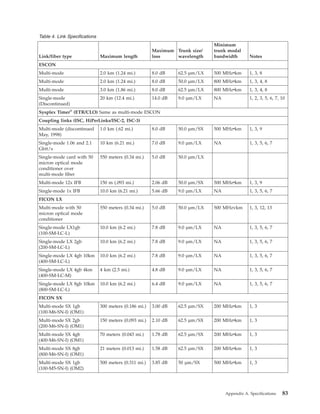
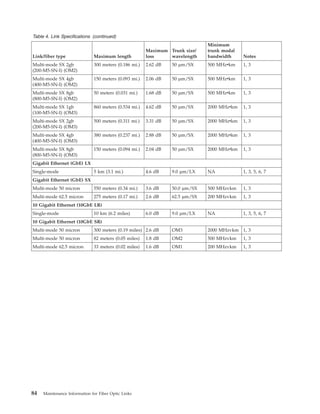
  • 10.
    v Appendix C,“Measuring Device Transmit and Receive Levels,” contains procedures on how to determine if the transmit and receive signals are within specification. Although these procedures are also contained in the maintenance information for each device, they are included here for convenience. v Appendix D, “Measurement Conversion Tables,” contains conversion tables from English measurements to metric and from metric measurements to English. v Appendix E, “Work Sheets,” provides work sheets that may be reproduced and used for problem determination or to provide a permanent account record. viii Maintenance Information for Fiber Optic Links

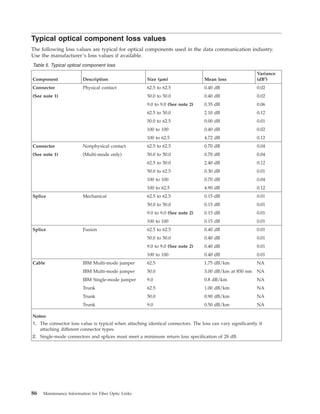
  • 11.
    Prerequisite publications Before youperform link problem determination using this publication, perform the maintenance procedures contained in the following publications: v Use Enterprise Systems Connection Link Fault Isolation, SY22-9533, to isolate ESCON link problems at a system level. v Use the applicable maintenance or service information publications for all ESCON devices installed on the link to determine proper operation of those devices. When this publication and other maintenance or service publications direct you to clean the fiber optic components, use the publication Fiber Optic Cleaning Procedures, SY27-2604. Where to find more information The following publications contain information related to the information in this publication: v Planning for Fiber Optic Channel Links, GA23-0367, provides information that can be used when planning for ESCON links. v Technical Service Letter No. 147 Fiber Optic Tools and Test Equipment (Revised 2/19/96 or later), contains a complete list of fiber optic support tools and test equipment. v Maintenance Information for the 9037 Model 002 Sysplex Timer, SY27-2641. Coupling links are designed to be optically compatible with the F0 or physical layer industry standard ANSI Fiber Channel Physical Interfaces (FC-PI-2), published by the American National Standards Institute, New York, NY. The open fiber control (OFC) timing for 531 megabits per second links follows this ANSI standard. The OFC timing for 1.0625 gigabits per second links uses the same timing as specified in the ANSI standard for 266 megabits per second links, which allows longer distances for gigabit links. How to send your comments Your feedback is important in helping to provide the most accurate and high-quality information. Send your comments by using Resource Link® at http://www.ibm.com/servers/resourcelink. Click Feedback on the Navigation bar on the left. You can also send an email to reslink@us.ibm.com. Be sure to include the name of the book, the form number of the book, the version of the book, if applicable, and the specific location of the text you are commenting on (for example, a page number, table number, or a heading). Accessibility This publication is in Adobe Portable Document Format (PDF) and should be compliant with accessibility standards. If you experience difficulties using this PDF file you can request a web-based format of this publication. Go to Resource Link at http://www.ibm.com/servers/resourcelink and click Feedback from the Navigation bar on the left. In the Comments input area, state your request, the publication title and number, choose General comment as the category and click Submit. You can also send an email to reslink@us.ibm.com providing the same information. When you send information to IBM, you grant IBM a nonexclusive right to use or distribute the information in any way it believes appropriate without incurring any obligation to you. About this publication ix | | | | |
  • 12.
    x Maintenance Informationfor Fiber Optic Links
  • 13.
    Chapter 1. Introductionto fiber optic links This chapter provides a brief introduction to fiber optic information transfer, lists the components that can be included in an IBM fiber optic channel link, and shows an example of a fiber optic channel link. For more information on fiber connectors and adapters, refer to http://rtpgsa.ibm.com/home/i/t/itstesc/web/ public. Unidirectional fiber optic information transfer Information transfer through an optical fiber usually occurs in only one direction by using a transmitter and a receiver (Figure 1). The transmitter accepts encoded digital information, converts it into an optical (light) signal, and sends it through the fiber. The receiver detects the optical signal, converts it into an electrical signal, and amplifies it. The decoded digital information (output) is then the same as the encoded digital information (input). Bidirectional fiber optic information transfer Fiber optic information transfer can also occur in two directions simultaneously (Figure 2). This method uses 2 optical fibers contained in 1 duplex fiber optic cable and combines the transmitter, receiver, and duplex receptacle functions into 1 transmitter-receiver subassembly (TRS) in each device. Figure 1. Unidirectional fiber optic Information transfer Figure 2. Bidirectional fiber optic Information transfer © Copyright IBM Corp. 1990, 2011 1
  • 14.
    Optical fiber elementsand optical cable Note that the term Fibre is used in the ANSI Fibre Channel Standard documents to denote both copper and optical fiber media. The fiber element within an optical cable usually consists of a core and a cladding (Figure 3). The core provides the light path, the cladding surrounds the core, and the optical properties of the core and cladding junction cause the light to remain within the core. Although the core and the cladding diameters, expressed in micrometers (µm), are often used to describe an optical cable, they actually indicate the physical size of the fiber element. For example, a fiber element having a core diameter of 62.5 µm and a cladding diameter of 125 µm is called 62.5/125 µm fiber. In an optical cable, the core and cladding are typically surrounded by other layers (such as a primary and secondary buffer), a strength member, and an outer jacket (Figure 3) that provide strength and environmental protection. Because information transfer usually occurs in only one direction through an optical fiber, various fiber types have been developed for different applications. The properties and specifications of an optical fiber determine many characteristics. For example, single-mode fiber (nominally about 9.0 µm) provides a single high-bandwidth information “path”. Single-mode fiber is normally used to transfer information over greater distances compared to multi-mode fiber (62.5 µm, for example), which provides multiple paths and has a lower bandwidth. The terms single-mode and multi-mode are often used interchangeably to describe both the optical fiber and the cable types. Generally, laser diodes use single-mode fiber to transmit information while light-emitting diodes (LEDs) use multi-mode fiber. An exception is the multi-mode coupling link, which uses a laser source and 50 micron multi-mode fiber. In a data processing environment using optical fiber, product, distance, and right-of-way considerations usually determine if single-mode or multi-mode fiber is used. Figure 3. Typical optical cable elements 2 Maintenance Information for Fiber Optic Links | | | |
  • 15.
    Optical cable connectors Opticalcable connectors allow manual coupling and uncoupling of the fibers but contribute to link attenuation (loss). Although several connector types have been developed to minimize this loss, all connectors can be classified as either physical-contact or nonphysical-contact connectors. Physical-contact connectors Physical-contact connectors, sometimes referred to as butt-coupled connectors, have a polished end-face surface with a slight outward (convex) curvature. When inserted into the receptacle, the fibers are precisely aligned and touch each other, thereby allowing maximum light transfer and minimum return loss. The IBM duplex connector (Figure 4 on page 4), the ST connector (Figure 6 on page 4), the Fiber Channel Connection (FICON) SC-duplex connector (Figure 7 on page 4), the FC connector (Figure 8 on page 5), the IBM FDDI connector, also known as a Media Interface Connector (MIC) (Figure 11 on page 5), the MT–RJ connector (Figure 12 on page 5) and the LC connector (Figure 13 on page 6) are types of physical-contact connectors. IBM duplex connectors, which combine the transmit and receive signals in one housing, provide high reliability and have low loss characteristics. They are keyed to provide correct orientation and use release tabs to prevent accidental removal. Some IBM duplex connectors and receptacles used for single-mode fiber have additional keying. This prevents the plugging of multi-mode IBM duplex connectors into IBM products having single-mode receptacles. The Fiber Channel Connection (FICON) SC-duplex connector is another type of connector which may be keyed to prevent accidental plugging of a multi-mode fiber into a single-mode receptacle, and to provide correct orientation to the TRS. The FDDI MIC connector uses special keys to provide correct orientation (Figure 11 on page 5). The MT–RJ connector has distinct male ends (with metal guide pins) and female ends (with guide holes). Only male to female connections will transmit optical signals. Since all MT–RJ transceivers have a male interface, only female jumper cables are required for most installations. For single-mode ESCON links, the SC-duplex connector may be used on both the transceiver receptacle and the fiber optic cable as an alternative to the single-mode ESCON connector and receptacle. The SC-duplex connector and receptacle are defined as part of the ANSI Fiber Channel Standard Physical and Signaling Interface (FC-PH) ref. X3T9.3/755D. The connector is shown in Figure 7 on page 4; it is the same connector which has been adopted for other industry standard data links including FICON, ATM, and low cost (LC) FDDI. For single-mode ESCON links, the transceiver receptacle and connector is gray and the optical fiber cable is yellow, conforming to the established color coding for single-mode ESCON channels. The SC-duplex receptacle and connector are keyed to prevent accidental plugging of a multi-mode fiber into a single-mode receptacle. All of the physical layer characteristics for the single-mode ESCON interface must still be maintained by transceivers and cables using this alternative interface. Chapter 1. Introduction to fiber optic links 3
  • 16.
    Nonphysical-contact connectors Nonphysical-contact connectorsdo not allow the fiber end-faces to touch. Because an air gap exists, these connectors typically have a higher interface loss compared to physical-contact connectors. The biconic connector used by IBM (Figure 9 on page 5), which is equivalent to AT&T part number 1006A, is an example of a nonphysical-contact connector. Figure 4. ESCON Duplex multi-mode Connector Figure 5. ESCON Duplex Single-mode Connector Figure 6. ST Physical-Contact Connector Figure 7. SC-Duplex Connector 4 Maintenance Information for Fiber Optic Links
  • 17.
    Figure 8. FCPhysical-Contact Connector Figure 9. Biconic Nonphysical-Contact Connector Figure 10. Multifiber Terminated Push-on Connector (MTP). Twelve fiber connector available on IBM Global Services trunk cables and harnesses. This connector is also used for 12x InfiniBand optical (IFB-O) cable but is referred to as an MPO connector. Figure 11. MIC (FDDI) Connector Figure 12. MT–RJ Connector Chapter 1. Introduction to fiber optic links 5
  • 18.
    Connector color coding IBMsimplex connectors use color-coding to show the direction that light travels through a link (see “Determining the direction of light propagation” on page 28). These connectors are black (or use a black marking) and white (or use a white marking). IBM duplex cable connectors use color-coding to differentiate between multi-mode and single-mode. multi-mode cables have black connectors and single-mode cables have gray connectors. They do not require color coding to determine the direction that light travels, or propagates, through the cable because the connectors are physically keyed. This provides proper orientation and allows the fibers to be labeled “A” and “B”, which is shown on the connector. See“Determining the direction of light propagation” on page 28. The FICON SC-duplex connector is an industry standard optical connector (as defined in ANSI Fiber Channel Standard Physical and Signaling Interface (FC-PH), published by the American National Standards Institute. Since it may be purchased from a variety of vendors, there is no consistent scheme of color coding or labeling the ends of a simplex cable with FICON SC connectors. These connectors can be identified by their shape (see Figure 7 on page 4) and the direction of light propagation must be verified from the vendor specifications. For IBM supplied cables, the single-mode FICON jumper has a yellow connector with grey clip and a yellow cable jacket, while the multi-mode has a blue connector with black clip and an orange jacket. This is the same color scheme used for ESCON connectors and cables. Figure 13. LC Duplex Connector 6 Maintenance Information for Fiber Optic Links
  • 19.
    IBM jumper cables Cablingis a customer responsibility. Single-mode fiber optic cabling (9/125 micrometer) has a yellow outer coating. multi-mode standard bandwidth fiber optic cabling (50/125 and 62.5/125 micrometer) has an orange outer coating. The OM3 50/125 micrometer multi-mode fiber optic cabling (2000 MHz-km) has and aqua outer coating. Note: A fiber optic link (device-to-device connection) must consist entirely of one type of fiber. It must be entirely single-mode, entirely standard multi-mode, or entirely OM multi-mode. The elements in an IBM duplex jumper cable (Figure 14) consist of 2 tight-buffered optical fibers (core and cladding) surrounded by a strength member, all of which are encased in a common flexible jacket. Duplex cables for coupling links (or ESCON XDF™ ) (Figure 15) are similar, except that they are not encased in a single jacket. Both single-mode and multi-mode jumper cables have a cladding diameter of 125 µm. Single-mode cable has a mode field diameter (MFD) of about 9 µm; multi-mode cable has a core diameter of either 62.5 µm or 50.0 µm. All IBM jumper cables have a duplex connector on one end, which attaches to a fiber optic channel link device. Attaching a jumper cable to a distribution panel, however, could require jumper cables with other connector types (see “Optical cable connectors” on page 3). IBM offers these jumper cables: v Single-mode and multi-mode applications: – Duplex-to-duplex jumper cables have an IBM duplex connector on both ends. – Duplex-to-duplex jumper cables have an FICON SC duplex connector on both ends. – Duplex-to-duplex jumper cables have an LC duplex connector on both ends. – Duplex-to-duplex jumper cable conversion kits: - IBM duplex receptacle on one end and an FICON SC duplex connector on the other end. - An LC connector on one end and a duplex receptacle on the other end. v Multi-mode applications only: – Duplex-to-biconic jumper cables have a pair of color-coded biconic connectors on one end and are available to support the 3044 Models C02 and D02. – Duplex-to-ST jumper cables have a pair of color-coded, physical-contact ST connectors on one end. – Duplex-to-FC jumper cables have a pair of color-coded, physical-contact FC connectors on one end. Figure 14. IBM duplex jumper cable elements Figure 15. Coupling Facility or ESCON XDF jumper cable elements. (Jumper cables which use FICON SC duplex connectors.) Chapter 1. Introduction to fiber optic links 7 | | | | | | | | | |
  • 20.
    – Duplex-to-unterminated jumpercables have an unterminated end (no connector) that allows the attachment of any connector type. – Duplex-to-duplex jumper cables with female MT–RJ on both ends. – Duplex-to-duplex jumper cables with male MT–RJ on both ends. – Adapter kits: - ESCON receptacle to female MT–RJ connector - ESCON connector to female MT–RJ connector Note: If a single-mode ESCON XDF link using the SC-duplex connector interface must be connected to a single-mode ESCON XDF connector interface, use the ESCON XDF Adapter Kit (46H9223). The kit consists of a 2-meter single-mode jumper cable with SC-duplex-to-ST connectors (46H9222) assembled to the single-mode ESCON-to-ST adapter. Instructions are provided with each kit. Trunk cable Fiber optic trunk cable is generally used for longer links, such as between floors or buildings. It should also be used in single-floor fiber optic channel link environments when many jumper cables and connections are required. If trunk cable is used, distribution panels must provide the hardware used to attach the IBM jumper cables. A trunk cable typically contains from 12 to 144 fibers and has a strength member and an outer jacket. Each fiber optic channel link requires trunk fibers. The physical trunk cable configuration varies and depends on user requirements, environmental conditions, and the type of installation required (for example, above ground or underground). Splices Fiber optic trunk cables can be joined by two splicing methods. Either method, when performed by a trained technician using high-quality materials, can produce a splice having a very low optical power loss. v Fusion splices are joined by an electric arc. v Mechanical splices are joined within a holder and sometimes use epoxy to bond the fibers. Distribution panels Many types of distribution panels exist. They are available in various sizes and styles and are called different names, depending primarily on their application or use. For example, they can be called central distribution panels, main distribution panels, zone panels, patch panels, building interface panels, enclosures, or cabinets. In a fiber optic channel link, they provide the hardware attachment capability between trunk cables and IBM jumper cables. They can also be used for floor-to-floor cable connections within a building or for connections between buildings. For more information about distribution panel requirements, contact your IBM marketing representative. Couplers and adapters Distribution panels must provide couplers or adapters to allow attachment of IBM jumper cables. Couplers join the same connector types, while adapters join different connector types. The following couplers and adapters, available from IBM, are shown in Figures Figure 16 through Figure 23. Other types of adapters for patch panels may be available as RPQs, including the FICON SC-duplex-to-ST adapter. A conversion kit is available to adapt an FICON duplex interface to an ESCON duplex interface. v IBM duplex coupler v ST coupler v FC/PC coupler v MT–RJ duplex coupler (joins male to female MT–RJ) 8 Maintenance Information for Fiber Optic Links
  • 21.
    v LC duplexcoupler v IBM duplex-to-ST adapter v IBM duplex-to-FC/PC adapter v FICON SC-duplex-to-ST adapter v FICON SC-duplex-to-FC adapter v FICON SC-duplex-to-duplex coupler v MTP-to-MTP coupler v MIC coupler v MIC-to-ST adapter v MIC-to-FC adapter Note: IBM recommends using IBM duplex-to-duplex jumper cables between ESCON-capable devices and distribution panels, FICON SC-duplex-to-duplex jumper cables between coupling link devices and distribution panels, and IBM duplex-to-ST or IBM duplex-to-FC/PC adapters in distribution panels. Other adapters for patch panels may be available as RPQs. Figure 16. IBM Duplex Coupler Figure 17. ST Coupler Figure 18. FC/PC Coupler Chapter 1. Introduction to fiber optic links 9 | | | | |
  • 22.
    Figure 19. IBMDuplex-to-ST Adapter Figure 20. IBM Duplex-to-FC/PC Adapter Figure 21. FICON SC-Duplex-to-ST Adapter Figure 22. FICON SC-Duplex-to-FC Adapter Figure 23. FICON SC-Duplex-to-Duplex Coupler 10 Maintenance Information for Fiber Optic Links
  • 23.
    Figure 24. MTP-to-MTPCoupler Figure 25. MT-RJ Coupler Figure 26. LC Coupler Figure 27. FICON-ESCON Kit ST MT-RJ Figure 28. MT-RJ-to-ESCON Kit Chapter 1. Introduction to fiber optic links 11
  • 24.
    SC LC Figure 29.LC-to-FICON Kit 12 Maintenance Information for Fiber Optic Links
  • 25.
    Mode conditioning patchcables In some fiber optic applications, it is possible to use a long wavelength (1300 nm) single-mode transceiver with multi-mode fiber by placing a special device known as a mode conditioning patch (MCP) cable at both ends of the link. The MCO cable resembles a standard 2 meter jumper cable. As shown in Figure 30, the MCP is unique. It contains both single-mode and multi-mode fibers in a single jumper cable assembly. Without the MCP, it is not possible to use a single-mode transceiver with multi-mode fiber because the laser source does not launch an equal amount of optical power into all modes of the fiber. Using a single-mode transceiver with multi-mode fiber without an MCP cable leads to excessive dispersion of the data pulses, and the link will not function. IBM supports reuse of existing multi-mode fiber optic cabling with Long Wavelength (LX) transceivers, as a migration aid, if the link data rate does not exceed 1 Gbps. MCP cables are supported for use with ISC-3 links, Gigabit Ethernet LX, and FICON LX, provided the link data rate is 1 Gbps. The unrepeated distance is limited to 550 meters (1,804 feet). Clip, gray Strain Relief, blue Strain Relief, beige Bulk Cable, yellow, PN 54G3420 Bulk Cable, orange, PN 54G3405 (or low halogen equivalent) Shrink Tubing (2x), Black P3 P2 P1 MCP Unit Label Detail Figure 30. Mode Conditioner Patch Cable (MPC). Connections P2 and P3 may be terminated with either an SC duplex or an ESCON duplex coupler. Connector P1 is available in either an SC duplex or LC duplex connector. Chapter 1. Introduction to fiber optic links 13
  • 26.
    Splitter tool An opticalsplitter is used to measure optical power levels in a coupling facility. The optical splitter tool is shown in Figure 31 for multi-mode links and Figure 32 for single-mode links. Refer to “Isolating link segments using the splitter tool” on page 107 for more information. Figure 31. Optical splitter tool for multi-mode links Figure 32. Optical splitter tool for single-mode links 14 Maintenance Information for Fiber Optic Links
  • 27.
    Fiber optic channellink configuration Note: IBM offers help in the planning, design, and installation of fiber optic channel links through its Connectivity Services offering (Fiber Transport System) of IBM Global Services. For more details, contact your IBM marketing representative. Also, the IBM Fiber Transport Services (FTS) offering provides planning assistance, commodities, and installation for multi-mode and single-mode fiber trunk systems. Fiber optic channel links, which require separate optical fibers for sending and receiving information, use IBM duplex or FICON duplex connectors, duplex jumper cables, and 2 trunk fibers. A fiber optic channel linkcould consist of only 1 jumper cable that connects devices, or it could have many cables, distribution panels, adapters, couplers, and connectors. Parallel Sysplex® using InfiniBand (PSIFB) 12x links use InfiniBand optical (IFB-O) 12x cables which package 12 fibers for transmit and 12 fibers for receive. The IFB-O 12x cables utilize the Multi-fiber Push-On (MPO) connector. Regardless of the number of cables and components, a fiber optic channel link attaches 2 devices and must consist entirely of either single-mode or multi-mode cables. Figure 33 shows an example of a fiber optic channel link having: v Two IBM duplex-to-duplex jumper cables v Two distribution panels, each containing an IBM duplex-to-ST adapter v Four ST connectors v Two trunk cable fibers v Four trunk cable splices Important IBM duplex-to-duplex jumper cables should be used between ESCON devices and distribution panels, FICON SC duplex-to-duplex jumper cables should be used between coupling link devices and distribution panels, and IBM duplex-to-ST, or IBM duplex-to-FC adapters should be used in distribution panels. In an OSA link (FDDI, ATM, GbE, or 10GbE) environment, a link consists of the physical connection between the TRS of one device and the TRS of another device. Figure 33. Example of components in a fiber optic channel link. Chapter 1. Introduction to fiber optic links 15 | | | |
  • 28.
    An FDDI linkcan consist of one access station connected to a concentrator, or a concentrator connected to a concentrator on a dual access counter-rotating ring (other point-to-point configurations are also possible). Individual FDDI access stations are electronically made into logical rings at the concentrator. Concentrators with counter-rotating rings also have the connections managed electronically. The physical FDDI connection, however, is handled by placing primary out and secondary in into one MIC housing and primary in and secondary out in the other MIC housing. Figure 34 shows a possible FDDI link employing a device-to-concentrator connection. Links other than FDDI may not use concentrators or hubs, but will usually run to switches or distribution panels. Figure 34. Components in a typical link 16 Maintenance Information for Fiber Optic Links
  • 29.
    FDDI service limitations Thefollowing paragraphs describe limitations that could exist while servicing FDDI links; they do not apply to other types of fiber optic links. Jumper cable The FDDI specifications for connector design are not specific enough to guarantee that every FDDI connector will work with every product under all conditions. IBM recommends the use of IBM jumper cables with IBM products to meet FDDI specifications and to ensure performance expectations. Some jumper cables used with IBM products might not yield the correct amount of launched power. An Original Equipment Manufacturer (OEM) product might use a jumper cable other than IBM’s for the same reason. Note: The amount of power launched from the device into the fiber is affected by the connector-to-device interface and the fiber size. IBM jumper cables can be directly connected to an OEM device and measurements will be accurate if the device manufacturer has specified IBM jumper cables as acceptable. Other measurements at any connection in the link or the end-to-end link loss measurement are not subject to this condition. Link bandwidth An FDDI multi-mode link can be limited by dispersion instead of attenuation. Link length, fiber type, fiber specifications, transmitter spectral width, and transmitter center wavelength are factors that have the potential to produce FDDI link errors. This potential can exist even if all factors are within the FDDI specifications. However, if the link is 2 km or less and consists of optical fiber that is 500 MHzvkm at 1300 nm or better, excessive attenuation, not dispersion, is the most probable cause of the problem. Note: Optical bypass switches, although permitted in the FDDI standard, make the link longer. This can cause a link to become inoperative due to dispersion, even if attenuation is within specification. Link error conditions There are 2 basic types of link error conditions: v A link failure occurs when the receiver does not detect a signal, which is usually caused by a: – Weak or defective transmitter or receiver – Defective jumper cable – Dirty or misplugged connector – Defective or misplugged segment of the optical fiber cabling. v A link error occurs when the status of one or more bits has changed, which is usually caused by: – A weak transmitter or receiver – A dirty or misplugged connector – A dirty transmitter-receiver subassembly – An incorrect transmitter-to-receiver relationship – Excessive link attenuation – Dispersion of the link signal. Link error analysis Because dispersion is not usually measured in the field, it is important to determine if attenuation is the most likely cause of a link failure. Therefore, analyze the failing link environment before proceeding with fault isolation. The following questions can help isolate the error when performing link failure analysis. v What is the status of similar links and devices? v Are there any substitute devices? Chapter 1. Introduction to fiber optic links 17
  • 30.
    v Are thereany spare optical fiber pairs? v Is this the first time that the failing link or links have been used? v Has this cabling combination been used before? v If it is an FDDI link, has an optical bypass switch been installed in the link? v Has this cabling combination been used for another application that had a different wavelength? v Is the cabling plant a new installation? v Was the cabling plant installed to support an ESCON, ATM, FICON, or FDDI environment? v Was the cabling plant installed over a period of time? v Was the cabling plant previously used to support other applications? v Is there a mixture of fiber types within the cabling plant? v Is there a mixture of fiber types within the same distribution panel? v Is there a mixture of applications using the same distribution panel? v Is this the first time that part of the cabling plant was configured in the link? v Are the cabling plant lengths and specifications available? Examples of link error analysis The following examples show how experience and good diagnostic judgment can aid in error analysis for a link environment. v The failing link uses the same cabling components, has approximately the same length, and attaches the same device types as another link that is currently operational. It is most likely that attenuation, not dispersion, caused the link error. v The failing link operates correctly when a substitute device is attached. Again, attenuation is probably the cause of the error. v The failing link operates correctly when substitute link components (spare or backup cables) are used. Attenuation is usually the cause of the error. v All links with this configuration are failing. If attenuation measurements are within specifications, the length of the link and optical fiber specifications should be checked. v The failing link has never been used before. The length of the link and optical fiber specifications should be checked if attenuation measurements are within specifications. v The failing link is the only link in this location. If attenuation measurements are within specifications, the length of link and fiber plant specifications should be checked. v The failing link was previously used for an entirely different type of system. If a customer determines that the link was optimized for an application employing a wavelength other than 1300 nm, then excessive dispersion could be the cause of the error. Dispersion Under some conditions (in an FDDI link only), it is difficult to determine if the most probable cause of an error is attenuation or dispersion (for example, a link of 2.1 km with an attenuation of 11.3 dB). Because dispersion testing is an expensive procedure, it might be more cost-effective for the customer to reconfigure the link or replace the fiber rather than determine the exact cause of the failure. The following items can aid in this analysis: v Customer records of the measurements done by cabling installation personnel can be checked. These records often include attenuation measurements from a power meter, as well as a copy of Optical Time Domain Reflectometer (OTDR) data. v It is possible that a given pair of attached devices meets FDDI specifications because of a “hot” transmitter and a sensitive receiver. This combination could allow satisfactory operation for a specific link, but the individual link components are still not within specifications. This combination is not possible under the ATM or FICON specification. 18 Maintenance Information for Fiber Optic Links
  • 31.
    v Similarly, aweak transmitter and receiver pair could meet FDDI specifications but still not operate correctly on the link. Chapter 1. Introduction to fiber optic links 19
  • 32.
    20 Maintenance Informationfor Fiber Optic Links
  • 33.
    Chapter 2. ServiceStrategy and Maintenance Activities This chapter summarizes the service strategy and activities associated with Fiber Optic Channel link installation, maintenance, problem determination, verification, repair, and testing. See Chapter 3 for specific maintenance procedures. Additional services, including design, installation connectivity, and link restoration are available through the IBM Global Services offering. Link problem determination summary Service representatives can use either the maintenance analysis procedures (MAPs) or a “fast-path” method to perform problem determination, and return a link to operational status for ESCON links. For coupling links, only the Fast-Path method may be used because these links use a different type of laser safety control that does not permit use of the MAPs. This problem determination also includes IBM jumper cables. Both procedures consist of measuring the end-to-end link loss (attenuation) using an optical source and a power meter. Since the safety controls for the coupling links do not permit the laser to remain operational when the link is open, the device transmitter must be used along with an optical splitter to measure the end-to-end link loss. See Appendix B, “Tools, Test Equipment, and Parts,” on page 87 for the part numbers of all service tools, materials, and test equipment. Link service activities The following paragraphs summarize the link activities performed by service representatives. Installation activities Service representatives install and connect IBM jumper cables to devices and distribution panels. For installations that use connectors or cables other than those supported by IBM, IBM Marketing and Services must provide recommendations to the customer and to IBM planning and service personnel. Repair activities Service representatives perform either major or minor repair actions: v A major repair action consists of replacing an IBM jumper cable. v A minor repair action consists of replacing the spring and connector shroud on the IBM duplex connector. Test activities Service representatives also perform test activities on IBM fiber optic cables and components. For non-IBM components, the customer must provide test cables and adapters. IBM will perform activities relating to these components, but this service could be billable. Link training topics The base level of link training for IBM CEs includes: v Basic fiber optic theory v Light budget concepts v General link commodities information v Link loss calculations © Copyright IBM Corp. 1990, 2011 21 | | | | | | | | | |
  • 34.
    v Link operationalcharacteristics v Fiber optic cable handling and cleaning procedures v Power meter and light source usage procedures v Basic fiber optic test procedures v Problem determination for a major link component v Minor repair of the IBM duplex connector. Keying and installing an IBM FDDI connector This section describes how to install FDDI keys and labels. It also lists some potentially serious cabling errors and explains the keying techniques that could prevent these errors. (LC FDDI, FICON and ATM do not use these keying methods.) Note: Retain all protective covers and unused keys. When connectors and receptacles are not being used, all protective covers should be installed because dirt can cause excessive loss and prevent correct operation of the link. Using FDDI cable keying can also prevent system cabling defects that are difficult to detect and diagnose. Three serious defects are: v The reversal of a dual-attachment station within the ring trunk such that what was intended to be the A connection is the B, and what was intended to be the B connection is the A. This causes the station media access controls (MACs) to be inserted in the opposite position of the intended trunk ring. v The connection of a single attachment station directly to the trunk ring by connecting it to either an A or B receptacle. This results in a break in the trunk ring. v The connection of the M receptacle of a concentrator directly into the trunk ring by connecting it to either an A or B receptacle. This also results in a break in the trunk ring. IBM FDDI connector keys The FDDI standard specifies four types of keyed connectors and receptacles: A, B, M, and S. Three field-installable key inserts and four color-coded labels are provided with each connector: v Port A — Red key and red label v Port B — Blue key and blue label v Master — Green key and green label v Slave — No key and white label. Each connector assembly comes with a set of color-coded labels to identify a keyed connector after it has been inserted in a receptacle. To position the label on the connector, select the label that matches the key type being used. White labels identify the Slave (S) connector, which does not have a separate key. Position the label on the back of the connector. See Table 1. Note: Without a key installed, the connector can be inserted in any type of FDDI receptacle. Correct keying is recommended to avoid installation errors and to provide efficient cable management. Table 1. IBM recommendations for keying FDDI networks Connection Key type Workstation to wall S / S Distribution panel to Concentrator M port M / M Distribution panel to Concentrator A port A / A Distribution panel to Concentrator B port B / B Concentrator A to Concentrator M port A / M Concentrator B to Concentrator M port B / M Concentrator 1A to Concentrator 2B port A / B 22 Maintenance Information for Fiber Optic Links
  • 35.
    Table 1. IBMrecommendations for keying FDDI networks (continued) Connection Key type Concentrator 1B to Concentrator 2A port B / A Workstation to Concentrator M port S / M Installing the key To install a key: 1. Remove the selected color-coded key from the protective cover of the connector. 2. Insert the tab on the key in the slot on the top of the connector. 3. Push firmly on the key until it snaps into place. Removing the key To remove a key: 1. Insert the tip of a paper clip or narrow mechanical pen into the small hole in the bottom of the connector. 2. Push firmly until the key pops out of its locked position. 3. Put the key in the protective cover attached to the connector. Cleaning the connector The connector should be cleaned before inserting it in the receptacle to avoid possible contamination from dirt and dust particles. Refer to Fiber Optic Cleaning Procedures, SY27-2601. Installing and removing the connector Insert the connector by pushing it into the receptacle until it clicks into place. Do not force the connector. If it binds, make sure that the receptacle and connector keys are aligned and that they are of the same type. To remove the connector from the receptacle, simply pull back on the connector housing. Replace all protective covers on the connector and the receptacle to avoid contamination or damage. Chapter 2. Service Strategy and Maintenance Activities 23
  • 36.
    Typical link configurations Toperform problem determination, a fiber optic channel link should be considered as one of the following configurations: v One jumper cable between 2 devices (Figure 35) v Two jumper cables connected through 1 distribution panel (Figure 36) v Two jumper cables, each connected to a distribution panel, and a trunk cable (Figure 37). Note: The trunk cable in this configuration could be a short length of fiber optic cable (within a single distribution panel) that joins the 2 jumper cables. Figure 35. Link configuration 1 consisting of 1 jumper cable between 2 devices Figure 36. Link configuration 2 consisting of 2 jumper cables and 1 distribution panel Figure 37. Link configuration 3 consisting of 2 jumper cables, a trunk cable, and 1 or 2 distribution panels 24 Maintenance Information for Fiber Optic Links
  • 37.
    FDDI links connectdevices in logical rings, but are physically connected in a star configuration. Devices could contain only a single pair of fibers, such as a device to a concentrator. Critical devices, such as concentrators, contain 2 pairs of fibers formed into counter-rotating rings. From this description, a concentrator would contain multiple single-station interfaces to multiple devices and a pair of interfaces to possibly another concentrator. It is likely, therefore, that several devices within a rack would be connected by jumpers only within an equipment closet, whereas 2 ports would exit the closet on counter-rotational links to other concentrators. Other fiber optic links may be configured in a wide variety of ways, including star and ring configurations. Figure 38 shows a closet-connected concentrator. Figure 38. Link configuration–—2 jumper cables in a counter-rotating ring Chapter 2. Service Strategy and Maintenance Activities 25
  • 38.
    Common link failures Beforeperforming problem determination, you should consider the following failure possibilities, which are typical during and after installation. If the problem, symptom, or condition exists, perform the action suggested. v For a “no-light” condition during an installation or after a reconfiguration, the link could have 2 device transmitters connected rather than having each transmitter connected to a receiver. Make sure an odd number of link crossovers exists. See “Determining the direction of light propagation” on page 28 for more detailed information. If jumper cables with FICON SC-duplex connectors are provided by a vendor other than IBM, consult the vendor’s specifications to determine the correct direction of light propagation. After determining that a “no-light” condition exists and with the optical source and power meter attached, swap the biconic test cable connectors on the power meter. If the “no-light” condition disappears, the link is not properly connected. v The quality and cleanliness of connections can be a large source of loss. Check for dirty or broken connectors at the devices and distribution panel(s). These problems can be found by isolating each link segment. See the publication Fiber Optic Cleaning Procedures, SY27-2604, and use the supplies contained in the fiber optic cleaning kit (IBM part number 5453521). v Patch cords (used to attach 1 distribution panel position to another) can cause additional link loss in a configuration using multiple distribution panels. Isolating each link segment can determine if the IBM jumper cables are within specifications. v Device distance limitations exist. If I/O overruns or timeouts occur, check the distance specifications of the I/O device. v Link distance limitations also exist. See Table 4 on page 83 for maximum link lengths. 26 Maintenance Information for Fiber Optic Links
  • 39.
    FICON Express8 fiberoptic cable requirements The FICON Express8 10KM LX and SX features utilize the latest high bandwidth Fibre Channel technology and autonegotiate to 8 Gbps, 4 Gbps, or 2 Gbps based on the link data rate capability of the attached transceiver. Negotiation to 1 Gbps is not supported. The FICON Express8 features utilize the existing single mode and multi-mode cable plants. However, the 8 Gbps channel is more sensitive to the condition of the cable plant. The cable plant must satisfy the industry standard specification to minimize connector reflections and maintain link loss budget specification... It is highly recommended that the fiber optic link be thoroughly analyzed to ensure the cable plant specifications (total cable plant optical loss as well as connectors/splices return loss) are being met for that link length. For example, the Fibre Channel standard requires all connectors and splices to have a return loss greater than 26 dB as measured by the methods of IEC 61300-2-6. The most common source of cable plant optical link problems is associated with the various connections and splices in the optical link. Dust, dirt, oil or defective connections may cause a problem with high speed channels, such as 8 Gbps, whereas, lower link data rates, such as 1, 2, or 4 Gbps may be unaffected. If you are experiencing excessive bit errors, it is recommended that you first clean and reassemble the connections, using the IBM Fiber Optic Cleaning Procedure (SY27-2604). The document includes the procedure and materials required. The cleaning is best performed by skilled personnel. The cleaning procedure may need to be performed more than once to ensure all dust, dirt, or oil is removed. Chapter 2. Service Strategy and Maintenance Activities 27
  • 40.
    Determining the directionof light propagation Before performing problem determination, an understanding of light travel (propagation) is necessary to allow measurement of: v Transmit levels v Receive levels v End-to-end link loss The transmitter (output) of each Fiber Optic Channel link device propagates light to the receiver (input) of the next device. For this to occur, an odd number of physical crossovers must exist for each fiber. Figure 39 on page 29 shows the direction of light propagation through an IBM jumper cable, which is keyed to maintain this crossover requirement. Figure 39 on page 29 also shows that an IBM duplex connector has A and B embossed on the plastic housing and that IBM’s biconic, ST, and FC connectors are color-coded. v For IBM duplex-to-duplex jumper cables, the transmit signal enters 1 connector at B and exits the other connector at A. v For IBM duplex-to-biconic, duplex-to-ST, and duplex-to-FC jumper cables, the transmit signal enters the duplex connector at B and exits the other end at the black connector. Figure 40 on page 29 shows three examples of physical fiber connections that satisfy the crossover requirement for device-to-device attachment. Notes: 1. In a Fiber Optic Channel environment containing duplex-to-duplex jumper cables and a trunk cable, the trunk must incorporate a crossover. 2. Fiber Optic Cables using FICON SC-duplex connectors obtained from vendors other than IBM may not have a built-in crossover or be labeled according to the conventions above. Consult the manufacturer’s specifications. 3. The coupling facility link is serviced using either the multi-mode splitter tool (IBM part number 54G3426) or the single-mode splitter tool (54G3427). These splitters may be inserted anywhere in an operating link without affecting link functions. 4. IBM’s biconic, ST, and FC connectors are color-coded (white and black). The MIC duplex connector has the letters R and T embossed on the plastic housing. 5. Industry standard color coding for single-mode links is a yellow cable jacket with a blue duplex connector; multi-mode links use an orange cable jacket with a beige duplex connector. Not all connectors will conform to these color coding standards. 28 Maintenance Information for Fiber Optic Links
  • 41.
    Figure 39. Determiningthe direction of light propagation in IBM jumper cables (ESCON connectors are shown in this figure). Figure 40. Determining the direction of light propagation in fiber optic channel links. Chapter 2. Service Strategy and Maintenance Activities 29
  • 42.
    Link verification summary Linkverification ensures that a link meets IBM specifications, thereby allowing attachment of Fiber Optic Channel devices. Verifying a link requires using an optical source to transmit a signal through the link and a power meter to measure this signal at the other end. For multi-mode links, an optical mode conditioner (OMC) tool provides consistent power loss measurements. Before you begin link verification, you need the following information: v Link distance. v Link bandwidth (multi-mode only). v Link documentation, such as a link diagram, schematic, or blueprint, and link performance data, such as trunk cable data sheets or operational test results. Also, the customer must provide the necessary documentation and specifications for the premises and external trunk cables if installed. You can also use the Cable Administration Work Sheet, SX23-0415, to record the required link information. Figure 66 on page 80 shows an example of a completed worksheet. Link verification consists of (1) calibrating the test equipment, (2) obtaining reference levels, and (3) substituting a link cable for a test cable to obtain the loss measurements. This measured loss should be less than the maximum allowable link loss. The amount of loss introduced by the link depends on the jumper cable length(s), the trunk cable length and specifications, and the number and type of link splices and connectors. To perform link verification, follow the step-by-step procedures described in “Link problem determination using MAPs” on page 33. 30 Maintenance Information for Fiber Optic Links
  • 43.
    Chapter 3. ProblemDetermination Procedures This chapter contains link problem determination that can be performed by using either the maintenance analysis procedures (MAPs) or the “fast-path” method. The procedure you use depends on the amount of guidance you require and the type of link you are servicing. v Use the MAPs and follow the step-by-step instructions to perform link problem determination, link verification, and jumper cable verification. v Use the fast-path method (see “Link problem determination using the fast-path method” on page 51) if you know how to perform Fiber Optic Channel link problem determination and do not want to use the MAPs, or if you are working on a coupling link. Notes: 1. The MAPs use the optical mode conditioner (OMC) tool for multi-mode ESCON link measurements; the fast-path method does not. 2. The MAPs use the term simplex when referring to non-duplex connectors or connections such as ST, FC, or biconic. Most figures, however, show only biconic or duplex components. 3. Before beginning this section, network problem determination should have isolated the problem to a specific link and device maintenance procedures should have been completed. 4. An optical power meter reading LO indicates that no light has been detected by the meter. There are several possible causes for this condition: v A jumper cable is either unplugged or plugged in the wrong direction. v A jumper cable terminated with simplex connectors could be plugged as transmit-to-transmit and receive-to-receive instead of transmit-to-receive. v The entire link does not have an odd number of crossovers. v A link component is damaged and a connector or coupler has failed. Start link problem determination During fiber optic channel link problem determination, the devices at each end of the link are identified as device 1 and device 2. Always refer to the device where you start these procedures as device 1. Problem determination consists of measuring the link at specific points. These measured values are then compared to acceptable or maximum values to determine if the link loss is within specifications. Table 2 on page 34 and Table 3 on page 36 contain these values for the MAP procedures; Table 8 on page 118 contains the fast-path values. If it is determined that a device transmitter or receiver is not within specifications and the device is maintained by IBM, replace the transceiver card according to the device maintenance procedure and verify correct link operation. If the device is not maintained by IBM, inform the customer that the transceiver is out of specification and that this is the probable source of the error, then return to the IBM device that generated the call and follow its maintenance procedures for end of call. If the problem still exists after replacing the transceiver card, go to “MAP 0300: Start” on page 32 to perform link problem determination or verification. Go to “MAP 0300: Start” on page 32 to perform link problem determination or verification. © Copyright IBM Corp. 1990, 2011 31 | | |
  • 44.
    MAP 0300: Start 001 Doyou want to use the maintenance analysis procedures (MAPs) to perform link problem determination or verification? Note: You must use the fast path procedures if you are working on coupling links. If yes go to step 3. If no, continue with the next step. 002 Go to “Link problem determination using the fast-path method” on page 51 003 Go to “Link problem determination using MAPs” on page 33 32 Maintenance Information for Fiber Optic Links |
  • 45.
    Link problem determinationusing MAPs Begin at “MAP 0310: Testing a link” on page 37 to perform step-by-step problem determination or verification of a link segment or component. Before you begin, see “Common link failures” on page 26 for additional information. Chapter 3. Problem Determination Procedures 33
  • 46.
    Table 2. Maximumlink loss with optical source tool as a transmitter (at 1300 nm) Link/Fiber type Maximum loss Maximum length Trunk size ESCON Multi-mode 7.0 dB (Note 1) 2.0 km (1.24 miles) 62.5 µm (500 MHzvkm) Multi-mode 6.5 dB (Note 1) 2.0 km (1.24 miles) 50.0 µm Multi-mode 7.0 dB (Note 1) 3.0 km (1.86 miles) 62.5 µm (800 MHzvkm) Single-mode (discontinued) 14.0 dB 20 km (12.4 miles) 9 to 10 µm Coupling Links Single-mode 1.06 Gbps or 2.1 Gbps 7.0 dB 10 km (6.2 miles) 9 to 10 µm Single-mode card with 50 micron optical mode conditioner over multi-mode fiber 5.0 dB 550 meters (0.34 miles) 50.0 µm FDDI Multi-mode (discontinued) 9.0 dB 2.0 km (1.24 miles) 62.5 µm ATM Multi-mode (discontinued) 11.0 dB 2.0 km (1.24 miles) 62.5 µm Single-model (discontinued) 15.0 dB 20.0 km (12.4 miles) 9 to 10 µm FICON Multi-mode with 50 micron optical mode conditioner on an LX link 5.0 dB 550 meters (0.34 miles) 50.0 µm (Note 3) Multi-mode with 62.5 micron optical mode conditioner on an LX link 5.0 dB 550 meters (0.34 miles) 62.5 µm (Note 3) Single-mode LX 1gbps (100-SM-LC-L) 7.8 dB 10 km (6.2 miles) 9 to 10 µm Single-mode LX 2gbps (200-SM-LC-L) 7.8 dB 10 km (6.2 miles) 9 to 10 µm Single-mode LX 4gbps 10km (400-SM-LC-L) 7.8 dB 10 km (6.2 miles) 9 to 10 µm Single-mode LX 4gbps 4km (400-SM-LC-M) 4.8 dB 4 km (2.5 miles) 9 to 10 µm Single-mode LX 8gbps 10km (800-SM-LC-L) 6.4 dB 10 km (6.2 miles) 9 to 10 µm Multi-mode SX 1gbps (100-M6-SN-I) 2.76 dB 250 meters (0.155miles) 62.5 µm (160 MHzvkm) Multi-mode SX 2gbps (200-M6-SN-I) 1.98 dB 120 meters (0.075 miles) 62.5 µm (160 MHzvkm) Multi-mode SX 4gbps (400-M6-SN-I) 1.72 dB 55 meters (0.034 miles) 62.5 µm (160 MHzvkm) Multi-mode SX 1gbps (100-M6-SN-I) 3.00 dB 300 meters (0.186 miles) 62.5 µm (200 MHzvkm) Multi-mode SX 2gbps (200-M6-SN-I) 2.10 dB 150 meters (0.093 miles) 62.5 µm (200 MHzvkm) Multi-mode SX 4gbps (200-M6-SN-I) 1.78 dB 70 meters (0.043 miles) 62.5 µm (200 MHzvkm) Multi-mode SX 8gbps (800-M6-SN-I) 1.58 dB 21 meters (0.013 miles) 62.5 µm (200 MHzvkm) Multi-mode SX 1gbps (100-M5-SN-I) 3.85 dB 500 meters (0.311 miles) 50 µm (500 MHzvkm) 34 Maintenance Information for Fiber Optic Links |
  • 47.
    Table 2. Maximumlink loss with optical source tool as a transmitter (at 1300 nm) (continued) Link/Fiber type Maximum loss Maximum length Trunk size Multi-mode SX 2gbps (200-M5-SN-I) 2.62 dB 300 meters (0.186 miles) 50 µm (500 MHzvkm) Multi-mode SX 4gbps (400-M5-SN-I) 2.06 dB 150 meters (0.093 miles) 50 µm (500 MHzvkm) Multi-mode SX 8gbps (800-M5-SN-I) 1.68 dB 50 meters (0.031 miles) 50 µm (500 MHzvkm) Multi-mode SX 1gbps (100-M5-SN-I) 4.62 dB 860 meters (0.534 miles) 50 µm (2000 MHzvkm) Multi-mode SX 2gbps (200-M5-SN-I) 3.31 dB 500 meters (0.311 miles) 50 µm (2000 MHzvkm) Multi-mode SX 4gbps (400-M5-SN-I) 2.88 dB 380 meters (0.236 miles) 50 µm (2000 MHzvkm) Multi-mode SX 8gbps (800-M5-SN-I) 2.04 dB 150 meters (0.093 miles) 50 µm (2000 MHzvkm) Gigabit Ethernet (GbE) LX Multi-mode with 50 micron optical mode conditioner 2.4 dB 550 meters (0.340 miles) 50 µm Multi-mode with 62.5 micron optical mode conditioner 2.4 dB 550 meters (0.340 miles) 62.5 µm Single-mode 4.6 dB 5 km (3.1 miles) 9 to 10 µm Gigabit Ethernet (GbE) SX Multi-mode 50 micron 3.6 dB 550 meters (0.34 miles) 50 µm Multi-mode 62.5 micron 2.6 dB 275 meters (0.17 miles) 62.5 µm 10 Gigabit Ethernet (10GbE) LR Single-mode 6.2dB 10 km (6.2 miles) 9 to 10 µm Parallel Sysplex using InfiniBand 1x IFB 5.66 dB 10 km (6.2 miles) 9 to 10 µm 12x IFB 2.06 dB 150 meters (0.93 miles) 50 µm Notes: 1. This value does not include the higher-order-mode loss because the MAPs use the OMC tool for multi-mode link measurements. 2. Multi-mode coupling links operate at wavelengths of 770 - 850 nm; their maximum distance is 1 km (0.62 miles) using 50 micron fiber, with a maximum allowable loss of 3 dB/km measured at 850 nm. 3. The use of MCP cables is not supported over 1 gb. Chapter 3. Problem Determination Procedures 35
  • 48.
    Table 3. MaximumIBM jumper cable attenuation (including connectors) Fiber type Cable length in meters (ft.) Maximum loss ESCON, ATM, FICON LX, FDDI, GbE LX Multi-mode 4 to 85 (12 to 279) 1.0 dB at 1300 nm Multi-mode 86 to 143 (280 to 469) 1.1 dB at 1300 nm Multi-mode 144 to 200 (470 to 656) 1.2 dB at 1300 nm Multi-mode 201 to 257 (657 to 843) 1.3 dB at 1300 nm Multi-mode 258 to 314 (844 to 1030) 1.4 dB at 1300 nm Multi-mode 315 to 371 (1031 to 1217) 1.5 dB at 1300 nm Multi-mode 372 to 428 (1218 to 1404) 1.6 dB at 1300 nm Multi-mode 429 to 485 (1405 to 1591) 1.7 dB at 1300 nm Multi-mode 486 to 500 (1592 to 1640) 1.75 dB at 1300 nm Coupling link, FICON SX, GbE SX Multi-mode 4 to 50 (12 to 164) 1.0 dB at 850 nm Multi-mode 51 to 117 (165 to 384) 1.2 dB at 850 nm Multi-mode 118 to 183 (385 to 600) 1.4 dB at 850 nm Multi-mode 184 to 250 (601 to 820) 1.6 dB at 850 nm Multi-mode 251 to 317 (821 to 1040) 1.8 dB at 850 nm Multi-mode 318 to 383 (1041 to 1257) 2.0 dB at 850 nm Multi-mode 384 to 450 (1258 to 1476) 2.2 dB at 850 nm Multi-mode 451 to 500 (1476 to 1640) 2.35 dB at 850 nm ESCON, coupling link, ATM, FICON, GbE Single-mode 4 to 300 (12 to 984) 1.0 dB at 1300 nm Single-mode 301 to 500 (985 to 1640) 1.1 dB at 1300 nm Note: Use supplier attenuation values if jumpers are not supplied by IBM. 36 Maintenance Information for Fiber Optic Links |
  • 49.
    MAP 0310: Testinga link 001 1. Compare the configuration of the link you want to test to those shown on page 24; then select a work sheet from Appendix E, “Work Sheets,” on page 113 that most resembles this configuration. 2. Go to Step 002. 002 1. Record the device 1 and device 2 identification information on the work sheet. Remember that you are at device 1. 2. Test both fibers in the link, starting with “MAP 0320: Testing fiber 1” on page 38. Chapter 3. Problem Determination Procedures 37
  • 50.
    MAP 0320: Testingfiber 1 001 Go to “Obtaining reference levels and attaching test equipment to a link” on page 57 to obtain P1 and to attach the test equipment; then return here. The optical source and attached test equipment should now be connected to the device 1 end, and the power meter and attached test equipment to the device 2 end. Go to step Step 002. 002 1. Record the values for P1 and L in the Fiber 1 column on the work sheet: P1 = the reference level from the applicable procedure in “Obtaining reference levels and attaching test equipment to a link” on page 57 L = the maximum link loss value from Table 2 on page 34. 2. Calculate the minimum acceptable receive level F1 , and record the value in the Fiber 1 column on the work sheet. See the example below, and go to step Step 003. Example: Multi-mode Single-mode P1 Reference level -21.0 dBm -10.0 dBm L Maximum link loss 7.0 dB 14.0 dB (-) __________ __________ F1 Minimum acceptable receive level at A1 -28.0 dBm -24.0 dBm 003 Observe the power meter display, and go to step Step 004. 38 Maintenance Information for Fiber Optic Links
  • 51.
    004 Is the meterreading at A1 less than the minimum acceptable receive level F1 ? (Example: -32.0 dBm is less than -29.0 dBm.) If yes go to step 6. If no continue with next step. 005 Fiber 1 loss is within specifications. Fiber 2 must now be tested. Go to “MAP 0340: Testing fiber 2” on page 43. 006 Fiber 1 loss is not within specifications. Go to step Step 007. 007 Does this link configuration consist of only 1 jumper cable? If yes go to step 11. If no continue with next step. 008 Take the power meter and attached test equipment to C1 . Is jumper 1 duplex-to-duplex? If yes, go to step 10. If no, continue with next step. 009 Go to “Obtaining P2 for a multi-mode link” on page 63. Record the P2 value in the area labeled Px in the Fiber 1 column on the work sheet; then go to “MAP 0330: Fiber 1 loss unacceptable” on page 40. 010 Record the value P1 in the area labeled Px in the Fiber 1 column on the work sheet; then go to “MAP 0330: Fiber 1 loss unacceptable” on page 40. 011 Replace the jumper cable, and verify the repair using the maintenance procedures that directed you here if the devices are available. If the problem still exists, contact your next level of support. MAP 0320 (continued) Chapter 3. Problem Determination Procedures 39
  • 52.
    MAP 0330: Fiber1 loss unacceptable 001 You are here because: The receive level for fiber 1 is less than the minimum acceptable receive level. Possible causes could be a: v Loose or dirty connector v Cut or damaged jumper cable or trunk cable v Defective adapter, coupler, or distribution panel 1. The value P1 or P2 obtained in the reference level procedure should have been recorded in the area labeled Px in the Fiber 1 column on the work sheet. 2. Obtain the maximum jumper cable dB loss values for both jumper 1 and jumper 2 from Table 3 on page 36. Record these values in the areas labeled J1 and J2 in the Fiber 1 column on the work sheet as required for your configuration. 3. Calculate the minimum acceptable receive level G1 , and record this value in the Fiber 1 column on the work sheet. See the example below, and go to step 2. Example: Multi-mode Single-mode Px Reference level -20.2 dBm -10.0 dBm J1 Maximum jumper loss 1.2 dB 1.1 dB (-) __________ __________ G1 Minimum acceptable receive level at C1 -21.4 dBm -11.1 dBm 002 1. If disconnected in a previous step, connect the optical source and attached test equipment to jumper 1 at B1 . 2. Disconnect jumper 1 from the distribution panel at C1 . If jumper 1 has simplex connectors, remove only the black-coded connector from the distribution panel. 3. Connect the power meter and attached test equipment to jumper 1 at C1 . If jumper 1 has simplex connectors, attach the black-coded connector to the test equipment. 4. Observe the power meter display, and go to Step 003 on page 41. 40 Maintenance Information for Fiber Optic Links
  • 53.
    003 Is the meterreading at C1 less than the minimum acceptable receive level G1 ? (Example: -22.5 dBm is less than -21.4 dBm.) If yes, go to Step 007. If no, go to Step 004. 004 Does this configuration consist of 2 jumper cables and 1 distribution panel (no trunk)? If yes, go to Step 006. If no, go to Step 005. 005 1. Disconnect the power meter and attached test equipment from jumper 1 at C1 . 2. Reconnect jumper 1 to the distribution panel at C1 . 3. Disconnect the optical source and attached test equipment from B1 . 4. Take the optical source, power meter, and all attached test equipment to D1 ; then go to Step 008. 006 Jumper 2 loss is not within specifications. Replace jumper 2, and verify the repair using the maintenance procedures that directed you here if the devices are available. If the problem still exists, contact your next level of support. 007 Jumper 1 loss is not within specifications. Replace jumper 1, and verify the repair using the maintenance procedures that directed you here if the devices are available. If the problem still exists, contact your next level of support. 008 Is jumper 2 duplex-to-duplex? If yes go to Step 010. If no go to Step 009 009 Go to “Obtaining reference levels and attaching test equipment to a link” on page 57, and obtain P3 . Record this value in the area labeled Py in the Fiber 1 column on the work sheet; then go to Step 011 on page 42. 010 Record the value P1 in the area labeled Py in the Fiber 1 column on the work sheet; then go to Step 011 on page 42. MAP 0330 (continued) Chapter 3. Problem Determination Procedures 41
  • 54.
    011 Calculate the minimumacceptable receive level H1 , and record the value in the Fiber 1 column on the work sheet. See the example below, and go to Step 012. Example: Multi-mode Single-mode Py Reference level -20.0 dBm -10.0 dBm J2 Maximum jumper loss 1.2 dB 1.1 dB (-) __________ __________ H1 Minimum acceptable receive level at A1 -21.2 dBm -11.1 dBm 012 1. Disconnect jumper 2 from the distribution panel at D1 . If jumper 2 has simplex connectors, remove only the white-coded connector. 2. Connect the optical source and attached test equipment to jumper 2 at D1 . If jumper 2 has simplex connectors, attach the white-coded connector to the test equipment. 3. Take the power meter and attached test equipment to A1 ; then connect it to jumper 2. 4. Observe the power meter display, and go to Step 013. 013 Is the meter reading at A1 less than the minimum acceptable receive level H1 ? (Example: -25.0 dBm is less than -21.2 dBm.) If yes, go to Step 015. If no, go to Step 014. 014 The problem is in the trunk or distribution panel(s). If this link segment includes: v Fiber Transport Services (FTS) components, contact your local Availability Services Marketing Specialist. v Components covered by another service agreement or maintenance offering, contact the IBM marketing representative v Components not covered by any service agreement or maintenance offering, inform the customer 015 Jumper 2 loss is not within specifications. Replace jumper 2, and verify the repair using the maintenance procedures that directed you here if the devices are available. If the problem still exists, contact your next level of support. MAP 0330 (continued) 42 Maintenance Information for Fiber Optic Links
  • 55.
    MAP 0340: Testingfiber 2 001 Note: When using this MAP, the optical source and attached test equipment should be connected to the device 2 end, and the power meter and attached test equipment should be connected to the device 1 end. Have you obtained P1 and not switched off power to the optical source? If yes, go to Step 003. If no, go to Step 002. 002 Go to “Obtaining reference levels and attaching test equipment to a link” on page 57 to obtain P1 , and attach the test equipment; then go to step Step 004. 003 Go to step Step 004. 004 Make sure the optical source and attached test equipment are connected at the device 2 end, and the power meter and attached test equipment are connected at the device 1 end. 1. Record the values for P1 and L in the Fiber 2 column on the work sheet: P1 = the reference level from the applicable procedure in “Obtaining reference levels and attaching test equipment to a link” on page 57 L = the maximum link loss value from Table 2 on page 34. 2. Calculate the minimum acceptable receive level F2 , and record the value in the Fiber 2 column on the work sheet. See the example below, and go to step Step 005. Example: Multi-mode Single-mode P1 Reference level -21.0 dBm -10.0 dBm L Maximum link loss 7.0 dB 14.0 dB (-) __________ __________ F2 Minimum acceptable receive level at A2 -28.0 dBm -24.0 dBm 005 Observe the power meter display, and go to Step 006 on page 44. Chapter 3. Problem Determination Procedures 43
  • 56.
    006 Is the meterreading at A2 less than the minimum acceptable receive level F2 ? (Example: -32.0 dBm is less than -29.0 dBm.) If yes, go to Step 008. If no, go to Step 007. 007 Fiber 2 loss is within specifications. If you have already tested fiber 1, the test procedure is complete. Return to the procedure that directed you here. If the problem still exists, contact your next level of support. 008 Fiber 2 loss is not within specifications. Go to step Step 009. 009 Does this link configuration consist of only 1 jumper cable? If yes, go to Step 013. If no, go to Step 010. 010 Take the power meter and attached test equipment to D2 . Is jumper 2 duplex-to-duplex? If yes, go to Step 012. If no, go to Step 011. 011 Go to “Obtaining P2 for a multi-mode link” on page 63. Record the P2 value in the area labeled Px in the Fiber 2 column on the work sheet; then go to “MAP 0350: Fiber 2 loss unacceptable” on page 45. 012 Record the value P1 in the area labeled Px in the Fiber 2 column on the work sheet; then go to “MAP 0350: Fiber 2 loss unacceptable” on page 45. 013 Replace the jumper cable, and verify the repair using the maintenance procedures that directed you here if the devices are available. If the problem still exists, contact your next level of support. MAP 0340 (continued) 44 Maintenance Information for Fiber Optic Links
  • 57.
    MAP 0350: Fiber2 loss unacceptable 001 You are here because: The receive level for fiber 2 is less than the minimum acceptable receive level. Possible causes could be a: v Loose or dirty connector v Cut or damaged jumper cable or trunk cable v Defective adapter, coupler, or distribution panel 1. The value P1 or P2 obtained in the reference level procedure should have been recorded in the area labeled Px in the Fiber 2 column on the work sheet. 2. Obtain the maximum jumper cable dB loss values for both jumper 2 and jumper 1 from Table 3 on page 36. Record these values in the areas labeled J2 and J1 in the Fiber 2 column on the work sheet as required for your configuration. 3. Calculate the minimum acceptable receive level G2 , and record this value in the Fiber 2 column on the work sheet. See the example below, and go to step Step 002. Example: Multi-mode Single-mode Px Reference level -21.5 dBm -10.0 dBm J2 Maximum jumper loss 1.4 dB 1.1 dB (-) __________ __________ G2 Minimum acceptable receive level at D2 -22.9 dBm -11.1 dBm 002 1. If disconnected in a previous step, connect the optical source and attached test equipment to jumper 2 at B2 . 2. Disconnect jumper 2 from the distribution panel at D2 . If jumper 2 has simplex connectors, remove only the black-coded connector from the distribution panel. 3. Connect the power meter and attached test equipment to jumper 2 at D2 . If jumper 2 has simplex connectors, attach the black-coded connector to the test equipment. 4. Observe the power meter display, and go to step Step 003. Chapter 3. Problem Determination Procedures 45
  • 58.
    003 Is the meterreading at D2 less than the minimum acceptable receive level G2 ? (Example: -30.5 dBm is less than -22.9 dBm.) If yes, go to Step 007. If no, go to Step 004. 004 Does this configuration consist of 2 jumper cables and 1 distribution panel (no trunk)? If yes, go to Step 006. If no, go to Step 005. 005 1. Disconnect the power meter and attached test equipment from jumper 2 at D2 . 2. Reconnect jumper 2 to the distribution panel at D2 . 3. Disconnect the optical source and attached test equipment from B2 . 4. Take the optical source, power meter, and all attached test equipment to C2 ; then go to step Step 008. 006 Jumper 1 loss is not within specifications. Replace jumper 1, and verify the repair using the maintenance procedures that directed you here if the devices are available. If the problem still exists, contact your next level of support. 007 Jumper 2 loss is not within specifications. Replace jumper 2, and verify the repair using the maintenance procedures that directed you here if the devices are available. If the problem still exists, contact your next level of support. 008 Is jumper 1 duplex-to-duplex? If yes, go to Step 010. If no, go to Step 009. 009 Go to “Obtaining reference levels and attaching test equipment to a link” on page 57, and obtain P3 . Record this value in the area labeled Py in the Fiber 2 column on the work sheet; then go to step Step 011. 010 Record the value P1 in the area labeled Py in the Fiber 2 column on the work sheet; then go to step Step 011. MAP 0350 (continued) 46 Maintenance Information for Fiber Optic Links
  • 59.
    011 Calculate the minimumacceptable receive level H2 , and record the value in the Fiber 2 column on the work sheet. See the example below, and go to step Step 012. Example: Multi-mode Single-mode Py Reference level -20.0 dBm -10.0 dBm J1 Maximum jumper loss 1.2 dB 1.1 dB (-) __________ __________ H2 Minimum acceptable receive level at A2 -21.2 dBm -11.1 dBm 012 1. Disconnect jumper 1 from the distribution panel at C2 . If jumper 1 has simplex connectors, remove only the white-coded connector. 2. Connect the optical source and attached test equipment to jumper 1 at C2 . If jumper 1 has simplex connectors, attach the white-coded connector to the test equipment. 3. Take the power meter and attached test equipment to A2 ; then connect it to jumper 1. 4. Observe the power meter display, and go to step Step 013. 013 Is the meter reading at A2 less than the minimum acceptable receive level H2 ? (Example: -25.0 dBm is less than -21.2 dBm.) If yes, go to Step 015. If no, go to Step 014. 014 The problem is in the trunk or distribution panel(s). If this link segment includes: v Fiber Transport Services (FTS) components, contact your local Availability Services Marketing Specialist. v Components covered by another service agreement or maintenance offering, contact the IBM marketing representative v Components not covered by any service agreement or maintenance offering, inform the customer 015 Jumper 1 loss is not within specifications. Replace jumper 1, and verify the repair using the maintenance procedures that directed you here if the devices are available. If the problem still exists, contact your next level of support. MAP 0350 (continued) Chapter 3. Problem Determination Procedures 47
  • 60.
    MAP 0360: Jumpercable verification 001 You are here because: The fast-path procedure directed you to verify the loss of a jumper cable. Obtaining the reference level: 1. Go to “Obtaining reference levels and attaching test equipment to a link” on page 57, and obtain the level ( P1 , P2 , or P3 ) that matches the cable configuration and direction of light propagation for the fiber being tested. If obtaining P1 , do not attach the test equipment to the link. 2. Go to step Step 002. 002 Measuring the jumper loss: 1. Connect the jumper cable that you want to verify to the couplers; then observe the power meter display. 2. The difference between the meter reading and the reference level must not exceed the maximum jumper loss found in Table 3 on page 36. See the example below, and go to Step 003 on page 49. Example: Multi-mode Single-mode Reference level -21.0 dBm -12.0 dBm Meter reading -25.0 dBm -15.0 dBm (-) __________ __________ Jumper loss 4.0 dB 3.0 dB 48 Maintenance Information for Fiber Optic Links
  • 61.
    003 Is the jumperloss greater than the maximum jumper loss value? If yes, go to Step 005. If no, go to Step 004. 004 The fiber is within specifications. v If you need to verify the second fiber in the jumper cable, go to Step 006. v If not, return to the fast-path procedure, and continue with the next step. 005 The jumper is not within specifications. Replace the jumper, and verify the repair using the maintenance procedures that directed you here if the devices are available. If the problem still exists, contact your next level of support. 006 Verifying the second fiber in the jumper cable: 1. Go to “Obtaining reference levels and attaching test equipment to a link” on page 57, and obtain the level ( P1 , P2 , or P3 ) that matches the cable configuration and direction of light propagation for the fiber being tested. If obtaining P1 , do not attach the test equipment to the link. 2. Move the optical source and the power meter to the jumper cable ends opposite their previous attachment in step Step 002. 3. Reconnect both ends of the jumper cable to the couplers; then observe the power meter display. 4. The difference between the meter reading and the reference level must not be greater than the maximum jumper loss found in Table 3 on page 36. See the example below, and go to Step 007 on page 50. Example: Multi-mode Single-mode Reference level -21.0 dBm -12.0 dBm Meter reading -25.0 dBm -15.0 dBm (-) __________ __________ Jumper loss 4.0 dB 3.0 dB MAP 0360 (continued) Chapter 3. Problem Determination Procedures 49
  • 62.
    007 Is the jumperloss greater than the maximum jumper loss value? If yes, go to Step 009. If no, go to Step 008. 008 The jumper is within specifications. Jumper cable verification is complete. Return to the fast-path procedure, and continue with the next step. 009 The jumper is not within specifications. Replace the jumper cable, and verify the repair using the maintenance procedures that directed you here if the devices are available. If the problem still exists, contact your next level of support. MAP 0360 (continued) 50 Maintenance Information for Fiber Optic Links
  • 63.
    Link problem determinationusing the fast-path method Use this method to isolate a failing link by either excluding (swapping) each link segment or by measuring optical power through each of the 2 fibers. See also “Common link failures” on page 26 for additional information. If you cannot determine the problem using this method, contact your next level of support. Note: Before you begin, make a copy of the “Fast path work sheet: all link configurations” on page 116. You will use this work sheet to record the optical power levels at specific points in the link, and then determine where the failure exists. Note: Although the procedures refer only to IBM duplex and biconic connectors and components, they can also be performed using ST, FC, MT–RJ, LC, and FICON connector types. The optical source tool can only be used on links with a wavelength of 1300 µm; links operating at other wavelengths (such as SX links at 850 nm or wavelength multiplexed links near 1550 nm) must use the attached device as a light source. As a rule of thumb, typical optical fiber loss at 1300 µm is 0.5dB/km; at 850 nm is 3dB/km; and at 1550 nm is 0.3dB/km. 1. Have you already obtained the transmit and receive levels for both devices (device 1 and device 2)? v If Yes, record the values on the fast-path work sheet as B1 (device 1 transmit), A2 (device 1 receive), B2 (device 2 transmit), and A1 (device 2 receive). v If No, go to Appendix C, “Measuring Device Transmit and Receive Levels,” on page 89 to obtain them. Record these values on your fast-path work sheet; then return here when done. 2. Use the work sheet to calculate if the loss of either of the 2 link fibers exceeds the maximum link loss shown in Table 7 on page 116. a. If both fibers are within specifications, either return to the maintenance procedures that directed you here or contact your next level of support. b. If 1 or both fibers are not within specifications, and the link consists of only 1 jumper cable, replace the jumper cable. c. If the link has more than 1 jumper cable or has both jumper and trunk cables, you must isolate one segment of the link at a time until you locate the failure. See also any previous link loss data for comparison, including the installer’s records if available. 1) If you want to exclude each link segment, go to step 3. 2) If you want to measure each link segment, go to step 4. Chapter 3. Problem Determination Procedures 51
  • 64.
    3. To excludea link segment, use: v A spare link v A spare pair of trunk fibers v A spare jumper cable v A spare coupler or adapter 4. To measure a link segment, first refer to the work sheet. You should have already determined if fiber 1 or fiber 2 is not within specifications. This determines the points within the link that you should measure. You also need to know the length of the jumper cable(s) to determine if the power level at these points is within specifications. See also “Determining the direction of light propagation” on page 28 if necessary. If you are measuring a link in a coupling facility with open fiber control, you can only isolate link segments using the splitter tool; see “Isolating link segments using the splitter tool” on page 107. a. If fiber 1 is not within specifications ( B1 to A1 ): 1) Take measurements at C1 and D1 . Measure C1 at the jumper 1 connector (removed from the distribution panel), and measure D1 at the distribution panel. For ESCON links: – Multi-mode links–See Figure 41 and Figure 42 on page 53. – Single-mode links–See Figure 43 and Figure 44 on page 54. For coupling facility links use a splitter tool to isolate a link segment: – Multi-mode links–See Figure 47 on page 56. – Single-mode links–See Figure 48 on page 56. – FDDI links, see Figure 45 on page 55. – ATM, FICON, or GbE links, see Figure 46 on page 55. For more information on the splitter tools, see “Isolating link segments using the splitter tool” on page 107. 2) Is the power level at C1 less than the value shown in Table 8 on page 118 (use the jumper 1 cable length)? v If Yes, jumper 1 could be defective. Verify the jumper cable loss before replacing the cable. Go to “MAP 0360: Jumper cable verification” on page 48. v If No, go to the next step. 3) Is the power level at D1 greater than the value shown in Table 8 on page 118 (use the jumper 2 cable length)? v If Yes, jumper 2 could be defective. Verify the jumper cable loss before replacing the cable. Go to “MAP 0360: Jumper cable verification” on page 48. v If No, go to step 5. b. If fiber 2 is not within specifications ( B2 to A2 ): 1) Take measurements at C2 and D2 . Measure C2 at the distribution panel, and measure D2 at the jumper 2 connector (removed from the distribution panel). See Figure 41 and Figure 42 on page 53 for multi-mode links; see Figure 43 and Figure 44 on page 54 for single-mode links. 2) Is the power level at D2 less than the value shown in Table 8 on page 118 (use the jumper 2 cable length)? v If Yes, jumper 2 could be defective. Verify the jumper cable loss before replacing the cable. Go to “MAP 0360: Jumper cable verification” on page 48. v If No, go to the next step. 3) Is the power level at C2 greater than the value shown in Table 8 on page 118 (use the jumper 1 cable length)? v If Yes, jumper 1 could be defective. Verify the jumper cable loss before replacing the cable. Go to “MAP 0360: Jumper cable verification” on page 48. v If No, go to step 5. 52 Maintenance Information for Fiber Optic Links
  • 65.
    5. The trunkcable is the most probable cause of the failure. Switch to an alternate pair of trunk fibers (if available), and inform the customer. If the problem still exists, contact your next level of support Figure 41. Measuring C2 or D1 for a multi-mode link Figure 42. Measuring C1 or D2 for a multi-mode link Chapter 3. Problem Determination Procedures 53
  • 66.
    Figure 43. MeasuringC2 or D1 for a single-mode link Figure 44. Measuring C1 or D2 for a single-mode link 54 Maintenance Information for Fiber Optic Links
  • 67.
    Figure 45. Obtainingthe FDDI end-to-end link loss using the fast-path method Figure 46. Obtaining the ATM end-to-end link loss using the fast-path method Chapter 3. Problem Determination Procedures 55
  • 68.
    AB AB Device Device Multimode Splitter PN54G3426 Multimode Dup/Dup Coupler PN 54G3421 Multimode Dup/Dup Coupler PN 54G3421 Multimode FICON Dup/Dup Cable Multimode FICON Dup/Dup CableST Adapter PN 02G6157 Power Meter AA AB BB BA FICON Cable Part NumbersFICON Cable Part Numbers Part Number Length (Meters/Feet) 54G3373 7 / 20 54G3374 13 / 40 54G3375 22 / 70 54G3376 31 / 100 54G3377 46 / 150 54G3378 61 / 200 54G3379 Custom Part Number Length (Meters/Feet) 54G3373 7 / 20 54G3374 13 / 40 54G3375 22 / 70 54G3376 31 / 100 54G3377 46 / 150 54G3378 61 / 200 54G3379 Custom Figure 47. Isolating a multi-mode link segment with a splitter tool AB AB Device Device Single-mode Splitter PN 54G3427 Single-mode Dup/Dup Coupler PN 54G3430 Single-mode Dup/Dup Coupler PN 54G3430 Single-mode FICON Dup/Dup Cable Single-mode FICON Dup/Dup CableST Adapter PN 02G6157 Power Meter AA AB BB BA FICON Cable Part NumbersFICON Cable Part Numbers Part Number Length (Meters/Feet) 54G3409 7 / 20 54G3410 13 / 40 54G3411 22 / 70 54G3412 31 / 100 54G3413 46 / 150 54G3414 61 / 200 54G3415 Custom Part Number Length (Meters/Feet) 54G3409 7 / 20 54G3410 13 / 40 54G3411 22 / 70 54G3412 31 / 100 54G3413 46 / 150 54G3414 61 / 200 54G3415 Custom Figure 48. Isolating a single-mode link segment with a splitter tool 56 Maintenance Information for Fiber Optic Links
  • 69.
    Obtaining reference levelsand attaching test equipment to a link These procedures: v Make sure the test equipment is calibrated. v Provide instructions to obtain optical power reference levels for the problem determination procedures. v Describe how to attach the calibrated test equipment to a link. The figures used as examples in these procedures show the IBM part numbers of the test equipment. See Appendix B, “Tools, Test Equipment, and Parts,” on page 87 for the part numbers of all test equipment. Notes: 1. There are separate procedures for multi-mode and single-mode links and for links at different operating wavelengths. Make sure you are using the correct procedure. 2. The configuration chosen for a reference measurement should match the configuration of the link or jumper cable under test. 3. Only the multi-mode procedures for long wave (1300 µm) links use the OMC tool; multi-mode links for short wave (850 µm) links may use the same procedures as single-mode links. 4. Although the multi-mode procedures refer only to duplex and biconic connectors and components, they can also be performed using ST, FC, or FICON SC connector types. P0 is the base measurement used to calibrate the power meter. It is also used as a reference for the other test configurations to make sure the test cables are operating within specifications. See “Obtaining PO for a multi-mode link” on page 58 or “Obtaining P0 for a single-mode link” on page 67. Note: If unusual or unexpected readings occur while measuring power levels, verify that the P0 value has not changed by more than 0.3 dB. If it has, clean the cable connectors and test equipment connections; then retry the test. If the problem still exists, replace the cable, the optical source, then the OMC tool (if applicable), and finally the power meter with known operational components. P1 is the reference measurement used for end-to-end link problem determination. It is also used as a reference for jumper cable measurements when both ends of the jumper cable have duplex connectors. See “Obtaining P1 and attaching test equipment to a multi-mode link” on page 60 or “Obtaining P1 and attaching test equipment to a single–mode link” on page 68. P2 and P3 , used for long wavelength multi-mode only, are the reference measurements that apply when testing a duplex-to-biconic jumper cable. See “Obtaining P2 for a multi-mode link” on page 63 and “Obtaining P3 for a multi-mode link” on page 65. After completing a reference measurement, leave the test cables and couplers plugged into the optical source and power meter. Then move the optical source, power meter, test cables, and couplers to the appropriate location, and plug them into the link cables. If power to the optical source has been switched off, or if the test cables or couplers have been disconnected from the optical source or the power meter, repeat the reference measurement. Chapter 3. Problem Determination Procedures 57
  • 70.
    Obtaining PO fora multi-mode link This procedure applies only to ESCON or ATM long wavelengths links; other multi-mode laser links such as FICON SX or Gigabit Ethernet SX may use the same procedures as for single-mode fiber attachment. This procedure ensures proper operation of the optical source and the power meter, and establishes the power output of the optical source. If you require detailed operating instructions for the test equipment, refer to the manufacturer’s operating manuals. The IBM Fiber Optic Field Test Support Kits (see Appendix B, “Tools, Test Equipment, and Parts,” on page 87) provide space for these manuals. 1. Make sure 1) the connectors are clean, 2) the LED module “plug-in” is inserted into the optical source, and 3) the biconic adapter is inserted into the power meter. 2. Switch on both instruments, and allow approximately 5 minutes for warm-up. Note: Some instruments have a power-on hold (POH) pushbutton to prevent automatic power-off. 3. Set the power meter to 1300 nm. 4. Zero the power meter with darkened sensor. 5. Attach one end of a biconic-to-biconic test cable to the optical source; then attach the other end to the receptacle on the OMC tool (see Figure 49 on page 59). 6. Attach the biconic cable from the OMC tool to the power meter. 7. Adjust the optical source output to obtain a reading of -25.0 dBm (±1.0 dB) on the power meter display. v If the reading is within specifications, record this value as P0 on the work sheet selected from Appendix E, “Work Sheets,” on page 113 for the fiber being tested; then go to “Obtaining P1 and attaching test equipment to a multi-mode link” on page 60. Do not disconnect the OMC tool, and do not switch off power to the optical source. v If the reading is not within specifications, remove the OMC tool, and connect the biconic-to-biconic test cable directly to the power meter. Adjust the optical source output to obtain -15.0 dBm (±1.0 dB) on the power meter. – If the reading is within specifications, reconnect the biconic-to-biconic test cable to the OMC tool, and reconnect the OMC tool to the power meter. If the power meter reads -25.0 dBm (±5.0 dB), adjust the optical source to obtain -25.0 dBm (±1.0 dB). If the optical source cannot be adjusted, replace the OMC tool. 58 Maintenance Information for Fiber Optic Links
  • 71.
    – If thereading is not within specifications, clean the cable connectors and test equipment connections; then retry the test. If the test still fails, replace the cable, then the optical source, and finally the power meter with known operational components. Figure 49. Obtaining P0 for a multi-mode Link Chapter 3. Problem Determination Procedures 59
  • 72.
    Obtaining P1 andattaching test equipment to a multi-mode link This procedure applies only to ESCON or ATM long wavelengths links; other multi-mode laser links such as FICON SX or Gigabit Ethernet SX may use the same procedures as for single-mode fiber attachment. This procedure checks the multi-mode test cables and establishes the power output of the optical source using these cables. It then shows how to attach this test equipment to a multi-mode link terminated by duplex connectors on both ends. 1. Obtain P0 if you have not already done so, or if power to the optical source has been switched off, or if the OMC tool has been disconnected from the optical source. 2. Make sure the LED module “plug-in” is inserted into the optical source, and the biconic adapter is inserted into the power meter. 3. Make sure all connectors are clean; then assemble the test equipment (see Figure 50 on page 61, Figure 52 on page 62, or Figure 53 on page 62). a. Remove the cable from the OMC tool to the power meter, and attach it to a biconic coupler. b. Attach the white-coded biconic connector of duplex-to-biconic test cable 1 to the other end of the biconic coupler; then attach the duplex connector to duplex coupler 1. c. Attach one end of a duplex-to-duplex test cable to duplex coupler 1; then attach the other end to duplex coupler 2. d. Attach the duplex connector of duplex-to-biconic test cable 2 to duplex coupler 2; then attach the black-coded biconic connector to the power meter. 4. Observe the power meter display. The maximum difference allowed between P1 and P0 is 2.5 dB. v If the difference is less than 2.5 dB, record the value as P1 on the work sheet selected from Appendix E, “Work Sheets,” on page 113 for the fiber being tested; then go to the next step. v If the difference is greater than 2.5 dB, clean the cable connectors and test equipment connections; then retry the test. If the test still fails, replace each cable and then each coupler with known operational components until the test does not fail. If the test continues to fail, replace the OMC tool, then the optical source, and finally the power meter. 5. Remove the duplex-to-duplex test cable between the 2 duplex couplers. Do not switch off power to the optical source, and do not disconnect the test cables or couplers from the optical source or the power meter. 6. Attach the test equipment to the link as follows (see Figure 51 on page 61): a. Connect one end of the link to duplex coupler 1. b. Take the power meter and attached test equipment to the next point in the link you want to check; then connect that end to duplex coupler 2. 60 Maintenance Information for Fiber Optic Links
  • 73.
    7. Return tothe MAP that directed you here. Figure 50. Obtaining P1 for a multi-mode link Figure 51. Connecting the test equipment to a multi-mode link Chapter 3. Problem Determination Procedures 61
  • 74.
    Figure 52. Obtainingthe link loss reference level (P1) - FDDI Figure 53. Obtaining the link loss reference level (P1) - ATM or FICON 62 Maintenance Information for Fiber Optic Links
  • 75.
    Obtaining P2 fora multi-mode link Notes: v Although this procedure refers only to duplex-to-biconic jumper cables, it also can be performed using IBM duplex-to-ST or duplex-to-FC cables and their associated adapters and couplers. v If a step directs you to connect a test component that is already attached, continue with the next step. This procedure applies only to ESCON or ATM long wavelengths links; other multi-mode laser links such as FICON SX or Gigabit Ethernet SX may use the same procedures as for single-mode fiber attachment. P2 is used as a reference level for a duplex-to-biconic jumper cable when the direction of light propagation is from the optical source into the duplex connector and out of the biconic connector into the power meter. 1. Obtain P0 if you have not already done so, or if power to the optical source has been switched off. 2. Make sure all connectors are clean; then assemble the components (see Figure 54 on page 64). a. Attach one end of a biconic-to-biconic test cable to the optical source; then attach the other end to the OMC tool. b. Attach the cable from the OMC tool to one end of biconic coupler 1. c. Attach the white-coded biconic connector of a duplex-to-biconic test cable to the other end of biconic coupler 1; then attach the duplex connector to the duplex coupler. d. Attach the duplex connector of a duplex-to-biconic test cable to the other end of the duplex coupler; then attach the black-coded biconic connector to biconic coupler 2. e. Attach one end of biconic-to-biconic test cable 2 to biconic coupler 2; then attach the other end to the power meter. 3. Observe the power meter display. The maximum difference allowed between P2 and P0 is 2.5 dB. v If the difference is less than 2.5 dB, record the value P2 on the work sheet selected from Appendix E, “Work Sheets,” on page 113 in the area labeled Px for the fiber being tested; then go to the next step. v If the difference is greater than 2.5 dB, clean the cable connectors and test equipment connections; then retry the test. If the test still fails, replace each cable and then each coupler with known operational components until the test does not fail. If the test continues to fail, replace the OMC tool, then the optical source, and finally the power meter. 4. Remove duplex-to-biconic test cable 2 (between the duplex coupler and biconic coupler 2) from the test equipment setup. Do not switch off power to the optical source, and do not disconnect the test cables or couplers from the optical source or the power meter. 5. Return to the MAP that directed you here. Chapter 3. Problem Determination Procedures 63
  • 76.
    Figure 54. ObtainingP2 for a multi-mode link 64 Maintenance Information for Fiber Optic Links
  • 77.
    Obtaining P3 fora multi-mode link Notes: v Although this procedure refers only to duplex-to-biconic jumper cables, it also can be performed using IBM duplex-to-ST or duplex-to-FC cables and their associated adapters and couplers. v If a step directs you to connect a test component that is already attached, continue with the next step. This procedure applies only to ESCON or ATM long wavelengths links; other multi-mode laser links such as FICON SX or Gigabit Ethernet SX may use the same procedures as for single-mode fiber attachment. P3 is used as a reference level for a duplex-to-biconic jumper cable when the direction of light propagation is from the optical source into the biconic connector and out of the duplex connector into the power meter. 1. Obtain P0 if you have not already done so, or if power to the optical source has been switched off. 2. Make sure all connectors are clean; then assemble the components (see Figure 55 on page 66). a. Attach one end of biconic-to-biconic test cable 1 to the optical source; then attach the other end to the OMC tool. b. Attach the cable from the OMC tool to one end of biconic coupler 1. c. Attach one end of biconic-to-biconic test cable 2 to biconic coupler 1; then attach the other end to biconic coupler 2. d. Attach the white-coded biconic connector of duplex-to-biconic test cable 1 to the other end of biconic coupler 2; then attach the duplex connector to the duplex coupler. e. Attach the duplex connector of duplex-to-biconic test cable 2 to the duplex coupler; then attach the black-coded biconic connector to the power meter. 3. Observe the power meter display. The maximum difference allowed between P3 and P0 is 2.5 dB. v If the difference is less than 2.5 dB, record the value P3 on the work sheet selected from Appendix E, “Work Sheets,” on page 113 in the area labeled Py for the fiber being tested; then go to the next step. v If the difference is greater than 2.5 dB, clean the cable connectors and test equipment connections; then retry the test. If the test still fails, replace each cable and then each coupler with known operational components until the test does not fail. If the test continues to fail, replace the OMC tool, then the optical source, and finally the power meter. 4. Remove duplex-to-biconic test cable 1 (between biconic coupler 2 and the duplex coupler) from the test equipment setup. Do not switch off power to the optical source, and do not disconnect the test cables or couplers from the optical source or the power meter. 5. Return to the MAP that directed you here. Chapter 3. Problem Determination Procedures 65
  • 78.
    Figure 55. ObtainingP3 for a multi-mode link 66 Maintenance Information for Fiber Optic Links
  • 79.
    Obtaining P0 fora single-mode link This procedure may also be used for short wavelength (SX) links if an 850 µm light source is available. This procedure ensures proper operation of the optical source and the power meter, and establishes the power output of the optical source. If you require detailed operating instructions for the test equipment, see the manufacturer’s operating manuals. The IBM Fiber Optic Field Test Support Kits (see Appendix B, “Tools, Test Equipment, and Parts,” on page 87) provide space for these manuals. 1. Make sure 1) the connectors are clean, 2) the laser module “plug-in” and key are inserted into the optical source, and 3) the ST adapter is inserted into the power meter. 2. Switch on both instruments, and allow approximately 5 minutes for warm-up. Note: Some instruments have a power-on hold (POH) pushbutton to prevent automatic power-off. 3. Set the power meter to 1300 nm. 4. Zero the power meter with darkened sensor. 5. Attach the yellow-coded connector of an ST-to-ST test cable to the optical source; then attach the red-coded connector to the power meter (see Figure 56). 6. Set the optical source to the maximum output position. The reading on the power meter display should be between -2.7 and -10.0 dBm. v If the reading is within specifications, record this value as P0 on the work sheet selected from Appendix E, “Work Sheets,” on page 113 for the fiber being tested; then go to “Obtaining P1 and attaching test equipment to a multi-mode link” on page 60. Do not switch off power to the optical source. v If the reading is not within specifications, clean the cable connectors and test equipment connections; then retry the test. If the test still fails, replace the cable, then the optical source, and finally the power meter with known operational components. Figure 56. Obtaining P0 for a single-mode link Chapter 3. Problem Determination Procedures 67
  • 80.
    Obtaining P1 andattaching test equipment to a single–mode link This procedure checks the single-mode test cables and establishes the power output of the optical source using these cables. It then shows how to attach this test equipment to a single-mode link terminated by duplex connectors on both ends. 1. Obtain P0 if you have not already done so, or if power to the optical source has been switched off. 2. Make sure the laser module “plug-in” is inserted into the optical source, and the ST adapter is inserted into the power meter. 3. Make sure all connectors are clean; then assemble the test equipment (see Figure 57). a. Remove the red-coded connector of ST-to-ST test cable 1 from the power meter; then attach it to an ST coupler. b. Attach the red-coded connector of ST test cable 2 to the other end of the ST coupler. c. Attach the yellow-coded end of ST test cable 2 to the power meter. 4. Observe the power meter display. The maximum difference allowed between P1 and P0 is 0.4 dB. v If the difference is less than 0.4 dB, record the value as P1 on the work sheet selected from Appendix E, “Work Sheets,” on page 113 for the fiber being tested; then go to the next step. v If the difference is greater than 0.4 dB, clean the cable connectors and test equipment connections; then retry the test. If the test still fails, replace each cable and then each coupler with known operational components until the test does not fail. If the test continues to fail, replace the optical source and then the power meter. 5. Remove the ST coupler between the 2 ST-to-ST test cables. Do not switch off power to the optical source, and do not disconnect the test cables from the optical source or the power meter. 6. Attach the test equipment to the link as follows (see Figure 58 on page 69): a. Attach a duplex-to-ST adapter to each red-coded connector of the two ST-to-ST test cables. 1) Attach ST-to-ST test cable 1 to the A side of duplex-to-ST adapter 1. 2) Attach ST-to-ST test cable 2 to the B side of duplex-to-ST adapter 2. b. Connect one end of the link to duplex-to-ST adapter 1. c. Take the power meter and attached test equipment to the next point in the link you want to check; then connect that end to duplex-to-ST adapter 2. 7. Return to the MAP that directed you here. Figure 57. Obtaining P1 for a single-mode link 68 Maintenance Information for Fiber Optic Links
  • 81.
    Figure 58. Connectingthe test equipment to a single-mode link Chapter 3. Problem Determination Procedures 69
  • 82.
    70 Maintenance Informationfor Fiber Optic Links
  • 83.
    Chapter 4. JumperCable Handling and Installation Summary This chapter provides guidance for handling fiber optic jumper cables and provides a summary of the tasks necessary to install them. Jumper cable handling precautions The following precautions should be taken when handling fiber optic jumper cables: v Make sure the cable cutouts in the floor tiles have the appropriate protective edging. v Route the cables away from any sharp edges or projections that could cut the outer jacket. v Do not route the cables near unprotected steam or refrigeration lines. v Do not coil the cable to less than a 96.0-mm (3.78 in.) diameter. v Do not bend the cable to less than a 12-mm (0.5 in.) radius. v Do not pull cables into position; place them. v Do not grasp the cable with pliers. v Do not attach a pull rope or wire to the connectors. v Always clean the connectors before attaching them. v Do not remove the protective plugs or protective covers until you are ready to clean the connectors and attach the cables to a device. v Always leave the protective plugs and protective covers on unused ports and cable connectors. v Connect the cable carefully to prevent damage to the connector housing or the fiber optic ferrules. v Before inserting the connector, make sure the connector and receptacle keying are aligned. v Ensure that each FDDI connector has the correct keys installed for the intended application. Pre-installation checklist Cable inventory v Quantity: Ensure that you have enough jumper cables. v Length: Ensure that the jumper cables are long enough to reach each device or distribution panel, and that they have an additional length to allow for correct bend radius, slack, and minor equipment relocation. v Connectors: Ensure that each end of the jumper cable has a compatible connector for attachment to the intended device or distribution panel, and that the connectors have protective covers. © Copyright IBM Corp. 1990, 2011 71
  • 84.
    Jumper cable installationsummary This section summarizes the installation process; it does not provide detailed installation instructions. Fiber optic cables, cable planning, labeling, and installation are all customer responsibilities for new installations and upgrades. IBM Networking Integration and Deployment Services for zSeries® fiber cabling and for enterprise fiber cabling allow IBM to offer a comprehensive set of services for all customers, from product level to enterprise level. These services take into consideration the requirements for all of the protocols and media types supported on System z (for example, ESCON, FICON, Coupling Links, OSA), whether the focus is the data center, the Storage Area Network (SAN), the Local Area Network (LAN), or the end-to-end enterprise. Jumper cable labeling Each IBM jumper cable has a jacket marking that contains the part number, EC number, length in meters and feet, and manufacturing/warranty data. Additional jacket markings may be added by the suppliers. Example: PN VVVVVVV/FFFFFFF EC1234567 31 m 100.0 ft 11210005 BAR CODE DATE ODE SNUM Where V = variable length part number, F = fixed length part number. Manufacturing and warranty data includes: BAR CODE INFO 1 Vendor code 1 Last digit of year manufactured 210 Day-of-year manufactured (Julian date) 005 Sequence number The above is bar code information for reference. Cable labeling tags (IBM part number 84X7035) are available through your IBM branch office. These tags should also be “to” locations. Note: The ST and FC connectors on the end of an IBM jumper cable are color-coded and should be labeled as follows: Black = Transmit (light into the link) White = Receive (light from the link) Note: Fiber optic jumper cables and connectors using the FICON SC-duplex connector may be obtained from vendors other than IBM, and may not have the bar code label or conform to the color coded labeling. Consult the manufacturer’s specifications for labeling conventions. Safety equipment The following items should be available to warn of obstructions and hazardous conditions: v Warning signs and tags v Barricades for open floor tiles Test equipment See Technical Service Letter TSL #147 Fiber Optic Tools and test Equipment (revised 2/19/96 or later) for a list of fiber optic tools and materials. 72 Maintenance Information for Fiber Optic Links
  • 85.
    Documentation The following documentsshould be available to ensure correct device connection: v Floor plans v Cable routing diagrams (as required) v Physical configuration v Logical configuration Cable routing v Raised floor: Fiber cables can be installed under a raised floor. The following precautions must be taken besides those for IBM bus and tag cables: – Do not place the cables on top of moisture sensors or smoke detectors. – Cables should not be secured if an unloaded bend radius of less than 12 mm (0.5 in.) can exist. Note: This precaution applies to cables installed both above and below a raised floor. v Raceway or cable tray: Cables should be placed, not pulled, in a tray or raceway. v Ceiling or partition: Cables must be protected from sharp corners, ceiling hangers, pipes, dropped ceiling grids, metal partition studs, and construction activity. Conduit can be used when additional protection is required. v Vertical shaft (between floors): Cable should be left on the shipping spool, or in a loose coil, and lowered from above. For installation in a vertical shaft, the cable must be protected against extreme temperature and possible damage from moving equipment. Cable ties must be used to secure the cable at intervals of 3 meters (10 ft.), and strain relief must be provided at intervals of 100 meters (328 ft.). v Plenum: IBM jumper cables for FICON, FDDI, ATM, and GEN are plenum rated. ESCON cables for plenum installation are available by special request from IBM. Cable layout, slack management, and strain relief There should be at least 2 meters (6.5 ft.) of cable at each end for any future equipment relocation. Slack management should be used when storing excess jumper cable. Strain relief, provided by devices and distribution panels, should be used to prevent connector damage. Connector protection Attach connectors carefully to prevent damage to the housing or the fiber optic ferrules. If possible, leave connectors in their protective shells until you are ready to attach them to the receptacles. Also, use the shells when temporarily unplugging the connectors. Unused fiber optic duplex receptacles on an IBM device must have a protective plug (IBM part number 18F4017, 17G5609, or 78G9610) installed to prevent contamination (seeFigure 59 on page 74 or Figure 60 on page 74). For non-IBM connectors, use the protection method recommended by the vendor for that connector. Chapter 4. Jumper Cable Handling and Installation Summary 73
  • 86.
    Figure 59. ESCONprotectiveplug (part number 18F4017) Figure 60. Optical wrap/protective plug for FICON links. IBM part numbers 16G5609 for multi-mode and 78G9610 or 86F1180 for single-mode. For 4G or 8G Ficon, IBM part number 15R7536 should be used for both short wave (SX) and long wave (LX) applications. Figure 61. MT-RJ wrap plug Figure 62. LC wrap plug 74 Maintenance Information for Fiber Optic Links
  • 87.
    Chapter 5. Documentation Thischapter summarizes the information used to document link installations and provides instructions and a sample work sheet for recording link specifications and physical characteristics. Cable administration information As the customer’s fiber optic channel link environment grows, accurate records must be maintained to list the changes, modifications, and reconfigurations within the environment. This chapter describes the documentation required, explains the various types of ESCON link connections, and shows an example of the entries used to complete a Cable Administration Work Sheet, SX23-0415. Link installation documentation The following documentation and information should be available to ensure link compatibility exists for IBM devices: v Floor plans of existing facilities v Switching and multiplexing requirements v Equipment locations v Logical connectivity diagrams v Cable routing diagrams v Installer’s records Documentation for new installations The following documentation and information should be available for new installations to ensure link compatibility exists for IBM devices: v Link loss measurements. v Contractor’s warranty or verification statement. v Compliance with national, state, and local building codes. New requirements have been added that specifically relate to installation of fiber optic cabling. © Copyright IBM Corp. 1990, 2011 75
  • 88.
    Documentation for allinstallations The following documentation and information should be available for all installations to ensure link compatibility exists for IBM devices: v Device and link distances v Product specifications v Cable routing diagrams: – Location and length of each link – Type, location, and identification of connectors, adapters, and couplers – Locations of splices and distribution panels v Manufacturer’s data sheets: – Cable (see Appendix A, “Specifications,” on page 81 for specification requirements) – Bend radius control – Connectors – Strain relief – Splices – Distribution panels – Attached devices – Installer’s warranty or verification statements Link connections and IOCDS and cable information A link environment can consist of all fiber optic cables, or it can consist of copper bus and tag cables and fiber optic jumper and trunk cables. The following figures show these three link types: v Logical link connection (Figure 63) v Physical point-to-point link connection (Figure 64 on page 77) v Complex physical link connection (Figure 65 on page 77) The complex physical link connection is used to complete the Cable Administration Work Sheet example shown on page Figure 66 on page 80. Logical link connection IOCDS and cable information: PATHID M/T Serial CHPID Length M/T Serial Conn ID 309001 3090 xxxx 01 100 ft. 3803 yyyy 02 Figure 63. Example of a logical link connection 76 Maintenance Information for Fiber Optic Links
  • 89.
    Physical point-to-point linkconnection IOCDS and cable information: PATHID M/T Serial CHPID Length M/T Serial Conn ID 309001 3090™ xxxx 01 100 ft. 3803 yyyy 02 Complex physical link connection Completing the cable administration work sheet The following paragraphs list and explain the entries used in the completed Cable Administration Work Sheet example shown in Figure 66 on page 80. The work sheet uses the complex physical link connection shown in Figure 65 as a basis and includes typical information available for that link. When comparing Figure 65 to the completed work sheet, notice where the information for one link segment ends and the other begins. For example, the column under 3090-12345 ends at the To Label entry of 3044-12345, which is the end of link segment 01. Link segment 02 then begins at the top of the next column (3044-98765) and ends at Distribution Panel 1 (labeled DP01C01 DP01C02). Continue down this column and up from the bottom of the next column to determine the trunk information (link segment 03). In the same manner, continue up the same column and down the next column for link segment 04 and 05 information. Figure 64. Example of a physical point-to-point link connection Figure 65. Example of a complex physical link connection Chapter 5. Documentation 77
  • 90.
    Product information The ProductInformation column ( 1 ) consists of: v Machine Type: The numeric (or alphanumeric) machine type. Note: Always start with the device closest to the processor or at the processor. v Ser#: The 5-digit serial number. v Port#: The port or channel path identifier (CHPID) of the device. v Strain Relief Used? (Y/N): Is the device strain relief used? Jumper cable information The Jumper Cable Information column ( 2 ) consists of: v Vendor: The provider of the jumper cable assembly. v Length (meter or ft): The length of the jumper cable in meters or feet. Either unit of measure is acceptable. It is specified in the cable label information. If not known, estimate the actual length. v Loss (dB or dB/km) and Bandwidth (MHzvkm) Specifications: Complete this column for non-IBM multi-mode jumper cables only. v Modified? If yes, Loss Measurement Fiber 1/Fiber 2: Note: Cable modification is not recommended. For example, modification voids the cable warranty, and modified components are not supported by the IBM fiber optic tool kits. If the jumper cable was modified, record the loss measurement for fiber 1 and fiber 2. v Connector Types: The device end is a duplex connector unless the cable is attached to an original equipment manufacturer (OEM) device that uses other than a duplex receptacle. The other end depends on the type of distribution panel adapter or coupler used. v Slack Storage? (Y/N): Is cable slack managed by using a slack-storage device? v From Label Fiber 1/Fiber 2 M/T Serial: Unique label information at the “from” end of the cable (the distribution panel or device). v Path ID/Segment ID: Path and segment identification. v To Label Fiber 1/Fiber 2: Unique label information at the “to” end of the cable (the distribution panel or next device). 78 Maintenance Information for Fiber Optic Links
  • 91.
    Trunk information The TrunkInformation column ( 3 ) consists of: v Cable Manufacturer and Fiber Core Size (µm): The cable manufacturer and the fiber core size in µm. v Installer: Name of the company or contractor. v Length (km or ft): Length of the trunk cable in kilometers or feet. Either unit of measure is acceptable. v Attenuation Specification (dB/km) or Loss Measurement (dB): Trunk loss in dB/km (from the cable manufacturer) or dB (from the installer). v Bandwidth Specification (MHzvkm): multi-mode only. Specified by the cable manufacturer (for example, 500 MHzvkm). v # of Splices and Type: Should be part of the link schematic. Note if the splice is mechanical or fusion. v Connector Type(s) at Panel(s): Type of connector used at the distribution panel (for example, IBM duplex, ST). v OTDR Print? If yes, ID: Contractors and installers could have used an optical time domain reflectometer (OTDR) to record link trace information. Either hardcopy or softcopy records are acceptable and should provide link identification information. v From Panel ID Fiber 1/Fiber 2: Distribution panel “from” locations for fiber 1 and fiber 2. v Path ID and Segment ID: Path and segment identification. v To Panel ID Fiber 1/Fiber 2: Distribution panel “to” locations for fiber 1 and fiber 2. Loss measurements The Loss Measurements column ( 4 ) consists of: v Date Tested: Date when link verification was performed. v End-End Link Verification Loss (dB): Link loss from device connector to device connector. Service comments Chapter 5. Documentation 79
  • 92.
    The Service Commentscolumn ( 5 ) can be used for information such as: v IBM contract number v Service comments v OEM device information (machine type and serial) v Hazardous area identification Product Information Machine Type Ser # Port # Strain Relief Used? (Y/N) Vendor Loss Measure- ment Service Comments Cable Administration Work Sheet 1 Length (meter or ft) Loss (dB or dB/km) and Bandwidth (Mhz km) Specifications Modified? If yes, Loss Measurement Fiber 1/Fiber 2 Connector Types Stack Storage? (Y/N) From Label Fiber 1/Fiber 2 M/T Serial Path ID/Segment ID To Label Fiber 1/Fiber 2 JumperCableInformation 2 Cable Manufacturer and Fiber Core Size ( m)l Installer Length (km or ft) Attenuation Specification (dB/km) or Loss Measurement (dB) Bandwidth Specifications (Mhz km) # of Splices and Type Connector Type(s) and Panel(s) OTDR Print? If Yes, ID From Panel ID Fiber 1/Fiber 2 Path ID and Segment ID To Panel ID Fiber 1/Fiber 2 Date Tested End-End Link Verification Loss (dB) 3 4 5 TrunkInformation Figure 66. Example of a Cable Administration Work Sheet 80 Maintenance Information for Fiber Optic Links
  • 93.
    Appendix A. Specifications Thischapter lists the specifications and optical properties for a fiber optic channel link, IBM jumper cables, and trunk cable. To allow for growth, a trunk cable with higher modal bandwidth than the minimum specification should be considered. © Copyright IBM Corp. 1990, 2011 81
  • 94.
    Link specifications Table 4on page 83 lists the specifications for links using single-mode (9/125-µm), or multi-mode (62.5/125-µm, or 50/125-µm) fiber optic cable. The trunk to which the IBM jumper cables are connected must have optical properties that conform to the specifications in the table. 82 Maintenance Information for Fiber Optic Links
  • 95.
    Table 4. LinkSpecifications Link/fiber type Maximum length Maximum loss Trunk size/ wavelength Minimum trunk modal bandwidth Notes ESCON Multi-mode 2.0 km (1.24 mi.) 8.0 dB 62.5 µm/LX 500 MHzvkm 1, 3, 8 Multi-mode 2.0 km (1.24 mi.) 8.0 dB 50.0 µm/LX 800 MHzvkm 1, 3, 4, 8 Multi-mode 3.0 km (1.86 mi.) 8.0 dB 62.5 µm/LX 800 MHzvkm 1, 3, 4, 8 Single-mode (Discontinued) 20 km (12.4 mi.) 14.0 dB 9.0 µm/LX NA 1, 2, 3, 5, 6, 7, 10 Sysplex Timer® (ETR/CLO) Same as multi-mode ESCON Coupling links (ISC, HiPerLinks/ISC-2, ISC-3) Multi-mode (discontinued May, 1998) 1.0 km (.62 mi.) 8.0 dB 50.0 µm/SX 500 MHzvkm 1, 3, 9 Single-mode 1.06 and 2.1 Gbit/s 10 km (6.21 mi.) 7.0 dB 9.0 µm/LX NA 1, 3, 5, 6, 7 Single-mode card with 50 micron optical mode conditioner over multi-mode fiber 550 meters (0.34 mi.) 5.0 dB 50.0 µm/LX Multi-mode 12x IFB 150 m (.093 mi.) 2.06 dB 50.0 µm/SX 500 MHzvkm 1, 3, 9 Single-mode 1x IFB 10.0 km (6.21 mi.) 5.66 dB 9.0 µm/LX NA 1, 3, 5, 6, 7 FICON LX Multi-mode with 50 micron optical mode conditioner 550 meters (0.34 mi.) 5.0 dB 50.0 µm/LX 500 MHzvkm 1, 3, 12, 13 Single-mode LX1gb (100-SM-LC-L) 10.0 km (6.2 mi.) 7.8 dB 9.0 µm/LX NA 1, 3, 5, 6, 7 Single-mode LX 2gb (200-SM-LC-L) 10.0 km (6.2 mi.) 7.8 dB 9.0 µm/LX NA 1, 3, 5, 6, 7 Single-mode LX 4gb 10km (400-SM-LC-L) 10.0 km (6.2 mi.) 7.8 dB 9.0 µm/LX NA 1, 3, 5, 6, 7 Single-mode LX 4gb 4km (400-SM-LC-M) 4 km (2.5 mi.) 4.8 dB 9.0 µm/LX NA 1, 3, 5, 6, 7 Single-mode LX 8gb 10km (800-SM-LC-L) 10.0 km (6.2 mi.) 6.4 dB 9.0 µm/LX NA 1, 3, 5, 6, 7 FICON SX Multi-mode SX 1gb (100-M6-SN-I) (OM1) 300 meters (0.186 mi.) 3.00 dB 62.5 µm/SX 200 MHzvkm 1, 3 Multi-mode SX 2gb (200-M6-SN-I) (OM1) 150 meters (0.093 mi.) 2.10 dB 62.5 µm/SX 200 MHzvkm 1, 3 Multi-mode SX 4gb (400-M6-SN-I) (OM1) 70 meters (0.043 mi.) 1.78 dB 62.5 µm/SX 200 MHzvkm 1, 3 Multi-mode SX 8gb (800-M6-SN-I) (OM1) 21 meters (0.013 mi.) 1.58 dB 62.5 µm/SX 200 MHzvkm 1, 3 Multi-mode SX 1gb (100-M5-SN-I) (OM2) 500 meters (0.311 mi.) 3.85 dB 50 µm/SX 500 MHzvkm 1, 3 Appendix A. Specifications 83
  • 96.
    Table 4. LinkSpecifications (continued) Link/fiber type Maximum length Maximum loss Trunk size/ wavelength Minimum trunk modal bandwidth Notes Multi-mode SX 2gb (200-M5-SN-I) (OM2) 300 meters (0.186 mi.) 2.62 dB 50 µm/SX 500 MHzvkm 1, 3 Multi-mode SX 4gb (400-M5-SN-I) (OM2) 150 meters (0.093 mi.) 2.06 dB 50 µm/SX 500 MHzvkm 1, 3 Multi-mode SX 8gb (800-M5-SN-I) (OM2) 50 meters (0.031 mi.) 1.68 dB 50 µm/SX 500 MHzvkm 1, 3 Multi-mode SX 1gb (100-M5-SN-I) (OM3) 860 meters (0.534 mi.) 4.62 dB 50 µm/SX 2000 MHzvkm 1, 3 Multi-mode SX 2gb (200-M5-SN-I) (OM3) 500 meters (0.311 mi.) 3.31 dB 50 µm/SX 2000 MHzvkm 1, 3 Multi-mode SX 4gb (400-M5-SN-I) (OM3) 380 meters (0.237 mi.) 2.88 dB 50 µm/SX 2000 MHzvkm 1, 3 Multi-mode SX 8gb (800-M5-SN-I) (OM3) 150 meters (0.094 mi.) 2.04 dB 50 µm/SX 2000 MHzvkm 1, 3 Gigabit Ethernet (GbE) LX Single-mode 5 km (3.1 mi.) 4.6 dB 9.0 µm/LX NA 1, 3, 5, 6, 7 Gigabit Ethernet (GbE) SX Multi-mode 50 micron 550 meters (0.34 mi.) 3.6 dB 50.0 µm/SX 500 MHzvkm 1, 3 Multi-mode 62.5 micron 275 meters (0.17 mi.) 2.6 dB 62.5 µm/SX 200 MHzvkm 1, 3 10 Gigabit Ethernet (10GbE LR) Single-mode 10 km (6.2 miles) 6.0 dB 9.0 µm/LX NA 1, 3, 5, 6, 7 10 Gigabit Ethernet (10GbE SR) Multi-mode 50 micron 300 meters (0.19 miles) 2.6 dB OM3 2000 MHzvkm 1, 3 Multi-mode 50 micron 82 meters (0.05 miles) 1.8 dB OM2 500 MHzvkm 1, 3 Multi-mode 62.5 micron 33 meters (0.02 miles) 1.6 dB OM1 200 MHzvkm 1, 3 84 Maintenance Information for Fiber Optic Links
  • 97.
    Notes: 1. The maximumlink length includes both jumper and trunk cables. 2. The ESCON Extended Distance feature (ESCON XDF) must be installed in both the channel and the ESCON Director to obtain a maximum link length of 20 kilometers (12.4 miles). 3. If the customer uses IBM’s Fiber Transport Services (FTS), contact the marketing representative for distance considerations. 4. The maximum total jumper cable length cannot exceed 244 meters (800 ft.) when using either 50/125-µm trunk fiber or when a 62.5/125-µm link exceeds 2 kilometers (1.24 miles). 5. Single-mode connectors and splices must meet a minimum return loss specification of 28 dB. 6. In a single-mode jumper cable, the minimum distance between connectors or splices is 4 meters (13.1 ft.). 7. In a single-mode trunk cable, the distance between connectors or splices must be enough to ensure that only the lowest-order bound mode propagates. 8. The maximum link loss for multi-mode fiber includes the higher-order-mode loss, which is 1.5 dB for 50 µm and 1.0 dB for 62.5 µm on ESCON links only. 9. Short wavelength (SX) versions of Gigagit Ethernet and FICON multi-mode links use a short wavelength laser (780 to 850 nm) over multi-mode fiber. Fiber loss at these wavelengths (3 to 4 dB/km) is higher than for other links using 1300 nm lasers (0.5 dB/km). 10. Some single-mode ESCON transceivers use the FICON duplex connector rather than the IBM ESCON duplex connector. The maximum length and loss values are the same for both connector types and the maximum loss/distance is not reduced by using the ESCON adapter kit (part number 46H9223). 11. The maximum FDDI link loss includes a system loss of 2.0 dB, which includes higher order mode losses, extinction ratio, and retiming penalties. 12. Although the ANSI Fibre Channel Connection does not support the use of long wavelength (1300 nm) lasers on multi-mode fiber, IBM will support this combination. Special mode conditioning patch cables or couplers may be required; Refer to the Fiber Channel Connection (FICON I/O Interface Physical Layer, SA24-7172. 13. The use of MCP cables is not supported over 1 gb. Appendix A. Specifications 85
  • 98.
    Typical optical componentloss values The following loss values are typical for optical components used in the data communication industry. Use the manufacturer’s loss values if available. Table 5. Typical optical component loss Component Description Size (µm) Mean loss Variance (dB2 ) Connector Physical contact 62.5 to 62.5 0.40 dB 0.02 (See note 1) 50.0 to 50.0 0.40 dB 0.02 9.0 to 9.0 (See note 2) 0.35 dB 0.06 62.5 to 50.0 2.10 dB 0.12 50.0 to 62.5 0.00 dB 0.01 100 to 100 0.40 dB 0.02 100 to 62.5 4.72 dB 0.12 Connector Nonphysical contact 62.5 to 62.5 0.70 dB 0.04 (See note 1) (Multi-mode only) 50.0 to 50.0 0.70 dB 0.04 62.5 to 50.0 2.40 dB 0.12 50.0 to 62.5 0.30 dB 0.01 100 to 100 0.70 dB 0.04 100 to 62.5 4.90 dB 0.12 Splice Mechanical 62.5 to 62.5 0.15 dB 0.01 50.0 to 50.0 0.15 dB 0.01 9.0 to 9.0 (See note 2) 0.15 dB 0.01 100 to 100 0.15 dB 0.01 Splice Fusion 62.5 to 62.5 0.40 dB 0.01 50.0 to 50.0 0.40 dB 0.01 9.0 to 9.0 (See note 2) 0.40 dB 0.01 100 to 100 0.40 dB 0.01 Cable IBM Multi-mode jumper 62.5 1.75 dB/km NA IBM Multi-mode jumper 50.0 3.00 dB/km at 850 nm NA IBM Single-mode jumper 9.0 0.8 dB/km NA Trunk 62.5 1.00 dB/km NA Trunk 50.0 0.90 dB/km NA Trunk 9.0 0.50 dB/km NA Notes: 1. The connector loss value is typical when attaching identical connectors. The loss can vary significantly if attaching different connector types. 2. Single-mode connectors and splices must meet a minimum return loss specification of 28 dB. 86 Maintenance Information for Fiber Optic Links
  • 99.
    Appendix B. Tools,Test Equipment, and Parts A complete list of fiber optic tools and test equipment is available in Technical Service Letter TSL #147 Fiber Optic Tools and test Equipment, revised 2/19/96 or later. This TSL contains a current list and description of all part numbers in the fiber optic tool kit, ordering information, and calibration of test equipment. Tool kits and field bills of material (BOMs) are available to service both single-mode and multi-mode optical fiber links using ESCON, Fiber Channel Connection (FICON or coupling facility links) and GbE; attachment to ST, FC, and biconic connector types is also supported. © Copyright IBM Corp. 1990, 2011 87
  • 100.
    88 Maintenance Informationfor Fiber Optic Links
  • 101.
    Appendix C. MeasuringDevice Transmit and Receive Levels This section contains procedures on how to measure the dB power levels of the device transmit and receive signals. This section also contains information to isolate sections of a coupling link using the splitter tool. An optical power meter is required for troubleshooting fiber optic problems. An optical power meter (12G8814) and adapter cables are available at branch offices as part of the IBM fiber optic field tool kits (46G6836, 46G6837, or 46G6839). An alternate is the miniature optical power meter (MOP), IBM P/N 25F9767, that plugs into a digital voltmeter. RETAIN® tip H164015 contains information on part numbers, optical connection adapters, and ordering. Information is also available at the following IBM Intranet Web site at http://rtpgsa.ibm.com/home/ i/t/itstesc/web/public (You will need your IBM Intranet ID and password for access.) To navigate, click on Tools Catalog --> Test Equipment --> Fiber Optic. Set up the MOP meter and multimeter as follows: 1. Plug the MOP meter into the multimeter a. COM of the MOP meter to COM on the multimeter b. Other pin to DC Volts 2. Select the desired wavelength on the MOP meter 3. Select mVdc on the multimeter. All of the procedures in this appendix describe methods of measuring optical power using the attached device as a source; this is the only way to measure SX links at 850 nm or wavelength multiplexed links around 1550 nm. This chapter contains: “Measuring receive-in power” on page 90 “Measuring transmit-out power” on page 93 “Coupling links (InterSystem Channel - ISCs) multi-mode power level measurement procedures” on page 95 “Coupling links (InterSystem Channel - ISCs) single-mode power level measurement procedures” on page 101 “Isolating link segments using the splitter tool” on page 107 “ETR link multi-mode power level measurement procedures” on page 108 © Copyright IBM Corp. 1990, 2011 89 | | |
  • 102.
    Measuring receive-in power SeeAppendix C, “Measuring Device Transmit and Receive Levels,” on page 89 for information about using the Miniature Optical Power meter, P/N 25F9767. 1. Switch on the power meter, and allow approximately 5 minutes for warm-up. Note: Some instruments have a power-on hold (POH) pushbutton to prevent automatic power-off. 2. For long wavelength (LX = 1300nm) links, set the power meter to 1300nm. For short wavelength (SX = 850nm) links, set the power meter to 850nm. Note: Refer to Table 4 on page 83 for links which use LX or SX transmitters. 3. Zero the power meter with darkened sensor. 4. Make sure the connectors are clean; then assemble the test equipment using the appropriate figure: Figure 67 on page 90; ESCON multi-mode link Figure 68 on page 91; ATM, multi-mode FICON, or singl-emode FICON link, or 10 GbE LR single-mode link Figure 69 on page 91; FDDI multi-mode link Figure 70 on page 91; ESCON or ETR multi-mode link with MT–RJ connector Figure 71 on page 91; FICON or ISC-3 peer mode link with LC connector Note: Some FDDI devices can send test signals; ask the customer to have “halt” signals sent from these devices. 5. Observe the power meter display, and record the value on the work sheet. The receive level should read within the specifications for the channel type. See Table 6 on page 92. Note: If the level is within this range and the receiver is not operating properly, the device receiver optical port could be dirty, or the receiver could be defective. 6. Go to “Measuring transmit-out power” on page 93. Remove from Device Duplex Coupler (34F2151 or 42F8604) Duplex-to-Biconic Test Cable (18F6948) Biconic Adapter (02G6156) Power Meter (12G8814 or 25F9767) Figure 67. Measuring Receive-In Power for an ESCON Multi-mode Link 90 Maintenance Information for Fiber Optic Links
  • 103.
    SC-to-SC Cable ST-to-ST Test Cable (02G6159) SC-to-ST Adapter (54G3424 or 54G3381) Device Power Meter (12G8814 or 25F9767) Figure 68.Measuring Receive-In from the Link - ATM, Multi-mode FICON, Single-mode FICON, or 10 GbE LR MIC-to-ST Adapter (92F9009) T T RDevice Power Meter (12G8814 or 25F9767) MIC-to-MIC Cable or FDDI Link Ending in MIC Connectors ST-to-ST Test Cable (02G6159) Figure 69. Measuring Receive-In from the Multi-mode Link - FDDI Power Meter 12G8814 or 25F9767 MT-RJ to ST RX Test Cable (with pins) ST Adapter MT-RJ Cable Remove from Device MT-RJ Duplex Coupler (11P0298) Figure 70. Measuring Receive-In Power for a Multi-mode ESCON or ETR Link with MT–RJ Connector Power Meter 12G8814 or 25F9767 LC to ST Test Cable (21L3656) ST AdapterLC Cable Remove From Device LC Duplex Coupler (05N6766) Figure 71. Measuring Receive-In Power for a FICON or ISC-3 Peer Mode Link With LC Connector Appendix C. Measuring Device Transmit and Receive Levels 91
  • 104.
    Table 6. Minimumand maximum acceptable power specifications Link Type TX Min TX Max RX Min RX Max Multi-mode FICON LX with MCP -8.5 dBm -4 dBm -22 dBm -3 dBm Single-mode FICON LX 1gb (100-SM-LC-L) -9.5 dBm -3 dBm -20 dBm -3 dBm Single-mode FICON LX 2gb (200-SM-LC-L) -11.7 dBm -3 dBm -20 dBm -3 dBm Single-mode FICON LX 4gb 10km (400-SM-LC-L) -8.4 dBm -1 dBm -16 dBm -1 dBm Single-mode FICON LX 4gb 4km (400-SM-LC-M) -11.2 dBm -1 dBm -16 dBm -1 dBm Single-mode FICON LX 8gb 10km (800-SM-LC-L) -8.4 dBm -1 dBm -13.5 dBm -1 dBm Multi-mode FICON SX 1gb (100-M5-SN-I, 100-M6-SN-I) -10 dBm -1 dBm -16 dBm 0 dBm Multi-mode FICON SX 2gb (200-M5-SN-I, 200-M6-SN-I) -10 dBm -1 dBm -14 dBm 0 dBm Multi-mode FICON SX 4gb (400-M5-SN-I, 400-M6-SN-I) -9 dBm -1 dBm -13 dBm 0 dBm Multi-mode FICON SX 8gb (800-M5-SN-I, 800-M6-SN-I) -8.2 dBm -1 dBm -9.5 dBm 0 dBm Multi-mode ESCON -20.5 dBm -15 dBm -29 dBm -14 dBm Single-mode ESCON (Discontinued) -8 dBm -3 dBm -28 dBm -3 dBm Single-mode GbE -11 dBm -3 dBm -19 dBm -3 dBm Single-mode 10GbE LR -8.2 dBm 0.5 dBm -14.4 dBm 0.5 dBm Multi-mode GbE -9.5 dBm -3 dBm -17 dBm -3 dBm Single-mode Coupling Links (ISC, HiPerLinks/ISC-2, ISC-3) Operating at 1 Gbit/s (compatibility mode) -11 dBm -3 dBm -20 dBm -3 dBm Single-mode Coupling Links (ISC, HiPerLinks/ISC-2, ISC-3) Operating at 2 Gbit/s (peer mode) -9 dBm -3 dBm -20 dBm -3 dBm Multi-mode Coupling Links (ISC, HiPerLinks/ISC-2, ISC-3) Operating at 1 Gbit/s (Discontinued) -16.5 dBm -8.7 dBm -26.5 dBm -8.7 dBm Single-mode Coupling Links (1 x IFB) -7 dBm 0.5 dBm -13 dBm -0 dBm Multi-mode Coupling Links (12 x IFB) Operating at 5 Gbit/s -5.4 dBm -1.5 dBm -14.5 dBm -1.5 dBm Sysplex Timer (ETR/CLO) -20.5 dBm -15 dBm -29 dBm -14 dBm 92 Maintenance Information for Fiber Optic Links
  • 105.
    Measuring transmit-out power SeeAppendix C, “Measuring Device Transmit and Receive Levels,” on page 89 for information about using the Miniature Optical Power meter, P/N 25F9767. Note: The biconic or ST adapter should still be inserted into the power meter optical port, and the black-coded connector of the test cable should still be attached to the power meter. 1. Make sure the connectors are clean; then assemble the test equipment using the appropriate figure: Figure 72; ESCON multi-mode link Figure 73 on page 94; FDDI multi-mode link Figure 74 on page 94; ATM, FICON, 10 GbE LR, or single-mode FICON link Figure 75 on page 94; ESCON multi-mode link with MT–RJ connector Figure 76 on page 94; FICON or ISC-3 peer mode link with LC connector Notes: a. For ISC-3 compatibility mode single-mode links, see “Coupling links (InterSystem Channel - ISCs) single-mode power level measurement procedures” on page 101. b. For ETR links, see “ETR link multi-mode power level measurement procedures” on page 108. 2. Observe the power meter display and record the value on the work sheet. The transmit level should read within specifications for the channel type. See Table 6 on page 92. Note: If the level is not within this range, the device transmitter optical port could be dirty, or the transmitter could be defective. 3. Remove the coupler from the link jumper cable, and reconnect the jumper cable to the device. 4. Have you obtained the transmit and receive levels for both devices? v If Yes, return to the fast-path step that directed you here. v If No, return to “Measuring receive-in power” on page 90 and repeat the procedure for the other device. Device Duplex-to-Biconic Test Cable (18F6948) Biconic Adapter (02G6156) Power Meter (12G8814 or 25F9767) Figure 72. Measuring transmit-out power for an ESCON multi-mode link Appendix C. Measuring Device Transmit and Receive Levels 93
  • 106.
    MIC-to-ST Adapter (92F9009) T Device Power Meter (12G8814 or 25F9767) MIC-to-MIC Test Cable (92F8977) ST-to-ST Test Cable (02G6159) Figure73. Measuring transmit-out from a multi-mode device - FDDI SC-to-SC Cable ST-to-ST Test Cable (02G6159) SC-to-ST Adapter (54G3424 or 54G3381) T Device Power Meter (12G8814 or 25F9767) Figure 74. Measuring transmit-out from a device - ATM, FICON, 10GbE LR, or single-mode FICON Device Power Meter 12G8814 or 25F9767 MT-RJ to ST TX Test Cable Without Pins (11P0297) ST Adapter Figure 75. Measuring transmit-out power for an ESCON link with MT– RJ connectors Power Meter 12G8814 or 25F9767 LC to ST Test Cable (21L3656) ST Adapter Device Figure 76. Measuring transmit-out power for a FICON or ISC-3 peer mode link with LC connectors 94 Maintenance Information for Fiber Optic Links
  • 107.
    Coupling links (InterSystemChannel - ISCs) multi-mode power level measurement procedures Some coupling links use a different type of laser safety control than ESCON links, so they require a different method for measuring transmit and receive power levels. Coupling links operating at 2 Gbit/s (peer mode) do not require this procedure; the previous method for measuring single-mode links may still be used in this case (see Appendix C, “Measuring Device Transmit and Receive Levels,” on page 89). Other coupling links operating at 1 Gbit/s use a safety method called Open Fiber Control (OFC); the transmitters on both ends of the link will only function if there is a complete fiber link between both pairs of transmitters and receivers. If the link is opened at any point (such as unplugging a connector or breaking a fiber) both transmitters automatically shut down as a safety measure. The transmitters will automatically turn on again within 10 seconds after the link is re-established. To maintain a complete link while measuring the power levels, it is necessary to use a fiber optic splitter to tap off a small amount of light from an operating link. This measurement can be used to determine the power levels in the link according to the following procedures. Because some coupling links use OFC laser safety control, it is not possible to measure the fiber loss using the MAPs. All link problem determination and link verification for these links must be performed using the Fast Path method. The coupling links use a different type of optical connector than the ESCON links. The SC duplex connector should be held by the sides of the connector body when plugging so that the fibers on the transmit and receive sides are not accidentally pushed together. The connector should plug with a maximum force of about 5 lbs.; if plugging is difficult, move the connector slightly side to side, rather than forcing it into the housing. The connector is keyed to allow insertion in only one orientation; note the orientation of the keys when you remove the connector so that it will be easier to re-insert. Note: Standard SC duplex products are available from many vendors; When using a non-IBM cable, consult the customer’s specifications for insertion and withdrawal. Appendix C. Measuring Device Transmit and Receive Levels 95 | | | | | | | | | | | | | | | | | | | |
  • 108.
    Measuring device transmitterand receiver levels If you did not measure the transmitter and receiver levels of the device, as instructed by the device maintenance publication, use the following procedure. See Appendix C, “Measuring Device Transmit and Receive Levels,” on page 89 for information about using the Miniature Optical Power meter, P/N 25F9767. This procedure must be performed before measuring the power levels on the channel. 1. Insert the optical wrap plug (part number 16G5609 for SC and 15R7536 for LC) into the optical channel and perform any available hardware diagnostic tests. This will determine if the optical transmitter and receiver card are functioning properly. This will not, however, determine if they are operating within specification limits. 2. Run the wrap tests using the wrap test procedure in the maintenance information manual for the device: If the wrap test fails, replace the channel card using the instructions in the maintenance information manual for the device. Then continue measuring the device transmitter and receiver levels using the procedure in that manual. If the wrap test completes successfully, insert the optical splitter tool (part number 54G3426). Attach the splitter connector marked “DEVICE TO BE MEASURED” into the optical transceiver and connect the rest of the test equipment (see Figure 77 on page 97). 3. Measure the transmit-out power level of the device; it should be between -8.7 and -16.5 dBm. Note: Each optical splitter is labeled with the total splitter loss in dB. Add this value to the power meter reading to obtain the actual optical power reading. This reading should be between -5.0 and +1.3 dBm. 4. If the transmit-out level is out of specification limits, replace the channel card. using the instructions in the maintenance information manual for the device. Then continue measuring the device transmitter and receiver levels using the procedure in that manual. 5. If the transmitter power is within specification limits, connect the test equipment (see Figure 78 on page 98). 6. Measure and record the receive-in power level. Note: Do not replace the card on the basis of this measurement, even if the power meter continues to read L0. A bad receiver light level may be caused by a fault in the fiber optic cable or in the transmitter on the other end of the link. 7. If this is your first time through this procedure, repeat steps 1 through 6 for the device attached to the other end of the link. If this is your second time through this procedure, continue with “Measuring receive-in power for a multi-mode coupling link” on page 98. 96 Maintenance Information for Fiber Optic Links | | | |
  • 109.
    Device Multimode Splitter PN 54G3426 MultimodeSC Duplex Coupler PN 54G3421 Multimode Wrap Plug PN 16G5609 ST Adapter PN 02G6157 B A A B Power Meter 12G8814 or 25F9767 Figure 77. Measuring device transmitter levels for a multi-mode coupling link Appendix C. Measuring Device Transmit and Receive Levels 97
  • 110.
    Measuring receive-in powerfor a multi-mode coupling link See Appendix C, “Measuring Device Transmit and Receive Levels,” on page 89 for information about using the Miniature Optical Power meter, P/N 25F9767. Make sure the connectors are clean; then assemble the test equipment (using Figure 78) as follows: 1. Switch on the power meter, and allow approximately 5 minutes for warm-up. Note: Some instruments have a power-on hold (POH) pushbutton to prevent automatic power-off. 2. Set the power meter to 850 nm. 3. Zero the power meter with darkened sensor. 4. Remove the SC duplex connector from the device whose receiver is to be measured. Attach the duplex connector of the splitter (part number 54G3426) labeled “DEVICE TO BE MEASURED” to the open end of the link, using the SC duplex coupler (part number 54G3421). 5. Attach the other, unmarked end of the splitter to the device. The splitter is now positioned to measure the optical power coming from the other end of the link into the device receiver. 6. Attach the ST connector adapter (part number 02G6157) to the power meter, and insert the ST connection from the splitter into the power meter. 7. Observe the power meter display. Be sure to wait at least 10 seconds after completing the connections for the link to re-establish transmitting, and for the power meter reading to stabilize before taking a reading. The power meter reading should be between - 8.7 dBm and - 26.5 dBm. Notes: a. Each optical splitter is labeled with the total splitter loss in dB. Add this value to the power meter reading to obtain the actual optical power reading. The receiver optical power should be between -15.0 dBm and + 1.3 dBm, ± 0.5 dBm. b. If the level is not within this range, the receiver is not getting enough light; either the transmitter is bad or there is a fault in the cable connecting the transmitter and receiver. Continue with “Measuring transmit-out power for a multi-mode coupling link” on page 99. If the level is within this range and the receiver is not operating properly, the device receiver optical port could be dirty, or the receiver could be defective. Clean the TRS and repeat the measurement; if the level is still out of spec, then the receiver is defective; record the level measured, and replace the card with the defective receiver. 8. Go to “Measuring transmit-out power for a multi-mode coupling link” on page 99. AB Device Multimode Splitter PN 54G3426 Multimode SC Duplex Coupler PN 54G3421 ST Adapter PN 02G6157 To Coupling Facilty Channel A AB B BA Power Meter 12G8814 or 25F9767 Multimode Cable Figure 78. Measuring receive-in power for a multi-mode coupling link 98 Maintenance Information for Fiber Optic Links |
  • 111.
    Measuring transmit-out powerfor a multi-mode coupling link Note: The ST connector of the splitter (part number 54G3426) should remain connected to the power meter. See Appendix C, “Measuring Device Transmit and Receive Levels,” on page 89 for information about using the Miniature Optical Power meter, P/N 25F9767. Assemble the test equipment (using Figure 79 on page 100) as follows: 1. Remove the splitter from the device and the link. 2. Attach the splitter connector marked “DEVICE TO BE MEASURED” to the device, and attach the unmarked splitter connector to the link using the SC duplex coupler (part number 54G3421). The splitter is now positioned to measure the transmitter output power of the device. 3. Observe the power meter display. Be sure to wait at least 10 seconds after completing the connections for the link to re-establish transmitting, and for the power meter reading to stabilize before taking a reading. The power meter reading should be between - 8.7 dBm and - 16.5 dBm. Notes: a. Each optical splitter is labeled with the total splitter loss in dB. Add this value to the power meter reading to obtain the actual optical power reading. The transmitter optical power should be between -5.0 dBm and + 1.3 dBm, ± 0.5 dBm. b. If the level is within this range and the link is not operating properly, continue with the link maintenance procedure. If the level is not within this range, the device transmitter optical port could be dirty, or the transmitter could be defective. Clean the transmitter port and repeat the measurement; if the level is still out of range, the transmitter is defective; replace the card with the bad transmitter. 4. Remove the splitter from both the device and the link, and reconnect the link to the device. 5. Have you obtained the transmit and receive levels for both devices? v If Yes, return to the Fast Path step that directed you here. v If No, return to “Measuring receive-in power for a multi-mode coupling link” on page 98 and repeat the procedure for the other device. Note: The optical power meter reading taken with the splitter represents 10% of the true optical power in the link (10 dB), minus some loss associated with the splitter tool. The combined loss is marked on each splitter. To correct a power meter reading for the 10% power sampling, add the value given on the splitter to the power meter reading. This measurement procedure is accurate to within ±. 0.5 dB, because of variations in the splitter's optical connectors. Appendix C. Measuring Device Transmit and Receive Levels 99 | |
  • 112.
    AB Device Multimode Splitter PN 54G3426 MultimodeDup/Dup Coupler PN 54G3421 ST Adapter PN 02G6157 To Coupling Facilty Channel A AB B BA Power Meter 12G8814 or 25F9767 Figure 79. Measuring transmit-out power for a multi-mode coupling link 100 Maintenance Information for Fiber Optic Links
  • 113.
    Coupling links (InterSystemChannel - ISCs) single-mode power level measurement procedures Some coupling links use a different type of laser safety control than ESCON links, so they require a different method for measuring transmit and receive power levels. Coupling links operating at 2 Gbit/s (peer mode) do not require this procedure; the previous method for measuring single-mode links may still be used in this case (see Appendix C, “Measuring Device Transmit and Receive Levels,” on page 89). Other coupling links operating at 1 Gbit/s use a safety method called Open Fiber Control (OFC); the transmitters on both ends of the link will only function if there is a complete fiber link between both pairs of transmitters and receivers. If the link is opened at any point (such as unplugging a connector or breaking a fiber) both transmitters automatically shut down as a safety measure. The transmitters will automatically turn on again within 10 seconds after the link is re-established. To maintain a complete link while measuring the power levels, it is necessary to use a fiber optic splitter to tap off a small amount of light from an operating link. This measurement can be used to determine the power levels in the link according to the following procedures. Because some coupling links use OFC laser safety control, it is not possible to measure the fiber loss using the MAPs. All link problem determination and link verification for these links must be performed using the Fast Path method. The coupling links use a different type of optical connector than the ESCON links. The SC duplex connector should be held by the sides of the connector body when plugging so that the fibers on the transmit and receive sides are not accidentally pushed together. The connector should plug with a maximum force of about 5 lbs.; if plugging is difficult, move the connector slightly side to side, rather than forcing it into the housing. The connector is keyed to allow insertion in only one orientation; note the orientation of the keys when you remove the connector so that it will be easier to re-insert. Note: Standard SC duplex products are available from many vendors; if you are using a non-IBM cable, consult the vendor's specifications for insertion and withdrawal. Measuring device transmitter and receiver levels If you did not measure the transmitter and receiver levels of the device, as instructed by the device maintenance publication, use the following procedure. This procedure must be performed before measuring the power levels on the channel. 1. Insert the optical wrap plug (part number 78G9610 for SC and 15R7536 for LC) into the optical channel and perform any available hardware diagnostic tests. This will determine if the optical transmitter and receiver card are functioning properly. This will not, however, determine if they are operating within specification limits. 2. Run the wrap tests using the wrap test procedure in the maintenance information manual for the device: v If the wrap test fails, replace the channel card using the instructions in the maintenance information manual for the device. Then continue measuring the device transmitter and receiver levels using the procedure in that manual. v If the wrap test completes successfully, insert the optical splitter tool (part number 54G3427). Attach the splitter connector marked “DEVICE TO BE MEASURED” into the optical transceiver and connect the rest of the test equipment (see Figure 80 on page 102). For ISC3, connect the LC to SC conversion kit, part number 05N4808, between the splitter and the device (see Figure 81 on page 102). 3. Measure the transmit-out power level of the device. Appendix C. Measuring Device Transmit and Receive Levels 101 | | | | | | | | | | | | | | | | | | | | | | | |
  • 114.
    Note: Each opticalsplitter is labeled with the total splitter loss in dB. Add this value to the power meter reading to obtain the actual optical transmit-out power level. This reading should be between -11.0 and -3.0 dBm. 4. If the transmit-out level is out of specification limits, replace the channel card. using the instructions in the maintenance information manual for the device. Then continue measuring the device transmitter and receiver levels using the procedure in that manual. 5. If the transmitter power is within specification limits, connect the test equipment (see Figure 83 on page 104 or Figure 81). 6. Measure and record the receive-in power level. Note: Do not replace the card based on this measurement, even if the power meter continues to read L0. A bad receiver light level may be caused by a fault in the fiber optic cable or in the transmitter on the other end of the link. 7. If this is your first time through this procedure, repeat steps 1 through 6 for the device attached to the other end of the link. If this is your second time through this procedure, continue with “Measuring receive-in power for a single-mode coupling link” on page 103. Device Single-mode Splitter PN 54G3427 Single-mode SC Duplex Coupler PN 54G3430 Single-mode Wrap Plug PN 78G9610 ST Adapter PN 02G6157 B A A B Power Meter 12G8814 or 25F9767 Figure 80. Measuring device transmitter levels for a single-mode coupling link Device Single-mode Splitter PN 54G3427 Single-mode SC Duplex Coupler PN 54G3430 Single-mode Wrap Plug PN 78G9610 ST Adapter PN 02G6157 B A A B Power Meter 12G8814 or 25F9767 LC to SC Conversion Kit (05N4808) Figure 81. Measuring device transmitter levels for an ISC3 operating at compatibility mode 102 Maintenance Information for Fiber Optic Links
  • 115.
    Measuring receive-in powerfor a single-mode coupling link Make sure the connectors are clean; then assemble the test equipment (using Figure 82 or Figure 83 on page 104) as follows: 1. Switch on the power meter, and allow approximately 5 minutes for warm-up. Note: Some instruments have a power-on hold (POH) pushbutton to prevent automatic power-off. 2. Set the power meter to 1300 nm. 3. Zero the power meter with darkened sensor. 4. Remove the SC duplex connector from the device whose receiver is to be measured. Attach the duplex connector of the splitter (part number 54G3427) labeled “DEVICE TO BE MEASURED” to the open end of the link, using the SC duplex coupler (part number 54G3430). For ISC3, connect the LC to SC conversion kit, part number 05N4808, between the splitter and the device (see Figure 83 on page 104). 5. Attach the other, unmarked end of the splitter to the device. The splitter is now positioned to measure the optical power coming from the other end of the link into the device receiver. 6. Attach the ST connector adapter (part number 02G6157) to the power meter, and insert the ST connection from the splitter into the power meter. 7. Observe the power meter display. Be sure to wait at least 10 seconds after completing the connections for the link to re-establish transmitting, and for the power meter reading to stabilize before taking a reading. Notes: a. Each optical splitter is labeled with the total splitter loss in dB. Add this value to the power meter reading to obtain the actual optical received-in power level. The receiver optical power should be between - 20 dBm and -3 dBm , ± 0.5 dBm. b. If the level is within this range and the receiver is not operating properly, the device receiver optical port could be dirty, or the receiver could be defective. 8. Go to “Measuring transmit-out power for a single-mode coupling link” on page 105. AB Device Single-mode Splitter PN 54G3427 Single-mode Dup/Dup Coupler PN 54G3430 ST Adapter PN 02G6157 To Coupling Facilty Channel AB A B A B Power Meter 12G8814 Single-mode Cable Figure 82. Measuring receive-in power for a single-mode coupling link (ISC Legacy) Appendix C. Measuring Device Transmit and Receive Levels 103
  • 116.
    AB Single-mode Splitter PN 54G3427 Single-modeSC Duplex Coupler PN 54G3430 ST Adapter PN 02G6157 To Coupling Facilty Channel AB A B A B Power Meter 12G8814 or 25F9767 Single-mode Cable Device LC to SC Conversion Kit (05N4808) Figure 83. Measuring receive-in power for an ISC3 operating at compatibility mode to ISC legacy link (ISC3 to ISC legacy) Single-mode Splitter PN 54G3427 ST Adapter PN 02G6157 B A A B Power Meter 12G8814 or 25F9767 AB LC to LC Coupler (05N6766) A B Single-mode Cable to Coupling Facility Channel Device LC to SC Conversion Kit (05N4808) LC to SC Conversion Kit (05N4808) LC Figure 84. Measuring receive-in power for an ISC3 operating at compatibility mode (ISC3 to ISC3) 104 Maintenance Information for Fiber Optic Links
  • 117.
    Measuring transmit-out powerfor a single-mode coupling link Note: The ST connector of the splitter (part number 54G3427) should remain connected to the power meter. Assemble the test equipment (using Figure 85 on page 106 or Figure 86 on page 106) as follows: 1. Remove the splitter from the device and the link. 2. Attach the splitter connector marked “DEVICE TO BE MEASURED” to the device, and attach the unmarked splitter connector to the link using the SC duplex coupler (part number 54G3421). For ISC3, connect the LC to SC conversion kit, part number 05N4808, between the splitter and the device (see Figure 86 on page 106). The splitter is now positioned to measure the transmitter output power of the device. 3. Observe the power meter display. Be sure to wait at least 10 seconds after completing the connections for the link to re-establish transmitting, and for the power meter reading to stabilize before taking a reading. Notes: a. Each optical splitter is labeled with the total splitter loss in dB. Add this value to the power meter reading to obtain the actual optical received-in power level. The transmitter optical power should be between -11.0 dBm and - 3.0 dBm, ± 0.5 dBm. b. If the level is within this range and the link is not operating properly, continue with the link maintenance procedure. If the level is not within this range, the device transmitter optical port could be dirty, or the transmitter could be defective. Clean the transmitter port and repeat the measurement; if the level is still out of range, the transmitter is defective; replace the card with the bad transmitter. 4. Remove the splitter from both the device and the link, and reconnect the link to the device. 5. Have you obtained the transmit and receive levels for both devices? v If Yes, return to the Fast Path step that directed you here. v If No, return to Figure 82 on page 103 or Figure 83 on page 104 and repeat the procedure for the other device. Note: The optical power meter reading taken with the splitter represents a percentage of the true optical power in the link, minus some loss associated with the splitter tool. The combined loss is marked on each splitter. To obtain the actual transmit-out power level, add the value given on the splitter to the power meter reading. This measurement procedure is accurate to within ± 0.5 dB, because of variations in the splitter's optical connectors. Appendix C. Measuring Device Transmit and Receive Levels 105 | |
  • 118.
    AB Device Single-mode Splitter Single-mode Cable PN54G3427 Single-mode Dup/Dup Coupler PN 54G3430 ST Adapter PN 02G6157 A AB B BA Power Meter 12G8814 To Coupling Facilty Channel Figure 85. Measuring transmit-out power for a single-mode coupling link AB Single-mode Splitter Single-mode Cable PN 54G3427 Single-mode SC Duplex Coupler PN 54G3430 ST Adapter PN 02G6157 A AB B BA Power Meter 12G8814 or 25F9767 To Coupling Facilty Channel Device LC to SC Conversion Kit (05N4808) Figure 86. Measuring transmit-out power for an ISC3 operating at compatibility mode to ISC legacy link (ISC3 to ISC legacy) AB LC to LC Coupler (05N6766) A B Single-mode Cable to Coupling Facility Channel Device LC to SC Conversion Kit (05N4808) LC to SC Conversion Kit (05N4808) LC Single-mode Splitter PN 54G3427 ST Adapter PN 02G6157 A B B A Power Meter 12G8814 or 25F9767 Figure 87. Measuring transmit-out power for an ISC3 operating at compatibility mode for an ISC3 compatibility link (ISC3 to ISC3) 106 Maintenance Information for Fiber Optic Links
  • 119.
    Isolating link segmentsusing the splitter tool Coupling facility links operating at 2 Gbit/s (peer mode) do not use Open Fiber Control (OFC). Coupling facility links operating at 1 Gbit/s (compatibility mode) use the laser safety method known as Open Fiber Control (OFC). The transmitters on both ends of the link only function if there is a complete fiber link between both pairs of transmitters and receivers. If the link is opened at any point (such as unplugging a connector or breaking a fiber), both transmitters automatically shut down, as a safety measure. The transmitters will automatically come on within 10 seconds after the link is re-established. To isolate a segment of the link, it is necessary to use a fiber optic splitter to tap off a small amount of light from an operating link. Figure 88 (multi-mode link) and Figure 89 (single-mode link) show how to assemble the test equipment. Within 10 seconds after the link is assembled with the test equipment shown, the laser comes on and the power meter shows the light levels within the link. AB AB Device Device Multimode Splitter PN 54G3426 Multimode Dup/Dup Coupler PN 54G3421 Multimode Dup/Dup Coupler PN 54G3421 ST Adapter PN 02G6157 AA AB BB BA Power Meter 12G8814 Multimode CableMultimode Cable Figure 88. Isolating a link segment using the multi-mode splitter AB AB Device Device Single-mode Splitter PN 54G3427 Single-mode Dup/Dup Coupler PN 54G3430 Single-mode Dup/Dup Coupler PN 54G3430 ST Adapter PN 02G6157 AA AB BB BA Power Meter 12G8814 Single-mode CableSingle-mode Cable Figure 89. Isolating a link segment using the single-mode splitter Appendix C. Measuring Device Transmit and Receive Levels 107
  • 120.
    ETR link multi-modepower level measurement procedures Some ETR cards require the receive-in signal (timing and pulses) from the 9037 Sysplex Timer to be connected for the transmit-out power to be at the correct level. If the receive-in signal is disconnected during the measurement, the transmit-out number may be significantly lower than it is during normal operation. This is true for z990 and later server ETR cards. Be sure that you have measured the Receive-In power level using the instructions in “Measuring receive-in power” on page 90 prior to this Transmit-Out measurement. If the Receive-In power level does not meet specification, the Transmit-Out measurement can be incorrect on a functional ETR card. To make the transmit-out power meter reading on those cards, you must ensure that the transceiver on the ETR card continues to receive light. The ETR card generally connects to the ETR channel via an MT-RJ-to-ESCON duplex adapter cable (Figure 28 on page 11). If this is not the case, you must use the appropriate adapters to make sure the receive-in signal is connected to the ETR card transceiver during the transmit-out power level measurement. Measuring transmit-out power for an ETR link Make sure the connectors are clean. Then assemble the test equipment (using Figure 90 on page 109) as follows: 1. Switch on the power meter, and allow approximately 5 minutes for warm-up. Note: Some instruments have a power-on hold (POH) pushbutton to prevent automatic power-off. 2. Set the power meter to 1300 nm. 3. Zero the power meter with darkened sensor. 4. The ESCON duplex connector has two ST simplex connectors. Disconnect the transmit side ST connector only. Note: Ensure that you have disconnected the transmit side by checking the Loss of Light LED on the card. 5. Connect the transmit side ST connector to the power meter using Figure 90 on page 109. 6. Observe the power meter display. Be sure to wait at least 10 seconds after completing the connections for the transmit-out power level to stabilize and for the power meter reading to stabilize before taking a reading. Notes: a. Each optical splitter is labeled with the total splitter loss in dB. Add this value to the power meter reading to obtain the actual optical received-in power level. this level should be between -20.5 dBm and -15.0 dBm, ±0.5 b. If the level is within this range and the link is not operating properly, continue with the link maintenance procedure. c. If the level is not within this range, the device transmitter optical port could be dirty, or the transmitter could be defective. Clean the transmitter port and repeat the measurement. If the level is still out of range, the transmitter is defective and you must replace the card with the bad transmitter. 7. Disconnect the ST connector from the power meter and reconnect it to the ESCON Duplex connector. 8. Have you obtained the transmit and receive levels for both devices? v If Yes, return to the Fast Path step that directed you here. v If No, use the device in Figure 70 on page 91 for the ETR card receive level and refer to Maintenance Information for the 9037 Model 002 Sysplex Timer, SY27-2641, to measure the 9037 Sysplex Timer device. 108 Maintenance Information for Fiber Optic Links
  • 121.
    MT-RJ Power Meter 12G8814 or 25F9767 ST Transmit ST Connector STDevice Figure90. Measuring transmit-out power for an ETR link Appendix C. Measuring Device Transmit and Receive Levels 109
  • 122.
    110 Maintenance Informationfor Fiber Optic Links
  • 123.
    Appendix D. MeasurementConversion Tables English-to-metric conversion table English value Multiplied by Equals metric value Fahrenheit (°F -32) x 0.556 Celsius Inches 2.54 Centimeters (cm) Inches 25.4 Millimeters (mm) Feet 0.305 Meters (m) Miles 1.61 Kilometers (km) Pounds 0.45 Kilograms (kg) Pounds 4.45 Newtons (N) Metric-to-english conversion table English value Multiplied by Equals metric value Celsius (°C x 1.8) + 32 Fahrenheit Centimeters (cm) 0.39 Inches Millimeters (mm) 0.039 Inches Meters (m) 3.28 Feet Kilometers (km) 0.621 Miles Kilograms (kg) 2.20 Pounds Newtons (N) 0.225 Pounds © Copyright IBM Corp. 1990, 2011 111
  • 124.
    112 Maintenance Informationfor Fiber Optic Links
  • 125.
    Appendix E. WorkSheets The work sheets in this appendix may be copied and should be kept as a permanent account record. MAP work sheet: link configuration 1 Device 1 Device 2Customer Name DateType Serial Port Type Serial Port B1 A2 Fiber 1 Fiber 2 Jumper A1 B2 P0 dBm Fiber 1 Fiber 2 P1 Reference Level dBm P1 Reference Level dBm L Maximum Link Loss dB L Maximum Link Loss dB F1 Maximum Acceptable Receive Level at A1 (-) dBm (-) F2 Maximum Acceptable Receive Level at A2 dBm © Copyright IBM Corp. 1990, 2011 113
  • 126.
    MAP work sheet:link configuration 2 Device 1 Device 2Customer Name DateType Serial Port Type Serial Port B1 A2 Fiber 1 Fiber 2 Jumper 2 A1 B2 P0 dBm Fiber 1 Fiber 2 P1 Reference Level dBm P1 Reference Level dBm L Maximum Link Loss dB L Maximum Link Loss dB F1 Maximum Acceptable Receive Level at A1 (-) dBm (-) F2 Maximum Acceptable Receive Level at A2 dBm Jumper 1 C1 C2 D1 D2 Distribution Panel P1 Reference Level dBm P1 Reference Level dBm L Maximum Link Loss dB L Maximum Link Loss dB F1 Maximum Acceptable Receive Level at A1 (-) dBm (-) F2 Maximum Acceptable Receive Level at A2 dBm 114 Maintenance Information for Fiber Optic Links
  • 127.
    MAP work sheet:link configuration 3 Device 1 Device 2Customer Name DateType Serial Port Type Serial Port P0 dBm Fiber 1 Fiber 2 P1 Reference Level dBm P1 Reference Level dBm L Maximum Link Loss dB L Maximum Link Loss dB F1 Maximum Acceptable Receive Level at A1 (-) dBm (-) F2 Maximum Acceptable Receive Level at A2 dBm Px Reference Level dBm Px Reference Level dBm J1 Maximum Link Loss dB J2 Maximum Link Loss dB G1 Maximum Acceptable Receive Level at C1 (-) dBm (-) G2 Maximum Acceptable Receive Level at D2 dBm B1 A2 Fiber 1 Fiber 2 Jumper 2 A1 B2 Jumper 1 C1 C2 D1 D2 Trunk Distribution Panel 1 Distribution Panel 2 Py Reference Level dBm Py Reference Level dBm J2 Maximum Link Loss dB J1 Maximum Link Loss dB H1 Maximum Acceptable Receive Level at A1 (-) dBm (-) H2 Maximum Acceptable Receive Level at A2 dBm Appendix E. Work Sheets 115
  • 128.
    Fast path worksheet: all link configurations Device 1 Device 2Customer Name DateType Serial Port Type Serial Port B1 A2 Fiber 1 Fiber 2 Jumper 2 A1 B2 C1 dBm B1 Device 1 Transmit Level dBm B2 Device 2 Transmit Level dBm A1 Device 2 Receive Level dB A2 Device 1 Receive Level dB Fiber 1 Link Loss (-) dBm (-) Fiber 2 Link Loss dBm Jumper 1 C1 C2 D1 D2 Trunk Distribution Panel 1 Distribution Panel 2 C2 dBm D2 dBmD1 dBm Table 7. Maximum link loss when using the device as a transmitter Fiber type Maximum loss Maximum length Trunk size Multi-mode (1300 nm) 8 dB 2.0 km (1.24 miles) 62.5 µm Multi-mode (1300 nm) 8 dB 2.0 km (1.24 miles) 50.0 µm Multi-mode (1300 nm) 8 dB 3.0 km (1.86 miles) 62.5 µm multi-mode (850 nm) 8 dB 1.0 km (0.62 miles) 50.0 µm Single-mode (1270 - 1340 nm) 14.0 dB 20 km (12.4 miles) 9 to 10 µm Single-mode Coupling link (1270 - 1355 nm) 7.0 dB 3.0 km (1.86 miles) 9 to 10 µm multi-mode (850 nm) 6.0 dB 550 meter (0.31 miles) 50 µm or 62.5 µm 116 Maintenance Information for Fiber Optic Links
  • 129.
    Product Information Machine Type Ser # Port# Strain Relief Used? (Y/N) Vendor Loss Measure- ment Service Comments Cable Administration Work Sheet 1 Length (meter or ft) Loss (dB or dB/km) and Bandwidth (Mhz km) Specifications Modified? If yes, Loss Measurement Fiber 1/Fiber 2 Connector Types Stack Storage? (Y/N) From Label Fiber 1/Fiber 2 M/T Serial Path ID/Segment ID To Label Fiber 1/Fiber 2 JumperCableInformation 2 Cable Manufacturer and Fiber Core Size ( m)l Installer Length (km or ft) Attenuation Specification (dB/km) or Loss Measurement (dB) Bandwidth Specifications (Mhz km) # of Splices and Type Connector Type(s) and Panel(s) OTDR Print? If Yes, ID From Panel ID Fiber 1/Fiber 2 Path ID and Segment ID To Panel ID Fiber 1/Fiber 2 Date Tested End-End Link Verification Loss (dB) 3 4 5 TrunkInformation Figure 91. Example of a cable administration work sheet Appendix E. Work Sheets 117
  • 130.
    Table 8. Jumpercable power levels Link/fiber type Cable length in meters (Ft.) Level at C1 / D2 Level at C2 / D1 ESCON, ATM, FDDI, FICON, and GbE Multi-mode 4 to 73 (12 to 240) -22.0 dBm -29.0 dBm Multi-mode 74 to 146 (243 to 479) -22.1 dBm -28.9 dBm Multi-mode 147 to 219 (482 to 719) -22.2 dBm -28.8 dBm Multi-mode 220 to 292 (722 to 958) -22.4 dBm -28.6 dBm Multi-mode 293 to 365 (961 to 1198) -22.5 dBm -28.5 dBm Multi-mode 366 to 438 (1201 to 1437) -22.6 dBm -28.4 dBm Multi-mode 439 to 500 (1440 to 1640) -22.7 dBm -28.3 dBm Coupling link, FICON SX, GbE SX Multi-mode 7 (21) -6.0 dBm -15.0 dBm Multi-mode 13 (33) -6.1 dBm -14.9 dBm Multi-mode 22 (66) -6.2 dBm -14.8 dBm Multi-mode 31 (93) -6.3 dBm -14.7 dBm Multi-mode 46 (138) -6.4 dBm -14.6 dBm Multi-mode 61 (183) -6.5 dBm -14.5 dBm ESCON, ATM, FICON LX, GbE LX, Coupling Facility Single-mode 7 (21) -11.0 dBm -20.0 dBm Single-mode 13 (33) -11.1 dBm -19.9 dBm Single-mode 22 (66) -11.2 dBm -19.8 dBm Single-mode 31 (93) -11.3 dBm -19.7 dBm Single-mode 46 (138) -11.4 dBm -19.6 dBm Single-mode 61 (183) -11.5 dBm -19.5 dBm Note: ESCON channels using the FICON connector may use FICON cables with the values described above. 118 Maintenance Information for Fiber Optic Links
  • 131.
    Multi-mode calculated linkloss work sheet A. Calculating the multi-mode component mean loss Connection loss multiplied by the number of connections in the link: ________- µm-to-________- µm connection: ________ dB x ________ = ________ dB ________- µm-to-________- µm connection: ________ dB x ________ = ________ dB Splice loss multiplied by total number of splices in the link: ________ dB x ________ = ________ dB Jumper cable loss multiplied by the combined length of the jumper cables: ________ dB/km x ________ km = ________ dB Trunk loss per kilometer multiplied by the total trunk length (in km): ________ dB/km x ________ km = ________ dB (+) __________ (For FDDI only, add 2.0 dB system loss to this value.) Total component mean loss ________ dB B. Calculating the multi-mode component variance loss Connection variance multiplied by the number of connections in the link: ________- µm-to-________- µm ________ dB2 x ________ = ________ dB2 ________- µm-to-________- µm connection: ________ dB2 x ________ = ________ dB2 Splice variance multiplied by total number of splices in the link: ________ dB2 x ________ = ________ dB2 Jumper cable loss multiplied by the combined length of the jumper cables: ________ dB/km x ________ km = ________ dB2 (+) __________ (For FDDI only, add 0.04 dB2 system loss to this value.) Total component variance loss ________ dB2 C. Calculating the total multi-mode link loss Total component mean loss: = ________ dB Square root of total component variance loss multiplied by 3: p_________ dB2 = ________ dB x 3 = ________ dB High order mode loss (ESCON only): = ________ dB 50.0-µm trunk = 1.5 dB (+) __________ 62.5-µm trunk = 1.0 dB Note: Maximum allowable link loss for different type links is given in Table A-1 on page A-2. Calculated link loss ________ dB Appendix E. Work Sheets 119
  • 132.
    Single-mode calculated linkloss work sheet A. Calculating the single-mode component mean loss Connection loss multiplied by the number of connections in the link: ________ dB x ________ = ________ dB Splice loss multiplied by total number of splices in the link: ________ dB x ________ = ________ dB Jumper cable loss multiplied by the combined length of the jumper cables: ________ dB/km x ________ km = ________ dB Trunk loss per kilometer multiplied by the total trunk length (in km): ________ dB/km x ________ km = ________ dB (+) __________ Total component mean loss ________ dB B. Calculating the single-mode component variance loss Connection variance multiplied by the number of connections in the link: ________ dB2 x ________ = ________ dB2 Splice variance multiplied by total number of splices in the link: ________ dB2 x ________ = ________ dB2 (+) __________ Total component variance loss ________ dB2 C. Calculating the total single-mode link loss Total component mean loss: = ________ dB Square root of total component variance loss multiplied by 3: p______+0.05 dB 2 = ________ dB x 3 = ________ dB Jumper assembly loss plus excess connector loss: = 0.50 dB (+) __________ Calculated link loss ________ dB 120 Maintenance Information for Fiber Optic Links
  • 133.
    Calculating the lossin a multi-mode link This chapter describes how to calculate the maximum allowable loss for an fiber optic link that uses multi-mode components. It shows an example of a multi-mode ESCON link and includes a completed work sheet that uses values based on the link example. The same procedures may be used to calculate the link loss for a coupling link, ATM, FDDI, FICON, or GbE link. Note that the jumper and trunk losses for a multi-mode coupling link will be larger than for a multi-mode ESCON link of the same length. This is because all ESCON, ATM, FDDI, FICON, and GbE links operate at 1300 nm wavelength, while multi-mode coupling links operate at 780 nm, and the fiber loss is greater at 780 nm. Be sure to use the fiber loss corresponding to the proper wavelength for multi-mode links; refer to the ESCON and coupling link physical layer documents for more information. Each link has a loss (attenuation) whose value depends on the loss induced by each cable, connector, and splice. This value, when calculated, cannot be greater than the maximum link loss (see Table 4 on page 83). Use the following explanation and refer to the configuration example (Figure 92 on page 124) and the work sheet example (Table 9 on page 125). Although actual values should be used if possible, this example uses the typical loss values shown in Table 5 on page 86. Completing a loss work sheet for a multi-mode link Use Section A of the Link Loss Work Sheet to calculate the total component mean loss, Section B to calculate the component variance loss, and Section C to calculate the total link loss. Dispersion Dispersion in an optical system is the spreading of information pulses over the fiber with distance. The maximum distance at which the incoming signal pulses are still separated well enough for correct detection is the point at which the link becomes dispersion limited. Fibers are available from vendors in different sizes and characteristics. Dispersion is not a factor for 62.5/125-µm fiber with a modal bandwidth of 500 MHzvkm for distances up to 2 km. Dispersion can become a consideration for other fiber sizes as distances approach the FDDI 2-km maximum. Most FDDI products have been designed to meet the FDDI maximum specification for 62.5/125-µm fiber. For greater distances or for fiber that does not meet the FDDI specification, contact the device manufacturer. Dispersion is not a limiting factor for ESCON, GbE, ATM, or FICON links. Link limitations FDDI multi-mode link The following link conditions should be met, on a FDDI link, when using the work sheets provided: v If 50-µm jumper cables are used in the design, all link segments of the design should use only 50-µm fiber. v A connection from 100- to 50-µm fiber is not supported, because of excessive attenuation. v A connection from 62.5- to either 50- or 100-µm fiber and subsequently back to 62.5-µm fiber should be made only once within the link. v Splices should be made only to fibers with the same core diameters. ESCON, GbE, ATM, or FICON link An ESCON, GbE, ATM, or FICON link should use either single-mode or multi-mode fiber throughout and not convert from one fiber type to another. Although the ANSI FICON does not include the use of long wavelength (1300 nm) lasers in multi-mode fiber, IBM will support 50.0 µm and 62.5 µm multi-mode fiber as well as 4.0 µm single-mode fiber as specified in Refer to the Fiber Channel Connection (FICON I/O Interface Physical Layer, SA24-7172. Appendix E. Work Sheets 121 | | | | | | | | |
  • 134.
    Loss calculation Each linkhas a specific calculated loss value that depends on the loss induced by each cable, connector, and splice. This calculated value combined with other parameters cannot be greater than the maximum link loss. Maximum link loss specifications are given in Table 4 on page 83. Section A: Calculating the multi-mode component mean loss The fiber cable manufacturer should provide either the component mean (average) loss or worst-case specification data. If the mean value is not available, use the worst-case specification data to complete Section A. If the manufacturer's data is not available, use the typical component loss values from Table 5 on page 86. Connections: Multiply the average connection loss value by the total number of connections in the link. Connections to coupling link-capable, FICON-capable, or ESCON-capable devices are included in the device specification and should not be included in the connection calculation. Note: A link consisting of one IBM duplex-to-duplex jumper cable is considered to have no connections when calculating the link loss. Splice Loss: Multiply the splice loss value by the total number of link splices. If the link has both mechanical and fusion splices, calculate the losses separately, then enter the total on the work sheet. Jumper Cable Loss: Multiply the combined length of the jumper cables in kilometers by the jumper cable loss per kilometer. Trunk Cable Loss: Multiply the total length of the trunk cable in kilometers by the cable loss per kilometer. Section B: Calculating the multi-mode component variance loss The fiber cable manufacturer should provide the values used to determine variance loss. This loss, attributable to manufacturing tolerances or installation methods (or both), is induced by connections and splices. v If the manufacturer’s data is not available, use the typical component loss values from Table 5 on page 86. v If the manufacturer has provided only worst-case specification data, it includes the variance loss. Enter a value of zero on the work sheet for the Total Component Variance Loss. v If the manufacturer provides a standard deviation (σ) value, use the square of this value to determine the component variance loss. For example, if σ equals 0.24, then enter a value of 0.06 (0.24 squared) on the worksheet for the Total Component Variance Loss. Connections: Multiply the connection variance value by the total number of connections in the link. Connections to ESCON-capable devices are included in the device specification and should not be included in the connection calculation. Splice Variance: Multiply the splice variance value by the total number of splices in the link. v For FDDI links only, include the system variance of 0.04 dB2 . Section C: Calculating the total multi-mode link loss The total calculated link loss includes the following values: v All calculated component mean losses. v Three times the square root of the sum of the calculated component variances. 122 Maintenance Information for Fiber Optic Links
  • 135.
    v The higher-ordermode loss. This loss, induced by the connectors and the first few hundred meters of each link, is assigned a constant value, depending on the trunk fiber size. This loss should only be included for an ESCON link. – For 50.0-µm trunk fiber, use 1.5 dB. – For 62.5-µm trunk fiber, use 1.0 dB. v The FDDI system loss, for FDDI links only; this value is 2.0 dB and includes extinction ratio penalty, higher order mode losses and retiming penalty for an FDDI link. Appendix E. Work Sheets 123
  • 136.
    Loss calculation examplefor a multi-mode ESCON link Figure 92 shows a link example consisting of: v Jumper Cable 1 (IBM duplex-to-duplex, multi-mode, 13 meters). v Jumper Cable 2 (IBM duplex-to-duplex, multi-mode, 77 meters) (combined jumper cable length = 90 meters or 0.09 km). v 1.5 km of 50-µm trunk cable (bandwidth = 800 MHzvkm). v One 62.5-µm-to-50.0-µm physical-contact connection (in each fiber). v One 50.0-µm-to-62.5-µm physical-contact connection (in each fiber). v Six 50-µm mechanical splices (in each fiber). v Trunk cable connectors are ST (physical contact). Note: The example of a completed Calculated Link Loss Work Sheet (Table 9 on page 125) uses Table 5 on page 86, which lists typical values for currently used components. Use Table 5 on page 86only if the manufacturer’s specifications are not available. Figure 92. Example of a multi-mode ESCON link 124 Maintenance Information for Fiber Optic Links
  • 137.
    Table 9. Exampleof a completed calculated link loss work sheet for a multi-mode link. This example was completed for an ESCON link. A. Calculating the multi-mode component mean loss Connection loss multiplied by the number of connections in the link: __62.5___- µm-to-__50.0__- µm connection: __2.10__ dB x ___1___ = __2.10__ dB __50.0___- µm-to-__62.5__- µm connection: ___0____ dB x ___1____ = ___0____ dB ________- µm-to-________- µm connection: ________ dB x ________ = ________ dB Splice loss multiplied by total number of splices in the link: __0.15__ dB x ___6____ = __0.90__ dB Jumper cable loss multiplied by the combined length of the jumper cables: __1.75__ dB/km x __0.09__ km = __0.16__ dB Trunk loss per kilometer multiplied by the total trunk length (in km): __0.90__ dB/km x __1.5___ km = __1.35__ dB (+) __________ (For FDDI only, add 2.0 dB system loss to this value.) Total component mean loss __4.51__ dB B. Calculating the multi-mode component variance loss Connection variance multiplied by the number of connections in the link: __62.5__- µm-to-__50.0__- µm __0.12__ dB2 x ____1___ = __0.12__ dB2 __50.0__- µm-to-__62.5__- µm connection: __0.01__ dB2 x ____1___ = __0.01__ dB2 ________- µm-to-_______- µm connection: _______ dB2 x ________ = _______ dB2 Splice variance multiplied by total number of splices in the link: __0.01__ dB2 x ____6___ = __0.06__ dB2 (+) __________ (For FDDI only, add 0.04 dB2 system loss to this value.) Total component variance loss __0.19__ dB2 C. Calculating the total multi-mode link loss Total component mean loss: = __4.51__ dB Square root of total component variance loss multiplied by 3: p__ ___ dB0.19 2 = __0.44__ dB x 3 = __1.32__ dB High order mode loss (ESCON only): = ___1.5__ dB 50.0-µm trunk = 1.5 dB (+) __________ 62.5-µm trunk = 1.0 dB Note: Maximum allowable link loss for different type links is given in Table A-1 on page A-2. Calculated link loss __7.3___ dB Appendix E. Work Sheets 125
  • 138.
    Loss calculation foran FDDI multi-mode link Figure 93 shows a link example consisting of: v Jumper Cable 1: IBM FDDI-to-IBM FDDI, physical contact, 62.5 µm, 12 m. v Jumper Cable 2: ST-to-ST, physical contact, 62.5 µm, 12 m. v Jumper Cable 3: IBM FDDI-to-IBM FDDI, physical contact, 62.5 µm, 12 m. v 2.0 km of 62.5-µm trunk cable – The first trunk segment is 100 m. – The second trunk segment is 1.9 km. v Seven 62.5 µm mechanical splices – Two splices are included to allow for possible future repair. – Five splices are already in the fiber. v Trunk cable connectors are ST (physical contact). Note: The example of a completed Calculated Link Loss Work Sheet (Table 10 on page 127) uses Table 5 on page 86, which lists typical values for currently used components. Distribution Panel Distribution Panel ST Connectors ST Connectors Device 1 Device 2 Trunk Cable Repair Splice Distribution Panel ST Couplers Splice Repair Splice Trunk Cable Splice Splice Splice Splice FDDI Jumper 1 FDDI Jumper 3 FDDI-to-ST Adapter FDDI-to-ST Adapter ST-to-ST Jumper Cable 2 Figure 93. Typical FDDI link and components 126 Maintenance Information for Fiber Optic Links
  • 139.
    Table 10. Exampleof a completed calculated link loss work sheet for an FDDI link A. Calculating the multi-mode component mean loss Connection loss multiplied by the number of connections in the link: __62.5___- µm-to-__62.5__- µm connection: __0.4___ dB x ___4___ = __1.6___ dB _________- µm-to-_______- µm connection: ________ dB x ________ = ________ dB Splice loss multiplied by total number of splices in the link: __0.15__ dB x ___7____ = __1.05__ dB Jumper cable loss multiplied by the combined length of the jumper cables: __1.75__ dB/km x __0.036__ km = __0.06__ dB Trunk loss per kilometer multiplied by the total trunk length (in km): __1.0___ dB/km x __2.0___ km = __2.0___ dB (+) __________ (For FDDI only, add 2.0 dB system loss to this value.) Total component mean loss __4.71__ dB B. Calculating the multi-mode component variance loss Connection variance multiplied by the number of connections in the link: __62.5__- µm-to-__50.0__- µm __0.02__ dB2 x ____4___ = __0.08__ dB2 ________- µm-to-_______- µm connection: ________ dB2 x ________ = _______ dB2 Splice variance multiplied by total number of splices in the link: __0.01__ dB2 x ____7___ = __0.07__ dB2 (+) __________ (For FDDI only, add 0.04 dB2 system loss to this value.) Total component variance loss __0.15__ dB2 C. Calculating the total FDDI multi-mode link loss System loss (2.0 dB): = 2.0 dB2 Total component mean loss: = __4.71__ dB Square root of total component variance loss plus system variance loss (0.04 dB) multiplied by 3: p_ _ dB0.15+0.04 2 = __0.436__ dB x 3 = __1.31__ dB (+) __________ Note: Maximum allowable link loss for different type links is given in Table A-1 on page A-2. Calculated link loss __8.02__ dB Appendix E. Work Sheets 127
  • 140.
    Calculating the lossin a single-mode link This chapter describes how to calculate the maximum allowable loss for an ESCON link that uses single-mode components. It shows an example of a single-mode ESCON link and includes a completed work sheet that uses values based on the link example. The same procedure can be used to calculate the loss for a single-mode coupling link. Each link has a loss (attenuation) whose value depends on the loss induced by each cable, connector, and splice. This value, when calculated, cannot be greater than the maximum link loss (see Table 4 on page 83). Use the following explanation and refer to the configuration example (Table 10 on page 127) and the work sheet example (Table 11 on page 131). Although actual values should be used if possible, this example uses the typical loss values shown in Table 5 on page 86. Completing a loss work sheet for a single-mode link Use Section A of the Link Loss Work Sheet to calculate the total component mean loss, Section B to calculate the component variance loss, and Section C to calculate the total link loss. Section A: Calculating the single-mode component mean loss The fiber cable manufacturer should provide either the component mean (average) loss or worst-case specification data. If the mean value is not available, use the worst-case specification data to complete Section A. If the manufacturer's data is not available, use the typical component loss values from Table 5 on page 86. Connections: Multiply the average connection loss value by the total number of connections in the link. Connections to coupling link-capable or ESCON-capable devices are included in the device specification and should not be included in the connection calculation. Notes: 1. A link consisting of one IBM duplex-to-duplex jumper cable is considered to have no connections when calculating the link loss. 2. The ESCON XDF Adapter kit does not add connection loss to the link. Splice Loss: Multiply the splice loss value by the total number of link splices. If the link has both mechanical and fusion splices, calculate the losses separately, then enter the total on the work sheet. Note: Because a single-mode link can be up to 20 kilometers (12.4 miles) and fiber cable is available in reels of from 1 to 7 kilometers (0.62 to 4.35 miles), single-mode trunk cable could require “reel-to-reel” splicing. If this loss is included in the trunk cable loss, do not include it in the splice loss calculation. If not certain about whether to include this value, contact your marketing representative. Jumper Cable Loss: Multiply the combined length of the jumper cables in kilometers by the jumper cable loss per kilometer. Trunk Cable Loss: Multiply the total length of the trunk cable in kilometers by the cable loss per kilometer. Section B: Calculating the single-mode component variance loss The fiber cable manufacturer should provide the values used to determine variance loss. This loss, attributable to manufacturing tolerances or installation methods (or both), is induced by connections and splices. 128 Maintenance Information for Fiber Optic Links
  • 141.
    v If themanufacturer’s data is not available, use the typical component variance loss values from Table 5 on page 86. v If the manufacturer has provided only worst-case specification data, it includes the variance loss. Enter a value of zero on the work sheet for the Total Component Variance Loss. v If the manufacturer provides a standard deviation (σ) value, use the square of this value to determine the component variance loss. For example, if σ equals 0.24, then enter a value of 0.06 (0.24 squared) on the worksheet for the Total Component Variance Loss. Connections: Multiply the connection variance value by the total number of connections in the link. Connections to coupling link-capable or ESCON-capable devices are included in the device specification and should not be included in the connection calculation. Note: The ESCON XDF Adapter kit does not add connection loss to the link. Splice Variance: Multiply the splice variance value by the total number of splices in the link. Section C: Calculating the total single-mode link loss The total calculated link loss includes the following values: v All calculated component mean losses. v Three times the square root of the sum of the calculated component variances plus the jumper assembly variance loss (0.05 dB) v The jumper assembly loss and the excess connector loss. For a 9-µm trunk cable, these values are: – Jumper assembly loss = 0.3 dB – Excess connector loss = 0.2 dB. Appendix E. Work Sheets 129
  • 142.
    Loss calculation examplefor a single-mode link Figure 94 shows a link example consisting of: v Jumper Cable 1 (IBM duplex-to-duplex, single-mode, 92 meters). v Jumper Cable 2 (IBM duplex-to-duplex, single-mode, 122 meters) (combined jumper cable length = 214 meters or 0.21 km). v 19.76 km of 9-µm trunk cable. v Two physical-contact ST connections (in each fiber). v Two mechanical splices (in each fiber). Note: The example of a completed Calculated Link Loss Work Sheet (Table 11 on page 131) uses Table 5 on page 86, which lists typical values for currently used components. Use Table 5 on page 86 only if the manufacturer’s specifications are not available. Figure 94. Example of a single-mode ESCON link 130 Maintenance Information for Fiber Optic Links
  • 143.
    Table 11. Exampleof a completed calculated link loss work sheet for a single-mode link. This example was completed for an ESCON link. A. Calculating the single-mode component mean loss Connection loss multiplied by the number of connections in the link: __0.35__ dB x ___2___ = __0.706__ dB Splice loss multiplied by total number of splices in the link: __0.15__ dB x ___2____ = __0.30___ dB Jumper cable loss multiplied by the combined length of the jumper cables: __0.8___ dB/km x __0.21__ km = __0.17__ dB Trunk loss per kilometer multiplied by the total trunk length (in km): __0.5___ dB/km x __19.76__ km = __9.88__ dB (+) __________ Total component mean loss __11.05__ dB B. Calculating the single-mode component variance loss Connection variance multiplied by the number of connections in the link: __0.06__ x ____2___ = __0.12__ dB2 Splice variance multiplied by total number of splices in the link: __0.01__ dB2 x ____2___ = __0.02__ dB2 (+) __________ Total component variance loss __0.14__ dB2 C. Calculating the total single-mode link loss Total component mean loss: = __11.05__ dB Square root of total component variance loss plus system variance loss (0.04 dB) multiplied by 3: p_ _+0.05 dB0.14 2 = __0.436__ dB x 3 = __1.31__ dB Jumper assembly loss plus excess connector loss: = 0.50 dB (+) __________ . Calculated link loss __12.86__ dB Appendix E. Work Sheets 131
  • 144.
    132 Maintenance Informationfor Fiber Optic Links
  • 145.
    Appendix F. Notices Thisinformation was developed for products and services offered in the USA IBM may not offer the products, services, or features discussed in this document in other countries. Consult your local IBM representative for information on the products and services currently available in your area. Any reference to an IBM product, program, or service is not intended to state or imply that only that IBM product, program, or service may be used. Any functionally equivalent product, program, or service that does not infringe any IBM intellectual property right may be used instead. However, it is the user’s responsibility to evaluate and verify the operation of any non-IBM product, program, or service. IBM may have patents or pending patent applications covering subject matter described in this document. The furnishing of this document does not grant you any license to these patents. You can send license inquiries, in writing, to: IBM Director of Licensing IBM Corporation North Castle Drive Armonk, NY 10504-1785 USA The following paragraph does not apply to the United Kingdom or any other country where such provisions are inconsistent with local law: INTERNATIONAL BUSINESS MACHINES CORPORATION PROVIDES THIS PUBLICATION “AS IS” WITHOUT WARRANTY OF ANY KIND, EITHER EXPRESS OR IMPLIED, INCLUDING, BUT NOT LIMITED TO, THE IMPLIED WARRANTIES OF NON-INFRINGEMENT, MERCHANTABILITY OR FITNESS FOR A PARTICULAR PURPOSE. Some states do not allow disclaimer of express or implied warranties in certain transactions, therefore, this statement may not apply to you. This information could include technical inaccuracies or typographical errors. Changes are periodically made to the information herein; these changes will be incorporated in new editions of the publication. IBM may make improvements and/or changes in the product(s) and/or the program(s) described in this publication at any time without notice. Any references in this information to non-IBM websites are provided for convenience only and do not in any manner serve as an endorsement of those websites. The materials at those websites are not part of the materials for this IBM product and use of those websites is at your own risk. IBM may use or distribute any of the information you supply in any way it believes appropriate without incurring any obligation to you. Any performance data contained herein was determined in a controlled environment. Therefore, the results obtained in other operating environments may vary significantly. Some measurements may have been made on development-level systems and there is no guarantee that these measurements will be the same on generally available systems. Furthermore, some measurements may have been estimated through extrapolation. Actual results may vary. Users of this document should verify the applicable data for their specific environment. Information concerning non-IBM products was obtained from the suppliers of those products, their published announcements or other publicly available sources. IBM has not tested those products and © Copyright IBM Corp. 1990, 2011 133
  • 146.
    cannot confirm theaccuracy of performance, compatibility or any other claims related to non-IBM products. Questions on the capabilities of non-IBM products should be addressed to the suppliers of those products. All statements regarding IBM's future direction or intent are subject to change or withdrawal without notice, and represent goals and objectives only. All IBM prices shown are IBM's suggested retail prices, are current and are subject to change without notice. Dealer prices may vary. This information is for planning purposes only. The information herein is subject to change before the products described become available. This information contains examples of data and reports used in daily business operations. To illustrate them as completely as possible, the examples include the names of individuals, companies, brands, and products. All of these names are fictitious and any similarity to the names and addresses used by an actual business enterprise is entirely coincidental. If you are viewing this information softcopy, the photographs and color illustrations may not appear. Trademarks IBM, the IBM logo, and ibm.com® are trademarks or registered trademarks of International Business Machines Corporation in the United States, other countries, or both. If these and other IBM trademarked terms are marked on their first occurrence in this information with a trademark symbol ( ® or ™ ), these symbols indicate US registered or common law trademarks owned by IBM at the time this information was published. Such trademarks may also be registered or common law trademarks in other countries. A current list of IBM trademarks is available on the web at “Copyright and trademark information” at www.ibm.com/legal/us/en/copytrade.shtml. InfiniBand is a registered trademark of the InfiniBand Trade Association. Adobe is a registered trademark of Adobe Systems Incorporated in the United States, and/or other countries. Other company, product, or service names may be the trademarks or service marks of others. Electronic emission notices The following statement applies to this IBM product. The statement for other IBM products intended for use with this product will appear in their accompanying manuals. Federal Communications Commission (FCC) Statement Note: This equipment has been tested and found to comply with the limits for a Class A digital device, pursuant to Part 15 of the FCC Rules. These limits are designed to provide reasonable protection against harmful interference when the equipment is operated in a commercial environment. This equipment generates, uses, and can radiate radio frequency energy and, if not installed and used in accordance with the instructions contained in the installation manual, may cause harmful interference to radio communications. Operation of this equipment in a residential area is likely to cause harmful interference, in which case the user will be required to correct the interference at his own expense. Properly shielded and grounded cables and connectors must be used in order to meet FCC emission limits. IBM is not responsible for any radio or television interference caused by using other than recommended cables and connectors, by installation or use of this equipment other than 134 Maintenance Information for Fiber Optic Links
  • 147.
    as specified inthe installation manual, or by any other unauthorized changes or modifications to this equipment. Unauthorized changes or modifications could void the user’s authority to operate the equipment. This device complies with Part 15 of the FCC Rules. Operation is subject to the following two conditions: (1) this device may not cause harmful interference, and (2) this device must accept any interference received, including interference that may cause undesired operation. Canadian Department of Communications Compliance Statement This Class A digital apparatus complies with Canadian ICES-003. Avis de conformlté aux normes du ministère des Communications du Canada Cet appareil numérique de la classe A est conform à la norme NMB-003 du Canada. European Union (EU) Electromagnetic Compatibility Directive This product is in conformity with the protection requirements of EU Council Directive 2004/108/EC on the approximation of the laws of the Member States relating to electromagnetic compatibility. IBM cannot accept responsibility for any failure to satisfy the protection requirements resulting from a non-recommended modification of the product, including the fitting of non-IBM option cards. This product has been tested and found to comply with the limits for Class A Information Technology Equipment according to European Standard EN 55022. The limits for Class equipment were derived for commercial and industrial environments to provide reasonable protection against interference with licensed communication equipment. Warning: This is a Class A product. In a domestic environment, this product may cause radio interference in which case the user may be required to take adequate measures. European Community contact: IBM Technical Regulations Pascalstr. 100, Stuttgart, Germany 70569 Telephone: 0049 (0) 711 785 1176 Fax: 0049 (0) 711 785 1283 email: tjahn@de.ibm.com EC Declaration of Conformity (In German) Deutschsprachiger EU Hinweis: Hinweis für Geräte der Klasse A EU-Richtlinie zur Elektromagnetischen Verträglichkeit Dieses Produkt entspricht den Schutzanforderungen der EU-Richtlinie 89/336/EWG zur Angleichung der Rechtsvorschriften über die elektromagnetische Verträglichkeit in den EU-Mitgliedsstaaten und hält die Grenzwerte der EN 55022 Klasse A ein. Um dieses sicherzustellen, sind die Geräte wie in den Handbüchern beschrieben zu installieren und zu betreiben. Des Weiteren dürfen auch nur von der IBM empfohlene Kabel angeschlossen werden. IBM übernimmt keine Verantwortung für die Einhaltung der Schutzanforderungen, wenn das Produkt ohne Zustimmung der IBM verändert bzw. wenn Erweiterungskomponenten von Fremdherstellern ohne Empfehlung der IBM gesteckt/eingebaut werden. Appendix F. Notices 135
  • 148.
    EN 55022 KlasseA Geräte müssen mit folgendem Warnhinweis versehen werden: "Warnung: Dieses ist eine Einrichtung der Klasse A. Diese Einrichtung kann im Wohnbereich Funk-Störungen verursachen; in diesem Fall kann vom Betreiber verlangt werden, angemessene Maßnahmen zu ergreifen und dafür aufzukommen." Deutschland: Einhaltung des Gesetzes über die elektromagnetische Verträglichkeit von Geräten Dieses Produkt entspricht dem “Gesetz über die elektromagnetische Verträglichkeit von Geräten (EMVG)“. Dies ist die Umsetzung der EU-Richtlinie 89/336/EWG in der Bundesrepublik Deutschland. Zulassungsbescheinigung laut dem Deutschen Gesetz über die elektromagnetische Verträglichkeit von Geräten (EMVG) vom 18. September 1998 (bzw. der EMC EG Richtlinie 89/336) für Geräte der Klasse A. Dieses Gerät ist berechtigt, in Übereinstimmung mit dem Deutschen EMVG das EG-Konformitätszeichen - CE - zu führen. Verantwortlich für die Konformitätserklärung nach Paragraf 5 des EMVG ist die IBM Deutschland GmbH, 70548 Stuttgart. Informationen in Hinsicht EMVG Paragraf 4 Abs. (1) 4: Das Gerät erfüllt die Schutzanforderungen nach EN 55024 und EN 55022 Klasse A. update: 2004/12/07 People’s Republic of China Class A Compliance Statement This is a Class A product. In a domestic environment, this product may cause radio interference in which case the user may need to perform practical actions. Taiwan Class A Compliance Statement Warning: This is a Class A product. In a domestic environment, this product may cause radio interference in which case the user will be required to take adequate measures. 136 Maintenance Information for Fiber Optic Links
  • 149.
    Japan Class ACompliance Statement This is a Class A product based on the standard of the VCCI Council. If this equipment is used in a domestic environment, radio interference may occur, in which case, the user may be required to take corrective actions. Korean Class A Compliance Statement ( ) , . A Appendix F. Notices 137
  • 150.
    138 Maintenance Informationfor Fiber Optic Links
  • 151.
    Index A adapter types 8 B biconic connector4 bidirectional fiber optic information transfer 1 C cable administration information 75 cable administration work sheet 117 explanation of entries 77 introduction 75 cable handling precautions 71 calculating link loss in a multi-mode link 121 checklist, pre-installation 71 cleaning, FDDI connector keys 23 connector biconic 4 FC 3 IBM duplex 3 nonphysical-contact 3 protection 73 ST 3 connectors optical cable 3 conversion table, measurement 111 conversion table, metric-to-English 111 coupler types 8 coupling link 14 multi-mode power level measurement 95 receive-in power measurement 103 single-mode power measurement 101 transmit-out power measurement 105 D dispersion 121 distribution panel adapters 8 couplers 8 protective plug, duplex receptacle 74 purpose of 8 documentation cable administration information 75 cable administration work sheet 77 device installation 73 link installation 75 duplex connector 3 E ESCON, GbE, ATM, or FICON limitations 121 F Fast path work sheet 116 FC connector 3 FDDI connector cleaning 23 installing 23 removing 23 FDDI connector keys labeling 22 removal 23 FDDI multi-mode link limitations 121 loss calculation 126 FDDI service limitations general 17 jumper cable connector 17 link bandwidth 17 fiber optic information transfer 1 fiber optic links, introduction 1 fusion splice 8 I information transfer bidirectional 1 unidirectional 1 information transfer, fiber optic 1 installation cable handling 71 jumper cables 71 link documentation 75 tools, test equipment, and parts 87 installing, FDDI connector 23 introduction to fiber optic links 1 J jumper cable connector protection 73 connectors 3 description 6 elements 6 handling precautions 71 installation summary 72 layout 73 light propagation 28 maximum loss values 36 nonphysical-contact connector 4 physical-contact connector 3 pre-installation checklist 71 routing 73 slack management 73 strain relief 73 L labeling, FDDI connector keys 22 laser 2 LED 2 level measuring 89 light propagation, direction of 28 link cable administration work sheet 77 configuration, typical 15 description 15 installation documentation 75 light propagation, direction of 28 problem determination 31 service activities 21 service strategy 21 training topics 21 typical configurations 24 link installation documentation 75 link limitations ESCON, GbE, ATM, or FICON 121 FDDI multi-mode link 121 link problem determination fast-path method 51 introduction 31 procedures 31 summary 21 typical link failures 26 using MAPs 33 link specifications 81 link verification summary 30 tools and test equipment 87 loss calculation FDDI multi-mode link 126 multi-mode component mean loss 122 multi-mode component variance loss 122 multi-mode link total 122 single-mode component mean 128 single-mode component variance 128 single-mode link 128 single-mode total link 129 M MAP work sheet link configuration 1 113 link configuration 2 114 link configuration 3 115 MAPs link problem determination 33 measurement conversion tables 111 coupling link single-mode power 101 measurement, coupling link multi-mode power 95 © Copyright IBM Corp. 1990, 2011 139
  • 152.
    measuring device receive level 89 transmitlevel 89 device transmit and receive 96 device transmitter and receiver 101 receive-in levels single-mode link coupling link 103 receive-in power 90 receive-in power for a multi-mode coupling link 98 transmit-out levels single-mode link coupling link 105 transmit-out power 93 transmit-out power for a multi-mode coupling link 99 mechanical splice 8 meter, MOP 89 metric-to-English conversion table 111 modes 2 MOP meter 89 MOP multimeter 89 multi-mode calculated link loss work sheet 119 multi-mode coupling link measuring receive-in power 98 measuring transmit-out power 99 multi-mode fiber 2 multimeter, MOP 89 N nonphysical-contact connectors 4 O optical cable handling precautions 71 information transfer 1 optical cable connectors 3 optical component loss values, typical 86 optical fiber determining the size 2 elements 2 general 2 optical specifications component loss values, typical 86 P physical-contact connector 3 pre-installation checklist cable inventory 71 documentation 73 safety equipment 72 preinstallation checklist tools, test equipment, and parts 87 protective plug, duplex receptacle 74 R receive-in power measuring for a multi-mode coupling facility link 98 receive-in power, measuring 90 recommendations for keying FDDI networks 22 removal, FDDI connector keys 23 removing, FDDI connector 23 S safety equipment 72 service activities, link 21 service strategy, link 21 single-mode calculated link loss work sheet 120 single-mode component mean loss calculation 128 single-mode component variance loss calculation 128 single-mode fiber 2 single-mode link loss calculation 128 single-mode total link loss calculation 129 specifications link 81 optical component loss values, typical 86 specifications, jumper cable maximum loss 36 splice fusion 8 mechanical 8 splitter tool 14, 107 ST connector 3 T test equipment calibration of 57 obtaining reference levels using 57 test equipment calibration ESCON multi-mode obtaining P1 60 obtaining P2 63 obtaining P3 65 obtaining PO 58 ESCON single-mode obtaining P0 67 obtaining P1 68 tools, list of 87 training topics, link 21 transmit-out power measuring for a multi-mode coupling facility link 99 transmit-out power, measuring 93 transmitter and receiver levels measuring 101 transmitter-receiver subassembly (TRS) 1 trunk cable description 8 typical link configurations 24 U unidirectional fiber optic information transfer 1 V variance loss, multi-mode link 122 W work sheet cable administration 117 fast path 116 multi-mode calculated link loss 119 single-mode calculated link loss 120 work sheets 113 cable administration 77 140 Maintenance Information for Fiber Optic Links
  • 154.