Zombies!
(MemoryManagement inthefront-end.)
Whaaaat?MemorymanagementinJS?
EasytoDiscover,hardtogetridof.
zombiesimpactslong-livingappsandhard-coreusersmost
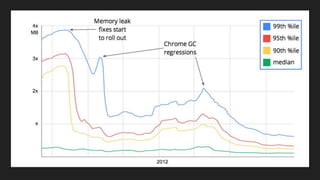
casestudies:TheGreatGMailmemoryleak
http://www.html5rocks.com/en/tutorials/memory/effectivemanagement/
Whaaaat?MemorymanagementinJS?
Fundamentals
Whatisgarbage?
HowisgarbageCollected?
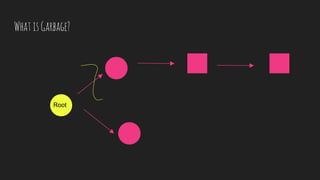
WhatisGarbage?
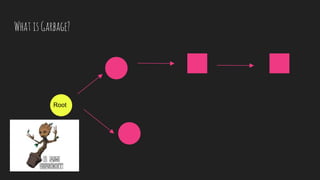
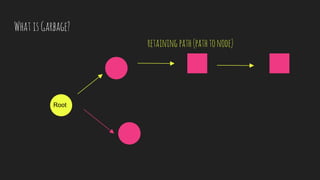
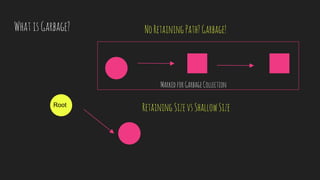
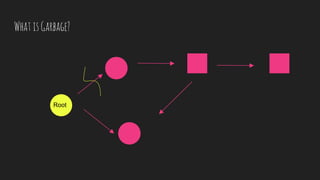
Garbageisallocatedmemorywithnopathtothe
rootnode(noretainingpath).
WhatisGarbage?
Root
WhatisGarbage?
Root
retaining path(pathtonode)
WhatisGarbage?
Root
WhatisGarbage?
Root
MarkedforGarbageCollection
NoRetainingPath?Garbage!
RetainingSizevsShallowSize
WhatisGarbage?
Root
WhatisGarbage?
Root
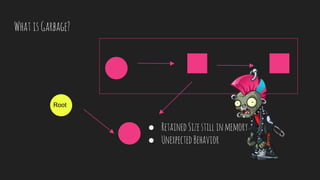
● RetainedSizestillinmemory
● UnexpectedBehavior
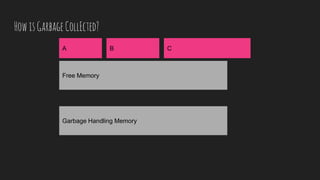
HowisGarbageCollEcted?
Free Memory
Garbage Handling Memory
A B C
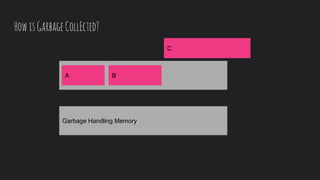
HowisGarbageCollEcted?
Free Memory
Garbage Handling Memory
A B
C
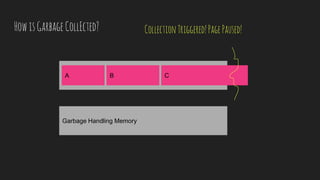
HowisGarbageCollEcted?
Free Memory
Garbage Handling Memory
A B C
CollectionTriggered!PagePaused!
JANK!
(Optimizeyourrenderingcycleat60fpsforsilkysmoothapps)
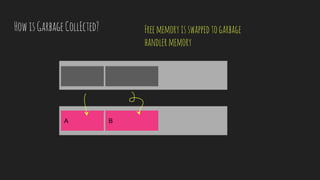
HowisGarbageCollEcted?
Free Memory
GarbA B
Freememoryisswappedtogarbage
handlermemory
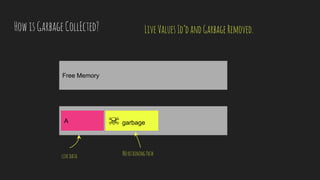
HowisGarbageCollEcted?
Free Memory
GarbA ☠ garbage
LiveValuesId’dandGarbageRemoved.
livedata NoretainingPath
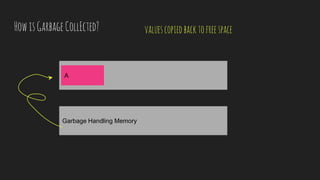
HowisGarbageCollEcted?
Free Memory
Garbage Handling Memory
A
valuescopiedbacktofreespace
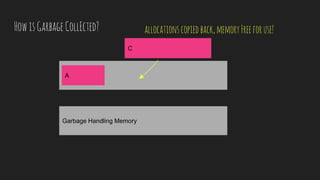
HowisGarbageCollEcted?
Free Memory
Garbage Handling Memory
A
C
allocationscopiedback,memoryFreeforuse!
ButIhave32GB!LEt’sTHrowmoreMEmoryAtthePRoblem!
MoreMemorymeansgarbagepotentiallycollectedlessfrequently.
Whengarbageneedscollecting,itpausestheapplicationandtakesalotoftime.
Moregarbagetoclean===longerhang-upswhilegarbagecollecting.
KnowYerZombie.
ZombieLeakageExamples
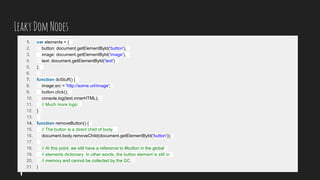
LeakyDomNodes
Mostoftheproblem->DOMnodesremainsinmemorybecauseofa
JSreference(i.e.jqueryselector),eventhoughnorealDOMpath.
LeakyDomNodes
LeakyDomNodes
1. var elements = {
2. button: document.getElementById('button'),
3. image: document.getElementById('image'),
4. text: document.getElementById('text')
5. };
6.
7. function doStuff() {
8. image.src = 'http://some.url/image';
9. button.click();
10. console.log(text.innerHTML);
11. // Much more logic
12. }
13.
14. function removeButton() {
15. // The button is a direct child of body.
16. document.body.removeChild(document.getElementById('button'));
17.
18. // At this point, we still have a reference to #button in the global
19. // elements dictionary. In other words, the button element is still in
20. // memory and cannot be collected by the GC.
21. }
LeakyDomNodes
JSPointstodomnodethathasalreadybeenremoved,butbecause
thejsreferenceshasn’tbeennullified,thedomnodestillexistsin
memoryasadivzombie!
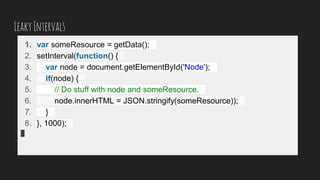
LeakyIntervals
1. var someResource = getData();
2. setInterval(function() {
3. var node = document.getElementById('Node');
4. if(node) {
5. // Do stuff with node and someResource.
6. node.innerHTML = JSON.stringify(someResource));
7. }
8. }, 1000);
LeakyIntervals
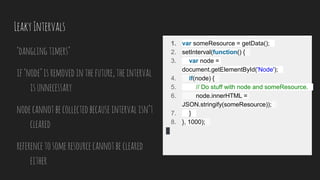
‘danglingtimers’
if‘node’isremovedinthefuture,theinterval
isunnecessary
nodecannotbecollectedbecauseintervalisn’t
cleared
referencetosomeresourcecannotbecleared
either
1. var someResource = getData();
2. setInterval(function() {
3. var node =
document.getElementById('Node');
4. if(node) {
5. // Do stuff with node and someResource.
6. node.innerHTML =
JSON.stringify(someResource));
7. }
8. }, 1000);
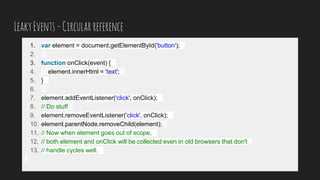
LeakyEvents-Circularreference
1. var element = document.getElementById('button');
2.
3. function onClick(event) {
4. element.innerHtml = 'text';
5. }
6.
7. element.addEventListener('click', onClick);
8. // Do stuff
9. element.removeEventListener('click', onClick);
10. element.parentNode.removeChild(element);
11. // Now when element goes out of scope,
12. // both element and onClick will be collected even in old browsers that don't
13. // handle cycles well.
LeakyEvents
Unbindeventswhennolongerneeded.
Unbindeventswithproperscope.
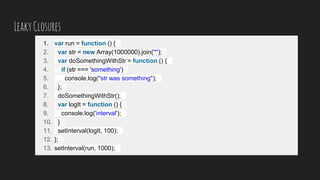
LeakyClosures
1. var run = function () {
2. var str = new Array(1000000).join('*');
3. var doSomethingWithStr = function () {
4. if (str === 'something')
5. console.log("str was something");
6. };
7. doSomethingWithStr();
8. var logIt = function () {
9. console.log('interval');
10. }
11. setInterval(logIt, 100);
12. };
13. setInterval(run, 1000);
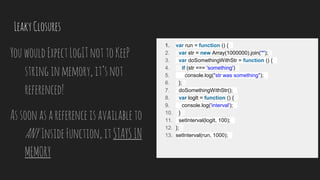
LeakyClosures
YouwouldExpectLogITnottoKeeP
stringinmemory,it’snot
referenced!
Assoonasareferenceisavailableto
ANY InsideFunction,itSTAYSIN
MEMORY
1. var run = function () {
2. var str = new Array(1000000).join('*');
3. var doSomethingWithStr = function () {
4. if (str === 'something')
5. console.log("str was something");
6. };
7. doSomethingWithStr();
8. var logIt = function () {
9. console.log('interval');
10. }
11. setInterval(logIt, 100);
12. };
13. setInterval(run, 1000);
Frameworks
$jquerycache->fixesanotherproblem,createsmore.
whatever.JS->handlesdestructionforyou,butonlyifyouuseit
likeintended.
usingframeworksgivesupcontroloverallocation.
whenindoubt,killitanyway.
Frameworks $(‘elm’).remove(), blah.destroy()
HUNTINGYERZOMBIE.
MemoryProfilingWithChromeDevtools
Examples
●GarbageCollectioninAction
○Closureexample
●detacheddomnodes
●LeakingNodes
Tools
●Profiletool
○RecordHeaPAllocations
●TimelineTool
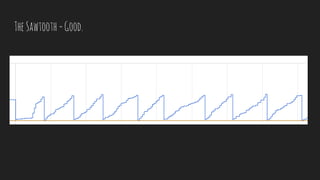
TheSawtooth=Good.
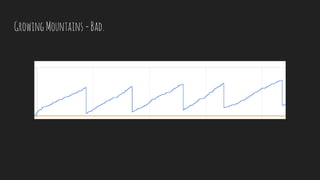
GrowingMountains=Bad.
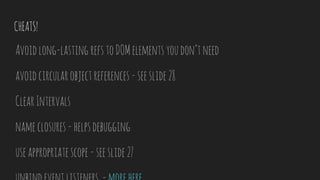
CHEATS!
Avoidlong-lastingrefstoDOMelementsyoudon’tneed
avoidcircularobjectreferences-seeslide28
ClearIntervals
nameclosures-helpsdebugging
useappropriatescope-seeslide27
References.
https://speakerdeck.com/addyosmani/javascript-memory-management-masterclass
http://www.dwmkerr.com/fixing-memory-leaks-in-angularjs-applications/
https://addyosmani.com/blog/taming-the-unicorn-easing-javascript-memory-profiling-in-
devtools/
https://auth0.com/blog/2016/01/26/four-types-of-leaks-in-your-javascript-code-and-how-to-get-
rid-of-them/
https://www.youtube.com/watch?v=j4Uvk5zxrhM->chromeDevtoolsworkflow
GoBeaZombie
Hunter.

Zombies! Memory Management in Javascript