© 2020, Altinity LTD© 2019, Altinity LTD
© 2020, Altinity LTD
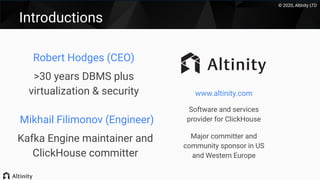
Introductions
www.altinity.com
Software and services
provider for ClickHouse
Major committer and
community sponsor in US
and Western Europe
Robert Hodges (CEO)
>30 years DBMS plus
virtualization & security
Mikhail Filimonov (Engineer)
Kafka Engine maintainer and
ClickHouse committer
© 2020, Altinity LTD
What’s Kafka?
(And why use it
with ClickHouse)
© 2020, Altinity LTD
Kafka Broker
Kafka is messaging on steroids
Topic: Readings
Partitions
Producer
Producer
Consumer
Consumer
Consumer Group
Replicas
© 2020, Altinity LTD
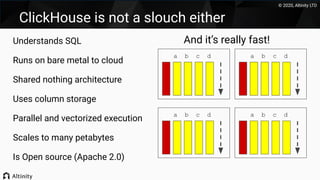
ClickHouse is not a slouch either
Understands SQL
Runs on bare metal to cloud
Shared nothing architecture
Uses column storage
Parallel and vectorized execution
Scales to many petabytes
Is Open source (Apache 2.0)
a b c d
a b c d
a b c d
a b c d
And it’s really fast!
© 2020, Altinity LTD
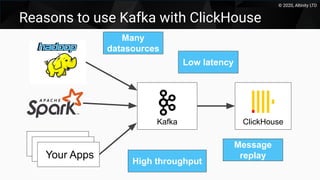
Reasons to use Kafka with ClickHouse
Kafka
Apps
ClickHouse
AppsYour Apps
Many
datasources
High throughput
Low latency
Message
replay
© 2020, Altinity LTD
Reading data
from Kafka
© 2020, Altinity LTD
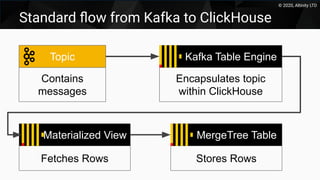
Standard flow from Kafka to ClickHouse
Topic
Contains
messages
Kafka Table Engine
Encapsulates topic
within ClickHouse
Materialized View
Fetches Rows
MergeTree Table
Stores Rows
© 2020, Altinity LTD
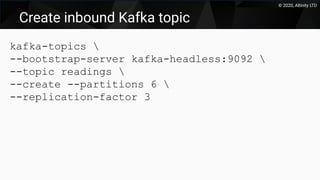
Create inbound Kafka topic
kafka-topics 
--bootstrap-server kafka-headless:9092 
--topic readings 
--create --partitions 6 
--replication-factor 3
© 2020, Altinity LTD
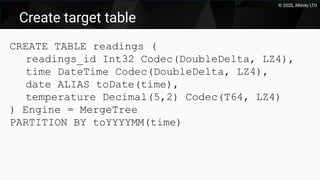
Create target table
CREATE TABLE readings (
readings_id Int32 Codec(DoubleDelta, LZ4),
time DateTime Codec(DoubleDelta, LZ4),
date ALIAS toDate(time),
temperature Decimal(5,2) Codec(T64, LZ4)
) Engine = MergeTree
PARTITION BY toYYYYMM(time)
© 2020, Altinity LTD
Create Kafka Engine table
CREATE TABLE readings_queue (
readings_id Int32,
time DateTime,
temperature Decimal(5,2)
) ENGINE = Kafka SETTINGS
kafka_broker_list = 'kafka-headless.kafka:9092',
kafka_topic_list = 'readings',
kafka_group_name = 'readings_consumer_group1',
kafka_num_consumers = '1',
kafka_format = 'CSV'
© 2020, Altinity LTD
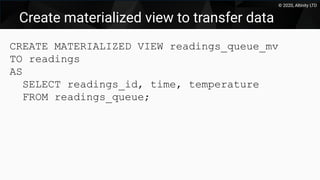
Create materialized view to transfer data
CREATE MATERIALIZED VIEW readings_queue_mv
TO readings
AS
SELECT readings_id, time, temperature
FROM readings_queue;
© 2020, Altinity LTD
Writing data to
Kafka
© 2020, Altinity LTD
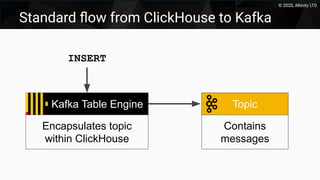
Standard flow from ClickHouse to Kafka
Topic
Contains
messages
Kafka Table Engine
Encapsulates topic
within ClickHouse
INSERT
© 2020, Altinity LTD
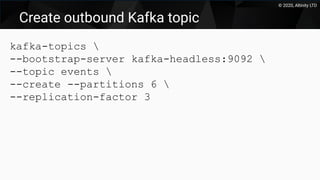
Create outbound Kafka topic
kafka-topics 
--bootstrap-server kafka-headless:9092 
--topic events 
--create --partitions 6 
--replication-factor 3
© 2020, Altinity LTD
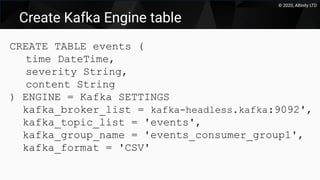
Create Kafka Engine table
CREATE TABLE events (
time DateTime,
severity String,
content String
) ENGINE = Kafka SETTINGS
kafka_broker_list = kafka-headless.kafka:9092',
kafka_topic_list = 'events',
kafka_group_name = 'events_consumer_group1',
kafka_format = 'CSV'
© 2020, Altinity LTD
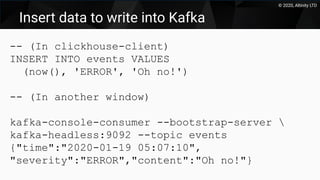
Insert data to write into Kafka
-- (In clickhouse-client)
INSERT INTO events VALUES
(now(), 'ERROR', 'Oh no!')
-- (In another window)
kafka-console-consumer --bootstrap-server 
kafka-headless:9092 --topic events
{"time":"2020-01-19 05:07:10",
"severity":"ERROR","content":"Oh no!"}
© 2020, Altinity LTD
Kafka Tips and
Tricks
© 2020, Altinity LTD
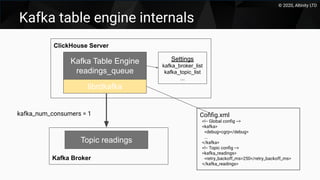
Kafka table engine internals
ClickHouse Server
Kafka Table Engine
readings_queue
librdkafka
Kafka Broker
Topic readings
Settings
kafka_broker_list
kafka_topic_list
...
kafka_num_consumers = 1 Config.xml
<!-- Global config -->
<kafka>
<debug>cgrp</debug>
...
</kafka>
<!-- Topic config -->
<kafka_readings>
<retry_backoff_ms>250</retry_backoff_ms>
</kafka_readings>
© 2020, Altinity LTD
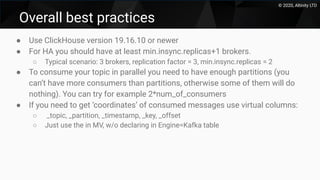
Overall best practices
● Use ClickHouse version 19.16.10 or newer
● For HA you should have at least min.insync.replicas+1 brokers.
○ Typical scenario: 3 brokers, replication factor = 3, min.insync.replicas = 2
● To consume your topic in parallel you need to have enough partitions (you
can’t have more consumers than partitions, otherwise some of them will do
nothing). You can try for example 2*num_of_consumers
● If you need to get ‘coordinates’ of consumed messages use virtual columns:
○ _topic, _partition, _timestamp, _key, _offset
○ Just use the in MV, w/o declaring in Engine=Kafka table
© 2020, Altinity LTD
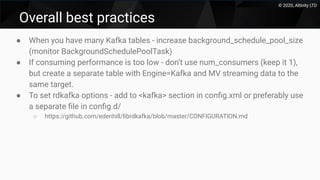
Overall best practices
● When you have many Kafka tables - increase background_schedule_pool_size
(monitor BackgroundSchedulePoolTask)
● If consuming performance is too low - don’t use num_consumers (keep it 1),
but create a separate table with Engine=Kafka and MV streaming data to the
same target.
● To set rdkafka options - add to <kafka> section in config.xml or preferably use
a separate file in config.d/
○ https://github.com/edenhill/librdkafka/blob/master/CONFIGURATION.md
© 2020, Altinity LTD
ClickHouse Clusters and Kafka
● Best practice - every ClickHouse server consumes some partitions, and
flushes rows to local ReplicatedMergeTree table.
● Flush to Distributed table is also possible
○ If you need to shard the data in ClickHouse according to some sharding key
● Chains of materialized view are possible but can be less reliable
○ inserts are not atomic, so on failure you can get ‘dirty’ state
○ Atomic MV chains are planned for the first half of 2020
© 2020, Altinity LTD
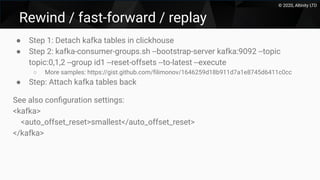
Rewind / fast-forward / replay
● Step 1: Detach kafka tables in clickhouse
● Step 2: kafka-consumer-groups.sh --bootstrap-server kafka:9092 --topic
topic:0,1,2 --group id1 --reset-offsets --to-latest --execute
○ More samples: https://gist.github.com/filimonov/1646259d18b911d7a1e8745d6411c0cc
● Step: Attach kafka tables back
See also configuration settings:
<kafka>
<auto_offset_reset>smallest</auto_offset_reset>
</kafka>
© 2020, Altinity LTD
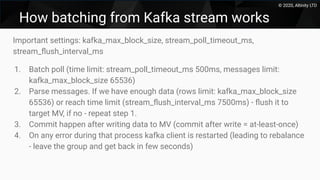
How batching from Kafka stream works
Important settings: kafka_max_block_size, stream_poll_timeout_ms,
stream_flush_interval_ms
1. Batch poll (time limit: stream_poll_timeout_ms 500ms, messages limit:
kafka_max_block_size 65536)
2. Parse messages. If we have enough data (rows limit: kafka_max_block_size
65536) or reach time limit (stream_flush_interval_ms 7500ms) - flush it to
target MV, if no - repeat step 1.
3. Commit happen after writing data to MV (commit after write = at-least-once)
4. On any error during that process kafka client is restarted (leading to rebalance
- leave the group and get back in few seconds)
© 2020, Altinity LTD
Alternatives to
the ClickHouse
Kafka Engine
© 2020, Altinity LTD
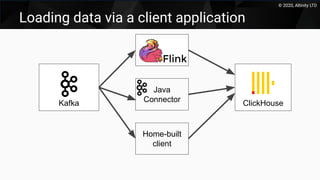
Loading data via a client application
Kafka ClickHouse
Java
Connector
Home-built
client
© 2020, Altinity LTD
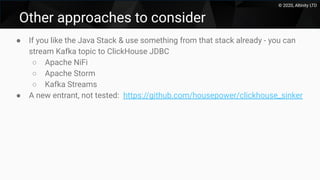
Other approaches to consider
● If you like the Java Stack & use something from that stack already - you can
stream Kafka topic to ClickHouse JDBC
○ Apache NiFi
○ Apache Storm
○ Kafka Streams
● A new entrant, not tested: https://github.com/housepower/clickhouse_sinker
© 2020, Altinity LTD
Kafka Feature
Roadmap and
Wrap-up
© 2020, Altinity LTD
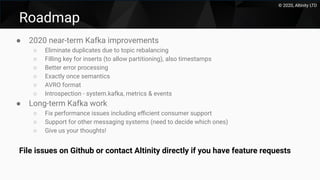
Roadmap
● 2020 near-term Kafka improvements
○ Eliminate duplicates due to topic rebalancing
○ Filling key for inserts (to allow partitioning), also timestamps
○ Better error processing
○ Exactly once semantics
○ AVRO format
○ Introspection - system.kafka, metrics & events
● Long-term Kafka work
○ Fix performance issues including efficient consumer support
○ Support for other messaging systems (need to decide which ones)
○ Give us your thoughts!
File issues on Github or contact Altinity directly if you have feature requests
© 2020, Altinity LTD
Thank you!
Special Offer:
Contact us for a 1-hour
consultation
Presenters:
rhodges@altinity.com
mfilimonov@altinity.com
Visit us at:
https://www.altinity.com
Free Consultation:
https://blog.altinity.com/offer

Fast Insight from Fast Data: Integrating ClickHouse and Apache Kafka

  • 1.
    © 2020, AltinityLTD© 2019, Altinity LTD
  • 2.
    © 2020, AltinityLTD Introductions www.altinity.com Software and services provider for ClickHouse Major committer and community sponsor in US and Western Europe Robert Hodges (CEO) >30 years DBMS plus virtualization & security Mikhail Filimonov (Engineer) Kafka Engine maintainer and ClickHouse committer
  • 3.
    © 2020, AltinityLTD What’s Kafka? (And why use it with ClickHouse)
  • 4.
    © 2020, AltinityLTD Kafka Broker Kafka is messaging on steroids Topic: Readings Partitions Producer Producer Consumer Consumer Consumer Group Replicas
  • 5.
    © 2020, AltinityLTD ClickHouse is not a slouch either Understands SQL Runs on bare metal to cloud Shared nothing architecture Uses column storage Parallel and vectorized execution Scales to many petabytes Is Open source (Apache 2.0) a b c d a b c d a b c d a b c d And it’s really fast!
  • 6.
    © 2020, AltinityLTD Reasons to use Kafka with ClickHouse Kafka Apps ClickHouse AppsYour Apps Many datasources High throughput Low latency Message replay
  • 7.
    © 2020, AltinityLTD Reading data from Kafka
  • 8.
    © 2020, AltinityLTD Standard flow from Kafka to ClickHouse Topic Contains messages Kafka Table Engine Encapsulates topic within ClickHouse Materialized View Fetches Rows MergeTree Table Stores Rows
  • 9.
    © 2020, AltinityLTD Create inbound Kafka topic kafka-topics --bootstrap-server kafka-headless:9092 --topic readings --create --partitions 6 --replication-factor 3
  • 10.
    © 2020, AltinityLTD Create target table CREATE TABLE readings ( readings_id Int32 Codec(DoubleDelta, LZ4), time DateTime Codec(DoubleDelta, LZ4), date ALIAS toDate(time), temperature Decimal(5,2) Codec(T64, LZ4) ) Engine = MergeTree PARTITION BY toYYYYMM(time)
  • 11.
    © 2020, AltinityLTD Create Kafka Engine table CREATE TABLE readings_queue ( readings_id Int32, time DateTime, temperature Decimal(5,2) ) ENGINE = Kafka SETTINGS kafka_broker_list = 'kafka-headless.kafka:9092', kafka_topic_list = 'readings', kafka_group_name = 'readings_consumer_group1', kafka_num_consumers = '1', kafka_format = 'CSV'
  • 12.
    © 2020, AltinityLTD Create materialized view to transfer data CREATE MATERIALIZED VIEW readings_queue_mv TO readings AS SELECT readings_id, time, temperature FROM readings_queue;
  • 13.
    © 2020, AltinityLTD Writing data to Kafka
  • 14.
    © 2020, AltinityLTD Standard flow from ClickHouse to Kafka Topic Contains messages Kafka Table Engine Encapsulates topic within ClickHouse INSERT
  • 15.
    © 2020, AltinityLTD Create outbound Kafka topic kafka-topics --bootstrap-server kafka-headless:9092 --topic events --create --partitions 6 --replication-factor 3
  • 16.
    © 2020, AltinityLTD Create Kafka Engine table CREATE TABLE events ( time DateTime, severity String, content String ) ENGINE = Kafka SETTINGS kafka_broker_list = kafka-headless.kafka:9092', kafka_topic_list = 'events', kafka_group_name = 'events_consumer_group1', kafka_format = 'CSV'
  • 17.
    © 2020, AltinityLTD Insert data to write into Kafka -- (In clickhouse-client) INSERT INTO events VALUES (now(), 'ERROR', 'Oh no!') -- (In another window) kafka-console-consumer --bootstrap-server kafka-headless:9092 --topic events {"time":"2020-01-19 05:07:10", "severity":"ERROR","content":"Oh no!"}
  • 18.
    © 2020, AltinityLTD Kafka Tips and Tricks
  • 19.
    © 2020, AltinityLTD Kafka table engine internals ClickHouse Server Kafka Table Engine readings_queue librdkafka Kafka Broker Topic readings Settings kafka_broker_list kafka_topic_list ... kafka_num_consumers = 1 Config.xml <!-- Global config --> <kafka> <debug>cgrp</debug> ... </kafka> <!-- Topic config --> <kafka_readings> <retry_backoff_ms>250</retry_backoff_ms> </kafka_readings>
  • 20.
    © 2020, AltinityLTD Overall best practices ● Use ClickHouse version 19.16.10 or newer ● For HA you should have at least min.insync.replicas+1 brokers. ○ Typical scenario: 3 brokers, replication factor = 3, min.insync.replicas = 2 ● To consume your topic in parallel you need to have enough partitions (you can’t have more consumers than partitions, otherwise some of them will do nothing). You can try for example 2*num_of_consumers ● If you need to get ‘coordinates’ of consumed messages use virtual columns: ○ _topic, _partition, _timestamp, _key, _offset ○ Just use the in MV, w/o declaring in Engine=Kafka table
  • 21.
    © 2020, AltinityLTD Overall best practices ● When you have many Kafka tables - increase background_schedule_pool_size (monitor BackgroundSchedulePoolTask) ● If consuming performance is too low - don’t use num_consumers (keep it 1), but create a separate table with Engine=Kafka and MV streaming data to the same target. ● To set rdkafka options - add to <kafka> section in config.xml or preferably use a separate file in config.d/ ○ https://github.com/edenhill/librdkafka/blob/master/CONFIGURATION.md
  • 22.
    © 2020, AltinityLTD ClickHouse Clusters and Kafka ● Best practice - every ClickHouse server consumes some partitions, and flushes rows to local ReplicatedMergeTree table. ● Flush to Distributed table is also possible ○ If you need to shard the data in ClickHouse according to some sharding key ● Chains of materialized view are possible but can be less reliable ○ inserts are not atomic, so on failure you can get ‘dirty’ state ○ Atomic MV chains are planned for the first half of 2020
  • 23.
    © 2020, AltinityLTD Rewind / fast-forward / replay ● Step 1: Detach kafka tables in clickhouse ● Step 2: kafka-consumer-groups.sh --bootstrap-server kafka:9092 --topic topic:0,1,2 --group id1 --reset-offsets --to-latest --execute ○ More samples: https://gist.github.com/filimonov/1646259d18b911d7a1e8745d6411c0cc ● Step: Attach kafka tables back See also configuration settings: <kafka> <auto_offset_reset>smallest</auto_offset_reset> </kafka>
  • 24.
    © 2020, AltinityLTD How batching from Kafka stream works Important settings: kafka_max_block_size, stream_poll_timeout_ms, stream_flush_interval_ms 1. Batch poll (time limit: stream_poll_timeout_ms 500ms, messages limit: kafka_max_block_size 65536) 2. Parse messages. If we have enough data (rows limit: kafka_max_block_size 65536) or reach time limit (stream_flush_interval_ms 7500ms) - flush it to target MV, if no - repeat step 1. 3. Commit happen after writing data to MV (commit after write = at-least-once) 4. On any error during that process kafka client is restarted (leading to rebalance - leave the group and get back in few seconds)
  • 25.
    © 2020, AltinityLTD Alternatives to the ClickHouse Kafka Engine
  • 26.
    © 2020, AltinityLTD Loading data via a client application Kafka ClickHouse Java Connector Home-built client
  • 27.
    © 2020, AltinityLTD Other approaches to consider ● If you like the Java Stack & use something from that stack already - you can stream Kafka topic to ClickHouse JDBC ○ Apache NiFi ○ Apache Storm ○ Kafka Streams ● A new entrant, not tested: https://github.com/housepower/clickhouse_sinker
  • 28.
    © 2020, AltinityLTD Kafka Feature Roadmap and Wrap-up
  • 29.
    © 2020, AltinityLTD Roadmap ● 2020 near-term Kafka improvements ○ Eliminate duplicates due to topic rebalancing ○ Filling key for inserts (to allow partitioning), also timestamps ○ Better error processing ○ Exactly once semantics ○ AVRO format ○ Introspection - system.kafka, metrics & events ● Long-term Kafka work ○ Fix performance issues including efficient consumer support ○ Support for other messaging systems (need to decide which ones) ○ Give us your thoughts! File issues on Github or contact Altinity directly if you have feature requests
  • 30.
    © 2020, AltinityLTD Thank you! Special Offer: Contact us for a 1-hour consultation Presenters: rhodges@altinity.com mfilimonov@altinity.com Visit us at: https://www.altinity.com Free Consultation: https://blog.altinity.com/offer